
NatWest Accelerator Events Free one-day marketing seminar at the NatWest Accelerator, Milton Keynes · 10 November 2026 Free marketing seminar · NatWest Accelerator, Milton Keynes · 10 Nov 2026 Free seminar · 10 Nov 2026
NatWest Accelerator, MK
Get your free invite →Invite →

Home › Blog › Google Ads

Google Ads

10 Amazing Google Ads Tips To Help Your Dental Marketing Strategy

10 Amazing Google Ads Tips To Help Your Dental Marketing Strategy
Read the video transcript

Okay, we are live. Please give me a moment. I'll make sure everything is working fine and we'll get started. Okay, that's good. Everything seems to be working fine. Hello, my name is Uzair, and thanks for joining in. It is 22nd of October 2020, 4 o'clock in the UK, and it's time for a bit of Google Ads. Every weekday we go live at this time, so if you are new here to this channel and you would like to be notified, then please subscribe to the channel and hit the, hit the bell button, and you'll be one of the first ones to be notified whenever we go live or put anything up on our channel.

We've got, um, Google Ads call ads to go through today. So the format would be, I'll go through the complete setup of, as to how easy and quick it is to set up a call only ad, and then I'll answer any questions for, for you guys. If you have any questions, please, please put them on the, on the comment box on the, around the video, and I'll try my best to answer them for you. Um, hello to Safaili, Alamke and Shopping Bazaar, Mustafa. Welcome. Some familiar names here.

Okay, so Google call ads. I think it's the most requested topic or subject I am sent, as to how to use them, how to set them up and how to get the best out of them. The biggest mistake people make when using call ads is the bidding. People are scared to bid high. With call only ads you will need to bid quite a lot more than the search ads, because the intent of someone is, is very big, because they have made the call to your business. They are interested in your service or your product. The ball is in your court to convert them.

It's not like someone coming to your website, filling in a form, and then you get back to them. Sometimes you will find they are busy, sometimes you can't get through and you'll have to keep trying multiple times. So you got to take that into account, how much of a time saving this is when compared to the call ads. Okay, call ads, the cost per click is a lot high, but you save all this time chasing the lead around. Um, sometimes the lead, you, you never get hold of them, and after trying for five, six times you give up, and you wasted all the time.

So if you take that into account, the amount of time of yourself or your staff members, then you'll appreciate that the call only ads are worth every penny. It will get you good quality leads, and it's up to you how to get them to convert. So let's go to our Google support centre and we see what they've got to say over here, and then I'll go into Google Ads, start, uh, setting up the ads.

So, designed to encourage people to call your business and can appear only on devices that make phone calls. So when a potential customer clicks your ad, the ad places a call to you from your device when somebody clicks this. Now they've also got the link to your website. Before, it never used to be. So the ad is going to look like this. You've got two headlines and two description lines, a phone number which needs to be verified on your website.

And what I mean by that is, you need to have that same, exactly the same phone number which you're putting in your ad to show up to, to here on the website. That's how Google is going to verify your, uh, URL and the, obviously the phone number. You can use some extensions with it, but I'll come on to that in a second.

So before you start any of your call ads, you must turn on your call reporting, and we'll also obviously set up a conversion, uh, tracking for the, for the call only ads, which will be through the call extensions. So once you set up your call extension, this is going to work. Um, how a call ad works. You, your ad wins an auction and shown on the search network only. It only shows up on the Google page and nowhere else.

Someone will tap your ad. When somebody clicks on that ad, that's when you get charged, not when somebody connects to your, uh, phone line or the number. If they abandon the call, unfortunately that click has costed you money. So that person's mobile dialer opens up with the number, and at this point they may or may not abandon that call, because quite often people will click something by mistake or by accident. So then they may not call you, but it has costed you that money.

So you've got to take that into consideration and to account when you're doing all your costings, because not 100% of the phone calls in Google Ads will result in an actual calls to your business. Person taps the call button to place the call, and this is when you will start to speak to that person.

Now, when it comes to conversion tracking and setting up of conversions, what you want to do is have a sensible amount of time for a call to be considered as a conversion. So when I say a sensible amount of time, it really depends of how long usually someone will speak to an agent. If somebody's talking to someone about a car insurance or a mortgage or home insurance, they are going to talk with someone for a few minutes.

But if somebody is calling a plumber or a locksmith, within 30, 40, 50 seconds they will want somebody to come to them as quickly as possible, and all the information they need to give that person is either a postcode or a zip code and the address, and then somebody will be on the way to them to help them out. So this is where you want to set up your conversion tracking the right way.

So for smaller, um, call lengths, you want your conversion tracking to be a minimum of around, I would say, 20, 30 seconds long, because if somebody even call, click that button, called you, and then they hang up after three, four seconds, you should not consider that as a, as a conversion. GFN is Google forwarding number, and that's how it works. It will forward that number to your phone number.

Okay, when you create your ads, you'll be asked to enter the following information when you're, by, building up the ad: two headlines, business name, phone number, two lines of description, display path, final URL and a verification URL. And here's the bit about the extensions. So you should definitely set up your location extension, which is through your Google My Business. You must always have that set up. Structured snippets extensions and call extensions.

Okay, um, this is all usual stuff. When the visit, your ad's position and ad rank is high enough to appear in next. Yeah, so what they're saying: adding a final URL won't guarantee that it will show with your ad all the time. The visit website link will show with your ad when the visit website link is predicted to improve your performance, or your ad rank is high enough for extensions to appear.

So this is quite important. Google is quite big on ad rank. I'm not going to go into great detail as to how ad ranks work, but it is about whose ad rank is higher, and the, the advertiser with the best ad rank will obviously, will get the biggest ad with the most extensions and so on, and that's the, um, the gist of it. Okay, headline is the usual, for most languages, 30 characters, 30. 25 is the business name. 90 and 90.

Okay, um, display URL. So what you want to do is, you don't want the full URL. Even if you have got, um, yourwebsite.com forward slash your landing page or whatever, you just want to show the root, root URL, and the verification one needs to be the exact one where you've got the phone number. But if you got the phone number throughout your website, then just put the, the website URL. Okay, so that's pretty much it. It's fairly straightforward. What have they got to see, say over here? Like, they create an effective mobile site. Okay, that's about mobile websites.

All right, so let's go to your campaigns. When you go over here to the ads, you go to the plus button, and then you've got the call ad, updated. So this one has got the latest and the greatest, um, call ad updates over here. Um, we don't know what's going to happen in the future, but as of today this is the latest version. First of all, put your number down. You don't need to put plus, just put the phone number in.

Recommended, always put in. Now, when I say always do what they are saying about the recommendations, well, especially with the location targeting, um, even though they have got a setting where it says recommended, I don't, because that's what, that's not the right one which I tend to use, because I want people to, for the ads to be shown to the people in the location and not outside the location.

Okay, URL is the same. If you want any. Why has it got a warning? Okay, that disappears. And if you're not sure about anything, just hover the mouse over these question mark bubble and you will see what it is. Now, this is where you want to stuff your keywords in, right? So I will put in digital marketing. I'll write my headline: leading. Now, things like best or number one digital marketing agency, or the best digital marketing agency, you must use those kind of claims with, you know, with caution.

Google doesn't like these, uh, claims where they, you are saying you are the best. If you are the best or you are the number one, then you got to prove it. Um, obviously they won't ask you for that, but Google doesn't like all these claims. So something like top or leading. Now, this is about, us as well as other digital marketing agencies get a lot of problem when we try to run ads for Google Ads, the trademark. So need to be careful. We'll, it will get approved, but it will be approved limited, so I might as well avoid that issue.

Agency. Ah, okay, I put in top. Something like that. Okay, get a free audit. And then I'm gonna put in my description one and description two. I'm not gonna put in here, but you get the gist. I'm just gonna copy and paste it so it, ad looks complete. And whenever you go over the, your character limit, is going to turn red. You won't be able to upload. That's a good thing, that you really can't make mistakes.

Um, call reporting is turned on, right, and then you use the conversion, um, setup from here. So this is one of the call extensions which I can use. We tend to put the phone number in there as well, in the conversion name, action, because then we know that this is our one. Because when we get client accounts, a lot of these conversions have been set up from, by other people, so just to make sure that we don't get confused with some other conversions which have, may have been set up by someone else, we put the name, a number in there.

And then all you do is, uh, save that. Obviously I've not set up a ad group in here, so that's why it's giving me an error message, but if I had an ad group in here, it will save. And you can use multiple, and you should use multiple call ads as well, just like you would upload multiple search ads in your campaigns. Uh, set up a couple of ads and see how it, um, how they run and which message or which ad is performing better, and you can split test. That's it. That's it. That's how easy it is to set up your, your call ad.

Okay, I'm gonna go to the comments now, and if you have any questions, then please do so. And bring my laptop. Safaili: my display ad is now working, it's slowly showing results, thank you. Okay, good. Yeah, that's good. Um, well done, and keep, yeah, keep working away, keep optimising, and you'll start to get better results.

The display, with display campaigns, you know, never compare it against a search campaign. That's the worst thing you can do, or the worst thing a client can keep hassling you about. Oh, my CTR is very low, my clicks are too many. But they will not complain about the low cost per click ever, take my word for it, because the Google search network will always be expensive compared to the display network. They're never more. But what you will find is people will compare the metrics on the GDN compared to the search network.

Okay, hi Adam. For call ads, should you only expect 50% of the calls to actually come through? Yes. Um, I mean, the, the, that's the, that's what you should aim at, you know, half the calls. It will never be that every phone click or a phone call is converting into an actual call. You want that number to be as low as possible, but it won't be. But so if you work on the basis of 50, um, then you, you won't, you won't go wrong.

But then there's nothing you can, or you can do to even optimise that number, because is people clicking on the ads. There's no way we can optimise their thumb to stop them clicking the ads if they don't need to speak to someone.

Hi Pratik. How do I know whether keywords I'm using are trademarks keywords or not? Well, if you don't know and you use them, Google will then, um, give you a message that you can't use these, these are trademarked, and you won't be able to run your, your ads. But most of the time you, you will know, because when you are dealing with big brands, 99, 100 percent there will be trademark. For small businesses, not so much, but with bigger businesses, absolutely.

Shopping Bazaar, hello. Should we add any tag in our website for call only ads? Well, for call only ads, all you need to do is to set up your location, sorry, not the location, the call extension. But with regards to all the other tags, absolutely yes, 100%. Set up your conversion tracking, your global site tag, your Analytics, Tag Manager, any kind of tag which you can think of.

You know, if you are running ads on, even if you're not running ads on Facebook, put the pixel in. LinkedIn, Pinterest, um, Insta, not Instagram, Twitter, because Instagram and Facebook are the same. Put every kind of tag and just keep pixeling every, every visitor to your website.

With lead form conversion tracking, does the pixel follow the user regardless of where they fill out the form, or does it have, have to be on the landing page only once you send them to a thank you page? Um, can't remember exactly how it was. We did cover this lead form. Because this is fairly new, we haven't used it a lot, but if, if the lead page on submission takes you to a thank you page, then yes, you can pixel them in over there.

But if it's just a pop-up, which I'm pretty sure the pop-up message comes up, that's right, the pop-up comes up where we set up the thank you message, but then you should tempt them to go to a page which they can only go through once they submit that form. So you know they've come through this route, and then you can put that pixel, uh, the conversion tracking pixel, on that, um, thank you page, and that's how you can do that.

And to do, to do that, give them something, a one-off offer or an irresistible offer which they will find it hard to, to refuse, although not everyone will click on it. So that data will only be dependent on how many people click that link to go through to that page.

Hi Daniela, good to see you here. What are some of the most competitive professions for call ads? Oh God, every profession, every niche, every market is competitive. Um, yeah, you name it, you know, locksmiths, plumbers, mortgage advisors, real estate, uh, car dealership, airlines or, or booking the tickets. Yeah, every, every niche. There's no way there is something where any, I find that there is hardly any competition.

Should we use the maximise click strategy for call ads? Yeah, you can try different strategies, but as I've always said, you know, you start with manual, build up your conversion data, and then you can start to go to smart bidding.

Which campaign you recommend for pest control services? Yeah, pest control is one of them. We, we've run quite a few campaigns for pest controls and they're all call ads. The text ads don't work, because if you got a rodent running around in your restaurant, you need to speak to somebody to come and catch it or kill it. You don't want to fill in a form and wait for somebody to call you back. So pest control, yeah, absolutely call ads.

I'm running a search campaign without adding audience. Does that mean circumventing system policy? Not really. Now, first of all, why? Okay, with, without audience, no, that's fine. Um, even if you are using audience and you are, you set them up as observation, then that's fine. That's not a problem. Why would it be circumventing system policy? I'm not too sure, Pratik.

Hello Wesley. Can you please do a video on how to do an evaluation on the YouTube ad results, what to pay attention to and guidelines for a successful ad? Okay, good question. Um, YouTube metrics again are top of the funnel, but you can also have, um, campaigns running for the bottom of the funnel. It really depends on how you want to, uh, run your campaigns, but a combination of both really works well.

So to give my example, most of, well, not most, all of our marketing resources and budgets is put into video, right? So let's say I'm watching, I'm going live on this one and you're watching this live stream. So you have got pixeled in to my remarketing list. I can run remarketing ads to all, to anyone who has viewed any of my videos on my channel or anywhere else on the internet, if it has been embedded.

If you go to Quora or Reddit, where someone has embedded one of my videos, or I have gone in and embedded my video, and you watch it over there, you get pixeled in and I can remarket to you through Google Ads. So that is a very powerful way to, to retarget. And then I would look at, the important one is the view rate. You know, look at the 25 percent, 50, 75 and 100 percent.

Those who viewed my video to 75 to 100, I know that they were extremely engaged and interested in my message, my offer, my video and everything. So what I would do in that respect is remarket to them extremely aggressively. Those are the best of the best who I want to go after, and they are more likely to convert if I put an offer in front of them.

So these kind of sessions and videos are my top of the funnel, where I'm building up my brand awareness. People search on Google, on YouTube, they come across my videos, and then they click on it, they play, and then all of a sudden you see that YouTube will also suggest and recommend more of my videos to you, and you may click some more videos, and you are slowly, slowly pushed down the, uh, down the funnel. So yeah, I'll put this on our, our to-do list. At the moment I think we pretty much scheduled all the videos for at least until end of November, so I'll certainly put this in.

Okay, I think I've covered all the questions for today, and if you, I'll wait a few seconds. If anyone has got any more questions, then now's your chance, and then I'll be back on, on Monday. So if you haven't subscribed yet, then please do so. You'll get your notifications if you hit the bell button every time we go live on, on YouTube. And right now we are live streaming on, where are we streaming? LinkedIn, Facebook, Dailymotion, Twitter. Instagram, hopefully from next week we will be going live as well.

So this is what, you know, I always keep on saying, that do the work once and leverage it to as many channels and platforms. I hope you enjoyed this session. I wish you a great weekend. Tomorrow my wife Farzana will be here. I believe she is talking about workflows in Asana. So till then, stay safe, and I look forward to seeing you back here again on Monday. Bye for now.

With each passing day, the number of dentists is increasing, and the market saturation is expanding. In this situation, increasing sales is not an easy task, but nothing is impossible.

You might have heard that we are living in the age of social media. In this era, if you want to grow your business or you want to sell a service, then you must have a social media presence. In addition, social media can help you find your potential clients.

Free NatWest Accelerator event

Get Found, Get Chosen, Get Your Time Back

A free one-day marketing seminar in Milton Keynes · 10 November 2026

Get your free invite →

Getting clients in a competitive industry like dentistry could be challenging, but a better dental marketing strategy can help you. For instance, PPC (pay-per-click) advertisements can help you to generate considerable clients. One can use one to many social media platforms to reach their potential customers. Nowadays, three crucial marketing channels include Facebook, Instagram, and Google Ads.

Get your free Marketing Action PlanNot sure where to start? Answer a few questions and get your plan in about a minute. No email needed.

Get my plan →

Choosing the best social media platform is crucial for getting sales. Choosing the social media marketing strategies could be the determining point of your career. Marketing strategies matter a lot, especially if you need marketing in the era of coronavirus or another crisis.

Better marketing strategies come with time, but we are here to help you. Our team has collected some best marketing strategies for you. These marketing strategies will certainly help you in finding the best clients and in generating revenue.

So let’s see, what are some best dental marketing strategies?

Google Ads can help in reaching your potential clients, and they will take your dentistry practice to the next level. A Google platform, PPC, that we have mentioned above, can help you in generating customers.

For Google Ads, you will make an appealing pamphlet or bid online. In this ad, you decide on a main keyword or phrase. When people search for that keyword on Google, Google will show your advertisement to the searcher.

Using Google Ads is one of the best ways to reach your potential clients. Google will show your ads only to the person who searches for your services. For instance, if you have put the keyword “best dentistry practitioner” then whoever searches for the best dentistry service will find your ads.

People click on your ad to reach you, and with every click, Google charges some amount of money. The process is easier said than done because you need to make sure that only quality leads click on your ads. It is crucial to decide the potential market or potential customer, then optimise your Google Ads accordingly. Otherwise, your marketing budget will be depleted.

We have 10 tips for growing your dental marketing strategy with Google Ads: 

1. Place a bid on the location keyword
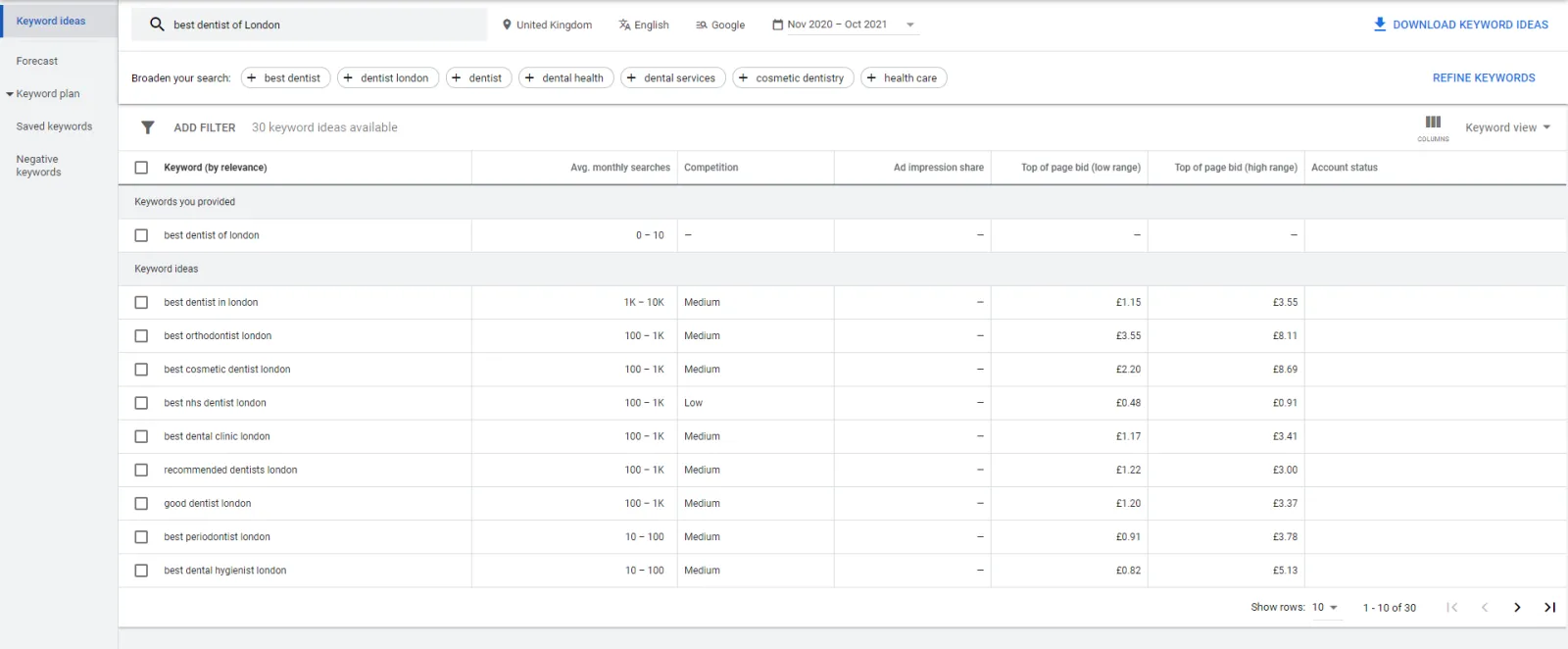
Location Based Keywords

Dentistry is not like an online business. Because your client needs to meet you in person to get your services, you should bid on the local location or in a certain geographical region. Then, Google will show ads only to the people in the selected area.

Make sure to add your location to your keyword. For instance, if you are practising dentistry in London, use the phrase, “best dentist of London” or something like that in your ads that specify your circle.

With this strategy, you will get the maximum number of those clients who will have a high intent for getting your services. And, the clients who can reach you easily.

2. Place a bid on the emergency keyword.
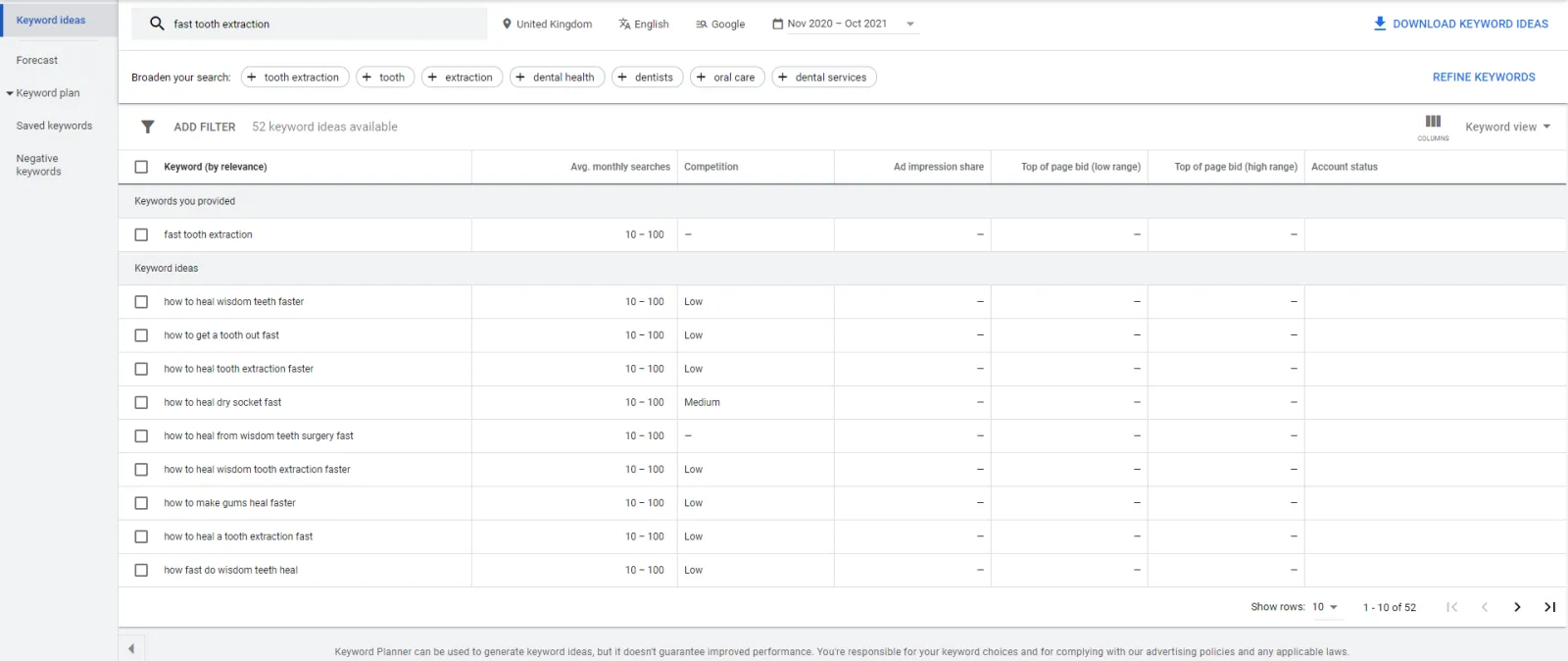
Emergency Dental Keywords

You use emergency keywords for the people who are ready to buy your services. For instance, one emergency keyword for dentistry could be “fast tooth extraction” Whoever searches the keyword will find your services on Google.

Using emergency keywords is one of the easiest ways to get clients. The number of searches for the emergency keywords is less than the traditional keywords, but the buying intent is higher because the client who is searching these keywords wants to get your services instantly.

For emergency keywords, you have a small audience. And that is why the cost per click (CPC) is lower. It is one of the best tactics if you are operating with a tight budget.

Before searching for the emergency keyword, keep the client’s requirements under consideration. To do this, search for the most in-demand emergency service in your area. For example, if there is no dental clinic for emergency tooth extraction, give that service at your clinic and advertise it through Google Ads. This method will certainly help in generating great profit.

3. Focus on demographic targeting
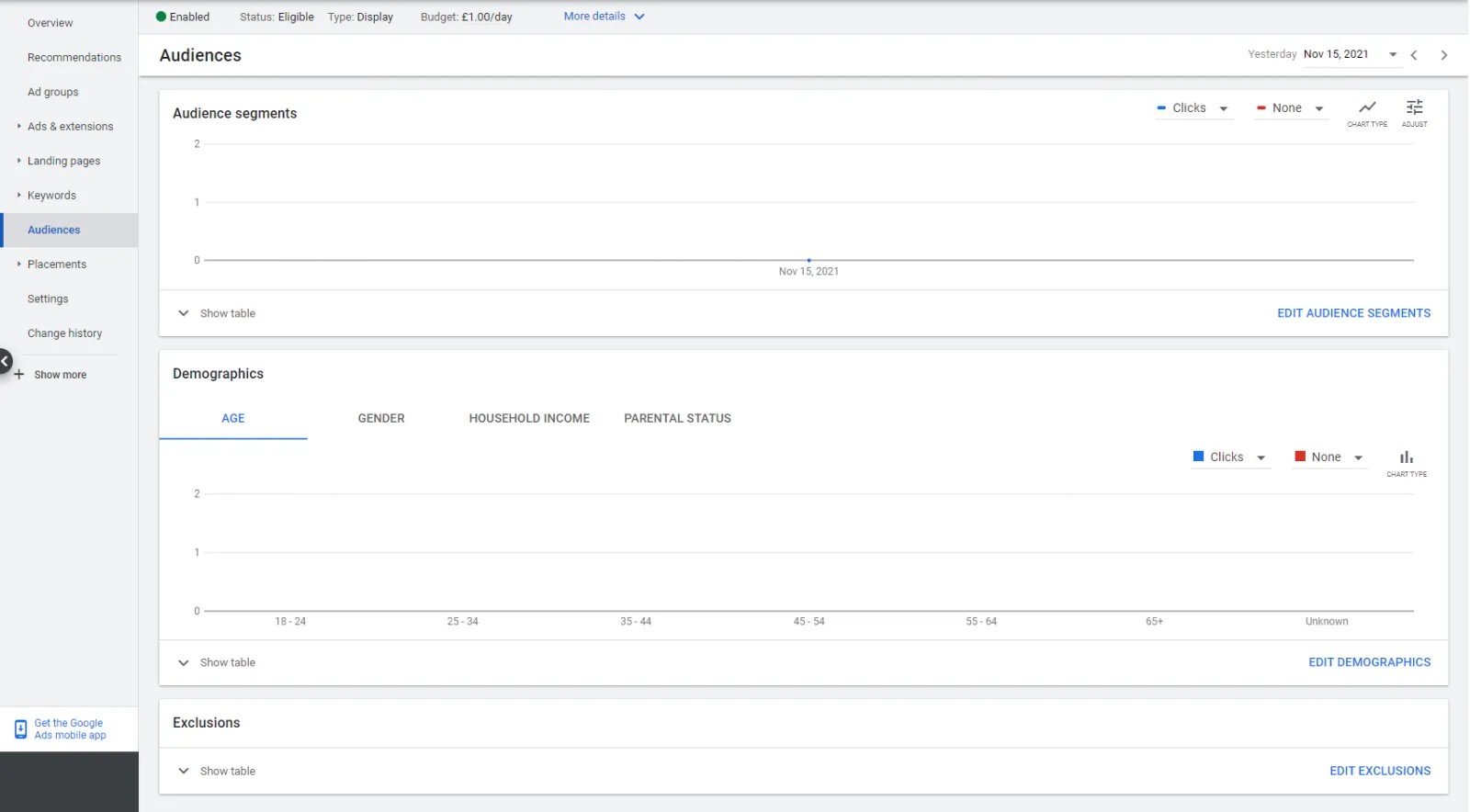
Demographic Targeting

Demographic targeting, if used wisely, will generate revenue for you. With the help of Google Ads, you can use demographic information wisely to target your audience.

Uzair KharawalaLIVE
Free weekly YouTube live

Live every Tuesday at 2pm UK. Bring your marketing questions.

Get your Google, local SEO and AI questions answered live.

Join for free

There are different options in Google Ads demographics age. You can select among age groups, 18-24, 25-34, 35-44, 45-54, 55-64, 65 and up gender male-female, and transgender.

For instance, if you are running a three-day campaign for tooth extraction. For this campaign, you should choose a group of people aged 50 and above. Because, at this age, people need a tooth extraction. Not to mention, you should choose the male and female populations because both are equally important in this scenario.

4. Use location extension to get more traffic.
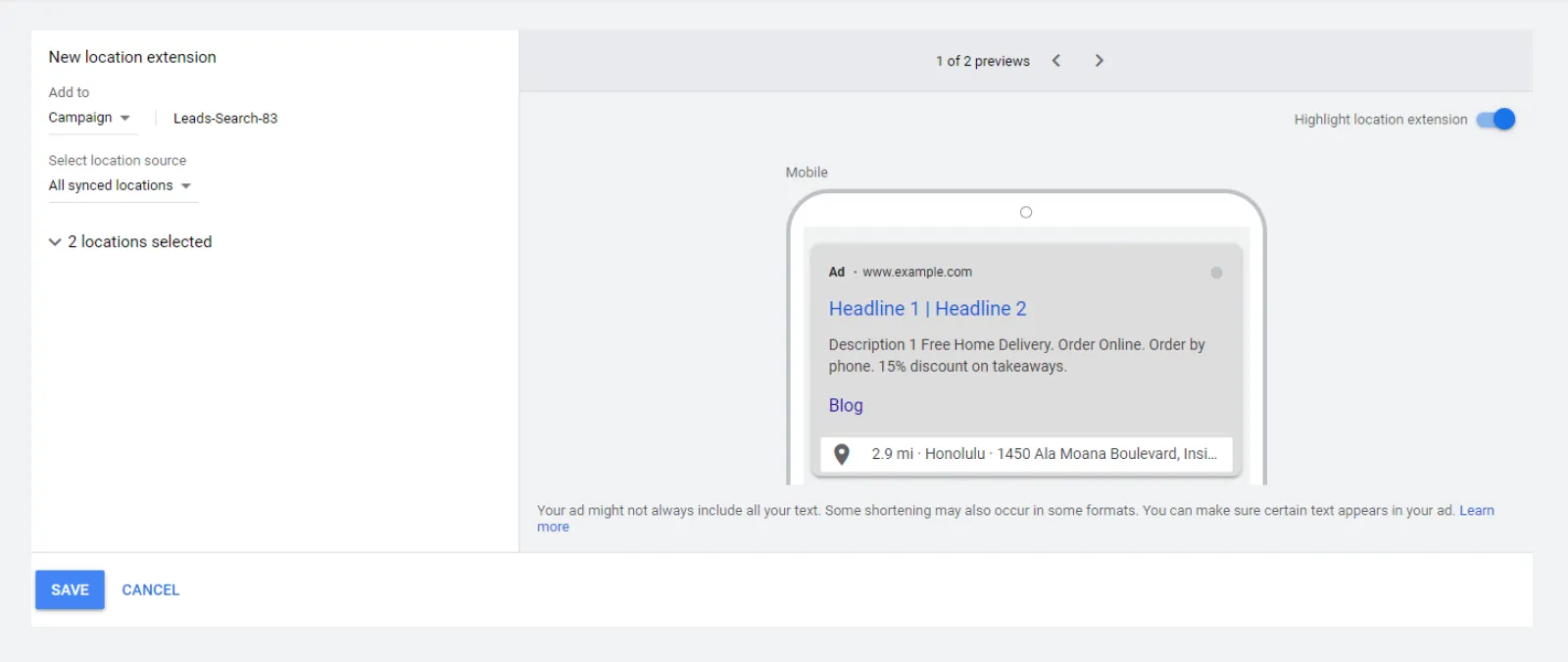
Google Ads Location Extension

It is one of the simplest and easiest ways to enhance foot traffic. To do this, you need to add ads and extensions to your ad.

By doing this, your ads will appear on the map. Google Maps Ads can attract people looking for a dental office in their area. And, the ad that appears on Google Maps gets a high ranking in Google search results.

5. Use the Google ad call extension.
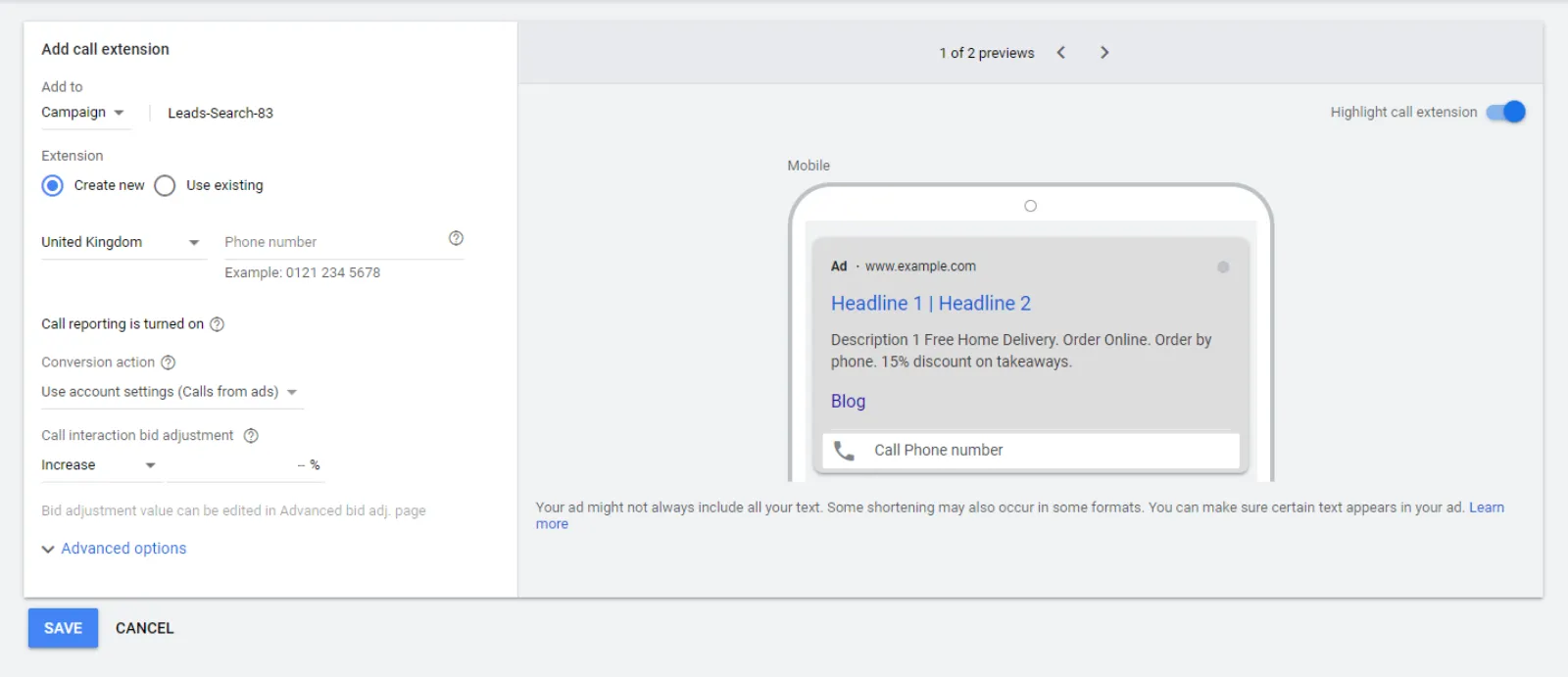
Google Ad Call Extensions

According to the research, people who visit online dentistry ads don’t buy the services. Because the ads fail to clear their concerns. The best method to avoid this is to add a contact number on the ad so people can call to solve their concerns.

Research has also shown that phone calls are one of the most common methods for dentistry appointments. So, it is crucial to add a contact number to the ad. Google has an extension through which you can add the click-to-call button to your ad.

Visitors will be able to contact you directly by clicking on the click to call option. Call extension is one of the successful dental marketing strategies.

6. Call-only ads for mobile phones.

Sometimes people are reluctant to use an online service until they find it super beneficial. A call-only ad is for customers who find the research of the dentist difficult.

The call-only ads appear during browsing and general phone searches. These ads don’t have a direct link to the website. They only smooth the pathway of contact between you and your customer. The call-only ads have proven to be a very successful method of getting potential clients.

7. Concentrate on long key phrases from voice searches
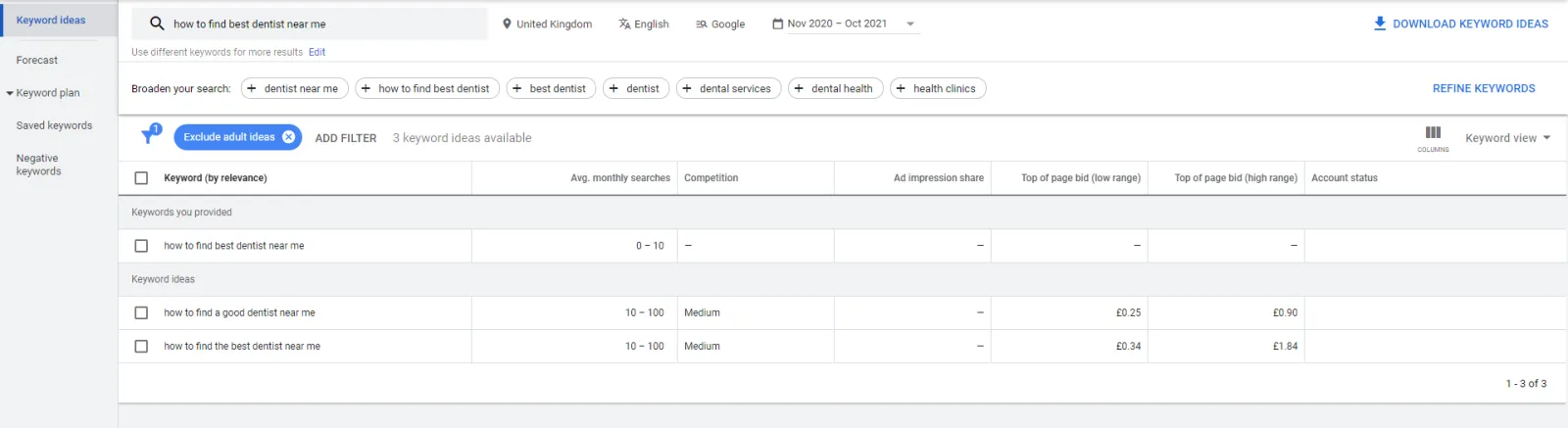
Long Tail Key Phrases

With the advancement of technology, the method of browsing is changing. You will be amazed to know that now about 50% of the searches are done through voice search. And 15% of these voice qualities usually contain the long key phrase that includes how, what, when, and best.

When you start putting the long key phrases in your content, you will start receiving your targeted audience even if the search result of your key phrase is lower.

Brainstorming and negotiation with the team members can help in finding the best long key phrases. When you start bidding on these commonly used key phrases, you will start receiving organic traffic on the website and clients to the clinic.

8. Use the Google ad bid adjustment for your dental ads

If you are a dentist and want to increase the number of clients in your clinic with the help of Google Ads, then there is no purpose in showing the ads a hundred miles away from your clinic. It is just a waste of money.

The bid adjustment of the ad is the same as the demographic adjustment of the ad, and it is also one of the instant and successful dental marketing strategies. The best way to use the bid adjustment of the ad is to adjust the bid based on the keyword, neighbourhood area, emergency conditions, and other attributes that ensure that your ads will be shown to your potential clients.

9. Use an optimised ad-specific landing page

A landing page is a page that appears in response to your click. All your Ads should have intriguing landing pages and a compelling call to action, except the call-only ads. Call-only ads did not need landing pages.

The CTA of your landing page should compel visitors to buy from your website, and it should also have the correct contact information. And, make sure to add the button for pacing the order in your website so clients can do so easily.

10. Consult with a Google Ads assistant

All of the methods that we have explained are the best techniques, and they will take your online marketing to the next level. But Google Ads is a do-it-yourself platform, so there is are chance that you will get an instant result by following the methods that we have explained above.

Or you might get the result after some time if you have followed and applied all the techniques. If you are still not getting any benefit, it is time to connect a Google Ads assistant. Working with Google Ads assistants can help you get a good return on your investment.

Conclusion

The medium of the advertisement has changed over the past few years. Now, online advertisements have more influence over people. Google Ads have been proven to be very successful, and they attract a wide audience.

So, if you are designing Google Ads for a dental marketing strategy, then make sure to follow the 10 tips that we have explained above. It will surely help to generate considerable profit.

Uzair Kharawala

Written by Uzair Kharawala

Partner at SF Digital Studios, a Google Premier Partner agency. Uzair has been helping businesses grow with Google Ads since 2002 and teaches it every week on YouTube.

Book A Call →Subscribe on YouTube for new videos every weekday →
Free every week

Get our best Google Ads tips by email

New articles and videos, straight to your inbox. Unsubscribe any time.

We respect your privacy at all times. Privacy Policy

You may also like

Read the blog →

Your next customers are out there. Let's go and get them.

Tell us where you want your business to be, and we'll show you how to get there.

Book A Call →or get your free Google Health Check →
Happy clients

Don't take our word for it

4.9 from 157 Google reviews, plus case studies and client videos.

See our happy clients →
"It has now been 3 months since we started and our sales have increased 300%."
Ruhi Latif Rafplay, Dubai
"Uzair and Farzana are two of the most honest, sincere and trustworthy people you will ever meet."
Gavin Morgan GDM Jewellery · Google review
"If I needed a campaign built, this is one of the rare few people IN THE WORLD I would trust to do it properly."
Hemmel Amrania Google Ads professional · Google review
Book A Call →
Chat with us on WhatsApp