I believe we are live. Please give me a moment. I'll make sure everything is working fine and we'll get started. All looking good. Okay. So, hello and a very warm welcome to today's YouTube live stream. My name is Uzair and it is the 20th of September 2020 four o'clock in the UK where we go live every weekday to go through topics such as Google Ads, digital marketing, video marketing, or pretty much anything to do with generating new leads or sales for yourself or for your business.
I hope you had a great weekend and so far a productive Monday morning or afternoon, wherever you are in the world or evening in Hawaii or Australia. Okay. So, if you are new to this channel or to the live stream the way this works is, I'll go through the topic which I'm going to cover today, which is all about Google Ads extensions and towards the end, I'm going to answer any questions which you may have put up on the comment box on the right-hand side, or it could be under the video on your device or screen.
So, we have got GoogleAds extensions, why you need to use them, why should you care about them and why you ought to be using it... It's because it makes your ads a lot bigger. You hog even more real estate on Google at the top. Doesn't cost you anything additional or extra. You can cram in more of your messaging, products, services, or anything you want to put up on Google.
So, why wouldn't you use it? You know, it doesn't cost you anything extra. It's just that sometimes people don't know how to use them. Can't be bothered. They are a bit lazy because it does take a little bit of time to set them up. But once they're set up, you don't need to touch them. They'll just keep on running.
As long as Google thinks it is relevant to that search term which somebody is putting up and it's going to enhance the user experience. Hello to Sandy, Emily, and everyone else who is watching live, or as a recording, but let's show you first of all on Google what I'm talking about, Google Ads extension, when you go and put a search term.
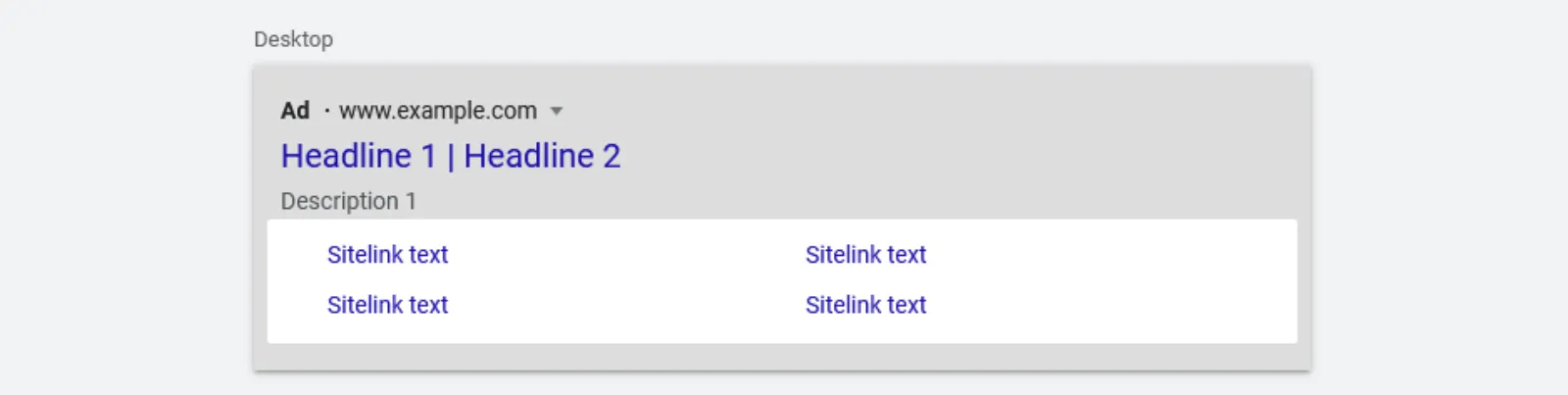
So, in this case, I put in let's say iPhone 11, you got these site links, see now how big this ad is compared to this one. I'm really surprised how small Apple's own ad is, not put in description two even, but there you go! You've got your auto headline one and two descriptions. We've got two lines and your site links these are so you got a bigger, big heading as big as the main headline and then two additional lines of text.
This ad looks a lot bigger than this one, that one and that one. And this is what I mean by using these extensions, makes your ads a lot bigger increases your quality score, ad rank, click-through rate, pretty much, you know, everything is heading in the right direction. If you know how to use these properly, same over here, we've got two site links and the three other ones.
Now, these won't appear on all the ads. It will be only at the top. So, the ad or the advertiser with the highest ad rank will get to build these site links. Now, you can have up to a maximum of four site links over here. Now, there are other extensions as well, and I'm not seeing any over here, there you go.
These are call-outs over here. So, you've got four site links... You see how big this ad is? So, this is what I'm going to show you how to put these in. So, your ads become a lot bigger and you attract that click. Let's hop into our GoogleAds interface. Hello, Danilo, Mike, good to see you guys here and what you do is you go into your ads and extensions, and then in extension, now I've got a couple already set up.
So, go to your plus blue button, add extension. Then you have what eight or nine, I think and they keep on changing as well and this is the new one, the lead form extension. That's why it's ten. Site link, callout structure, snippet, call, location, price, app, promotion. If you are not running an app campaign, then this doesn't apply to you.
But the two most important one, which I would always start with is the call extension and the location extension. You must link your Google My Business page to your Google Ads account because when somebody's searching for a restaurant near me, Google is going to look at your Google My Business page, and then it will work out okay.
How far that searcher is away from your restaurant or your store or whatever, so this is really a must. Let's do the easy one - call extension. Now, all of these can be set up at the account campaign or ad group level. So, if you've got a fairly small business and pretty much all the extensions apply to the whole account, then I would just set it up over here and then forget about it.
But if you've got some extensions which are relevant to certain campaigns only then you apply to those campaigns or perhaps to those ad groups. So, you can create new or use the existing one. I'm going to create new and you use your country. Now, it is not available in all the countries, but the ones which are available, you will see them in this list and I'm going to put my number and call reporting is turned on and I'm not going to go into conversion tracking and conversion setup, but that is from there.
So, I want to make sure that I'm tracking all the clicks from my ads. So, somebody clicks on my ad as a call button. I know that it has come through my ad and it is being tracked. This is why we set this up. You can go on the advance options. So, let's say you want to run this call extension from your opening to the closing time, which could be let's say nine AM till five PM and it will only run during those times, not at any other and you can select the days, Monday to Friday or on the weekend and that's your call extension set up.
With site link, it is kind of like creating a mini ad on extension. So, we saw we had a headline and two lines of description, right. So, the same thing will apply over here. The headline will be twenty-five characters and the description one, description two is up to thirty-five characters and then a final URL. One thing you can't do is send all of these to the same homepage or the same URL.
It's got to be different. On my website, we've got different pages for GoogleAds, web design, video, photography and so on. If I'm talking about GoogleAds agency and say the best agency for managing the campaign, something like that. Now, you will notice that I have not put in or put up the capitalisation on each of these words, which we always do on the ads, what you want to do is to...
Because this is kind of like a subheading. You don't want to make it too obvious and it doesn't read right or look good, it's fine. If we just have the first letter as the capital, even though over here, they have not utilised the capitalisation properly. They should have, but overall, this ad looks good. They've got all the various pages to call to actions as well.
You can put in a call to action, buy now, book now, free consultation or whatever it may be in these like site links. Now, what you want to do is you don't want to just put up four you want to put up at least six to eight because then Google is going to pick out the most relevant ones for that ad.
So, if you just put in four, you're more likely to get a maximum of two site links being shown you won't get three or five. Four is the maximum obviously, but they'll either show two or four, I've never seen three site links being shown. So, it's best you put up more, set them all up in one go, and it's all done and dusted, don't need to tinker with it.
Okay, I'm going to cancel this. Go to a couple of other ones. Callouts are really good. Again, account-level campaign or ad group level. These are like, let's say free consultation, I will use capitalisation on there. What else could I...open five days a week or it could be seven days a week. If you had something like a free trial for your offer, the free trial, spell it correctly, free parking is good because then people can see that you've got plenty of parking and so on.
So, these are all the callouts, which you don't need to have additional headlines description it's just one line up to twenty-five characters. Cancel that. Structured snippets are one of my favourites because you have got lots of things you can put up - you can put up if you are a service-based industry like we are, we'll put up our service catalogue, pay per click, Google Ads, we can put in Facebook ads.
These are all your services, right. Web design, videography, corporate photography, nice and quick. It literally takes you seconds and you should always put these up. If you are selling brands, Nike, Puma, Adidas, and all of these, then put them up and make a list. You can have insurance coverage as well. Lots of things. Courses, destinations. If you are a travel company, then you can say, well, you know, cover or travel to, all of these can be put up.
Location is your Google My Business. So, you link it and it's going to show up over here. This is another good one where you can make your ads fairly prominent by pre-qualifying your audience for that click by putting up your price. They can't afford ten dollars. I don't want them to click on my site, and waste my budget, but I could have service categories, services, products and so on.
Let's go over services, they are mostly over here for service-based, but I would say, click. You can have a no qualifier from up to, on average, from... I'm just putting in... And you can put in web design could be, and then obviously you want a description, sorry. A mistake here, you put in a description about what that offer is about, right and put the final URL and then you can add some more over here, add the units, add the pricing and so on, fairly straightforward, it's easy to use.
Not very complicated. You could also have a promo extension, but they have got a pre-built list of promotions. So, let's say you got winter sale, which will be coming up very soon for everybody, put in the price. You can have a monetary discount, percentage, up to (monetary), or to percent, let's say ten pounds. Fifty pounds and that's how this is going to show up on the ad with the little price tag on it.
Now, this is giving me a little error message because I have gone over the character limit of twenty characters, so what you want to do... I can just pick this out. It's given me an option over here as well, that's fine, forgotten about that. So, you can use that and you can have a start date, end date.
Even if you forget it will stop promoting on that end date which is quite cool. Which one have I missed price, we have done promo. This is for multiple locations if you have got multiple offices. The lead form is new. So, you've got these call to action. Let's say get a quote. Then you put in the blurb and then your headline, your business name, the business headline would be over here.
A business name would be there, description up to two hundred characters, and then you can choose what information you want from somebody signing up. So, The form is going to show up like this and then we put in the ad over here, get an instant quote or something like that. I wouldn't say instant because we don't do instant, get...Ah, perfect thirty-odd.
Then in here you can put in prescription, fill in your details. Whatever you want to say and then the description as well. What this is about. You can add more questions. You can even put in an image over here. I don't think I have any, let's put this one in. So, that's how it's going to look like.
You must have a privacy policy URL, and you got to enter that in there. Then when someone fills in the form, you can put in the headline, thank you. We'll be in touch something like, again, you can have a... If you are offering a download, you can have a download link or you can visit your website. So, this is quite good and this is how easy it is.
Once you sit down to create all these extensions, won't take you more than an hour. But the benefits of using these far outweigh the one hour of work you're going to put in because once you've done it, you pretty much good to go. Okay, I'm going to go to the comments now and please fire away. Any questions you may have.
So, Sandy, you were talking about audience empathy. Well, you need to know what your customer needs and requires, right and that's what you want to offer in GoogleAds and this is why we are targeting those keywords. So, I'm not too sure what you mean by how it is going to impact on GoogleAds. Because if you know the pain point, why do we go to Google?
We go to Google when we have a problem, or we have a pain point, right? We are going to Google to find a solution to that problem. Now, if you got that solution to someone's problem, you are going to make money and the bigger the solution, the more money you're going to make. So, what you want is, do your keyword research.
See what they're looking for, what they're asking, you know, look by iPhone. That's the problem. Somebody is looking on iPhone, book a dentist, book a plumber, or, you know, cheapest car insurance, all these are pain points and you got to just go after that, those keywords, after those people, with the right ad, which is written properly, which has got the benefits, features, strong call to action so that when somebody reads the ad and they go, yup, this looks pretty good.
I'm going to check them out and that's what, that's how it's going to affect your or have any impact or not have an impact on your campaigns. (Sandy) "If we keep four ad extensions only is Google will keep that four extensions, or it will only show two?" Well, you're less likely to get four out of four, to be honest with you.
That means that all four must be relevant in Google's eyes. So, it's best to put up more, you know, contact page, blog page, frequently asked questions, about us. These are the four basic ones, and then you have three or four other service pages and you got your eight site links. No problem. Hi Adam. "Is there a technique to avoid wasted call ad clicks that aren't actually coming through as a call, I notice you can get a lot of expensive clicks that don't come through as a real call?" Yes.
So, there's no such thing as a technique, but you can minimise it because you'll find the ratio between the click on a phone call. It's not a conversion. Somebody's clicked the ad, but either by mistake or they were just, you know, curious to see what happens when they see that call button and then they don't call. But that is counted as a phone call in the GoogleAds, right.
So, what you want to do is at least have half, if you've got a hundred phone calls, your minimum you're looking for is at least fifty, and you'll find that ratio to be around that number and obviously from that call into conversion is another ratio. So, you won't find that out of a hundred calls, you are going to get sixty or seventy leads.
I mean the higher the number, the better it is, you need to keep a very close eye on those keywords, which are converting the best and then just go after those keywords, eighty, twenty, right. Twenty percent of the keywords give you eighty percent of the results and that is very true in campaigns where we are running for locksmiths, plumbers, dentists, and so on.
Call ads are working really well, or we do run ads for roadside assistance companies, right. So, when you're broken down and you need assistance or towing your car to home or to your office, so you need to make sure that your call conversion is as high as possible, as well as the phone call to...the call. Prateek. I believe I hope I pronounced your name correctly.
"My goal is lead gen and I'm running the campaign with max clicks strategy with a bid limit of five." Okay. "But the keywords are reaching the max bid limit since three days as earlier, they had average CPC of two. How should I optimise them? Like, shall I use all exact or phrase match? Or like, do we optimise keywords?" Well, obviously you can't optimise the keywords.
You can optimise the bids for sure. If you are on max click strategy, why do you want to go there? If you are focusing on conversion, click is a click. Google is going to give you all sorts of clicks. You want that just a click or brand awareness. That's a different matter. That's a very expensive way to run a campaign.
I wouldn't go on max clicks as such. What I would do is I would run manually, first of all, get the conversion data in and then go to some automated strategy like the target CPA or maximum conversions and so on. I hardly ever use max clicks. Adam. "When you are in manual bidding before you switch to smart bidding is enhanced CPC, a waste of money?" Not really because you'll, if it's a brand-new account with no data in it, I want to fail quickly and get up as quickly as possible, right.
So, with enhanced bidding or the ECPC, Google is going to be very aggressive in the bidding. Even if you may be bidding, let's say three dollars a click. You may be charged six or seven, sometimes. I've seen even higher and what I want to do is to see what's happening on the account in the search term queries, what sort of impressions I'm getting and once I'm getting that data in and have spent a bit of money, then I can start to optimise it.
So, I wouldn't consider, or I wouldn't call this wasting money. It never is. It is about buying that data from Google as quickly as possible because your clients don't want to wait two months just to test the waters. They'll be itching. They'll be jumping up and down. Oh, when are we going to get the orders? Or when are we going to get the calls?
So, you got to prepare their minds that look, this is not a hundred meters dash. It is a marathon and these are the stages we have to go through, unfortunately, because we don't have any data before in the accounts, we have to spend money, not waste money, or throw money to see what is happening and what's not happening.
Okay. Sandy, most of the time I do wear white! So, thank you for your comment. Okay. I think I've covered every question. If there's any more. Now's your time. (Suraj) "Google sends recommendations in ad account. Is that worth it?" A great question. I would say ninety percent, I ignore it because it's all about increasing the budget or going to a smart bidding strategy.
It is a good way to keep an eye on something which you may have forgotten to do. So, something like you may have forgotten to set up the extensions, or set up a responsive search ad or something like that. So, it is handy, but you need to take those recommendations with a pinch of salt because you are working and running campaigns to benefit you.
Obviously, these recommendations sometimes may go against it because they just don't work the way you want to work your campaigns, yeah. Keep an eye on them. I'm not saying they're all bad, but a lot of them I tend to ignore. Prateek. "Okay, great. Then I will change my bid strategy, but then what about keywords, does match type affects the average CPC?" Yes.
Okay. Yeah. Match type will affect your CPC. If you go broad, it's going to be very cheap. If you go, exact is going to be a bit more expensive. They're asking to simply increase your budget. Yes, of course, they will. Yes. Thanks, Emily for recommending, we've got loads of stuff on our playlist about this on strategy, the stuff, and I think I've covered, but yes, there's a video on man versus machine where I compared the results between a manual campaign and what I'm getting from the bots or the AI or the Google algorithm.
Most of the time they've beaten me, but the way I've set these up in the first place is the key to running a very successful and highly profitable, smart campaign. If you put in the wrong data, Google is going to go all over the place and you'll pretty much not lose the money, but they will spend the money with very little.
Okay, brilliant. So, thank you guys for being here today. I'll see you tomorrow. Same place, same time. So, until then stay safe and goodbye for now.


 LIVE