Hello. I believe we are live. My name is Uzair and welcome to today's live stream. It is four o'clock in the UK on the 16th of September, 2020. If you are new here, a very warm welcome to you and to those who are here on a regular basis, the format of the sessions is very informal. I'll go through a certain topic, usually on Google Ads, digital marketing, online advertising and so on and I'll answer any questions you may have, or I'll try my best to answer them for you.
So, there's a common box on the right-hand side, or maybe below your video, please put them in and I'll come to all the comments and questions towards the end of the session. So, hello Aamish. So nice to see you over here. So, today I'm going to talk about something on automation, where we can create automated rules in Google Ads.
So, it does all the heavy lifting for you, and you don't need to worry about doing all the manual and the trivial tasks on a daily, weekly, or monthly basis. So, things which you might forget to do to switch something off which is not working or it's getting more expensive, you need to bring the bids down or increase the bids on a keyword, which are performing very well.
So, lots of cool stuff, which you can do with automated rules and very few people know that it literally exists in Google Ads. So, I'm going to show you how to set it up. So, hi Umar, nice to see you as well. So, yeah, you can be on the top if you put your question in, so I'll go from the top and I'll go in that order.
But I will, I usually try and answer everybody's question before we log off. But before we start, I love this. I've got everything you need is within you. It's so true and very inspiring because it's all up here in your mindset. If you want to achieve something in life or in business, you just got to put your mind to it and you don't give up, keep trying and you'll get the results.
Okay. So, let's go to, first of all, the Google Ads Help Center. So, they've got quite a bit of content over here. You can go afterwards and read about it, but I'll just go through the main bits before we go into the Google Ads Interface. Alright, so ways to use automated rules. So, it allows you to schedule your ads, to appear a specific time of the day, adjust bids, as I said earlier on and control your budgets, costs pretty much everything.
So, you think about the tasks you perform on a regular basis in your Google Ads account, write them down and it's best to write them down on paper and then you go into your Ads account and start to structure and set these rules up. Sometimes, I've seen people have gone overboard and they put in so many rules of different kinds, that if you run one rule, the other one when it runs, it negates the first one.
So, you don't want to go crazy, because when you do find out about this rule, you are going to go crazy. Like I did many years ago and I'm thinking, I'm going to create this rule. I'm going to create that rule. So, everything is pretty much automated, but then at the end of the day, it was just a bit of a mess.
So, you just want to do a few important things which will help you with your workflow. Okay. So, they've got scheduling the ads, pausing low-performing ads or keywords, bid scheduling, controlling budgets and costs, all sorts of things you can do and it can be set up at campaign, ad group, ad and keyword level and I'll show you in a bit, but let's have a look at a couple of rules, as to what they are talking about.
So, you've got several promo ads containing the phrase Memorial Day specials and you want to run them over this weekend. Okay. So, this is like time. So, if you don't want to run an ad after the event has finished, but what you can do is whether it's Memorial Day, Christmas, Eid, Diwali or whatever you want to make sure that it runs, or it switches off the next day and it could be a day of the holiday.
So, how do you turn them off? Because especially over here in the UK, we have a long Christmas break and somebody has to switch the campaign off. If the Christmas offer has expired on the 26th or the 27th of December. So, you can do it this way, you set it up and at the right time your campaign will pause.
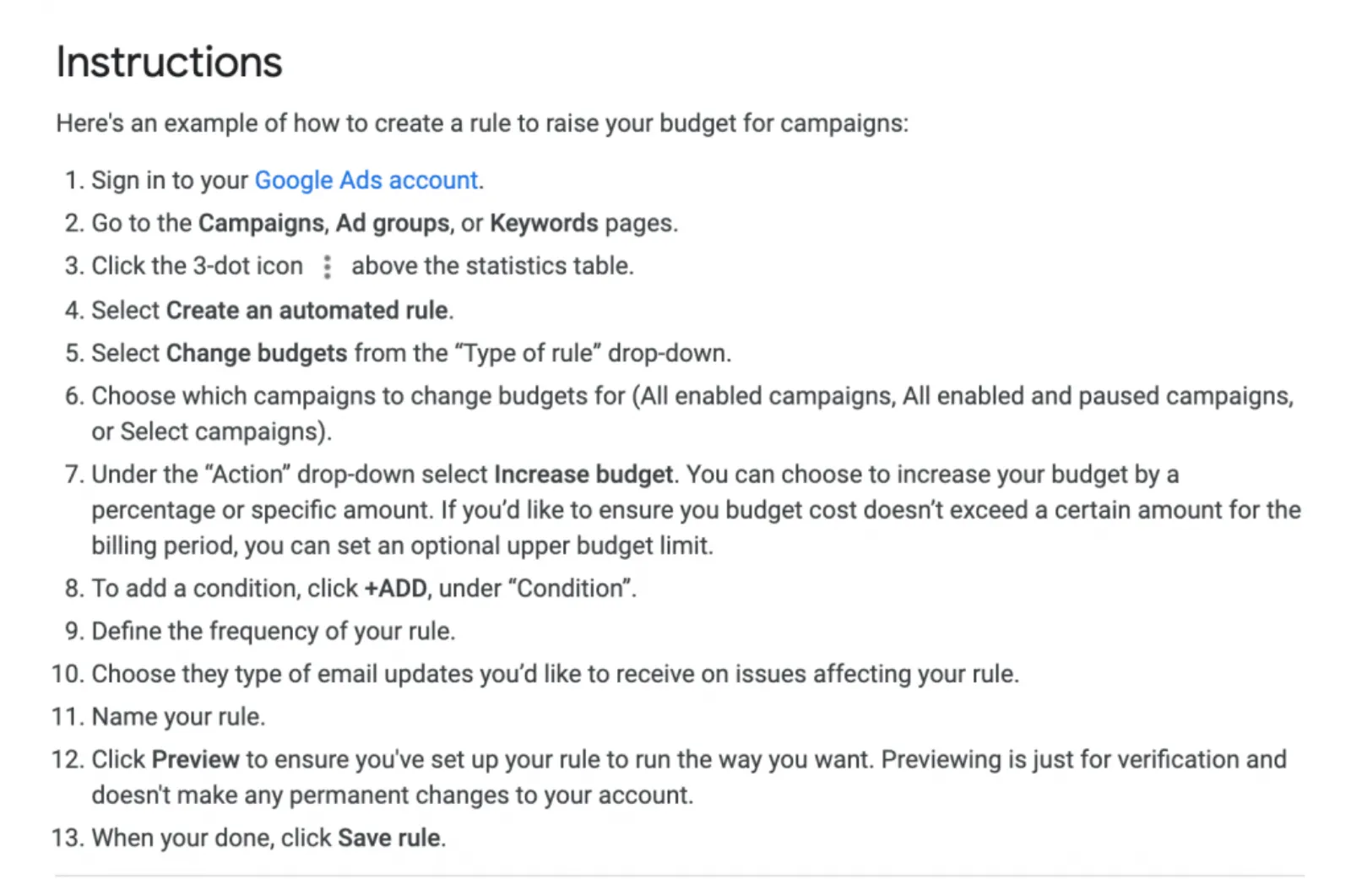
So, they've given all the instructions over here, step-by-step, as to how you can do that. Turn on or off a special ad from a promotional event. So, the opposite. You can do it next year, as well. If you want to, but I would not recommend you do that, to turn on an ad on a certain date or time, because you may want to change the text ad or run a completely separate set of keywords.
This is quite good, low performing ads or keywords. So, expensive keywords, non-converting keywords, keywords which are pretty much not costing you money. You can pause them on automation, especially when you've got thousands and thousands of keywords in a campaign, you can do that. So, I know a lot of you run campaigns on skags, which is a single keyword ad group.
So, what you can do is, in that ad group, if that ad group is expensive, pause it. Because you know there's only one keyword in there so this works quite well. Okay. Bids and scheduling. Adjust bids for keywords based on cost per conversion. Good. So, if the keyword is performing well and is profitable, you don't want to miss out in the auction, so you can increase the bids and I'll show you in a bit how to do that.
So, as you can see, they've written over here, a second weekly rule could decrease bids by 15% for keywords with the cost per conversion more than 12 dollars. So, you can increase or decrease the bids and adjust them automatically. This is quite handy and I love this one the most of all the automated bids because if you are, it depends on how you are bidding, we bid at the ad group level.
Whereas, a lot of you guys may be bidding at the keyword level. So, it doesn't matter which level you are bidding at. If you are bidding at the keyword level, then you can set up a rule and that is going to take a huge chunk of the workflow every day because the keyword biddings would be done automatically and you can create an upper limit or a lower limit, so it doesn't go crazy and it keeps on increasing every day.
Rules only run once a day. So, if you are running a very big account, where you are potentially spending tens of thousands of dollars a day. Then, you want to be running scripts, which can be run on an hourly basis and that is a lot more advanced and outside the scope of these. But for most of you who are running smaller campaigns, this is a great way to start up setting up rules, maybe put up four or five rules and you'll be good to go.
It will ease up your workflow and also you won't be leaving it alone. A lot of the advertisers or business owners, they set up the campaigns and forget that they haven't switched it on and then hardly go in there to make any changes, but at least, so with the rules whatever metrics you have set up these will be applied accordingly.
So, you can see there are lots of different ways you can set up the rules. So, let's go into the AdWords interface and we will set up some rules. Okay. So, I'm at the campaign level right now, this is in my test account. There's no data over here and then what you want to do is to go here in the three dots on the right-hand side, create an automated rule, then you name of your rule, select the action.
So, I want to only set up on enable campaigns. Sorry. Action is to enable campaign, pause or change budgets, right? So, I can pause a campaign if it has spent a certain amount or I can change the budget. If it is, let's say not profitable. So, you can say the average daily or campaign total depends on what you want.
You can either set up an action. So, let's say I want to increase the budget by 10% and I want to have an upper daily limit of a hundred pounds. Then you can apply to your campaigns and selected accounts or to the selected campaign. So, I'm going to leave this alone for now. So, status all enabled because paused ones don't matter.
So, I'm going to change that condition and then you can add over here the condition. So, you've got all these metrics. So, let's say a good one could be conversions, let's say I'm increasing the budget, right? So, if I type in, conversions. Greater than, let's say five in this campaign and I add another. So, you're gonna add as many conditions as you like and that's the good thing about these rules.
My cost per conversion, let's say my target cost per conversion was 30 pounds. Right. So, if it is less than 25, then I can afford to increase the bid or I can go less than 30 because what I don't want to do is to be limited by budget. If my campaign is profitable. So, once there's a setup, you can either set it up for once, daily, weekly or monthly and then you can look at the data from all of these date range, email, if there are any results or only if there are changes or errors to the rule.
So, you know that it has been done or not been done. Once you click the preview, as I don't have any live or enabled campaigns over here, you will see on how many campaigns this rule will be applied and then you just save it and it's as easy as this. Then, we have, let's go back at and the same thing you can do at the ad group level or keyword level, however you won't, really.
Let's do the keyword level. Search keywords and then I go to automated rules and the same, similar interface. You'll see, okay, you got the action over here is enable, pause, change, keyword bids. So, this is a good one where if, pause my keyword in wherever you want to select right at the ad groups or campaign or in the account.
All enabled and I want to pause keywords, which are expensive. So, oh no, I want to create a keyword, which has spent a lot of money and not converted, right? So, conversions less than one. So, you don't have the equal to over here. It will be greater than, or less than one, which will be obviously zero and then I can say performance is cost.
It has spent 200 pounds. Now, it depends on your cost per click because if you've got a cost per click where we are getting average CPC of 80 or 60 dollars, then obviously that is two clicks. You don't want to pause that, but if your CPCs are around 2 dollars or pounds or five pounds or something like that, and you got a lot of clicks and you spent a fair amount of money, then you want to apply that.
So, what you want to do is to give those keywords a fair amount of leeway. You don't want to pause them too quickly because it might be a good one it's just that in that timeframe. It did not convert. So, you can either do that all time or previous 90 days and so on and then in the change history, obviously, you can see what these rules have done and if you want to undo any action, then you go back into your keywords section and unable that keyword again.
So, this again will be really helpful and it would be a great way to manage your workflow. If you've got thousands of, or possibly a few hundred keywords, you don't need to worry about it, that I don't know where to look, how to look, how to change this base, as long as you've got all these parameters set up.
So you, as they said very rightly in the support centre, don't just jump in here, like straight up and start thinking about rules, pen and paper away from the computer screen, make a list of how many you got for the campaigns, ad group level keyword, or wherever you want to set up these rules and then you start running, another good one, which I really like is let's say the campaigns have paused and the campaign has got zero impressions yesterday across all the campaigns because of a billing issue or something has happened.
You will know straight away because there's the... You'll get an email notification, that this rule has run and the campaigns are not running. So, there's lots of really cool stuff which you can do in here with automated rules. So, we don't use rules as such because we have created scripts and they run on an hourly basis. So, it's a little bit more advanced than this, but this is a great way to get started with automation.
Okay, boys and girls, now's your chance to put any questions in the comment box. I'm going to look at it now and reply back. So, first of all, hello to everyone, Umar, Kumar, Mike, Nikhil. Lovely to see you guys here. How much, Umar you're asking "How much time keywords take to stabilize, stable?" I mean, what, I mean, what I think what you mean is, how much time it takes to give you...
I'm not sure what you mean by that. Are you looking at, how much time do you give keywords to give you results? Because there isn't any, you got to keep trying and depends on how you are using the negative keywords as well and what match types you are running. So, you want to give as much time as possible.
Now, as I said earlier on over here, just now I will look at how much money that keyword has spent and if it is... Then you look into it, let's say you are targeting a competitors' keyword, which is quite often, we would do it ourselves. But if it is not converting, then we know that people are looking for that competitor only and not your company.
So, I would pause it and definitely put that keyword as a negative keyword in our account. So, we don't waste more budget on it. Yeah. Kumar: "Is the topic of radio decided beforehand? Are we supposed to ask the question only related to the topic of the video?" You're talking about this session? No. You're free to ask any questions you may have, because this is why I log on here every day, teach something which may be of interest to you or something new and answer any questions you may have.
Hi Adam. Okay. Thank you. Yeah, rules are pretty cool. As I said earlier on not many people use it, but use it, you know, cautiously don't go crazy because when I used to do it, I would see the CPC skyrocket, because I've just kept on, or keep increasing, keep increasing the bid and I'm thinking why the hell it is happening?
And I had forgotten that I'd put in the rules over here. So, do make. Do keep an eye on it as to what's happening and put a limit, an upper or lower limit. So, it doesn't kill off the keyword or, you know, take it so hard that it is impossible to get a positive return on ad spends.
Okay. Kumar: "In YouTube video ad (set on keywords), how to generate search term report?" You can't do the search term report. You can do a placement, where your videos were placed. It works completely different for video marketing and video ads. So, you can run on where the ads were placed or which channels or placements. Apps I would absolutely remove for sure.
So, it doesn't go on there. Yeah and also try audience targeting as well, intent, custom intent, custom affinity and see which one is getting the best performance. So, keep them in a separate campaign. That's what I would do. Nikhil: "In a keyword search, there are many types, which one is best to use?" I think you are referring to which keyword search type, match type is the best one to use.
So, there are obviously four match types, phrase, exact broad modified and broad. Personally speaking, we never use broad at all because it's too broad as the name suggest. Broad modified is good. The phrase is good. Exact, you need to have a fair amount of traffic for that keyword. Otherwise, you'll get very little impressions or clicks, but if you've got a keyword which has got high volume, then, by all means, you know, just have a handful of those keywords and the other thing which I would also recommend is you don't need, you know, lots and lots of keywords it's the 80, 20. 20% of the keywords will give you 80% of the results and those golden nugget keywords is what you want to really, you know, look after, take care of.
So, nobody or your competitors can pinch it away from you. What I mean by that is you don't want to lose your ad rank or be outbidded by the competitors. If those keywords are really good, then you be bold and aggressive and try to knock everybody down. So, your ad stays in the top four. You don't want your ads to be at the bottom of the Google page because nobody sees those ads over there.
Mike: "Should negative keywords be an exact match?" Not necessarily, no, because first of all, you need to see what you are putting it as an exact match. So, if somebody is just typing in the word 'shoe' or 'shoes' now in this instance, I would put both of them shoe and shoes as an exact match negative, Google works completely the opposite way of the positive keywords, where it will if you were bidding for shoe, it will or potentially can show your ads on shoes, but it will not stop your ad showing the other way around if you just had a singular keyword.
So, that's how it is. We can't do much about it. Not many people like this, because it should be the same for the negative keywords as well. If you are showing ads for similar keywords, then you should stop showing for those similar keywords as well. But that's not the case. So, what you do is you put singular as well as plural.
Now, the reason why I'm saying shoes, if you got a shoe store for, let's say running shoes only you are not selling party shoes or dancing shoes or ballet shoes or tennis shoes or any other kind. So, all those... So, I would say tennis shoe, tennis shoes, a lot of people will be searching for, you can start putting them as negative, but if you just put the word tennis in as exact match negative, then it will not kill off all the other tennis shoe-related search queries and search terms.
So, this is how you just want to be a bit careful as to which match type you want to put in and at what level are you putting them at, account level, campaign or ad group level? It really depends on the structure of how you have set up your campaign. Muaz, I hope I have pronounced your name properly. (Muaz:) "Can we scrape emails from LinkedIn and target them as a customer match?
Even though the audience are not customers, but have an interest in product or service?" It is against LinkedIns' policy. I'm pretty certain to scrape any data from there, so I would not recommend you do that and to set up a customer match audience, you need to have a spend of about 50,000 dollars a month. Even if you did have a scraped email list, you need to have your account whitelisted for uploading those emails.
Nik Olay, "Do you suggest putting brand terms as a broad match?" I don't get that question as to what are you trying to ask if you could please put that again in the comment. Brand terms as a broad match? No. Okay. Okay. I understand what you say. I would set it up as definitely a broad modified. I don't use the brand as broad terms, ever.
Broad we don't use. So, again, depends on how you structure it. So, we have a structure of a broad modified and exact, so the broad modified will have only the BMM brand term and the exact match we'll have the brand term. So, let's say the exact running shoe, let's take the example of running shoes. So, in the BMM ad group, we will have plus running plus shoes, right and the exact, I would have running shoes as exact, best running shoes, cheapest running shoes, best top-quality running shoes or whatever reviews we don't because people are looking for reviews, but all the relevant keywords will be in the exact match.
So, the BMM will keep on fishing and hunting for new search queries, which then get added into the exact match and we keep on evolving those campaigns and the same exact match keywords in the exact match would be as exact match negatives in the broad modified. I know it's a bit confusing and you might not get your head around it, but when you think about it, it is pretty straightforward because we want to sculpt the traffic from going into the BMM group for the exact match search queries and we want them to show through for the exact match keywords because that is the best keyword for that search term.
Okay. What have we got here? Oh, I see. You're asking, putting brand terms as the broad match in the negative list. Yeah, depending on, as I just explained, it's not one rule fits all. It needs to be thought about it, you know, and plan properly. At what level are you, obviously you are... You got a negative keyword list, so you're putting it at the account level.
So, if you want to put them at the account level, then put them as phrase match, at least because then there's no way by accident. You block it off. (Nikhil): "How can we promote affiliate via SEO of blogpost?" So, you have your affiliate promotions or offers on your landing page or your blog page and then you drive traffic to that page.
Do not and I say that again, do not, and never put affiliate links in your Google Ads account. It will get suspended and you will not get your account back. You can run and control the landing page as to what you put on there, with the affiliate links, run ads through either display, video, discovery, Gmail, wherever you want to from and then when they click through to your affiliate offer, then hopefully you get the credit.
Adam, "Do you ever use broad negatives?" No. We tend to use phrase match and exact, usually. Okay. That's cool. I think I've covered pretty much all the questions and comments. Yes. Last chance to put in your questions now, otherwise we'll call it a day, but yeah, I hope you enjoyed this automated rules. Try to have a play with it.
You know you won't break it and try it start with one or two. Don't go at every level, try and do a couple of campaign level automation and see how it changes every day and once you are comfortable with running these rules, you don't need to worry about... And when you wake up in the morning, stressing about going into your ad accounts every day, if it's a small one, you can have a nice little set of rules, which will bid up, bid down, stop or start whatever you want to do on automation, but don't just leave it running on rules either because you want to keep an eye on what's happening in your account.
Mateusz, "Sorry for being late." Oh my God. I was just about to kick you off. All right. I'll let you off today, but yeah. Thanks for being here. The recording will be live in a little in a few minutes after we log off. So, no problem at all my friend. Okay. Nik Olay, "What you're saying is if you want to totally exclude a branded term, you would use broad negative, right?" Yeah.
You can run it if you want to run broad. I'm not saying the way I run campaigns is the best way. This is what we do and we use phrase match and that's about it or exact negatives. We run at the account level. We run at the ad group level as well. So, we've got different ways where we sculpt the traffic, where we, if we don't want any key search terms to trigger any of our ads, those go at the account level negative keyword list and if you want to sculpt traffic from going into the BMM ad group and want that to go into the exact match, then the BMM would have the exact match negatives in there, cool.
Nik, "Your way is more refined." Okay. Thank you. Yeah. No, but you know, there are so many ways to run Google Ads, every person I talk to, especially at the agency level, they may be running completely different to us and we compare notes and see which one works and we want to keep on improving our workflow, so that we do a better job for our clients and perform a bit more for them.
Thank you, everyone, for being here. We'll call it a day now and I've got a couple of other meetings to go to, so hopefully, you enjoyed it. Do like, comment or share below and I'll hopefully will see you tomorrow. Same time, the same place. So till then, stay safe and goodbye.



 LIVE
 then select Rules. In this window you will see a list of all of your rules along with icons indicating if the rules are enabled or paused.
