
NatWest Accelerator Events Free one-day marketing seminar at the NatWest Accelerator, Milton Keynes · 10 November 2026 Free marketing seminar · NatWest Accelerator, Milton Keynes · 10 Nov 2026 Free seminar · 10 Nov 2026
NatWest Accelerator, MK
Get your free invite →Invite →

Home › Blog › Google Ads

Google Ads

Google Ads For Dentists: How To Set Up Google Ads Discovery Campaigns

Google Ads For Dentists: How To Set Up Google Ads Discovery Campaigns
Read the video transcript

Please give me a moment. I'll make sure everything is working fine and we shall get started. Okay, looks good, and we are live everywhere. Hello, and a very good afternoon to you. First of all, apologies, uh, for the delay in starting this, um, live stream. It is not four o'clock, it's almost, what time is it, almost ten past four, just after ten past four. We had a bit of technical issues, so I had to restart the, the Mac.

Anyhow, I think we're live, everything is looking fine, and I hope you had a great weekend and ready to start. Well, in some part of the world it's the end of the day, but if you are starting your Monday and you're looking forward to the week, then let's get this live stream on the go. Every weekday we go live with a topic such as Google Ads, video marketing, display ads, pretty much anything and everything to do with video ads and Google Ads.

Today I'm going to go through a very interesting topic and a campaign which not many people know of, and these are called the Google Ads Discovery campaign. Now, if you're new here on this channel, the format is that I'll cover today's topic, I'll go through the workflow or the slides, and then towards the end of the session I'll try my best to answer any questions you may have. So please put them in the comment box on the, around the video, and I'll try my best to answer them for you.

Okay, that looks good. So where were we? Yes, Discovery ads, or campaigns I should say. Now, what you want to do is to be able to create a campaign which goes pretty much everywhere. It goes on Google Search Network, it goes on Display, it goes on YouTube, it goes on Gmail, and you create one campaign, a couple of ads or maybe one ad, and that's it. Let Google do all the heavy lifting for you by creating all these ads dynamically. I mentioned search. Yet, I'm sorry, it doesn't go on search yet. It goes on these three other networks.

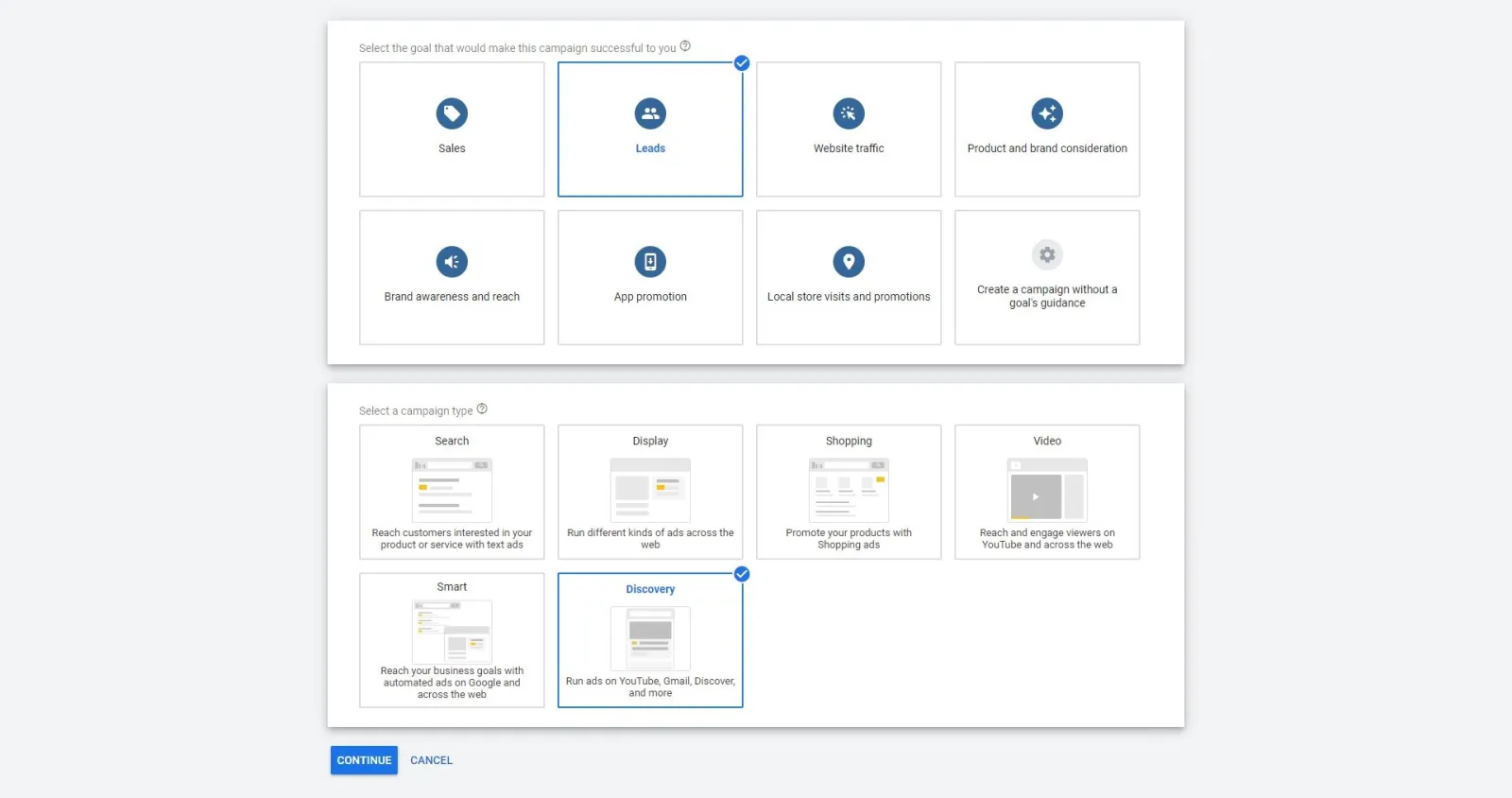
How do you get started? So all you do is you go to the new campaign, and then, depends on what your objective is, I'm gonna go for leads. And then in here, instead of the Search, which you would normally use and select, we go on Discovery: "Generate leads with visually rich, personalised ads that show across YouTube, Gmail, Discover and more." Click on that, continue. You put in your campaign name, select your location, your language.

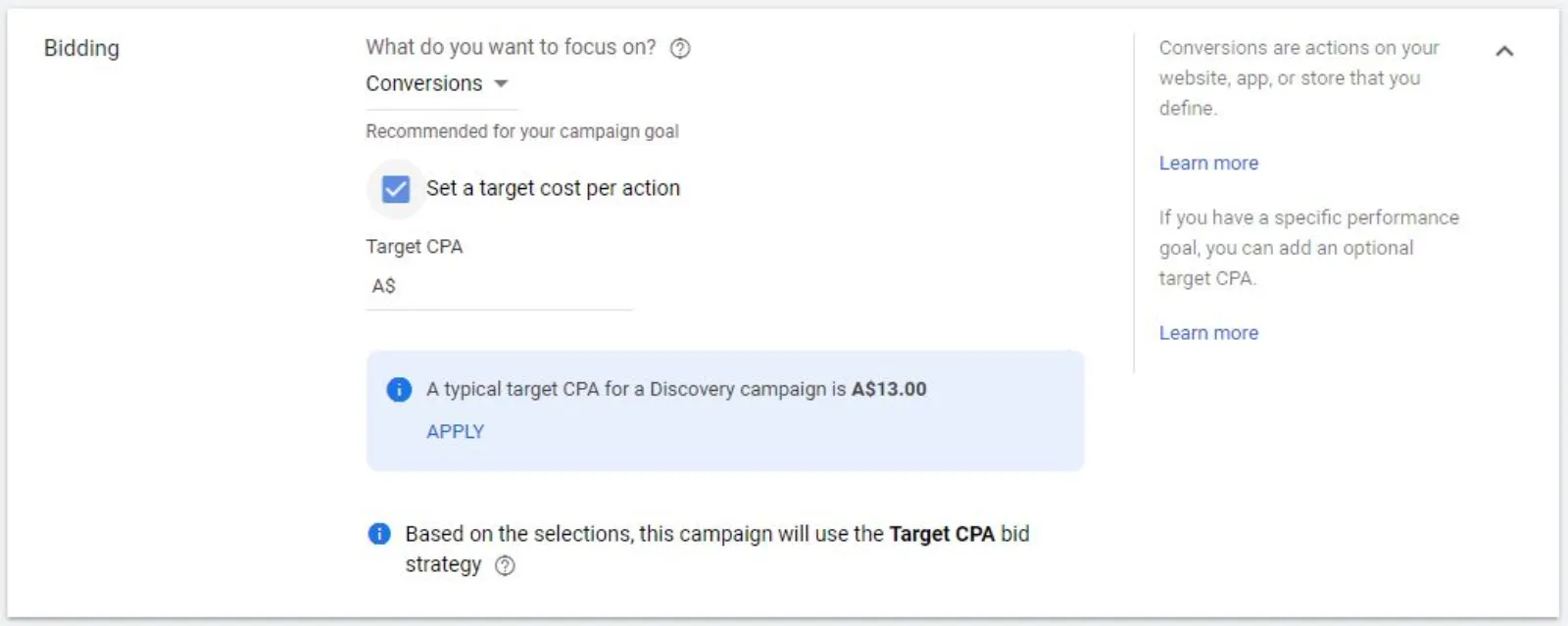
This is where it's a little bit different. You cannot go on manual mode, as it will not allow you to do that. All it does is, it, you pay for the conversions and not for the clicks. That's what this is all about. So all you do is you put in your conversion or the target CPA. When you check this box in, Google is going to look, your, in your account and give you a number as to how much it can get you a conversion for.

So it's giving me seven pounds and 20 pence for a typical conversion, and this is a typical target cost per acquisition for a Discovery campaign. So I can either apply it, or what I tend to do is, initially I can go a bit higher, so I'm giving Google a little bit more leeway to get my conversions. Although it knows that it can get me a conversion at seven pounds and 20 pence, I'm going to go a bit higher, and once I start getting the conversions and get the campaign running, I'll reduce the, the bids.

So you, as I said earlier on, you do not pay for the clicks. There's no bidding for the clicks. It's only for the cost per acquisition. If Google can get you a conversion, is going to charge me whatever it has bought that conversion at. We do not pay for any clicks.

And then the budget. Now this is where, again, most people go wrong. If I just put in 12, I'm not giving Google enough budget, because potentially Google can only get me one conversion per day. So what I want to do is, I want to at least give five times, sometimes even more, the, the cost per acquisition. So I'm going to start with 12 times 5, 60. So I'm giving it a fair amount of budget.

But over here it says here, "Consider increasing your budget to 84 or higher to help improve your campaign's performance. Your budget is too low for your bid, which might reduce your campaign's performance." And when you see that, don't freak out that, oh my God, I don't have enough budget. As long as you are prepared to pay for that lead, you need to start running this campaign to get it moving, and then you can reduce it.

But why would you reduce it if you are getting a great CPA? So although I bid 12 pounds, if I start getting, cam, conversions at five or six pounds, then potentially I can easily get up to, what, 20 conversions a day. And as long as I can handle the amount of leads coming through, I'll keep on ramping up. If, in fact, if I need more, I can take that spend to 200 or 150 or whatever.

And this is the power of these Discovery campaigns, because the volume is so much that you have got no limitations to how high you can scale this. It is very scalable, and we only pay when we get a conversion.

Then you have all the various, um, settings. Conversions, definitely set up your conversions, and I've got account level conversion setting, which is fine. Then you name your ad group, and what I tend to do is, if I'm targeting the business professionals in a particular ad group, I will name that as business professionals. I, what I tend to do is target one targeting per ad group.

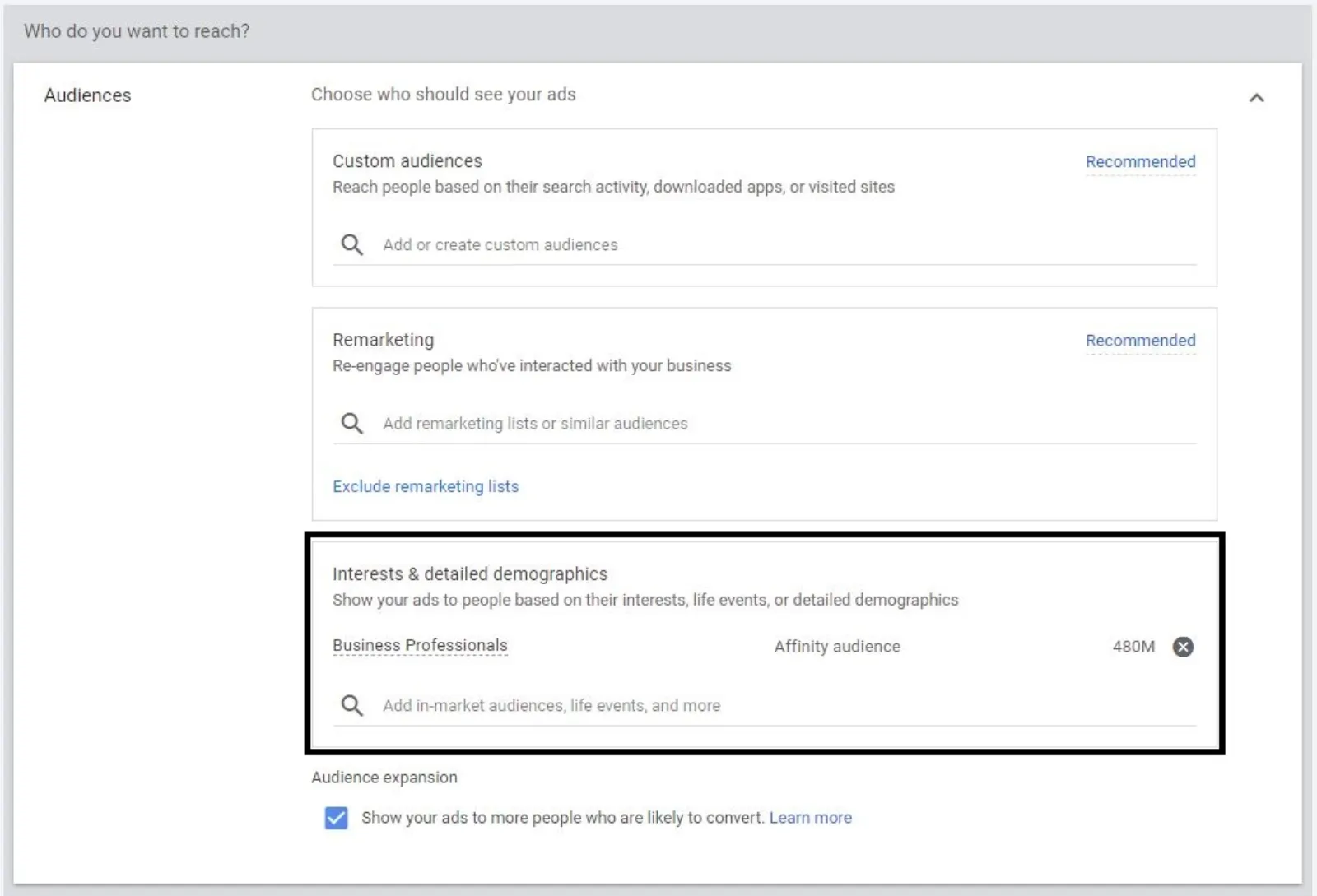
So it's giving me lots of different ideas as to what it is. This is for my website, because this is my test account. So if I wanted to do, let's say, teeth whitening, it won't give me, um, the targeted audience over here because it hasn't got enough data for the dentist niche. But I'm just going to target, let's say, teeth whitening, and I want to target the business professionals who are my tag, who may be my target audience.

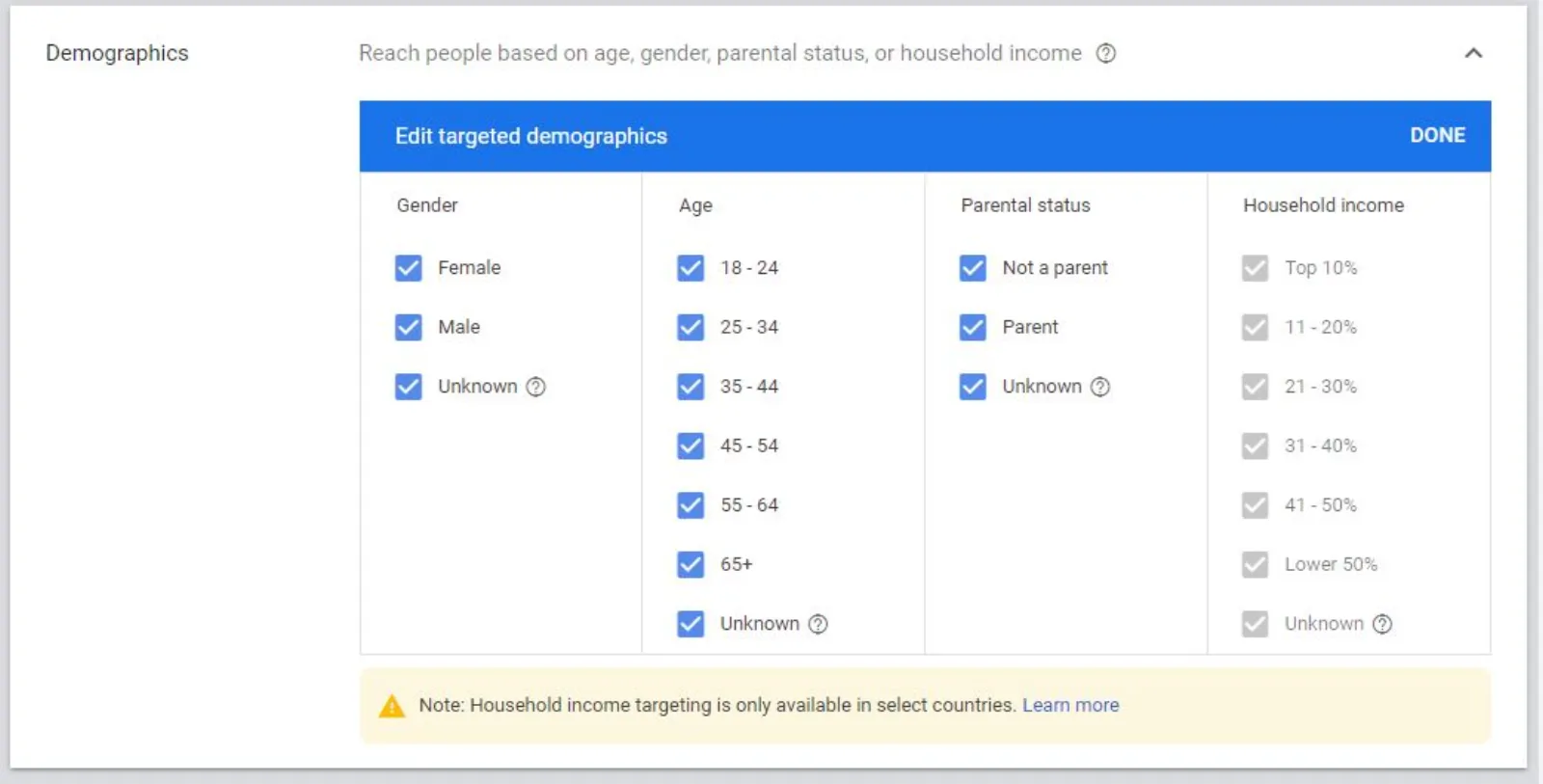
Then you go on the demo, and whoever you don't want to target, you take them out. And you can't change anything on the household income, so that is fine. And then you go to your ads. You've got two types of ads: one is carousel ad and one is Discovery ad. And all you do is you go in there, you put in the final URL. I'll just go to Google and pick up a website, um, let's say this one. This is just for test purposes. I'll put up a dentist website.

And here's what you need to do then, is throw in a few images and logos, and that, your headline, up to one, two, three, five, I think you can put in, yeah, five headlines and three or four descriptions, five descriptions you put in. Now, if you don't have images, you can also use stock images, and I'm going to put in the whitening. So these are all royalty free images which you can use. I'm going to select that.

And now what you want to do is give Google different, um, ratios, because depending on the size it's going to ship, put in different size images and ads. So I've got the first one, and then I've got the square one, and then the four to five, and these three are all applicable for that. So I've selected those three ratios, and it says "your watermark will not appear in your ad", which is from Shutterstock, which is fine.

So these are, you're not breaking any laws or infringing on anybody's copyrights, because these are all allowed in Google. Use that. So the more images you have to test, use different ones. You can change and crop the image the way you want it. These three are all selected, and I'll use, this is a nice one, because with the teeth whitening I do know that they are like different shades of white, which they are showing over here. That's a nice photo.

And you can use a dentist photo as well if you are using, if you are a dentist and you want to run this ad. So that's good. I will put in now, and we need to put in a logo as well. So what we do is, I think I have one of my recently used logos. I'll use that. Ah, that is it. So select it as a logo. Although it's not the right shape or size, I'm just using it to show you guys how to do that. And now that error message has disappeared.

Now you will see how, so I'm just gonna, this is headline one. If you repeat it, it's going to give you that error message. You have up to 90 characters, and I'll change that so you can see how the description will look as well. So you don't need to worry about split testing different messages and images to "teeth whitening dentist", something like that.

See it? Although I have not written this headline in the description, but even if you were to write it, it won't take you long. Images you don't need to worry about. You've got beautiful images, and look how cool this ad looks. That is the beauty, and I love these ads because they work wonderfully well. And your call to action could be whatever: Contact Us, Learn More, Book Now, I think Book Now is there as well, and Learn More I like, or Contact Us is good as well. I'll leave it as Contact Us.

And then you can see your ad, how it looks on a mobile or on a desktop. So you will see these kind, whenever you see these kind of ads, these are what we call the responsive display ads, where Google is going to mix and match the image, headline, description and see which one is giving us the best performance using all these different combination.

So you can imagine, if you were to try to do this yourself, it's going to be a nightmare with all these different size images and descriptions, and secondly, you will need to have potentially a graphic designer to give you different options. Whereas over here, I've just thrown in the images, the logo, headlines, description, job done. I can pretty much get my campaign up and running in no time, and if I don't get the performance, I can then come back in, change the headlines or the description and the images and start over again.

And that's how it will look on YouTube, with the "Ad" written over there, and on Gmail is going to be right at the top. And this is how easy it is to create a Google Discovery campaign. This is for the teeth whitening dentist.

So hope you enjoyed this video. I'm sorry it got a bit delayed and over, and I've got another appointment to hop onto, so hence I'm going to cut it short for today, and I'll be back tomorrow. Tomorrow is writing ads, and I'll write some ads for you. So if you do want me to write your ads, send me a message through our website or through WhatsApp and I'll be more than happy to write an ad for you. So till then, stay safe, and I look forward to see

Today I’m going to go through a very interesting topic and a Google Ads campaign which not many people know of and these are called the Google Ads discovery campaigns.

About Google Ads Discovery Campaigns

I should say now what you want to do is to be able to create a campaign that goes pretty much everywhere it goes on display it goes on YouTube it goes on Gmail.

Free NatWest Accelerator event

Get Found, Get Chosen, Get Your Time Back

A free one-day marketing seminar in Milton Keynes · 10 November 2026

Get your free invite →

And you create one Google Ads campaign a couple of ads or maybe one ad and that’s it let Google do all the heavy lifting for you by creating all these ads dynamically.

Get your free Marketing Action PlanNot sure where to start? Answer a few questions and get your plan in about a minute. No email needed.

Get my plan →

How Do You Get Started with Discovery Campaigns
Discovery Campaigns

So all you do is go to the new campaign and then depends on what your objective is I’m going to go for leads and then in here instead of the search which you would normally use and select we go on discovery generate leads with visually rich personalized ads that show across YouTube Gmail discover and more click on that continue.

How to Choose the Right Google Ads Bidding Strategy
Google Ads Bidding Strategy

This is where it’s a little bit different you can’t go on manual mode as it will not allow you to do that all it does is it you pay for the conversions and not for the clicks that’s what this is all about so all you do is you put in your conversion or the target CPA when you check this box in Google is going to look you’re in your Google Ads account and give you a number as to how much it can get you a conversion for so it’s giving me £7 and £20 for a typical conversion and this is a typical target cost per acquisition for a Google Ads discovery campaigns so I can either apply it or what I tend to do is initially I can go a bit higher.

So I’m giving Google a little bit more to get my conversions although it knows that it can get me a conversion at £7 and £20 I’m going to go a bit higher and once I start getting the conversions and get the Google Ads campaign running I’ll reduce the bids so you, as I said earlier on you, do not pay for the clicks there’s no bidding for the clicks it’s only for the cost per acquisition if Google can get you conversion is going to charge me whatever it has bought that conversion at we do not pay for any clicks.

How to Calculate Your Discovery Campaigns Budget

Discovery Campaigns Budget

The budget now this is where again most people go wrong if I just put in £12 I’m not giving Google enough budget because potentially Google can only get me one conversion per day so what I want to do is I want to at least give five times more sometimes, even more, the cost per acquisition so I’m going to start with £60.

So I’m giving it a fair amount of budget but over here it says here consider increasing your budget to £84 or higher to help improve your Google Ads campaigns performance. Your Google Ads budget is too low for your bid which might reduce your Google Ads campaigns performance.

When you see that don’t freak out that oh my god I don’t have enough budget as long as you are prepared to pay for that lead you need to start running this campaign to get it moving.

And then you can reduce it but why would you reduce it if you are getting a great CPA so although I bit £12 if I start getting conversions at £5 or £6 then potentially I can easily get up to what 20 conversions a day and as long as I can handle the number of leads coming through I’ll keep on ramping up if in fact if I need more I can take that spend to £200 or £150 or whatever.

This is the power of Google Ads discovery campaigns because the volume is so much that you have got no limitations to how high you can scale this it is very scalable and we only pay when we get a conversion.

How to Set Up Google Ads Conversion Tracking

Google Ads Conversion Tracking

You have all the various settings conversions set up your conversions and I’ve got account level conversion setting which is fine.

Uzair KharawalaLIVE
Free weekly YouTube live

Live every Tuesday at 2pm UK. Bring your marketing questions.

Get your Google, local SEO and AI questions answered live.

Join for free

How to Choose Discovery Campaigns Ad Group Name

Discovery Campaigns Ad Group Name

Name your ad group and what I tend to do is if I’m targeting the business professionals in a particular ad group I will name that as business professionals.

How to Use Google Ads Audiences?
Google Ads Audiences

What I tend to do is target one targeting per ad group so it’s giving me lots of different ideas as to what it is this is for my website because this is my test account so if I wanted to do let’s say teeth whitening it won’t give me the targeted audience over here because it hasn’t got enough data for the dentist niche but I’m just going to target let’s say teeth whitening and I want to target the business professionals who are my target who may be my target audience.

How to Use Demographic Targeting
Demographic Targeting

You go on the demographics and whoever you don’t want to target you take them out and you can’t change anything on the household income so that is fine.

How to Create Discovery Ads
How to Create Discovery Ads

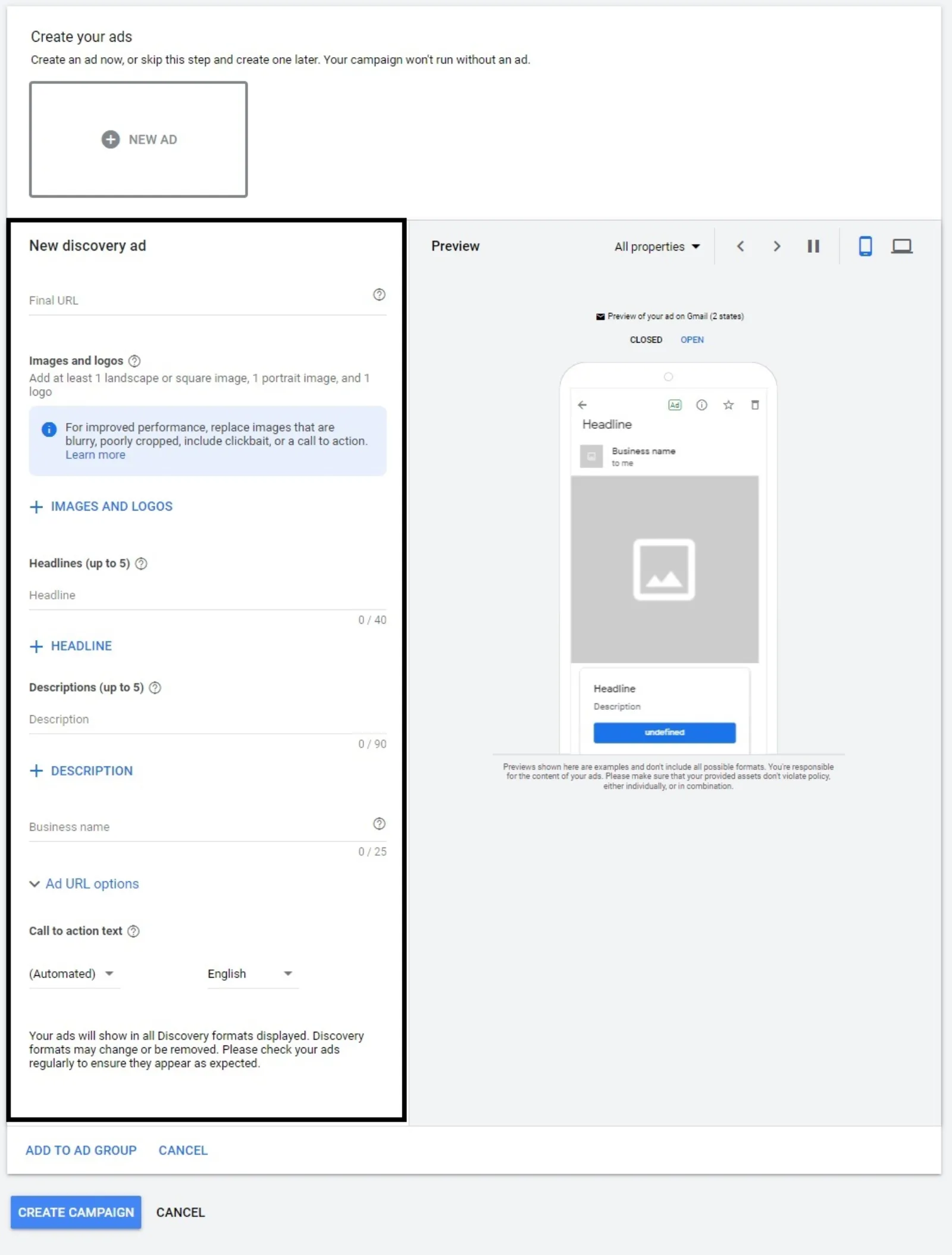
You go to your ads you’ve got two types of ads one is discovery carousel ad and one is discovery ad and all you do is you go in there you put in the final URL. I’ll just go to Google and pick up a website. Let’s say this one is just for test purposes. I’ll put up a dentist website.

Here’s what you need to do then is throw in a few images and logos and that your headline up to 5 headlines and 5 descriptions you put in now. If you don’t have images you can also use stock images and I’m going to put in teeth whitening.

So these are all royalty-free images which you can use I’m going to select that and now what you want to do is give Google different ratios because depending on the size it’s going to ship put in different size images and ads so I’ve got the first one and then I’ve got the square one and then the 4:5 and these three are all applicable for that so I’ve selected those three ratios and it says your watermark will not appear in your ad which is from Shutterstock which is fine.

So these are you’re not breaking any laws or infringing on anybody’s copyrights because these are all allowed in Google use that so the more images you have to test use different ones you can change and crop the image the way you want it these three are all selected.

I’ll use this as a nice one because with the teeth whitening I do know that they are like different shades of white which they are showing over here that’s a nice photo and you can use a dentist photo as well if you are using if you are a dentist and you want to run this ad so that’s good I will put in now and we need to put in a logo as well so what we do is I think I have one of my recently used logos I’ll use that is it so select it as a logo although it’s not the right shape or size I’m just using it to show you guys how to do that and now that error message has disappeared.

Now you will see how so I’m just going to this is headline one if you repeat it it’s going to give you that error message you have up to 90 characters and I’ll change that so you can see how the description will look as well so you don’t need to worry about split testing different messages and images to teeth whitening dentist something like that see it although I have not written this headline in the description even if you were to write it won’t take you long.

Images you don’t need to worry about you got beautiful images and look how cool this ad looks that is the beauty and I love these ads because they work wonderfully well.

How to Add a Call to Action in Your Discovery Campaigns
Call to Action

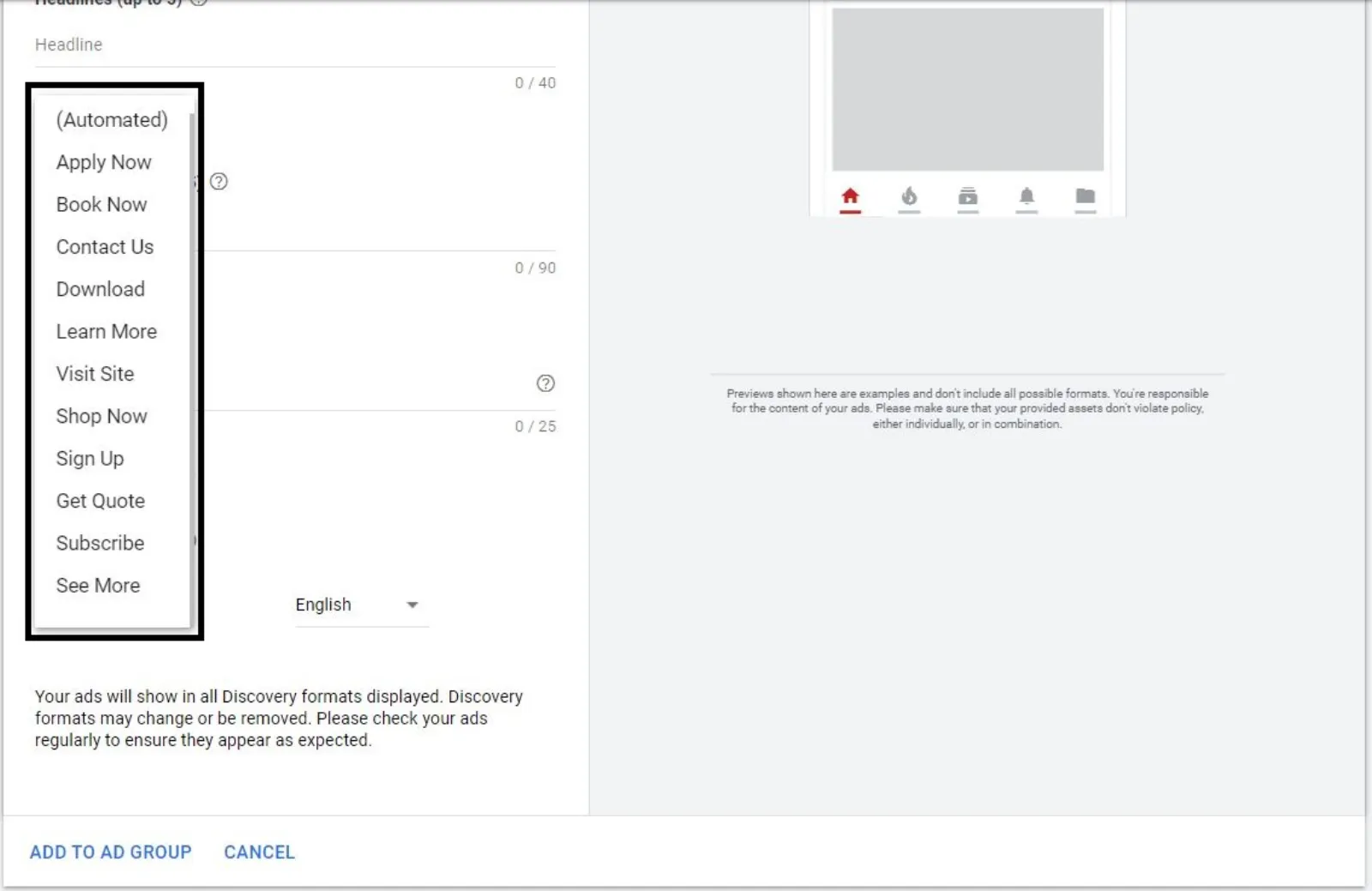
Your call to action could be whatever Contact Us, Learn more, Book Now. I think “Book Now” is there as well and “Learn more” I like or “Contact Us” it’s good as well I’ll leave it as “Contact Us”.

How to Check Your Discovery Ads with Google Ads Preview Tool
Google Ads Preview Tool

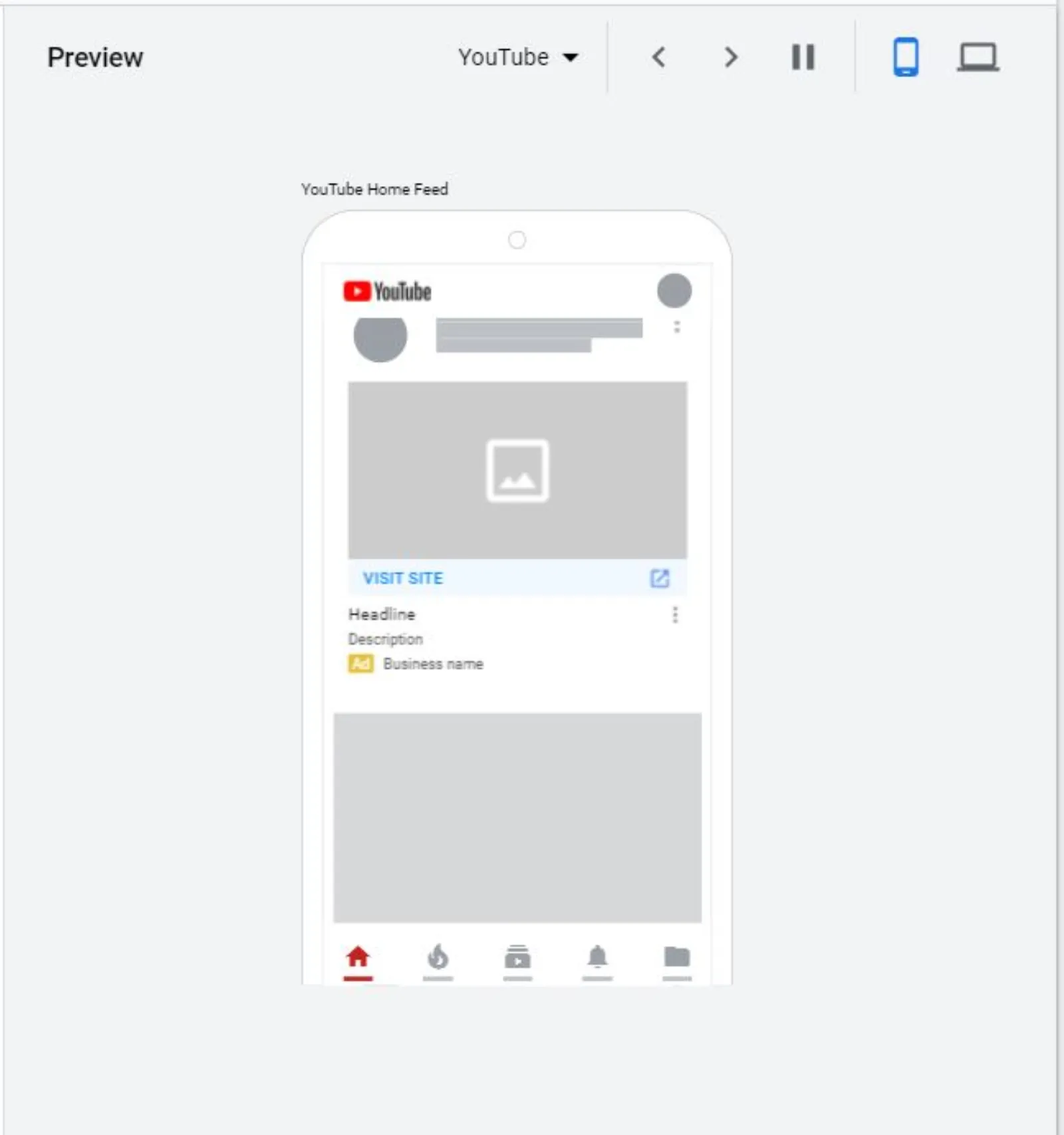
You can see your ad how it looks on a mobile or a desktop so you will see these kinds whenever you see these kinds of as these are what we call the responsive display ads where Google is going to mix and match the images, headlines, descriptions and see which one is giving us the best performance using all these different combinations.

So you can imagine if you were to try to do this yourself it’s going to be a nightmare with all these different size images and descriptions and secondly, you will need to have potentially a graphic designer to give you different options whereas over here I’ve just thrown in the images the logo, headlines, descriptions job done I can pretty much get my campaign up and running in no time.

And if I don’t get the performance I can then come back and change the headlines or the descriptions and the images and start over again and that’s how it will look on YouTube with the ad written over there and on Gmail is going to be right at the top and this is how easy it is to create a Google Ads discovery campaign this is for the teeth whitening dentist.

Uzair Kharawala

Written by Uzair Kharawala

Partner at SF Digital Studios, a Google Premier Partner agency. Uzair has been helping businesses grow with Google Ads since 2002 and teaches it every week on YouTube.

Book A Call →Subscribe on YouTube for new videos every weekday →
Free every week

Get our best Google Ads tips by email

New articles and videos, straight to your inbox. Unsubscribe any time.

We respect your privacy at all times. Privacy Policy

You may also like

Read the blog →

Your next customers are out there. Let's go and get them.

Tell us where you want your business to be, and we'll show you how to get there.

Book A Call →or get your free Google Health Check →
Happy clients

Don't take our word for it

4.9 from 157 Google reviews, plus case studies and client videos.

See our happy clients →
"It has now been 3 months since we started and our sales have increased 300%."
Ruhi Latif Rafplay, Dubai
"Uzair and Farzana are two of the most honest, sincere and trustworthy people you will ever meet."
Gavin Morgan GDM Jewellery · Google review
"If I needed a campaign built, this is one of the rare few people IN THE WORLD I would trust to do it properly."
Hemmel Amrania Google Ads professional · Google review
Book A Call →
Chat with us on WhatsApp