NatWest Accelerator Events Free one-day marketing seminar at the NatWest Accelerator, Milton Keynes · 10 November 2026 Free marketing seminar · NatWest Accelerator, Milton Keynes · 10 Nov 2026 Free seminar · 10 Nov 2026
NatWest Accelerator, MK
Get your free invite →Invite →

Home › Blog › Google Ads

Google Ads

Google Ads Image Extensions: Everything You Need To Know

Google Ads Image Extensions: Everything You Need To Know
Read the video transcript

Want to deliver engaging Google search ads with Image Extensions. In this video, I am going to show you how to do just that. Hello, my name is Uzair and thanks for joining in. If you haven't subscribed to our channel, then, please do so and also do hit the bell button as we upload content on a very regular basis and you'll be one of the first one to get notified.

Okay, so something new has been launched and announced by Google Ads. something extremely exciting. I think you need to start using it because that is definitely going to increase your click through rate and when the CTR increases, what that means is you getting more clicks on your ads which Google loves. That means your quality score is going to go high.

Your ad rank is going to improve. Your cost per click is going to come down because of the quality score. So, all in all, is going to work out in your favour and if you are getting more clicks, then hopefully, if your ad and the landing page or offer is congruent to each other, then, you most probably are going to start to get conversions as well.

So, how do we do that? This is with this new extension which is the image extension As you can see, it's this was announced on May 27, 2021 This has been going on for a while. Global had announced but it wasn't available globally but now they have launched it globally. So, if you haven't seen it in your account yet, it will be rolled out and what I'll do is I am also going to I show you in the account how to set up So, let see what this all about Consumers now expect a more visual experience when they browse products and services online.

In fact, 86% of consumers in surveyed countries around the world, say that they expect photos to be a feature that businesses offer them when shopping online. Last year, they had introduced image extensions to help you create a more visually engaging search ad. So, that is the key that normally on a search ad, there are no images but now they are starting to roll this out.

So, what you can do is you can put up photos of your logo, your products, even your headshot and that is a great way to engage with your audience and that's what I'm going to do because one of my accounts has recently been whitelisted and I can now upload Image Ads Image Extensions, I should say not Image Ads.

Okay. Starting today which is the May 2. 2021 Image Extensions are available globally and this is how is going to look. So, somebody search for food delivery. The ad has popped up over here and look at this now. That is so cool. I love this. The way Google has launched this search Image extension and is going to entice the user to click on your ad because if your competitors aren't using it or don't know how to use it, then, they'll be missing out on this new feature.

Okay, I'm not going to read all of this. It's just the usual brand case studies how Estee Lauder increased their clicks or the performance but it is extremely simple and easy to use and there are two Extensions. One is the normal Image extension and one is the dynamic Image extension and that uses machine learning to automatically select the most relevant images from your ads landing page and append them to your ads.

So, this is really cool. You don't need to do anything. Google is just going to work out which Image is the most relevant to which ad. Now that is crazy and it's quite scary as well as to how clever the AI and the the machine is heading towards it Pretty much knows everything about us to be honest.

So, it can't be more scarier than that. Once you opt in, we'll add images from your landing pages to your corresponding ad groups in your search campaigns. You can then review these images and remove any you don't want to show with your ads. Perfect dynamic Image Extensions are currently available in English and will roll out in additional languages over the next few months.

So, hopefully later on this year, it will go on all of these. So added by Google and these are the images which they showing. Let's see what the the best practice is. Create unique Image Extensions for priority campaigns and ad groups then opt into dynamic Image Extensions for a quick way to add visuals to the rest of the ad groups in your ad account search campaigns Image Extensions will always serve over dynamic Image Extensions.

So, that is if you got Image Extensions, then they are going to take precedent over the dynamic ones then you have it on YouTube as well When your the campaign is opted into search partners Image, Extensions are eligible to show with your ad in YouTube search results that again is really cool. I like that this gives you an easy way to inspire potential customers while you expand the reach of your search campaigns by connecting with people as they search for videos related to your products and services.

They can engage even more qualified customers and that's about it really there. Not much to it rather than to set it up. So, how do we set this up? So, if you go. Let me go into an account that hasn't got a hasn't got this extension. So, if I go into one of my dummy accounts, you'll see that there is no Image Extensions over here, right?

So, that is an account without the image extension right now and this is an account with an image extension. So, you go there. And it's so easy. There's nothing to explain really. You either add to campaign level or add group level or you can use an existing one if you got one, right? Create a new ad image or images, upload, choose file, and then I'm just going to select one headshot like that or it could be a logo.

It could be anything really and once it uploaded, you select on it. Now, you can either have it as a square or they have another the option which is the 16:9 ratio, the horizontal one, the 1.9:1 ratio. If you have one more image which is in this format like a rectangle, then you upload it again and you select that so you can have either a square or the rectangle one.

Either way, Whichever one you want. Save and then you save it over here again and then that pops up and that's where the image is going to show up on my ads. So, if somebody is looking so in this campaign, I can either put my image ad because most well, not most people I should say. I'll say many people have seen my videos and are aware of me in the Google Ads niche.

So, if they go to Google and they are looking for something else like Google Ads training or Google Ads or whatever, anything to do with Google Ads and let's say my ad pops up all of a sudden, my headshot is there. So, I am going to use different a headshot like three or four different ones and see which ones are getting the clicks and getting giving me better better results.

So, that's how easy it is to set up an Image extension. So, hope you enjoy this video and I look forward to seeing you at the next one.

Want to deliver engaging Google search ads with Image Extensions.

In this video, I am going to show you how to do just that. Okay, so something new has been launched and announced by Google Ads. Something extremely exciting. I think you need to start using it because that is definitely going to increase your click-through rate and when the CTR increases, what that means is you getting more clicks on your ads which Google loves. That means your quality score is going to go high.

Free NatWest Accelerator event

Get Found, Get Chosen, Get Your Time Back

A free one-day marketing seminar in Milton Keynes · 10 November 2026

Get your free invite →

Your ad rank is going to improve. Your cost per click is going to come down because of the quality score. So, all in all is going to work out in your favour and if you are getting more clicks, then hopefully, if your ad and the landing page or offer is congruent to each other, then, you most probably are going to start to get conversions as well.

Get your free Marketing Action PlanNot sure where to start? Answer a few questions and get your plan in about a minute. No email needed.

Get my plan →

Google Ads Image Extensions

Google Ads Image Extensions
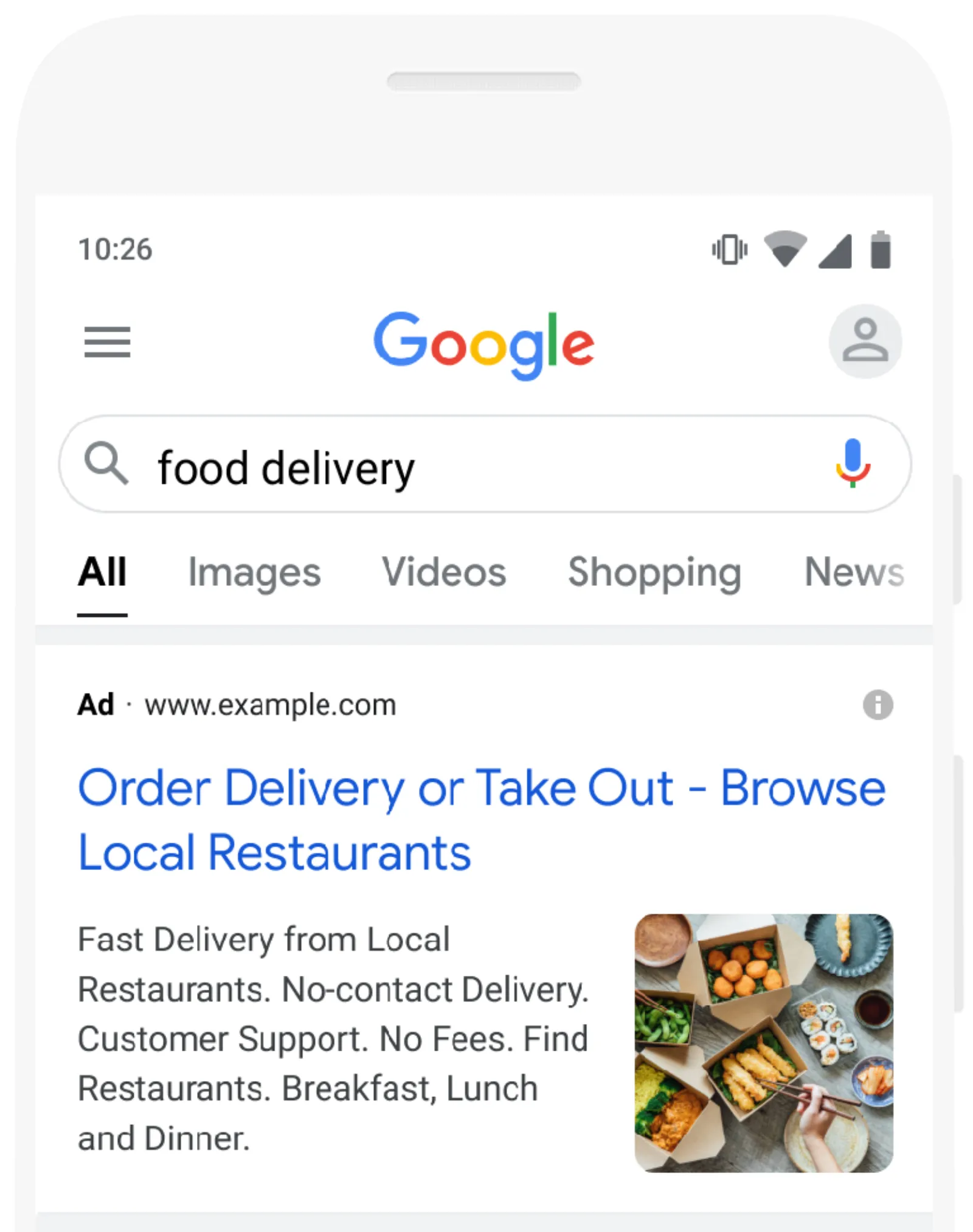
Search ad shown with an image extension / Photo by Google Ads Support

So, how do we do that? This is with this new extension which is the image extension as you can see, it’s this was announced on May 27, 2021, this has been going on for a while. Global had announced but it wasn’t available globally but now they have launched it globally. So, if you haven’t seen it in your account yet, it will be rolled out and what I’ll do is I am also going to I show you in the Google Ads account how to set up image extension.

So, let see what this all about consumers now expect a more visual experience when they browse products and services online. In fact, 86% of consumers in surveyed countries around the world, say that they expect photos to be a feature that businesses offer them when shopping online.

Last year, they had introduced image extensions to help you create a more visually engaging search ad. So, that is the key that normally on a search ad, there are no images but now they are starting to roll this out. So, what you can do is you can put up photos of your logo, your products, even your headshot and that is a great way to engage with your audience and that’s what I’m going to do because one of my accounts has recently been whitelisted and I can now use image extensions.

Okay. Starting today which is May 2, 2021 image extensions are available globally and this is how is going to look. So, somebody searches for food delivery. The ad has popped up over here and look at this now. That is so cool. I love this. Way Google has launched this search image extension and is going to entice the user to click on your ad because if your competitors aren’t using it or don’t know how to use it, then, they’ll be missing out on this new feature.

Google Ads Dynamic Image Extension
Google Ads Dynamic Image Extension
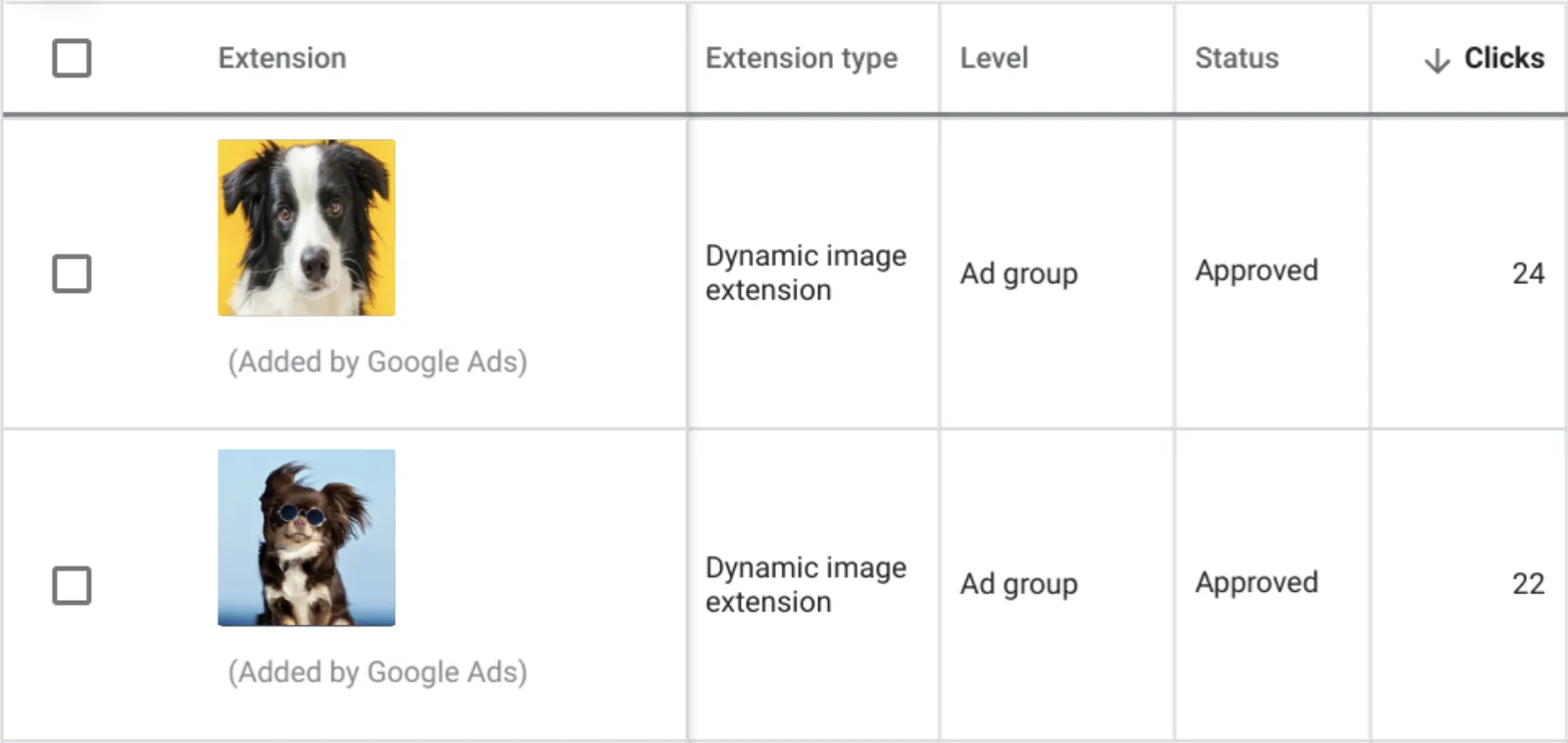
Review dynamic image extensions created from your landing page / Photo by Google Ads Support

It is extremely simple and easy to use and there are two Extensions. One is the normal Image extension and one is the dynamic Image extension and which uses machine learning to automatically select the most relevant images from your ads landing page and append them to your ads. So, this is really cool. You don’t need to do anything. Google is just going to work out which Image is the most relevant to which ad.

Now that is crazy and it’s quite scary as well as to how clever the AI and the machine is handling towards it pretty much knows everything about us to be honest. So, it can’t be scarier than that. Once you are opt-in, we’ll add images from your landing pages to your corresponding ad groups in your search campaigns. You can then review these images and remove any you don’t want to show with your ads.

Uzair KharawalaLIVE
Free weekly YouTube live

Live every Tuesday at 2pm UK. Bring your marketing questions.

Get your Google, local SEO and AI questions answered live.

Join for free

Perfect dynamic image extensions are currently available in English and will roll out in additional languages over the next few months. So, hopefully later on this year, it will go on all of these. So added by Google and these are the images which they showing. Let’s see what the best practice is.

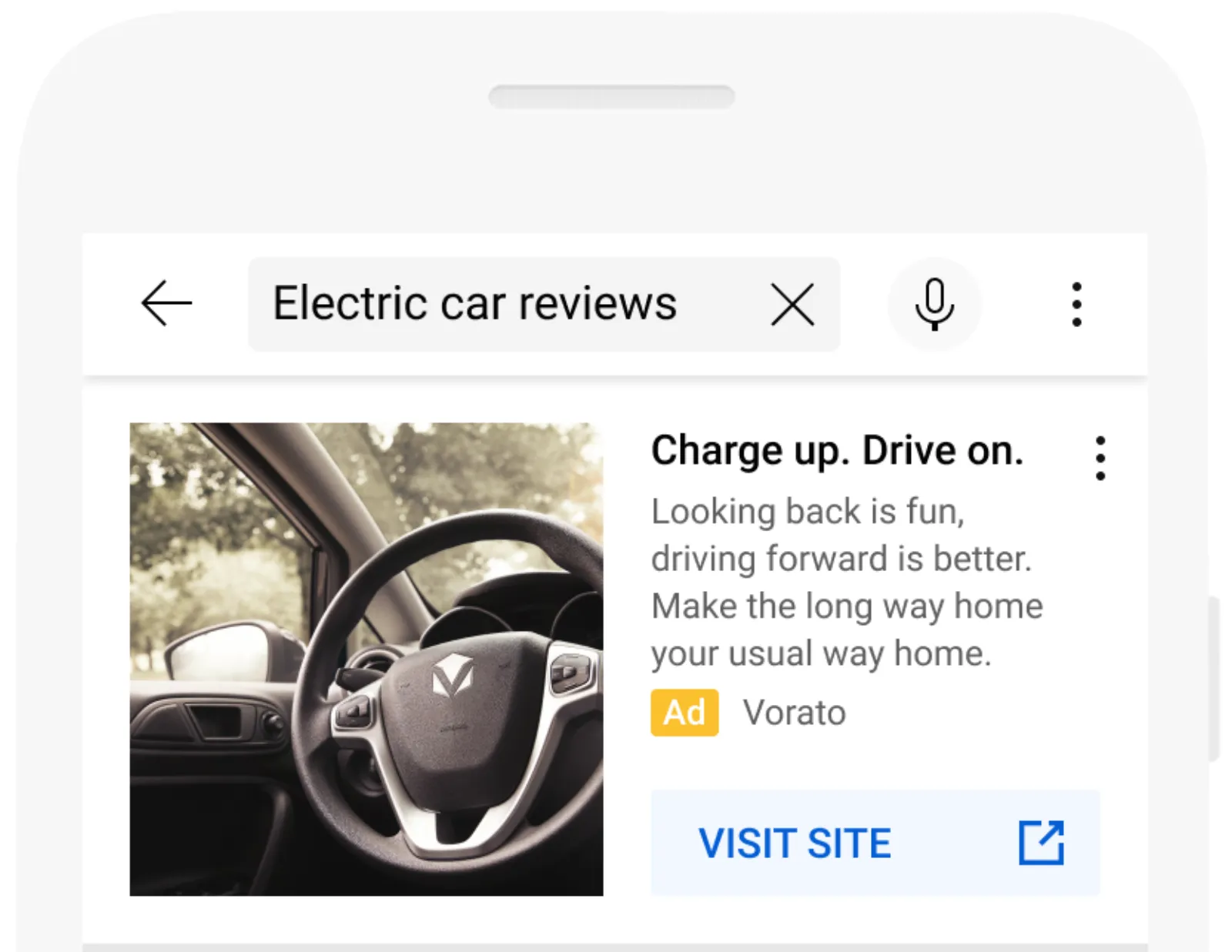
Create unique image extensions for priority Google Ads campaigns and ad groups then opt into dynamic image extensions for a quick way to add visuals to the rest of the ad groups in your ad account search campaigns image extensions will always serve over dynamic image extensions. So, that is if you got image extensions, then they are going to take precedent over the dynamic ones then you have it on YouTube as well When you’re the campaign is opted into search partners image extensions are eligible to show with your ad in YouTube search results that again is really cool.
Google Ads Image Extensions on YouTube
Search ad shown with an image extension in YouTube search results / Photo by Google Ads Support

I like that this gives you an easy way to inspire potential customers while you expand the reach of your search campaigns by connecting with people as they search for videos related to your products and services. They can engage even more qualified customers and that’s about it really there. Not much to it rather than to set it up.

How to Set Up Image Extensions in Google Ads

So, how do we set this up? So, if you go. Let me go into a Google Ads account that hasn’t got this extension. So, if I go into one of my dummy accounts, you’ll see that there are no image extensions over here, right? So, that is a Google Ads account without the image extension right now and this is an account with an image extension.

So, you go there. And it’s so easy. There’s nothing to explain really. You either add to campaign level or ad group level or you can use an existing one if you got one, right?

Create a new ad image or images, Upload, and choose a file, and then I’m just going to select one headshot like that or it could be a logo. It could be anything really and once it uploaded, you select on it.

Now, you can either have it as a square or they have another option which is the 16:9 ratio, the horizontal one, the 1.9:1 ratio. If you have one more image which is in this format like a rectangle, then you upload it again and you select that so you can have either a square or the rectangle one.

Either way, whichever one you want. Save and then you save it over here again and then that pops up and that’s where the image is going to show up on my ads.

So, if somebody is looking so in this campaign, I can either put my image ad because most well, not most people I should say. I’ll say many people have seen my videos and are aware of me in the Google Ads niche.

So, if they go to Google and they are looking for something else like Google Ads training or Google Ads or whatever, anything to do with Google Ads and let’s say my ad pops up all of a sudden, my headshot is there.

So, I am going to use different a headshot like three or four different ones and see which ones are getting the clicks and getting giving me better results. So, that’s how easy it is to set up an Image extension. So, hope you enjoy this video and I look forward to seeing you at the next one.

Uzair Kharawala

Written by Uzair Kharawala

Partner at SF Digital Studios, a Google Premier Partner agency. Uzair has been helping businesses grow with Google Ads since 2002 and teaches it every week on YouTube.

Book A Call →Subscribe on YouTube for new videos every weekday →
Free every week

Get our best Google Ads tips by email

New articles and videos, straight to your inbox. Unsubscribe any time.

We respect your privacy at all times. Privacy Policy

You may also like

Read the blog →

Your next customers are out there. Let's go and get them.

Tell us where you want your business to be, and we'll show you how to get there.

Book A Call →or get your free Google Health Check →
Happy clients

Don't take our word for it

4.9 from 157 Google reviews, plus case studies and client videos.

See our happy clients →
"It has now been 3 months since we started and our sales have increased 300%."
Ruhi Latif Rafplay, Dubai
"Uzair and Farzana are two of the most honest, sincere and trustworthy people you will ever meet."
Gavin Morgan GDM Jewellery · Google review
"If I needed a campaign built, this is one of the rare few people IN THE WORLD I would trust to do it properly."
Hemmel Amrania Google Ads professional · Google review
Book A Call →
Chat with us on WhatsApp