
NatWest Accelerator Events Free one-day marketing seminar at the NatWest Accelerator, Milton Keynes · 10 November 2026 Free marketing seminar · NatWest Accelerator, Milton Keynes · 10 Nov 2026 Free seminar · 10 Nov 2026
NatWest Accelerator, MK
Get your free invite →Invite →

Home › Blog › Google Ads

Google Ads

Google Ads Local Business

Google Ads Local Business
Read the video transcript

Did you know that approximately 80% of local searches result in a conversion? Local searches drive conversions for small businesses. So why is your campaign not getting the results you expected? Hello, I’m Uzair and thanks for watching this video, where I will give 3 powerful Google Ads strategies to help your business to drive more local sales and attract more attention to your brand. 1.

Ad Extensions Using ad extensions can really help to improve your Google Ads results for local search. One of the biggest mistakes that people make is to use them without a reason or strategy. For a local campaign, you should consider using four key ad extensions: location, phone calls, affiliate locations, and dynamic site links. All four of these will be really critical to your campaign.

With dynamic site links, you can take your campaign to the next level, as Google automatically calculates the best site extensions for your ads based upon the user’s intent and previous search history. They were created to help connect an audience to the content that they are actually looking for. 2. Target Local Keywords and Locations By targeting both together, you may have lower traffic overall, but you will have more precise targeting and, hopefully, a higher converting audience.

The first step is to change the default setting of location targeting within your campaign settings. Click on the locations tab and select “People in or regularly in your targeted locations”. Google will now know that you only want to target people that are living or working within your selected location. This prevents people physically located outside of your target area from being shown your ads.

If you still want to capitalize on them as well, you can run a separate brand awareness campaign with the default location settings applied. After changing those settings, you can then target keywords to ensure that you are getting the most accuracy in the audience that your ads are shown to. So, for example, if you run a shoe shop, you may select “children’s shoes Milton Keynes”.

By combining very targeted keywords with location targeting, you have a guaranteed audience that live near your business that are looking for what you offer. 3. Run “Local Search Ads” and Use Bid Modifiers These do take a bit of work to set up, but they can be one of the greatest features to drive local, high-quality leads. Instead of linking to your website, they link to a page on Google My Business that gives people more information about your store, like opening hours, reviews, photos, and so on.

The setup process also lets you show your ads in Google Maps directly. To set this up, you need to be running location extensions on your Google Ads, have an existing Google My Business page to work from and then optimize your bids and keywords for location targeting. Once you have done this, you need to optimize your Google My Business page to make sure that it contains all of the relevant information that searchers need.

Next, you need to optimize your location targeting within bids. To do this, you simply select the locations that you are targeting within your dashboard and then click on the bid adjustment column. One top tip here is to create different levels of radius around your location, for example, 5, 10 and 15 miles. You can then increase the bid amounts the closer the location is.

This means that you will spend less on clicks that might not convert, and more on those more likely to. I hope you enjoyed this video. Thanks for joining in and I look forward to seeing you in my next video. Bye for now

Did you know that approximately 80% of local searches result in a conversion? Local searches drive conversions for small businesses. So why is your campaign not getting the results you expected?

In this article, I will give three powerful Google Ads strategies to help your business to drive more local sales and attract more attention to your brand:

Free NatWest Accelerator event

Get Found, Get Chosen, Get Your Time Back

A free one-day marketing seminar in Milton Keynes · 10 November 2026

Get your free invite →

1. Ad Extensions

Using ad extensions can really help to improve your Google Ads results for local search. One of the biggest mistakes that people make is to use them without a reason or strategy. For a local campaign, you should consider using four key ad extensions: location, phone calls, affiliate locations, and dynamic site links.

Get your free Marketing Action PlanNot sure where to start? Answer a few questions and get your plan in about a minute. No email needed.

Get my plan →

All four of these will be really critical to your campaign. With dynamic site links, you can take your campaign to the next level, as Google automatically calculates the best site extensions for your ads based upon the user’s intent and previous search history. They were created to help connect an audience to the content that they are actually looking for.

2. Target Local Keywords and Firm Locations

By targeting both together, you may have lower traffic overall, but you will have more precise targeting and, hopefully, a higher converting audience.

Uzair KharawalaLIVE
Free weekly YouTube live

Live every Tuesday at 2pm UK. Bring your marketing questions.

Get your Google, local SEO and AI questions answered live.

Join for free

The first step is to change the default setting of location targeting within your campaign settings. Click on the locations tab and select “People in or regularly in your targeted locations”.
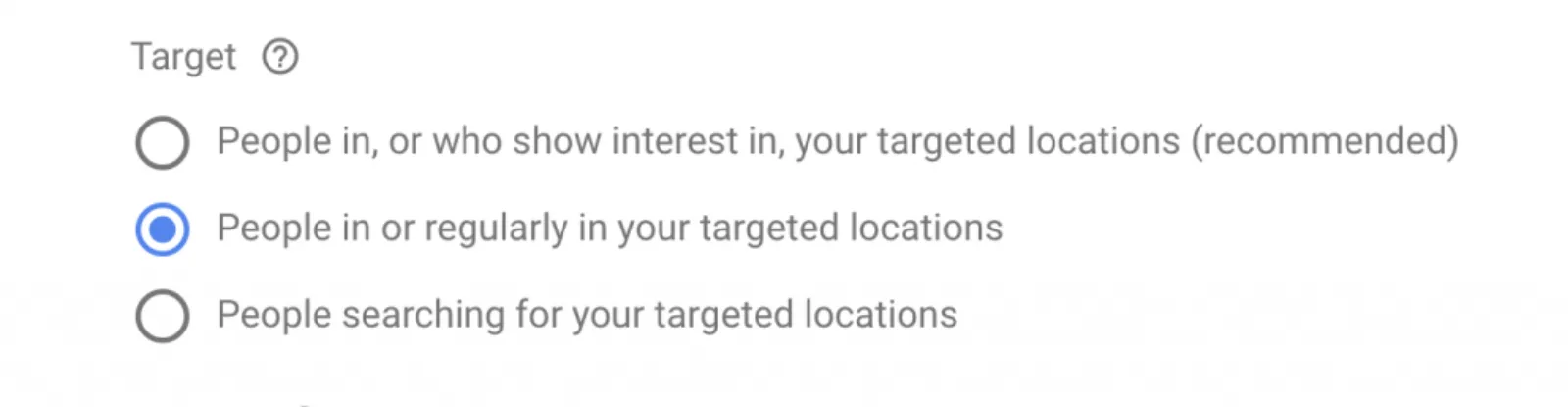
People in or regularly in your targeted locations

Google will now know that you only want to target people that are living or working within your selected location. This prevents people physically located outside of your target area from being shown your ads. If you still want to capitalize on them as well, you can run a separate brand awareness campaign with the default location settings applied.

After changing those settings, you can then target keywords to ensure that you are getting the most accuracy in the audience that your ads are shown to. So, for example, if you run a shoe shop, you may select “children’s shoes Milton Keynes”. By combining very targeted keywords with location targeting, you have yourself a guaranteed audience that lives near your business that is looking for what you offer.

3. Run “Local Search Ads” and Use Bid Modifiers

These do take a bit of work to set up, but they can be one of the greatest features to drive local, high-quality leads. Instead of linking to your website, they link to a page on Google that gives people more information about your store, like opening hours, reviews, photos, and so on. The setup process also lets you show your ads in Google Maps directly.

To set this up, you need to be running location extensions on your Google Ads, have an existing Google My Business page to work from and then optimize your bids and keywords for location targeting. Once you have done this, you need to optimize your Google My Business page to make sure that it contains all of the relevant information that searchers need.

Next, you need to optimize your location targeting within bids. To do this, you simply select the locations that you are targeting within your dashboard and then click on the bid adjustment column. One top tip here is to create different levels of radius around your location, for example, 5, 10 and 15 miles. You can then increase the bid amounts the closer the location is. This means that you will spend less on clicks that might not convert, and more on those more likely to.

Uzair Kharawala

Written by Uzair Kharawala

Partner at SF Digital Studios, a Google Premier Partner agency. Uzair has been helping businesses grow with Google Ads since 2002 and teaches it every week on YouTube.

Book A Call →Subscribe on YouTube for new videos every weekday →
Free every week

Get our best Google Ads tips by email

New articles and videos, straight to your inbox. Unsubscribe any time.

We respect your privacy at all times. Privacy Policy

You may also like

Read the blog →

Your next customers are out there. Let's go and get them.

Tell us where you want your business to be, and we'll show you how to get there.

Book A Call →or get your free Google Health Check →
Happy clients

Don't take our word for it

4.9 from 157 Google reviews, plus case studies and client videos.

See our happy clients →
"It has now been 3 months since we started and our sales have increased 300%."
Ruhi Latif Rafplay, Dubai
"Uzair and Farzana are two of the most honest, sincere and trustworthy people you will ever meet."
Gavin Morgan GDM Jewellery · Google review
"If I needed a campaign built, this is one of the rare few people IN THE WORLD I would trust to do it properly."
Hemmel Amrania Google Ads professional · Google review
Book A Call →
Chat with us on WhatsApp