
As a savvy online marketer, you probably already know that Google Ads can be an incredibly effective way to drive traffic to your website. However, as with any advertising platform, it’s important to make sure you’re optimising your campaigns as much as possible to get the best results. One powerful tool you have at your disposal when it comes to Google Ads is negative keyword match types.
Negative keyword match types allow you to specify which search terms you don’t want your ads to show up for. For example, if you’re advertising a luxury brand of handbags, you might use negative keyword match types to prevent your ads from showing up for people who are searching for cheap handbags or knockoffs. This can help you avoid wasted ad spend and ensure that you’re only reaching the most relevant potential customers.

Get Found, Get Chosen, Get Your Time Back
A free one-day marketing seminar in Milton Keynes · 10 November 2026
In this blog post, we’ll take a closer look at how to use Google Ads’ negative keyword match types effectively.
Get your free Marketing Action PlanNot sure where to start? Answer a few questions and get your plan in about a minute. No email needed.
Get my plan →Start With Broad Match
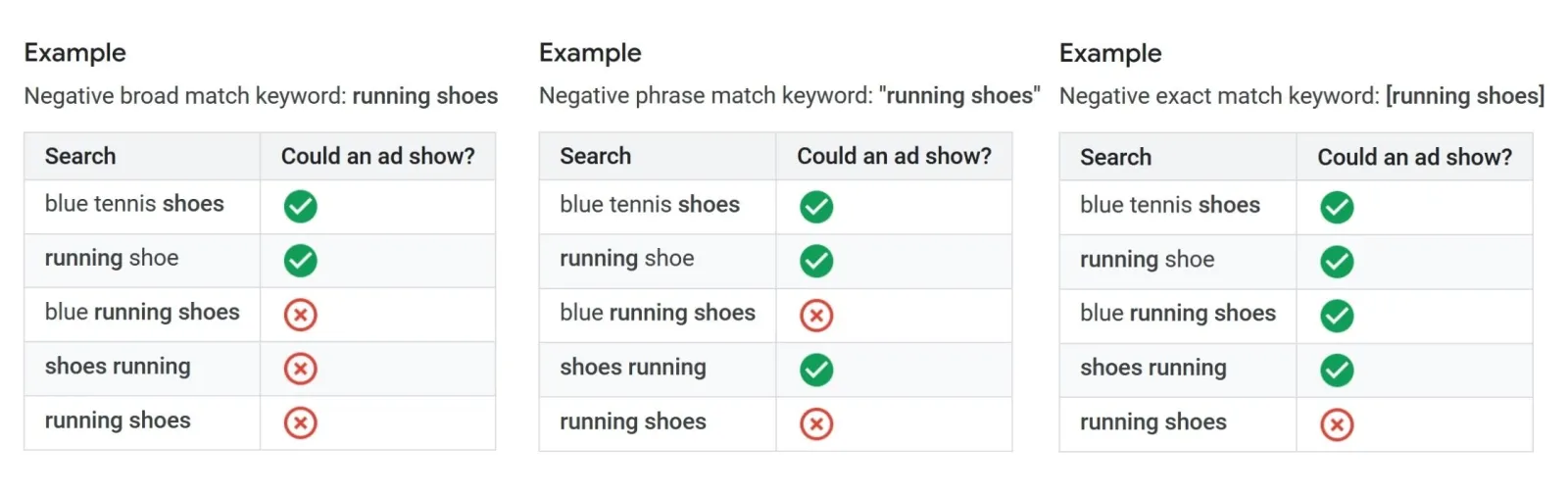
When you’re first starting out with negative keyword match types, it’s a good idea, to begin with broad match. This means that you’ll exclude any search term that contains your negative keyword, regardless of the order in which the words appear.
For example, if your negative keyword is “free,” your ads won’t show up for any search terms that include that word, such as “free handbags” or “handbags free shipping.”
Narrow Down With Phrase Match
As you become more comfortable with negative keyword match types, you can start to use more specific match types. Phrase match allows you to exclude any search term that includes your negative keyword as a phrase. This means that the words must appear in the order you specify, but there can be other words before or after the phrase.
 LIVE
Live every Tuesday at 2pm UK. Bring your marketing questions.
Get your Google, local SEO and AI questions answered live.
For example, if your negative keyword is “cheap handbags,” your ads won’t show up for search terms like “discounted cheap handbags” or “cheap handbags under $50.”
Get Even More Specific With Exact Match
Finally, you can use exact match to exclude any search term that matches your negative keyword exactly. This is the most specific match type, and it ensures that your ads won’t show up for any search term that includes your negative keyword, regardless of whether it appears as a phrase or in a different order.
For example, if your negative keyword is “knockoff handbags,” your ads won’t show up for any search terms that include that exact phrase.
Keep An Eye On Your Search Terms Report
Once you’ve started using negative keyword match types, it’s important to keep an eye on your search terms report to see what terms your ads are showing up for. This report will show you the exact search terms that people are using when they see and click on your ads.
If you notice that your ads are showing up for irrelevant terms despite your negative keyword match types, you may need to adjust your strategy. This could mean adding more specific negative keywords, or it could mean re-evaluating your targeting altogether.
Don’t Go Overboard
While negative keyword match types can be incredibly powerful, it’s important not to go overboard. If you exclude too many search terms, you may end up limiting your potential audience and missing out on valuable traffic. Make sure you’re striking a balance between excluding irrelevant terms and still reaching a wide enough audience to make your campaigns effective.
In conclusion, negative keyword match types can be a powerful tool for optimising your Google Ads campaigns. By starting with broad match and gradually narrowing down to more specific match types, you can ensure that you’re only reaching the most relevant potential customers. Just remember to keep an eye on your search terms report and not to go overboard with your exclusions.

Written by Uzair Kharawala
Partner at SF Digital Studios, a Google Premier Partner agency. Uzair has been helping businesses grow with Google Ads since 2002 and teaches it every week on YouTube.
Get our best Google Ads tips by email
New articles and videos, straight to your inbox. Unsubscribe any time.