
Are you ready to take charge of your Google Performance Max (PMax) campaigns? While PMax offers impressive automation and expansive reach, sometimes you need a bit more control over where your ads show up. Enter negative keywords – your secret weapon for refining targeting and optimising your ad spend. Let’s delve into why negative keywords matter and how you can wield them effectively with PMax.
Why Negative Keywords are Game-Changers for PMax
First things first, why should you care about negative keywords? Well, they serve three crucial purposes:

Get Found, Get Chosen, Get Your Time Back
A free one-day marketing seminar in Milton Keynes · 10 November 2026
- Preventing Irrelevant Traffic: PMax’s broad reach means your ads might end up in front of people searching for entirely unrelated stuff. Negative keywords swoop in to save the day by filtering out these irrelevant searches, ensuring your ads are seen by the right audience.
- Safeguarding Your Brand: You wouldn’t want your ads popping up next to inappropriate or sensitive content, right? Negative keywords act as your brand’s bodyguard, shielding it from potential damage by keeping your ads away from unsuitable search results.
- Zeroing in on Profitable Queries: Let’s face it – not all searches are created equal. Negative keywords help you weed out the low-conversion searches, allowing you to focus your budget on those golden nuggets with the highest potential for conversion.
How to Deploy Negative Keywords in PMax
Adding negative keywords directly to your PMax campaigns might not be an option, but fear not – there are workarounds:
Get your free Marketing Action PlanNot sure where to start? Answer a few questions and get your plan in about a minute. No email needed.
 LIVE
Live every Tuesday at 2pm UK. Bring your marketing questions.
Get your Google, local SEO and AI questions answered live.
- Account-Level Negative Keyword Lists: Head over to your Google Ads settings and create a negative keyword list. Apply this list to all your campaigns, including PMax, for overarching control over where your ads appear.
- Campaign-Level Negative Keywords: Take advantage of your existing Search campaigns to identify underperforming search terms. Once identified, add these as negative keywords to your PMax campaigns to refine your targeting further.
Types of Negative Keywords to Keep in Mind
When it comes to negative keywords, one size doesn’t fit all. Here are the main types you should consider:
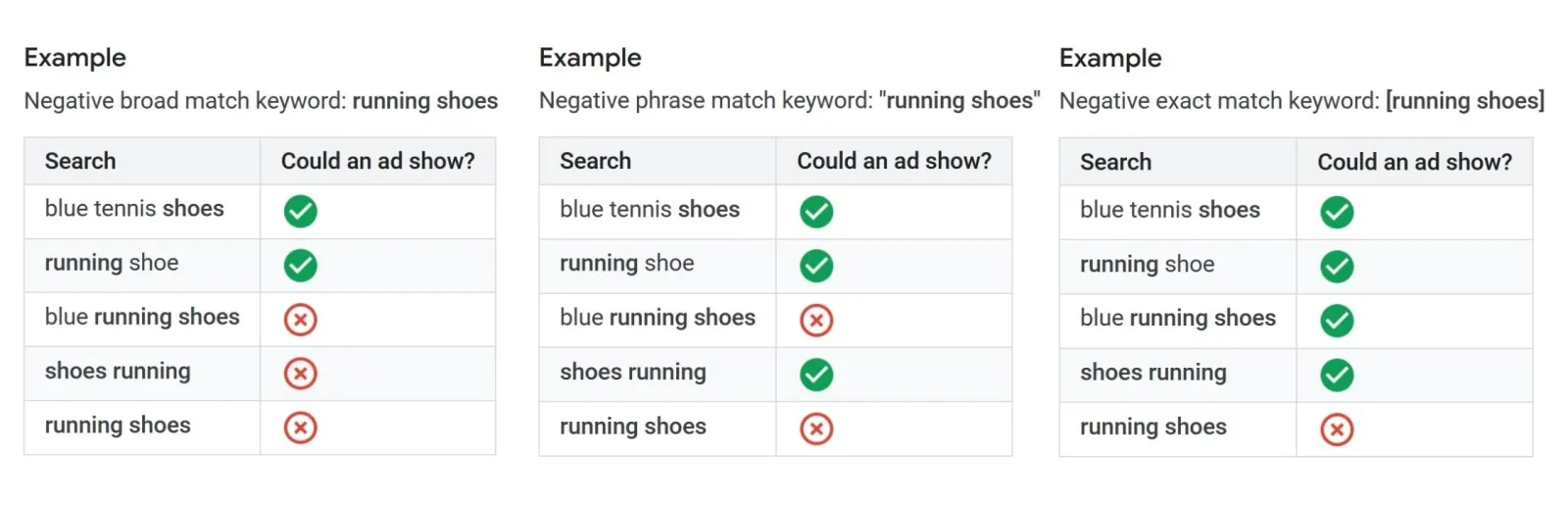
- Broad Negatives: Use these to block out entire themes or categories that aren’t relevant to your ads.
- Phrase Match Negatives: Prevent your ads from showing for specific phrases that might not align with your goals.
- Exact Match Negatives: Exclude very precise searches to ensure your ads are seen by the right audience.
- Pro Tips for Negative Keyword Mastery
Now that you know the basics, here are some insider tips to take your negative keyword game to the next level:
- Start Small, Expand Gradually: Begin with a focused list of negative keywords and tweak as you gather more data and insights.
- Keep an Eye on Search Term Reports: Regularly analyse what’s triggering your ads and be on the lookout for potential negative keywords to add.
- Stay Vigilant: Make it a habit to review and update your negative keyword lists to stay aligned with shifts in search trends and your business objectives.
The Bottom Line
Negative keywords might seem like a small detail, but they pack a powerful punch when it comes to controlling your ad placements, optimising your budget, and boosting your ROI with PMax. By incorporating them strategically into your campaign management arsenal, you’ll be well on your way to advertising success!

Written by Uzair Kharawala
Partner at SF Digital Studios, a Google Premier Partner agency. Uzair has been helping businesses grow with Google Ads since 2002 and teaches it every week on YouTube.
Get our best Google Ads tips by email
New articles and videos, straight to your inbox. Unsubscribe any time.