Believe, yeah, live. Please give me a moment, I'll make sure everything is working fine and get started. All good. Hello, and a very warm welcome. My name is Uzair, and it is 5 o'clock in the UK. What date? 7th, 26th of August 2020. Uh, thank you for being here with me, live stream or watching it as a recording.
Every weekday I log on over here on YouTube at five o'clock in the UK and go through certain topic or digital marketing, Google Ads, email marketing. So today I've got, um, another session on Google Ads, where we'll be talking about the network, which ones you need to use, why you should use them. So those of you who have been here before, you know the trailer, will cover the topic, small presentation. If you have any questions, then put them in the comment box below towards the end of the session.
So anyone who is new here, please introduce yourself, say hello, hi, which country you are coming in from, and any questions, put them in the comment box. I'll come to that, come to those towards the end. I try and answer each and every one before we log off. These sessions are usually around 25, 30 minutes long. Let's go into our, doesn't it.
Today I'm going to start with, and in fact going forward we'll be starting with, celebrating a win. If you've got any, uh, wins you had, personal life or business life, then please do get it. So today I'm getting this one with you, is that we've posted 600 video on our channel. It was a lot of videos, a lot of hard work, long hours, but being worth every minute of it.
I thoroughly enjoy creating these content and videos for you guys, and without you guys I wouldn't be doing it, because if nobody's watching I probably would have stopped. Thank you so much, really appreciate what, and continue to create more good quality content to take your know-how, knowledge, expertise and your business to the next level.
So thank you guys. Uh, create the party from India. Thank you Mike, thanks Richard. So I truly appreciate you guys, uh, being here and your support. So I even didn't realise 600, because it just popped up on the YouTube, uh, analytics, but whilst I was, uh, doing some work, and now I'm thinking, wow, just over two and a half years loaded use.
Another little win is, um, this is one of my oldest videos. I believe, I believe I uploaded this in December 2017. This just crossed over 100,000 views, all organic. I didn't put any ads on it. I do run some ads, but on this one I haven't, and I just let it grow, and it was getting the views. Now we've got over a hundred thousand views. Again, thank you so much.
So these are my wins. If you guys have any wins, no matter how big or sm matter, please share this community. You had a first conversion with Google Ads, or a new client, or anything, please do put them in the comment box and I shall read it a bit. So thank you guys for all your comments. Brilliant. Okay, so, and now's your chance to put the questions in as well.
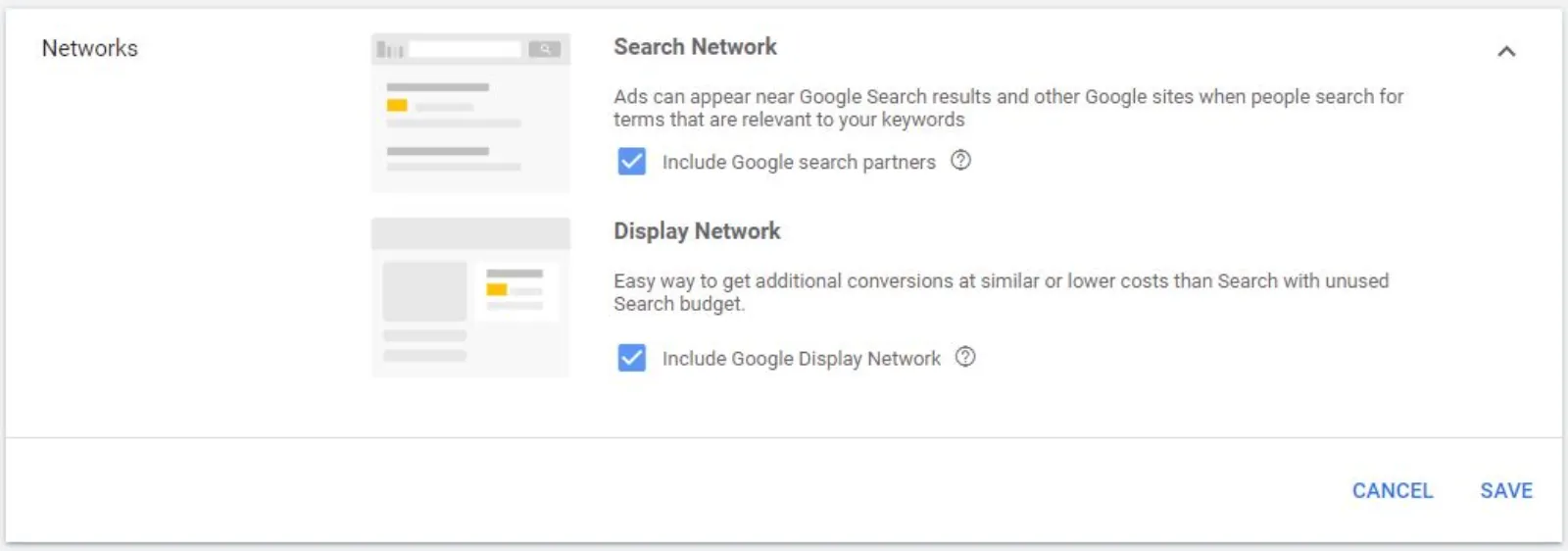
So today I'm going to talk about the search partners and the display network. When you are setting up your campaign, quite a few of you get confused. We use these, should we not, why should we use them, when to use the. Hopefully the next few minutes is going to, um, demystify these two networks. So whenever you go into your account, setting up a new campaign, you will get these, right, whether you want to include the search partners and also in.
So let me explain first what is the search partner and a network. Search partners, they extend the reach of Google search ads to hundreds of non-Google website, YouTube and other Googles. Now, nobody knows which, which ones are these. I personally believe it could be something like Wiki or AOL, a couple of networks where, but the only one they, and this is straight off, uh, Google support, so text how they have written it, only one they mentioned is YouTube. We know for a fact that these ads which partners go on, on YouTube.
Now this is something very interesting: to help you get a similar cost per conversion as you get on the search network. I have not found this. Very occasionally, um, you'll find, but mostly it is a bit expensive. And some clicks on the search partner network may cost more or less than the Google search tax CPC bid. I've never seen a click on the search partner more expensive than the search network. Always cheap.
So again, I'm not sure why they have written this, but somebody at Google knows more than obviously I do, but I've not come across. If you have, then please do put it in the comment and see, let me know whether you have experienced something different or not. But the cost per conversion is quite interesting, what they've said. Similar cost per conversion means I'm something wrong.
Apas, obviously the display network is the, what we call the GDN, Google Display Network, collection of very high quality websites and apps, 2 million placements where you can play website. When you choose this option, your campaign will run on the GDN with no additional data. Your ads will appear only when they're predicted to and you want your budget on. So obviously this is the display in which I'm sure you, all of you, most of you know about.
Okay, so the type of ads you can place on these channels: text, dynamic search ads, call only ads, shopping ads, image ads. Here's a little tip: the CTR, click-through rate, is usually lower than search network, and it won't affect your qualities. You are concerned about that your quality score may go down because of a low CTR, it won't.
And always keep the search partner and display network campaigns separate from your search network, because they've got different goals, a different metrics, and you don't want to muddy them together by putting them with your search network. Search network, you always keep them separate. You run them, these two, uh, separately.
So should you or should you not use them? Well, you, as I always say, test it for yourself. Don't listen to me or to anybody else. It may work for me, it may not work for you. It may work for you, it may not allow it. Try, test it. When you are setting up your campaign, uh, you can either include or exclude these two networks by checking two boxes. As simple. You don't need to do anything else with regards to the setup. That's all you need to do.
So I did a little test to see what happens. So here's, um, my campaign setup, and you can see that you got, you will get the data for the display network and for the Google search separately. So to get this, under your campaigns what you need to do is first go to your icon segment, the pop-up pops up, go to network, and then you will find that these two appear here, and you will find that search has so many clicks, impression one, and the display network.
So you can separate these out and you'll be able to see, because of the Google display networks being so big, it's not surprising that it has got so many impressions compared. And same again over here, the CTR is very low. So let's see what we get.
Now this campaign, I physically can't bid more than a, and I pay more, my campaigns will not be profitable. So what happens is, so as you can see over here, all of these keywords are below first page bid of 11, 24, 1976, 24, 28, 30. 5, 19.24, pretty much almost double or more than double than what my allowable maximum is.
Now you can see here in this max column I'm putting up 10, but even though I've enhanced it, I know I'm paying a little bit more, I wanted to see whether I can traffic or not. At such a lower CPC it was quite difficult to get, you know, volume of impressions, clicks we want to get. I tried the, these two. What I got were, so the target CPA I was working towards was 50, right, that's my targets, and I was getting 85, 30 conversions and average CPC of 421.
So how did we get over here when these were so high, and how you can scale these? This, oh, I think I have missed one. Hold on. Without that I kill you any questions you may have about. Okay, fix, two ticks. Oh, there it is. Sorry about, I've deleted that by mistake. Okay, I'll just be two ticks.
And as I've said before, you know, until you don't try and do different tests, you'll never find out what is going to work and what's not going to. Again, on most of the internet, and most of the gurus will say, don't run on search partners, display network, don't try it, no. Alright, I think I, I'll make this blocking go down a bit. Okay, um, all right, here it is.
So these are the two networks. This one has got 77 clicks, 254 impressions, 11, 350 CTR. Now the average CPC here, 969, and the display network, 275. So there's a huge difference here. The cost similar. I let it run for a little while to see what happens. Now you can, three conversions at 212 pounds each, 4.62 conversion rate, and over here 12, uh, 12 conversions at 53.55, which is very close to my target CPA, 4.82.
Now the good thing which I have found from here is, I know Google Display Network is massive. I can really scale it, and I'm happy with my CPC, and I'm happy with that conversion rate as well. Obviously I would like to improve it as we go along, but the most important thing is the cost per acquisition. What I wanted to show you, so apologies, I must have deleted this slide by mistake.
So then how do you scale this? Once you start to get the results, what you want to do is, if you keep them in the same campaign, the search network is not going to get the budget. The display network is going to eat up, and the partners. So what you do is then you separate them out. As you can see, this is my main campaign which had the data in there. These are all brand new, because they haven't run yet.
So what I, or we as a company, do, we separate these out by the computer and the mobile. So we will have a separate budget for the same, and then display network, I keep them separate again, computers and mobile, so each one with its own budget. And then we see now how the devices are performing, whether the mobile is performing better than the computer or vice versa.
Tablets, don't run a lot of traffic on it. We've usually found drive tablets not to work. So now we just run on pretty much on these two, these two networks, and this is how you can scale it.
So if you find campaigns where it's a small campaign in a local area, there's not a lot of search volume, and you are not spending your budget, not getting any impressions or clicks, try the display network and the search partners. See what happens and get some movement, get the name out of your brand, service, product in the local community, and then you're going to get that brand awareness go higher. And run a brand campaign as well after that, to see whether you are getting the brand campaign. This is how I would build these.
So now I'm gonna go to the questions and comments. You like, love, enjoy the sessions, then I would truly appreciate if you take a couple of moments of your time, go to this URL and give me a little review. That would be much. Okay, so hello back to everyone.
Vivek: video ads versus search ads, what do you prefer for local businesses? Both. In fact you run, um, run video, display or image, uh, search, email. If it's a local campaign, because you will be restricted by the volume you can get, right, you want to hit your anywhere and everywhere they go. So you want to be like an octopus now. Wherever your audiences are going, hanging, grab them and reach them.
Video is absolutely incredible, there's no doubt about it. We as a business, we put video first. And the beauty with video is, most small businesses, especially a local campaign, they will hardly get any clicks to build up a remarketing list, so you will not be able to remarket. What you can do is you run video campaign. Anybody who views your video, you can then remarket.
That's a strategy which we use quite a lot and very effectively, because the views are literally pennies instead of, you know, pounds or dollars. So cheap, and because not many people are doing it, still very, very affordable. I would highly recommend you.
Thank you Adam, Rich, find what, Olu. Rejit Kumar: okay, I selected standard display campaign and increased bidding and daily budget, but still my ad is not running in YouTube. Help me, some problem. Um, okay, so your bids are fine, your daily budget is fine, then you're probably targeting too tight. If you have overlapped a couple of different targeting, then it will restrict. Try to take them out and just let it run for a few hours and see if you get any, any movement.
Make sure that obviously your billing set up, and I made this mistake myself. But everything has been set up and I'm wrecking my brain on the client account, because that account we usually don't have it, it was on manual billing, and I just didn't look at it, and it doesn't give you that red warning message that, you know, date your billing or anything like that. So it's very easily done.
But try to go on different targeting, different audiences, make different ad groups or different campaigns, test it, throw everything at Google, and yeah, that should start to work if you got your bids and the budget set up the right way.
Hi, Adam: I really like the way you structure your ad groups. It's very granular and organised. Could you share your naming convention and structure in the, in a future session? Well, forget the future, I'll do it now. Um, here it is. We call it the main campaign. You've got multiple different services, so let's say for our business we could have ad groups for Google Ads, web design, video marketing, photography, anything else, right. Each one will have its own ad group.
As we run the campaigns, we find that, oh, Google Ads is eating up all the budget and none of the other ad groups are getting a look in. Take that one out and put them in its own ad groups. Begin with, keep it simple, because no need to spend all the time, energy, to find that none of the, some of the ad groups are not even getting much traffic. We can keep them in one ad group, or you can start separately.
So over here, srch means search text ads, cpu, computer, and we tend to put the CPA in front, so anybody who's looking at it, because we've got multiple people working on the account, just by looking at that, um, the name of that campaign, we can see that what it is. Although you can see from the icon that is a search, shopping or a display campaign, but for our workflow we need to have that: if the title of the campaign contains srch, then do this or do that.
So we need to have search, or dspl for display, vid for vid, and so on. Then the call ads would be call, cl, image or video we can put in here, and then mobile would be mob here. So then I can straight away, without having to go into the campaign and see whether, which device it is running on, straight away we can see.
And now some of the campaigns, accounts we have got, we've got literally dozens and dozens of campaign running. To go into each one of these campaigns and find out what's happening over there, device, is tedious. Straight away, very easy to. Hope this answers your question. So the naming convention is pretty straightforward and simple, and you just keep, be consistent, that's all. You know, just create your own and stick to it, and then everybody can follow the same system.
Mustafa: is it possible to use a page builder's domain on my ads, like Google Sites? Yeah, I've seen people running on Google Sites. I don't any problems. Audio thing. Audio seems to be working fine here, Declip. I'm not sure. Nobody else has put in a comment about the audio not being good, so I'll keep. Thank you for your comment.
Excluded apps and exclusions in general manually, till it is showing app click. Thanks Richard. Oh, audio has been cutting off. So sorry, I'm not sure what's happening. I'm gonna give this a little smack or a knock. Believe the microphone will behave. Okay, that's, um, a bit better.
Um, yeah, you can only exclude apps through the Google Ads Editor. Google has stopped allowing you to exclude apps in the interface. You don't know how to exclude, um, use the Google Ads Editor, then there is a, there are a couple of videos in this playlist. Watch it, watch those videos, and you will find that you, you can exclude apps in the Google, Google Display Network campaign. And if you, uh, again, apps is also one of the places which I would highly recommend that you.
So thank you question, uh, Declip, for pointing this out. Yeah, I always, we always exclude apps from all our GDN campaigns. So that's good. Today covered everybody in. Yeah, let's call it today and we'll catch up tomorrow, same time, same place. Thank you for being, being here, and I'll, I'll see you guys tomorrow. Stay safe and goodbye.


 LIVE
