Okay. I believe we are live. Please give me a moment. I'll make sure everything is working fine and we'll get started. We've got new software, which we are using today where we can live stream to multiple channels. Hello Fadi, Mike, Nikhil, Danish good to see you guys here. Please, if you could hear me and see me fine on YouTube or on Facebook, LinkedIn and where else are we going?
Instagram, I think then please give me a little, yes. Then I know that I'm not talking to a computer screen, like a lemon! I think it's working fine. Yeah. It's working. Okay. Hi Siddharth, Sandy. Brilliant. Thank you, Mike. Yeah. Seems to be working very well. Emily can hear me well on Facebook. Cool. It is working. It's very exciting.
So, let's get the show started. Hello everyone. My name is Uzair and welcome to today's YouTube live stream, not YouTube live stream. I should say, what should I say. The internet or the social media live stream. Because we are streaming live on multiple channels from now on going forward. These sessions obviously for free and I go through certain topics, answer any questions you may have if you're struggling with something or have any problems with Google Ads, digital marketing, and so on.
So, happy to answer any questions, please bear in mind now because of the way we are live streaming, there is a bit of a delay. So, please put in your questions sooner rather than later, because I may not see them and once, I disconnect, obviously, I'm going to see it afterwards, but then you can come back tomorrow and ask me again.
So, thank you, everyone, who replied that the sound is okay, and everything seems to be working fine as well. Lovely. Hope you had all a great weekend and a productive one. Well, not working, but a relaxing one I should say. So, today is Monday what's the date to today, the 12th of October. Oh my God. The whole, almost a whole year has gone by and before we know it, it'll be Christmas.
Today, I'm going to cover Google Analytics and how to set up audiences for your remarketing. It's quite important that you set these audiences up and everybody will have their own audiences. It doesn't mean that what I'm showing you right now will be applicable to you, but for the majority of the cases, it will be because I'm going to go through some basics, a basic one, and very simple and easy to set up.
So, you don't get confused and you can get started. Nikhil, perfect in LinkedIn as well. Oh, thank you. We truly are all over the internet now and you're going to soon take over the world. That's the whole idea. Okay. I love it. When a plan goes to... It's working and the technology is working as well. So, we had a bit of a problem, not a problem.
I think it was a user error. It was probably me. I keep breaking things and I've got a great team behind me who will fix it for me. So, Malik, thank you. Also working fine on LinkedIn. Can someone go on Instagram and check that out as well, please? It is just at SF Digital and see if we are live on Instagram, I believe you just need to turn your phone around to go fullscreen because this is a vertical format.
Now, I have my work cut out because I'm looking at millions of messages pinged across to me from all over the place, but I'll get better and I'll get used to it. So, if I don't answer your questions from other than the YouTube channel, I do apologise, upfront, but I have a little window over here where I can see LinkedIn, Facebook, Bravo, Sandeep.
Hi from Facebook, he's there, lovely. Oh yeah. It seems to be working. I'm not sure what's happening on Instagram, Emily, if you could have a look on there. I appreciate that. Cool. Well, let's get started. Okay. Where is Smart Analytic? Analytics is your dashboard, the eyes and the ears of your Google Ads and what we do is we link analytics and Google Ads together because we need to bring in the data from Analytics, into Google Ads and audiences, events, goals.
We can import them as well. We'll get a really bird's eye view... of your user activity on your website or app. So, today what we'll do is we'll start off with a simple, I'll start off with the audience, which I hate the most. Those are the bounces who bounce off the website after five seconds or so, how dare they and I also used to hate bounces when I used to play cricket.
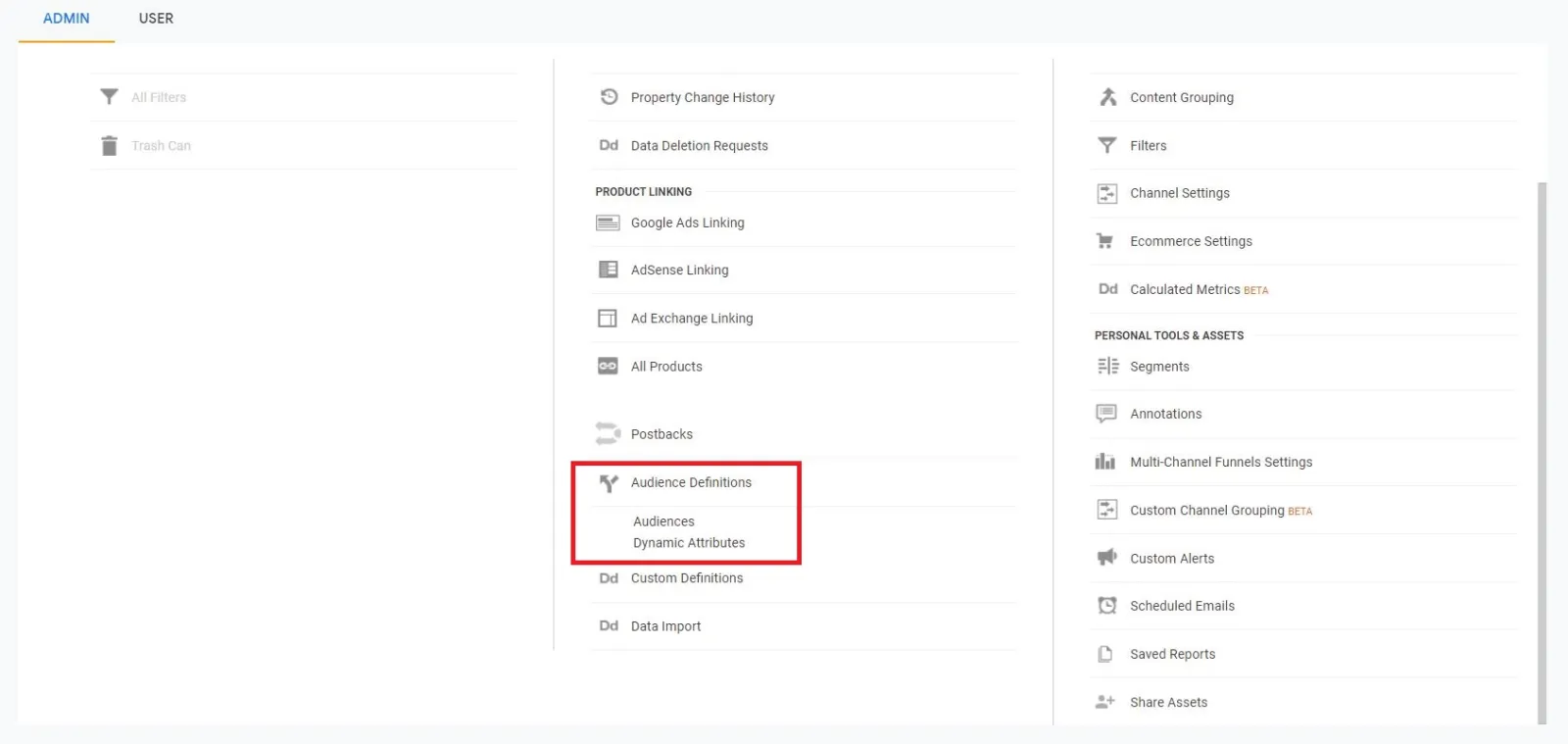
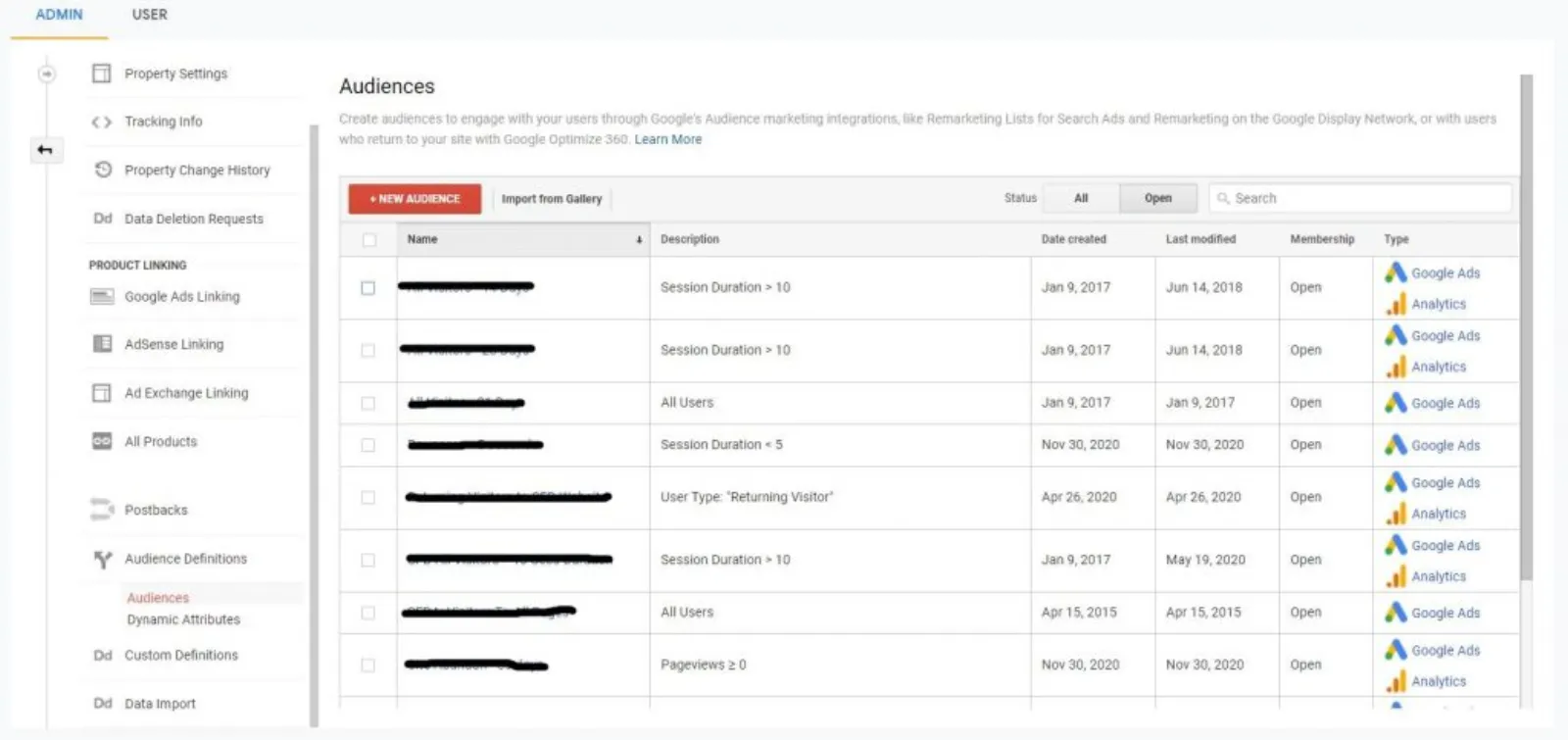
I used to hate them because when I used to play, we didn't have any helmets. So, if we didn't duck out of the way, we'll get it on the head! So, let's start with the bounces. Okay. So, what you do is you go to your... Under property settings and the audiences, audience definitions, and then audience and then we go over here.
I mean, there are some already set up before, ignore these. You would probably have a blank one because there won't be anything in here. You go to new audience or you can import from the gallery as well. There are lots of other people who have kindly shared their audiences. It's all pre-built all you do is import them.
You don't need to do anything and you're good to go. There are loads in here, right. I'm going to close this because I don't want to give you the fish. I'm going to show, teach you how to fish. a new audience. Now, you will have create new or import segment and then you've got recommended audiences in here as well.
New, all users, new users. These are the visitors and if you're not sure about what this is, you can hover the mouse or that little question mark bubble and it's going to give you the description, returning users, users who completed the goal conversions and so on. We're going to go create new. Now, this is where you might find it more confusing, but what you want to do is to ignore everything, just follow what I'm showing you to get you started at least, then you can read or learn a bit more about some advanced strategies on how to set up an audience.
So, we're going to build up our first audience. We go to advance and we go under conditions and we change the sessions to users, fairly straightforward and then you go into ad content and I'm going to type in bounces. Per session or per user. Why is that not giving me the bounces... Sorry, not the bounces, I'm doing it completely the wrong way.
Time on page or user per session, less than five seconds, you apply, then you can have a membership duration list. So, thirty days is fine and then you go to your... You can call it whatever you like really, or time on site, let's do it time on site for now. We'll do the time on page less than five seconds.
And then what you got is you got this all set up, then you must, I'm not going to go in there now because I've got other accounts as well with the Google ID. This is just my test account. So, you must go in there and add it to your Google Ads account. But if you don't, then it's not going to go into your Google Ads account.
I'm going to cancel this, but I will show you another audience, I'll show you a few audiences so you can see how we do it. Same again. You go into that and then we change this to users and then, in fact, session duration is the one I was looking for. That's the one. You got all these different metrics per user, per session.
You can decide per session, less than let's say ten seconds or five seconds or whatever you want and then you apply. You can then go into your duration list and then you can call them if you want to classify them as bounces, we can. Less than 10 seconds. And then you go the next step and you save them into your audience destination.
The other thing which you can do is page views as well. You go into... So, what we are doing is we are creating all these audiences and I'm going to show you in another session, how we then put all of these audiences as in observation mode to our campaigns. So, then you can see what's happening and what's not happening.
Create new conditions, page views. Now, if I want to see how many people visited more than two pages or less than two pages, then you can have a series of these audiences, two, four, six, or two, six, twelve, or however many, depending on your... How your website is. Ten, very few people have it, but two, four, six is quite a good number.
You can create these audiences and you've got your membership number and then you've got your name, your audience as what the condition is. So, I will just put in as page views greater than two. Hmm. You can also do a three-day list. So, if I want to see the duration as three days and then I can make another one as seven days where I will just change that to seven and do that, or I can make a membership list of thirty days.
So, then what you can... Bid differently because someone who has been to your site and spent more. Stayed on the site for a certain number of time and viewed more than two pages in the last three days is a lot more valuable than somebody who had taken the same action thirty days ago. So, this way you can have as many lists as you like it doesn't cost.
There is a limit to it. I can't remember the exact number, but there are plenty, you won't run out of them and then this is how you create all your audience lists in Google Analytics. All you must do is to make sure that you import them. You just need to check that box to Google Ads. Okay. Now, I'm going to go to the comments because they are popping up from all over the place.
Think I might bring them over here and then I'll answer them for you. Sandeep, "If I want to start a course in future, I should share my results or my client results. Then I should promote my course, is that right?" Proof of concept. Yeah, of course. You need to show them how good the results are. Once somebody learns something from you and then they apply it into their own business and they got those results.
If you don't have, then obviously you need... You should get a few people, charge them little or no money and say, look, I'm going to give you the proof of concept. So, you need to get started somewhere. Everybody has to get started somewhere and once you have got a lot of social proof, as well as, you know, hard results, then you can obviously charge more.
Now, some of the comments are not popping up on this screen. I don't know why, I'm going to take this away and first of all, I'm going to go onto the YouTube one and then I'll keep an eye on Facebook and LinkedIn. This is the only thing, which is a little bit buggy right now. Fadi, "I have a question related to broad match modifiers, for example, plus rent plus villa plus London." Okay.
"It will match rent a villa in London, but if, instead of London I put yes Island, how should I write it?" So, you would write it. In fact, I'll just do that. So, you will put in plus rent plus villa plus. Yes. Plus believe yes. Island is near Abu Dhabi. I was there last year, I think. So, make sure there's a space between each word and there is no space between the plus and the word and that's it.
So, if you've got a four-word phrase or five, just put a plus in front of each one of them, that should do the trick. Yeah. The location would be in two words the way you write it or the way people write it. So yes, if it was just one word yeah, silent, then there will not be any plus between ESN and Island.
Okay. Akash. Hi Akash, "I usually get five thousand clicks on Google Ads, but on Google Analytics, it shows the data around fifteen to twenty percent less. There will always be a discrepancy and Google Analytics in my humble opinion will always under-report. So, what we do is we import the analytics into Google Ads and if it's a conversion data, we never include it in the conversion column and as long as they are similar because they're always a bit of delay as well coming through.
So, you'll never, you'll pull your hair out. If you try to match them, you never will. As far as I know, it will always, there will always be a bit of discrepancy. Danish, "How to avoid fraud clicks in Google Ads" Good luck with that. My friend, you can minimise it, but you'll never be able to stop it.
Google has got its own very sophisticated system, but even though they have a great system built-in in Google Ads, you always find there are fraudulent clicks and you can use third-party apps to put in another layer of security over your Google Ads account. Now, there are lots of different ones. I would not recommend any one of them because everybody uses it differently and some say, this one is a good one and the other one is a bad one.
So, I don't want to do any injustice to any app or software, which I don't know about. So, all I would do is... All of them offer a free trial of fifteen days or a thirty-day trial and then you can see which one works for you. Nikhil. Thank you. Yeah, I thought so. It was in Abu Dhabi.
Yeah. Thank you, Schubert, for saying try Click Cease. Hi, Adam. "Is goal conversion data within analytics enough info to support display ad remarketing, or do you need to set up an audience based on those goals and then import them into Google Ads?" Well, what we are trying to do here, Adam, is not only remarket to those visitors who have come through to our website only via Google Ads, but you will have also other channels where you are getting the ad, the traffic from.
So, you'll have email list, direct, organic, social, brand or wherever you are getting this traffic from. So, you need to remarket to anybody who has been to your website, whether they came from Facebook, Instagram, LinkedIn, or wherever, put all the tags. I mean, on our side, we've got tags for Pinterest, LinkedIn, Twitter, all sorts. Wherever I can find a pixel and we've got an account, put it on.
Doesn't really matter. Even if we are not using them for running ads, but at least we are pixeling them in. But with Google Analytics, as soon as they come in, they are on your website and then they are pixeled in. So, this is why we would use analytics to run it. Now, goal conversion is a different matter.
What you can do is if you find an audience where the goal conversion rate is very high, that means they are very interacted and engaged. What I mean by that is if I come to your website, Adam and I scroll to the bottom of the page. If you have set that up, that's a goal, I click a video play button.
That's a goal. I stay on the website for six minutes. That could be a goal or I visit multiple pages. Now, I showed you guys how to put those value for each goals. The more goals I am achieving the more valuable I am as an audience to you and then when you bring that in and you see in your Google Ads dashboard, that these conversions, which are not in the conversion column but in the all-conversions column, you can see that this campaign or this ad group, or this audience is giving me the most valuable value for goals.
You bid up. Bid very aggressively. So, you know that you are going after the best possible traffic. I hope I explained that. And you, all of you understood because when I'm talking, sometimes I think the whole world knows what I'm talking about. Okay. I'm going to now go on to my other screen and see if there are any questions posted from Facebook.
Aha. I got one Bravas and Sandy is that you Sandy are you trying to confuse me. You're popping between the two YouTube and Facebook. If you are then don't do it. I'll kick you off the live stream. First multimedia. Okay. "Can I create FB group like SF?" You're asking me, you're telling me that you want to create an FB group.
If you want to create a group. Yeah. Be my guest. You can create as many groups as you like, but you can moderate it. Good luck with that. Okay. Mike, I've covered yours. Did I cover that. Okay now, this is really getting confusing. I need to tune my mind as to which one I have and I haven't.
"Can you track conversions just by importing goals into Google Ads or do you need to use Google Tag Manager?" Tag Manager is... You can use to set up some of the more complicated event tracking, which is really good. Importing is completely different, but tracking and setting up through Tag Manager is the best way going forward. Think I have covered everybody today.
That's fine. Good. I think it is working pretty well, except I think I got a message that Instagram is not working. It doesn't matter. At least Facebook, LinkedIn, YouTube are running so three. So, now what we've done is we have amplified our message three times or once the Instagram starts as well four X, you know, you do the work once and now I'm reaching YouTube, Facebook, LinkedIn, and hopefully Instagram very soon and this is what you guys want to be doing it as well.
Do the work once don't work hard, work smarter and instead of having to do four different live sessions, you do this once and we are using an app called restream.io, really good. Well, this worked today perfectly well without any hiccups or glitches. So, I think, I shall continue to use this. Okay. So, thank you all for being here today.
I really enjoyed it, this was my first one multi-streaming to multiple channels, but it's the same amount of time, Sandy, it's restream. I'll put it in restream.io. I don't have any affiliation or anything like that, it's what I'm promoting, well, not promoting, but this is what I'm using, and I'm happy to share this with all of you.
So, but you got to start live streaming first, no need getting all these shiny new objects and tools, even if you... if you don't have a thousand subscribers on YouTube for be able to live stream, get started on Facebook or Instagram or wherever or LinkedIn, if you got your account whitelisted, yeah, absolutely. Just get started. My friend, because as you can see, the lockdowns are getting worse.
We are getting locked in. This is the only way out and use video. So, that's it for today. I shall see you tomorrow on YouTube, Facebook, Instagram, hopefully, and LinkedIn, but till then stay safe and goodbye.


 LIVE
