Home › Blog › Google Ads

Google Ads

Google Display Network Campaign: How To Create Google Display Ads Campaign

Google Display Network Campaign: How To Create Google Display Ads Campaign
Read the video transcript

Hello, are you looking to generate leads or sales and also increase brand awareness? In this video I am going to show you just that using Google Display Network. Hello and welcome back. My name is Uzair and thanks for joining in. If you are new to this channel then please do subscribe and hit the bell button. As you will be notified every time we upload new content and we upload our videos on our channel on a very regular basis.

So, let's get started. Google Display Network is one of the most untapped channels where you can generate a lot of leads. In fact, high quality leads at very low cost. Unfortunately, I would say majority of advertisers on Google don't know how to utilize this network properly. So, in this video, I'm going to show you just that and we'll use an example for a wedding photography business as to how you'd go about using the Google Display Network to generate leads or sales for your wedding photography business but if you got some other business, the same things apply is just that you will be targeting your niche or your keywords or your audiences for your business.

Okay, so let's get started. We are here in our Google Ads portal. You click at the campaign level, new campaign. And we want to generate leads and from here you are going to select display and that is the display network. You get two options over here. One is the smart display and one is the standard. We want to go on the standard display for this one.

Then you enter your business URL. So, I'm going to take a photographer's website. Now, I search for a particular wedding photography keyword and this website popped up on number one so, the name of this website is Lisa Lander Photography. So, they get a little bit of branding and brand awareness. Okay, so then you pop your address over here.

Then, you put in your campaign name. You can put in whatever you like but I'm just going to put in continue. You'll be asked locations. Now, what Google has done recently is it has changed this interface and made it a lot more easier to create these campaigns. So, you'll be prompted with a certain question or things to choose or select.

And all you do is just keep going through it. So, now as they say creating campaigns is easier. I don't want that. Okay, I'm gonna exit the guide. You can select the country or the locations and if you want to go advance search. Let's say I want to put in a radius around me where we are. Let's say this is in Birmingham.

I'll select that. It will show me where my ads are going to show up and I'm going to select. Then you have another option over here under the location options. Which is quite important because what you want to do is instead of the first one which Google recommends you need to select the second one because I want to search for people just in my targeted location.

But if you want to show outside let's say somebody in London is searching for wedding photographers in Birmingham. Then you want to be selecting that one. But I only want to select people in my targeted location. And that's what I would do. The second one is fine. The people presence of people in your exclude locations, you just select that one.

Language, English. Then you go to more settings, ad rotations, you don't want to worry too much about it for the time being. We just let Google optimize the best performing ads. For now, and then I go into more settings again. Ad schedule, I want to run it all day long but you can select which days you want to run, whether you want to just run Monday to Fridays or weekends or all days, and select the time range.

I'll keep it like that. Devices I want to show up on every device which is mobile, computer and tablet. You don't need to worry too much about this. This is the advance options dynamic ads you don't want to worry too much for this campaign. Start and end dates. If I am start, if I want my campaigns to start as quickly as possible once the ads have been approved, then you just leave it as it is.

And let's say you want you don't want to run your ads over the Christmas period because you are closed. So, you can put an end date over here as 20th or 21st of December and then the campaign will automatically stop. Otherwise, if you would just want to let it run, don't put any dates at the on the end date.

Conversions, you need to set up your conversion action before you start any campaigns. Don't have to you know say this because without conversion tracking, nothing is going to work for you. And you don't need to worry too much about the content but if you want to go into here and don't want to show your ads on certain sensitive topics then you can select and opt out right.

And then we go next put in your budget this is my test campaign so that's going to be one pound for now but you can put in whatever you want. Now you got two options. One is the individual campaign budget which is set per campaign. You may have multiple campaigns in your account. Or you can also add from a shared budget.

So, what this shared budget does is you can create a shared budget and have multiple campaigns look into the same budget. So, you may have five, let's say your budget is 100 pounds a day and you got five campaigns running. That does not mean that each campaign is going to take 20 pounds from that budget. If one campaign is performing very well is going to eat up a lot more budget.

Then the other ones which are not getting enough of the budget and may not run properly. So there are advantages and disadvantages for shared budget. It's entirely up to you how you wish to run you’re budgeting. So for now I'll just gonna keep it as individual campaign. Bidding what you want to do is start off with maximise conversions.

Right. That is my go to conversion action for the time being in 2021. Before we used to start with manual campaign but now the algorithm and the machine learning is getting so much better. That you can start off with this. What I am telling Google is get me a conversion at any price. I don't care. I just need some conversion, some data into the account.

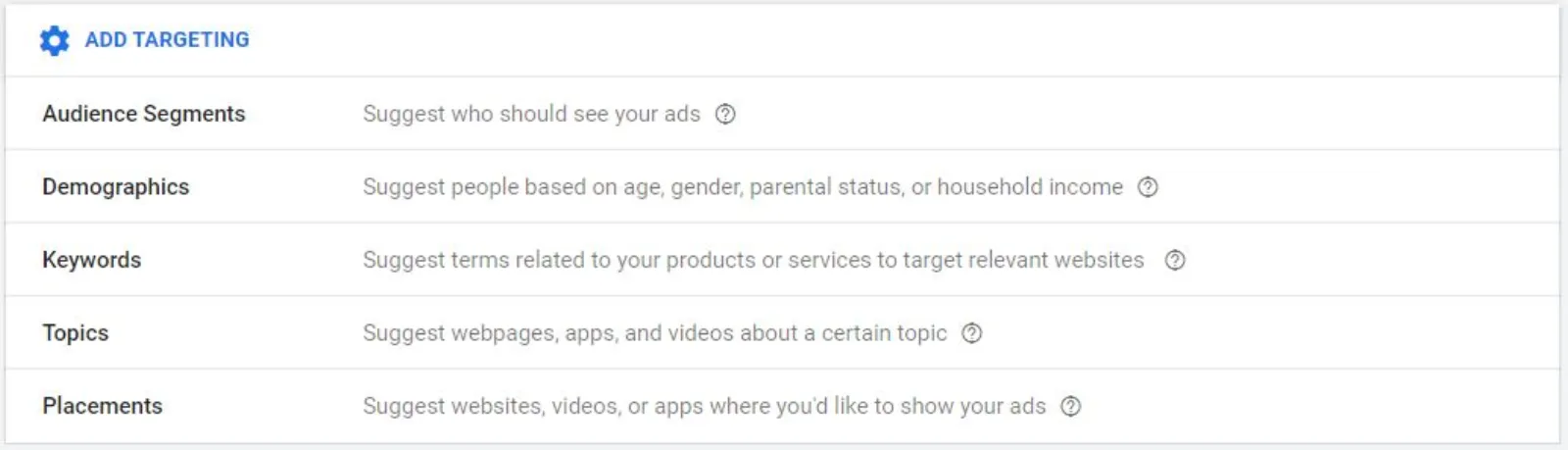
So that we can see what's happening and what's not happening. Of death. Now we need to target who we wish to target. So there are certain ways we can target our ads. So we can segment the audiences, demographics, keywords, topics or placements. So let's go through each one of these. Now, Google has pre-built audiences in here. As you can see.

So, I can target if I want to get in front of the wedding plan. If somebody is organizing their wedding, they are looking at wedding planners or wedding planning. So, they will be my perfect audience. Somebody who's looking to buy wedding rings or engagement rings that could be another one. And there was some more where bridal wear, wedding photography is a bull's eye audience targeting you can put in.

Pre-wedding photography. You can go a bit broad with local photographers. See there are loads of these. But what I would do is I'm not going to do what I have just done. Throw in a lot of targeting in one ad group. I will create one ad group and this is really important. One targeting per ad group. So, I'm gonna clear the all of this and I'm going to just go with the top one.

Let's go wedding planning, right? Just one. And nothing else. Then you have this option whether you want to optimize the targeting or not some people say yeah it works really well. Some people say they don't it doesn't. Try test it. If it doesn't then you can take it out. And that's all you do and then you start writing your ad.

Now, as I put in the URL of wedding photography website, it's going to give me some ideas. When I click over there, why isn't that? Not working. It popped up a minute ago. Okay. Let's say I'm gonna just start put typing in. Wedding photographer. Okay. Too long. I can't do it. So, I'm gonna put a short form.

Like that. There you go. I'm just gonna select these but you can create your own headlines and descriptions. Okay, we put in. It says you add up to five headlines. I put this in and you can see that all the headline this green box has checked. Right. Okay. Then, I need to put in a long headline. So, all I'm going to do for the sake of this.

Exercise. I'm just going to copy all of this to make something up. But you should write it properly because you got 90 characters. So, utilize it properly. Then Google has already pre-enter some text. Just check it. Make sure it makes sense. Now for laid-back and carefree couples it really depends whether you want to use that language or not but there you go.

I'm just going to use Google's descriptions for now. Now if you put in the same one twice it will tell you that you are repeating yourself. I'm just going to do that for now. So, please do fill up all the characters to count because you must utilize all the space and then I'm going to put in Lisa Lander photography.

Next is I've got over here the green headlines and descriptions are done. Now I need to start adding images and videos. So you can click over here. You can say it you need a minimum of two or more high quality images which you can either upload. Or you can use Google's X ones and also you can put in a video in there as well.

So it will also scan the website for you which is really good. So you can do have to upload. You have two options over here. One is for the rectangle size. I can frame it the way I want because I know me being an ex-photographer as photographers are very fussy as to how we frame the images. Okay, so this is a use as an image and not as a logo.

I'll selected that and select two ratios use that one. This looks good. Go over here. And that's fine. Now, this one because this square one is gonna get cropped. So, I'm not going to use that. I'm only going to use this size. This one will work for both of them. Good. And you just need an about ten images and so on.

But you can put in as many as you want, right? And I'm going to save it. Where have we got a logo? We don't seem to have a logo. Over here but what I will do is just for the sake of this video. I am going to use this one as a logo. Something like that. The other way around.

Okay. So, that's done. And I can also put in a video. It says your portrait and landscape videos around 30 seconds work best. You can have longer ones as well if you like. I'm just going to let’s do. Oh they have a video as well by Lisa Lander. I'll just use her video. And this is how that your ad is going to look like.

So, what will happen is Google is going to use an image, a headline or a long headline or a description line depending on the size of the ad. Now, this these are called the responsive display ad. These are really good because you don't need to be a designer. It will mix and match the headlines, photos and the video.

And see which one is working the best which is obviously the click through rates and conversions etc. So, whichever is performing the best is going to start using that a lot more. So, all the headache and heavy lifting has been done by Google. We don't need to worry about making lots of different sizes and using different headlines and text and images.

All is done over here as you can see. You can, I'll show you the video ad which also looks really good. Like that. So, video is going to play within the ad. You have all your logo there, information, text etc. And you can see how it's going to look on a on a computer. You can choose your formats.

This is how the image ad is going to look like. Now, what you can also do is once you've done all of these things, more options. Call to action. That's really important. You have lots of them. Get Quote, Sign Up, Visit Site, and Contact Us. So, I would use something like this, Contact Us. And also you can have custom colors for these buttons and the text and stuff like that.

So, you can put in the main colour and the accent colour as per your branding. Once I am happy with all of these and now I can see my ad strength is excellent. I've got all the green thick marks over there. That means I have filled in my ad. What all the information which Google requires over here.

I'm gonna create the ad. And next you can go through one final scan as to what you set up. Publish. Okay. Now, what I would do is I'm going to go back to my ad group level. And I think I selected that audience as wedding planning. So, I'm going to name this as wedding planning. Alright, now, we had loads of other ones as well.

All you do is copy this ad group. Paste it. It will show you yeah put it in this campaign and paste. And we gonna do the same thing for as many ad groups as you want. So, one ad group, one targeting, right? And the ad from the first ad group will be copied into the next one. So, we don't need to worry about that.

What I would do is make sure that the ad is approved first before you copy and paste it. Because if there is some problem, then you will have to go into each one of these ad groups and rectify that. Once they are first ad group ad is approved then you start copying and pasting as many ad groups as you want.

You can have 10, you can have 20, 30. Doesn't matter really. So, I've got my second one. I don't know the name yet. So, all I would do is I would go to my ad group. Go to my audiences. Edit. I'm gonna take this one out. And I'm gonna select this one. Wedding and engagement rings. And then I'm going to rename that at group.

Wedding engagement rings. That's done. Now, I can do another ad group if you want or copy this. And paste it. The beauty with the display network is unlimited traffic. You have got so much traffic over here. You just cannot imagine. You can scale it as much as you want. You can test lots of different things. You can I'm only done audiences.

I can do by keywords. I can do by placements. For placements is a good one where let's finish this one and I'll show you what I mean by placement. You can target certain websites, blogs or YouTube channels with your display ads, right? Okay, so this one is copied. I'm going to go to my ad group. Audiences. Edit.

Take this one out. And I am going to select one more bridal wear. But then there are other ones over here which are brand new in market or life events. Marriage. You can see getting married soon. Or recently married. So if you've got a product if you are a photographer for newly married couples for example wedding albums or designing an album or something like that you can target them.

Google knows that they are research about getting married soon. So you can search, you can go after this. Or you can go in in-market segment and go through all these options and see if you can find anything about, there you go, another one for wedding planning, right? I'm gonna select this one bridal wear. And then I'm going to rename this ad group.

Bridal wear. The way I'm doing this is obviously more work but you can see how organized your ad groups are starting to look. If you throw all your targeting in one ad group, it's very difficult for you to see what's working and what's not working, which is expensive, which is giving you conversions at a good price. So, this is how I would go about doing it.

Now, let's go to placements where you can place your ads and you can tell Google I want to just place my ads over here so if I put in a wedding blogs right so, you are going to find all these websites. Rock my wedding, whimsical wonderful weddings, wedding blogs, love my dress, want that wedding, okay. All these blogs are monetized with advertising.

So, this is an ad which has been placed by Google. And the way to look at that is this. If you click on the ad choices, you will see that the name of that advertiser where they are based and this is what the Google's ad personalization advertiser identity tells you so I know that this is a Google product there are other companies third party companies which can also put ads on placements but this is for sure is a Google ad so what we did just now is those image, headline, description, call to action.

It has been made up in this size. You will also see a smaller size, right? Using the same information which we have put in the headlines and descriptions. Now, this is one of my products which is the Google Ads like A Boss. Now, this has popped up in front of me because Google is targeting me as a user.

Google knows I am interested in Google Ads. So although this website has got nothing to do with online marketing, digital marketing, Google Ads and so on. It is the person who is seeing these ads. So this is one of my remarketing ads which is have popped up over here. And I don't need to do anything. But with regards to this one, okay, let's go to this one is down.

Let’s see any ads which are popping up here. Sometimes these blogs they run their own advertising. Stuff and not let Google run ads on there. So this one hasn't got any. Let's see over here. Sometimes you'll see little boxes on the right hand side. Where the ads pop up but you get the gist. it's not only these wedding album wedding blogs which will show your ads it could be any so if I go to CNN.com you can pick up a placement over here.

So let's say you know lifestyle category or there will be lots of different categories over here. I think the ad is popping about to pop up over here. The internet is a bit slow. That’s one of my ads which have popped up again in there. This is a different size ad you see. All these high quality websites will allow Google to run the ads.

So, you can then put in your placements on these channels and websites, right? So, that's how you set up a display campaign. Go through all the targeting and the audiences. Don't start all of them at the same time. Do a handful if you are new to this. See what's happen what's not happening. If you are getting clicks that means people like your ad, what they read on the ad but if you are not getting the conversions, the problem may be or will be on the landing page.

The offer is not good. There is no strong call to action. The messaging is not strong enough. Copywriting could be weak. The images are not very good. So, you need to keep tweaking and testing. So, the first thing you want to do is to start driving highly targeted traffic from here onto your website. And then if they don't convert then you start looking at what is your targeting.

Yes, I am getting the right target. So if these ads showed up on a wedding blog. You know that all these brides are reading these blogs. Now, the other thing which I would do and also from my experience is you want to exclude certain demographics. So for example men you don't want to show your ads to men.

Only to women so you can do that and you can also select a certain age range. So if you want to exclude 18 to 24 highly unlikely that that age group is going to get married. Then you can exclude them as well. So there's lots of different ways you can start to put exclusions and keep on optimizing your campaign until you start to get the results.

So if you enjoy this video, please do subscribe to our channel. We upload videos on a regular basis. I appreciate your time with me and I look forward to seeing you in the next one. Bye for now.

Every brand or business desires to increase its leads or sales. But not a lot of them know the various tricks and tips of lead generation. In this blog, we will discuss everything about the Google Display Network ads campaign (GDN).  How is this different from the search engine ads and how you can generate quality leads using this easy yet effective system?

Google Ads

Google ads is an advertising platform designed by Google, where advertisers bid and then their ad is shown to the audience through various channels.

Google Ads is the main body which is further divided into two parts:

Get your free Marketing Action PlanNot sure where to start? Answer a few questions and get your plan in about a minute. No email needed.

Get my plan →
  1. Google Search Network– where advertisers’ ads are shown to the users on search engine results.
  1. Google Display Network ads– where the graphic ads are shown on web pages.

Google Display Network

Google display network ads is a very vast network where your ads can be displayed. Not a lot of people are familiar with this terminology and most of them still consider google display ads the same as Google search ads.

Even those who do know a few things about Google display network ads, cannot use this properly and produce the maximum result. Read this blog till the end and all your questions or doubts about the Google display network ads campaign will be cleared. 

For Example

To guide you properly about the Google Display Network ads campaign, we will be using the example of a wedding photography business. We will explain how you can create a Google display ads campaign for promoting your business.

Here we will be targeting leads and sales on wedding photography, but if you have some other business, you can use the same strategy but a different target audience, according to your niche.

How To Create Google Display Network Campaign

You can create your display ad campaign using these simple steps.

Step 1 – login to your Google Ads account

Step 2 – From the campaign level in the page menu click on “+ new campaign”.

Step 3 – Select “leads” from the options for the campaign goal.

Step 4 – From the campaign type options select “display”.

Step 5 – From the campaign subtype options select “standard display campaign”.

Step 6 – Add the URL to your business website.

Step 7 – Type your campaign name (something related to your whole campaign).

Step 8 – Click on continue.

Campaign Settings

After going through the above-mentioned steps, your campaign is now created. But, you still need to select some further options to create an ideal and responsive Google display ads campaign.

Selecting The Desired Ad Location Or Country
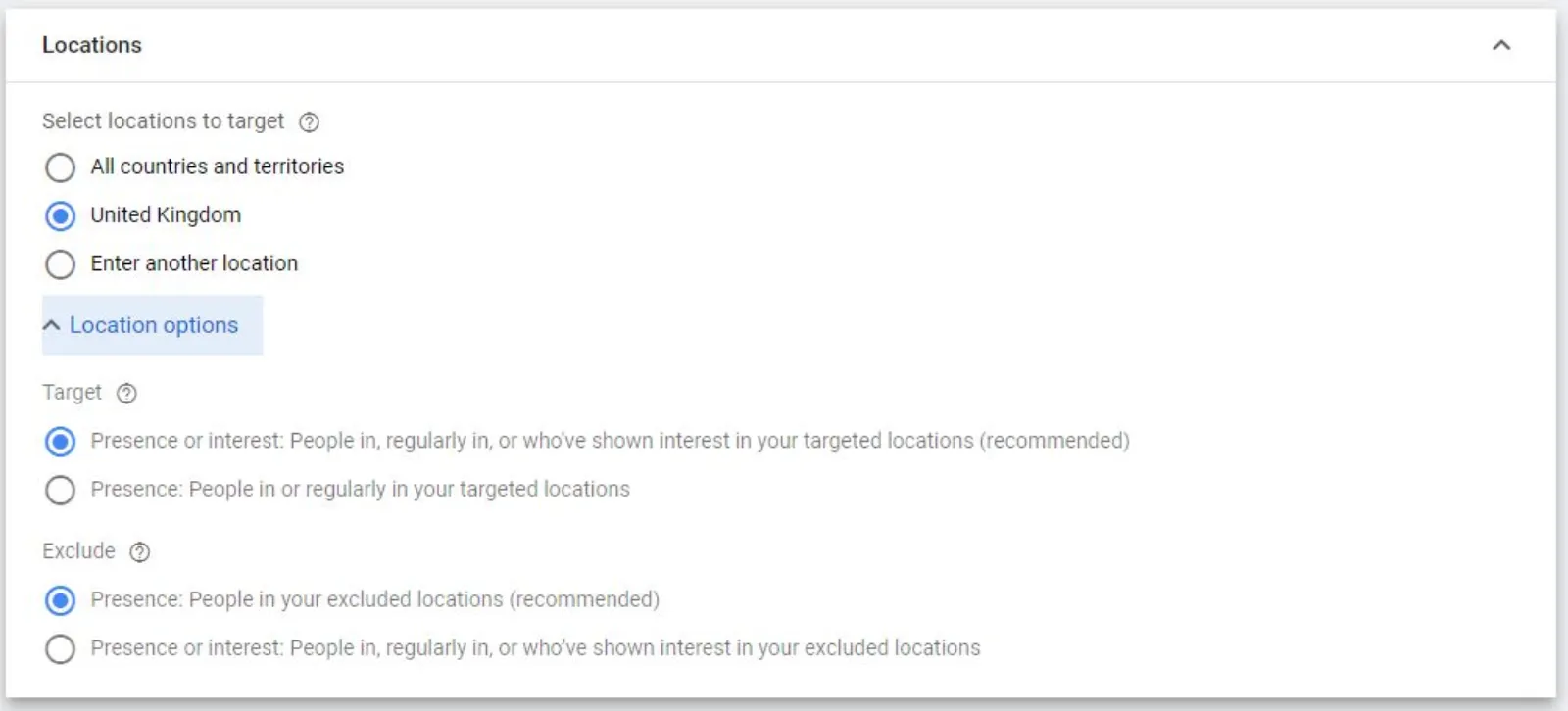
Google Ads Location Targeting

With the new Google interface, it’s a lot easier to create a campaign. All you have to do is keep selecting your required options from the available ones and done.

Here in this option, you will be shown three main options:

  1. All countries and territories. If you select this option your ad campaign will be shown to people all over the world.
  2.  You can select the whole country as your target audience and now your ad will be shown to anyone in the country who searches for your keywords.
  3. Select another location— now you can select a specific radius around your area. This is best if you have a physical business and you want only the people in your proximity to be able to view your ad.

You are further given two more location options:

  1. Allows people outside your location who have an interest in your selected location to be shown your ads. For example, a person anywhere in London may search for a wedding photographer in Manchester and your ad might be shown to them.
  1. Allows only people in your selected ad location to be shown your ads.

Select “Presence: people in your exclude locations” and you are now done with the location settings.

Languages

Google Ads Languages

Select the language your business mainly deals in. For example, here we are selecting the language English.

Ad Rotation
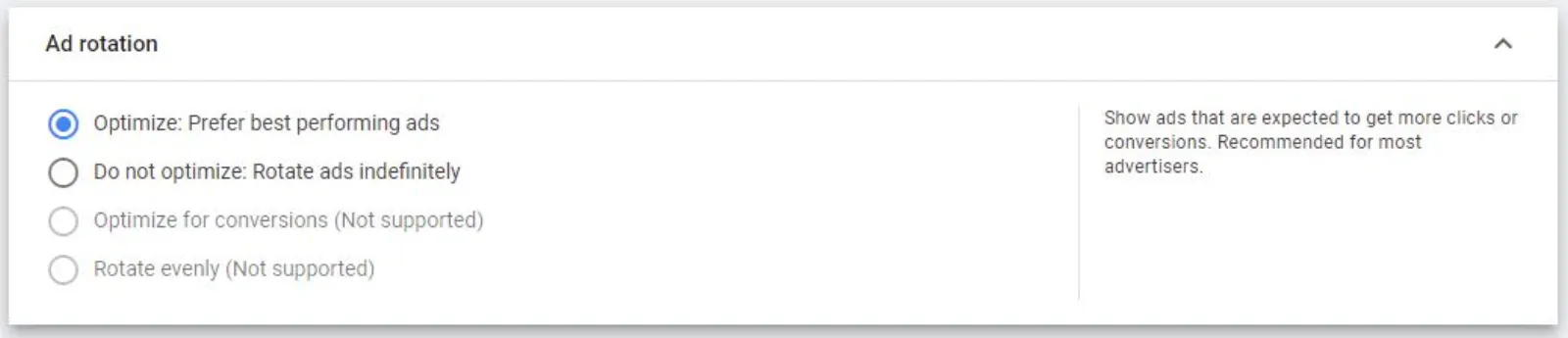
Google Ads Ad Rotation

In this options menu, select the first option that is “optimize: prefer best performing ads.”

Now Google will optimize your ads for the time being you don’t have to worry about them a lot. Later after checking their turnover, you can manage ads manually.

Selecting The Ad Schedule
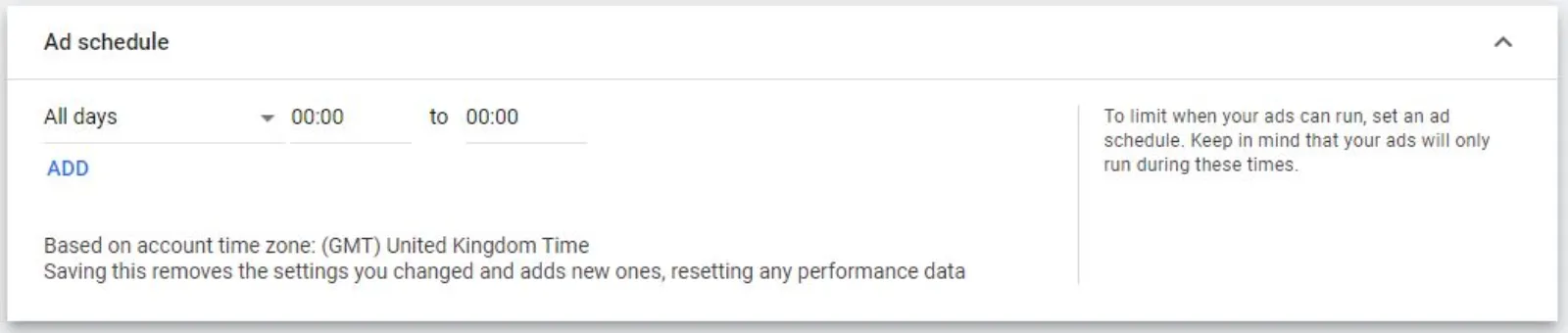
Google Ads Ad Schedule

When and how much you want the ad to run over the Google Ad campaign can be controlled here. You may want the ad to be run only from Monday to Friday or only on weekends depending on your requirements. Since we are using the example of a photography business, we are going to keep it live for the whole week.

Selecting The Target Devices

Google Ads Target Devices

Here you are given a few options as to where you want your ads to be displayed. The best option is to select “show on all devices”. This way your ads can be viewed on any device and this may lead to more sales.

Setting Up The Start And End Dates For The Ad Campaign
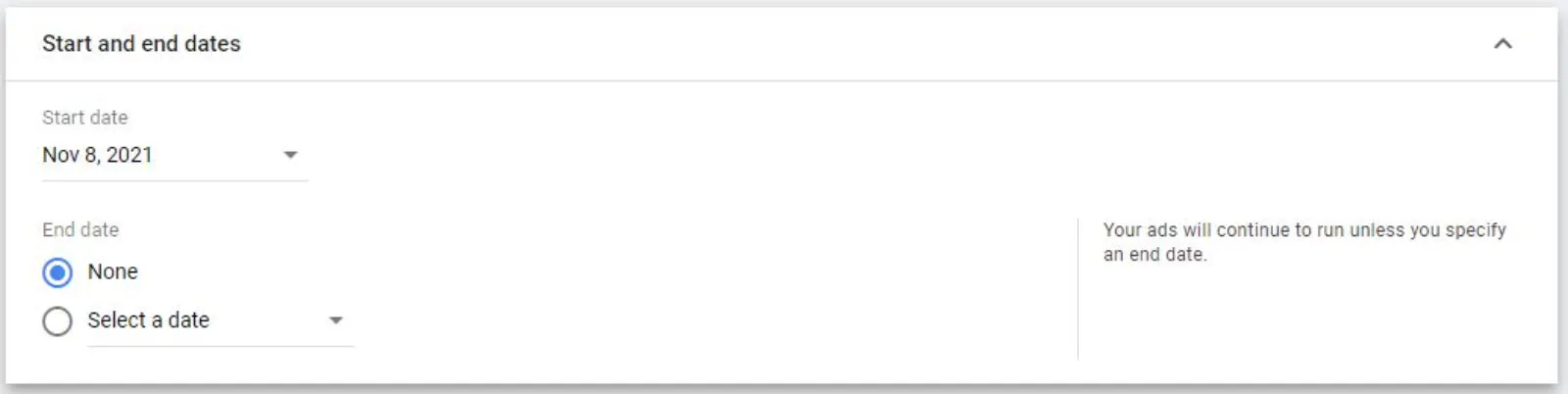
Google Ads Start And End Dates

If your business is up and running, you can start right away. And, in the ending dates, select the date when you want your campaign to end. For example, if you are not going to be open on Christmas, you may select the Ending dates at 21 December and then your ad will only run till 21st December. 

If you want the ads to continue running, then leave the ending date empty. By doing this, your ad will continue running till you change your mind and stop it manually.

Conversions

Google Ads Conversions

After setting up the start and end dates for the Ad campaign, you also need to set up your conversion action before you start any campaigns. Without a personalized conversion setup, you cannot know what is working for your ads and what is not?

Setting Up The Content Exclusion Settings
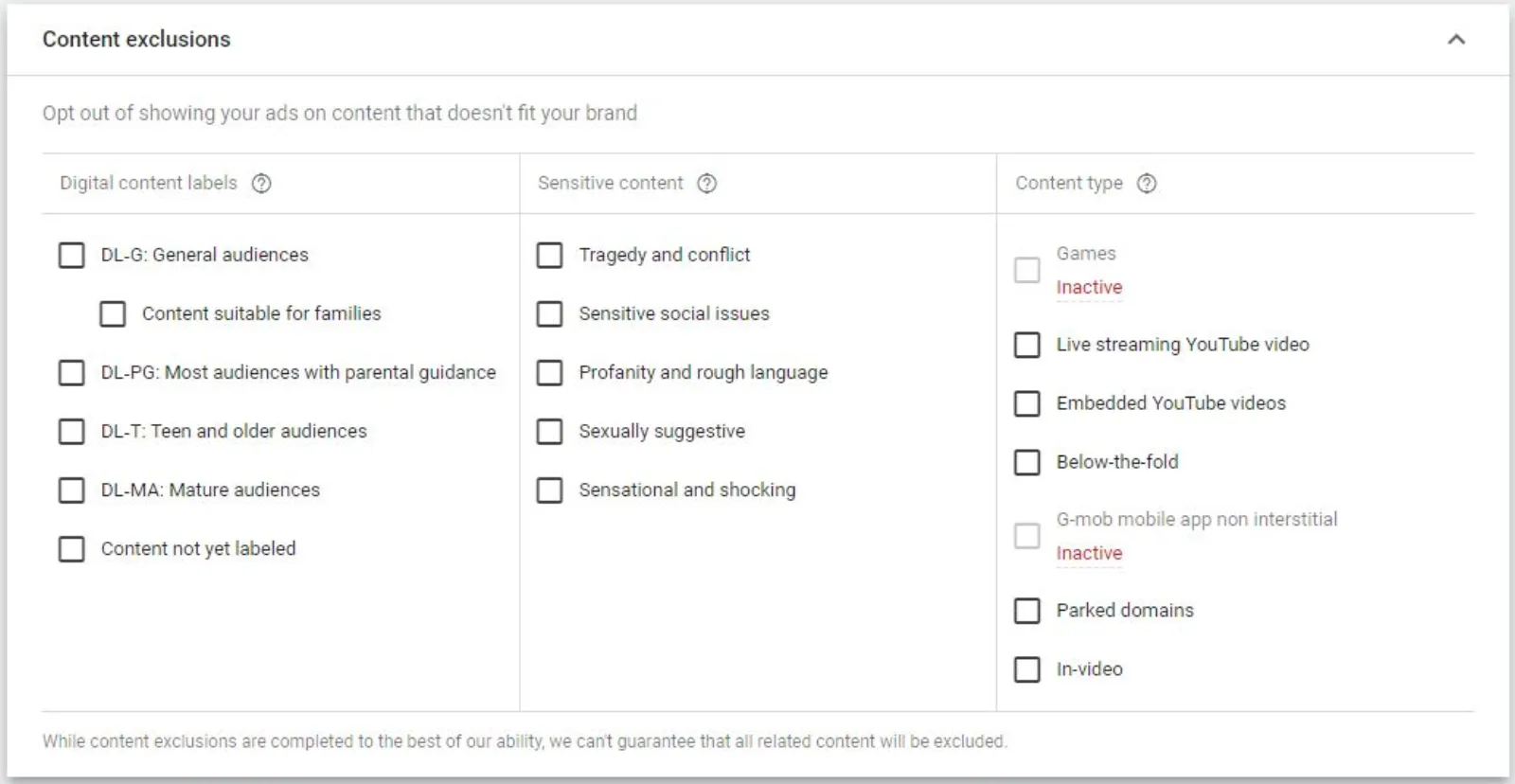
Google Ads Content Exclusions

If you want the basic easy setup of your Google display ads, you may leave this option as it is. But, if you do not want to show your ad on certain sensitive topics, such as sexual or religious topics, you can select and opt out of them. In this way, your ad will only be shown on topics that are somewhat relevant to your brand, and this can thus narrow down your target audience. 

Setting Up The Google Ads Budget
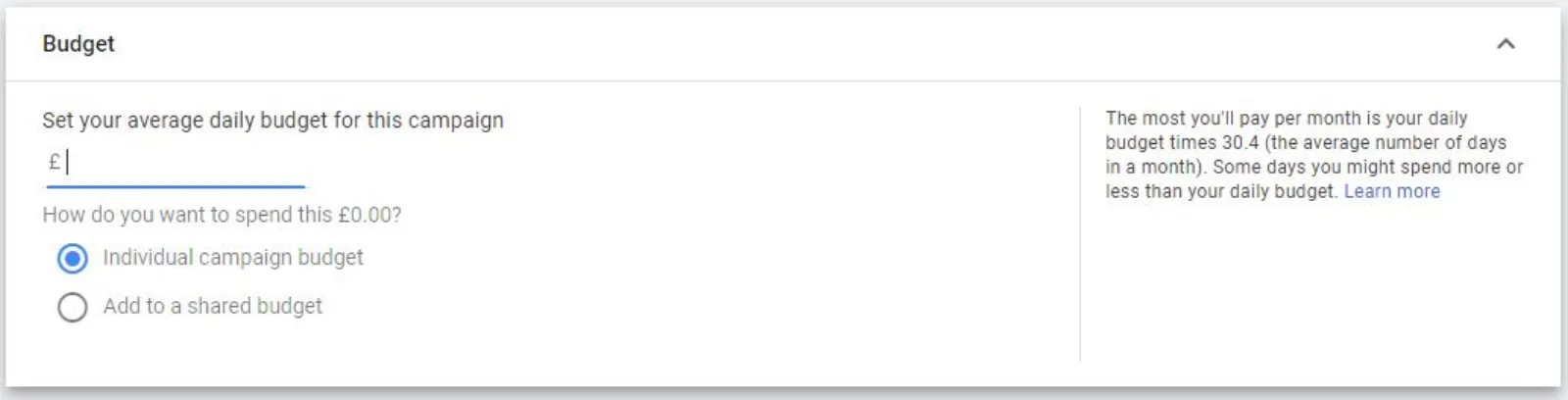
Google Ads Budget

Now you have an ad campaign ready to go up and running, you just need to properly set up its budget. For testing our Google display network ads campaign for the photography business, we are going to put 1 pound as a budget for this campaign.

Not to mention, there are two major options which you can choose to set up a Google Ads budget. One is to put a budget for each campaign, and the other is to set a shared budget. When you choose a shared budget option, you basically allow Google to manage which one gets how much budget.

This does not mean that if you have put a shared budget of 100 Pounds in a day, and you have five campaigns running— each campaign is going to take 20 pounds from that budget. Instead, what will happen is the one getting more clicks will eat more of the budget and is going to be preferred. This might even deprive others of the opportunity to flourish.

Pros And Cons Of A Shared Budget

There are several pros and cons when setting up a shared budget. If your budget is very tight, then it’s better to have a shared budget for your ad campaigns. It will allow you to work on other factors while Google manages your money.

But in case you have a nice and big budget, you can set an individual budget for each campaign and then analyse each one separately. This will give you more control over your Google display network campaigns.

For our test ad campaign, we will be using an individual budget. But, you may select shared, depending on your preference.

Selecting The Best Bid Strategy
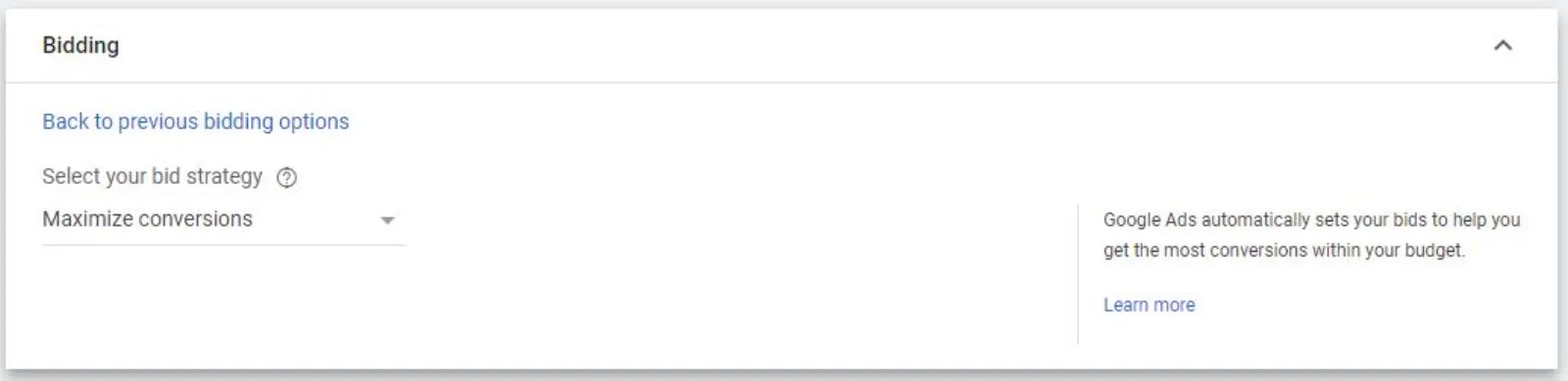
Google Ads Bid Strategy

The best option is to select “maximize conversions”. In the old days, we used to select manual CPC. But, in recent times, Google and AI have advanced so much that we no longer need to worry about these little things. Google will do all that needs to be done in order to produce maximum conversions.

Selecting The Target Audience

Google Ads Target Audience

Now we need to set a specific target audience to whom we wish to show our ads. So, there are certain ways we can target our ads. We can have several options for this, such as segmenting the audiences, demographics, keywords, topics or placements. Google has pre-built audiences and we can select various target audiences or keywords, depending on our choice.

For example, as we are promoting a wedding photographer business, we are given a few options such as 

  • Bridal wear
  • Wedding rings
  • Engagement rings
  • Wedding planning
  • Pre-wedding photography
  • Local photographers

All of these options are ideal and all or any one of these can be selected. But, the best practice is to select only the most relevant, and then try other options in other campaigns so we know which is working the best. 

Putting all the keywords in the same campaign is not beneficial. Why? It is due to the fact that your ad will be shown to the more irrelevant general public who might not be interested in your business. 

For our Google display network test campaign, we have only selected the most relevant keyword that is wedding planning. So, you need to remember that in lead generation, specific is better and quality leads are superior to quantity.

Using Optimized Targeting

Optimized targeting can serve as a filter. It will analyse and then optimize which things work and which don’t. If you don’t know a lot about optimized targeting, it is better to give it a shot. Now see if it works, then continue using this technique.

Creating Responsive Display Ads
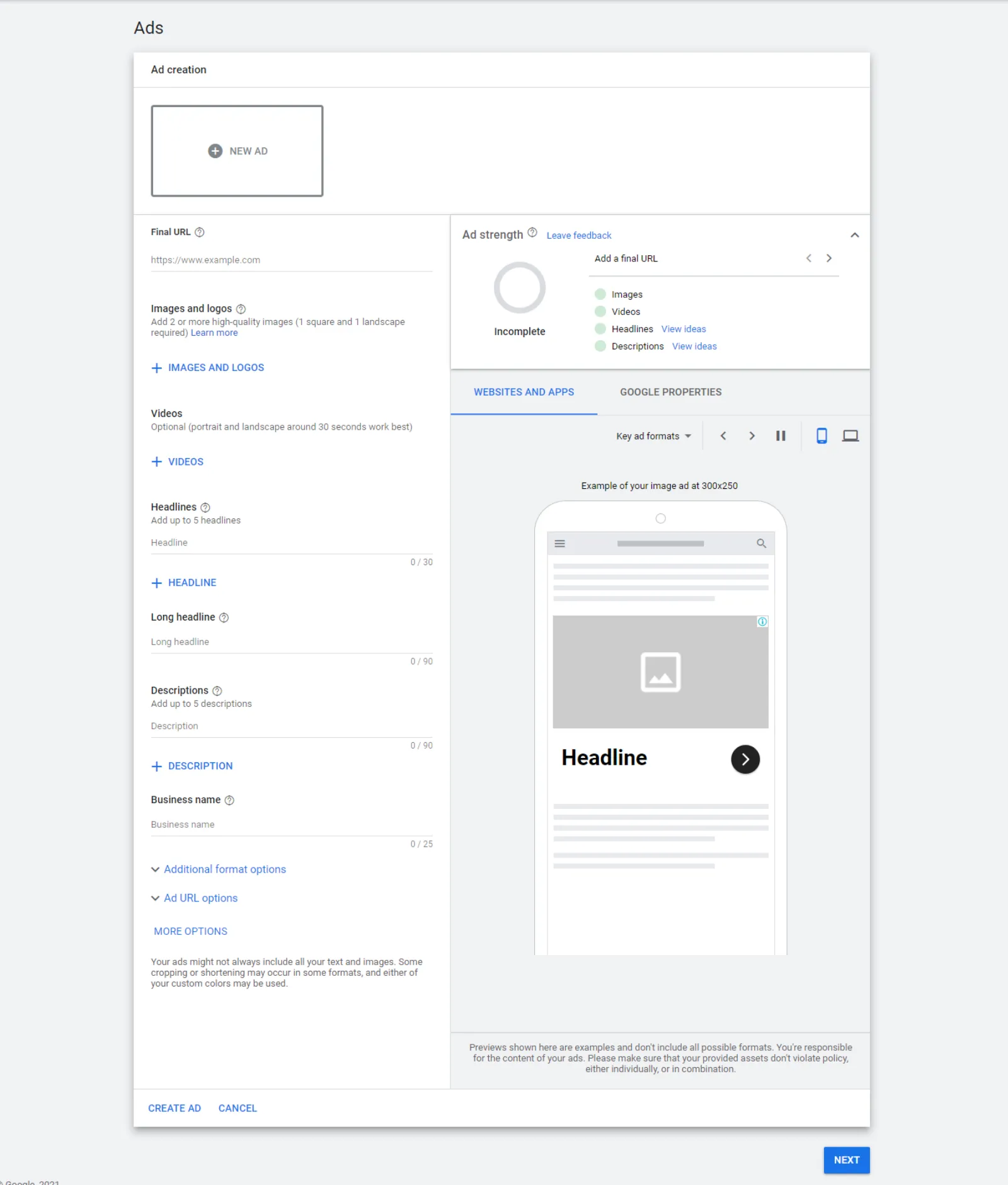
Google Ads Responsive Display Ads

Now, the majority of the technical details are done and it’s time to create the actual ad which will be displayed on the web pages. Now, you need to start writing the heading. At this stage, we are given the option to write up to five headings. So, we will write short and precise headings. For example, for the wedding photographer business, we can write headings such as wedding photographers, Lisa lander photography, get more information and hire a photographer.

Pro Tip: You should write some details about your business in the long heading. Google ads will present some pre-written automated descriptions and you can read that to check if it’s alright or add some more details to make it perfect.

For heading, you’ve got 90 characters, so use them all to make a nice and sweet description for your ad. What’s next? You now need to add a business name. After this, you can see two green ticks in the Ad strength at the top right corner of your screen. 

Adding Images And Videos To The Ad

Now the description part is done and we are left with the addition of images and videos. 

Click on the blue “+ image and logos” button.

Since we had already linked the wedding photography business, we can select images and videos from there and optimize their size according to our preference.

We have two sizes given; rectangle and square and we can frame our image using the grid lines. It’s better to add at least 5 or 6 images and one video for best results.

Finally, here comes the time for the videos. For this, you can add portrait or landscape video, and it’s best to use an image for around 30 seconds.

Responsive Display Ads

Now, Google will manage everything in the ad such as the headline images and the description, depending on the size of the ad. So, you don’t need to be an expert designer, as google will manage and mix the headlines, photos and video to see which one works the best in terms of conversions. 

This amazing feature makes the whole process a lot easier for the user. You just have to sit back and look at the results without having to get involved in it too much.

Finally, you can see how the ad will look on a mobile device or a computer once it is published. This is a really cool feature as it allows you to see and then make the required changes.

Call To Action (CTA)

Now you need to set up the call-to-action button. You have various options to select from, and you may choose the one which fits your requirements perfectly. 

Best examples: contact us, book now, orders now, get a quote and sign up etc. 

For our Google display network ads campaign for a wedding photography business, we have selected the contact us button for now.

Custom Colours

It is the option that allows you to select custom colours that resonate with your brand. Once you are done with all of this, you can see your ad strength. If your ad strength is max, this means that you have given all the required information that google requires.

Campaign Review

Once you are done with everything explained above, you should have a quick look to see everything is complete in the way you want it to be. Now, just press the publish button and boom!

Your campaign will now be checked and then will start running.

How To Duplicate Ad Group

To notice which things are working for your business and which are not—you need to duplicate Ad group. To do this, you will need to go to the ad group level, then select and rename the campaign with the audience that you had earlier selected. For example, the audience, in our case, was the wedding planner and you will rename it accordingly, then save it.

Step 1- Now the first step is to create a copy of the Google display network ad campaign. 

Step 2- Select the add group click on “edit” tocreate a copy.

Step 3- Click on the same menu and then paste it. Now, you will get two ad campaigns.

Step 4- Edit the second campaign’s name and also edit the audience. You should select a different audience. For example, we have selected the target audience: wedding ring or engagement.

Step 5- Now just repeat this step and keep adding different target audiences in each ad campaign. Name them the same as their target audience. In this way, you can easily manage multiple ad campaigns.

Note:

You can create multiple copies but it’s better to get the first one approved and then create copies with different keywords and the same basic information. This will save your time and energy. 

You can also set specific target demographics. For example, for a wedding photography campaign, our ideal audience is females from the age 25-40. Here, we may exclude men and also people under the age of 24 from the target audience.

Success is a long and tiring road that not many can travel.

Placements

Placements are the locations where your ad may show at. For example, if you want, you can tell Google to place your ad on certain websites. In this way, you will bid for a place at that website’s ad seat. What’s best? If you click on an ad, you can check the advertisers behind it.

Not to mention, websites and blogs over Google use ads to generate revenue. The bigger the website, the more money they charge for an ad to be placed there. If you think you can generate more revenue by having your ad displayed on a particular site, you can bid more for that website. By doing this, you may win the bid. It is all based on your business calculations. 

Conclusion

Setting a unique and personalized campaign is important for generating quality leads and thus producing sales. It may look like a tough task— but— it is worth it. So, your invested time will generate sweet revenue in return.

With that said, our complete guide on how to create a Google display network campaign comes to an end. We have presented all the major questions you may be asked in Google’s display network ad campaign. 

We also have discussed why Google display ads are different from Google search ads and how they are important. We hope you enjoyed this article and let us know if you have any queries about your Google display network ad campaign. 

If you liked this article, you can also read:

Uzair Kharawala

Written by Uzair Kharawala

Partner at SF Digital Studios, a Google Premier Partner agency. Uzair has been helping businesses grow with Google Ads since 2002 and teaches it every week on YouTube.

Book A Call →Subscribe on YouTube for new videos every weekday →
Free every week

Get our best Google Ads tips by email

New articles and videos, straight to your inbox. Unsubscribe any time.

We respect your privacy at all times. Privacy Policy

You may also like

Read the blog →

Your next customers are out there. Let's go and get them.

Tell us where you want your business to be, and we'll show you how to get there.

Book A Call →or get your free Google Health Check →
Happy clients

Don't take our word for it

4.9 from 157 Google reviews, plus case studies and client videos.

See our happy clients →
"It has now been 3 months since we started and our sales have increased 300%."
Ruhi Latif Rafplay, Dubai
"Uzair and Farzana are two of the most honest, sincere and trustworthy people you will ever meet."
Gavin Morgan GDM Jewellery · Google review
"If I needed a campaign built, this is one of the rare few people IN THE WORLD I would trust to do it properly."
Hemmel Amrania Google Ads professional · Google review
Book A Call →
Chat with us on WhatsApp