I believe we are live. Please give me a moment. I'll make sure everything is working fine and we'll get started. Okay. Everything seems to look good, the video is working and audio is working as well. Lovely. Okay. Hello, my name is Uzair and welcome to today's YouTube live stream. It is the 30th of September. Four o'clock in the UK.
It's not very bright and sunny. In fact, it's quite miserable and wet out there, hope where you are you got some decent, warm weather. Every weekday I should say, we go live and we go through topics such as Google Ads, digital marketing, video marketing, pretty much anything to do with online advertising. We generate new sales and leads for your business and for yourself.
Hi Mike. Yeah, you're just in time. You haven't missed anything yet. So, we just getting going. So, the format of the sessions is very informal. If you haven't been here before, I'll go through a certain topic and today it is about YouTube video ads, which I'll talk about in a bit then towards the end, I'm going to answer any questions you have, any problems you would like to share, and if you just dropping by lurking around in this channel and enjoying this live stream or viewing this video, then please do like share and comment and just say hello and tell me which part of the world you are from, because we get our audience from pretty much all over the world.
A lot from US, Canada, India, Pakistan, the Middle East. So, Africa as well. We get quite a few people. All right. So, hi Mustafa. Good to see you as well. So, where is my Google slide? Before we get started, I'm going to put my phone onto silent mode, so it doesn't disturb us. Okay. So, we are good to go.
All right. So, every now and then we celebrate the win and if you have got any wins, a new client, a new campaign, which you have set up or anything, which is good news, there are plenty of bad news in this world at moment out there. So, we need some good news to cheer us up, but please do share with everyone.
I put them in the comment box and I'll start off with my lovely wife Farzana becoming the Mayor of Leighton-Linslade! So, from now on, you guys would need to address me as Mr Mayor and you also would need to curtsy before you address me. I'm just kidding, but yeah, it's been, she got formally inaugurated yesterday. Was it a day before yesterday?
Yeah, we were all very pleased and happy that the town is in good hands at the moment! Another win and good news as we just crossed our thirteen thousand subscriber mark. So, if you haven't subscribed yet, so please do, the channel is picking up pace, is growing rapidly and we'd like to keep on growing. So, I truly, we truly appreciate your support.
Those of you who visit our channel, watch the videos, comment, send feedback and those of you who are regulars on these live streams. You know, I can... A few of the names which I can read off the top of my head, Adam, Mike, Sandy, Richard, Mustapha. So, we are building up a nice little community and yeah, long it may last and let's keep growing.
Tomorrow we're going to ramp up our video marketing to the next level. So, at the moment we are just live streaming on YouTube as you know, but we are going to live stream simultaneously to Twitter, Facebook, and Instagram and as soon as my LinkedIn account is whitelisted for the live sessions over there, we'll be going live as well.
So, what this does is it is amplifying our message. I'm doing the work once, thirty minutes while live and a bit of prep beforehand, but our audience size is going to hopefully multiply by four or on four different channels. Now, if you think about it, this is going to be extremely powerful, even more, powerful than what we are doing right now because more people are going to come across or stumble upon our videos, our content and as I've been going on about video marketing if you don't start now, you never are going to start.
So please, just get started. You know, I don't, I cannot explain as to how powerful this medium is. Now, it is going to get even more powerful because this COVID is not going to go anywhere in the near future is going to stay here for a long time and this is new, I should say, the new way to do business, to generate business and get clients.
So, hi Renata. Oh, from Leighton Buzzard. Oh, brilliant. I think you, one of the very few who have come from Leighton Buzzard. So, thank you for being here Renata and hope you enjoy this session as well. Adam. Hi and yeah, I've said hello anyway. Hello to everyone. Okay. So please, get started, you know, just start something and you push yourself to your limits and if it's not being uncomfortable, then you're not pushing yourself hard enough and talking about pushing yourself and this is what we have done today.
I have recorded my first TikTok video. It's not live yet. We just need to edit it and I felt extremely uncomfortable doing these stupid, silly poses, which everybody seems to be doing. So, you shall soon see our TikTok channel being live, well it is live, but we haven't got any content on there. So, that's another channel where we are putting out our content and message.
So, you know, you guys can see me, I'm pushing myself to the extreme limits to the point that I'm being uncomfortable and soon after ten minutes of recording, it was really good fun. So, I think Sandy was saying yesterday that, yesterday or day before yesterday, he felt uncomfortable talking in English because it's not his first language. Well, you don't need to speak trust me and let me show you, I'm going to step back a bit.
So, all we did was three top tips. How easy it is. So, let's see how it comes out. It might look dreadful, but we going to carry on because as I always said, perfect as you go along, you know, don't be a perfectionist and don't try to make things absolutely one hundred percent, get it done, and then just keep improving it as we go along.
Okay. So, to the main topic of video ads. So, since we are talking about video, I'm going to go through how to set up your first video campaign on YouTube, through Google Ads. Now, a lot of people get confused. Well, I want to run ads on YouTube. Why do I have to go through Google Ads. Well, Google owns YouTube and part of the advertising platform is, that you got Google Ads where you set up the YouTube Ads through that.
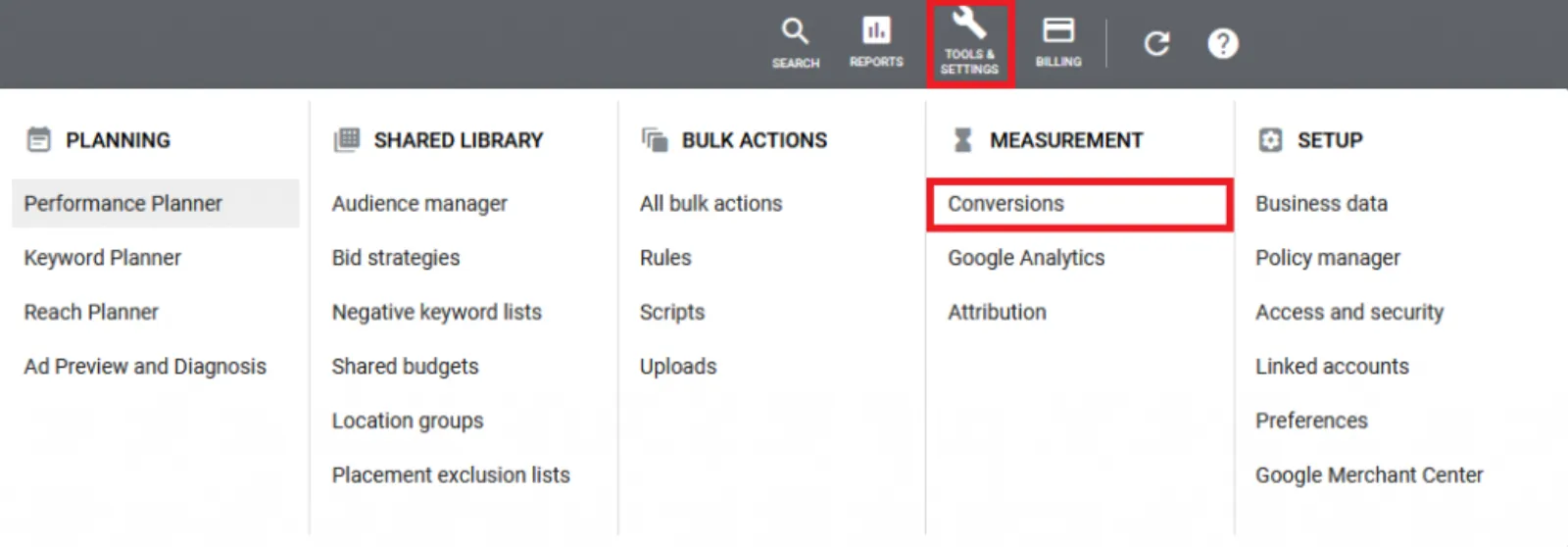
So, the first thing you need to do is to set up your YouTube channel obviously, and the video has got to be on your YouTube channel and then you go in. They've changed this recently, where is it linked accounts, and you link your YouTube channel to Google Ads account. That's the first thing you need to do. The internet is really, really slow today.
Don't know why. Over here and then... It's just a... You search for your channel and once it comes up, all you do is just link it, takes literally five seconds it's fairly, that's easy and straightforward. Okay. So, we back to our interface and if you do have any questions, please put them as we go along, I will come to those questions, towards the end of the session, all right.
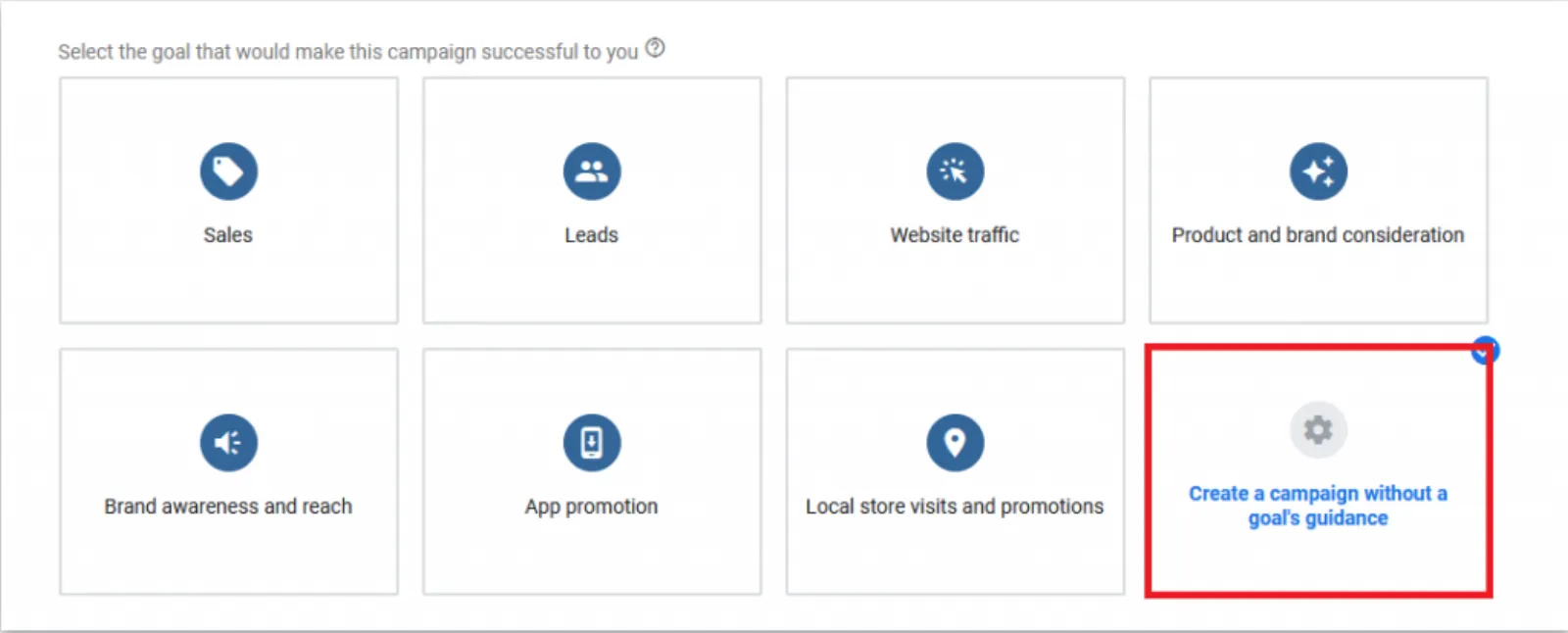
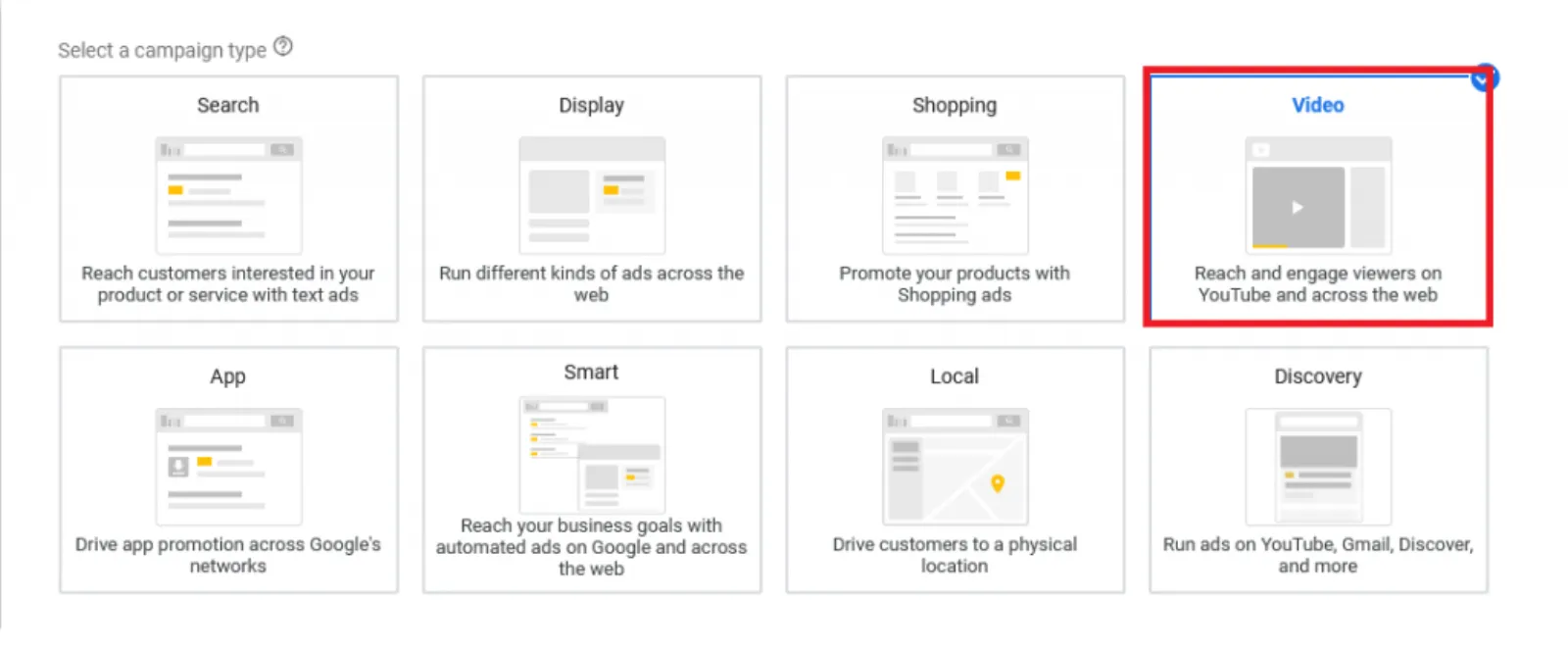
Plus, plus a new campaign, new campaign. Now, you get the choice of sales and all these other options, you go with the create with goal guidance does not mean that we are not setting up conversion tracking. We are tracking conversion tracking all the time, and then you got the choice of search, display, shopping, video. That's what we want.
Then, you got some more options over here. What kind of video ads you want to run custom, non-skippable, off-stream, drive conversions, ad sequence or shopping. We're just going to go straightforward custom video, which would be the in-stream ad, where you get the skip ad button after five seconds and you can skip. So, those are the ads, or you can also set up bumper and discovery ads, but we're just going to focus on the video in-stream ads today.
Then, you go continue and you name your campaign name, whatever you want, bidding strategy for the campaign, which we are running. We select maximum CPV, which is the cost per view. So, every time somebody views your video, you're going to be charged by Google. So, how much and how long they need to view the video is dependent on, obviously, how many people are in...
How many advertisers are in the auction? But the good thing is if someone skips your video ad after five or six or seven seconds, you as an advertiser, get free branding and free advertising. You do not get charged. You only get charged when someone views your video up to a minimum of thirty-seconds, or until the video finishes, whichever is the quicker or sooner.
So, if somebody quits your video after twenty-seven seconds, you have had free branding, free advertising, you in front of the person and they're looking and listening to your message, extremely powerful, medium of getting your name out there and putting your business and your brand in front of your audience. So, this is one of my favourite ways to promote, obviously, video and what we are going to do is to...
The target CPM is the cost per thousand impressions. So, how many times, every time, every thousand times your ads are shown, you will get. You can set up that bidding strategy, but you don't want to go that for now. We're just going to keep it simple and straightforward. Then, what we need to do is we have the campaign total or daily total.
Now, if you're a local business and you just want to target people in a ten-mile radius or a five-mile radius, then what you want to do is start with a very low budget. You can start with two pounds or two dollars or a dollar, and you'll start to see views coming in. But I would like to say five pounds is not a huge amount of daily budget, and you can quite easily start with this and then slowly, slowly ramp it up.
If you want to go a wider radius around where you are, more cities, nationally, or perhaps internationally, then you need to have a fair amount of budget. Then, you have a choice of networks where you want to put them in. When somebody. So, YouTube is the second largest search engine after Google. So, you'll find and you've probably have done it as well.
When you go to YouTube, there's a search bar at the top, you put in a search about how to make a burger, how to play golf or how to do whatever. So, this is what it will show the ads in. We don't want that because we want those skippable ads to come before or during any video we want, obviously, the YouTube videos to go on there and this is the display network where Google Ads or Google Display Network covers almost eighty-nine percent of the internet.
So, it can potentially put your ads on the largest advertising channel or network by a mile and potentially your ads can go on places like CNN, Huffington Post, Wall Street Journal, BBC.com, all these high authority websites. So, when somebody is on there and they all of a sudden see your video, you also get a brand lift because they see you advertising on those prestigious websites and they go, oh, wow.
You know, Uzair is advertising on such and such website. So, you also get a brand lift when you target high quality of websites and all these, Google has got over two million high-quality websites on the books. So, they can potentially place your ads pretty much anywhere you want. Then, you want to go into location. You can either go everywhere, your country, or you can choose a location and you can go into advanced location.
I can say, I want to put in ten-mile radius where I am, Leighton Buzzard, so now I can see that in this radius, my ads are going to be shown to only these people in this area. So, I know that this is fine. I can save it. Languages. All the languages or you can choose your language. English.
Doesn't really matter. Inventory, you have got three choices in here. You can compare and you can pick and choose whether you want to show on websites where there's profanity or, you know, videos of adult nature or violence and all that kind of stuff. So, you can pick and choose where you want your ads to show through, standard inventory is fine.
It's okay. Then, we go in here and then you can even pick and choose where you want to exclude your videos. So, I can exclude from live streaming videos or mature audiences or whatever I want to not to show my ads. Then, there's little additional settings, which many people miss out and this is one of the most important places in setting up your conversions.
I keep nagging everyone. I keep saying this all the time, do not and I repeat do not ever run your campaigns without setting up your conversion tracking. So, you have got no excuses not to set it up the first thing you must do a set up your conversion tracking, whatever it may be. It takes literally a few minutes, set it up, and then you can choose whether you want to set up your conversions at an account level.
So, any conversions I may have set up in my account, it will be applicable, or I can pick and choose. You know, if somebody submits a particular lead form or makes a purchase, which it isn't over here right now, you can select and set up your conversion tracking. Then, you have your devices. You can either show on all eligible devices, which are computer, mobile, and tablet.
TV screens, we don't have much data as to whether how good or bad it is, but more and more people are starting to use TV screens to browse the internet. You can also set up a particular device to advertise on, or you can also go deeper and say, I want to only show on iPhone or Samsung or on such and such network.
Only if you have got a product, which is only applicable. Let's say you are doing. You make Apple case, phone covers and cases. So, you only want to show people who've got an iPhone, right. Or Apple device, then you can pick and choose from here. But for most of us, this doesn't apply only to choose where you want to run your ads.
Frequency capping. You can cap, you don't want to annoy and cheese off people by showing your ads too many times. So, you can cap it and why would you show the same person ten times. Because then your budget is going to run ten and you will reach lesser of an audience. So, what you want to do is to cap your impression or a view frequency, the view is if somebody has viewed your video for more than thirty seconds or more, or impression is, you know, they've seen that impression and they've skipped after five seconds.
So, if I was going to choose between the two, I would just do that because I don't want to keep annoying them and then you can pick up one or two or three, however many you want and you set this frequency capping up. So, then if you got, if the same person is seeing ads less times in a day, your budget is going to last longer and more people will be covered and not the same people keep seeing the ads over and over again, even though they may skip your ads and you won't get charged, but still, I want to make sure, I want people to see my ads.
I want Google to charge me for the video views and that's the whole point of getting people to notice my videos and to click on that video, to come through to my landing page or website. Ad schedule. You can choose weekdays, weekends, individual days, twenty-four hours or nine to five, whatever you want. Then, we go into the ad group creation, you name your ad group.
I go by the name of the targeting, right and I'll come onto that in a bit and tend to keep one targeting per ad group. So, I can see what's happening in that and this is our targeting. You can target demo, audiences, keywords, topics, and placements. So, in the demographics, you can have gender. So, if you only want to target, let's say you're doing makeup products for women.
Then you take this out. Unknown, I tend to check it in because we don't know, Google doesn't know who they are. So, at least we cut out the men from my advertising, or it could be the other way around. If your product is for men, then you target the men. You don't want teenagers or youngsters, and you only want to target older people.
You can, again, the household income, the data. I don't personally think it's as good as Facebook. It is getting better. So, I tend to check all of these in and as well as the parental status. Audiences, you have loads of options over here. So, because the Google knows that I am in digital marketing, they're putting in, you know, business professionals, advertising, marketing, SEM, SEORush, not Rush, SEM rush, S E O and S E M services.
So, if I'm targeting this in-market audience, then what I'm going to do is I'm going to call this. IM, which is in-market and SEO and SEM services. Although I've got loads of them, I will then put them in a separate ad group, but I won't make them. I won't make all the ad groups now because what I want to do is to make one ad group first, put the targeting in, make the ads, and then copy, paste, copy, paste, and just keep changing the targeting.
So, you can have one, you can have a hundred, you can have dozens, you can have as many as you like. Another good way of targeting is keywords. Where you either put in a website or a landing page, or you put in your product or service name, right. Not bringing up any results. Okay, there you go. So, now I would put in all of these, this works completely the opposite way of the search network, right.
Where we would never do it, broad match and lots of keywords like this. If it's Nike football shoes compared to Nike tennis shoes, then you need to be careful because we don't want to put in Nike running shoes with football shoes or any other kind of, see that over here, basketball sneakers. You don't want to do that.
So, you pick and choose your keywords, which are relevant to each other and really tightly knitted. Right. Then, Google also has got lots of topics in here, so I can pick up business and industrial and see what we've got in here. We have got brand management, marketing, promo products, PR, sales, telemarketing, and so on. For each, again, targeting per ad group, you can put them all in.
That's the lazy way of doing it and that's what I see all the time. But then the data gets really muddled. You don't know which of these targeting is working, which one isn't working. So, separate them out and it's much easier, although it's a bit more work upfront in the long run. You will thank me. Placement, so this is like the exact match keywords, but on YouTube, if I want to, if I am selling football shoes, I can search for channels, which has got the football and it's going to come up with all these football channels.
Now, I know for a fact that anyone who goes to these channels are interested in football. I can place my ad. I can select all of them and again, to do this the right way, one channel per ad group. So, then you can see how much traffic you're getting per channel and if you are getting good conversions and performance from Sky compared to CNN, then you can bid less on CNN, bid more on Sky and so on.
Bid, comfortable bid to start with is ten pence or cents if you don't get any impressions, bid up a bit more. Keep bidding up until you start to get impressions. Now, bidding is where a fair amount of advertisers also get scared. Oh, if I bid five pounds, Google is going to charge me five pounds for a video view or a click.
No, they're not because you are only going to charge a little bit more or a penny more than the next best advertiser. If you want to be aggressive with your bidding, that's what you want to do is to bid very aggressive and outbid your competitors so that you win the auction and you get your views. Then, what you do is you just enter your YouTube video.
Let me just copy the video URL. So, at least I can quickly show you. In the meantime, if you have any comments or questions keep putting them in, tediously slow today, I don't know why, but there you go. Can't do much about it. Okay. Copy the URL from my channel and I will paste it, it's going to find it.
That's fine. Now, it will ask me what I want to do. I want to do the skippable in-stream ad. Where does the link or the click go to, you've put in your website address, display URL could be your main domain name, but it could be a final URL. Could be something like this or something like your main website, forward slash your landing page or whatever it doesn't.
This needs to be the exact URL, the display URL. You can just shorten it up and don't need to put in the full URL. That's Fine. The other most important thing when setting these ads up is the call to action. Keep an eye over here where my mouse is hovering. I checked the call to click action button and I've got now a nice little button.
See now over here, you will see this as well, where your logo comes up, your name, your website, display URL, and the call to action. If I don't have it. You miss an opportunity. You miss a big trick and all you're doing is showing your ads like this with the only call to action, which is skip ads.
So, you must put it in. You have call to action, with a maximum of ten characters. I know, learn more, always fits in nicely for me. Or you can have something like buy now if you're selling something else or sign up. Whatever your call to action could be, then you are allowed one headline. Yeah. I will say Google Ads, I can't have the training, but if I was putting something in, I need to make sure that it is less than fifteen characters.
So, that would, or the heading we'll go over here. Then, all you want to, also want to do is upload an image, and this is where it will go. So, you've got a really nice space and this is where a lot of people miss another good trick. It's not a trick, but it's a great way to keep your name in front of people for longer.
Because even if somebody skips my ad after five or six seconds, this banner is going to stay there for a lot longer. Just keeps them reminding them of you and you know, you never know that they might think you know what, I'm going to try and see what this is all about. So, you upload your video. You choose your file, which is three hundred by sixty pixels and once you've done that, I'm just going to create the campaign and within a matter of what fifteen, twenty minutes, you have set up your first video campaigns on YouTube.
Congrats. That's how easy it is when you know how, okay, I'm going to go to the comment box and see what the questions are. Mike, "If you made an admin of a Google Ads account, do you have equal ownership of the account?" It really depends on how you're accessing the account. So, if you are, let's say an agency and you want to get access to somebody else's account.
Like we do, we request access through our MCC, which is the, My Client Center account. The client will always be the clients, but we are in the admin, but we don't own, we never will ever own the account. So, that's the best way to do that and the other thing is those of you who are working with freelancers, agencies or other professionals, never, ever, ever give your Google login details to anyone.
If they do ask you for your Google Ads or Google account login, run a million miles away because they don't know what they're talking about. So, that's the way to access. Other people's Google accounts through your MCC account. Adam. Hi Adam, "I'm driving foot traffic to a local business. I'm developing a fifteen-second non-skippable ad." Okay. "I assume, this is more costly than a thirty-second skippable ad, but maybe more effective to deliver a final call to action." Yeah, usually these are different metrics and different ads, the fifteen-second ads, or even the six-second ads.
If you are driving traffic for that, to a physical brick and mortar store, what I would do is I would have a variety of videos, six seconds, fifteen and less than sixty seconds. So, the six-second ads, the bumper ads are charged per thousand impressions. So, you can keep on running those tens and tens and tens of thousands of times for brand awareness and that's what you want to do.
So, it's not a question about which one is cheaper and which one is more effective. It's using them as a team of players. You know, you've got a player, striker, a defender, a goalkeeper. When they come together as a team, you are more likely to beat the opposition. Then with two, with all the guys who are a striker or all the guys who are defenders, because, you know, you will have weak points, but when you have horses for courses, that's the right word and you've got all these various ads.
You run it through. Then, you start to see but don't expect results overnight. Or within a matter of days, you got to tell the client, educate the client and you control the expectations that, look, this is a long-term plan. The way this is going to work is to increase in foot traffic, obviously and also your brand term searches because, what will happen is people keep seeing your video ads is they're going to go to Google and put in that company name SF Digital and then you will see in Google Analytics or search console, how the impressions, clicks and the traffic coming through to your website.
So, I would say run all three. Hi Mike, "Can you easily convert an express Google Ad account to a full Google Ad account?" Yeah, easily here and unfortunately, now whenever you make a new account, Google will take you through that process of setting up a new account and you don't get the full access. If you don't know how to do that, you just call them up at the moment.
You can't call them up, but you can just go to support.google.com and search for converter express account into full account or what they call the switch to expert mode and it will go through no problem. (Adam), "Picking up from yesterday. Once you set up an audience using competitor URLs, how do you integrate that audience into a currently running search?" No, display campaigns, we were talking about Adam, yesterday, because those ones will work on display as well as on video, on search, you should put up a RLSA, which is returning, remarketing for search, what's that phrase, completely skipping my mind now, RL, remarketing list for search ads, so you bid up.
So, if somebody has come to your website, then gone away without converting. Then they've gone back to Google and they'll search for the same or similar terms. You can bid twenty percent, forty percent upon those RLSA audiences and you're more likely to win that auction because you are bidding very aggressively compared to your competitors, and they're going to click on it and they hopefully come back to your website.
Hi, Manvinder, "How to show text ad as well on YouTube, along with the video ad?" So, that's for the discovery ads, which obviously I haven't covered today, but if you Google search our YouTube channel, I have covered that and I will be covering that topic as well in the very near future. Hi, Sandy, "Yesterday, when I'm trying for search ads in advance settings, it showed tracking option in ad set up for landing page.
How does it work? And it's asking for a landing page URL." Yeah, you don't need to go into that. It is. If you don't know at the moment what you want to do, I wouldn't worry about, setting up that tracking option. What you need to do is to make sure that you have set up your conversion tracking, and it's very difficult to explain to you how you would set this up right now.
Make sure you set up your conversion tracking and that it's linked to your Google Analytics account, imported your audiences and if you've got any micro-goals set up in Google Analytics, bring them in. So, then you get a really bird's eye view of your campaign. You're most welcome Mike and Adam. Mustapha, "How to copy and paste an ad group in Google Ads Editor?" You can do it in the interface as well.
It's a lot slower and let me quickly show you, but in Google Ads Editor, it is lightning fast. So, if you've got, anyone has got any further questions, please put them in. Otherwise, I'm going to wrap it up for today. Okay. Internet is really, really slow. Okay, there you go. So, we just set up this campaign. You have got, come on Google, go into your campaign.
You've got your ad group select it, copy, paste. Ask you which campaign you want to, in the same campaign, or in some other campaign, I want to do it in the same campaign. You can either pause it, it doesn't matter really. But what you want to do is then change the name and the targeting option or the audience or whatever.
Now, you can see it takes a good few seconds before it will paste over here. If you got fifteen, twenty, thirty ad groups to do, you're going to spend at least hour, two hours trying to do this. Whereas, in Google Ads Editor is a matter of literally seconds. You copy, paste, change the audience and the name and I can upload, I can copy-paste at least twenty-odd ad groups in ten minutes or so.
It's that quick. Now, I've got that number two. It says here, I'll just change that to whatever the targeting was. Advertising, then I'm going to go and do this ad group, I'll then go into. This is tediously slow over here. So, in that ad group, I'm in that audiences, I'm going to remove that audience and then put in the new one and then the ads have already copied from the ad group level and all you are doing is to add that channel, add that audience.
Sandy, "Can we edit old campaigns?" Yeah. Can edit any campaigns, enabled or paused. No problem. When you change something in a campaign, you are pretty much editing it. So, yeah. There's no problem with that. Nikhil, "We can only pause the campaign, right? We cannot delete it. If we don't want to run that particular campaign." I tend not to delete anything from the account because I want to keep that data for the future.
If I want to go back and see what was happening and what wasn't happening. If you delete things in the account, then you lose it. I would say, just pause it. It doesn't come in the way and all you do is you go to the campaign level and I know why you want to delete it because you think you probably have got all enabled the status over here is all.
That's why you see all the old ones, which have been paused, as you can see, all of them are popped up. It just clogs up the screen. Right. But what you want to do is you can do that at ad group campaign level, ad group level, keyword level, and pretty much all over the interface. Now, I'm only seeing my enabled campaigns.
So, thank you, boys and girls, for staying with me and being here today and appreciate that very much and again, once again, thank you very much for subscribing to us. We are thrilled to have the past thirteen thousand subscribers. If you haven't subscribed now is the time and the chance to, well, you can. You can subscribe anytime you like, but now is the time to subscribe.
So, that's it for today and today's Wednesday. Yeah. I will see you tomorrow because Friday it will be Farzana's turn to go live. So, till then, stay safe and look forward to seeing it tomorrow. Bye for now.


 LIVE