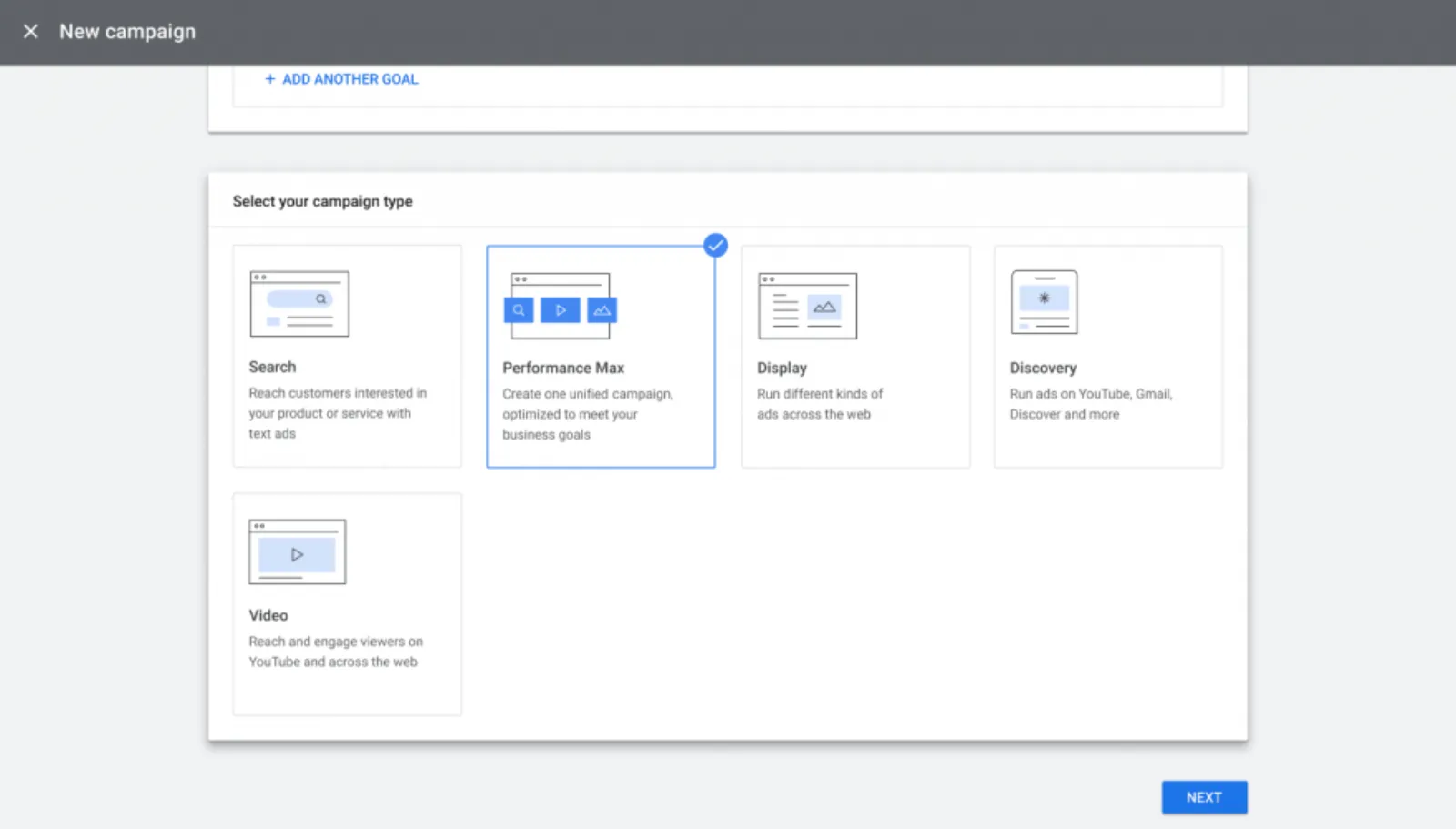
So let's get started and deep dive into Google Ads Performance Max. You should be able to see my screen. Yeah, it looks fine. Alright. So, the Performance Max is a new goal-based campaign type that allows performance advertisers to access all of their Google Ads inventory from a single campaign. That's right you heard it right from a single campaign so what we have learnt over the years to keep search, display, video, Gmail, shopping all these types of ads in separate campaigns because all of them have got separate metrics.
Google have completely turned the tables around and simplified it in a way that it is super easy and very effective to run such a campaign time and if you're not running it yet, you should be by the end of this session. So, what they've done is they've thrown all their toys into one place into one campaign and they've taken away the keywords.
Now, this is great news for those of you who struggle with keywords. If you struggled with the keywords, match types, negative keywords, search queries and all that, there's none of it. You don't need to worry about it. Google has created this campaign type which on the basis of the audience only and in my humble opinion I think keywords are the days of the keywords are now numbered sooner or later they are going to take it away because the algorithm is getting so powerful we really won't need keywords as such.
So they've thrown everything in here. So as you can see on the screen we've got images, we've got logos, we've got videos, and we've got text. All of them in one ad campaign or ad type. Then you can run these ads on YouTube, Gmail, Search, Display and discover all the five Google channels and networks. So it's a very powerful way to get your name in front of that and it's not only about branding and brand awareness is as they said it's a goal-based campaign.
You can run campaigns on the basis of your conversions. What your CPA is, what your ROAS needs to be all of this you can run and tell Google what you are looking for. So, here's what all these ads or one ad needs all of these items. So, you can upload up to 20 images, 5 logos, 5 videos, 5 headlines of 30 characters each, 5 long headlines of 90 characters each, one description of 60 characters, 4 descriptions of 90 characters, call to action button, business name, final and display URL.
Now, I don't know why they make it simple and get rid of the description I guess for 60 characters is for smaller ad sizes which I can appreciate but then they've got five headlines of 30 characters and five headlines of 90 characters again depending on the size of the ad. They've got that but it's pretty difficult to keep up with all of these different character counts and how many ads or how many headlines and descriptions they need.
But it's all in there you can't go wrong even if you don't remember it by heart. So I'm going to show and share some of the ad previews as to the how these ads look in the interface when they are run. So here's a YouTube ad. And this is not an in-stream ad but it is what we call the discovery ads or the in feed ad where it you can click on it.
It will either take it take you to your landing page or it can take you to your YouTube channel. Here's another one. This is on that one was on a mobile. This YouTube ad is on a desktop. Now the only thing which I think is a bug in there or Google have forgotten about it is that companion banner.
I haven't seen it in the ad platform neither in the Google Ads editor. If you have come across it then please do let me know. I think that's definitely a bug or unless we upload a 300 by 60 pixel image as an image in the ad then it might fit in there but then this is automatically set up and this is our Instream ad, Gmail ad on a mobile this is the open one when you have clicked on the ad this is how it's going to look when it is closed so when you click on an ad it opens up like that it.
Here's another one which is an open ad in Gmail and so you can see the combination of images, headlines, description, no two ads look the same. They all look different. Now try and do it yourself. It's going to take you hours on end. It will probably take your graphic design team a few days to set these up but this is all on the fly.
You just upload everything once and let Google do its job. Search ads which I'm sure you've seen many times. It they look exactly the same and they use the extensions, Ad extensions as well in here which is good which makes your ads look a lot bigger. Display now this is the clever stuff which I love I have not branded this colour over here this bar it looks at this image and it has matched the brand colour this border over here to the background colour of my image that is just one image which we have uploaded and it has matched it which is really really good so this is with the image on there for the display network this is without the image just the text ad 300 by 250 pixels.
This one is 300 by 250 pixels as well 480 by 120. See now we don't need to create all these different types of ads or the sizes of ads. It's only going to create wherever it needs that particular size and is going to put it on a certain website or landing page. Then we have the display video ad.
These were the native or the image ads over here. This is the text ad, this is an image ad. So in display, there are four types of ads display image ad, display text ad, display native ad and display video ad. Now this video which plays without the sound on in a banner ad on a particular website or web page.
It may not be on YouTube. It could be anywhere on the internet. So your reach with your video is it could be anywhere in the world. This is really good. I love these type of ads. There's an image ad. This is another display video ad. It has embedded the video which we have put up on our Performance Max ad and it's placed it over here.
Display image ads so you can I'm just showing you some a variety of ads so you can see how many different types and kinds of ads Google will run. So this is the discover ad a couple of these different using different images. This one has got a portrait image. This one has got a smaller image and so on.
And then it's going to change these headlines, descriptions and mix and match the headline with the description with the image and see which one perform the best and which one performs the worst and the algorithm is going to learn from it. So it's designed to complement your keyword-based search campaigns to help you find more converting customers across all of Google's channels like YouTube, display, search, discover, and maps.
That is also critical. You can run your ads on Google Maps. So, wherever there are searches for local searches or location-based searches like dentist near me, plumber near me, your ad on maps will definitely run. Very interesting thing which they have said is complement your keyword-based search campaigns. So it's not competing, it is actually complementing. So what it is looking, the algorithm is looking at other type of keywords which you are running in your search campaigns and the PMax is learning from these.
When we see an account where the search campaign is being cannibalized by the Performance Max because it is eating up all the traffic it is eating up all the conversions and so on, you’ll get itchy fingers to pause the search campaign because you are losing money on it. But actually it is complementing it. So I would recommend that you run along Performance Max, your search campaign, your dynamic search ads and so on.
Because all these signals is helping the algorithm to learn even better and faster. And then there are certain goal types which you can use for the Performance Max. Alright, so what are the benefits? I'm going to enlarge this a bit so you guys can read it a bit better. Okay, so you can unlock new audiences across Google's channels and networks, drive better performance against your goals, get more transparent insights, steer automation with your campaign inputs and the inputs are your images, text, videos, logos and simplify campaign management and easily optimize your ads.
That is the biggest benefit for me and for everyone. It is so easy. You set up the ad and all you are doing is testing the audiences and testing your creatives. By creatives, I mean images, videos and text so you don't need to worry about the keywords. As I said earlier on all you need to do is to focus on the creative and you will spend more time thinking about how I can improve my videos, how I can improve my images.
So you need to have good photos, good quality videos and you will find that its Performance Max is going to push you towards improving yourself and your creatives. Okay, so then what they also say is that it helps you find more converting customers and that's also very important and it's not only just about throwing money at Google and get zero in return you actually get conversions we run Performance Max a lot in every account and we find that this works wonderfully well.
So you customize the goals that matter to your business and maximize conversions or conversion value. So it can run on both target ROAS and target CPA allowed you to engage customers across all of Google's channels. So this this is the beauty of this campaign that you can literally target the top of the funnel middle of the funnel and the bottom of the funnel traffic at all stages in that sales cycle or to the part of the to the conversion you can hit them wherever your audience goes or your prospect goes search, display, video, YouTube.
You can hit them just with a single campaign that is the beauty of it. And with Google's real-time understanding of consumer intense and preferences paired with your input using audience signals Performance max can unlock new customer segments you may not have expected and you are going to reach people you would never thought you would be able to reach.
And you have the input you can set up the audience signals you know you can target your competitors you can target certain brands you can target by keywords you can target by what type of URLs and apps your audience uses or goes to all of this can be used just with one campaign and then you drive even more value so it's data-driven attribution across channels optimizes for the most incremental touchpoints that drive customers to conversions so we keep pushing them further down the sales funnel by hitting them at these various touchpoints and I believe this is one of the most powerful campaign type when it comes to AI and machine learning PMax is the it's like campaign Google Ads on steroids literally.
Machine learning models are used to make more accurate predictions about which ads, audiences and creative combinations perform the best for you. As I said it's going to rotate the ads or the image with the text, headline, description or the video see which one works the best. Then you acquire rich insights as well with reporting. This can help you understand which creatives are impacting your performance and help you optimize campaign creatives to drive ROI.
And new insights such as rising search trends can also help you understand changes in performance and inform your broader business strategy. So when should you use it? So you have specific advertising and conversion goals and this is important and critical. You must have your conversion goals. So, for example, if you want to drive online leads or sales or any other specific goal you may have, you can set it up and optimise your PMax campaigns for that.
You want to maximize the performance of your campaign, you aren't limited by which channel your ads appears on. So you obviously running your ads across all the Google's channels. You want to easily access all of Google's advertising channels using a single campaign. Super simple, super easy, anybody can run it. All you need are the creative assets. And you want to get additional reach and conversion value beyond keyword-based search campaign.
So you're not only just running on search, you're going pretty much everywhere and at the same time building up your brand and brand awareness. So how Performance Max works with search campaigns or keywords in your account? So, as I said earlier on it literally complements existing search campaigns and respects your keyword targeting. So it’s not competing with it, it's complementing it.
And I would also I should add one more thing is set up a DSA campaign as well. The dynamic search ads that will also help and complement the Performance Max. So here's a couple of things you need to take into account. So if the user square is identical to an eligible search keyword of any match type in your account.
The search campaign will be prioritized over Performance Max. But I'm not seeing that. We keep finding that the PMax is being prioritized over the search campaigns but this is what we will say so we've got to take it from them. If the query is not identical to an eligible search keyword the campaign or ad with the highest ad rank which considers Creative relevance and performance will be selected.
So again it goes back to that ad rank. You got to take into account your expected CTR, landing page experience and the quality score. So that will be selected. At times you may see existing keywords showing in Performance Max instead of search campaign due to ineligibility factors. A search keyword is not eligible to trigger an ad if the campaign is either limited by budget, has low search volumes or all creatives or landing pages for the ad groups are disapproved.
Okay, So this is what Performance Max is and we've gone into details I'm going to go into an account into a PMax and set it up from scratch in the coming week or so I'll show you how to set up a Performance Max. So now it's time for some Q&A and if you have any I'll try my best to answer them for you but I've got some over here on the screen which have already been sent before.
So this is by E LaFleche. Okay, I have a question regarding separating product types by listing group and creating separate asset groups. This makes sense in that we can also tailor the creatives to the product type. However, what happens when a person clicks on an ad for a product in asset listing group one but on the website visits a product from asset listing group two can remarketing happen smoothly?
Yes, of course, it will. So when they click on your asset group one they will go to that landing page and then they're browsing around and they click on some other pages on your website Google is collecting all this information and then it is going to take into account the remarketing and also end of this I think later on in the year or before the end of this year Google is going to stop running smart shopping. smart shopping is going to come into Performance Max so then the dynamic remarketing will also run through there so you don't need to worry about it is going to run pretty smoothly.
It shouldn't be a problem. Okay. This is from AkkiMad, okay does the change to match types effect “alpha/beta” funnel? Meaning if the exact keyword is excluded in phrase campaign does that guarantee the exact match and its close match terms will get triggered in the exact match alpha campaign? Thank you. yeah sure, AkkiMad we stop running the alpha-beta type of campaign about three years ago.
They don't work anymore. You don't need to go to that extent because once exact match weren't exact match then everything was thrown out of the window as far as alpha-beta was concerned and also SKAGs and some other campaign types. Right now the way I would recommend you do is the algorithm needs data put in the phrase and the exact match in the same ad group or if you want to keep it in separate ad groups that's fine but we used to do that but now we are testing putting them all in one ad group and let the algorithm go wild and free to say.
We want to you know give it the full force of the machine learning and the power of Google to get us the results we are looking for. So I wouldn't bother about Alpha-beta anymore. Hi Aamir, Is it possible to share this word doc with us? I think you may be referring to a particular Google Doc on one of the videos.
So, if there is a link under the video then yes you have access to that. If there isn't then no we don't have access. We don't have that video link or the Google Doc for you. When I don't have that link that means it's pretty straightforward. You can create that in Google sheets or excel. And just follow the format or the template which I'm showcasing on the video.
Fleathermouse, Hello. Solid advice on focusing on something and becoming really good at it. I was trying to do both Google and Facebook ads simultaneously. But it's very hard to keep up on both. Thanks for the help. Okay so I think you what you are referring to is one of my videos where I'm probably saying something like just focus on one become really good on one platform and don't try and do SEO, web design, Google Ads, Facebook ads, LinkedIn, Twitter, TikTok and so on just become really really good on one and focus on one and one thing only.
We don't advertise Facebook even though we can do Facebook ads better than most agencies or marketers. I don't. You won't see me set up or show or teach any videos on Facebook ads, right? All you see over here is Google Ads and YouTube which is part of Google. And that's what we do. I want everyone to see me as an expert in Google Ads.
And this is what I focus on. So I would recommend that you do the same and you you've learnt it yourself. It's very difficult to keep up. So many things happening all the time in Facebook and Google. It's literally you are spreading yourself too thin and you just want to be a master at one and one thing only.
Okay, hi Russell. Being a bricks and mortar business, I thought I would dabble in the local ads to make sure that I would I can get onto Maps listings. however it doesn't have any choice except maximize conversion value and I need to have enough conversions to make that viable are there any other campaigns that in Google Maps I've just shown you.
So yeah. Performance Max is what all you need is one simple campaign and it's going to go everywhere. Shoot some videos which I know you have done. You can put up to five videos in there and out of the five videos I would say put three as your service type videos. One video about you and one for as a customer review or a customer testimonial video.
So you got a variety of videos. And let it run just keep on running these campaign in a 5-mile or a 10-mile radius whatever whichever locations you want to run keep on running them you won't have any stress you won't be pulling your head out and you won't lose any sleep over it because it just works wonderfully well and then you focus on creating new videos change them every three months. the ones which you are not performing or you check the headlines or the description lines and keep trying to make it a bit better and be more creative with your photography and with your video and it's going to build up your brand awareness in your local community at lightning-fast speed at the minimal cost.
Okay, so I'm going to go to the next question which is from Tracy. Okay, hi Tracy. What do you think is a good enough minimum daily budget to run an effective Performance Max for lead generation? Great question. Now, Performance Max needs a fair amount of budget because it has got to do so much is doing searches ads, display, video, Gmail and all that.
Sometimes you might struggle with $10, $20 a day what we have found that when we are running into hundreds of dollars a day budget it starts to really gather speed and start to perform very quickly. But it may not be viable for you to spend so much money. I would recommend that if you can budget about as a bare minimum $30 or equivalent in your currency I don't know where you are.
Let it run for a few days. You need to let it run for at least six weeks. Don't try to make too many changes too quickly and I'm going to make a video on how to optimize PMax as well. Let it run for six weeks and see what happens. What you will find is you're not only getting conversions but you are increasing your remarketing list.
You are pixeling more people in because the click cost from display, video and all these other channels compared to search is a lot less as well. So you get more bang for your buck. So not only you are focusing on the conversion goals, you are also getting your remarketing list bigger. You're also getting video viewers. So you're creating a remarketing list for your video campaigns as well and so on.
So it works pretty much you know like a 360-degree marketing campaign where everywhere your client goes a prospect goes you'll hit them. So start with about 30 if you can. If you can't afford that then whatever budget you're comfortable losing. Don't overstretch yourself and don't throw everything in Google. Which will you know where you find yourself in a situation where you're having cash flow problems.
Never do that and this is this advice is to anybody and everybody. It’s really important that you manage your cash flow. And you got to break even as quickly as possible with any kind of advertising. And be cash flow positive. Otherwise, you'll never be able to scale your campaigns.


 LIVE
