
Google Ads negative keywords are a super important part of your Google Ads experience and knowing how to use them within your Google Ads campaign is equally important. In this blog post, we will be going through a simple guide on what negative keywords are, how they work within Google Ads and some helpful tips you might use when putting negative keywords into your campaign.
What Are Negative Keywords?
Negative keywords allow you to exclude different search terms from your Google Ads campaigns and help you to focus on only the keywords that matter to your business and your customers. Your ads aren’t going to be shown to anyone who is searching those negative keywords or phrases.

Get Found, Get Chosen, Get Your Time Back
A free one-day marketing seminar in Milton Keynes · 10 November 2026
So for example, if you add “free” as one of your chosen negative keywords within your campaign or ad group, Google Ads will not show your ad for any search that contains the word “free”. On the display network, your ad is less likely to show up on a website when your chosen negative keywords match the website’s content.
Get your free Marketing Action PlanNot sure where to start? Answer a few questions and get your plan in about a minute. No email needed.
Get my plan →How Do Negative Keywords Work?
When using negative keywords, one key factor is to choose what not to target for a highly targeted campaign.
When choosing negative keywords for search campaigns look for search terms that are similar to your keywords, but might cater to customers searching for a different product.
For example, let’s say your business is in the eye care sector and you’re selling eyeglasses. When choosing your negative keywords, you may want to include search terms like “wine glasses” and “drinking glasses”.
If you’re using display or video campaigns, negative keywords can benefit you by avoiding targeted unrelated sites or videos. However, keep in mind that negative keywords work differently when in a display or video campaign. For display or video ads, a maximum of 5,000 negative keywords is considered.
How To Use Them In Google Ads Campaigns?
Google Ads Search Campaigns
When using search campaigns, you can use broad match, phrase match or exact match negative keywords. Keep in mind these negative match types work differently than their positive counterparts. The main difference between the two is that you’ll need to add synonyms, singular or plural versions, misspellings and other close contrasts if you want to exclude them.
Google Ads Display Campaigns
When using display campaigns, a set of negative keywords will be excluded as an exact topic. Your ads won’t show on a page even if the exact keywords or phrases are not on the page, but the subject of the content is strongly related to the chosen set of negative keywords.
Types Of Google Ads Negative Keywords
Broad Match Negative Keywords
Negative broad match keywords are the default type for Google Ads campaigns. When using negative broad match keywords, your ads will not show if the search contains all your negative keyword terms, even if the terms are in a different order. However, your ad may still show if the search term contains only some of your keyword terms.
For example, if your negative broad match keyword was “running shoes”, the terms “shoes running” and “running shoes” will not appear. However, terms like “blue tennis shoes” and “running shoe” may appear.
Phrase Match Negative Keywords
 LIVE
LIVELive every Tuesday at 2pm UK. Bring your marketing questions.
Get your Google, local SEO and AI questions answered live.
When using negative phrase match keywords, your chosen ad will not show if the search contains the exact keyword terms in the exact same order. The search terms may include additional words, but the ad will not show as long as all the keyword terms are included, in the same order.
For example, using the same “running shoes” example from before. The terms “blue running shoes” and “running shoes” will not appear but the terms “blue tennis shoes” and “shoes running” may appear.
Exact Match Negative Keywords
When using negative exact match keywords, your ad will not show if the search contains the exact keyword terms, in the same order, without extra words.
For example, using the same “running shoes” example from before. The term “running shoes” will not appear, but the terms “blue tennis shoes” and “shoes running” may appear.
How Do I Add Negative Keywords In Google Ads?
When using negative keywords, you need to be clever and creative.
For example: If you use the wrong match negative keyword type, you may block a good keyword with that negative.
You can use negative keywords at ad group level, campaign level and account level.
To find, prepare and add Google Ads negative keywords to your Google Ads account, go through the following steps:
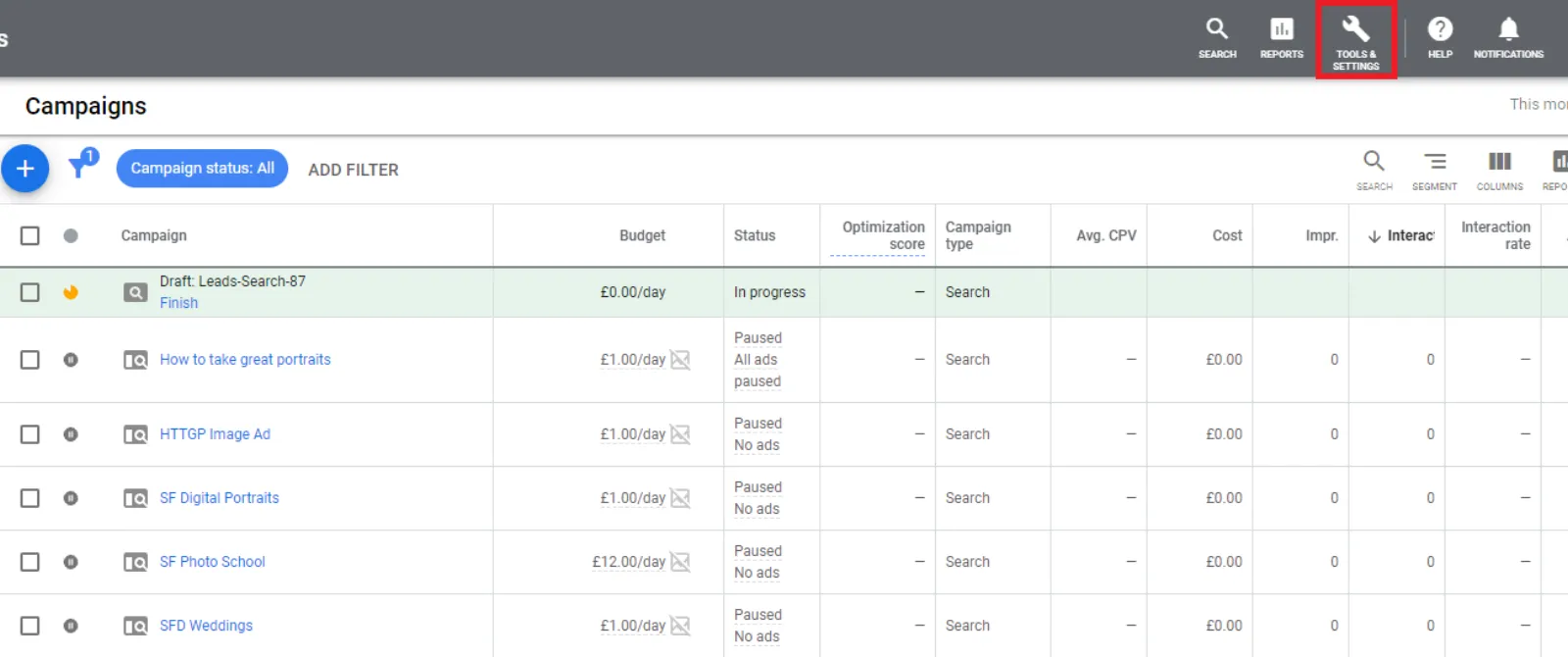
Step 1: Click on “Tools & Settings”
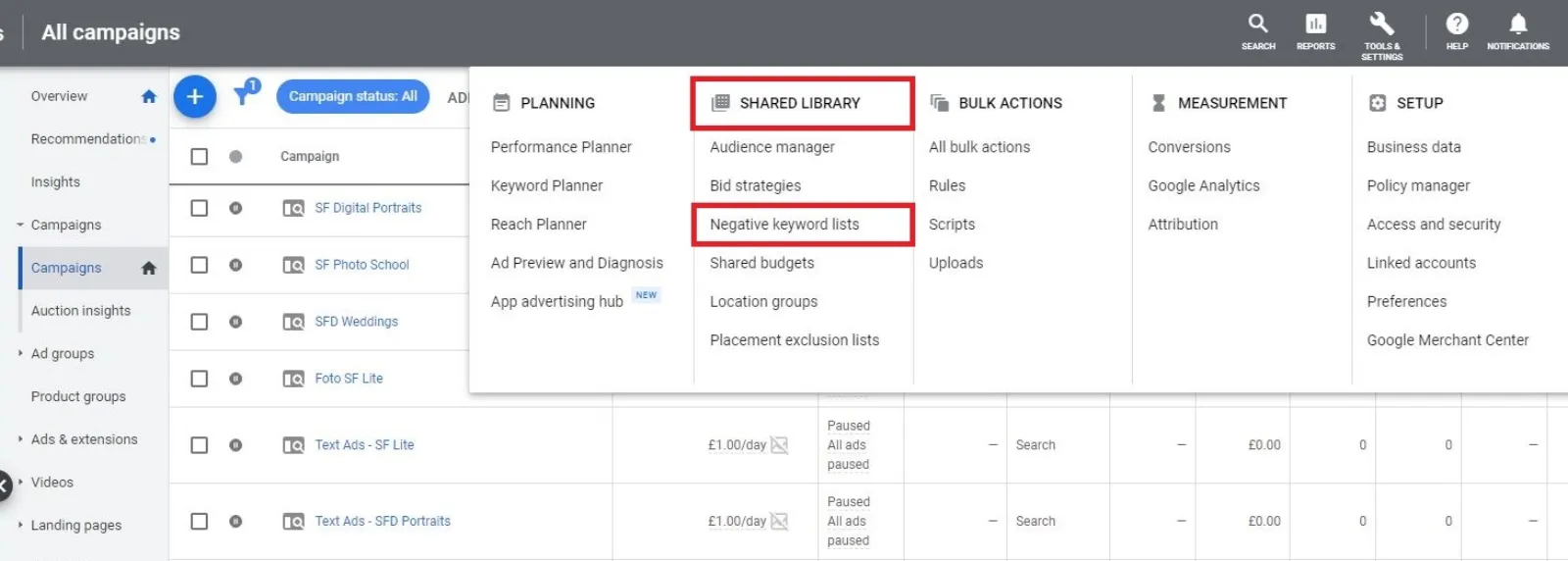
Step 2: Find the header “Shared Library” and click “Negative Keyword Lists”
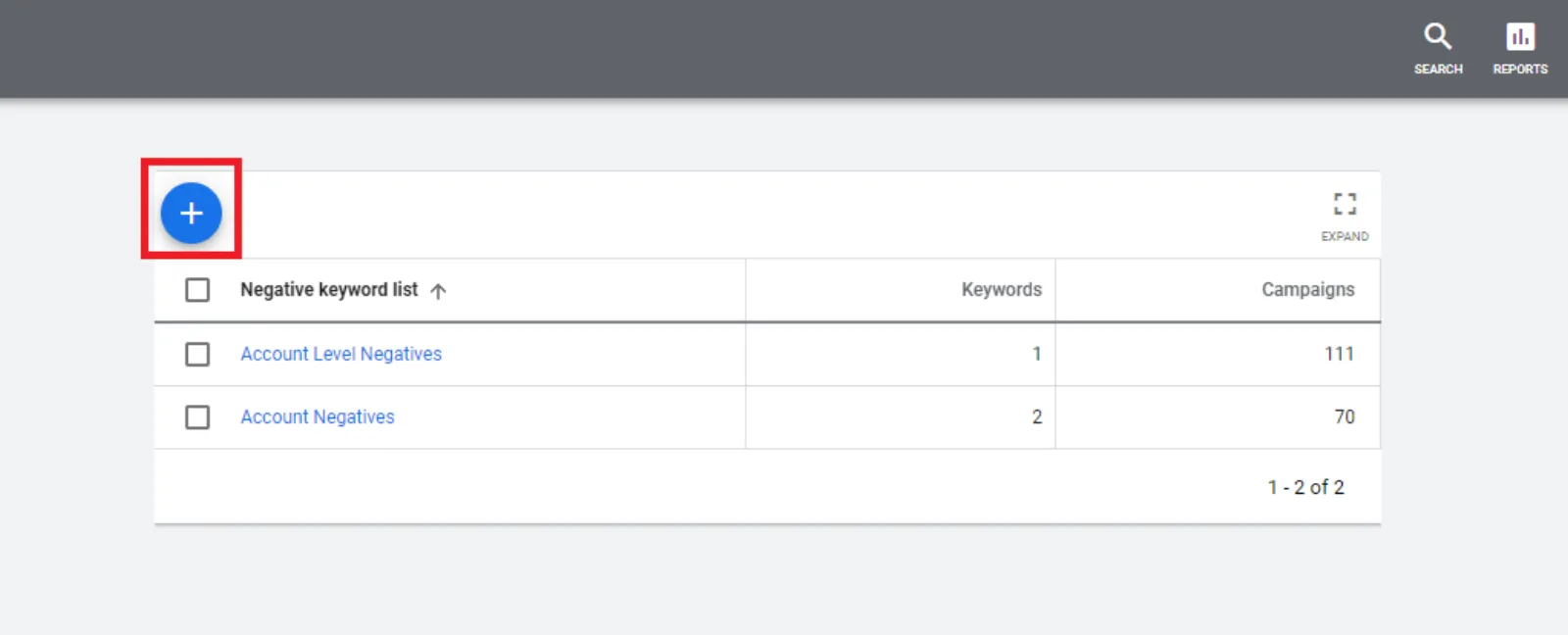
Step 3: Click on the blue plus (+) to create a new list
Step 4: Name the keyword list and then start adding in your negative keywords
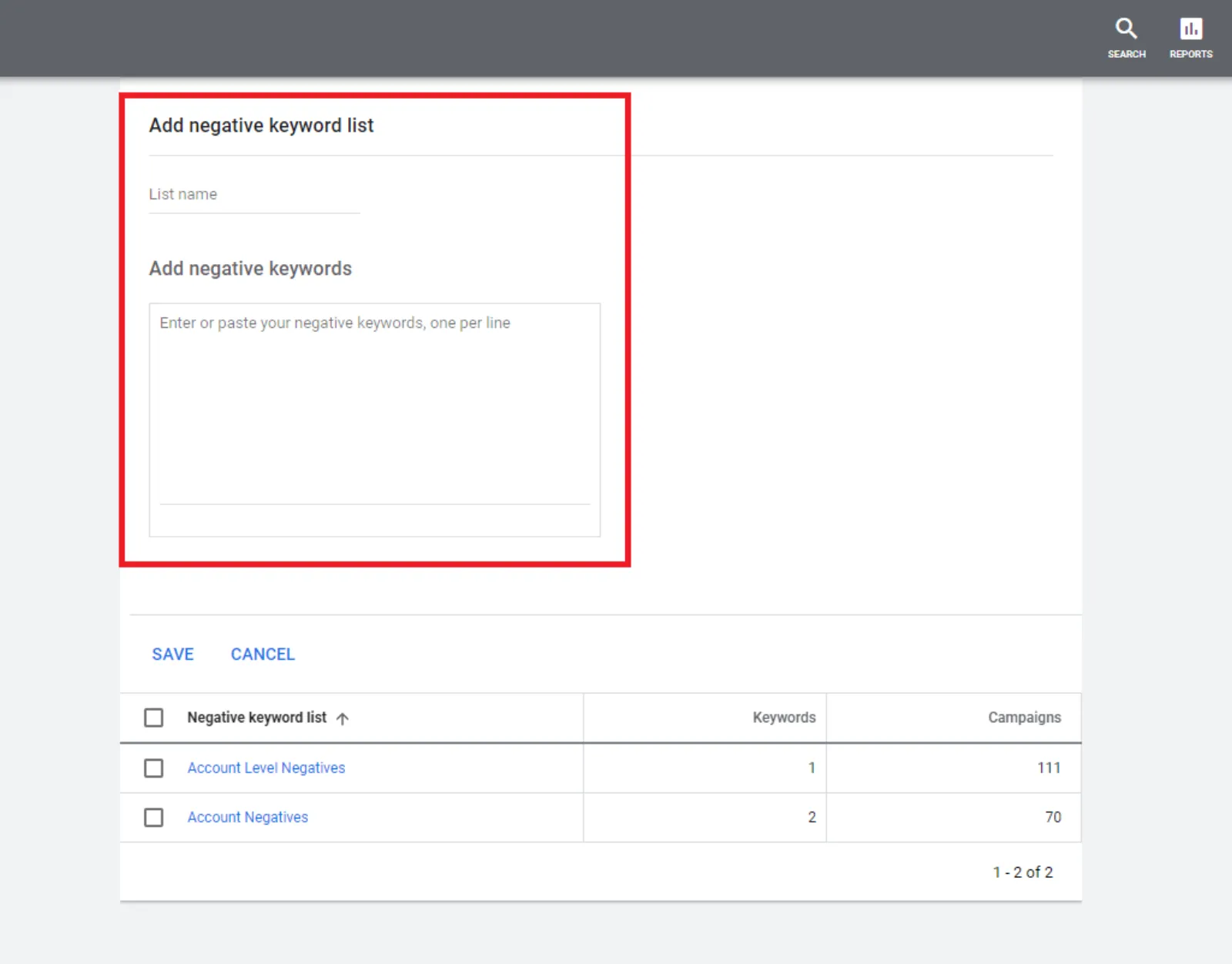
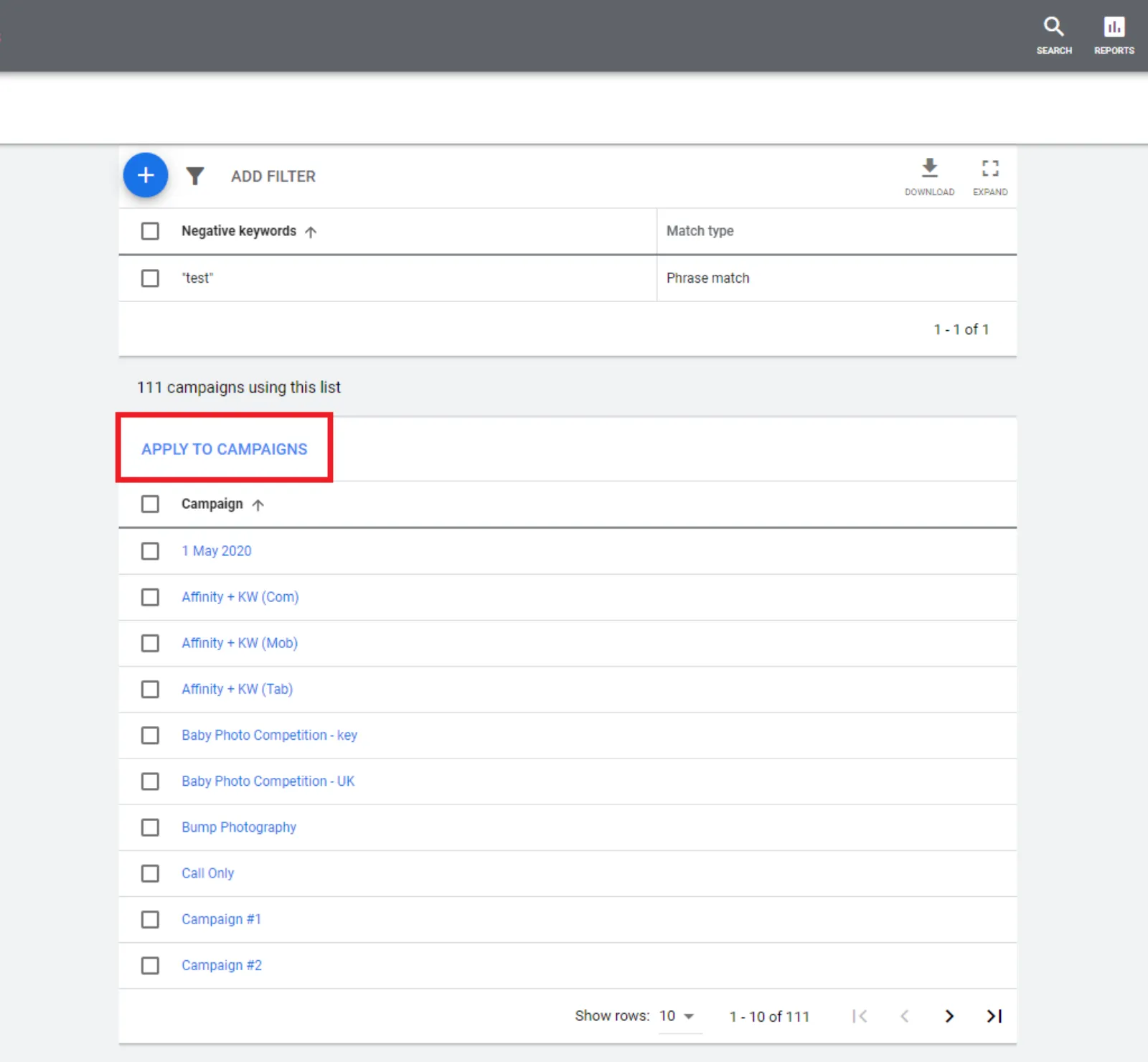
Step 5: Select your keyword list and press “apply to campaigns”
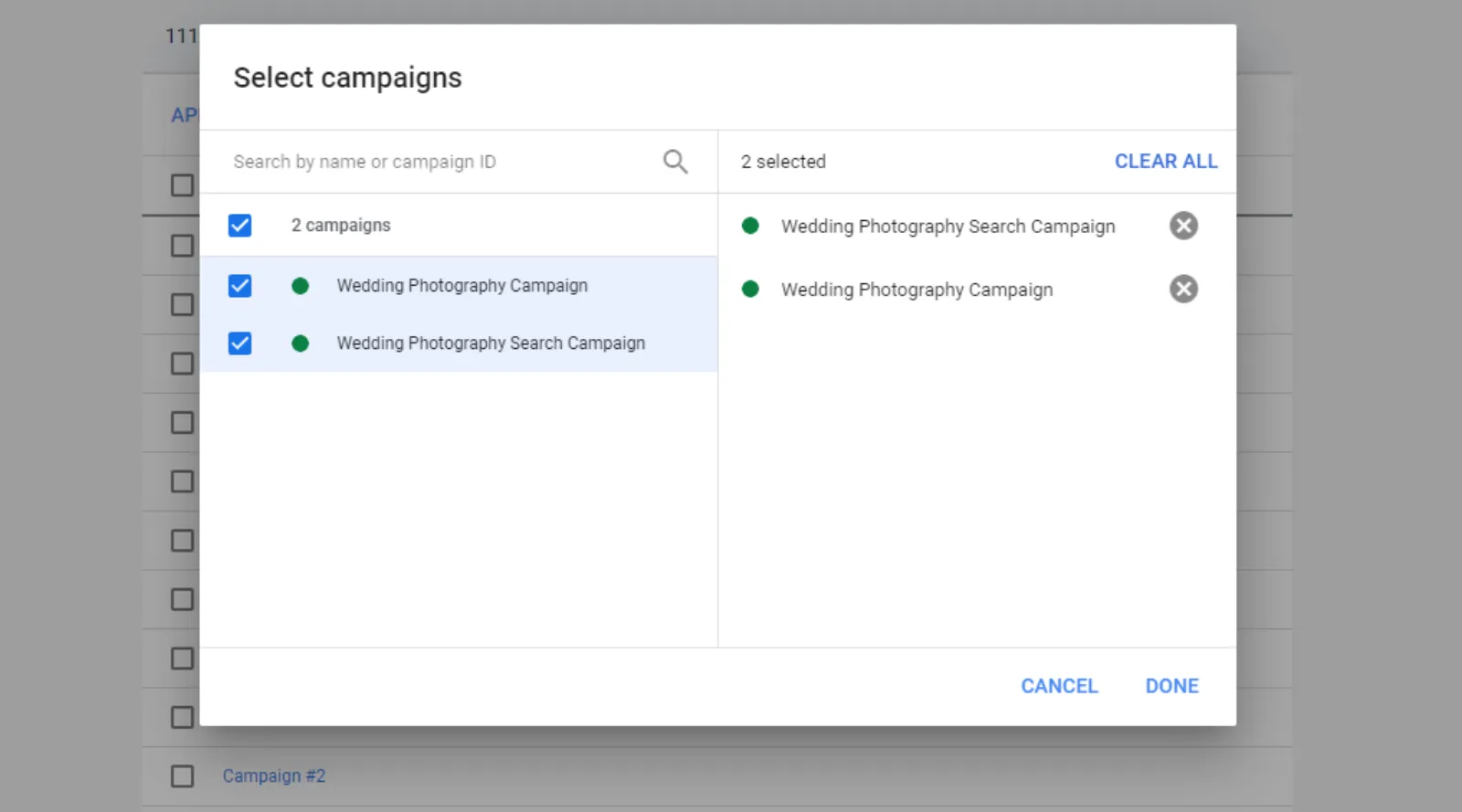
Step 6: Select which campaign you would like to link
We suggest creating an account level negative keyword list, with the generic negative keywords you know you don’t want to run throughout. Then to keep adding the negative keywords in that list, so that the whole account is blocked by those negative keywords. This will save you a lot of money.

Written by Uzair Kharawala
Partner at SF Digital Studios, a Google Premier Partner agency. Uzair has been helping businesses grow with Google Ads since 2002 and teaches it every week on YouTube.
Get our best Google Ads tips by email
New articles and videos, straight to your inbox. Unsubscribe any time.