
Google gets about nine out of ten searches in the UK. So most owners stop there, and that is fair. It is where the crowd is.
But the other one in ten is still a lot of people. And they aren't the same people.

Get Found, Get Chosen, Get Your Time Back
A free one-day marketing seminar in Milton Keynes · 10 November 2026
This post is about Bing Ads for a local business. It covers who those searchers are and what they cost to reach. It also shows how to set it up in an afternoon.
Get your free Marketing Action PlanNot sure where to start? Answer a few questions and get your plan in about a minute. No email needed.
Get my plan →Bing Ads is now called Microsoft Advertising, or Microsoft Ads for short. Most people still say Bing Ads, so I'll use both names here. They mean the same thing.
I have run Google Ads accounts for almost 15 years. Microsoft Ads is the channel I would add next for most local firms that already get leads from Google. It isn't right for everyone, and I'll show you how to tell.
What Are Bing Ads For A Local Business?
Bing Ads are paid search adverts. They show when someone searches on Bing, Yahoo, DuckDuckGo or other sites that use Microsoft's results. For a local business, they work like Google Ads. You pick the searches, set a budget and pay when someone clicks. The difference is who is searching.
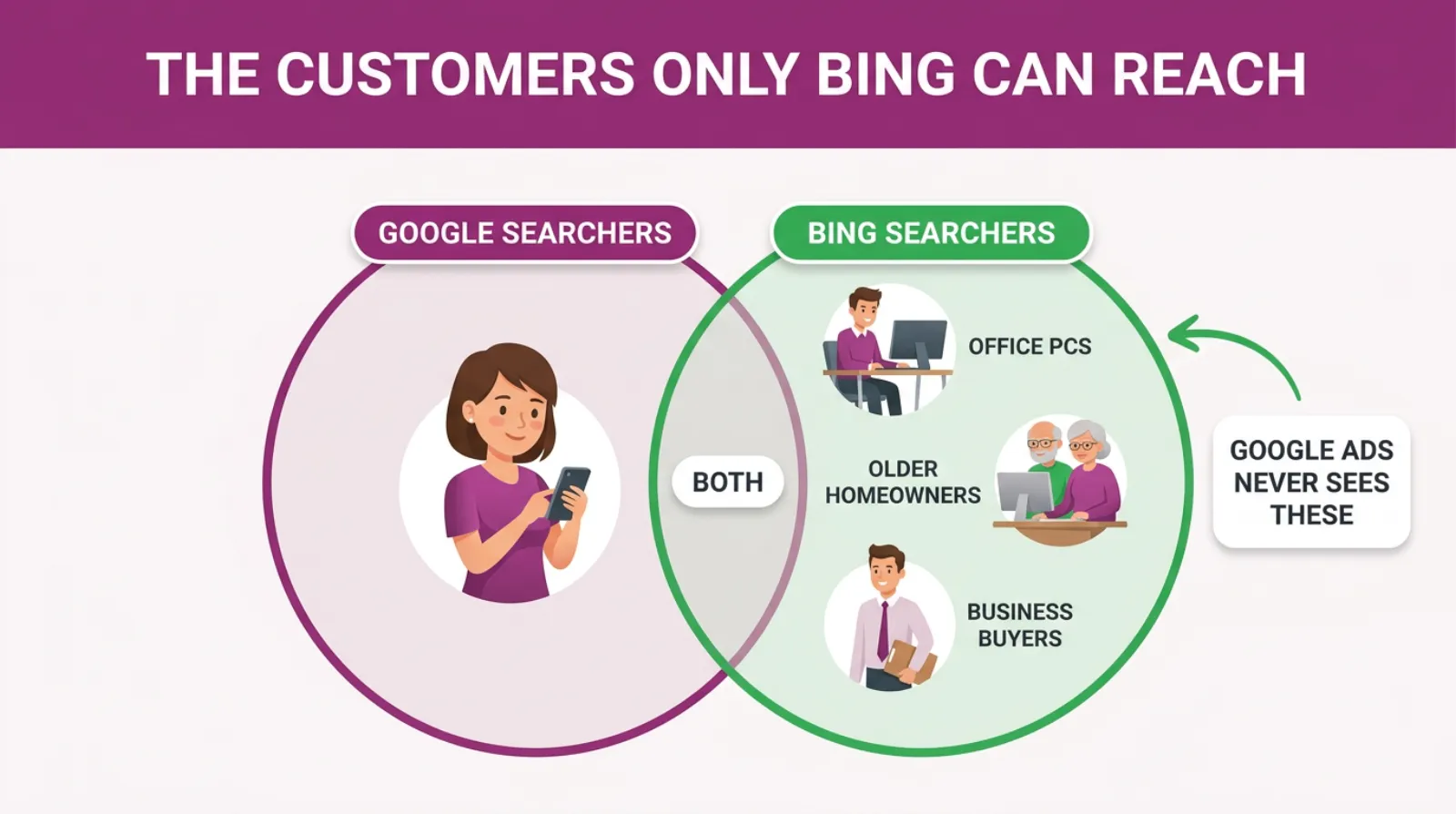
That last point is the whole story. The people who search on Bing tend to sit at a computer, not a phone. Many of them are at work, and many are older.
They are not on Bing because they chose it. Most of them are on Bing because it came with the computer.
So if your best customers are homeowners over 50, office managers or other businesses, a good share of them may never see your Google ad. Not because your ad is weak, but because they never opened Google.
Who Actually Uses Bing In The UK?
Bing is mostly a desktop search engine. As of September 2026, Statcounter's figures show Bing had 18.33 percent of UK desktop searches, against 75.99 percent for Google. On all devices together, Bing's share drops to about 6 percent.
That gap tells you who the searchers are. They are sitting at a laptop or a desk, not scrolling on a phone.
The desktop figure also moves around a lot. Statcounter had Bing at about 10 percent of UK desktop searches in August 2026.
A month later it was over 18 percent. So treat any single month as a rough guide, not a fixed number.
Here's why so many people end up on Bing without meaning to. Windows computers come with the Edge browser. Edge uses Bing as its search engine out of the box. So does the search box on the Windows taskbar.
Plenty of people never change that. Think of the office PC at a firm of accountants. Or a school business manager on a work machine. Think of a retired couple using the computer their grandson set up.
They type their search into whatever box is in front of them. On millions of computers, that box sends the search to Bing.
Microsoft's results also power other sites. Yahoo uses them, and so does DuckDuckGo, which many privacy-minded people choose on purpose. Microsoft's Copilot assistant also pulls in Bing results and can show ads.
So "Bing" really means a network of places. Microsoft calls it the Microsoft Search Network.
Why Would Google Never Show You These Customers?
Google can only show your ad to people who search on Google. That sounds obvious, but it is the reason this channel exists.
Say a homeowner types "roofer near me" into Bing. Your Google campaign doesn't take part in that search at all.
It does not matter how much you bid. It does not matter how good your ad is. The search happened somewhere else.
Most local owners never think about this. They see Google's nine-in-ten share and assume the rest is too small to matter.
But look at what the rest is made of. It's mostly desktop searches, so it leans towards people at work and people at home with time to research.
Those are often the people who spend the most. A homeowner planning a new kitchen does the research on a big screen. It's usually in the evening. An office manager choosing a new cleaning firm does it at their desk.
Here is a simple way to see it. Say your Google campaign brings in 40 enquiries a month. If Microsoft Ads could add even four or five more from people Google never reached, that is worth having.
Those extra enquiries aren't stolen from your Google campaign. They come from people your Google campaign could never see.
There is also less competition. Most of your rivals run Google Ads and stop there. On Bing, you may be one of only two or three local firms bidding on your best searches.
That's why we usually call it the quiet channel. Fewer advertisers chase the same people, so you can often reach them for less.
The Customers Only Bing Can Reach
How Much Do Bing Ads Cost Compared With Google?
Bing Ads clicks usually cost less than the same clicks on Google, because fewer businesses are bidding.
Industry guides in 2026 often put the saving at around 20 to 35 percent per click. You will also get fewer clicks in total, because fewer people search there.
So it is cheaper per click, but smaller overall. That's the trade.
The saving is not guaranteed, though. It depends on your trade and your town. In some areas a big national firm bids hard on Bing too, and the gap shrinks.
There is no minimum spend. You set a daily budget, the same as on Google. You only pay when someone clicks a search ad.
Here's a rough worked example, with round numbers. Say your Google clicks cost £4 and you get 300 a month.
If Bing clicks cost about a quarter less, that is £3 each. If Bing brings you a fifth of the clicks, that's 60 clicks for about £180 a month.
At the same enquiry rate, those 60 clicks could bring three or four more enquiries. That is a test most local businesses can afford.
Treat the saving as a bonus, not the reason. The real reason is reaching people you cannot reach anywhere else.
Microsoft Ads Or Google Ads: Which Suits A Local Business?
For most local businesses, the answer is both, in that order. Google first, because it has far more searches. Microsoft Ads second, once Google is working and you want more of the same kind of enquiry.
Here's how the two compare for a local firm.
| Google Ads | Microsoft Ads | |
|---|---|---|
| Share of UK searches, all devices | About 91 percent | About 6 percent |
| Share of UK desktop searches | About 76 percent | About 18 percent |
| Typical searcher | Everyone, mostly on phones | Desktop users, often at work or older |
| Click cost | Higher, more competition | Usually lower, fewer bidders |
| Local listing | Google Business Profile | Bing Places for Business |
| Setting up | Build from scratch | Can copy your Google campaigns across |
| Extra targeting | Google's own audience lists | LinkedIn job and company data |
The share figures come from Statcounter for September 2026. The rest is how the two platforms work today.
Two lines matter most for a local firm: the typical searcher and the setting up. One tells you who you will reach. The other tells you how little work it takes.
What Can Microsoft Ads Do That Google Ads Can't?
Microsoft Ads can reach searchers Google can't, copy your Google campaigns across in minutes and target people by their job or company using LinkedIn data.
Google has nothing like that last one. For local firms that sell to other businesses, it is a real edge.
Let's take each of those in turn.
It reaches a different crowd. We've covered this already. Desktop users, office workers and people who never changed the search box on their computer.
It copies your Google work. Microsoft has a free import tool. It pulls in your Google Ads campaigns, keywords, ads and negative keywords, so you are not starting from nothing.
It knows people's jobs. Microsoft owns LinkedIn. That lets Microsoft Ads use LinkedIn profile data, such as company, industry and job function.
Say you run a commercial cleaning firm in Milton Keynes. You could raise your bids when the searcher works in facilities management. Google cannot tell you that.
It reaches people in Copilot. As more people ask AI assistants for advice, Microsoft is placing ads inside Copilot answers. It's early, but it is a door Google Ads does not open.
It's often less crowded. Fewer local rivals bid on Bing. That can mean better positions for less money.
None of this means Microsoft Ads is better than Google Ads. It is smaller. But it does things Google can't, and it costs little to try.
Which Local Businesses Do Best On Bing?
Local businesses whose customers are older, work at a desk or buy for a company tend to do best on Bing.
Think roofers, kitchen fitters, solicitors, accountants, care homes and firms that sell to other businesses. Trades that rely on young people searching on their phones tend to do worst.
Here are the kinds of businesses we'd usually test first.
- Home improvement firms whose buyers are homeowners over 45
- Solicitors, accountants and financial advisers
- Care homes, home care and mobility firms
- Commercial cleaners, IT support and other business services
- Driving schools, tutors and training firms where parents do the research
And here are the ones where we'd think twice.
- Takeaways, bars and nightlife, where people search on phones
- Very cheap, fast decisions where nobody does research
- Businesses not yet getting steady leads from Google
The last one matters most. If Google is not working yet, Microsoft Ads will not fix it. It'll copy the same problems onto a smaller channel.
Get Google working first. Then use Microsoft Ads to reach the people Google missed.
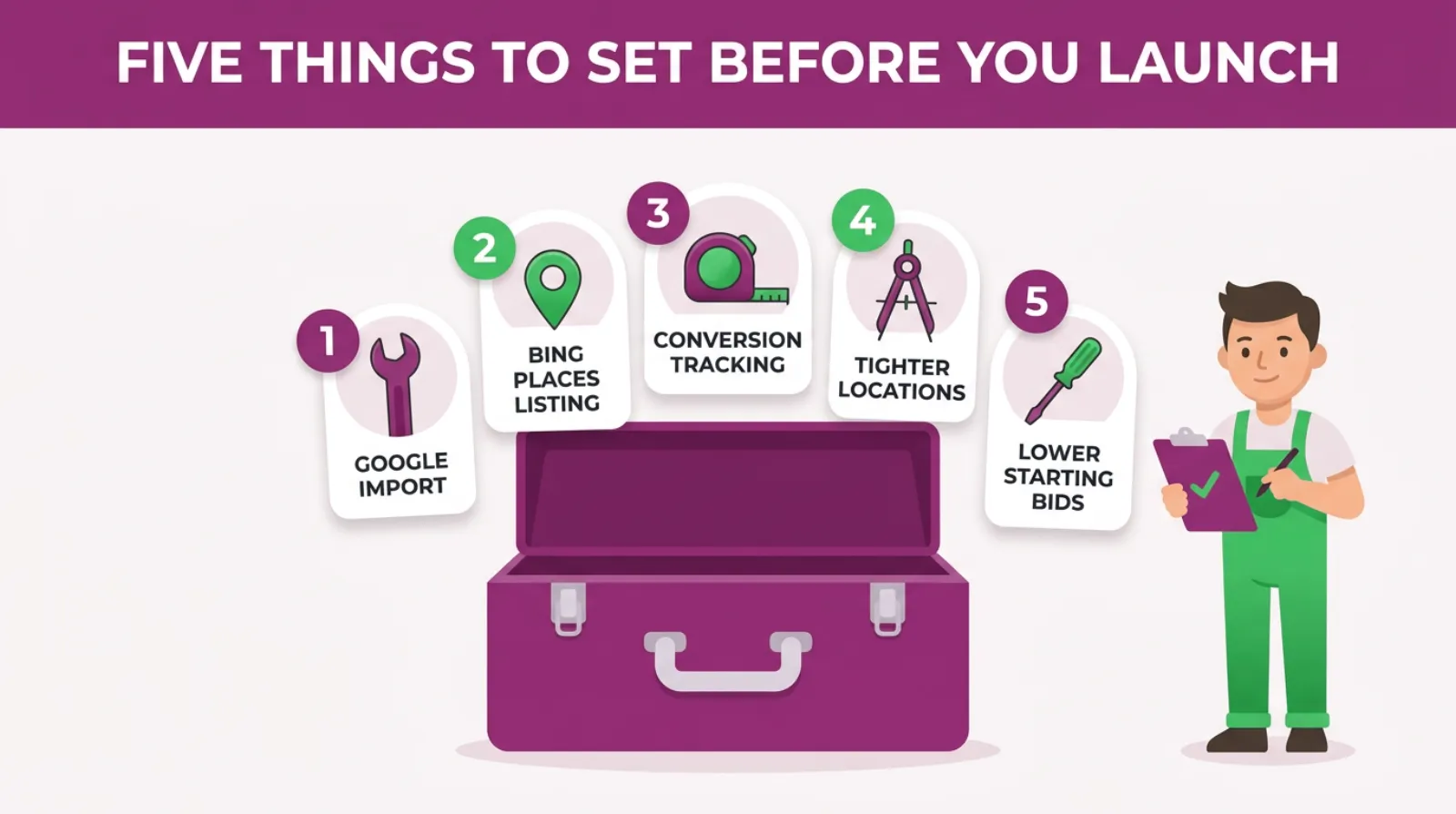
Five Things To Set Before You Launch On Bing
Do My Google Ads Work On Bing As They Are?
Mostly, yes. Your headlines, descriptions and keywords copy across and work fine on Bing. But a few small changes can make them work harder for the Bing crowd, who are often older and sitting at a desk with time to read.
Start with the headlines. A desktop searcher sees more of your ad than a phone user does, so every line gets read.
That means your descriptions matter more on Bing than they do on Google. Use them to answer the questions an older or business buyer asks before they ring, such as how long you've been going, whether you're insured and how fast you can come out.
Then check your phone number shows. Many Bing searchers still pick up the phone rather than fill in a form, especially for a trade or a professional service.
Last, look at your landing page on a big screen. Most owners only check their site on a phone now, because that's where Google traffic comes from.
A page that looks great on a phone can look empty on a desktop. Open it on a laptop and read it the way a Bing searcher would.
 LIVE
LIVELive every Tuesday at 2pm UK. Bring your marketing questions.
Get your Google, local SEO and AI questions answered live.
How Do I Set Up Microsoft Ads From My Google Account?
You can set up Microsoft Ads from your Google account in about an hour using Microsoft's free Google import tool.
You sign in to both, pick the campaigns you want and choose what to bring across. Your keywords, ads, budgets and negative keywords copy over in one go.
Here are the steps.
- Open a Microsoft Advertising account at ads.microsoft.com, using your business email.
- Go to Import and choose Import from Google Ads.
- Sign in to Google and give Microsoft permission to read your account.
- Pick the Google Ads account and only the campaigns that already bring in good leads.
- Choose Advanced import, so you can change bids and budgets on the way in.
- Set the import to run once, then check everything before you switch it on.
Microsoft's import tool can also run on a schedule, daily, weekly or monthly. That keeps your Microsoft campaigns in step with changes you make in Google.
We'd hold off on that at first. Run the import once, fix the settings, and only then decide if you want it to repeat.
Here's why. A scheduled import can copy a Google change straight over the top of a Microsoft fix. You change something on Bing, and the next import quietly puts it back.
Import your best campaigns only. If a Google campaign does not make money, do not copy it to a second channel.
Do I Need A Bing Places Listing?
Yes. Bing Places for Business is Microsoft's free local listing, the same idea as your Google Business Profile. It puts you on Bing Maps and in Bing's local results. It also feeds the address and phone number into your Microsoft ads.
If you already have a Google Business Profile, this takes ten minutes. Bing Places lets you import your Google listing, so your hours, photos and details come straight across.
Then check it carefully. Make sure the phone number is the one you want to ring. Then check your service area or address is right.
Many local firms skip this. That means their Bing ads show without a map pin, an address or opening hours.
Those extras make an ad bigger and more useful. A homeowner can see you're ten minutes away before they even click.
A free Bing Places listing is the cheapest win in this whole post. Do it even if you never run a Bing ad.
Which Settings Should I Change After The Import?
After the import, check four settings before you switch anything on: your locations, your search partners, your bids and your conversion tracking.
The import copies most of your Google work well. But it cannot know how Bing differs, and a few defaults can waste money.
Locations. Make sure each campaign targets people in your area, not people who show an interest in it. Otherwise someone in Leeds reading about Milton Keynes can see your ad.
Search partners. Microsoft shows ads on its own sites and on partner sites. Some partner traffic is fine, but some can bring poor clicks. Check where clicks come from in the first few weeks, and exclude any site that sends junk.
Bids. We usually start Microsoft bids about 20 percent below the Google ones. That is our working rule, not Microsoft's. Clicks often cost less on Bing, so there's no point paying Google prices on day one.
Tracking. Microsoft uses its own tracking tag, called UET, short for Universal Event Tracking. Add it to your site and set up the same enquiries you count in Google. Without it, you cannot tell if Bing is working.
There's one more to look for. Microsoft can make some of its own suggested changes to your account by itself. Check the recommendations area and turn off anything you do not want changed without asking.
How Much Should A Local Business Spend On Microsoft Ads?
Start with about a fifth of what you spend on Google search. That is our usual starting point for a local business.
It matches the smaller number of searches on Bing. If you spend £1,000 a month on Google search, start Microsoft Ads at about £200.
That gives you enough clicks to learn something in a month or two. It's also small enough that a weak start will not hurt.
Then let the numbers decide. If your cost per enquiry on Bing is the same as Google or lower, add more. If it is much higher after two months, fix the settings before you add a penny.
Here's the sum we use.
- Take your Google search budget for the month.
- Divide it by five for your Microsoft starting budget.
- Divide that by 30 for your daily budget.
- Check your cost per enquiry after 30 and 60 days.
So £1,000 on Google becomes £200 a month on Microsoft, or about £6.70 a day.
If that daily budget looks tiny, do not spread it thin. Put it on your one best service in your one best area.
A small budget on one service beats a small budget on everything. That rule works on Google, and it works on Bing too.
How Do I Know If Microsoft Ads Is Working?
You know Microsoft Ads is working when it brings in real enquiries at a cost you're happy with, and those enquiries turn into paying customers. Clicks and impressions are not enough. Count calls, forms and bookings, then check how many became jobs.
That means tracking has to be in place from day one. Add the UET tag and set up your enquiry goals. If you can, use a separate call tracking number on your Bing ads.
Then compare it with Google on the same terms. Here are the checks we run after the first two months.
- Cost per enquiry on Bing compared with Google
- How many Bing enquiries became paying customers
- Which searches brought the enquiries, and which wasted money
- Which partner sites sent clicks that never converted
Do not expect the same volume as Google. Bing will usually bring far fewer enquiries, and that's fine.
What you are looking for is quality at a fair price. Say 15 Bing enquiries a month turn into five jobs. That is a good channel, even if Google brings in 80.
One warning. Ask your team how each new customer found you, and write it down. Many owners never check, so a good Bing month goes unnoticed.
Why Isn't My Microsoft Ads Campaign Getting Clicks?
Most Microsoft Ads campaigns that get no clicks have bids that are too low, a tiny budget or keywords copied from Google that nobody types into Bing.
Your area may also be too small for Bing's lower search numbers. Check those four things before you give up on the channel.
Bing has fewer searches, so a narrow setup can mean almost no traffic. A campaign that works on Google for one small town might struggle. On Bing it could get only a handful of searches.
Here is what we'd check, in this order.
- Look at the search volume. Microsoft's keyword planner shows how many people search for each term in your area.
- Widen your area a little. If Google targets five miles, try ten or fifteen on Bing.
- Check your bids. If you cut them too hard, your ads may never win a place.
- Check Microsoft has approved your ads. It reviews ads too, and it holds some back.
Also check the match types. The import copies them across, but very tight keywords on a small channel can mean almost no searches.
Give it a few weeks before you judge. Bing traffic is thinner, so it takes longer to see a pattern.
Few clicks on Bing isn't failure. It is normal. No clicks at all usually means a setting needs fixing.
When Is Microsoft Ads Not Worth It?
Microsoft Ads is not worth it if Google isn't working yet, if your customers search mainly on phones or if you do not have time to check it.
It is a second channel, not a rescue plan. In those cases, the money is better spent fixing Google first.
It's only fair to say this plainly. Agencies love to sell more channels, and more channels are not always better.
Here's when we'd tell an owner to wait.
- Your Google campaigns do not bring steady, good enquiries yet
- Your customers are mostly young and search on their phones
- Your budget is already stretched thin on Google
- Nobody checks the account at least once a week
That last point catches people out. Bing campaigns cannot be left alone, any more than Google ones can. Search terms still drift, and partner sites still send junk clicks.
If any of those apply, sort them first. Microsoft Ads will still be there next quarter.
Your First 30 Days On Microsoft Ads
Here's a simple first month for a local business adding Microsoft Ads to a working Google account. It assumes Google already brings in steady enquiries.
- Week one. Claim your Bing Places listing and import it from Google.
- Week one. Open a Microsoft Ads account and import your best Google campaign only.
- Week one. Fix locations, bids and partner settings, then add the UET tracking tag.
- Week two. Switch on with about a fifth of your Google search budget.
- Week three. Check the search terms and add any junk as negative keywords.
- Week four. Compare cost per enquiry with Google and decide what to do next.
At the end of the month, you will have one of three answers. Bing works, so add budget. Bing is close, so fix and keep testing. Or Bing does not suit your customers, so switch it off.
All three are useful. You'll know for sure, instead of guessing, and it'll have cost you a few hundred pounds at most.
Frequently asked questions
Is Microsoft Ads the same as Bing Ads?
Yes. Microsoft renamed Bing Ads to Microsoft Advertising in 2019. It is the same platform, now covering Bing, Yahoo, DuckDuckGo and other partner sites.
Do Bing ads show on Yahoo and DuckDuckGo?
Yes. Microsoft's ads appear on Yahoo and DuckDuckGo as well as Bing. You can also choose whether to show on other partner sites in your campaign settings.
Should I run Microsoft Ads without Google Ads?
Usually not. Google has far more searches, so start there. Add Microsoft Ads once Google brings in steady enquiries.
Can I run Microsoft Ads on a small budget?
Yes. There's no minimum spend. Many local firms start with a few pounds a day on one service in one area.
Do Microsoft ads appear in Copilot?
Microsoft does show ads in some Copilot answers. It is still early, and you cannot yet buy those spots on their own.
How long does Microsoft Ads take to work?
Give it at least four to eight weeks. Bing has fewer searches, so it takes longer to collect enough data to judge it.
Keep Reading
If you want to go further with Microsoft Ads, these posts cover the next steps.
- How Does Microsoft Ads Compare To Google Ads?
- Is Microsoft Ads The Same As Bing Ads?
- How Do I Choose The Right Keywords For Microsoft Ads?
- Mastering Microsoft Ads Tracking: Your Definitive Guide to Unlocking Campaign Success
- Why Your “Set It and Forget It” Microsoft Ads Are Quietly Burning Through Your Budget
We picked these because each one covers a step from this post: comparing the two, keywords, tracking and keeping it in check.
Sources
The search share figures come from Statcounter, checked on 16 October 2026. The import steps come from Microsoft's own pages on its Google import tool, checked the same day.
- Desktop Search Engine Market Share United Kingdom
- Import tools
- Google Ads Import - Microsoft Advertising API
The Customers Are Already Searching
Google isn't the whole internet. It is most of it. But the slice it misses is full of people with money to spend and time to research.
Those people are already searching for what you sell. They are just doing it on a different search engine.
You don't need a big budget to reach them. You need a working Google account, a free Bing Places listing and an afternoon to copy your best campaign across.
Start small, track every enquiry and let the numbers tell you what to do next.
And if you would like someone to set it up with you, that's what we do at SF Digital every day.

Written by Uzair Kharawala
Partner at SF Digital Studios, a Google Premier Partner agency. Uzair has been helping businesses grow with Google Ads since 2002 and teaches it every week on YouTube.
Get our best Google Ads tips by email
New articles and videos, straight to your inbox. Unsubscribe any time.