
Someone at a desk in Northampton opens a new tab in Microsoft Edge. Before they type anything, a news feed appears. Somewhere in that feed is an advert for a local accountant.
That is a Bing display ad. Most small business owners do not know they exist, and plenty are paying for them without realising.

Get Found, Get Chosen, Get Your Time Back
A free one-day marketing seminar in Milton Keynes · 10 November 2026
This guide explains who actually sees Bing display ads and whether they are cheaper than Google's. It also shows how to test them without wasting money, and when to leave them alone.
Get your free Marketing Action PlanNot sure where to start? Answer a few questions and get your plan in about a minute. No email needed.
Get my plan →Are Bing Display Ads Cheaper Than Google's?
Not reliably. Microsoft does not publish average prices for its display ads, and we couldn't find a trustworthy UK benchmark comparing them with Google. Some accounts see cheaper clicks, others pay more. Judge Bing display ads on the cost per enquiry from your own small test, not on a promise.
That is not the exciting answer. But it is the honest one, and it saves you from a common mistake.
People often hear that Microsoft Ads is cheaper than Google Ads. That claim usually comes from search, where fewer advertisers compete for each click.
Display is a different market, and the same rule does not carry across.
What Are Bing Display Ads?
Bing display ads are the image, native and video adverts Microsoft shows on its own websites and apps, and on partner sites. Microsoft calls them audience ads. You run them through an Audience campaign in Microsoft Advertising.
Microsoft splits its network into two parts. Its Microsoft Learn page, updated in July 2026, says the Microsoft Advertising Network consists of search advertising and audience advertising.
Search ads show when someone types a search into Bing. They've told you what they want. That is intent.
Audience ads are different. Microsoft's own wording is that they show ads to your ideal audience when they interact with websites across the internet.
In plain English, they appear while people read, check email or browse.
There are three main formats. Each behaves differently.
Display ads are the classic picture adverts in fixed sizes.
Native ads are built to look like the content around them. An advert in an MSN news feed looks like another story, with an image, a headline and your business name.
Video ads play in video spaces across the network.
Many people still call all of this "Bing ads", because Microsoft Advertising was called Bing Ads until Microsoft renamed it in 2019 and brought search and display together under one brand. It is the same company and the same ad account.
Who Actually Sees Bing Display Ads?
People using Microsoft's own products see them most. That means readers of MSN and Microsoft Start, people checking Outlook.com email, Edge users opening a new tab and people playing Microsoft's casual games. Partner sites carry them too.
Microsoft's Learn page lists the places by name. It says audience ads can appear on sites like MSN, Microsoft Start, Microsoft Edge, Outlook.com and publisher partners.
Think about what each of those people is doing.
MSN and Microsoft Start readers are catching up on news, sport or the weather. Many arrive there because it's the Edge start page.
Outlook.com users are checking their personal email, sorting through bills, newsletters and messages from family, and the ad sits in or beside the inbox while they do it.
Edge users see a news feed every time they open a new tab. For people who use Edge at work, that can happen dozens of times a day.
Casual gamers are playing games like Solitaire or Mahjong on a lunch break or in the evening. They're relaxed, not shopping.
Notice the pattern. It's important. Almost nobody on that list is looking for a plumber, a solicitor or a dentist. They are busy with something else.
That doesn't make the audience worthless. It means you are interrupting people rather than answering them, exactly like Google display.
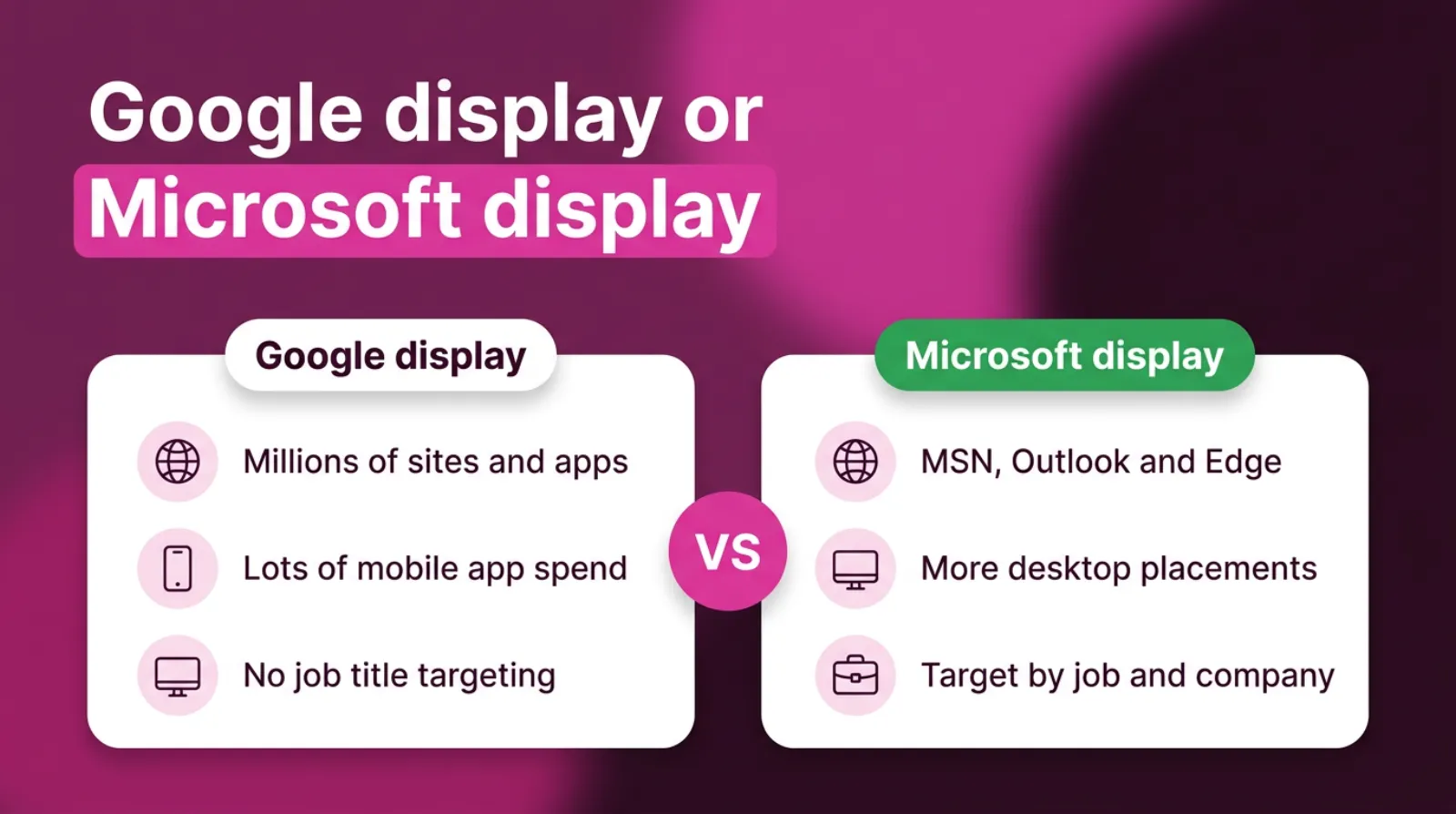
There's one big difference worth knowing. A lot of Google's display spend goes into mobile apps.
Microsoft's network leans on its own news, email and browser pages, and on desktop computers. For a business that sells to people at a desk, that can be a better fit.
Why Does This Matter For A Local Business?
It matters because you may already be paying for these placements without choosing them. Microsoft says its search ads may also appear on relevant sites, depending on your settings. So a "search only" campaign can quietly spend on display-style placements.
Here is how that happens. It's surprisingly common. Microsoft's Learn page says you can use ad distribution settings to show search ads across the entire Microsoft Advertising Network, or only on Microsoft sites and select traffic.
Many owners never open that setting. They import their Google campaigns, press go and assume every click came from a Bing search.
It also matters because of intent. A local business lives on enquiries from people who need help soon.
Display reaches people who are not asking yet, so it needs a tighter setup to pay its way.
And it matters because Microsoft's audience is different from Google's. If your customers are office workers, older homeowners or businesses, Microsoft's pages may reach them in places Google doesn't.
That is worth testing carefully, not ignoring.
Where Your Microsoft Ads Can Appear
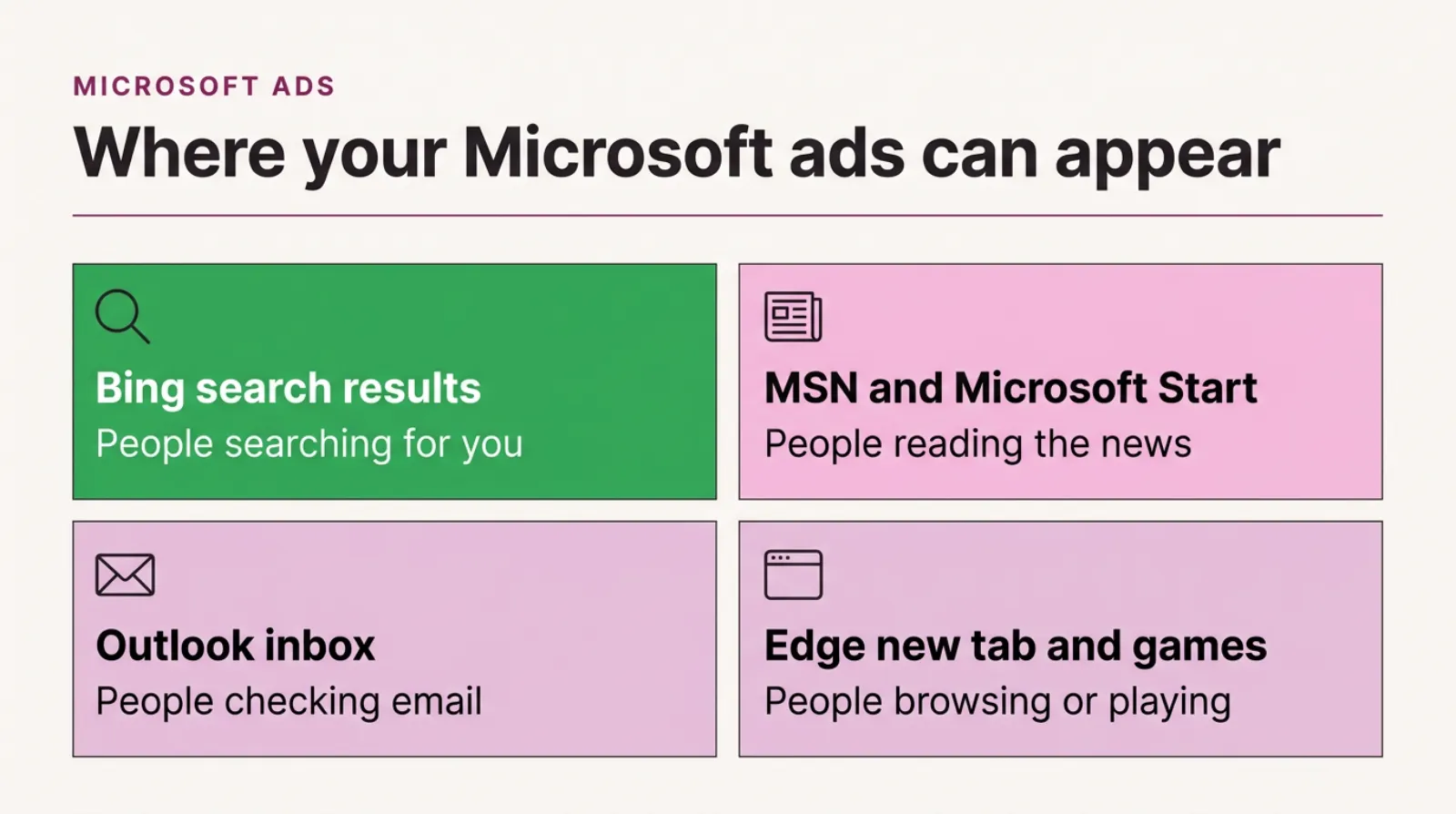
A grid of the four places Microsoft ads can appear: Bing search results, MSN and Microsoft Start, the Outlook inbox, and Edge new tabs with casual games, with Bing search marked as the best place for a local business to start.
When Are Bing Display Ads Worth Testing?
Bing display ads are worth testing once your Microsoft search ads already bring enquiries. They suit remarketing to past visitors, businesses selling to other businesses, and firms whose customers spend their day at a computer.
Here are the situations where we'd consider a test. Each one is specific.
Remarketing to your own visitors. Microsoft's display page says you can use audience targeting to reconnect with people who have already interacted with your business. Someone who looked at your services and left sees your name again while they read the news.
That is the strongest use for most local firms.
Selling to other businesses. Microsoft Advertising can target by company, industry and job function, using data from LinkedIn, which Microsoft owns. An accountant, IT firm or commercial cleaner can show ads to business owners in their area.
Google display can't target by job title like that.
Customers who live at a desk. If your buyers are office managers, finance directors or people working from home on a PC, Edge and Outlook put you in front of them during the working day.
Premium placements only. Since January 2026, Microsoft has offered placement targeting on its own sites. Its announcement says you can serve ads exclusively on premium Microsoft properties like MSN, Outlook, Microsoft Casual Games and Microsoft Edge.
That keeps you off unknown partner sites.
You already run Microsoft search. Your tracking, remarketing lists and account are already in place. A small display test costs little to add.
What is missing from that list? Finding brand-new local customers cheaply on a small budget. As with Google, search usually does that job far better.
Google Display Or Microsoft Display: How They Compare
How Does LinkedIn Targeting Work In Microsoft Display Ads?
Microsoft owns LinkedIn, so Microsoft Advertising can target people by the company they work for, their industry and their job function. You add those choices to an Audience campaign, and Microsoft shows your ads to matching people across its network.
For a local business that sells to other businesses, this is the most useful thing Microsoft display offers. Google display has nothing quite like it.
Picture a commercial cleaning firm in Luton. It does not want every adult in Luton. It wants office managers and facilities staff at businesses within 15 miles.
With job function and location together, Microsoft can get close to that. The audience is small, but every person in it could plausibly buy.
There are limits to keep in mind. The targeting relies on what people put on their LinkedIn profiles, and not everyone keeps theirs up to date.
Small towns can also produce audiences too small to run well.
Start wide on job function and narrow on location. A tight radius with a sensible range of roles usually beats a perfect job title in a tiny area.
It works best alongside remarketing. Business buyers rarely act on the first advert.
Seeing your name in Outlook, then in an Edge news feed, then in a Bing search builds the trust that leads to a call.
Who Shouldn't Bother With Bing Display Ads?
Most consumer trades with urgent jobs shouldn't bother. If people need you today, like an emergency plumber or a locksmith, they search. Display adds little.
The same goes for businesses with very low website traffic. Remarketing needs visitors to build a list.
If your site gets a few dozen visits a month, there's nobody to remarket to yet.
It's also a poor fit if your Microsoft search ads are not tracked. Without conversion data, you can't judge search, and you certainly can't judge display.
And if your whole budget is under £20 a day across every platform, keep it simple. Put it into Google search, a brand campaign and Microsoft search.
That's usually where the enquiries are.
There's no shame in skipping display. Plenty of profitable local businesses never run it. They spend their money where people are already looking.
You can always revisit it later. When your site grows and your search campaigns are fully funded, a small remarketing test makes far more sense.
How Much Do Bing Display Ads Cost?
Bing display ads cost whatever the auction sets for your audience, and Microsoft does not publish an average. You set a daily budget and a bid strategy, and you can stop at any time. For a local test, £5 to £10 a day is usually enough.
There is no minimum spend for a small business. Microsoft's display page simply says to decide on a budget and bid strategy to achieve your performance goals.
 LIVE
Live every Tuesday at 2pm UK. Bring your marketing questions.
Get your Google, local SEO and AI questions answered live.
So how do you know if it is good value? Use the same test as any advert. What did each enquiry cost? That is the only number that settles it.
If Microsoft display brings enquiries at £60 each and Google search brings them at £40, Google search wins. That's true however cheap the display clicks look.
These figures are illustrative, not a forecast.
Cheap clicks and cheap customers are not the same thing. Display clicks are often cheap because the people clicking weren't looking for you. Judge the campaign on enquiries, or do not judge it at all.
A small remarketing list also limits spend. If only a few hundred people visit your site each month, the campaign cannot usefully spend much without showing them the same advert again and again.
Bing Display Ads Or Google Display Ads: Which Should You Try First?
For most local businesses, try neither until search is working on both platforms. After that, start display with remarketing on whichever platform already sends you more website visitors. For business-to-business firms, Microsoft display often deserves the first test.
Here is how the two compare for a typical local service business.
| Google display | Microsoft display | |
|---|---|---|
| Where ads show | Millions of websites, apps, YouTube and Gmail | MSN, Microsoft Start, Outlook, Edge, casual games and partner sites |
| Share of spend in mobile apps | Often high on default settings | Lower, with more desktop placements |
| Target by job title or company | No | Yes, using LinkedIn data |
| Placement control | Exclusions after you see where ads ran | Placement targeting on Microsoft's own sites |
| Remarketing | Yes | Yes |
| Best first use | Remarketing to past visitors | Remarketing, or reaching business buyers |
Neither column is better for everyone. Context decides. The right choice depends on who your customers are and where they spend their time.
Are Your Microsoft Search Ads Already Running On Websites?
Possibly, yes. Microsoft says search ads may also appear on relevant sites, depending on your ad distribution settings. Check the setting in each search campaign to see whether it is the entire network or Microsoft sites and select traffic.
This is the most common surprise we see in Microsoft accounts. The owner thinks they're paying for Bing searches. Part of the budget is going elsewhere.
Here's how to check in a few minutes. You'll need your login.
- Open your Microsoft Advertising account and pick a search campaign.
- Open the campaign settings and find the ad distribution or network setting.
- See whether it is set to the whole network or to Microsoft sites and select traffic.
- Open the reports and look at where your ads showed and what each placement cost.
- Compare the cost per enquiry for search placements with everything else.
If the other placements bring enquiries at a good price, leave them on. If they don't, narrow the setting and move that money back into search.
Do not assume the default is right for you. Defaults are built to spend your budget, not to protect it.
How Do You Set Up Microsoft Audience Ads Without Wasting Money?
Start with remarketing, limit where ads can appear, target only your service area and track real enquiries before you judge anything. Those four steps stop most of the waste.
Here's the setup we'd use for a first test. Keep it small.
- Install the Microsoft UET tag on your website. It is Microsoft's tracking code, and it powers both conversion tracking and remarketing lists.
- Set up conversions for calls and form fills. Without them, you are guessing.
- Build a remarketing list of people who visited your site in the last 30 days.
- Create an Audience campaign aimed at that list only. Leave wider audiences off for now.
- Set location to your real service area. Use people in your area, not people interested in it.
- Use placement targeting to stay on Microsoft's own sites, such as MSN, Outlook and Edge.
- Exclude any partner websites that take money without bringing enquiries.
- Set a small daily budget and leave it for four to six weeks.
Steps 1, 2 and 4 matter most. Get those right and the test can't do much damage, even if the rest is not perfect.
Here is a tip from almost 15 years of running paid ads for small businesses. Write down your cost per enquiry from search before the test starts.
It gives you a clear target to beat.
What Should A Microsoft Display Ad Look Like?
A good Microsoft display ad looks like useful local content, not a banner. It names the town, shows a real photo and offers one clear next step.
That matters most for native ads. They sit in a news feed, so they compete with stories. A stock photo and a slogan look out of place there, and people scroll past.
Here's what tends to work. None of it costs extra.
Use a real photo. Your team, your van, your office or your finished work beats any stock image.
Write a headline like a news story. "What Milton Keynes landlords are getting wrong about tax" reads better in a feed than "Expert accountants, call today".
Name the town or area. It tells local readers this is for them, and tells everyone else to scroll on.
Keep the logo clear and simple. Ads often show small, so fine detail disappears.
Send people to a page that matches the ad. If the headline promises a checklist, the page should open with the checklist.
For remarketing, speak to people who already know you. "Still looking for an accountant before January?" works because it is true.
How Do You Know If Bing Display Ads Are Working?
They are working when they bring tracked enquiries at a cost per enquiry you're happy with. Impressions and clicks alone do not tell you that.
Start with the conversions column in Microsoft Advertising. Calls and form fills from your UET tag should all count.
Then look at where the ads appeared. Microsoft's January 2026 update added a content targeting report. It shows where your ads are served across content categories and Microsoft properties.
Check for these four signals. Start with the first.
Enquiries the campaign can claim. People who clicked and then called or filled in a form. This is the evidence that matters most.
Placements you would be happy to pay for. Most spend should sit on Microsoft's own pages or partner sites that make sense for your customers.
More searches for your business name. Good remarketing often shows up as extra brand searches on Bing and Google.
A sensible frequency. If a small list is seeing your ad many times a day, the campaign is spending too hard for its audience.
Compare the cost per enquiry with your search campaigns. If display costs twice as much per enquiry, the decision is easy.
When Should You Switch Bing Display Ads Off?
Switch them off when they haven't brought tracked enquiries after four to six weeks, when most spend goes to placements you would not choose, or when your search campaigns are short of budget. Any one of those is enough.
No enquiries after a fair test. If tracking works and display has brought nothing in six weeks, more time rarely fixes it.
Spend in the wrong places. If partner sites or casual games take most of the money, tighten placement targeting and retest once. If nothing improves, stop.
Search is limited by budget. Every pound in display is a pound not spent on people searching for you. Search should be fully funded first.
Switching off isn't failure. It's a decision, and often a good one, because the same budget moved into well-run search usually brings more enquiries within a few weeks. It is moving money to where it already works, and you can test again when your site has more visitors.
What About Performance Max On Microsoft Ads?
Performance Max on Microsoft Advertising can show your ads in both search and audience placements. Microsoft's Learn page lists Performance Max under both. So it can spend on display-style placements even if you never created a display campaign.
That is not automatically bad. It just needs watching. Performance Max can work well with good conversion tracking and enough data.
But it hides more of the detail. You see less about where each pound went, and small local accounts rarely give it enough enquiries to learn from quickly.
If you run Performance Max on Microsoft, treat it like a display campaign when you review it. The same questions apply, and the same answers should decide what happens next. Check placements, check cost per enquiry and compare it with plain search.
What Mistakes Waste The Most Microsoft Display Budget?
The costliest mistakes come from settings nobody checks. Here are the six we see most often.
- Importing Google campaigns and never checking the ad distribution setting. Search ads end up on sites the owner never chose.
- Starting with broad audiences instead of remarketing. It reaches lots of people who'll never need you.
- Skipping the UET tag. No tag means no remarketing and no reliable conversion data.
- Targeting people interested in your area rather than in it.
- Judging the campaign after a week. Display needs time, and early results swing wildly.
- Running display while search is limited by budget. That's paying for awareness while turning away ready buyers.
The first one is the easiest to fix. Open each Microsoft search campaign today and look at its distribution setting.
A Worked Example: One Accountant, Six Weeks
Picture an accountancy firm in Bedford that serves small businesses. The firm, the figures and the result here are illustrative, not a real client.
The firm runs Microsoft search ads at £15 a day, imported from Google. Enquiries are steady but the cost per enquiry seems high. Nobody has looked at the settings since the import.
In week one, they check the ad distribution setting. It is on the entire network, and a slice of spend has gone to sites outside search.
They narrow it and track the change.
In week two, they install the UET tag properly and set up call and form conversions. They build a remarketing list and a second list of business owners within 20 miles, using company and job targeting.
In weeks three to six, a small Audience campaign runs at £6 a day. It uses placement targeting on MSN, Outlook and Edge only, with native ads that name Bedford and feature the firm's real team.
The remarketing ads bring a few enquiries from people who'd visited the "bookkeeping for small business" page. The business-owner audience brings clicks but fewer calls, so they pause it.
The result is typical of a good test. It's rarely dramatic. One part works and stays. One part does not and stops. Search gets its full budget back, and nobody's guessing any more.
Frequently asked questions
What are Bing display ads called now?
Microsoft calls them audience ads, and you run them through an Audience campaign in Microsoft Advertising. They include display, native and video formats shown across Microsoft's sites and partner sites.
Where do Microsoft audience ads appear?
Microsoft says they can appear on sites like MSN, Microsoft Start, Microsoft Edge, Outlook.com and publisher partners. Placement targeting lets you limit them to Microsoft's own sites, including Microsoft Casual Games.
Are Microsoft Ads cheaper than Google Ads?
Microsoft search clicks are often cheaper because fewer advertisers compete, but this varies by industry and area. For display, there's no reliable public benchmark, so test it and compare cost per enquiry.
Can I stop my Microsoft search ads showing on other websites?
Yes. Change the ad distribution setting in each search campaign from the entire network to Microsoft sites and select traffic. Then check your placement reports to confirm the change.
Do I need the UET tag for Microsoft display ads?
Yes, if you want remarketing or reliable conversion tracking. The UET tag is Microsoft's website tracking code, and it builds the lists that make remarketing possible.
Can I target business owners with Microsoft display ads?
Yes. Microsoft Advertising can target by company, industry and job function using LinkedIn data. Google display cannot target by job title in the same way.
Keep Reading
These posts go deeper on the parts of Microsoft Ads that local businesses ask us about most.
- What Is The Microsoft Audience Network And How Does It Work?
- Is Microsoft Ads The Same As Bing Ads?
- How To Use Microsoft Ads’ LinkedIn Targeting To Reach B2B Buyers Google Can’t See
- Why Your “Set It and Forget It” Microsoft Ads Are Quietly Burning Through Your Budget
- Where Half Your Display Budget Quietly Goes
We picked these because each one covers a next step: the network itself, the naming, LinkedIn targeting, settings and display waste.
Sources
The Microsoft facts in this post come from Microsoft's own pages, which we checked on 25-10-2026. Settings and menus change, so check them before you rely on a step.
- What is the Microsoft Advertising Network?
- Performance Max updates and other product news for January 2026
- Display and Native ads
So, Should You Test Bing Display Ads?
Start with one question. Be honest about the answer. Are your Microsoft search ads already bringing enquiries at a price you are happy with? Check that number first.
If they aren't, fix search first. Check the distribution setting today, because that alone can change your results.
If they are, set up a small remarketing test on Microsoft's own sites. Give it four to six weeks and judge it on enquiries, not clicks.
And if you would like a second pair of eyes, book a call. We'll look at your Microsoft settings with you and tell you straight whether display deserves a test.

Written by Uzair Kharawala
Partner at SF Digital Studios, a Google Premier Partner agency. Uzair has been helping businesses grow with Google Ads since 2002 and teaches it every week on YouTube.
Get our best Google Ads tips by email
New articles and videos, straight to your inbox. Unsubscribe any time.