
You open your Google Ads account and the clicks are there, hundreds of them, and the money has gone out with them.
But the phone has been quiet. The diary looks the same as it did last month.

Get Found, Get Chosen, Get Your Time Back
A free one-day marketing seminar in Milton Keynes · 10-11-2026
Google Ads clicks but no customers is the most common complaint we hear from business owners. It is also the most misread. Most people blame the ads, cut the budget or switch agency, and then a few months later the same thing happens all over again.
Get your free Marketing Action PlanNot sure where to start? Answer a few questions and get your plan in about a minute. No email needed.
Get my plan →Here is the thing. A click is not a customer.
Between the two sits a chain of small steps, and the account breaks at one of them. Fix the wrong step and you spend more money for the same result.
This guide walks you through that chain, one link at a time. You will learn where each break shows up, how to check it yourself and what to fix first, with no jargon and no need to be an expert.
I have run Google Ads accounts for almost 15 years. The pattern is the same in a plumbing firm, a solicitor or a shop. The break is rarely where the owner thinks it is.
Why Does Google Ads Get Clicks But No Customers?
Google Ads gets clicks but no customers when something breaks between the search and the sale. The usual causes are the wrong searches, an ad that promises the wrong thing, a weak landing page, missed calls, slow follow-up, or tracking that counts the wrong result. Clicks prove the ad works. Something after the click doesn't.
That is the short answer. The longer answer is that you need to find which link is broken before you change anything.
Most owners skip that step. They see "clicks but no customers" and reach for the budget dial. But a smaller budget spent on a broken chain just loses money more slowly.
So the rest of this guide treats your account like a pipe with six joints. We'll check each joint in the order the money flows through it.
What Does "Clicks But No Customers" Really Mean?
A click means one person tapped your ad and landed on your website. That is all it means. It doesn't mean they wanted to buy, and it does not mean they could reach you.
Think of a shop on a busy high street where footfall is high all day. People walk in, look around and walk out again. The till never rings.
You wouldn't fix that shop by buying more footfall. You would ask why they walked out. Were they in the wrong shop? Was the price wrong? Did nobody serve them? Those are the questions that matter.
Google Ads works the same way. The click is the footfall and the customer is the till ringing.
Your job is to find the gap between the two.
Here's the chain every click has to travel before it becomes paid work.
- Someone types a search into Google.
- Your ad shows and makes them a promise.
- They tap and land on a page.
- They call, fill in a form or send a message.
- Someone at your business answers and follows up.
- The sale happens, and Google is told about it.
A break at any one of those six links gives you the same symptom. Clicks come in. Customers don't. That is why the symptom alone tells you so little.
Why Should You Care Where The Chain Breaks?
You should care because each break has a different fix, and the wrong fix costs money. Cut the budget when the real problem is a missed phone call, and you lose the few good leads you had.
Let's put some simple numbers on it. Say you spend £1,500 a month and pay £3 a click. That buys around 500 visits a month.
If 5 percent of those visits turn into an enquiry, that's 25 enquiries. If you win a third of them, that is about eight new customers. That is a healthy month for most local firms.
Now break one link. Maybe half the calls go to voicemail and nobody rings back.
You still pay for all 500 clicks, but your eight customers drop to four.
The cost per customer just doubled, and nothing in the ads changed. Google Ads looks broken. The real leak was in the office.
That is why we always trace the chain before touching a bid or a budget. It's slower for a day. It is far cheaper over a year.
There's a second reason it matters. Google's bidding learns from what you tell it.
If the chain breaks at the last link, Google learns from the wrong signals, and then it goes off and finds more of the wrong people, faster than before.
The Six Places A Google Ads Account Breaks
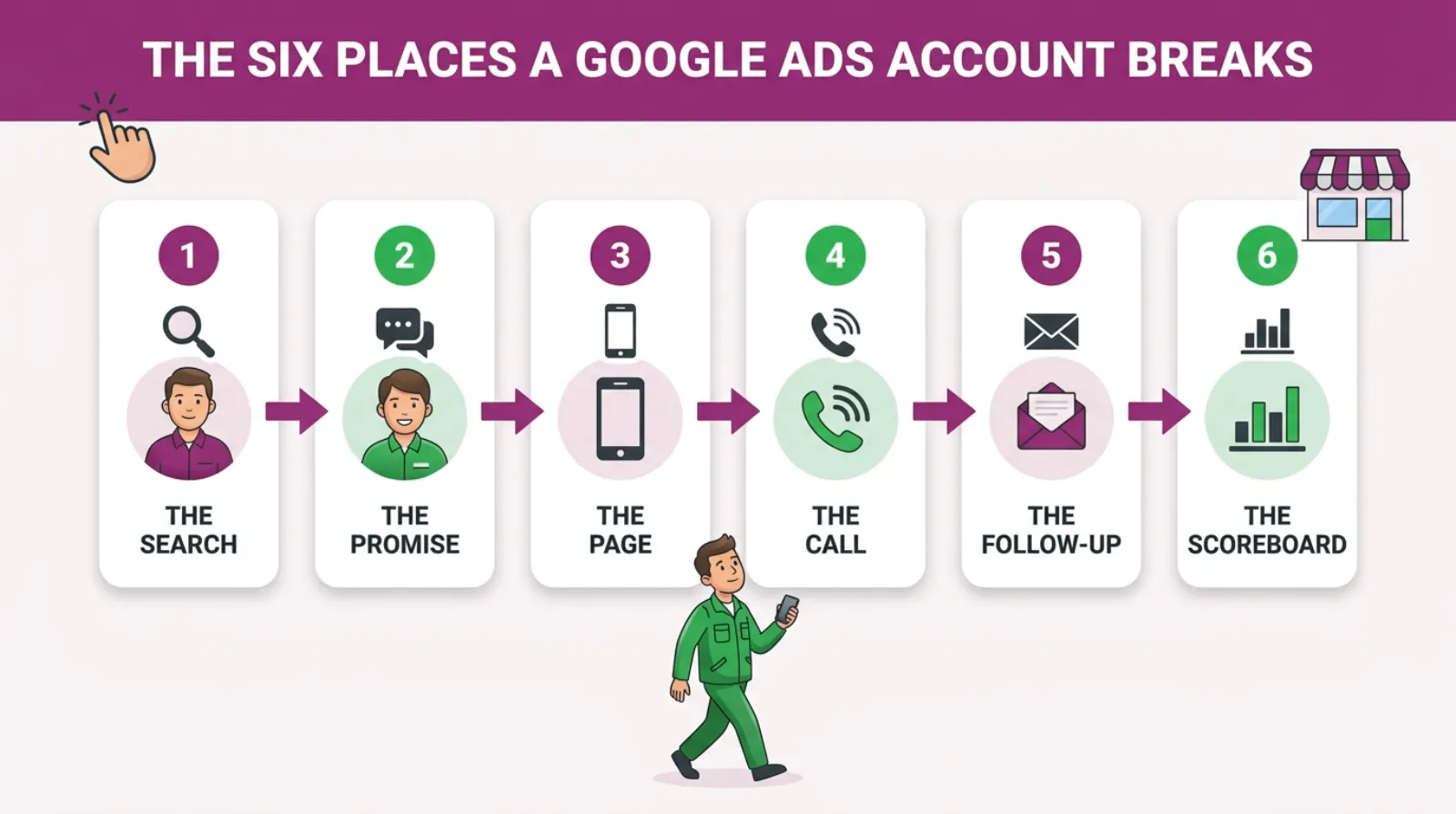
Every lost customer leaks out at one of these six points. Check them in this order, because each one depends on the one before it.
Break One: Is Your Ad Showing For The Wrong Searches?
Often, yes. Google can show your ad for searches that are close to your keyword but not the same thing, so people click, find out you can't help them and leave. You still pay for every one of those clicks.
As of October 2026, Google's own help page on keyword matching says broad match ads "may show on searches that are related to your keyword". It adds that this can include searches that don't contain the direct meaning of your keywords.
In plain English, a roofer bidding on "roof repair" can show for "roof repair course", "roof repair jobs" or "how to fix a roof myself". None of those people want to hire a roofer.
This is the most common break we see in the accounts that come to us, and the good news is that it is also the easiest one to check and fix in an afternoon.
How to check it
Open the search terms report. You'll find it under Insights and reports, then Search terms. It lists the exact words people typed before they clicked your ad.
Sort it by cost. Read the top 50 rows. Mark every search that a paying customer would never type.
Watch for these patterns.
- Jobs and careers: "jobs", "apprenticeship", "salary", "vacancies".
- Learning: "course", "training", "how to", "DIY".
- Free or cheap: "free", "cheapest", "second hand".
- Wrong place: towns you do not cover.
- Competitor names, if they cost a lot and never convert.
How to fix it
Add the bad words as negative keywords. That tells Google never to show your ad for them again. Do it weekly at first, because new junk searches keep turning up.
If most of your spend sits on broad match, consider phrase or exact match for your top keywords. You'll get fewer clicks, but more of them will come from people who actually want to buy what you sell.
Break Two: Does Your Ad Promise Something You Don't Sell?
Sometimes it does, and you do not notice because you wrote it months ago. An ad that says "Free quotes, same-day service" will pull in people who want it today. If you are booked two weeks out, they leave when they find out.
The ad is a promise, and the click is someone saying yes to that promise. If the next step breaks it, they go.
Here are the promises that cause the most trouble.
- Prices that look lower than your real prices.
- "Same day" or "24/7" when you cannot deliver it.
- Services you've stopped offering.
- Areas you no longer cover.
- Words that attract bargain hunters, such as "cheap" or "budget".
There is a quieter version too. Your ad can be too vague. "Quality service you can trust" gets clicks from anyone. A sharper ad filters people before they click.
How to check it
Open your ads and read every headline out loud. Ask one question of each one. Would I be happy if a customer held me to this on the phone? If not, it goes.
Then search for your own main service on your phone. Don't click your own ad, because that costs you money. Just read it next to your competitors'. Does yours say who it's for? If it doesn't, it'll attract everyone.
How to fix it
Rewrite any headline that over-promises, and add one line that filters out the wrong people.
"Commercial cleaning for offices over 2,000 sq ft" puts off the person with a one-bed flat. That's a good thing. You stop paying for clicks you would never win.
Break Three: Where Do Your Clicks Actually Land?
Too often, they land on the homepage. The person searched for one thing, and now they have to hunt for it. Many won't bother.
Imagine you search "emergency boiler repair Milton Keynes" and tap an ad.
You land on a homepage with a slider about kitchen fitting, bathroom design and a newsletter sign-up. Where's the boiler bit? Where's the number? Nobody waits long to find out.
You go back to Google and tap the next ad. That is a click you paid for, gone in eight seconds.
The page that catches the click needs to do three things fast.
- Repeat the promise the ad made, in the headline.
- Show the phone number and a short form without scrolling on a phone.
- Give one reason to trust you, such as reviews, years trading or a guarantee.
How to check it
Get your phone out. Search for your service and find your ad. Then type the page address the ad uses straight into your browser, so you don't pay for the visit.
Time how long the page takes to load. Count how many taps it takes to call you. Look for the words from your ad on the page.
If it takes more than a few seconds to load, or more than one tap to call, that's a break. Most of your clicks come from phones, so the phone test is the only one that counts.
How to fix it
Point each campaign at the page that matches it. If you do not have one, build a simple page for your best-earning service first.
It doesn't need to be fancy. It needs to say what they searched for, show the number and make the next step easy.
Break Four: Who Picks Up When Someone Calls?
This is the break nobody wants to talk about. The ads work. The page works. The phone rings. And nobody answers.
It is not laziness. You're on a roof, under a sink or in a meeting.
The call goes to voicemail. Most people don't leave a message, so they simply ring the next business on the list and book whoever answers first.
Forms have the same problem. An enquiry lands in an inbox nobody checks until Friday. By then the customer has booked someone else.
Speed matters more than almost anything else here. A person searching for a service today wants an answer today. Often they want it within the hour.
How to check it
Run a mystery shop on yourself. Ask a friend to call your ad number three times this week, once at 8am, once at lunch and once at 5.30pm, and write down what happens each time.
Then fill in your own website form. Note how long it takes for anyone to reply.
Next, look at your call log for the last month. Count the missed calls. Count how many you rang back, and how fast.
How to fix it
- Turn on call forwarding to a second phone, or use a call answering service.
- Set your ad schedule to the hours someone can answer.
- Send an automatic text to missed callers saying when you'll ring back.
- Send form enquiries to your phone, not just your email.
- Agree a rule in the business: every enquiry gets a reply within the hour.
If you cannot answer calls at weekends, don't pay for weekend calls. Pause the ads or switch them to forms only.
Break Five: What Happens To An Enquiry After It Arrives?
A lot of enquiries die quietly after the first reply. The quote goes out and nobody chases it. The customer was keen on Tuesday. By Friday, life got in the way.
This is where good leads turn into "Google Ads does not work". The lead was real. The follow-up wasn't.
Picture a kitchen fitter who sends ten quotes a month. Six people never reply.
If nobody follows up, those six go cold. A short, friendly call two days later might win back one or two of them, and that costs nothing but ten minutes.
That's not a sales trick. People are busy. They forget. A polite nudge is often all it takes.
How to check it
Pull out your last 20 enquiries from Google Ads. For each one, write down three things. Did we reply? Did we send a price? Did we follow up after the price? Be honest with each one.
You will quickly see where they stall. Some businesses lose them at the first reply. Others lose them after the quote.
How to fix it
- Keep one simple list of every enquiry, even in a spreadsheet.
- Follow up every quote twice: once after two days, once after a week.
- Ask each lost lead why they went elsewhere. The answer is often price or speed.
- Ask every new customer how they found you, and write it down.
That last habit matters more than it looks, because it's the only reliable way a small business can find out which of its paid clicks actually became paying customers.
Break Six: Is Google Counting Customers Or Just Clicks?
In many accounts, Google is counting the wrong thing. It reports "conversions" that are not enquiries at all. Then it spends your money chasing more of them.
As of October 2026, Google's help page defines conversion tracking as a free tool that helps measure how clicks on your ads lead to "meaningful actions such as sales or leads". The key word is meaningful. Google can only count what you tell it to count.
Here's what often gets counted by mistake.
- Someone viewing the contact page.
- Someone clicking an email link without sending anything.
- The same form counted twice.
- Calls of a few seconds, including wrong numbers.
- Actions copied in from Google Analytics that aren't leads.
Each one tells Google "this click was a success". So Google goes and finds more people like that. You end up with a report full of conversions and a diary with no customers.
The opposite happens too.
In accounts we manage where sales close by phone or on WhatsApp, we have seen Google Ads record between a third and a half of the real sales. The ads were working better than the report said. Without a check, that account might have been cut.
How to check it
Go to Goals, then Summary. Look at each conversion action marked as primary. Ask one question of each one. Is this a real enquiry I'd be happy to pay for? If not, it shouldn't steer the bidding.
Then compare the numbers. Count the real enquiries you got last month from your call log and inbox, and put that next to the number Google reports.
If they're far apart, the scoreboard is broken.
How to fix it
- Count only real enquiries as primary: calls over a set length, sent forms, booked jobs.
- Set everything else, such as page views, to secondary so it does not steer bidding.
- Track calls from the ads and from the website, not just one of them.
- When you can, tell Google which enquiries became customers. This is called offline conversion import.
That last step teaches Google what a good customer looks like. It is the single biggest upgrade most local accounts can make once the basics are right.
What If The Enquiries Come In But They're The Wrong Kind?
Then the chain is not broken. It's pointed at the wrong people. You are getting calls, but they want a job you don't do, a price you cannot match or an area you don't cover.
This is easy to miss, because the dashboard shows enquiries and so the account looks healthy from the outside. But a lead you can't sell to is worth nothing, however cheap it was.
Go back to your last 20 enquiries and sort them into two piles. One pile is people you could have sold to. The other is people you never could.
Now look at what the bad pile has in common. Often it's one search term, one ad or one area, and sometimes it is a single campaign that has been set to find "any lead" at any cost.
Fix that source first. Add the negative keywords, tighten the ad or change the area. A smaller number of the right enquiries beats a big number of the wrong ones every time.
And don't scale a campaign just because it shows lots of conversions. Check the leads are real customers first.
Which Break Is Costing You The Most?
Most accounts have more than one break. The trick is to find the one that leaks the most money and fix that first.
This table shows the symptom each break leaves behind and where to look.
| Break | What you'll notice | Where to check | First fix |
|---|---|---|---|
| The search | Strange words in the search terms report | Insights and reports, then Search terms | Add negative keywords weekly |
| The promise | Callers expect a price or speed you cannot offer | Your ad headlines, read out loud | Rewrite any headline that over-promises |
| The page | Lots of clicks, very few calls or forms | Your landing page, on your phone | Point ads at a matching page with the number on top |
| The call | Missed calls, voicemails with no message | Your call log and a mystery shop | Forward calls and reply within the hour |
| The follow-up | Quotes sent, no replies | Your list of the last 20 enquiries | Chase every quote twice |
| The scoreboard | Google shows conversions you can't find | Goals, then Summary | Count only real enquiries as primary |
If you only have time for one check this week, start with the scoreboard. If the tracking is wrong, every other number in the account is wrong too.
How Do You Know If Your Google Ads Are Actually Working?
You know your Google Ads are working when you can trace real customers back to them. Not clicks, not conversions on a dashboard, but paid jobs with a name and a value. Count customers won, divide the spend by that number, and compare it to what a customer is worth.
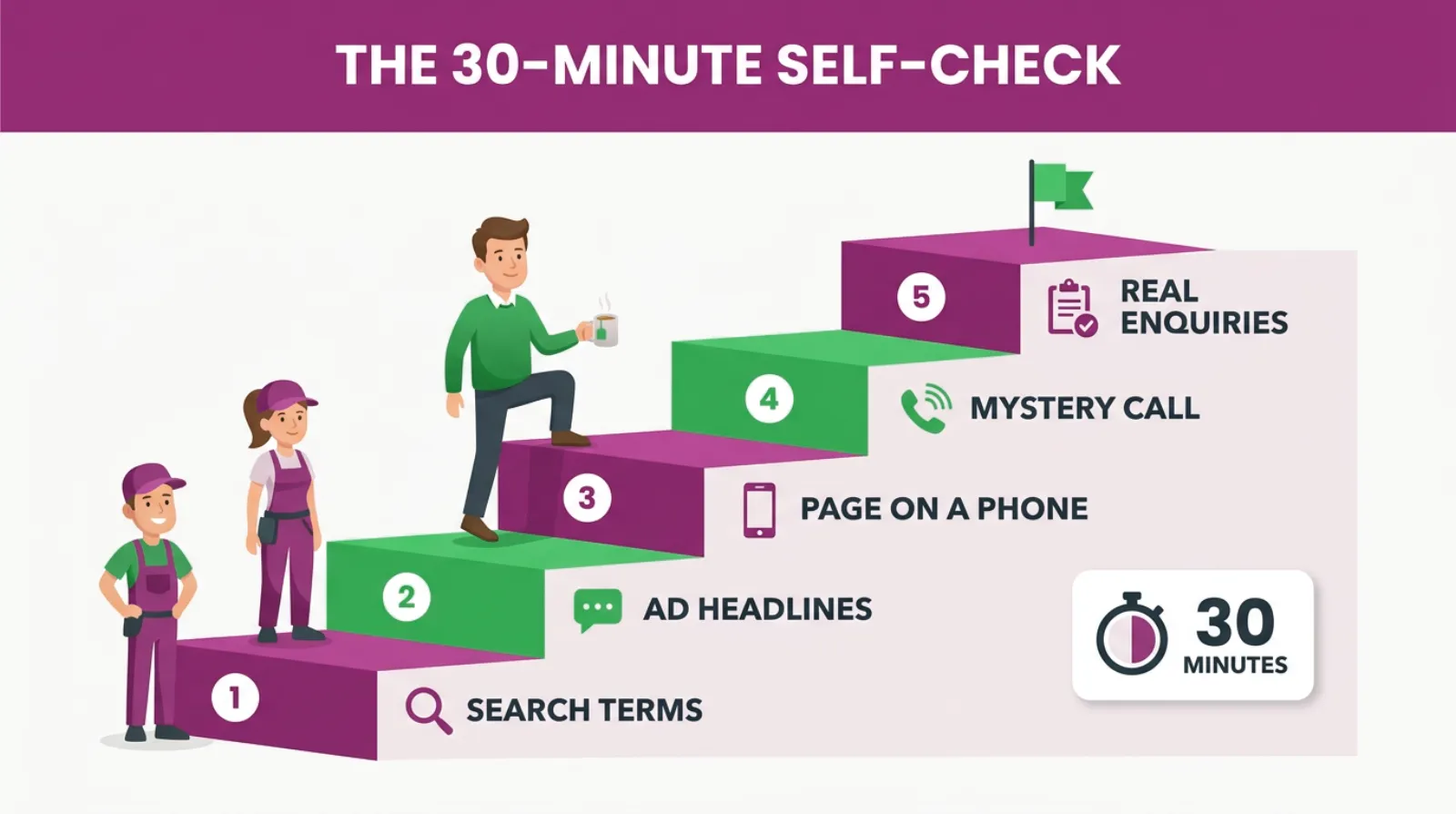
Here is a check you can do in 30 minutes with a cup of tea. Work through it in order.
- Open the search terms report and read the top 50 rows by cost. Note any junk.
- Read every ad headline out loud and mark anything you can't deliver.
- Open your landing page on your phone and time how long it takes to call you.
- Ring your own ad number, or ask a friend to, and see what happens.
- Compare the conversions Google reports with the real enquiries in your call log and inbox.
At the end you'll have a short list, and usually one item on it stands out from the rest. That's your first fix.
Do not fix everything at once. Change one thing, then give it two to four weeks so Google has time to settle and you have enough enquiries to judge the change fairly. If you change five things on the same day, you won't know which one worked.
Should You Cut The Budget When Clicks Don't Convert?
Usually not at first. Cutting the budget feels safe, but it doesn't fix a broken link. It just means fewer people fall through the same gap.
There is a better order. Fix the scoreboard so you can see what's real, then fix the leak you find, and only then decide on budget once you have honest numbers to work from.
There's one exception. If the search terms report is full of junk and you cannot fix it this week, pause the worst campaigns. Paying for clicks you know are wrong makes no sense.
If you have no real conversions yet, don't chase a cost per lead target either. Let the campaign run, keep cleaning the searches and wait until real enquiries come through. Google cannot learn from nothing.
Frequently asked questions
Why does Google Ads show conversions when I have no customers?
Usually because it's counting the wrong action, such as a page view, a button click or a very short call. Check which actions are set as primary under Goals. Only real enquiries should count. Then compare Google's number with your own call log.
How long should I give Google Ads before judging it?
Give a new or changed campaign four to six weeks before you judge it. Google needs time and data to learn. Judge it on real customers won, not on clicks, and only once your tracking is counting the right things.
Should I send Google Ads traffic to my homepage?
It is better not to. A homepage talks about everything, so the visitor has to hunt for what they searched for.
A page that matches the ad, with the phone number at the top, almost always turns more clicks into enquiries.
What is a good conversion rate for Google Ads?
There's no single good number, because it depends on your trade, your prices and your area. The best benchmark is your own account. Track it month by month and aim to raise it after each fix.
Should I turn off Google Ads if they are not bringing customers?
Not until you know why. Check the six breaks first: searches, ad promise, landing page, calls, follow-up and tracking.
Most accounts have a fixable leak. Turn it off and you lose the good leads along with the bad.
Can I see which Google Ads clicks became paying customers?
Yes, if you record it. Ask every new customer how they found you, and track calls from your ads.
Google Ads can also take in your sales data through offline conversion import, so the account knows which clicks turned into real jobs.
Keep Reading
If you've found a leak in your own account, these posts go deeper on each break.
- The Search Terms Report: The Most Expensive Tab You’ve Never Opened
- Negative Keywords Are The One Google Ads Job Google Will Not Do For You
- The £4,000-A-Month Conversion Tracking Mistake In 8 Of 10 SME Google Ads Accounts
- Qualified Leads Vs Converted Leads In Google Ads: What You Need To Know
- Your Google Ads Are Running 24/7. Your Customers Are Searching 9 to 5. Do the Maths
We picked these because each one covers a single link in the chain in more detail.
Sources
The quotes on keyword matching, search terms and conversion tracking come from Google's own help pages, checked in October 2026.
- About keyword matching options - Google Ads Help
- About the search terms report - Google Ads Help
- Conversion tracking: definition - Google Ads Help
Find The Break Before You Spend Another Pound
Clicks without customers do not mean Google Ads has failed you. They mean one link in the chain has snapped, and the good news is that you can find it yourself.
Start with the scoreboard, because it tells you whether the other numbers are true. Then work down the chain: the searches, the promise, the page, the call and the follow-up.
Fix one break, give it a few weeks and measure customers, not clicks. Most owners who do this find the account was closer to working than they thought.
And if you'd rather have someone trace the chain for you, that's what we do at SF Digital every week.

Written by Uzair Kharawala
Partner at SF Digital Studios, a Google Premier Partner agency. Uzair has been helping businesses grow with Google Ads since 2002 and teaches it every week on YouTube.
Get our best Google Ads tips by email
New articles and videos, straight to your inbox. Unsubscribe any time.