
Home › Blog › Video Marketing

Video Marketing

How Can Adzoola Help You Uncover YouTube Placements And Unique Keywords?

How Can Adzoola Help You Uncover YouTube Placements And Unique Keywords?
Read the video transcript

Hello and a very warm welcome to today's video. My name is Uzair and I've got a very special guest and a friend, uh, joining us today. Hi Alex. Hi Uzair, how you doing? I'm fine, how are you? Good, good, thanks. So before we get started, yeah, before we get started, I'll just, uh, summarize quickly as to what this video is all about and then I'm going to get Alex to introduce himself.

So anyone who's running YouTube ads, this is the video for you, because there's lots of things which you can't do in the interface, and Alex has created an amazing tool which help advertisers like ourselves to leverage the power of YouTube ads and take it to that next level, which most advertisers can't do. So before we get going, Alex, just give us a quick intro as to who you are, where you are based and what do you do.

Yeah, I'm Alex King, I'm the founder of Adzoola, and I've been in, actually, Google Ads, on managing Google Ads for clients, since 2008, and then, um, I moved into software, um, in 2015 was when I started work on Adzoola. So I, you know, the frustrations, as a, as I'm sure you're aware of, a Google Ads managers, is targeting, and so I started off building this, this tool is out of frustrations from, from my kind of work for clients.

And that was the, you know, finding targeting was, was difficult, finding really good targeting for advertisers who need, you know, a really high ROI, especially when they're starting, to get high ROI before they can scale. And I found that, uh, targeting, or finding really specific, uh, targeting, uh, helped that. And so, just cut a long story short, I built tools to be able to do that.

YouTube at the time as well, 2015-16-17, was taking off, and so I built tools, uh, specifically for YouTube ads targeting. Um, so that's taking you from kind of 2008, uh, to, to now, and, and my focus is, is doing Adzoola and building tools to help YouTube advertisers and Google advertisers to, uh, improve their targeting. And, uh, yeah, so that's, that's what I'm doing now.

Good. So with Adzoola you can, anyone in anywhere in the world can use it, and not just in certain countries, is that correct? That's correct, yeah. So you can use any language in the search and, and then get results for that language. Yeah, perfect. So let's dive in and give us a little demo as to what it can do.

Yeah, so I'll share my screen with you, and before, I think it's good at least before we, you know, go into, um, exactly, let me just share this screen here. And I'll just ask you questions as we go along as well, if you don't mind. Yeah, absolutely. So before we go into the Adzoola, yeah, uh, part of it, I wanted to, I think, you know, just, if you can see this, this is kind of, um, where I show people coming to YouTube ads how to start and think about targeting on YouTube ads.

Um, because when you, you're starting with YouTube, my philosophy is to start targeted, you know, really highly targeted to your particular audience, and that gives you the highest chance of success, so that you can then, uh, broaden out and scale. See a lot of mistakes that people make, that I hate, that, you know, come to me, is, you know, they say, oh, YouTube ads doesn't work, I've tried it.

Um, but what's happened is, what I found is, people often start with the broader forms of targeting before they kind of learn how to, uh, or even tested their, their offer and their video ad on YouTube. So what I suggest is, uh, starting with placements, which is where you can target videos or channels. I suggest starting with videos, specific videos, rather than channels.

But yeah, start up here, which is where, uh, your audience is narrower, to a smaller group of people. You, you don't scale necessarily with this form of targeting, but it does help you start with a high ROI, or at least test your offer and see whether you can get an ROI. And so you can see across here the benefits of, uh, placement targeting, which is, uh, your, your audience is narrow. That's a good thing, because you're targeted.

Often the ROI is higher, because you're speaking specifically to someone who potentially, if you choose the right videos, has intent at that period of time, and you can test your new ads without sort of, well, with a lower risk as well, and you don't need a bigger budget to see whether it's going to work or not, and you've got a lot of control.

So when you go down this pyramid, this is when you get broader and broader. So keyword targeting, and custom audiences, or segments as they're now called, and then other audiences. The further you go down here, the broader the, the audience, or the bigger the market, and that means that, uh, you often need bigger budgets to test things. The ROI can be lower, which is not a bad thing, it just means that you want to scale, and say your priority is not necessarily a high ROI, but it's, you know, customer acquisition.

And so starting here, and if you don't, you know, see success with placements, then it may not work when you move to these broader targeting methods. So any questions from, from that? Yeah, I mean, I really love the way you have explained this, because what most people do is they'll go down to the broad audiences without testing their creatives.

And it is so important with YouTube, or any kind of video ads, you've got to test the creatives as to whether the message resonates with that perfect audience or not. And if it's not, then you need to either change the video ad or change your landing page, if they are clicking on your ad and coming through. So optimizing your creative is one of the first thing you need to do before anyone starts scaling up.

Yeah, absolutely, exactly. And you can do this with a lower budget than if you were to, you know, broaden out as well. Uh, and like you say, you can test the whole funnel, if you've got a funnel in place, you know, from, and also if you're using the videos which are directly targeted to your audience, or your audience is watching, and you can't make it work, generally speaking it's not going to work at these broader levels.

And so, yeah, it's a low-risk way of seeing whether YouTube ads is working for you, or to test the different messaging, like you say, different offers and things. This is where you can do that. So whether you guys do the placements, you either spend 10 hours trying to find all the various channels and videos where you would like your ads to be shown, or use something like Adzoola.

Yeah, exactly. That's why with, in Adzoola, there are tools for all these kind of different ways of reaching your target audience. So, uh, with, with placements, yep, I mean, if you wanted to go to YouTube, you could type in a search term and copy some URLs that way, but, uh, you're going to see how, how much faster it will be in Adzoola, uh, to get hundreds of those. So I, would you like me to go over to Adzoola and show you how? Let's dive in, let's dive in.

Okay, so let's have a look here. So, uh, there are several tools, as you can see here, in Adzoola, and let's, let's come up with an example, actually, of, um, a business that might be, won't be running. We could be, uh, selling, uh, golf equipment, for example, that might be a good example. And what I actually do, uh, in Adzoola, if I'm looking at a market that I don't necessarily know, uh, what keywords someone's using, is actually I'll start with keyword search.

And in here there are seven different keyword tools, but what tool I'm going to use first is one that gives me some specific YouTube, um, keywords. So these are keywords that people are using on, uh, on YouTube to search. So if I start here with something like that, if I'm not sure what, what they're looking for, and I'm selling golf equipment, or maybe golf courses, that sort of thing, I could do golf equipment, maybe even something like golf swing, golf club. Golf club, yeah, these kind of things.

And then, um, now I'm going to get some suggestions as to, you know, what kind of keywords people are using. I'm just going to use the default, because I don't need a lot of keywords. We can get lots if we wanted to, but I'm just going to get the top 10 suggestions for each of those, so we can see what people are using on, on YouTube.

So I might choose something like golf club reviews, even golf clubs for beginners. Uh, it really depends kind of what you're selling. So, um, just come here and find out, you know, what this, what the suggestions are, actually kind of related to what product or service that you're selling. Um, and this doesn't have to be e-commerce, it can be info product, could be even be business to business. You can come here and find out some, some keywords.

Those green check marks on the right hand side means that that is your search term, correct? Yes, and these others are the suggestions. Okay. So this is the search, and these others are suggestions. So I'm just going to select, I can, I can select three keywords here. So, um, golf clubs for beginners, golf club reviews, golf equipment, uh, actually golf swing.

This is an interesting one, I wouldn't ever have thought of that. Ghost equipment for straight victims. Never see. This is the, the beauty of kind of using this, uh, tool to find, kind of, or uncover keywords that you wouldn't have thought of. So now what I can do is, because I've done this keyword research, I know that these keywords are being searched on YouTube, and now I can find the videos that rank for those keywords in a YouTube search.

So, um, in order to, to do that, I'm going to take these keywords over to video search, which is our tool to find videos that you can then use or add to your YouTube ads campaign, to make sure that they're relevant. So I'm just going to get the top 50 for each of these keywords.

And first of all, um, this kind of is where it already kind of stands out from doing this manually on YouTube, is that I can use several keywords here and get the results for each of these. Um, and like, like you asked earlier, you can come here and use, uh, you know, if you're in a different country, different language, you can use the, the keywords from your, in your language.

Um, and this, these filters here, these are, I call them filters because they're not hard, um, you know, criteria. If you select these, it just means, if you go to YouTube, um, in the country that you're at, and then use a specific language, yeah, the results would be whatever they are in that country. So they can often be mixed in terms of the, you know, language that's used in.

If I don't show my videos in a foreign country with a foreign language, I can just choose the country as UK, US, and English? Yeah, but it won't, it won't, uh, because many channels don't actually say what country they're in, yeah, uh, on YouTube. Uh, we don't, we've tested kind of showing only channels that are, or say they are, in a specific country, and the results are very poor, because, or, you know, very minimal.

So, uh, these, these are just kind of what you, if you were, like, we're both in England, um, but if you, if you were in the US, um, and you went to YouTube in the US, you'd get similar results to the UK anyway. What I've found in my testing is the, the biggest determining factor in what the result, in the results, and what changes the results, is, uh, the language that you use.

But, um, many members of Adzoola actually really requested to be able to select country, language, so, um, we've, we've given it, we've given it there as well as a, as a filter. So, um, just, just to give you an idea, I'm, all the settings here is, is if I want to get videos as if I was on YouTube, so they should be similar.

If you wanted to, um, change the order, or change the priority of your search, uh, you can do that with the order by selection, which you can choose, let's say, if you're looking for recent videos about your topic, then you could do upload date, or if you're just looking for the highest views on the topic, and not have relevance as the priority, because that would change the results, then you could do that here.

So do a quick search and see how fast the results are. And we've got, because we selected 50 per keyword, usually that, well, that adds up to 150, but we've got 144, which means actually we've got some videos that appear more than once for the keyword.

Okay, one very important question for you. Yeah. The recent changes in YouTube ads and the way the ads are displayed, even though you specify that I only want my video, my ads, to be shown on certain videos, they still go ahead and show on other videos. So how do we go around it? So it's the way you set up the campaign, if I've understood you correctly. Um, so if I just want to show my ads on these 50 videos and, yeah, exactly.

So you set up the campaign with, um, with placement targeting. Usually, uh, what I suggest, set it, um, the settings in the campaign should be, are, I actually set it up as a, a custom video campaign. So when you get, when you create, uh, the, the campaign itself, I go to, um, no goals, so don't select any of the goals, to no goals selected, and I select the custom video campaign.

And then in the settings, the network settings, um, I only select YouTube videos. I uncheck the video partners on the display network, and I uncheck the, um, the YouTube search. That then says, uh, and there's a video on my YouTube channel, um, going through exactly how to. Say okay, no, I didn't want to digest, that's all. I'll, I'll put that link in the description. Yeah, that's right, yeah.

So that is a good, important point though, because I have seen people add placements to a campaign, and I've seen it very, very significantly, um, problematic in terms of, they set it up and actually none of the spends goes to the placements that they've, uh, that they've put in the campaign. So it's very, you know, very important. Great, thanks for bringing that up, because people get confused a lot. Oh, why am I answering somewhere else? So yes, exactly.

So yeah, and now what we, so we can see a few things. We've got 144 results, um, for videos, and actually we break down the results into channels as well, should you want to kind of look into what channels have posted these videos. So that's what the results are: 69 channels have posted these 144 videos.

Now, uh, something to look at in terms of, you know, how popular is your market, and, you know, is this going to get you some views, or, you know, how is this going to spend, what budget kind of do I need, and how many, even how many videos do I add to my campaign. Total views here, it gives you an indication, yeah, of the size of your market. So here you can see 72 million, uh, views across these 144 videos. So that's, that's huge, you know. Um, you're going to get a lot of, uh, impressions on your ads if you just target these.

144 videos. So what you want to do when you come here is, uh, make sure that the, the videos are targeted, you know, they are relevant. So prioritize, particularly when you've got a market like this with so many views, prioritize relevance. Does it match what you're going to say in the video ad? Does it match what you're selling?

So in order to kind of do that, you can go through here and look through the results. Uh, you can delete any, any video that you see that's not relevant, and what really kind of saves time is the filters here. So if you see something that you'd, you, that you don't want in the results, you know, we used beginners in here, but if we wanted to exclude videos with beginner, we could easily just write it in here and, and then that excludes it, and you can use multiple filters like this.

You can exclude or include? Yes, exactly. So I could just change to include by clicking this, and the plus indicates include videos with that in the title. So yeah, if I wanted to just say, actually, I just want videos about, you know, uh, golf clubs, I can put golf club in here. Um, and that's, yeah, so we've got 72 to include that, and also the total views changes dynamically, so you can see, okay, so we've gone from 70 odd million to 24 million.

So Alex, for somebody who's new, and they've got small budget, yeah, starting out with YouTube, they can go crazy with a tool like this, but it's so powerful. How many placement would you recommend that one should start with? It's such a common question, but so difficult to answer, because the, it depends on things like the size of the market, okay, so here is huge, and your budget.

Because what you don't want to do is add hundreds of videos to your campaign and then kind of have your budget spread way too thinly. So, um, if you've generally got a small budget, but you've got high views, and like a lot here, then you only really need, uh, a hundred placements, you know, uh, 100 or so, yeah. And if you, you can always add more, you know, you don't need to, don't need to worry about, um, you can't change it at a later date.

And even out of that 100, a handful of them will cannibalize the whole budget, because they get so many impressions and views, and if that's the case, then I would say, if you're not getting the results or the conversions, you just pause them and then keep adding more to it. Exactly. Let others get some impressions.

That's an important point actually, because we talked about the way I would set up a placement campaign, and that is actually, to be able to only show, only show on placements, uh, you have to select maximum CPV or target CPM, but maximum CPV is the, the option that you choose. And with that, that means you're not automatically, although you're not using any automated bidding, yeah.

So that means you have to, the onus is on you, um, to actually say, or tell Google, I don't want to advertise on this video anymore. So you have to go in weekly or daily, depending on, you know, how much you're spending, and going and pause each of those placements that aren't performing, yeah, like you said. So another, another good point to make.

So yeah, I mean, in terms of the number of videos, yeah, if you're in business to business, for example, there may be fewer views on, on the videos, and so you can add more, you can add a couple of hundred videos, um, and especially if your, your budget is bigger. So it's kind of trade-off between making sure your budget isn't spread too thinly and, and the size of the views, or the number of views that those videos are getting.

Cool. So you got all the, you selected all your videos, all you do is copy the URL from here, I guess? That's right. One thing to just check, if you want to just, you know, if you're going through these and you want to quickly check whether you've got any kind of irrelevant videos, because depending on how many you, results you select here, and the further down the results you get, sometimes they become less relevant, because YouTube may not have videos that match your target audience further down the results.

So just have a quick check, sort by view, so that you get the highest, uh, the videos with the highest views of, you know, in your search result come up. And, and then that kind of, because what you don't want to do is kind of add these all to your campaign and find out there's a video that has millions of views, or multiple videos with millions of views. They're going to suck your budget, just as you say, or dominate or cannibalize the budget, and, um, and you don't want that happening.

So, and that, like, and they can often be the ones, the highest views can often be the kind of least relevant, certainly, uh, in some markets. So, uh, here it looks okay, we're on, we're on, um, we're on target, possibly because we have this filter here. So if I cleared that filter, um, this one has nine million views, um, but all these look relevant, so, you know, they all look good.

So yeah, if I wanted to target these, just very simply get URLs and copy them. You know, if you have filters in place, you could have choosed ones, and it's as simple as pasting those into your campaign. And also, one thing to look at here is, if you want to narrow it down a little bit further, and you've used several keywords, like here, which are kind of related keywords, what you can do is click this occurrence column, so that you find the videos that actually rank for more than one of your keywords.

So here you can see this, this video actually ranks for two of the keywords, and so potentially, um, if we've chosen the right keywords, then this is going to be a better video than other ones that maybe, yeah. Yeah, so they'll reach the, the target audience multiple ways, you know, because they rank for several keywords.

Great, now this is really, really good. Now earlier on you mentioned that Adzoola can also target video, or not videos, but you can also use audiences or other methods of targeting through here. That's right. So we've just, while we're in video search, I mean, we, we could take the titles, you know. So, um, let's say, so for those videos that occur, uh, more than once, so these are ones, these are all the videos that are actually appearing twice in the search results.

What we could do is go to video titles, and these are the video titles for, for those who, actually I'll click filter to show the filtered ones. And this is kind of a little used technique, is use titles as keywords. So obviously you want to strip out the characters like brackets and things like that, because we can't use those in, in Google Ads.

So what you could do is edit these into, uh, into keywords. So how to swing a golf club, simple way, you could leave it as it is, or you could just use it like this: how to swing a golf club. Um, you could, golf lesson basic swing, yeah, like that could be one, another keyword, and so on. So you could, you could add these as titles, um, these titles as keywords in your campaign.

You know, your competitors are probably not doing that, so that would be something to, to do, and these are obviously based on really, really relevant videos. So that could be one way. Another way to build audiences would be in, in keyword search, because here what we do, aside from the suggested keywords tool, which gives you some YouTube specific keywords, the rest are actually going to give you Google, Google search results.

So there's lots of different ways you can use these keyword tools, for example, uh, using domains, other, you know, competitor domains, to find what keywords they rank for and use those. And, and in YouTube ads you can actually use custom segments around keywords, and you can use websites as well, and there's tools in Adzoola to be able to find websites as well.

But just to give you an example, let's say if we stick to golf swing as our, as our keyword, and you could use multiple keywords in here, but I'm just going to use one, and you can get the related searches. So this is those eight kind of suggestions at the bottom of Google search engine result page, and you can see these here. Um, we've got the initial keyword and other ones as well.

So then, okay, we've got a few keywords here, but if we really want to dig into the market, we can actually use what's called depth layers. Now if you think back to the search engine result page, at the bottom of the search engine result page those eight suggestions are actually clickable, and so you could, you know, go through and click each one and find those results. But this is, what this does is, it's like clicking on each of these and finding the related, um, searches at the bottom of those search result page, yeah, pages, and so you can go two or three layers.

Nice. Which helps you kind of, from my perspective, if I'm working in a new market, or if I'm trying to look for different keywords that I could use in my market, this is a great way to understand the keyword landscape, what other people are searching around those terms. So now we've got 177 different keywords, and don't worry about the, the number of these keywords. This might look a small number to you, but it's the quality of the results.

Um, so let's, what we could do is find out, uh, what the second depth layer, uh, results are. So we started with golf swing, now with, sort of, uh, looking at things like overlapping golf grip, so that doesn't even include a golf swing at all. So what we can, so we're getting keywords here that don't include swing, and I can just sort of take out the word swing and see all these keywords that are helping us kind of to go away from the.

Like, often, I don't know if you've found this, but often if you've been doing a campaign for a while, you kind of get stuck in certain keywords that you use, and this is kind of a way to kind of branch out a little bit. Um, and this, and then we can look at another layer, which is the third layer, which is even further away, and now you can see sort of like V1 Golf app. So you can find out about companies and products that you can use as well in your targeting.

And you can use these keywords in your, you could potentially see if these are, you know, searched for on YouTube, or if there's content. So for example, if I wanted to do that, I could go, I'll select this and then send to video search, and this takes me to video search. I'm not expecting many results, or many relevant results, but there's, here you are, so there are some videos about this. Um, well, yes, the V1 app. So things like that. So you can use it for that, or for using in custom segments, where you build your own segments based on, on keywords.

I've got a quick question for you. Yeah. We've got the YouTube placement URLs. Now, I haven't done this, but I'm going to ask you whether you have done this or not. Have you used those URLs and, uh, made a custom segment audience of people who visit those URLs, i.e. the YouTube video pages? I haven't done that, no, and I think it's, it's good to try if you're in a massive market, yeah, and particularly you could, you could even do it for channels as well, to test.

Yeah, uh, so no, I haven't done it. Worth testing if you're in a big market, I think. If you're in a small market, you try to do it with, um, videos or channels with a small audience, I would expect it not to work very well. Yeah, no, thank you, because I thought I'll give this a go and see how it, how it performs. But it's worth trying, yeah.

And you mentioned that, so if you wanted to do, uh, a custom order around URLs or websites that, that rank for certain, uh, keywords, then you can use, um, the SERP competitors tool in Adzoola. Would you like me to show you how that works? Yeah, quickly, in there. Yeah, so, um, I can choose to, to do it with keywords, so I can use all these keywords that I've had, that I've got here.

So if I just choose all of them, I can send them to SERP competitors. You can use up to 200 keywords, and the more you use, the better the results, and I'm just going to leave all the default settings. So what this is doing is finding domains that rank for these keywords. So the results will give you. On Google? On, on Google, yeah.

Okay, so you can see here golf.com, left rough, and what you could do is, and it gives you some other data here, like the number of, um, keywords. Yeah, for using as a custom segment audience. Yeah, exactly. And you can open the row and see all the rankings, and if you want to, there's filters here to be able to kind of narrow the, the results down.

Uh, but essentially what you can do, you'll get some other sort of domains in there, sort of along with it, the rank obviously, uh, but yeah, you could choose the top 10 here, uh, or five. I would obviously leave Amazon out, of things like that. Amazon, YouTube, we can just delete those, yeah, and use those as a custom segment. Um, so that's a really good way of doing it.

Or what you could do is, uh, use the domain competitors. So rather than using your kind of keyword universe that you've added here, 100 odd keywords, what you could do is, if you want to look at whole domain and find similar websites to that whole domain, and what that domain ranks for, oh, you could, you could use the domain competitors. Yeah, golf.com, or the biggest, you could, your website in that niche.

Yeah, so you, you could, um, and these, this produces the best results when you've got a domain specific, so if the domain actually, you know, only produces kind of content that is relevant to the market. And so you see here, now I actually did that without kind of changing any of the settings, but I actually would recommend, um, changing one setting if you're going to use this.

And that is that, what this does is gets the top relevant or similar domains for, that are ranking for the same keywords as golf.com in the top 100. That's the default setting. So if we want more focused results, you know, those, uh, competitors that rank in the top 10 on Google for the same keywords, then, then narrow this down. So that's why you can see here, uh, that's USA Today, because it's probably got some rankings in there, yeah, maybe even lower.

But you can still see that this is, these are pretty highly targeted URLs for golfing websites. Yeah, exactly. And now with the video responsive ads, we can even target those placements, or on the Google Display Network. Yes, exactly. So yeah, so it's not just YouTube ads that you can use this for, you could use it across the, the, um, yeah, all the different kind of campaigns that allow sort of custom segments. So really useful.

And also, if you wanted to, you can sort of go back to keyword search, um, by selecting any of these, you know, and finding out, uh, the, the top keywords they have either in common, yeah, or that they rank for individually. So you can, you know, get individual keywords for each domain, and then you could use those perhaps in a custom segment as well. So there's lots of different kind of ways to, uh, to do it.

We're kind of going down the rat run here. It's important to come back to here, to see, to show you that, obviously, start, start here. Um, sometimes, sometimes if you're in certain markets, you won't find much content on YouTube for that particular market, or, um, or you'll need to broaden out, and you can, you can then go to keywords. But yeah, I would recommend for most people to start with placements and see how they go, and then you can use these other tools to broaden out once you, uh, once you've tested your ads and got success.

No, thank you so much. It's been really, really educational and informative and eye-opener, because it can do some amazing stuff. Now, do you have a free trial or something for anyone to use, or how the, how does it? Yeah, so if they, if they go to adzoola.com, uh, you can, if you, if you, you know, want to take a trial, that's currently there. Um, so yep, take a look.

You can also, if you've got any questions, just go to adzoola.com and there's a live chat, and you can ask me any questions you like. And also, for a limited period of time, we've, we've got the consultation. So if you're not sure whether YouTube ads is right for you, or you're running YouTube ads, seeing success, and you want to see how Adzoola can help you take it to another level, uh, you can organize a call with me, and so that's on the website as well.

No, that's good, and I'm going to put this, the URL link, in the description around the video. And Alex, I want to be respectful of your time as well, and I really appreciate you, uh, coming on this call and giving this a valuable educational lesson for everyone, including myself, as to how to take the YouTube ads to the next level. So before we wrap up this call, Alex, what would be your top tip for someone starting out on YouTube ads?

My top tip is targeting. So if you're starting on YouTube ads and you haven't got the right targeting, it's going to be difficult for you to see success. And close, a close second, I know the top, you said top tip, but close second is, uh, the, the video ad itself, and making sure that you've got that, uh, hook, that start, the first five seconds, to get people's attention. Because if you need to get people to your website, and that's, that's what you're using YouTube ads for, then, um, you need to get their attention first of all.

And let's tune into three tips. So first one, targeting. Um, the second one is that getting their attention. And then the third one is, um, getting that click-through rate, because one of, uh, one of the, one of the big mistakes that people who, uh, are actually using YouTube ads and, and seeing some success, or haven't really, or it hasn't really clicked for them yet, is click through rate. Yeah, a lot of people I see focus on view rate, because, uh, that's, you're on YouTube.

But view rate is a, it's a second place, third, fourth place. You are interrupting someone's viewing pattern, and your ad has to be, uh, so good, with such a great hook, that someone gets compelled to stop viewing what they were watching and then click on your ad to go through to your landing page to see what your offer is.

Yeah, and, you know, let's say you've got a good hook, or so, or, uh, you think you've got a good hook, because people are staying, you know, you've got a view rate of 30, 40, but that doesn't matter if they're not clicking through, and you, you need people to click through to take advantage of your offer. So, um, yeah, so the hook as, actually has to be good, but if, if it's getting people to watch past the 30 seconds, which is when you start paying, yeah, um, then if they don't click, it's, uh, and you're not using it for branding, then it's a, it's a waste.

Yeah, so, so yeah, those are the, the three kind of things that need to keep in mind. And if you can test a few different sort of, in, in, intros to the video, or what the hooks, or the first five to 30 seconds, just, if you're doing the video, just try to film a few different intros that lead into the main content of the ad. So you cut to the main content, you can keep that potentially the same, if you, you know, you don't want to film too many. Um, so that's what I would do.

Thank you, thank you so much, Alex, for your time, uh, truly appreciate it, and thank you everyone for, for watching this video. If you have any comments, please put them in the description. We reply to those, um, regularly, and if you have any questions, by all means go to adzoola.com, send Alex a live chat or an email, and I'm sure he will come back to you. So thanks all, we'll wrap this up now and we'll catch you guys up in our next video. Bye for now.

Seeing your YouTube ads fail to target the right audience is very disappointing. Low ROI or ad failure can be anything, from the improper use of keywords to advertising on the wrong channel or video.

If you are looking for something to help you find the proper channels, videos, and keywords to maximise your ads reach, Alex King is here to help you.

He is the founder of a most beneficial keyword tool, Adzoola. And, he also helped various clients get better ad results when he was managing Google Ads from 2008 to 2015.

Get your free Marketing Action PlanNot sure where to start? Answer a few questions and get your plan in about a minute. No email needed.

Get my plan →

Alex created this excellent tool out of the frustration that a typical Google Ads manager feels while searching perfect channels and videos for ads the whole day.

The long working hours to help the client get the highest ROI before scaling up motivated him to create some fantastic YouTube advertising tools. Luckily, you can now easily search for the best placements and videos for your ads using the Adzoola tool.

In this blog post, you will learn how Adzoola can help you uncover YouTube placements and unique keywords. So let’s dive right in!

What Is Adzoola?

If you are an advertiser on YouTube, you must be familiar with the hustle of selecting the correct placement and video for your ads. No one likes placing their ads on irrelevant content video.

That’s where the Adzoola tool helps you!

It gives you perfect placement ideas considering the target audience and comes up with the right video.

Alex told us how people often come to him complaining YouTube Ads don’t work. They don’t understand the importance of starting with a small and particular audience and getting into the broader forms. This dramatically affects the overall performance of ads and results in poor ROI.

So Alex suggests starting with the specific audience before digging into the broader form. In this way, you can also save your budget using this technique. That’s how Alex helped his clients get better ROI and visibility.

And if you find it hard to sit for long hours searching the right keyword, use Adzoola. Even if you belong to a different country, Adzoola provides you with language-changing options, and you can get results in any language.

Isn’t it awesome?

How To Search Keywords For YouTube In Adzoola?

When you get access to the Adzoola tool, you will see various other YouTube tools available in it. These tools help you in generating on-point results.

Alex shared a straightforward and helpful way to select the best placements and videos to display ads. First, enter your keyword in the keyword search tool and see what the top results are and how people are targeting that keyword.

Pick 10 top keywords from each category and search videos targeting that keyword. You will get a lot of videos; it’d be good to start by picking up 100 videos at the start, as it will save your budget.

With Adzoola, you get the particular targeting audience that makes it easy for you to place your ads and get better engagement.

But how to prevent other related ads from showing over your ad in that particular video?

Alex has an excellent tip to solve that issue. You have to set up proper ad campaigns to avoid other ads from displaying over your ad. Go to the campaign network settings and uncheck all the video partners on the display network.

You can also add more ads to your campaign and pause the slow working ads – saving your budget from running away. You can also exclude any unwanted video using the filter option available in the settings. Also, building an audience is easy if you keenly search which keyword ranks higher and how your competitors are ranking.
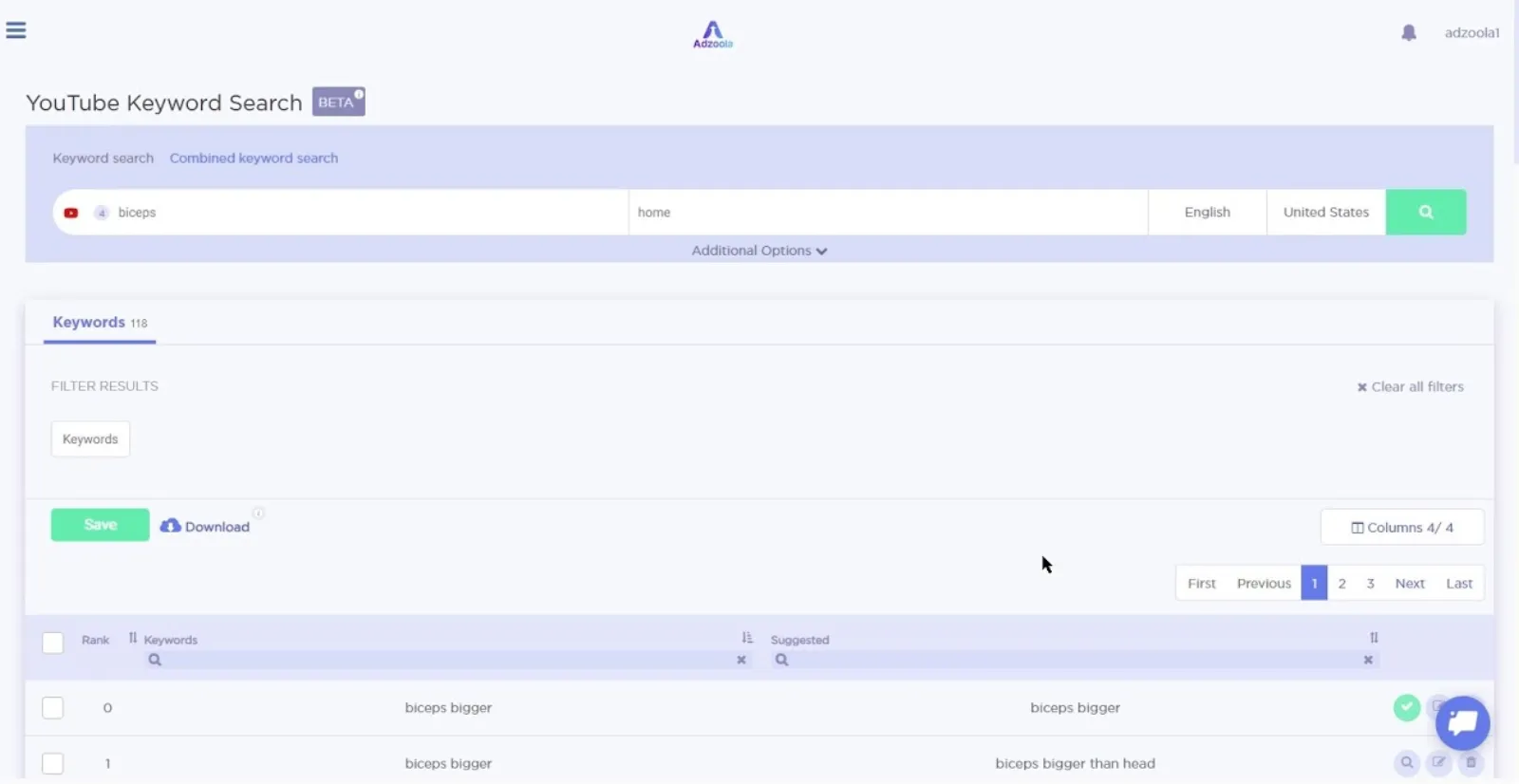
YouTube Video Targeting Tool

Something Exciting Alex Has To Say About The Keyword Search Part

There are three layers to it when it comes to targeting the right audience. First, directly use the main keyword and see how your competitors rank using it; collect those primary keywords.

The second layer involves the indirect search of keywords like if you are targeting golf swing, search for golf equipment. In the last layer, only target the word golf.

What Are The Different Tools Adzoola Has For You?

Adzoola is an excellent tool that gives you access to various unique keywords to increase your overall ads reach. If you are working on YouTube, go to the “video tools” category. Some of those fantastic tools are:

Video Searching

This option is beneficial in providing you with the best placement videos related to your keyword. Just type in the keyword, and all the videos targeting that keyword will show up in the results. You can then add the best ones in your campaign to run ads.

Channel Searching

If you are looking for a proper channel that perfectly matches your keyword, you can use this feature. You can place your ads on a whole channel instead of a few videos.

Keyword Searching

As the name suggests, this feature helps you select the best keyword that will rank higher on the search engine or YouTube. You will get a list of related keywords; create a list to pick a few. This tool is also used in web searches as well as YouTube searches.

Why should You Choose Adzoola?

In the past, it was effortless to upload the content and get maximum engagement within a minimum time. But now, it isn’t easy to rank your content on YouTube.

You must be wondering why?

YouTube gets approximately 500 hours of content with each passing minute, and in this vast competition, you should come up with unique keywords to target the right audience.

Why Adzoola?

The fact that Adzoola doesn’t cost you much and you can easily place your ads on the proper channels and videos makes it the best video tool. There are many factors that make Adzoola stand out among other competitors, such as:

Speedy Advertising

You may be thinking, why buy Adzoola when the same work can be done manually?

It takes a lot of time and attention to do the keyword search and find out the best placement site. You will exhaust yourself by finding out the right channel and video.

But with Adzoola, you don’t have to do all this. Just add the keyword, grab the best results and filter the content over which you need to display your ads.

Simple To Use

Adzoola is a straightforward tool with no complicated instructions and processes. The video tool and web search option enable you to do extensive research within a minimum time.

At this point, you must have got all the information related to how Adzoola can help you uncover YouTube placements and unique keywords. However, another helpful tip by Alex that can assist you in engaging the audience and grabbing their attention is to start the first 10 to 30 seconds of your ad with a good hook.

If you fail to get the maximum audience, there can be a low ROI. So, along with working on the tips and tricks to rank and display your ad, also work on the content of ads. Increased views mean you are on the right track.

Uzair Kharawala

Written by Uzair Kharawala

Partner at SF Digital Studios, a Google Premier Partner agency. Uzair has been helping businesses grow with Google Ads since 2002 and teaches it every week on YouTube.

Book A Call →Subscribe on YouTube for new videos every weekday →
Free every week

Get our best Google Ads tips by email

New articles and videos, straight to your inbox. Unsubscribe any time.

We respect your privacy at all times. Privacy Policy

You may also like

Read the blog →

Your next customers are out there. Let's go and get them.

Tell us where you want your business to be, and we'll show you how to get there.

Book A Call →or get your free Google Health Check →
Happy clients

Don't take our word for it

4.9 from 157 Google reviews, plus case studies and client videos.

See our happy clients →
"It has now been 3 months since we started and our sales have increased 300%."
Ruhi Latif Rafplay, Dubai
"Uzair and Farzana are two of the most honest, sincere and trustworthy people you will ever meet."
Gavin Morgan GDM Jewellery · Google review
"If I needed a campaign built, this is one of the rare few people IN THE WORLD I would trust to do it properly."
Hemmel Amrania Google Ads professional · Google review
Book A Call →
Chat with us on WhatsApp