

You did the sensible thing. You saw that Microsoft Ads has a free tool to import Google Ads campaigns, so you clicked through it in ten minutes and switched everything on.
The campaigns went live, the ads looked exactly like the ones on Google, the keywords were all there and the first clicks started coming through within a day or so.

Get Found, Get Chosen, Get Your Time Back
A free one-day marketing seminar in Milton Keynes · 10 November 2026
But some of what made your Google account work did not come across. And nothing on the screen told you so. That is what this post is about.
Get your free Marketing Action PlanNot sure where to start? Answer a few questions and get your plan in about a minute. No email needed.
Get my plan →I have run Google Ads accounts for almost 15 years.
Here is what the import changes when you move Google Ads to Microsoft Ads, where Microsoft's own help page admits it, and what to fix first.
What Breaks When You Import Google Ads To Microsoft Ads?
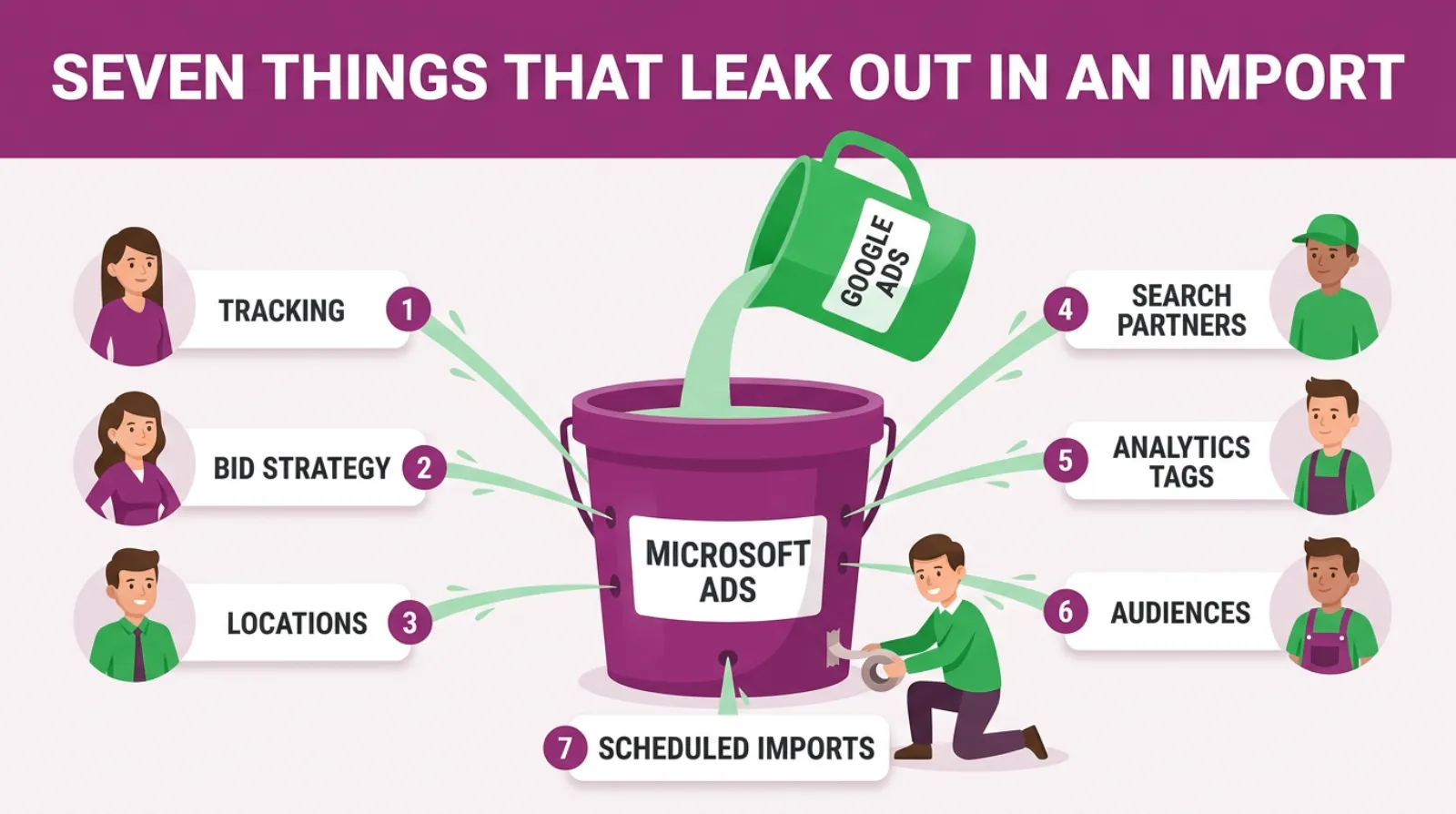
The import copies your campaigns, keywords, ads and negatives well. What breaks is the wiring around them. Your conversion tracking does not report to Microsoft. Your bid strategy can change. Small towns can widen into whole regions. Search partners can switch on. And a scheduled import can overwrite every fix you make.
None of that stops your ads from running. That is the problem.
The account looks healthy, it spends money every day, and from the outside you cannot tell that half of the settings that protected your budget on Google aren't there any more.
Most owners only find out months later. Usually when someone asks, "So what did we get from Bing?" and nobody can answer.
What Is The Microsoft Ads Google Import?
The Google import is a free tool inside Microsoft Ads. You sign in with your Google account, pick the campaigns you want and Microsoft copies them into your Microsoft Ads account.
It brings across your campaigns, ad groups, keywords, responsive search ads, most extensions, budgets and negative keyword lists. You can run it once, or set it to repeat daily, weekly or monthly.
It's a good tool. It saves hours of work, and it means you are not sitting down to build a second account, keyword by keyword and ad by ad, from a completely blank page.
But Microsoft is clear that it isn't a perfect copy. As of October 2026, Microsoft's help page on what gets imported from Google Ads says the tool won't bring across everything.
It tells you to review your campaigns afterwards and add back what is missing.
Most people skip that last part. Microsoft's own wording makes it sound like tidying up. In practice it decides whether the account makes money.
Why Does This Matter For A Small Business?
It matters because Microsoft Ads is often the cheapest extra channel a local business can add. But it only works if it is set up properly.
As of September 2026, Statcounter's data shows Bing had 18.33 percent of UK desktop searches.
That is a real slice of people searching at work, on office PCs and on the family computer at home.
Those are often the people who book a roofer, a solicitor or an accountant. They tend to be older and they tend to be serious.
So it's worth being there. But a broken import turns a cheap test into an expensive one.
Picture a plumber spending £400 a month on Google. They import the account, leave it running at the same £400 and check back a month later.
Here is what a quiet import can leave them with.
They've spent the money. Microsoft shows plenty of clicks but no conversions, because the tracking never came across.
And Google Analytics files the visits under organic search, so the plumber decides Bing does not work and switches it off.
Bing didn't fail there. The setup did.
The import copies the parts you can see and drops the parts that protect your budget. That is why it needs checking.
Seven Things That Leak Out In A Typical Import
What The Import Gets Right
Before we look at what breaks, it is fair to say what works. The import does a lot of the heavy lifting well.
Here is what usually comes across cleanly.
- Campaign and ad group structure, with the same names.
- Keywords and their match types, on the first import.
- Responsive search ads, including headline pins.
- Sitelinks, callouts, structured snippets, call and logo extensions.
- Negative keywords and shared negative keyword lists.
- Budgets, with an option to raise or lower them by a percentage.
That is most of the work in a small account. If you built a tidy Google account, you get a tidy starting point on Microsoft.
One thing to watch with match types. Microsoft's page says the import copies the match type the first time and never updates it after that.
So if you tighten a keyword in Google later, the Microsoft version stays as it was.
The trouble is everything around the campaigns. Tracking, bidding, targeting and timing. Let's go through each one.
Why Can't Microsoft See Any Of My Enquiries?
Microsoft cannot see your enquiries because your Google conversion tag only reports to Google. Microsoft needs its own tag, called the UET tag, on your website. Without it, every Microsoft campaign runs blind. You'll see clicks and spend, but zero conversions.
This is the biggest leak, and it causes most of the others.
Your Google account knows which clicks turned into calls and forms because a Google tag sits on your site, but that tag has no link to Microsoft at all.
Microsoft does have an option to import conversion goals from Google Ads, but its help page says Microsoft is still rolling the feature out, so not every account has it.
Where it does exist, it only brings across certain goals. They have to be online, tag-based goals created in Google Ads, such as a thank you page visit.
Goals you imported from Google Analytics do not come across. Neither do Google's own call tracking or smart goals.
And even the goals that do come across need the UET tag on your site before they can count anything.
Here is the fix.
- In Microsoft Ads, go to Conversions and create a UET tag.
- Add it to every page of your site, or through Google Tag Manager if you use it.
- Set up a goal for each real enquiry, such as a form thank you page.
- Check the tag shows as active within a day or two.
If you take calls, track those too. Add call extensions and set up a goal for calls, so phone leads count as well as forms.
Until you do this, you can't judge anything else in your Microsoft account. So do it first. Everything else waits.
Why Did My Bid Strategy Change After The Import?
Your bid strategy changed because Microsoft can't run a conversion-based strategy without its own conversion data. If there is no conversion goal in Microsoft yet, the import swaps strategies like Target CPA for one that does not need conversions, such as Maximise Clicks.
Microsoft's help page says it directly. If a Google strategy needs a conversion goal and Microsoft has none, it converts the strategy to one that does not.
Where Microsoft doesn't support a strategy at all, it switches the campaign to Enhanced CPC and sets bids at a level it recommends.
That is a big change. On Google, your campaign hunted for enquiries. On Microsoft, it may now be hunting for clicks, which is a very different thing.
Maximise Clicks chases the cheapest clicks it can find, and on a small budget those are often the weakest searches and the poorest partner sites.
So check every imported campaign's bid strategy on day one. Our usual starting point for a small account is manual bidding or Enhanced CPC, with bids a little below your Google bids.
Then, once the UET tag has recorded around 30 conversions in a month, you can test a conversion-based strategy again. That 30 is our working rule, not Microsoft's.
There is one more catch. Microsoft's page says imports have the update bid strategies option switched on by default.
So if you set up a repeating import, it can put the old strategy back. More on that below.
Why Are My Microsoft Ads Showing Outside My Area?
Your ads can show outside your area for two reasons. The import widens any location Microsoft doesn't recognise to the region around it. And Microsoft's location option may be set to include people who show interest in your area, not just people in it.
This one hurts local firms most, because a local firm's whole Google setup is usually built around a tight patch.
Microsoft's help page explains the first part. Some smaller places that Google lists are not in Microsoft's location list.
When that happens, the import maps the target to a larger parent area, such as a county or region.
So a campaign set to a few towns near your yard could come across targeting a much larger area. You would be paying for clicks from people you would never drive to.
There is an option to stop the widening, but read the small print first.
If you choose not to expand unsupported locations, Microsoft's page says the campaign will serve worldwide without location targeting.
That is worse. The safer option is the one that pauses campaigns where every imported location is unsupported.
Then there is the location option itself. Open each campaign's settings and look at who your ads show to. Choose people in your targeted locations, not people who show interest in them.
Check the map, not the list. Microsoft can show your targeted area on a map in the campaign settings. If it looks bigger than your patch, it is.
Location groups do not come across either, so anything built in Google from a list of places needs rebuilding by hand.
Did The Import Switch On Search Partners?
It did if your Google campaign had search partners ticked. Microsoft's page says those campaigns are set to target all its search networks. That means Bing, AOL and Yahoo, plus syndicated search partners, which are other sites that show Bing ads.
Some of those partners send good traffic. Others send a steady trickle of cheap clicks from sites you have never heard of, and those clicks rarely turn into a phone call or a form.
On Google, you might have left partners on without a second thought, but on Microsoft the partner network can be a bigger share of a small budget.
So after two weeks, run the website URL report, which Microsoft also calls the publisher report, because it shows which sites your clicks came from and what they cost.
Exclude any site with spend and no enquiries. Keep the good ones. That's a ten-minute job you can repeat once a month.
Why Does My Microsoft Ads Traffic Show As Organic In Google Analytics?
Your Microsoft traffic shows as organic because Google Analytics cannot tell it is paid. Google Ads labels its clicks automatically. Microsoft only adds the labels, called UTM tags, if you switch on its auto-tagging setting. Until then, Bing clicks look like free search traffic.
This one fools a lot of people. The visits are there. They're just filed in the wrong drawer.
On Google, auto-tagging does the work quietly. You probably never set up a UTM tag in your life.
 LIVE
LIVELive every Tuesday at 2pm UK. Bring your marketing questions.
Get your Google, local SEO and AI questions answered live.
The import does not change that, because there is nothing to copy, so if your Google URLs had no UTM tags, your Microsoft URLs do not either.
Microsoft's help page notes one thing it does change. If your URLs carried utm_source=google, the import swaps it to bing. That's helpful, but only if you used tags in the first place.
Here is the fix. In Microsoft Ads, go to Settings, then Account level options. Under auto-tagging of UTM, tick the box to add UTM tags to your destination URLs.
Then choose to keep any tags you already have and let Microsoft add the missing ones. From then on, your Microsoft clicks arrive as bing / cpc in Google Analytics.
If Google Analytics is where you judge your marketing, this setting decides whether Bing gets any credit at all.
Which Audiences And Age Groups Don't Come Across?
Several Google audiences don't come across at all. Customer lists, affinity audiences, detailed demographics and remarketing lists built in Google Analytics all stay behind. Age groups also change shape, and the 45 to 54 age group doesn't come across at all.
For many local accounts, audiences are a light touch. But if you have used them, here is what Microsoft's help page says.
In-market audiences come across. Some website visitor lists come across too, but any membership longer than 180 days is cut to 180.
Customer lists do not come across. Neither do YouTube lists or app lists. You would need to upload customer lists again inside Microsoft Ads.
Age is the odd one. Microsoft uses different age bands from Google.
Google's 35 to 44 becomes Microsoft's 35 to 49, and 55 to 64 becomes 50 to 64. Microsoft drops Google's 45 to 54 band completely. Most people miss that.
So if you'd excluded an age group, or bid it up or down, check the age settings by hand. Parental status and household income targeting do not come across either.
Can A Scheduled Import Undo Your Changes?
Yes. A scheduled import can overwrite changes you have made in Microsoft Ads. Microsoft's help page warns that a repeat import can overwrite bids, budgets and settings, and can pause, remove or rename campaigns. Many owners turn it on and forget it is running.
This is the leak that undoes all the others. You fix your bid strategy, your locations and your budgets, and then the weekly import runs on Sunday night and copies Google's settings straight back. Nothing warns you.
Negative keyword lists follow the same pattern. Microsoft's page says the import merges negatives from both sides, but the Google links to campaigns overwrite the Microsoft ones.
Watch out for names too. If a Google campaign has the same name as an existing Microsoft campaign, the import merges them. After that they're linked for good.
Here is what we'd do.
- Run the import once, not on a schedule.
- Fix everything in this post inside Microsoft Ads.
- If you want new Google campaigns copied later, run a one-off import with only new items ticked.
- If you must schedule it, open the import options and untick bids, bid strategies, budgets and URL options.
Microsoft's own advice is close to this. Its help page suggests choosing the option for items not previously imported, so existing campaigns are not overwritten.
A repeating import is fine for big accounts with a dedicated manager. For a small business, it is a quiet way to lose your fixes.
How Much Budget Should You Bring Across?
Bring across a fraction of your Google budget, not all of it. The import copies your Google budgets one for one unless you change them. Our usual starting point is about a fifth of your Google search budget, then add more once Microsoft shows real enquiries.
Microsoft's import options let you raise or lower every budget by a percentage as it comes across. Most people never open that screen.
So a Google campaign spending £30 a day arrives on Microsoft at £30 a day. That adds up fast. On a channel you haven't tested yet, with no conversion tracking, that is a lot of money to risk.
Here is a rough example with round numbers. Say you spend £1,000 a month on Google search. A fifth is £200 a month on Microsoft, about £6.60 a day.
That's enough to learn whether Bing works for you in a month or two. It is not enough to hurt if it does not.
Bids are worth a look too. Microsoft's page says it raises any bid or budget below its minimums to meet them.
In pounds the minimum search bid is 5p and the minimum daily budget is 5p, so that rarely bites in the UK.
The bigger point is that Bing clicks often cost less than Google clicks in the same trade.
Do not pay Google prices out of habit. Start a little lower and adjust once you see where your ads sit.
What The Import Changes, At A Glance
Here's a summary of the main changes, built from Microsoft's help page on what gets imported.
| What you set in Google | What you get after the import | What to do |
|---|---|---|
| Google conversion tag | Nothing reported to Microsoft | Add the UET tag and set up goals |
| Target CPA or Maximise Conversions | Maximise Clicks if Microsoft has no goal | Set manual or Enhanced CPC bids |
| Small towns or villages | Widened to the parent region | Check the map, choose people in your area |
| Search partners on | All Microsoft search networks on | Check the website URL report |
| Auto-tagging, no UTM tags | Bing clicks look organic in Analytics | Turn on UTM auto-tagging |
| Age 45 to 54 settings | Not imported | Set ages again by hand |
| Weekly import | Overwrites your Microsoft fixes | Run once, or untick bids and budgets |
None of these stop your ads from showing. All of them change what you pay for and what you can measure.
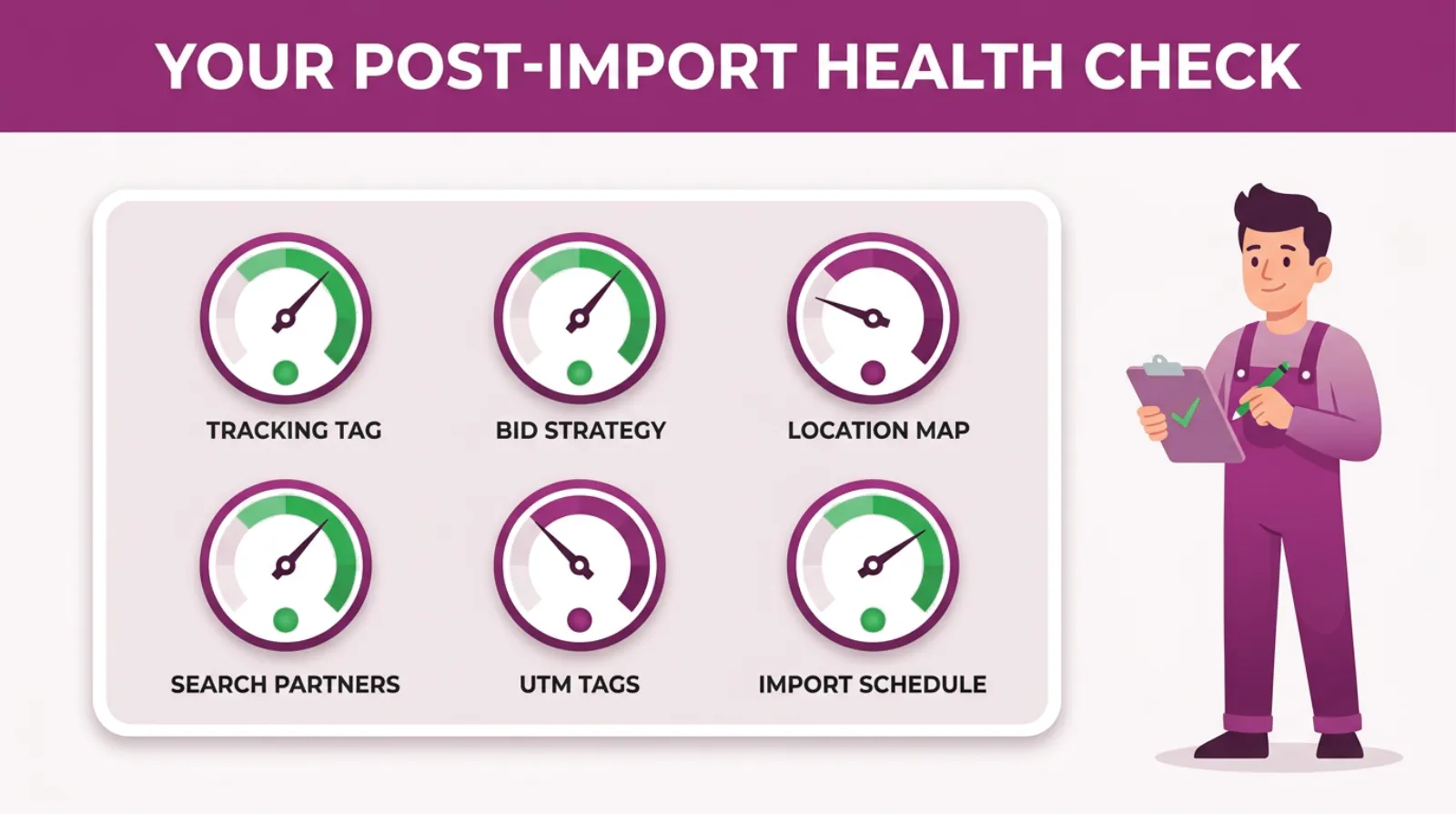
Your Post-Import Health Check
How Do I Import Google Ads Into Microsoft Ads Safely?
To import Google Ads into Microsoft Ads safely, import your best campaign once, with budgets lowered and the schedule off. Then fix tracking, bidding, locations and analytics before you switch it on. It takes about an hour more than a straight import.
Here are the steps in order.
- Sign in to Microsoft Ads and choose Import, then Import from Google Ads.
- Sign in with Google and pick your best campaign, not the whole account.
- Choose advanced import, so you can see every option.
- Lower budgets by a percentage, aiming for about a fifth of your Google spend.
- Tick the option to pause campaigns where every location is unsupported.
- Set the schedule to run now, once.
- Run the import, then pause the new campaign before it spends.
- Add the UET tag and your conversion goals.
- Set the bid strategy, the location option and UTM auto-tagging.
- Check the age, audience and ad schedule settings.
- Switch the campaign on.
Step two matters more than people think, because if a Google campaign does not make money, copying it to a second channel will not fix it.
Step seven is the safety net. Pausing straight after the import costs nothing. It gives you time to work through the checks without paying for clicks.
The ad schedule in step ten is worth a second look. Microsoft's page says a new campaign takes the account's time zone on the first import.
If your account isn't set to London time, your opening hours will be out.
How Do I Check My Google Ads Import Worked?
Check the import summary first, then open each campaign and work through the settings that change. Look at tracking, bid strategy, locations, search partners, UTM tags and the import schedule. After two weeks, compare your Microsoft enquiries with Google Analytics.
Microsoft shows an import summary when the import finishes. Read every line of it. It lists errors and warnings, including any locations the import moved to a larger area.
You can download those errors as a spreadsheet. If a location shows a warning, the import widened it.
Then work through this list on every imported campaign.
- The UET tag shows as active and your goals are recording.
- The bid strategy is the one you chose, not Maximise Clicks by default.
- The location map matches your real service area.
- Location option is set to people in your targeted locations.
- Search partners are on only if you have decided you want them.
- UTM auto-tagging is on at account level.
- Ad schedule hours match your opening hours.
- Any repeating import is off or has bids and budgets unticked.
After two weeks, do one more check. Open Google Analytics and look for bing / cpc as a source.
If it is there, your tags are working. If Bing still shows as organic, the UTM setting did not take.
And ask your customers how they found you. Someone saying "I searched on Bing" tells you more than any report.
Should You Import Or Build Microsoft Ads From Scratch?
For most small businesses, importing is the right choice, as long as you check it afterwards. It copies your structure, your keywords and your ads in minutes. Building from scratch only makes sense if your Google account is messy or you want Microsoft run very differently.
There is a fair argument for a clean build. It forces you to make every decision on purpose, so nothing slips through on a default.
But it takes hours, and most of what you would build would look exactly like your Google account anyway.
So here is our view. Import your best campaign, then treat the result as a draft.
Go through the checks in this post and you will get the speed of the import without inheriting its blind spots.
If your Google account is a mess, fix Google first. Importing a messy account just gives you two messy accounts.
When Is Microsoft Ads Not Worth Importing Yet?
It's not worth importing yet if your Google Ads do not bring in steady enquiries. The same goes if your Google conversion tracking is not working, or if nobody has time to check a second account every week.
Microsoft Ads adds to a working Google account. It doesn't fix a broken one.
It is tempting to think a new channel will solve a slow month, but in our experience the slow month usually comes from problems that would follow you straight across to Microsoft.
Here is when we'd tell an owner to wait.
- Google does not bring in good, steady enquiries yet.
- You can't say which Google campaigns make money.
- Your budget is already stretched on Google.
- Nobody will look at the Microsoft account once a week.
If any of those apply, sort them first. Bing will still be there next quarter.
Your First Two Weeks After The Import
Here is a simple plan for the first fortnight. It assumes Google already brings in steady enquiries.
- Day one. Import your best campaign once, with budgets lowered, then pause it.
- Day one. Add the UET tag, your goals and UTM auto-tagging.
- Day two. Fix bid strategy, location option, ages and ad schedule.
- Day two. Switch the campaign on.
- Day seven. Check the search terms and add negatives for anything irrelevant.
- Day fourteen. Run the website URL report and exclude poor partner sites.
- Day fourteen. Compare cost per enquiry with Google.
At the end of two weeks, you will have clean data for the first time. That's when you can decide whether to add budget, keep testing or stop.
Frequently asked questions
Does importing change my Google Ads account?
No. The import only reads your Google Ads account. It copies the settings into Microsoft Ads and leaves your Google campaigns exactly as they were.
Can I undo a Microsoft Ads import?
There is no undo button. You can pause or delete the imported campaigns in Microsoft Ads, and turn off any scheduled import so it does not run again.
Do negative keywords come across in the import?
Yes. Microsoft imports negative keywords and shared negative keyword lists at account, campaign and ad group level. Check them after the import, because Google's list links overwrite any Microsoft ones.
Does the import bring my extensions across?
Most of them. Sitelinks, callouts, structured snippets, call, location, price, promotion and logo extensions are all on Microsoft's list. Check each one is approved, because Microsoft holds some for review.
Will my match types stay the same?
On the first import, yes. Microsoft's page says later imports don't update it. Old broad match modifier keywords now run as broad match on Microsoft.
How often should I re-import from Google Ads?
For a small business, only when you add a new campaign. Run it once, with only new items ticked, so your Microsoft fixes stay in place.
Keep Reading
If you're setting up or fixing Microsoft Ads, these posts cover the next steps.
- Mastering Microsoft Ads Tracking: Your Definitive Guide to Unlocking Campaign Success
- What Is The Best Bidding Strategy For Microsoft Ads?
- What Platforms Do Microsoft Ads Appear On?
- How Does Microsoft Ads Compare To Google Ads?
- Why Your “Set It and Forget It” Microsoft Ads Are Quietly Burning Through Your Budget
We picked these because each one goes deeper on a fix from this post. Tracking, bidding, where your ads show and keeping the account in shape.
Sources
The import rules in this post come from Microsoft's help page on what gets imported from Google Ads, last updated in June 2026. The UTM steps come from Microsoft's help page on auto-tagging.
The search share figure comes from Statcounter. We checked all three on 16 October 2026.
- What gets imported from Google ads - Microsoft Advertising
- How do I add UTM tags to my landing page URL? - Microsoft Advertising
- Desktop Search Engine Market Share United Kingdom
The Import Is The Start, Not The Finish
Microsoft's import tool is good. It saves you hours and gives you a working account in minutes.
But it copies what you can see and quietly drops what you cannot. Your tracking, your bidding rules, your tight map and your clean analytics all need putting back by hand.
The fix is not hard. Import once and pause. Add the UET tag. Set your bids, your locations and your UTM tags. Turn off the repeating import.
Then give it two weeks of clean data. Only then judge it.
Want someone to check your import with you? That's what we do at SF Digital every day.

Written by Uzair Kharawala
Partner at SF Digital Studios, a Google Premier Partner agency. Uzair has been helping businesses grow with Google Ads since 2002 and teaches it every week on YouTube.
Get our best Google Ads tips by email
New articles and videos, straight to your inbox. Unsubscribe any time.