
Most local business owners think YouTube ads need a film crew, a studio and a budget to match. They do not.
A 15-second YouTube ad, filmed on the phone in your pocket, can put your face and your business in front of people in your area for a few pounds a day.
Get Found, Get Chosen, Get Your Time Back
A free one-day marketing seminar in Milton Keynes · 13 January 2027
Fifteen seconds is short enough to film in an afternoon and long enough to say one clear thing.
Get your free Marketing Action PlanNot sure where to start? Answer a few questions and get your plan in about a minute. No email needed.
Get my plan →This guide shows you how. What to say, second by second. What kit you need, most of which you already own. How to film it, edit it, upload it and judge whether it is working.
A quick note first. SF Digital runs Google Ads and YouTube campaigns for local businesses, so we're not neutral. We have kept to Google's own published rules and labelled our own views clearly.
What Is A 15-Second YouTube Ad?
A 15-second YouTube ad is a short video advert that plays before, during or alongside YouTube videos. You run it through Google Ads, choose who sees it and where, and pay only under the rules of the format you pick. Fifteen seconds is enough for a hook, one message and a clear next step.
It isn't a special product. It's simply a video of about 15 seconds that you upload to YouTube and use in a Google Ads video campaign.
The same short video can run in several places. Before other videos, in the YouTube Shorts feed, and in search results on YouTube.
The length is the point. Short ads force you to say one thing well, and that is exactly what a local business needs.
Why Does 15 Seconds Work So Well For Local Businesses?
Fifteen seconds works because it matches how YouTube charges and how people watch. Viewers can skip most ads after five seconds, so your first five seconds have to earn the rest. And on the most common format, you only pay when someone watches the whole of a short ad.
As of October 2026, Google's help page on video ad formats says this about skippable in-stream ads.
With cost-per-view bidding, you pay when a viewer watches 30 seconds of your video, or the whole video if it is shorter than 30 seconds, or interacts with it, whichever comes first.
So with a 15-second ad, someone who skips at five seconds usually costs you nothing. Someone who watches all 15 seconds, or clicks, is who you pay for.
That's a fair deal for a small business. You pay for people who were interested enough to watch to the end.
There's a second reason. Short ads are easier to make well. A two-minute advert needs a script, scenes and editing. And retakes. Lots of them. A 15-second advert needs one location, one person and one clear message.
And there is a third. A short ad can run almost anywhere on YouTube. The same 15 seconds can work as an in-stream ad, a Shorts ad or an in-feed ad, so one afternoon of filming goes a long way.
Which YouTube Ad Format Should Your 15-Second Ad Use?
For most local businesses, start with skippable in-stream ads and Shorts ads. They're the cheapest way to test, and you mostly pay for people who watched. Non-skippable ads guarantee the full 15 seconds but charge per thousand views, so they suit businesses that want to be seen widely.
Here's how the main formats compare, using the rules on Google's video ad formats help page as of October 2026.
| Skippable in-stream | Non-skippable in-stream | Bumper | Shorts ads | In-feed | |
|---|---|---|---|---|---|
| Where it shows | Before, during or after videos | Before, during or after videos | Before, during or after videos | Between Shorts in the feed | YouTube search and suggested videos |
| Can people skip? | Yes, after 5 seconds | No | No | Yes, by swiping | They choose to click |
| Length | No maximum, under 3 minutes recommended | 60 seconds or shorter | 5 to 6 seconds | Under 60 seconds recommended | No maximum |
| How you pay | Per view or per thousand impressions | Per thousand impressions | Per thousand impressions | Per view or per thousand impressions | When someone clicks to watch |
| Best for | Testing on a small budget | Being seen widely | A quick reminder | Phone viewers | People already searching |
Our pick for a first campaign: skippable in-stream plus Shorts. A 15-second ad fits both, and both let you pay for real views rather than reach.
If you would like a reminder version later, cut a six-second bumper from the same footage. One filming session, three formats.
Do Local Businesses Really Need Video Ads?
You don't need video ads to survive. But video does something search ads and leaflets can't: it lets people see and hear you before they call. For trades, clinics, salons and any business built on trust, that first impression often decides who gets the phone call.
Think about how people choose a local business. They want someone good. Someone friendly. Someone nearby. A photo helps. A face and a voice help more.
Video gets you remembered. Someone who saw your 15-second ad last week is more likely to recognise your name when they search for you next week.
That matters because most local searches end in a choice between a few names. If one of those names is familiar, it has an edge.
Video is also less crowded. Plenty of local businesses run search ads. Far fewer run YouTube ads. In smaller towns, hardly any do. That means less competition for your local audience.
And YouTube is not just for teenagers. People of every age watch it, on phones, laptops and the TV in the living room.
Your ad can reach homeowners in your area while they're watching a cooking video, a football highlight or a DIY guide.
Video doesn't replace search. It feeds it. People see your ad, remember you, and later search for you by name. That is why we treat YouTube as a partner to your search campaigns, not a rival.
A 15-Second Ad, Second By Second
How Do You Write A 15-Second YouTube Ad Script?
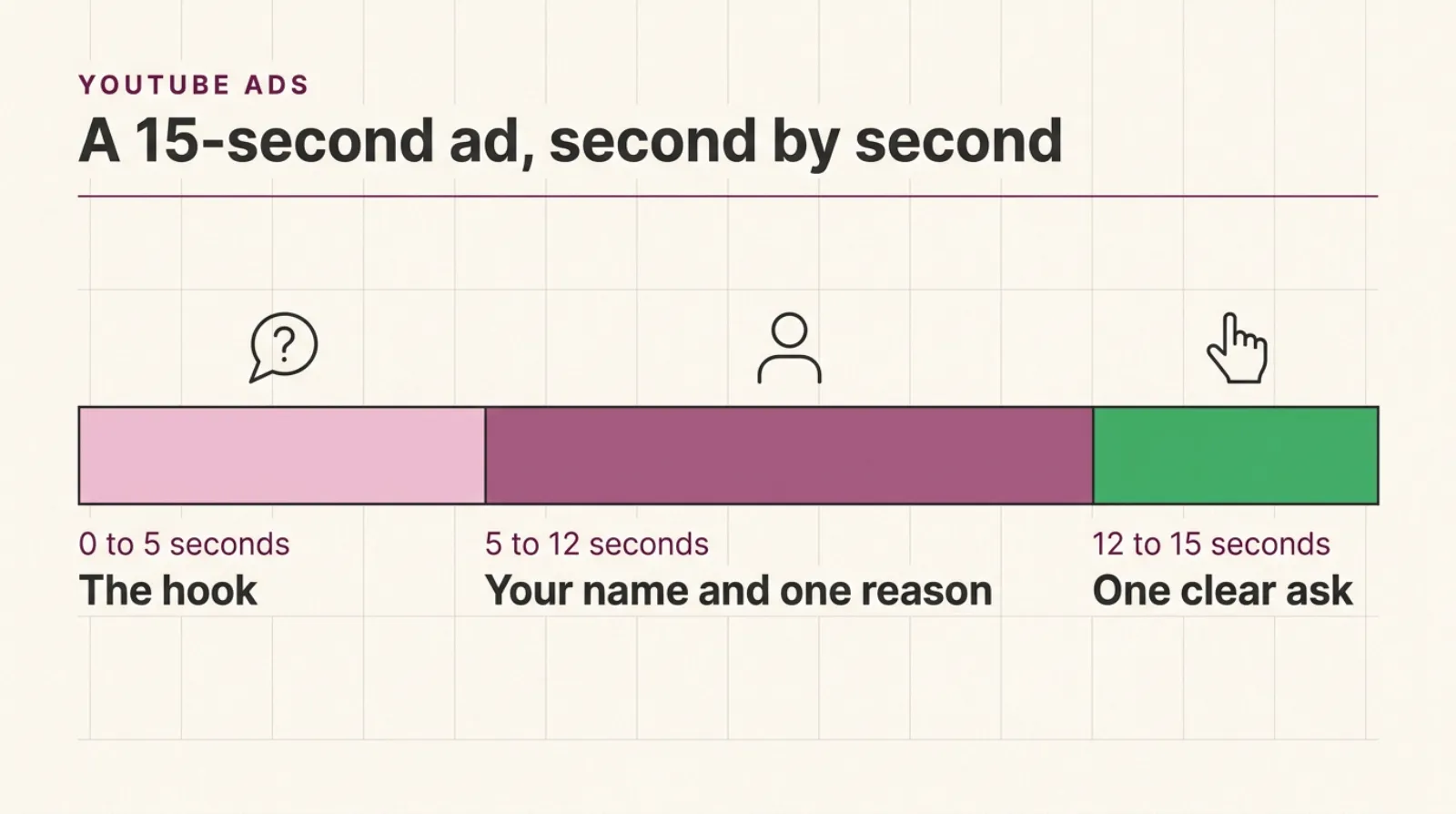
Write it in three parts. A hook in the first five seconds, one message with your name in the middle, and one clear action at the end. Keep it to about 35 to 40 spoken words. Read it out loud with a timer, and cut anything that doesn't fit in 15 seconds.
That word count is our rule of thumb, based on a normal speaking pace. Some people talk faster. Time yourself.
Google's own creative guidance gives a useful checklist. Think with Google's article on the ABCDs, from April 2022, sets out four principles for effective YouTube ads: Attention, Branding, Connection and Direction.
It says that, on average, the ABCDs deliver a 30% lift in short-term sales likelihood and a 17% lift in long-term brand contribution.
Those figures come from a Google and Kantar study, so treat them as the platform's own research. But the principles are sound, and they fit a 15-second ad perfectly.
Here's how each one works on a phone-filmed local ad.
Attention: hook them in five seconds. Start in the middle of the action or with a question your customer is already asking. Don't open with your logo or "Hi, I'm...". Open with the problem.
Branding: say your name early. Say your business name in the first ten seconds and show it on screen. Wear your uniform. Stand in front of your van or your shop sign.
Connection: one human moment. Look straight at the camera. Smile. Show your hands doing the work. People buy from people.
Direction: one clear ask. Tell them exactly what to do next. "Search for us." "Book a free quote." "Call today." One action, not three.
Write the hook last. Once you know your message and your ask, the best hook is usually obvious. It is the question your best customers asked you before they booked.
An Example 15-Second Script, With Timings
Here's a hypothetical example, written for a dog groomer in Dunstable. It's an illustration, not a real client.
- 0 to 5 seconds, the hook. "Is your dog's coat matted again before the next appointment?"
- 5 to 12 seconds, the message. "I'm Sam from Happy Paws in Dunstable. Gentle grooms, no rushing, and your dog's home in two hours."
- 12 to 15 seconds, the ask. "Book online today. Happy Paws, Dunstable."
That is 37 words. It opens with a problem dog owners recognise. It says the name twice. It gives one reason to choose them, and it ends with one action.
Notice what's missing. No list of services. No prices. No opening hours. No "established in". Those can live on the website.
Your turn. Write your own script using the same three parts. Then read it aloud with a stopwatch. If it runs over 15 seconds, cut words, not speed.
Here are a few hooks that work well for local businesses.
- A question: "Boiler making that noise again?"
- A surprise: "Most gutters in this street haven't been cleared in years."
- A promise: "A new kitchen fitted in ten days, not ten weeks."
- A local touch: "If you live in Leighton Buzzard, this is for you."
Keep any claim honest. If you say "ten days", you need to deliver it, and Google's advertising policies do not allow misleading claims.
What Do You Need To Film A YouTube Ad On A Phone?
You need five things: a recent smartphone, good light, a clip-on microphone, something to hold the phone steady, and a quiet room. Most owners already have the phone. A clip-on microphone and a small tripod together often cost less than a day's advertising.
Here's what each one does, and why it matters more than the camera.
A recent phone. Any phone from the last few years films in HD or better.
Google's video ad specs page, as of October 2026, recommends 1920 by 1080 pixels for horizontal video and 1080 by 1920 for vertical. Most phones do that easily.
Good light. Light is the difference between "home video" and "professional". Face a window, so daylight falls on your face. Never stand with a window behind you, or you'll turn into a dark silhouette.
A clip-on microphone. Viewers forgive slightly wobbly pictures. They do not forgive bad sound. Google's own ABCD guidance describes YouTube as almost entirely a sound-on experience, so a clear voice matters.
A small clip-on mic that plugs into your phone is the best value upgrade you can buy.
Something to hold the phone steady. A small tripod is ideal. A stack of books on a table works too. Hand-held footage looks shaky and distracts from your message.
A quiet room. Turn off radios, fridges and fans if you can. Close the windows. Soft furnishings like curtains and sofas help soak up echo.
Optional extras. A ring light helps on dark winter afternoons. A free teleprompter app lets you read your script while looking at the lens. Neither is essential.
Your Phone Ad Kit
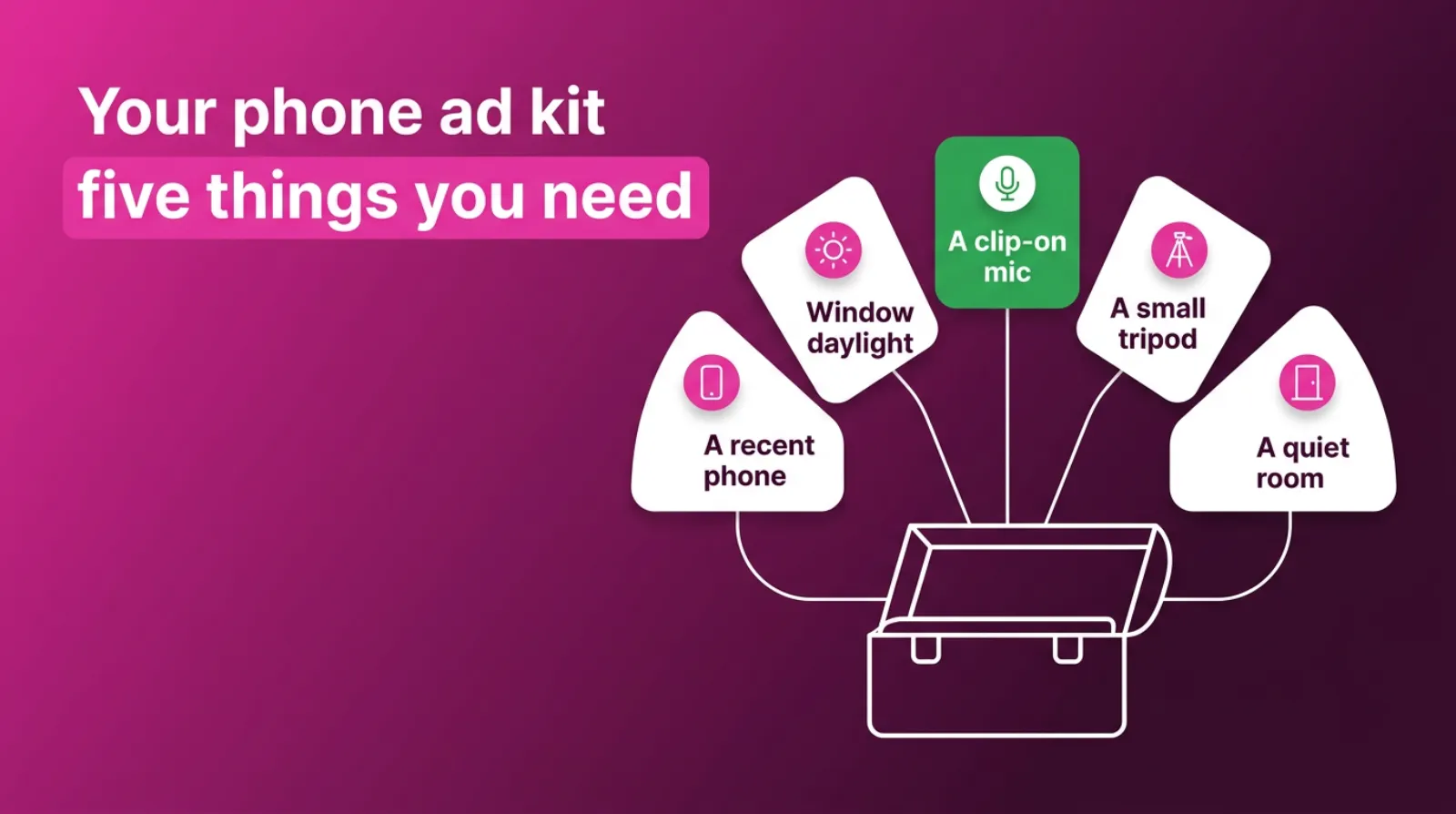
The five things a local business needs to film a YouTube ad on a phone: a recent smartphone, daylight from a window, a clip-on microphone, a small tripod or stand, and a quiet room, with the clip-on microphone highlighted as the best value upgrade.
How Do You Film A YouTube Ad On Your Phone, Step By Step?
Clean the lens, set the phone at eye level, face the light, clip on the microphone and film several takes. Shoot in the highest quality your phone offers, keep the phone still, and leave a second of silence at the start and end of each take for editing.
Here's the full routine we'd suggest for a first shoot.
Step 1: wipe the lens. Phone lenses pick up fingerprints in your pocket. A smudged lens makes everything look hazy.
Step 2: pick your spot. Somewhere that shows your work: your van, your shop, your workshop, your treatment room. Keep the background tidy.
Step 3: face the window. Daylight on your face, never behind you.
Step 4: set the phone at eye level. Looking down at the camera is unflattering. Looking up is worse.
Step 5: use the back camera if you can. It is usually sharper than the selfie camera. The front camera is fine if you need to see yourself.
Step 6: lock the focus and exposure. On most phones, press and hold on your face until the focus locks, so the picture does not pulse as you move.
Step 7: clip the mic about a hand's width below your chin. Do a ten-second test and play it back with headphones.
Step 8: film five to ten takes. The first take is rarely the best. By take four, most people relax.
Step 9: film some extra shots. Five seconds of your hands working, your van pulling up, a happy customer if they've agreed to it. These help in editing.
 LIVE
Live every Tuesday at 2pm UK. Bring your marketing questions.
Get your Google, local SEO and AI questions answered live.
Talk to one person. Imagine a single customer sitting where the phone is. It makes you sound warmer and more natural.
Should You Film Your YouTube Ad Horizontal Or Vertical?
Film vertical if most of your viewers will see it on phones in Shorts, and horizontal for ads before videos on laptops and TVs. As of October 2026, Google's video ad specs page lists 16:9 for horizontal, 9:16 for vertical and 1:1 for square. Ideally, film both.
It's easier than it sounds. Do your takes horizontally. Then turn the phone and do them again. It adds ten minutes.
If you only have time for one, our working advice for local businesses is to start vertical. A lot of YouTube viewing happens on phones, and vertical fills the whole screen.
But if you know your customers watch on the TV in the evening, horizontal may suit you better.
Keep yourself in the middle of the frame. That way, a horizontal video can be cropped to square or vertical later without cutting your head off.
How Do You Edit A 15-Second Ad On Your Phone?
Use a free phone editing app to trim your best take to 15 seconds, add captions, put your business name on screen and finish with a simple end card showing your next step. Keep music quiet underneath your voice, or leave it out.
Here's a simple edit order.
Trim hard. Cut the silence at the start. Your first word should start within the first half second.
Add captions. Many people watch with the sound low or off, especially on phones in public. Captions mean your message still lands. Most free editing apps can generate them for you; check every word.
Show your name. Put your business name and town on screen in the first ten seconds, in large, clear text.
Add an end card. The final two or three seconds should show your logo, your web address or "Search for [your name]", and the action you asked for.
Keep music low. If you add music, keep it well below your voice. Use music you have the right to use. Many editing apps include free tracks.
Check it on a phone screen. Watch it at arm's length. Can you read every word? Can you hear every word? If not, fix it.
Export in high quality. Choose the highest resolution your app allows, at least 1080p.
What If You Hate Being On Camera?
Plenty of owners feel awkward on camera, and that's normal. You can still make a good 15-second ad. Let a team member present it, film your hands doing the work with a voice-over, or show a happy customer who has agreed to take part.
A voice-over ad is the easiest place to start. Film five or six short clips of your work, then record your script separately, somewhere quiet, with the clip-on microphone. Lay the voice over the clips in your editing app.
Your face does help, though. People like to see who'll turn up at their door. Even two seconds of you smiling at the end, next to your name, makes the ad more personal.
If nerves are the problem, practise the script ten times before you film. Then do the takes in one go, without stopping to watch them back.
Most people find the fifth or sixth take is the one, because by then they've stopped thinking about the camera.
And remember who's watching. Not a film critic. A local person who needs what you do and wants to know you're friendly and good at it.
How Do You Upload And Run Your Ad In Google Ads?
Upload the finished video to your YouTube channel, set it to unlisted if you do not want it on your channel page, then create a video campaign in Google Ads. Choose your goal, set a daily budget, target the area you serve and add your video as the ad.
Ad videos need to be viewable by the public. Unlisted works, because anyone with the link can watch it. Private videos don't work for ads.
Some things to know before you start.
Campaign types have changed. As of October 2026, Google's help page confirms Video Action Campaigns have been upgraded to Demand Gen campaigns, with the final ones moved over by April 2026.
If you want enquiries rather than views, Demand Gen is now the campaign type Google offers for that. It runs on YouTube, Discover, Gmail and the Google Display Network.
Target your area tightly. Set location targeting to the towns or the radius you actually serve. A 15-second ad shown to someone 200 miles away is wasted money.
Add a final URL. Send people to the page that matches your ad, not your home page.
Start with one ad, then test a second. Once your first ad has been running for a few weeks, film a second hook and see which one people watch to the end more often.
If the setup feels like a lot, it's the part most owners hand to someone else. The filming is the part only you can do.
How Much Does A 15-Second YouTube Ad Cost?
Making a 15-second ad on a phone costs little more than your time and perhaps a clip-on microphone. Running it depends on your budget and area. For a local test, we'd suggest £10 to £20 a day for four weeks. That's our working range, not an official figure.
US guides give some idea of view prices. LocalIQ's guide, updated September 2026, says YouTube advertising costs on average $0.10 to $0.30 per view or impression.
Those are US dollar figures and do not name a source, so treat them as a rough guide only.
The billing rules matter more than the averages. On skippable ads with cost-per-view bidding, you pay when someone watches your whole 15-second ad, or interacts with it. People who skip early usually cost nothing.
Google sets the price in an auction. Your actual cost depends on who you target, when, and how many other advertisers want the same viewers.
Small areas spend slowly. If you target a single town, you may struggle to spend £20 a day. That's fine. It means you're reaching the same local viewers rather than spreading thin.
Production costs almost nothing. That is the real advantage of a phone ad. You can make three versions, test them, and keep the winner, all for less than a single studio day would cost.
What Mistakes Make A Phone Ad Look Cheap?
Phone ads look cheap because of poor sound, poor light and a slow start, not because of the phone. Fix the microphone, face the window, start talking in the first second and say one thing clearly. Those four changes do more than any new camera.
Here are the mistakes we see most often in self-filmed ads.
A slow start: three seconds of logo animation before anyone speaks. By then, the viewer has their thumb on the skip button.
Echo and wind: filming in an empty room or outside on a windy day. Use a clip-on mic and a furnished room.
Back-lighting: standing in front of a window. Turn around and face it.
Too many messages: trying to list every service in 15 seconds. Pick the one that brings the most profitable work.
No name: the ad is lovely, but nobody remembers whose it was. Say your name, and show it.
No ask: the ad ends without telling people what to do. Always finish with one clear action.
Reading the script: eyes darting sideways to a note. Learn it, or use a teleprompter app so you look at the lens.
Shaky footage: hand-held filming. Use a tripod or a stack of books.
How Do You Know If Your YouTube Ad Is Working?
Judge it on what happens after people watch. Look at how many people watch to the end, whether searches for your business name rise, and whether calls and enquiries go up. Give it four to six weeks before deciding, because video works over time.
Here's what we'd check, in order.
View rate. The share of people who watched rather than skipped. If it's low, your hook needs work.
Searches for your name. Check Google Search Console and your Google Business Profile. If more people search for your business by name while the ad runs, it is working.
Enquiries. Calls, forms and bookings, measured through conversion tracking. Ask new customers where they heard about you, too.
Search campaign results. If you also run search ads, watch whether brand searches and conversions rise.
Don't judge on clicks alone. Most people won't click a YouTube ad. They remember you and search later. That is why brand searches are often the best signal.
If nothing has moved after six weeks, try a new hook before giving up. The hook is the most common reason a good ad doesn't get watched.
Frequently asked questions
How long should a YouTube ad be for a small business?
For most local businesses, 15 seconds is a good length to start with. It's long enough for one message and short enough that people watch to the end, which is when skippable ads are charged.
Can I really film a YouTube ad on my phone?
Yes. Any recent smartphone films in HD, which meets Google's recommended video sizes. Good light from a window and a clip-on microphone make a bigger difference than the phone itself.
Do I pay if someone skips my YouTube ad?
On skippable in-stream ads with cost-per-view bidding, Google's help page says you pay when someone watches 30 seconds, the whole ad if it is shorter, or interacts with it. Someone who skips a 15-second ad early usually costs you nothing.
Should my YouTube ad be vertical or horizontal?
Google accepts 16:9 horizontal, 9:16 vertical and 1:1 square video. If you can, film both a vertical and a horizontal version. Vertical suits Shorts and phone viewers; horizontal suits ads before videos on laptops and TVs.
Does my YouTube ad need to be public on my channel?
No. Your ad video can be unlisted, so it doesn't appear on your channel page, but it can't be private. Ads must be viewable by the public.
How much should a local business spend on YouTube ads?
We suggest £10 to £20 a day for a four-week test in your area. That is our working guidance rather than an official figure. Judge the results on brand searches and enquiries, not clicks.
Keep Reading
These posts go further on YouTube ads, video scripts and filming.
- What Is The Minimum Budget For YouTube Ads?
- The YouTube Ad Budget That Pays You Back Three Months Later
- How To Create A Video Ad Script (A Practical Guide)
- How To Shoot Professional-Quality Videos With Your Smartphone For Under £100
- Google Ads Video Campaign Specifications: Ad Formats, Sizes, and Best Practices
- YouTube Shorts Are Getting Billions of Views a Day. Why Is Your Business Still Not Using Them?
We picked these because each covers a next step: budget, patience, scripting, kit, specs and Shorts.
Sources
The Google rules in this post come from Google's own help pages and Think with Google, which we checked on 25-10-2026. Rules change, so check them before you plan a campaign.
- About video ad formats
- About video ad specs
- Video Action Campaigns are being upgraded to Demand Gen
- Understanding the ABCDs of effective creative on YouTube
- How Much Does YouTube Advertising Cost?
So, What Will Your First 15 Seconds Say?
You don't need a studio. You need a phone, a window, a clip-on microphone and one clear message.
Write three lines: a hook, your name with one reason to choose you, and one action. Film it this week, ten takes, facing the light. Edit it to 15 seconds, add captions and an end card.
Then put it in front of people in your area. Keep the budget small. After a few weeks, judge it on brand searches and enquiries.
And if you'd like help turning your phone video into a YouTube campaign, book a call. We'll look at your script and your area with you, and tell you straight whether YouTube is worth a test for your business.

Written by Uzair Kharawala
Partner at SF Digital Studios, a Google Premier Partner agency. Uzair has been helping businesses grow with Google Ads since 2002 and teaches it every week on YouTube.
Get our best Google Ads tips by email
New articles and videos, straight to your inbox. Unsubscribe any time.