
A homeowner wants a new boiler. They do not open Google. They click the Copilot button on their Windows laptop. Then they ask which local firms are worth calling.
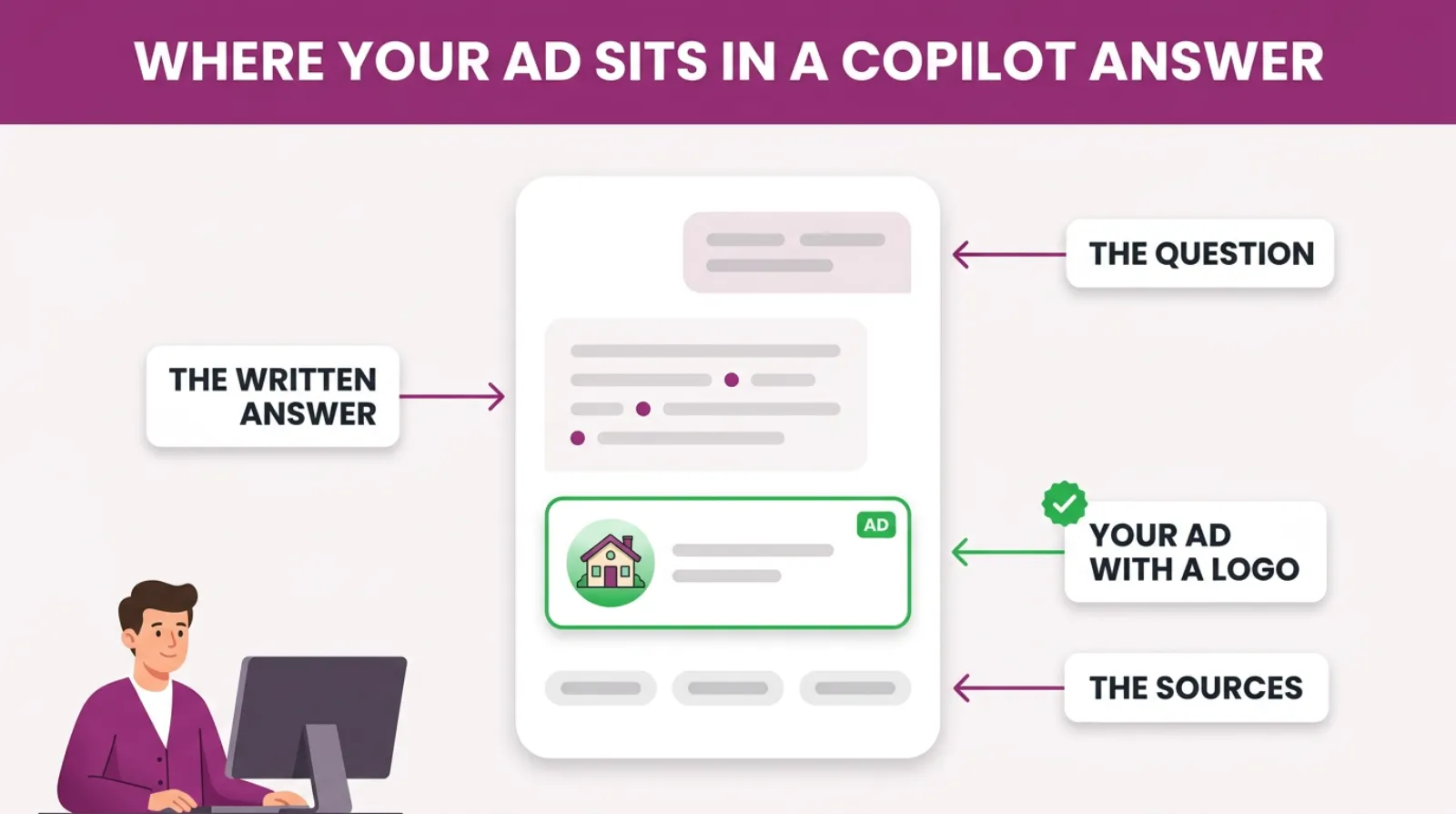
Copilot writes them a short answer. Sometimes an advert sits inside that answer. This post is about those Copilot ads, and whether your business can be the one that shows.

Get Found, Get Chosen, Get Your Time Back
A free one-day marketing seminar in Milton Keynes · 10 November 2026
The short version is yes, through Microsoft Ads. But it does not work the way most owners expect. One small setting decides whether you are even in the running.
Get your free Marketing Action PlanNot sure where to start? Answer a few questions and get your plan in about a minute. No email needed.
Get my plan →I have run Google Ads accounts for almost 15 years. I'll show you what Microsoft's own rules say and what they leave out. Then I'll show you what I'd do first as a local business.
Can Copilot Ads Put You In The Answer?
Yes. Microsoft Ads can show your advert inside a Copilot answer. You do not build a separate campaign for it. Your normal Microsoft Ads campaigns are entered automatically. Copilot picks an ad that fits the conversation. But there's no guarantee you will show, no way to buy that spot on its own and no separate report for it.
So you can get into the answer. You just cannot force your way in.
That's the honest picture, and it matters.
Some agencies talk about "Copilot ads" as if they were a new product you can switch on. They are not. They are your existing Microsoft Ads, shown in a new place.
Three things decide it. How good your campaigns are, which ad formats you use and whether your search ads carry a logo.
We will come to that last one, because it is the easiest one to miss.
What Is Copilot, And Who Is Asking It Things?
Copilot is Microsoft's AI assistant. You type or speak a question, and it writes back an answer in plain English. It builds that answer from what it finds on the web through Bing.
It used to be called Bing Chat, until Microsoft renamed it Copilot in November 2023 and started building it into almost everything it makes, from Windows to Edge.
It is on the Windows taskbar. It is built into the Edge browser and the Bing search page. It even has its own phone app.
That spread is the point. Plenty of people never chose Copilot. It was just there, on the computer in front of them.
Think about who that is. The office manager on a work laptop, looking for a new cleaning contract. Or a retired couple using the PC their family set up, asking about a new roof.
Those are the same people who already search on Bing.
As of September 2026, Statcounter's data shows Bing had 18.33 percent of UK desktop searches. Across all devices, the figure is about 6 percent.
So Copilot's audience leans the same way as Bing's: desktop, often at work and often older. For many local firms, that's a crowd worth reaching.
How Do Ads In Copilot Actually Work?
Ads in Copilot are built from the campaigns you already run in Microsoft Ads. Microsoft takes your existing headlines, descriptions and images. It turns them into an ad that fits inside the chat.
As of October 2026, Microsoft's help page on ads in Copilot says every eligible campaign is opted in automatically.
It also says advertisers cannot opt out, and that there is no guarantee an ad will show.
Here is the part that is different from normal search. Copilot does not just look at the last thing someone typed.
Microsoft says it reads the context of the whole conversation. Say someone spends three messages describing a damp patch on their bedroom ceiling. Then they ask who can fix it. Copilot has the full picture.
That is why the ads can feel more relevant than a normal search ad, because they're matched to a real problem that the person has described in their own words.
Your negative keywords still apply.
Microsoft's help page says they work in Copilot the same way they work on Bing. Say you've blocked "free" or "jobs" in your account. Your ads won't show against those in Copilot either.
That is good news. The negative list you've built up on Google, and copied across, protects you here too.
Is A Copilot Ad The Same As Copilot Recommending You?
No. A Copilot ad is a paid spot, marked as an advert, that sits inside or below the answer. Being recommended means Copilot names your business in the answer itself, for free, because of what it found about you on the web.
They are two different routes, and most owners mix them up.
Here is how they compare.
| Copilot ads (paid) | Named in the answer (unpaid) | |
|---|---|---|
| What it is | Your Microsoft Ads advert shown in the chat | Copilot mentions your business by name |
| What you pay | Per click, like a search ad | Nothing per click |
| What decides it | Your campaign, ad formats, logo and bids | Your website, Bing Places listing and reviews |
| How fast | Days, once your campaign is live | Months of steady work |
| Can you control it | Partly, through targeting and negatives | No, only influence it |
| Can you see it in reports | No, it is mixed in with other traffic | No, you have to test by asking Copilot |
The table is built from Microsoft's help page and how both routes work today.
The best position is both. That is the goal. You are named in the answer and your ad sits underneath it.
Can you only do one this month? The paid route is faster. The unpaid route lasts longer.
Why Does This Matter For A Local Business?
It matters because your customers' first question is moving. For years it went into a Google search box. Now a growing share goes to an AI assistant first. Copilot is the one built into Windows.
If your business is not in that answer, the customer may never get as far as Google.
Here is how that plays out. Someone asks Copilot, "Who fits loft insulation near Milton Keynes?" Copilot writes a short answer and names three firms.
If one of them suits, the person rings them. They never run a normal search. Your Google ad, your Map Pack spot and your website never get a look in.
Microsoft wants this to work. It's been sharing figures to prove it does.
In a study published in August 2025, Microsoft said ads in Copilot got 73 percent higher click-through rates than traditional search ads.
The same study said conversion rates were 16 percent stronger, and customer journeys were 33 percent shorter. That is Microsoft's own data, from February to May 2025. Treat it as a sales pitch with numbers attached.
Even so, the direction makes sense, because someone who has explained their problem to Copilot is much further along than someone typing two words into a search box.
They've already done the research. They want a name.
There is a second reason, and it's simpler. Fewer local businesses run Microsoft Ads at all. Most stop at Google.
So in a Copilot answer, you may face far fewer rivals than on Google.
Where Your Ad Sits In A Copilot Answer
How Do I Get My Ads To Show In Copilot?
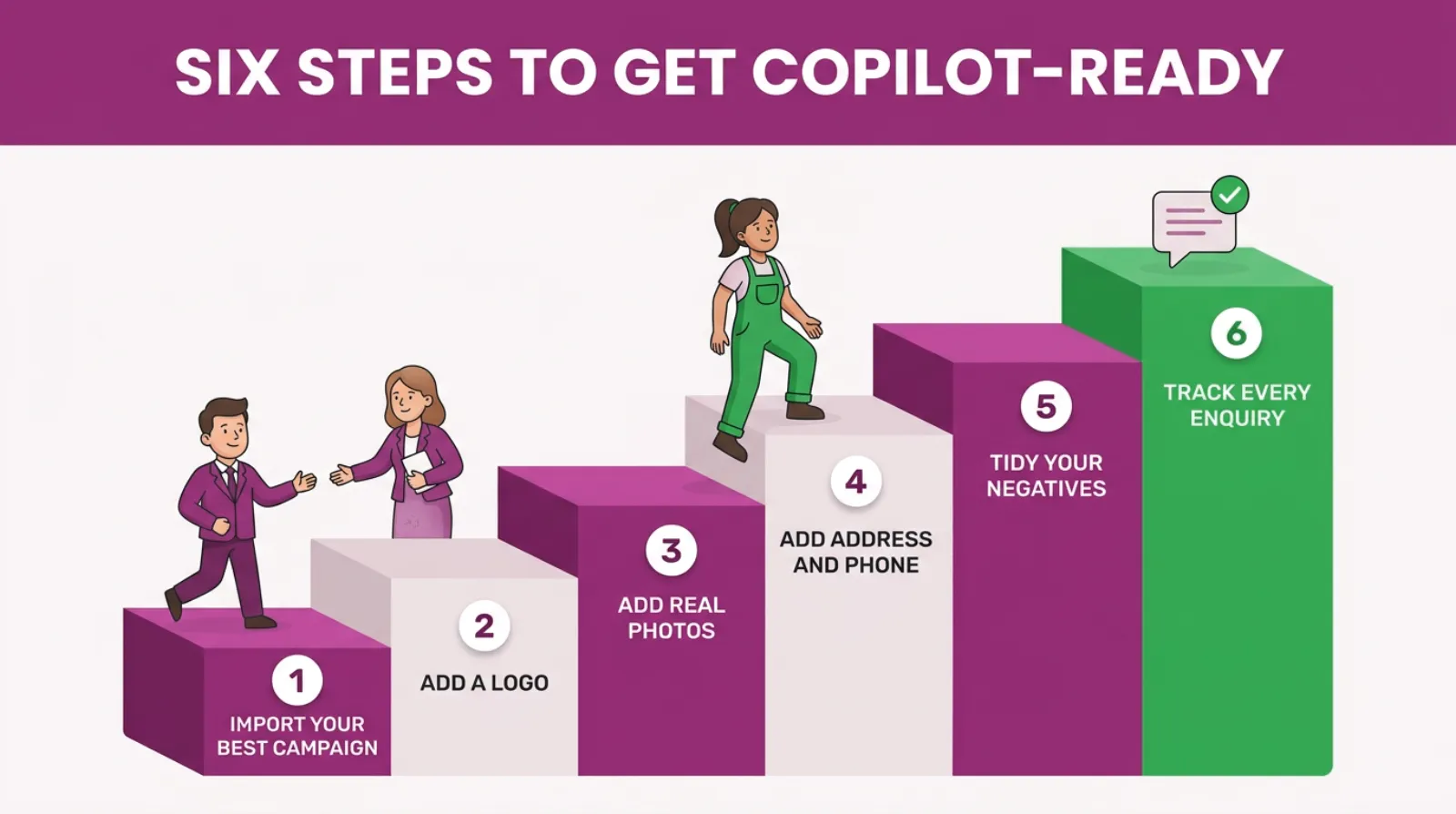
To get your ads into Copilot, run a Microsoft Ads campaign with a logo on your search ads. Then add images, keep your negative keywords up to date and track your enquiries. There is no Copilot switch to turn on.
Your campaign is entered automatically once it is eligible.
Here are the steps in order.
- Open a Microsoft Ads account, or log in to the one you have.
- Import your best Google Ads campaign using Microsoft's free import tool.
- Add a logo extension to every search campaign.
- Add image extensions, so your ads have pictures to show.
- Add your address and phone number with location and call extensions.
- Check your negative keywords came across in the import.
- Add Microsoft's UET tracking tag to your website and set up your enquiry goals.
Most of that is an afternoon's work if you already run Google Ads. The import brings your keywords, ads, budgets and negatives across in one go.
Step three is the one that matters most. Without it, your search ads can't show in Copilot at all.
Why Does A Logo Decide Whether You Show?
A logo decides it because Microsoft says so in black and white. As of October 2026, its help page on ads in Copilot is clear. Search ads must include a logo to be eligible to show there.
That means a logo extension you add yourself, or a business logo that Microsoft adds automatically.
This is an easy setting to miss. Plenty of local firms copy their campaigns across from Google and never touch them again.
The import doesn't always bring a logo with it, so the campaign can run perfectly well on Bing for months while never once being put forward for Copilot.
The fix is quick. Adding one takes about five minutes. Go to the assets or extensions area in Microsoft Ads. Choose a logo extension and upload a clean square version of your logo.
Then add your business name. Microsoft reviews it like any other ad. Give it a day before you check.
While you're there, add image extensions too. Microsoft's help page recommends them for Copilot. They make an ad stand out far more in a chat than plain text does.
Use real photos of your work, your team or your van rather than stock images, because someone deciding who to call wants to see the real business behind the ad.
Which Ad Types Can Show In Copilot?
Most of the ad types a local business uses can show in Copilot. They just have to meet the rules. Microsoft's help page lists the eligible types.
- Search ads with a logo, including responsive search ads and ads that Microsoft builds from your website.
- Performance Max campaigns, in both search and shopping placements.
- Multimedia ads, which are the bigger search ads with images.
- Product ads from Shopping campaigns, for businesses that sell products online.
- Property and tours ads, which are mainly for hotels and attractions.
For a plumber, a solicitor or a builder, the first line is the one that counts. Your responsive search ads, with a logo added, are your way in.
Shops and e-commerce firms have more options, because in April 2026 Microsoft launched Offer Highlights, which pull the product details you supply straight into Copilot conversations.
That is for retail, in English-speaking markets. It is not aimed at local service businesses yet.
Do I Need Performance Max To Show In Copilot?
No, you do not need it. Search ads with a logo are enough to be eligible. But Microsoft's help page says Performance Max is the best way to increase exposure in Copilot, because it gives Copilot the most text, images and options to work with.
That is true, and it is also worth being careful about.
Performance Max decides for itself where your money goes, and on a small local budget it can spend a fair share of it on clicks you would never have chosen yourself.
So here is what we'd usually do. Start with your search campaign. Add the logo and images, and let it run for a month or two.
 LIVE
LIVELive every Tuesday at 2pm UK. Bring your marketing questions.
Get your Google, local SEO and AI questions answered live.
If it is bringing in good enquiries, then test a small Performance Max campaign alongside it. Feed it your best images and your enquiry goals, and watch the search terms closely.
Do not switch everything to Performance Max just to chase Copilot. Get the basics right first.
How Much Do Copilot Ads Cost?
Copilot ads do not have their own price. You pay per click, the same as any Microsoft Ads search ad. The clicks come out of your normal campaign budget. There is no extra fee and no minimum spend for showing in Copilot.
What you pay depends on your bids, your trade and your area. Microsoft's help page also mentions bids. Raising them, and improving your quality score, helps your chances of showing in Copilot.
That doesn't mean you should bid wildly, but it does mean a campaign that's starved of budget, or bidding at the bottom of the market, is less likely to get picked.
Here is a rough worked example, with round numbers. Say Bing clicks cost you around £3 in your trade.
A starting budget of £200 a month buys about 66 clicks, and some of those will come from Copilot, some from Bing and some from Microsoft's partner sites.
Our usual starting point is a fifth of your Google search budget. That is an SF Digital working rule, not a Microsoft one.
So if you spend £1,000 a month on Google search, start Microsoft Ads at about £200. That's around £6.70 a day.
If that looks tiny, keep it focused. Put it on your one best service in your one best area, rather than spreading it thin.
Why Aren't My Ads Showing In Copilot?
The most common reason is a missing logo on your search ads. After that, look at bids and budget. Or the campaign may not be approved. And sometimes the answer is simply that nobody asked Copilot a question that matched your business.
Here is what we'd check, in this order.
- Look for a logo extension on every search campaign. No logo means no Copilot for search ads.
- Check your ads are approved. Microsoft reviews ads and extensions, and holds some back.
- Check your budget is not running out by mid-morning. A capped campaign misses most chances.
- Look at your bids. If you cut them hard on import, you may not win the auction.
- Check your negative keywords. A broad negative can block the longer questions people ask Copilot.
That last one catches people out. Copilot conversations are long and chatty, and people write to it the way they would talk to a friend who knows a good tradesperson. Take a negative such as "advice" or "how". It can quietly block a question that would have been a great lead.
So go through your negative list with that in mind, keeping the junk out while making sure you're not blocking real customers who ask their questions in full sentences.
And remember the rule from Microsoft's own page. Even when everything is right, there's no guarantee you will show.
How Can I Tell If My Ads Are Showing In Copilot?
You cannot tell from your reports, because Microsoft does not report Copilot on its own. As of October 2026, its help page says there are no specific metrics for ads served in Copilot. Your Copilot clicks are mixed in with your other Microsoft Ads traffic.
That is frustrating, and it is worth saying plainly. Anyone who shows you a "Copilot ads report" from Microsoft Ads is showing you something else.
So you judge it the way you would judge any channel. You look at the whole campaign and you ask your customers.
Here are the checks we run.
- Cost per enquiry on Microsoft Ads compared with Google Ads.
- How many Microsoft Ads enquiries turned into paying jobs.
- Whether the search terms report shows longer, chattier searches than before.
- What new customers say when you ask how they found you.
That last check is the most useful one. Train whoever answers the phone to ask, "How did you hear about us?" Then write the answer down.
If people start saying "Copilot" or "the AI on my computer", you know it's working. If nobody does after a few months, that is useful to know too.
What Should Your Ads Say If They Might Show In Copilot?
Your ads should answer the question a customer would ask Copilot, in plain words. Say what you do, where you do it and why someone should trust you. A chat answer is a conversation. Ads that sound like a reply fit in better than ads that shout.
Think about the questions people actually type. They do not ask for "roofer Leighton Buzzard". They ask something like "My flat roof is leaking after the storm, who can come out this week?" and expect a real answer.
So write headlines that match that kind of need. "Flat Roof Repairs This Week" works harder than "Quality Roofing Services".
Here's what we'd check in every ad before it goes into Copilot.
- The service, in the words customers use, not trade jargon.
- The towns you cover, so the ad makes sense to a local reader.
- One proof point, such as years trading, an accreditation or your review score.
- How fast you can help, if speed matters in your trade.
- A clear next step, such as call for a free quote.
Microsoft builds the Copilot version from the text and images you have already given it. Every headline in your responsive search ad could end up in a Copilot answer. So could every description.
That means weak filler headlines are a bigger risk than they used to be. If you have padded an ad with lines like "Best Service Around", Copilot might pick one.
Write every headline as if it could be the only one a customer sees. On Copilot, it might be.
Then check your landing page matches. Someone arriving from a Copilot chat has already described their problem in detail, so they want to land on a page about that exact problem, not on your home page.
Six Steps To Get Copilot-Ready
How Do You Get Named In The Copilot Answer Itself?
You get named in the answer by being easy for Copilot to find and trust on the web. Copilot builds its answers from Bing's results, so your Bing Places listing, your website and your reviews do most of the work. There is no way to pay for this part.
Paid ads get you a spot beside the answer. Being named puts you inside it.
Here's where we'd start.
Claim your Bing Places listing. Bing Places for Business is Microsoft's free local listing, and you can import your Google Business Profile into it so your hours, photos and details come across in minutes.
Add your site to Bing Webmaster Tools. It is free, and it tells Bing your pages exist. Many local sites have never been submitted to Bing at all.
Answer real questions on your website. Copilot quotes pages that give a clear, short answer to a real question. A good FAQ page, written the way customers ask, gives it something to lift.
Keep your details the same everywhere. Your name, address and phone number should match on every site. That means your website, Bing Places, Google and any directories.
Earn reviews. AI assistants lean on what other people say about you. A steady flow of honest reviews helps on every platform.
None of this is quick.
But it costs nothing per click, and it keeps working long after you stop paying for ads.
Is This The Same As Ads In ChatGPT Or Google's AI?
No. Each AI assistant has its own ad system, run by a different company. Copilot ads come from Microsoft Ads. Ads in Google's AI Overviews come from Google Ads.
So one campaign will not cover them all, and if you want to show in both Copilot and Google's AI answers, you'll need to run both accounts side by side.
The good news is that the groundwork is the same everywhere, because clear ads, real images, tight negatives and proper tracking help you on every platform you'll ever advertise on.
The same goes for the unpaid side. A website that answers real questions clearly helps you get named by Copilot, Google's AI and ChatGPT alike.
When Is It Not Worth Chasing Copilot?
It's not worth chasing Copilot if your Google Ads are not bringing in steady enquiries yet. The same goes if your customers mostly search on phones. Or if nobody has time to check a second account.
Copilot ads are an extra on top of a working account. They will not fix a broken one.
It's only fair to say that plainly. Every new ad placement comes with a wave of agencies selling it as a must-have, and Copilot is no different, so it is worth being clear about who should wait.
Here is when we'd tell an owner to wait.
- Your Google campaigns do not bring in good, steady enquiries yet.
- Your customers are mostly young and search on their phones.
- Your budget is already stretched thin on Google.
- Nobody checks the account at least once a week.
If any of those apply, sort them first. Copilot will still be there next quarter, and so will the customers asking it questions.
Your First 30 Days Of Copilot Ads
Here's a simple first month for a local business that already runs Google Ads. It assumes Google brings in steady enquiries.
- Week one. Claim your Bing Places listing and import it from Google.
- Week one. Open Microsoft Ads and import your best Google campaign only.
- Week one. Add a logo, image extensions, location and call details, then add the UET tag.
- Week two. Switch on with about a fifth of your Google search budget.
- Week three. Check the search terms and tidy any negatives that block real questions.
- Week four. Compare cost per enquiry with Google and ask new customers how they found you.
At the end of the month, you will have one of three answers.
It works, so add budget. It is close, so fix and keep testing. Or your customers are not on Microsoft's side of the web, so switch it off.
All three are useful. You'll know for sure, and it'll have cost you a few hundred pounds at most.
Frequently asked questions
Can I opt out of ads in Copilot?
No. Microsoft's help page says eligible campaigns are opted in automatically, and advertisers cannot opt out. You can use negative keywords to stop your ads showing against searches you do not want.
Do I need a separate Copilot campaign?
No. There's no separate Copilot campaign type. Your normal Microsoft Ads campaigns are entered for Copilot once they meet the rules, such as having a logo on search ads.
Do negative keywords work in Copilot?
Yes. Microsoft says negative keywords work in Copilot the same way they work on Bing. Any negatives in your account, campaigns or ad groups apply there too.
Is Copilot the same as Bing Chat?
Yes. Microsoft renamed Bing Chat to Copilot in November 2023. It is the same assistant, now built into Windows, Edge, Bing and its own app.
Does Copilot always show an ad?
No. Microsoft says there is no guarantee an ad will show. It also does not show ads in conversations its safety checks have flagged.
Can a small local business afford Copilot ads?
Yes. There's no minimum spend and no extra fee for Copilot. You pay per click from your normal Microsoft Ads budget. A few pounds a day is enough to start.
Keep Reading
If you want to go further with Microsoft Ads and AI search, these posts cover the next steps.
- What Platforms Do Microsoft Ads Appear On?
- Is Microsoft Ads The Same As Bing Ads?
- Benefits Of Microsoft Ads Performance Max Campaigns: A Game-Changer for Growth
- Mastering Microsoft Ads Tracking: Your Definitive Guide to Unlocking Campaign Success
- AI Overviews Ate Your Clicks. Now Your Google Ads Can Run Inside Them
- Why Your Customers Are Asking ChatGPT About You (And How To Win That Conversation)
We picked these because each one covers a step from this post. Where your ads show, Performance Max, tracking and AI answers on other platforms.
Sources
The Copilot rules in this post come from Microsoft's own help page, last updated on 2 September 2026.
The performance figures come from Microsoft Advertising's blog, and the search share figures come from Statcounter. All three were checked on 16 October 2026.
- About ads in Copilot - Microsoft Advertising
- 73% higher CTRs: Why advertisers need to pay attention to conversational AI
- Desktop Search Engine Market Share United Kingdom
The Question Is Already Being Asked
Your next customer may never type your trade into Google. They might ask Copilot instead, in a full sentence, on the computer they already own.
Microsoft Ads can put you in that answer. Not every time. Not in a way you can see in a report. But often enough to matter.
The steps are not hard. Import your best campaign and add a logo and images. Keep your negatives tidy. Ask every new customer how they found you.
Then do the slower work too. Claim Bing Places, answer real questions on your website and keep the reviews coming.
Want someone to set it up with you? That's what we do at SF Digital every day.

Written by Uzair Kharawala
Partner at SF Digital Studios, a Google Premier Partner agency. Uzair has been helping businesses grow with Google Ads since 2002 and teaches it every week on YouTube.
Get our best Google Ads tips by email
New articles and videos, straight to your inbox. Unsubscribe any time.