

Two things are true about your Google Ads account right now, and you were not asked about either.
Your ads can already appear inside AI Overviews, the AI-written summary sitting at the top of the results page. You did not switch this on, and there is no setting to switch it off.

Get Found, Get Chosen, Get Your Time Back
A free one-day marketing seminar in Milton Keynes · 10 November 2026
And you cannot see how those ads performed. Google provides no separate reporting for the placement. Everything is bundled into your existing numbers.
Get your free Marketing Action PlanNot sure where to start? Answer a few questions and get your plan in about a minute. No email needed.
Get my plan →That combination is unusual. Normally, a new placement arrives with a toggle and a report. This one arrived with neither.
Most coverage treats this as an SEO story about lost organic clicks. It is that, but it is also a paid search story, because the same query that lost its organic click still has your budget sitting on it.
This post covers what actually changed, what you can and cannot control, and how to work out whether it is affecting you when the reporting will not tell you.
What Ads In AI Overviews Actually Are
There is no new campaign type here. That is the first thing to understand, because the announcements made it sound like a product launch.
An AI Overview is the AI-generated summary Google places at the top of the results page for many queries. It answers the question directly, in its own words, drawing on multiple sources.
Ads can appear above that summary, below it, or woven inside it. What appears is your existing advertising. Text and Shopping ads from Search, Shopping, Performance Max and App campaigns are all eligible in every market where AI Overviews are live.
Nothing needs building. Nothing needs enabling. If you are advertising already, you are in.
Google decides whether to show an ad by evaluating both the query and the content of the summary it just generated, looking for commercial intent in either. So the trigger is not only what the person typed. It is also what Google decided to tell them.
That is a genuine shift in how placement works, and it is worth pausing on. Your ad is being matched against a piece of text Google wrote, seconds ago, that you will never see.
Why This Is Already Happening To You
The scale is the part people underestimate.
AI Overviews now appear on more than one in five Google searches. That share has grown steadily and shows no sign of stopping.
The behaviour change underneath is larger still. Zero-click searches, where someone searches and never clicks through to any website, reached 68% of US queries in early 2026. That is up from around half in 2019.
When an AI Overview appears specifically, the effect sharpens. Zero-click rates on those queries run at roughly 83%, against about 60% on queries without one. Click-through rates drop by close to 60% when an overview is present.
AI Mode, Google's fuller conversational interface, is more extreme again. It does not show organic results alongside a summary; it replaces them. Reported zero-click rates there sit around 93%.
Treat those figures as directional rather than precise. Methodologies differ, and published estimates of organic CTR loss range from about 15% to 89% depending on who measured and how. The direction is not in dispute even where the magnitude is.
For an SME, the practical translation is simple. On informational queries, far fewer people are leaving Google at all. The ones who do leave are further along, because they have already read the summary.
What Changes On The Results Page
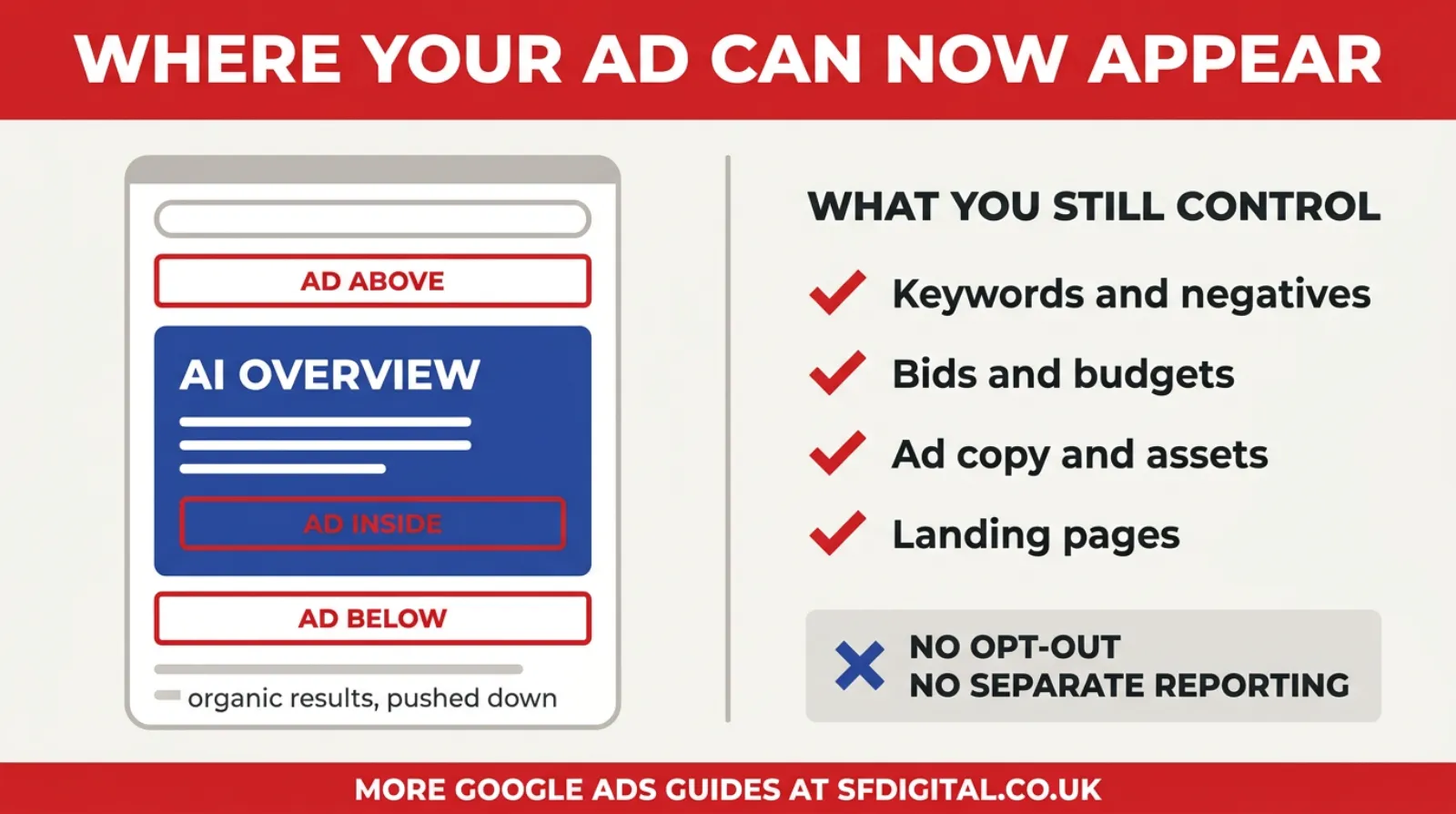
The placement is new. The controls, as the right-hand column shows, are mostly the ones you already had.
Which Of Your Keywords Are Actually Exposed
Not every query gets an overview, and the pattern is predictable enough to plan around. Sorting your keywords into these groups takes twenty minutes and tells you where the risk sits.
Questions and explanations almost always trigger one. Anything beginning with what, why, how, or containing "guide", "explained", "meaning" or "difference between". These are the queries AI Overviews were built for, and the summary usually answers them completely.
Comparisons trigger one very often, so anything built on versus, top, cheapest, alternatives or best is exposed. A summary can weigh options in a way a single ranked result cannot, so Google prefers answering to listing.
Cost and pricing queries are mixed and worth watching closely. "How much does a new boiler cost" frequently returns an overview with a range. That is a real problem for anyone whose pitch was to get the enquiry and then discuss price, because the range is now stated before you speak.
Local service queries with clear intent trigger them far less often. "Emergency plumber near me" usually still returns the map pack and the ads, because the searcher wants a phone number rather than an explanation.
Branded queries rarely trigger one. Someone searching your company name already knows what they want.
Transactional product queries are mixed but generally lighter. "Buy" and "order" and specific model numbers tend to return shopping results.
The useful conclusion is that exposure concentrates at the top of the funnel and thins out towards the bottom. If most of your budget sits on local, branded and transactional terms, this change affects you far less than the headlines suggest. If most of your budget sits on questions and comparisons, it affects you a great deal.
Work out which of those you are before you decide how worried to be.
AI Mode Is The Harder Version
AI Overviews are the gentle version of this. AI Mode is the one worth understanding, because it shows where the design is going.
In AI Mode, there are no organic results next to the summary. The conversational interface replaces the results page rather than sitting on top of it. You ask, it answers, you ask a follow-up.
Reported zero-click rates there run at around 93%. That is not a page with reduced clicks. That is a page that mostly does not produce clicks at all.
Ads appear in AI Mode too, and the same two facts apply: no opt-out, no separate reporting.
What makes it harder is the follow-up. In a normal search, one query produces one results page and one auction. In a conversation, someone might ask four questions in sequence, refining as they go. The commercial moment might arrive on the fourth exchange, in a context shaped by the three before it, none of which you can see.
For now, AI Mode represents a smaller share of searches than AI Overviews, so it is not where your budget is going today. It is worth watching rather than planning around, and the practical preparation is the same: be specific, be available, be the concrete option when the conversation reaches a decision.
What You Can And Cannot Control
This section is short, and that is the point.
You cannot opt out. There is no campaign setting, no account setting, no exclusion. If your campaigns are eligible and AI Overviews are live in your market, you are eligible for the placement.
You cannot report on it separately. Ads served in or around AI Overviews are reported under Top Ads, mixed in with ordinary top-of-page placements. There is no segment, no filter and no column that isolates them.
You cannot see the summary your ad was matched against. Google generates it per query, and it is not exposed to advertisers.
What you keep is everything you had before. Your keywords and negatives still work. Your bidding still works. Your budget caps still apply. Your ad copy is still yours to write, and your landing pages are still your responsibility.
So the honest framing is this. A new placement was added to the inventory you were already buying. You did not gain a lever, and you did not lose one, apart from visibility.
That is worth saying plainly because a lot of advice currently on offer implies you can optimise specifically for AI Overviews. Without reporting, you cannot optimise for it as a placement. You can only improve the advertising that happens to appear there.
How To Tell Whether It Is Affecting You
The reporting will not tell you, so you have to infer it. This takes about half an hour, and it is worth doing properly once rather than guessing repeatedly.
Start by finding out which of your keywords trigger an overview. Take your top twenty keywords by spend. Search each one, logged out, in a private window, from your actual target location. Note which return an AI Overview. That list is your exposure.
Expect a pattern. Informational and comparison queries almost always trigger one. Direct commercial queries, someone searching for a specific product or a local service with clear buying intent, trigger them far less often.
Next, split your reporting along that line. Group the triggering keywords together and compare their performance against the non-triggering ones over the last ninety days. You are not looking for a single number. You are looking for divergence between the two groups.
Then read the pattern.
If impressions hold steady but click-through rate falls on the triggering group, that is the overview absorbing attention. People are still seeing you and reading the summary instead.
If click-through rate holds but conversion rate improves, that is the more encouraging outcome. Fewer, better-informed people are clicking, because the summary filtered out the browsers.
If both fall, the query has probably moved from a research query to a fully answered one. That keyword may no longer be worth what you are paying.
 LIVE
Live every Tuesday at 2pm UK. Bring your marketing questions.
Get your Google, local SEO and AI questions answered live.
Finally, watch cost per qualified enquiry rather than cost per click. If clicks fall but enquiries hold, you are paying less for the same business. That is not a problem, however alarming the click chart looks.
What To Change In Your Advertising
You cannot optimise the placement. You can absolutely improve what shows up in it, and the guidance here is more specific than the usual advice to write better ads.
Stop explaining what you do. This is the biggest single change, and almost nobody has made it. Someone reading your ad beside an AI Overview has just been told what your category is, how it works and what to look for. An ad headline that says "Professional Roof Repairs In Bedfordshire" is repeating the summary back at them. Give them the next step instead: the price, the response time, the availability, the guarantee.
Lead with what a summary cannot contain. AI Overviews are good at general explanation and poor at specifics about you. Your actual price. Whether you can come out this week. Whether you cover their postcode. That is where the ad earns its place.
Separate your informational keywords from your commercial ones. If they sit in the same campaign, the overview effect on one group will distort your read of the other. Splitting them is worthwhile now even if it was optional before.
Reconsider what informational keywords are worth. Ranking or bidding to be the answer to a question is worth less when the answer appears above you for free. That does not mean abandoning them, since they still build familiarity, but it does mean judging them on assisted conversions rather than last click.
Make the landing page match the reduced patience. Someone arriving from an overview has done their reading. They do not want your explainer page. They want the price, the proof and the booking form.
And keep your extensions and assets full. Sitelinks, callouts, prices, images. In a compressed layout where the summary takes most of the space, the ads that occupy more room and answer more questions do better.
A Worked Example
An abstract method is easy to nod at and hard to apply, so here is the shape of it with numbers. These are illustrative rather than from a real account.
Picture a heating engineer spending nine hundred pounds a month across twenty keywords.
Splitting those twenty by whether they trigger an overview gives two groups. Eight informational terms, things like "how much does a new boiler cost" and "combi versus system boiler", taking about three hundred and fifty pounds. Twelve commercial and local terms, things like "boiler installation Luton" and "emergency boiler repair", taking about five hundred and fifty.
Comparing ninety days against the previous ninety, the informational group shows impressions roughly flat, click-through rate down by about a third, and cost per click slightly up. The commercial group shows all three broadly unchanged.
That is the signature. The overview is absorbing attention on the informational queries and leaving the buying queries alone.
The wrong response is to cut the informational group entirely. Those searches still represent people who will need a boiler, and the familiarity has value even without the click.
The better response is threefold. Reduce the informational budget rather than removing it, since each click now costs more and delivers less. Rewrite those ads to stop explaining and start offering, because the explanation has already happened above them. And judge that group on assisted conversions over a longer window instead of last-click, because its job has changed from capture to introduction.
The commercial group needs nothing done. That is the point of the exercise: it tells you where not to waste your attention as much as where to spend it.
What This Means For Your Content
This post is about ads, but the two sides are connected and ignoring the organic half gives a false picture.
Content that exists to answer a question is worth less in clicks than it was. The summary answers it. That is simply the new reality, and no amount of optimisation reverses it.
Content that exists to be cited is worth more. AI Overviews draw on sources, and being one of them puts your name in front of someone even when they never click. That is closer to a mention in a trade magazine than to a traffic channel, and it should be valued that way.
The practical consequence is that thin content answering common questions has very little future. Detailed, specific, genuinely expert content has more value than before, because it is the kind that gets drawn on and because it is what the summary cannot replicate.
For an SME, the sensible move is fewer and better pages rather than more of them, measured on brand searches and enquiries rather than on sessions. If your traffic falls while your branded search volume rises, the content is working. The old metric just stopped describing it.
Where This Is Heading
It is worth being straight about the direction, without pretending anyone knows the destination.
Google has a commercial problem to solve. AI Overviews and AI Mode are expensive to run, and they reduce the clicks that fund the business. Placing ads inside them is the obvious answer, which is why it happened quickly.
The likely direction is that the summary becomes the results page rather than a feature on top of it, and advertising moves inside it rather than around it. AI Mode is already the version of that with no organic results at all.
What that means for a small business is not catastrophic, but it is real. Traffic from informational content keeps declining. Being the answer matters more than being a link. And the value of a click rises, because fewer people are making them and the ones who do are further along.
The businesses that will struggle are those whose model depends on catching people early with content and converting them slowly. The businesses that will cope are the ones with something concrete to offer at the moment of decision.
The Three Numbers To Track From Now On
Since the placement itself cannot be measured, the sensible response is to change which numbers you watch rather than hunting for a report that does not exist.
Cost per qualified enquiry is the first, and it matters more than anything else here. Not cost per click, not cost per conversion, but what it costs to produce one enquiry you were genuinely glad to receive. This is the only figure immune to the placement question, because it measures the outcome rather than the mechanism. If it holds steady, the change has not hurt you regardless of what your click chart does.
Branded search volume is the second, and it is the one almost nobody watches. Search Console will show you how many people searched your business name each month. When people read a summary that mentions you and then look you up directly, that shows here and nowhere else. A rising branded line while general traffic falls is a sign the top-of-funnel work is still landing, just through a different door.
The split between your informational and commercial keyword groups is the third. Once you have sorted them, track them as two separate lines rather than one account total. The account average hides the divergence, and the divergence is the entire story. Two groups moving in opposite directions can produce a flat overall number that tells you nothing.
Those three together give a reasonable picture without needing visibility into a placement you will probably never get.
One habit worth adding alongside them. Once a quarter, search your ten most valuable keywords yourself and note which now return an overview. That list changes as Google expands coverage, and knowing it changed is more useful than any dashboard would be.
What Not To Do About It
A few reactions are common and unhelpful, and it is cheaper to skip them.
Do not pause everything and wait for clarity. The placement is not optional, and it is not going away, so there is nothing to wait for.
Do not chase an AI Overview optimisation service. Nobody can optimise a placement that has no reporting. Anyone selling you AI Overview ad optimisation is selling you ordinary ad optimisation with a topical label.
Do not read a falling click count as failure on its own. Fewer clicks at a better conversion rate is a better account, and this change produces exactly that pattern on some keyword groups.
Do not abandon informational content. It is now doing a different job, feeding the summaries and building familiarity rather than delivering clicks, and it still matters. It simply cannot be judged on sessions any more.
Frequently asked questions
What are ads in AI Overviews?
They are your existing Google Ads appearing above, below or within the AI-generated summary at the top of the results page. There is no separate campaign type and no new format. Text and Shopping ads from your existing Search, Shopping, Performance Max and App campaigns are eligible automatically, in every market where AI Overviews are live.
Can I opt out of showing ads in AI Overviews?
No. Google provides no opt-out setting at campaign or account level. If you run eligible campaigns where AI Overviews are live, your ads can appear there. The only way to avoid it entirely would be to stop advertising on the queries that trigger overviews, which is usually a worse trade.
How do I know if my ads are showing in AI Overviews?
You cannot tell directly. Google Ads offers no segmented reporting for the placement, and ads served in or around an overview are reported under Top Ads alongside ordinary top-of-page placements. The workaround is to search your own keywords, note which trigger an overview, then watch that group for changes in impressions and click-through rate.
Do AI Overviews reduce my Google Ads clicks?
The strongest evidence concerns organic clicks, which fall sharply when an overview appears, with click-through rates dropping by close to 60% and zero-click rates on those queries running at around 83%. For paid, the picture is mixed, because ads can appear inside the overview. Expect impressions to hold up better than clicks on informational queries.
Should I write my ads differently for AI Overviews?
Yes. Someone reading your ad beside an overview has already been told the basics. An ad that explains what your service is repeats what they just read. Lead with what the summary cannot give them: your price, your availability, your coverage area, your guarantee.
Are clicks from AI Overviews more expensive?
There is no way to know from your own account, because the placement is not reported separately. What is reasonable to expect is that the clicks you do receive come from people further along in their decision, because they have already read a summary before clicking.
Which campaign types can appear in AI Overviews?
Existing text, Shopping, local and app ads from Search, Shopping, Performance Max and App campaigns are all eligible. You do not need to create anything new, and there is no AI Overview campaign type to build.
Keep Reading
If this changes how you think about clicks, these five are the ones to read next.
- Beyond Google Search: Mastering SEO, AEO and GEO (The 2026 Playbook For Small Business Owners)
- How To Rank in ChatGPT: The New SEO Playbook for 2026
- Stop Guessing, Start Growing: The Only Google Ads KPIs You Actually Need to Track
- Google Ads Click Through Rate (CTR) - What Is A Good Click-Through Rate For Google Ads?
- Unveiling The Google Ads Auction: How It Works And The Secrets To Winning
- The Different Types Of Google Ads And When To Use Them
The first two cover being visible when the answer is written by a machine. The middle two matter because your benchmarks need rebasing when click-through rate falls for reasons outside your control. The last two are the mechanics underneath the placement.
The Part Worth Remembering
The instinct with a change like this is to ask how to win the new placement. That question has no answer yet, because the placement has no reporting and no controls.
The better question is what your advertising is for now that the top of the page answers the question before anyone reaches you.
For most small businesses, the answer is the same as it was, just more sharply. You are not there to explain your category. Google does that now, for free, above you. You are there to be the specific, available, credible option at the moment someone decides to act.
That means your price should be findable. Your response time should be stated. Your coverage area should be obvious. Your proof should be visible without scrolling.
None of that is new advice. What is new is that the vague version no longer works, because the vague version is what the summary already said.
The click was never the point. It was just the easiest thing to count.

Written by Uzair Kharawala
Partner at SF Digital Studios, a Google Premier Partner agency. Uzair has been helping businesses grow with Google Ads since 2002 and teaches it every week on YouTube.
Get our best Google Ads tips by email
New articles and videos, straight to your inbox. Unsubscribe any time.