
You change your bid strategy on a Monday. By Wednesday your cost per click has jumped and the phone has gone quiet.
There is one word next to the campaign in grey: "Learning".

Get Found, Get Chosen, Get Your Time Back
A free one-day marketing seminar in Milton Keynes · 10-11-2026
Most owners panic at this point. They cut the budget, change it back, swap the bid strategy or pause the whole thing.
Get your free Marketing Action PlanNot sure where to start? Answer a few questions and get your plan in about a minute. No email needed.
Get my plan →Each of those moves makes the Google Ads learning phase longer. And your budget pays for every extra day of it.
So what is Google actually doing with your money while that word sits there? It is not burning it for fun. It is running tests, and you are paying for them.
I have run Google Ads accounts for almost 15 years. The learning phase is the part owners understand least and touch most.
This guide shows you where the money goes, how long it lasts and what you can safely leave alone.
What Does Google Ads Do With Your Budget In The Learning Phase?
In the learning phase, Google spends your budget on tests. It bids higher and lower than normal. It shows your ads at new times, in new places and to new people. Then it watches which clicks turn into enquiries. Costs often rise and results wobble for a week or two. Once it has enough data, bids settle down.
That's the short answer. The longer answer matters more. The way you behave during those weeks decides whether the tests pay off.
Think of it as a trial shift at your business. You have hired someone new and they don't know your customers yet.
For the first week or two they'll try things, get some wrong and learn from it.
You would not sack them on day three. But you also wouldn't change their job title every morning and expect them to learn faster.
What Is The Google Ads Learning Phase, In Plain English?
The learning phase is the settling-in period after you start or change a Smart Bidding strategy.
Smart Bidding is the group of bid strategies where Google sets your bid for you in every auction. That includes Maximise conversions, Target CPA, Maximise conversion value and Target ROAS.
When you switch one of those on, Google does not know your business yet. It knows what other advertisers have seen. But it doesn't know which of your clicks turn into customers.
So it has to find out. And the only way to find out is to bid, spend and watch what happens.
Google's own help page on bid strategy statuses puts it mildly. It says that after a change "there may be minor performance fluctuations as Google Ads optimises your bids".
In real accounts, "minor" can mean a cost per lead that doubles for ten days.
The status shows up in the Bid strategy column of your campaigns table. Hover over the word "Learning" and Google tells you why it is there.
You'll see one of a handful of reasons. Each one points to a change in the account.
- New strategy: you just created the bid strategy or switched it back on
- Setting change: you changed a setting, such as your target cost per acquisition
- Composition change: you added or removed campaigns, ad groups or keywords
- Conversion change: you added or removed a conversion action, or changed how you count one
Notice what is missing from that list. We will come back to it, because it is the biggest myth on page one of Google.
Where Does Your Money Actually Go While Google Learns?
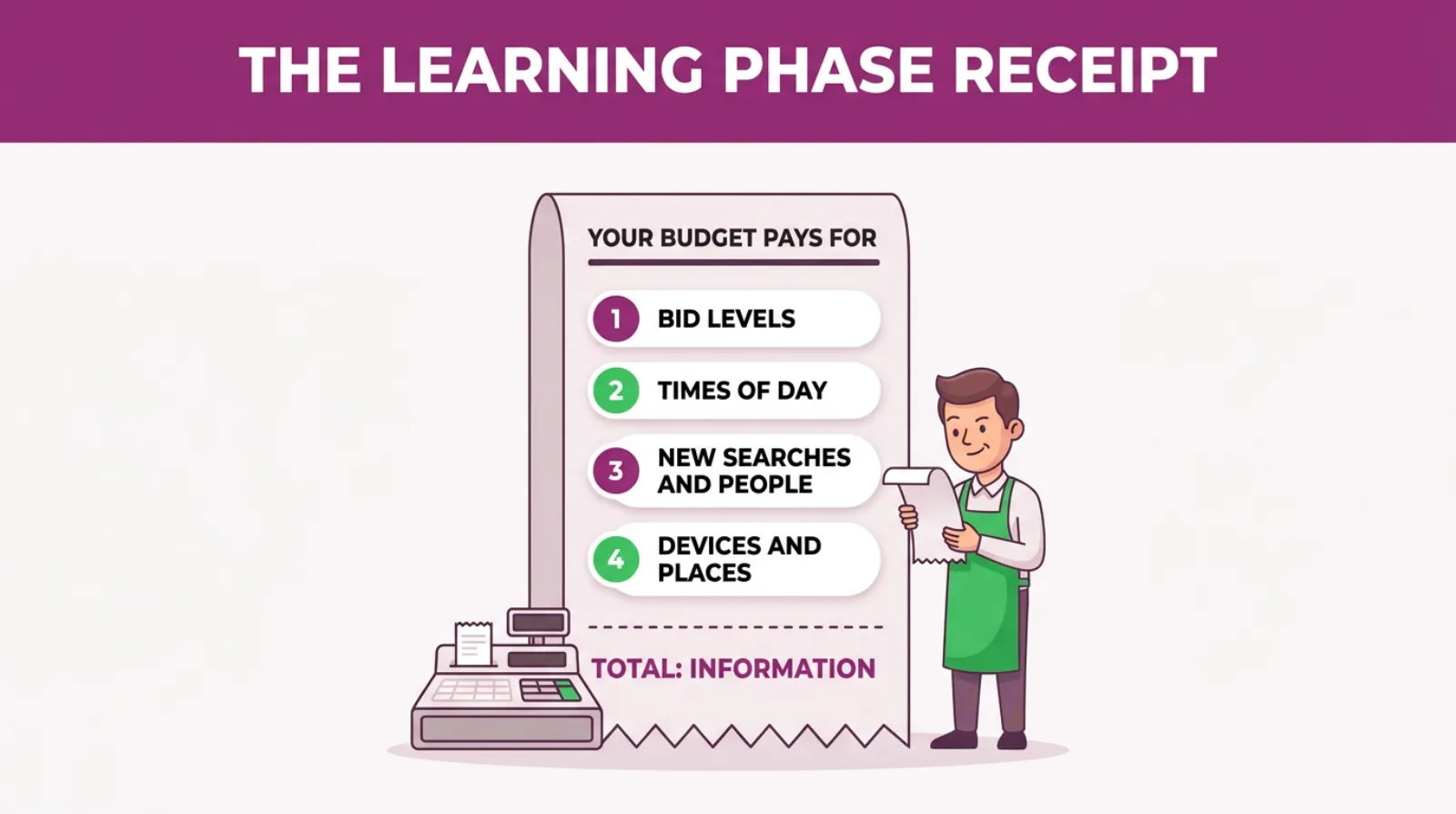
Your money goes into four kinds of tests. Google is buying information, not just clicks, and each test costs real pounds.
Here's what it is buying.
- Different bid levels. Google bids above and below where it will settle. It's looking for the price where a click is still worth having.
- Different times of day. It tries early mornings, late evenings and weekends to see when your buyers actually search.
- Different searches and people. It shows your ads on searches it is less sure about, and to people it has not tried before.
- Different devices and places. It compares phones, tablets and desktops, and towns across your target area.
None of this is random. As of October 2026, Google's help page on Smart Bidding lists the signals it looks at in every auction.
They include the device, the location and the day and time. They also include the browser, the language and the actual search typed.
During the learning phase, Google doesn't yet know which of those signals matter for you. A plumber's best leads might come from phones at 7am.
A solicitor's might come from desktops at lunchtime. Google has to spend money to find that out.
That is why costs rise first and fall later. The higher bids are part of the test, not a sign that something has broken.
There is one more thing that catches owners out. Google can spend up to twice your average daily budget on a busy day.
Its help page on average daily budgets says the daily limit is "two times your average daily budget for most campaigns".
It balances that out over the month. The monthly limit is 30.4 times your daily budget.
So a £40 a day campaign can spend £80 on a Tuesday. But you won't pay more than about £1,216 across the month.
During learning, those spiky days are more common. Google is testing busier slots, and it'll use the headroom to do it.
Why Should You Care About A Week Or Two Of Testing?
You should care because a learning phase you leave alone costs you a week or two. One you keep restarting can cost you months.
Every reset throws away most of what Google just paid to learn. It starts testing again, at higher bids, with your money.
Here's a hypothetical walkthrough. Picture a kitchen fitter on £30 a day. They switch to Maximise conversions. In week one the cost per lead jumps, so they cut the budget in half.
Google takes that as a reason to recalibrate. A week later the fitter puts the budget back up, then changes the target.
By the end of the month the campaign has been in learning for almost the whole time.
That fitter has not run Smart Bidding for a month. They've paid for the expensive first week four times over.
The learning phase isn't the problem. Restarting it is.
And because it looks like poor performance, owners blame Google Ads as a whole. We see owners switch off a campaign that was a few days away from working properly.
The Learning Phase Receipt: Where Your Budget Goes
How Long Does The Google Ads Learning Phase Last?
Most learning phases last one to two weeks. Small accounts with few conversions can take three weeks or longer.
As of October 2026, Google's help page on the learning period says it "can take up to around 50 conversion events or 3 conversion cycles".
A conversion cycle is the time between someone clicking your ad and becoming an enquiry or a sale.
So two things set the clock. How many conversions you get, and how long people take to decide.
A takeaway that gets 40 orders a day will learn in days. A builder gets four enquiries a week, from people who think about it for a fortnight. That account will take far longer.
Here is how it tends to play out in the accounts we manage. Use it as a rough guide, not a promise.
| Your account | Typical learning time | What to expect |
|---|---|---|
| 30 or more conversions a week | About one week | A short wobble, then steady results |
| 10 to 30 conversions a week | One to two weeks | Higher costs for the first week, then they ease |
| Under 10 conversions a week | Three weeks or more | Long wobble, may show "Learning (limited)" |
| Long buying cycle, such as building work | Three cycles of your own sales time | Judge it on enquiries over a month, not a week |
Google gives a third factor too: the bid strategy itself. Strategies that chase a value or a strict target need more data than plain Maximise conversions.
One more thing helps. Google says conversion data from earlier campaigns can speed the learning up.
That is why a new campaign in an old, well-tracked account usually settles faster than a brand-new account.
Does Changing Your Budget Reset The Learning Phase?
Not on Google's own list. As of October 2026, Google's learning period page names new strategies, setting changes and composition changes as triggers. A budget change isn't one of them.
That surprised a lot of people when they read it. Almost every article on page one tells you a budget change of more than 20 percent "resets learning".
The 20 percent figure is an agency rule of thumb. It is not a Google rule. But there's a real reason behind it, so do not throw it away.
A big budget jump changes what Google can afford. With twice the money, it can bid in auctions it used to skip.
Those are auctions it hasn't tested yet. So results can wobble even if the status never says "Learning".
A big cut does the opposite. Google drops the auctions it rates lowest, and some of those were working for you.
You are asking it to make the same results from less money overnight.
Our view, from almost 15 years of doing this, is simple. Change budgets in steps of about 20 percent, a week apart. It costs you nothing and it keeps the account calm.
If you need to make a big change for a real business reason, make it once.
Then leave it alone for two weeks. One big change is far cheaper than five small panicked ones.
What Restarts The Clock, And What Doesn't
Some changes restart learning and some don't. Knowing which is which saves most of the money owners lose here.
| The change you make | Does it restart learning? | What to do instead |
|---|---|---|
| Switching bid strategy | Yes | Pick one and give it at least two weeks |
| Changing your target CPA or ROAS | Yes, a setting change | Move it in small steps, a week apart |
| Adding or removing campaigns, ad groups or keywords | Yes, a composition change | Batch them into one change a fortnight |
| Adding or changing a conversion action | Yes | Fix tracking before you switch on Smart Bidding |
| Changing the daily budget | Not on Google's list, but big swings shake results | Steps of about 20 percent, a week apart |
| Adding negative keywords | Rarely causes trouble | Add them in one weekly batch |
| Pausing for a few days | Can do, as the data goes stale | Keep it running, or lower the budget a little instead |
| Editing ad text | Not a bid strategy change | Test new headlines, but not all at once |
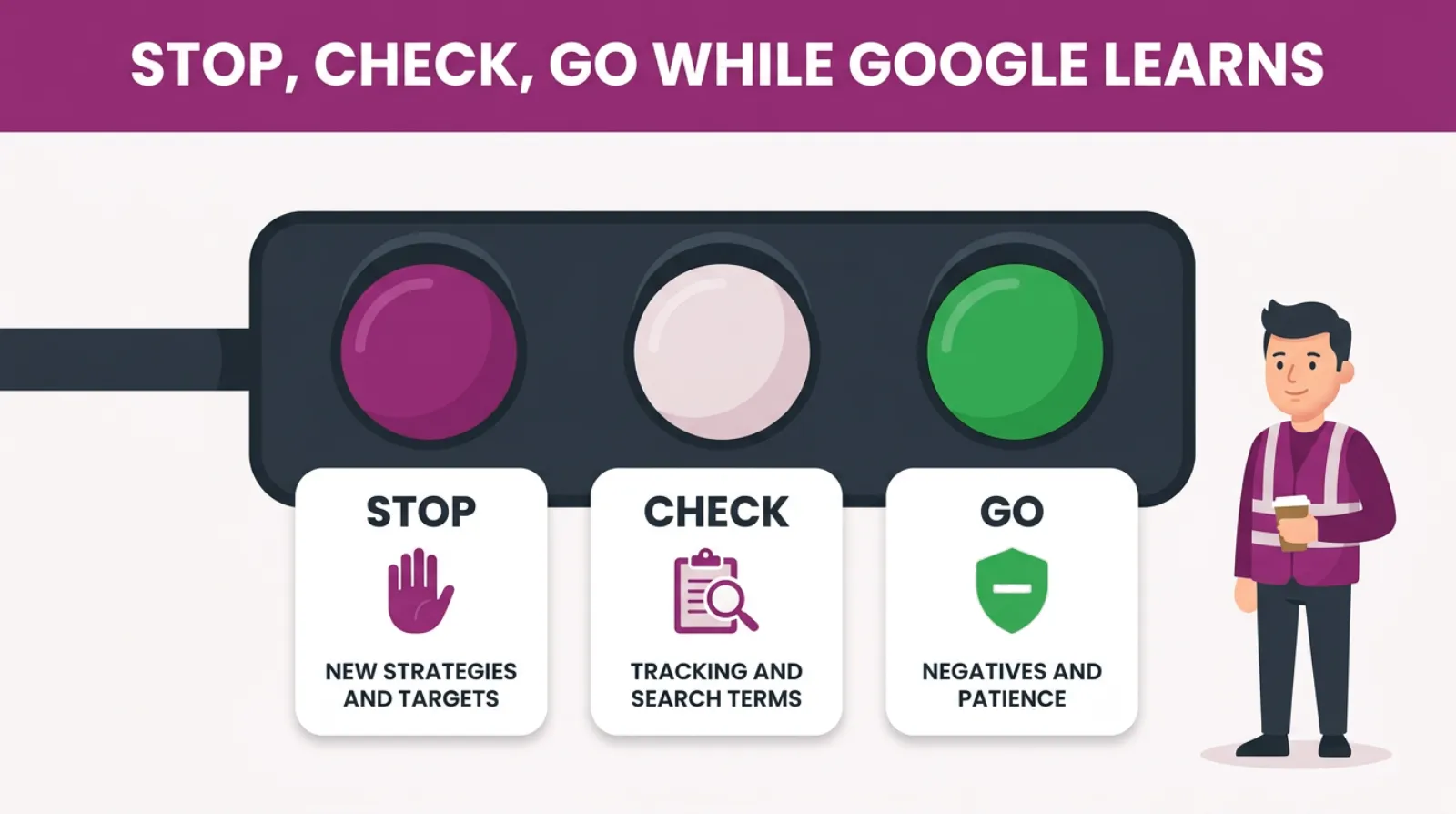
The pattern is clear when you look at it this way. Change what Google is aiming for, or what it's bidding on, and it goes back to school.
Anything that is just housekeeping, like blocking a clearly wrong search, usually does not.
How Do You Get Through The Learning Phase Without Wasting Money?
You get through it by getting the set-up right first, then changing as little as possible. Here are the five steps we follow on every account we start with.
- Check your tracking before anything else. Smart Bidding learns from your conversions. So if it counts page views or button taps, it learns the wrong lesson.
- Set a budget that can buy enough conversions. We'll show you the sum below.
- Make one change, then wait. Give each change at least a week, or two if you get under ten conversions a week.
- Keep a change log. Write the date and what you changed in a notebook or a sheet.
- Judge it after the learning phase, not during it. Google's own advice is that "you may not want to measure performance until the learning period is over".
Step one matters most. Google can only learn from what you tell it counts. Say your tracking records a five-second call as a lead. Google will happily go and buy more five-second calls.
We have written before about how wrong conversion tracking costs small accounts thousands a month. In the learning phase it's worse, because Google is building its whole bidding plan around those numbers.
Step four sounds dull, but it saves the most arguments. When results drop, you can look at the log and see what changed a week earlier. Without it, you are guessing.
A change log also stops the slow drift. Owners who log their changes make fewer of them, because they can see how many they've made.
There is a real benefit to doing this well. A campaign that gets out of learning cleanly tends to stay steadier for months.
Google has a clear picture of who your buyers are. So it stops paying for tests and starts paying for leads.
That is the payoff for two weeks of patience. Lower costs, steadier results and a campaign you don't have to watch every morning.
Stop, Check, Go: What To Touch While Google Learns
Why Is My Campaign Stuck On "Learning (Limited)"?
"Learning (limited)" means Google cannot get enough conversions to finish learning. The budget, the targeting or the conversions are too small. Google can't run the tests it needs.
It isn't a fault. It is Google telling you the maths doesn't add up.
Here is a worked example with round numbers. A local roofer sets £10 a day and pays about £4 a click. That buys roughly 75 clicks a month.
If one click in 20 turns into an enquiry, that's about four enquiries a month.
Google wants up to around 50 conversions to calibrate. At that rate it would take the best part of a year.
The campaign is not broken. It just can't buy enough data to learn from.
There are four honest fixes.
- Raise the budget on one campaign rather than spreading it thin across five
- Join small campaigns together, so the conversions land in one place
- Widen the area or the keywords a little, if your business can serve them
- Go back to a simpler bid strategy until you get more conversions
What we do not do is count something easier as a conversion just to feed Google more data.
Counting page views or button taps does get you out of learning. But Google then learns to buy page views, and that's not what you pay for.
How Much Budget Do You Need To Get Out Of Learning?
You need enough budget to buy a steady stream of conversions, not just clicks. A rough guide is that your campaign should be able to win 15 or more conversions a month.
Here is a simple way to check yours.
- Find your average cost per click. It's in the campaigns table, in the Avg. CPC column.
- Divide your monthly budget by it. That is how many clicks you can buy.
- Multiply by your conversion rate. That is how many conversions you can expect.
Say you spend £600 a month and pay £3 a click. That buys 200 clicks.
At a 5 percent conversion rate, you would expect about ten conversions a month. That's on the low side. Learning will be slow and your results will swing.
At £900 a month, the same sum gives you 300 clicks and about 15 conversions. That is usually enough to get through learning in a reasonable time.
If the sums say you can't afford 15, do not panic. It just means Maximise conversions might not be the right strategy yet.
Many small accounts do better starting on a simpler strategy, building up conversion data, then switching.
We've covered when to make that switch in a separate post, linked at the end of this one.
One more point on targets. If you use Target CPA, do not set it to the number you wish you paid. Set it close to what you actually pay now.
A target that's far too low tells Google to win almost nothing. It bids so cautiously that it cannot buy the data it needs, and learning drags on for weeks.
Start near your real cost per lead, then bring it down in small steps once learning has finished.
What Happens To Your Leads While Google Is Learning?
Leads still come in during the learning phase. But there are usually fewer of them and they cost more.
Some will be a little off target too. That's normal for a week or two, and it is not a reason to stop.
Google is trying searches and people it hasn't tested yet. A few of those tests will bring in the wrong kind of enquiry.
A plumber might get a call about a job they don't do. Another might come from a town they don't cover.
Do not ignore those calls. Write them down.
Each one tells you something useful. If the wrong enquiries all come from one search, add it as a negative. If they all come from one town, check your location settings.
This is also the week to answer the phone fast. Google is watching which clicks turn into conversions. A missed call is a lost lesson as well as a lost job.
Say your tracking counts every call over a minute as a lead. Google can't tell a booked job from a wrong number.
So the way you handle and log enquiries this fortnight shapes what Google buys for months.
In the learning phase, your phone manner is part of your bidding.
Is The Learning Phase Different For A Brand-New Account?
Yes. A brand-new account has no history, so Google has nothing of yours to start from. It leans on what it knows about similar businesses and tests from there.
That means the first learning phase in a new account is usually the longest. It's also the one where the set-up matters most.
Here is what we do differently when we start a new account.
- We get conversion tracking checked and working before a single pound is spent
- We often start on a simpler bid strategy to build up conversion history first
- We keep the campaign list short, so the data lands in one or two places
- We agree with the owner up front that the first month is a learning month
That last point saves the most stress. When everyone knows the first few weeks will wobble, nobody panics on day four.
An older account is different. If it has a year of clean conversion data, a new campaign can borrow from that history.
Google's help page says conversion data from previous campaigns can speed up the learning period. In practice, that's often the difference between three weeks and one.
Should You Pause A Campaign During The Learning Phase?
No, not unless something is genuinely wrong. Pausing stops the tests halfway, and the data Google collected gets older the longer you wait.
When you switch it back on, Google may have to start learning again. You will pay for those first expensive days twice.
There are a few good reasons to pause. If your ads are showing for a service you do not offer, stop them.
If your tracking has broken, stop. If you physically cannot take on more work this month, that's a fair reason too.
If you just want to spend a bit less, lower the budget by a step instead. The campaign keeps learning and you keep some control.
Five Habits That Keep An Account In Permanent Learning
Some accounts never leave learning. It is nearly always down to the same few habits.
- Checking every morning and acting on it. A single bad day means nothing. A bad fortnight does.
- Changing the target every week. Each change is a new aim. And Google has to learn it again.
- Splitting a small budget across many campaigns. Each one gets too little data to learn anything.
- Switching bid strategies when results dip. This one restarts the clock in full.
- Adding conversion actions mid-test. Google suddenly has a new scoreboard and has to relearn what good looks like.
You'll notice most of these feel like good management. They feel busy and careful. But in the learning phase, busy usually costs money.
The best thing most owners can do in learning is less.
What Should You Check When The Learning Phase Ends?
Check three things: the cost per enquiry, the quality of those enquiries and the searches you paid for.
The status changing from "Learning" to "Eligible" does not mean the campaign works. It just means Google has stopped testing.
Start with cost per enquiry. Compare the two weeks after learning with the two weeks before you made the change. Ignore the learning weeks themselves, because those were always going to look worse.
Then check quality. Count how many enquiries turned into a quote, a booking or a sale. A cheaper lead that never buys isn't cheaper.
Last, open the search terms report. Look at what people actually typed before they clicked.
Did Google find its conversions on searches you don't want? Add negatives in one batch and let it settle.
If one of the three looks wrong, fix that one thing. Then give it another week before you judge it again.
If all three look healthy, leave it alone. The hardest part of running Google Ads is not touching something that's working.
Frequently asked questions
Why did my cost per click go up in the learning phase?
Because Google is testing higher bids to find where your best clicks are. It is normal for costs to rise in the first week.
They should ease once learning ends, as long as you don't keep restarting it.
Does the learning phase apply to Maximise clicks?
The learning status mostly applies to Smart Bidding, the strategies that bid for conversions or value.
Maximise clicks has no conversion data to learn from. You may still see results wobble after a change. But there is no long learning period.
Does Performance Max have a learning phase?
Yes. Performance Max uses Smart Bidding, so it goes through the same learning period.
It runs across more places than a search campaign, so it often needs longer. We give it at least six weeks before we judge it.
Can I add negative keywords during the learning phase?
Yes. Blocking searches you'd never want to pay for is fine. And it stops Google wasting test money on them. Add them in one weekly batch rather than a few every day.
Will Google charge me more during the learning phase?
Not more than your normal limits. Google can spend up to twice your average daily budget on one day.
But it will not charge more than 30.4 times your daily budget across a month.
Does fixing my conversion tracking restart learning?
Yes, it usually does. Adding, removing or changing a conversion action changes what Google is aiming for.
That's why we fix tracking first and switch on Smart Bidding after, never the other way round.
Keep Reading
If you want to go deeper on bidding, budgets and tracking, these posts pick up where this one stops.
- What To Do With The Google Ads Learning Phase?
- When Can You Change Your Bid Strategy From Max Clicks To Max Conversions?
- Smart Bidding Ignores Half the Settings You’re Still Fiddling With
- The £4,000-A-Month Conversion Tracking Mistake In 8 Of 10 SME Google Ads Accounts
- How to Pace Your Google Ads Budget Like a Pro (Without Burning Cash by Day 10)
- How To Prevent Google Ads From Overspending Your Budget
We picked these because each one covers a decision you will face before, during or after the learning phase.
Sources
The quotes on the learning period, bid strategy statuses, Smart Bidding signals and daily budgets come from Google's own help pages, checked in October 2026.
- Duration of the learning period for campaigns and what affects it - Google Ads Help
- About bid strategy statuses - Google Ads Help
- About Smart Bidding - Google Ads Help
- About average daily budgets - Google Ads Help
Let Google Learn On Purpose, Not By Accident
The learning phase isn't Google wasting your budget. It is Google buying the information it needs to spend the rest of your budget well.
Your job is to make that information cheap. Get the tracking right and set a budget that can buy enough conversions. Then make one change at a time and wait.
Do that and the expensive part lasts a week or two, once. Skip it and you'll pay for the same lesson again and again.
And if you would rather have someone watch the learning phase for you, that's what we do at SF Digital every day.

Written by Uzair Kharawala
Partner at SF Digital Studios, a Google Premier Partner agency. Uzair has been helping businesses grow with Google Ads since 2002 and teaches it every week on YouTube.
Get our best Google Ads tips by email
New articles and videos, straight to your inbox. Unsubscribe any time.