Are you confused and snookered? Regarding the Google Ads various ad formats, sizes and specifications in this video, I'm going to go through all the specs, formats, sizes and best practices for Google Ads. Hello, my name is Uzair and thanks for joining in. In this video, I'm going to go through all the various Google Ads Ad formats, sizes and best practices because there are quite a few different types of campaigns.
Now you got App campaigns, Demand Gen, Display, PMax, Search, Shopping, Travel, Video. So, I too am getting confused now with all these different specifications for each ad you got different headlines, long headlines, descriptions, short headlines and all of these. So hopefully by end of this video, you will learn how to set up ads in each one of these campaign types.
But before I get started, I truly appreciate if you like videos like this one then please give it a thumbs up and subscribe to our channel because we upload videos like this one on a regular basis. Okay, so let's get back to the topic of this video, which is these ad formats and sizes. So, we start off with the App campaign.
So, in here you have the headline and descriptions and headline is 30 characters, description 90, quantity required, 1 to 5 headlines recommended. And now this is where the best practices come in. Many times I see 1 or 2 headlines being put in or 1 of 2 descriptions, but Google recommends 5 headlines and 5 descriptions. So, please do the work and make sure that you have put in all these headlines and descriptions and both of these are required and not optional.
Then you also have the images. You got 3 different size of images over here, landscape, portrait and square. Google also gives you the recommended size as well. So, 1200 x 628, 1200 x 1500, 1200 x 1200. So, I would recommend that you make your images to these sizes. Quantity required recommended well one, but you can upload up to 20 images over here on each one of these.
So, you can get started with just one of each image can be as JPEG or PNG with a maximum file size of 5 MB. If it's over 5 MB you will not be able to upload them into Google Ads. Recommended images are optional, but will help your campaign stand out with excellent ad strength. Then you can upload videos as well.
You upload a landscape video, a vertical video and a square video and the recommended length can be between 10 to 60 seconds for each one of these recommended number of videos 3, for landscape 7, for vertical, square is 2. I don't know where these numbers come from but this is what Google recommends. So, to be able to use videos in your ads, they need to be uploaded to YouTube before you can use them again.
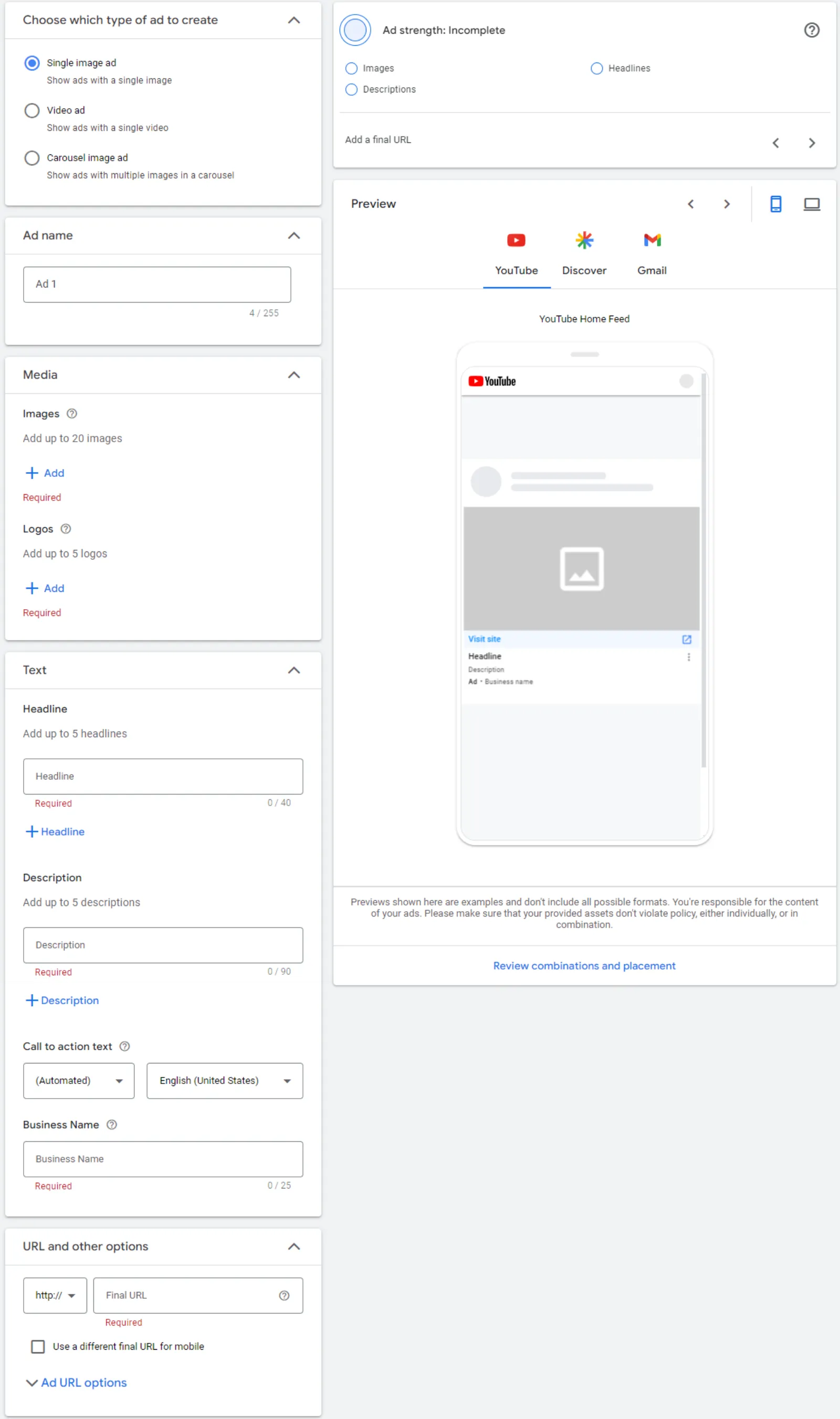
Recommended videos are optional but will help your campaign stand out with excellent ad strength. So, the next one is demand gen. This is the latest campaign type and see what Google has to say about this so very quickly. Demand gen campaigns help you reach up to 2.9 billion people as they browse feeds on YouTube. Check the Gmail promotions and social tabs and scroll through discover to catch up on their favourite topics.
So, text, final URL. You'll never run out of these, So, you just put in the final URL. All of these are required, by the way, where you see this little check put in the business name up to 25 characters long. Call to action is automated. One call to action is required. Headlines up to 40 characters and you can enter up to 1 to 5 headlines, but recommended a five.
So, write all five, descriptions is up to 90 characters and recommended is 3, but I would recommend putting five do a bit of work. Images. So, you got the landscape, then you got your logo in here as well, which is a square 1:1 format. You got a square image and a portrait, which is the 4:5 recommended size 1200 x 600.
I'm not going to go through each one of these. You can read it over here and you've got the recommended number of images 3. Logo is 1, square is 3. As well as the portrait. Videos, you've got landscape, vertical or the 4:5 ratio, the square recommended lengths 10 to 60. All of these are 10 to 60 and the quantity is 3.
By the way, videos are not required is optional, but I would recommend that you do upload the videos. Again, the videos need to be on YouTube before you can use them in demand gen. So, in demand gen, you need to have the text ads or the text headlines in the description. And you must also have the images in here because these are the required video is optional.
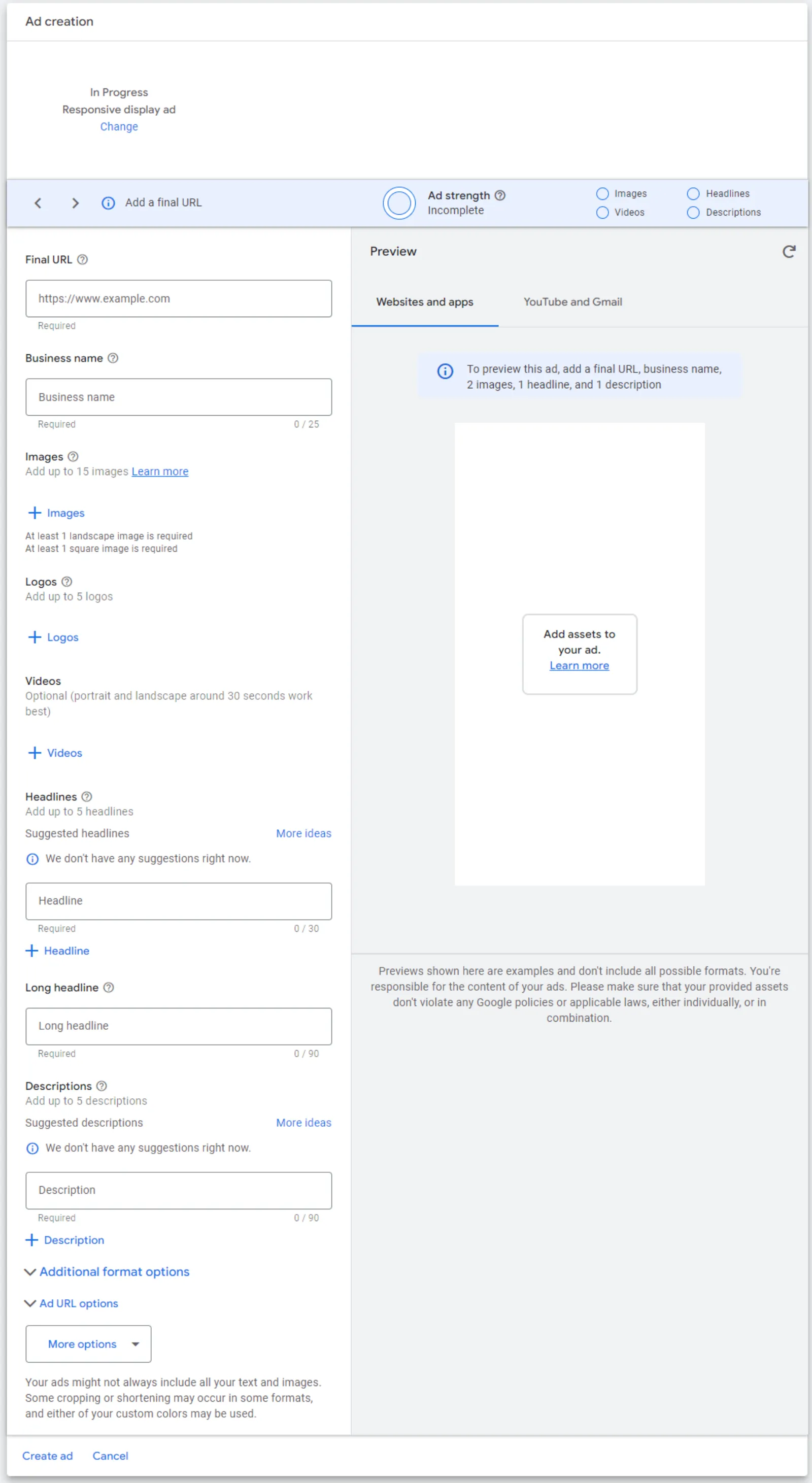
Let's move on to display. So, these are the responsive display ads where you throw in a bunch of images and headlines and descriptions and Google is going to mix and match and test lots of different headlines with different images and see which one works best. Start with the text. All of them are required. You've got the headlines, long headline, descriptions and business name, call to action as well.
Headlines up to 30, long headline up to 90, as well as descriptions, business name 25 and this is automated. Quantity 1 to 5 headlines, long headline is required is 1. Again, descriptions 1 to 5. I would recommend you put in all five. 1 business name and 1 call to action. Images again, there are four types of images or sizes.
The landscape logo. Look, you got two types of logos over here and then a square one. So, the difference between these two is this logo is a square one, whereas this one is kind of like a rectangle. 1200 x 628, 1200 x 1200, 1200 x 300 these are all in pixels by the way. And in here, the logo, they recommend 1 to 5.
Now, I'm not sure why they need five because I mean, every company has got only one logo. We have a different version or a different coloured logo, but that's about it really. So, I'm not sure why they allow you to upload five versions of the logo. I guess some companies do have more than one logo. Landscape up to 15 images and square up to 15 images, but both of them are recommended as five.
In images, when you are using images, try and use your original images rather than the stock images. Stock images are so overused everywhere, they just don't stand out from the crowd. PMax, which these days is the most everyone's favourite type of campaign. So, when you are setting up your objectives, PMax can be set up for the sales, leads, website traffic, the local ads, as well as when you want to create a campaign without the goal guidance.
So, these are highlighted over here. I'm not going to go into what the inventory or what PMax is all about in detail. We've got other videos on our channel about PMax, but the ad size is okay, let's start with the text. You've got headlines, long headline, description, business name, call to action and final URL, maximum length 30, 90, 90, 25 and final URL has got loads of characters by the way.
Headlines 3 to up to 15 headlines, recommended is 11. Again, they must have done a lot of testing because Google has got the most data, so that's why they put in this number 11. long headlines, recommended two headlines, descriptions four, one business name, one call to action, one final URL. I would recommend that you switch off the final URL expansion because with that it will send traffic to some other pages on your website and not to the final URL which you are targeting.
Image sizes landscape, square, logo we got two logo sizes and one portrait. We covered all these recommended sizes. The image sizes are pretty much the same across all the campaign types, but the recommended numbers over here is four. 4 landscape, 4 square, 1 logo, 1 logo here and 2 portrait. Again, you can set them up, upload them up as JPEG or PNG with a maximum file size of 5 MB, videos you got three sizes, landscape, square, vertical, 10 or more seconds each.
Recommended one each for each one of these ones and again for PMax. You need to upload your videos to YouTube first before you can use them in the campaign. You can also and if you are a retailer, you can also attach the Google Merchant Center feed to the PMax campaigns to start serving shopping ads. Let's go to search campaigns and these are the search campaigns.
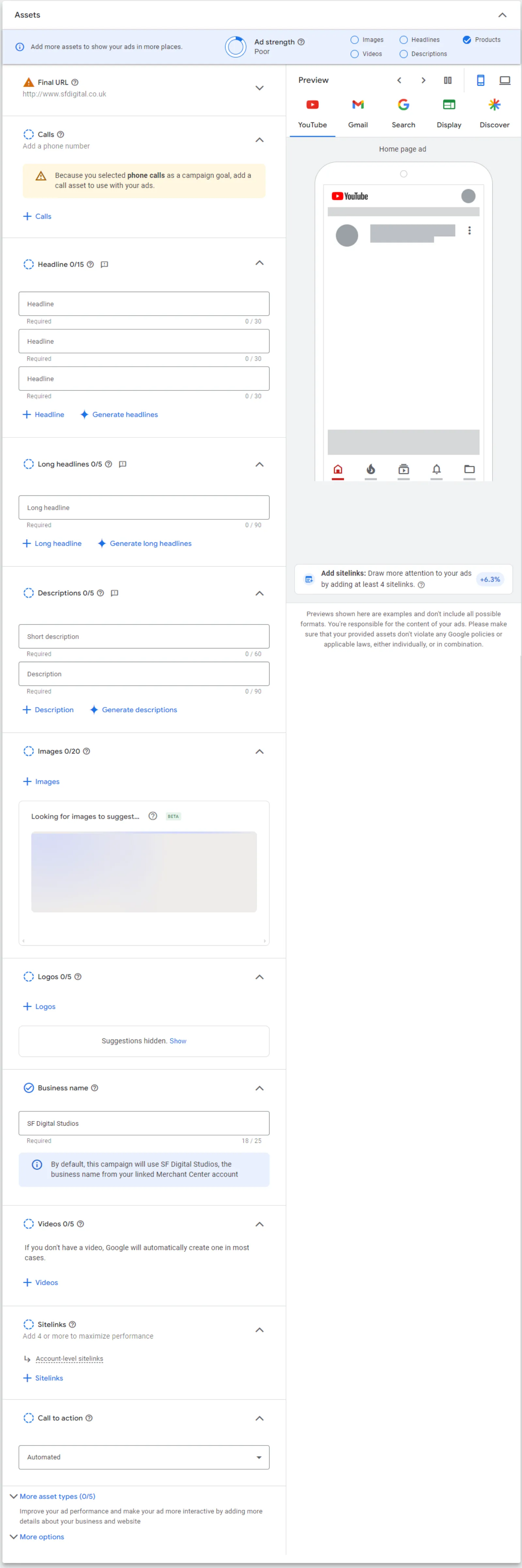
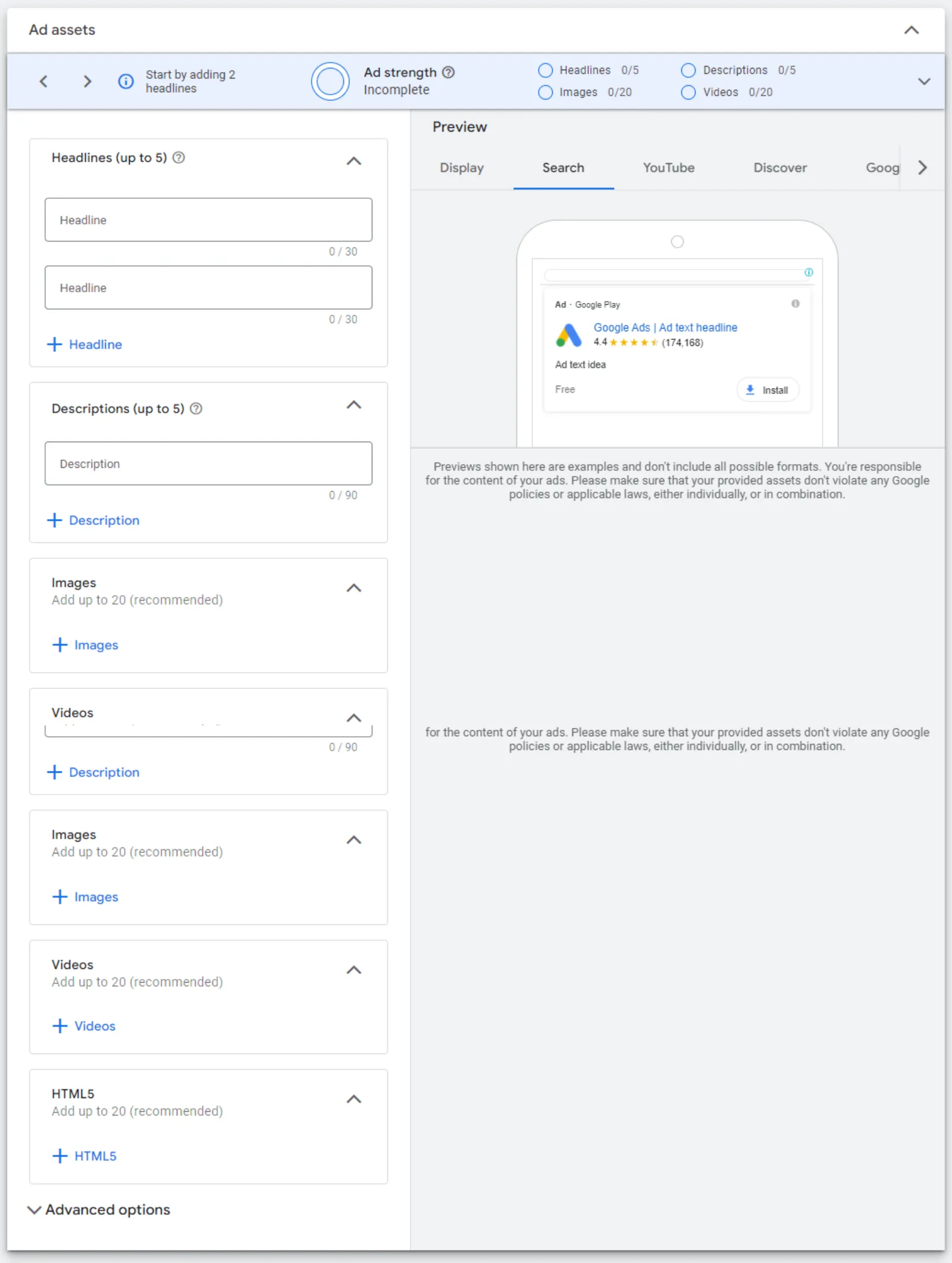
When you go to Google and search for something the ads pop up in text format. Text, business name which is over here. They've given some business information which allows you to complement your existing desktop and mobile text ads with business assets like name and business logo. This wasn't available before, but now they are allowing you to put in the business name as well as your business logo.
It will help connect your audience to you a bit better. So, business name is up to 25 characters. Image logo is square shape. Now, I know this might be misleading, that, okay, you got a circle or around over here, but this is the ratio you want to look at. The logo is 1:1. So, recommended size is 1200 x 1200, one image and this is required.
And this is how that interface looks like on Google Ads. When you put go in, you put in your final URL. Add your images, headline, descriptions, call to action. Ad assets, over here, the headlines up to 25 characters, 1 to 20 headlines. Recommended for final URL, description 90 up to 90 characters. Recommended 4 and images are the square and the landscape.
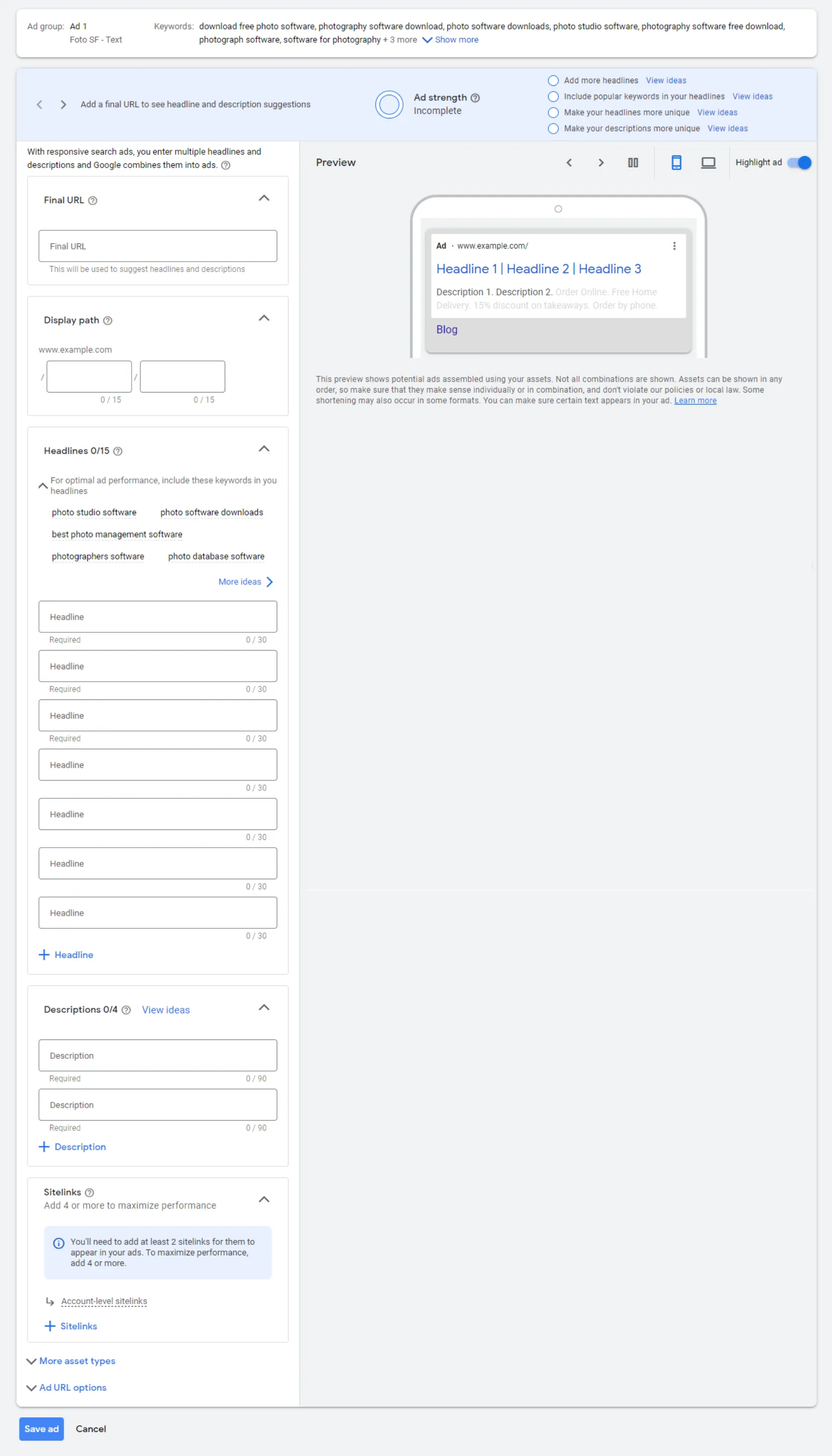
And recommended is one each one over here. And the landscape is up to 20 images. Responsive search ads lets you create an ad that adapts to show more relevant messages to your customers. So, you enter multiple headlines and descriptions when creating your responsive ad. And over time, Google will automatically test different combinations and see which one is working the best.
So, you've got headlines and descriptions. Headlines up to 30 and descriptions up to 90 characters, quantity up to 15 headlines, descriptions up to 4 headlines. These two are required and then you put in the final URL. So, shopping ads are the feed-based ads and you don't have much to do about it because it is through the Google Merchant Center.
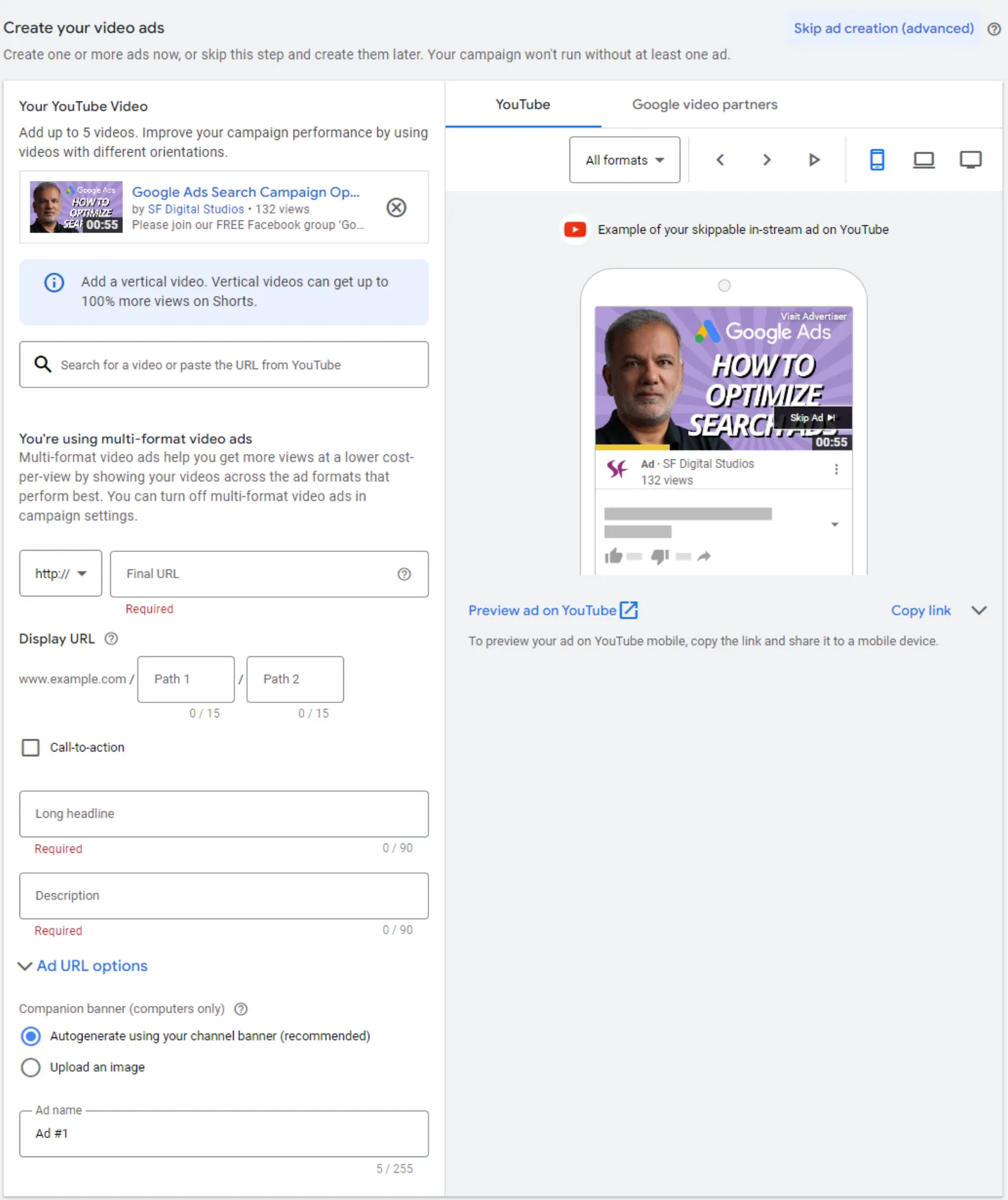
Travel is only for obviously travel companies or flight companies and stuff like that. Again, this is not many people who use these ads, but they are set up in a completely in a different way to 99% of the ads are run on Google. So, these are for holiday rentals and stuff like that. Okay, video. So, the in-feed video ads which will be on your YouTube.
So, the ratio is 16:9 horizontal, vertical 9: 16, square 1:1, Resolution 1920 x 1080. See, this is HD. These two are HD quality. Recommended length 15 seconds. Now this is surprising because they are recommending 15 seconds video as an ad because in 15 seconds you can't put your message across. So, when we run video ads, we are normally running ads up to 120 seconds.
We haven't tested 15 seconds. We have run branding video ads which up to 6 seconds long, 15 seconds we haven't run. But this is what Google is saying, that recommended length is 15 seconds. So, these video ads have got a headline. Now this is instead of 30 characters where it's 30 characters right across the board over here they made it 40.
And descriptions are usually 90 characters. Over here you've got 2 lines of 35 characters per line. And same here, headlines 2 lines 40 characters per line. YouTube Masthead is where on the homepage of the YouTube. This is where the ad will pop up again. This is for enterprise level campaigns, so very few companies would use them. But there is the format, which is the horizontal 16:9 recommended length any you got the headline, description, call to action and final URL.
Now recommended length you got less than 40 characters, 60 characters or 16 characters. The next one is the video action campaigns and they are cost effective way to drive more conversions on and off YouTube. So, these will go on the Google display network and also on other Google properties. So, let's see what they've got. Pretty much the same horizontal, vertical, square, HD quality 1920 x 1080, square is 1080 x 1080 recommended length greater than or equals to, well basically more than 10 seconds each.
And then they also recommend that to upload videos with other as an MPG file and all these other formats, usually we upload MP4 and which most people do as well. You got a you need to enter a headline, long headline, description, call to action, Final URL. And these are the maximum characters. So, if you do want to make a note, you can pause these campaigns or screenshot this and save it in your document somewhere with your reach campaign.
Again, you got these ratios and resolutions over here and the recommended length, horizontal, vertical. So video is basically three sizes. Then you got the thumbnails and the companion banner which again are really important, all thumbnail 16:9 or the landscape which is the 5:1. So, the companion banner is 300 x 60 pixels and got to be less than 150 KB and can be uploaded as JPEG, GIF or PNG.
But animated GIF won't work, it will just be a static one. And the landscape which is the thumbnail which is the same size as the video. And you can use these three file formats. File size needs to be less than 2 MB and less than 10 MB for podcast. So, these are all the various, there's quite a few file sizes as you can see in formats.
So, if you are confused and you need to go through them, this is the video for you which has got all these formats and specifications. So, hope you enjoyed this video and appreciate you being with me over here. If you haven't subscribe or given it a thumbs up yet, I truly appreciate you do that and I look forward to seeing you in the next one.
Bye for now.


 LIVE