NatWest Accelerator Events Free one-day marketing seminar at the NatWest Accelerator, Milton Keynes · 10 November 2026 Free marketing seminar · NatWest Accelerator, Milton Keynes · 10 Nov 2026 Free seminar · 10 Nov 2026
NatWest Accelerator, MK
Get your free invite →Invite →

Home › Blog › Google Analytics

Google Analytics

Top Metrics To Track In GA4 And Why They Are Important

Top Metrics To Track In GA4 And Why They Are Important
Read the video transcript

Google Analytics 4, or GA4 as it's often called, has changed how we look at website data. If you're used to the old Universal Analytics, GA4 might feel a bit different at first. But once you get the hang of it, it offers a detailed and flexible way to understand how users interact with your website or app. My goal today is to walk you through the important metrics you should be tracking in GA4 and explain why they matter, without getting bogged down in jargon.

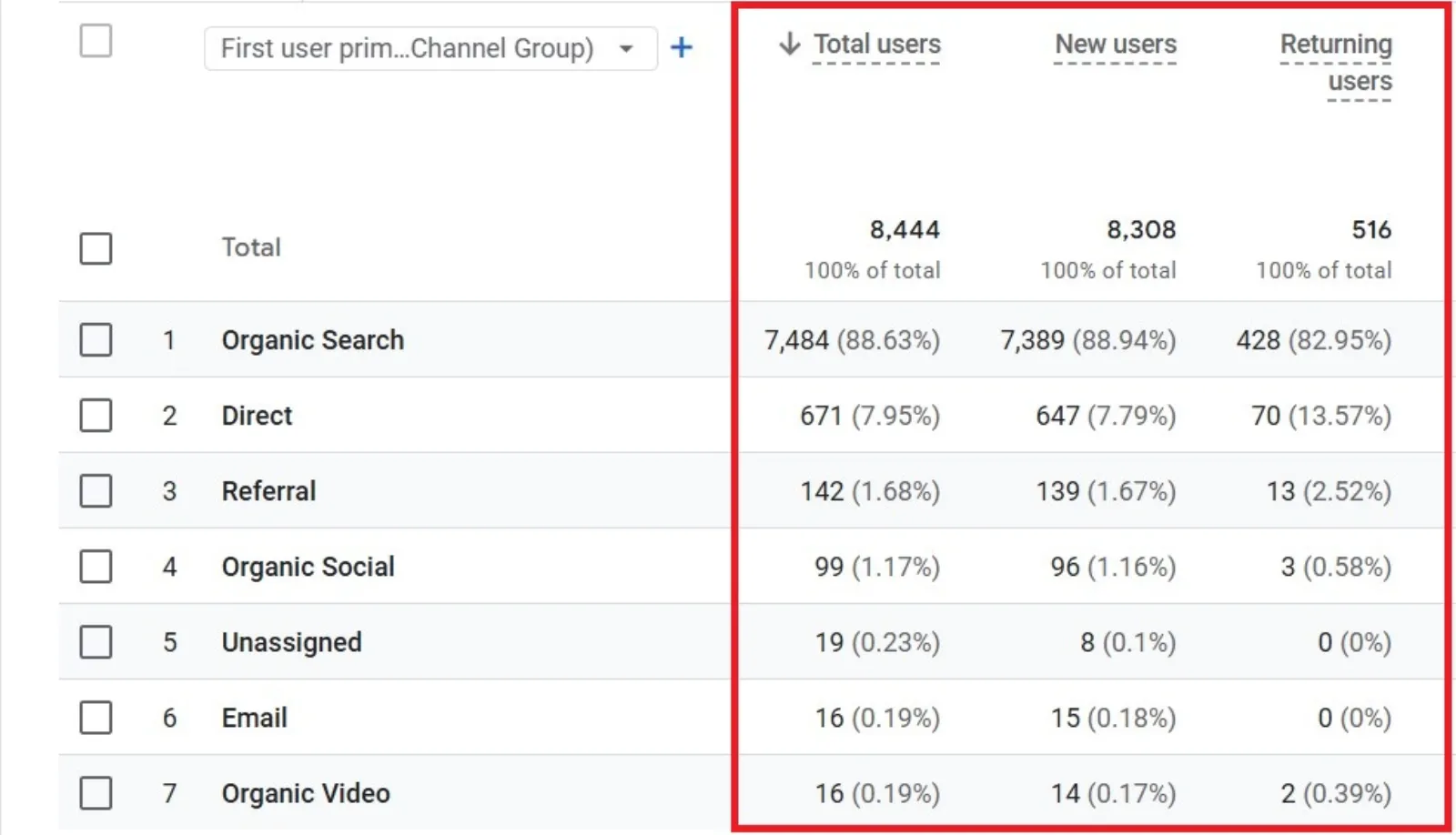
Users This metric tells you how many people visited your website or app. In GA4, you get three types: Total Users, New Users, and, importantly, Active Users. Understanding these numbers is key for tracking growth. If your marketing efforts are working, you should see your total and new users increasing. Active users give you a much better sense of who's genuinely interacting with your content.

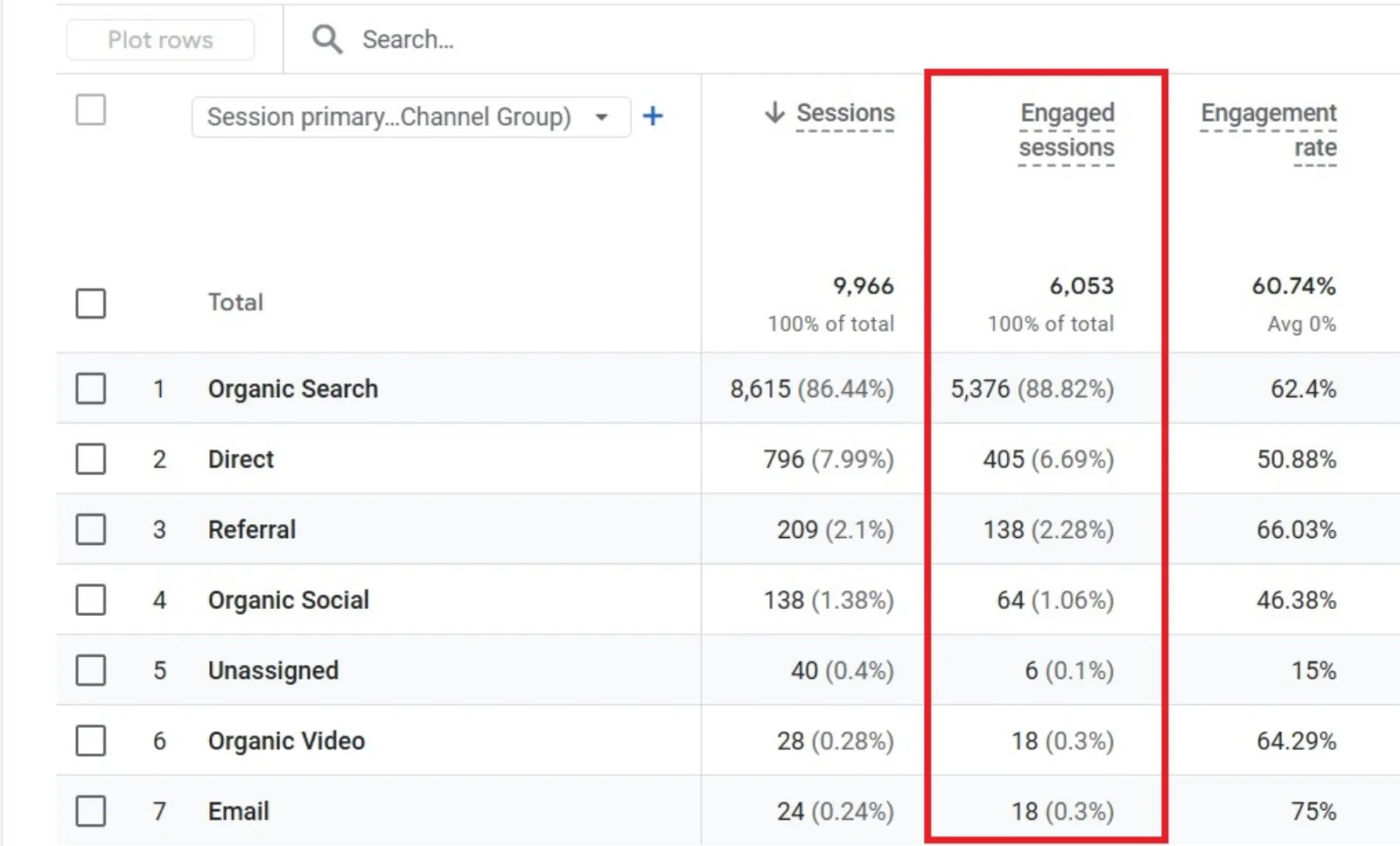
Engaged sessions This is a crucial concept in GA4. An engaged session can be defined as one that lasted longer than 10 seconds, had at least one conversion event, or had two or more page views. This metric helps filter out those quick clicks where someone just lands on a page and immediately bounces off; it shows you who's spending more time on your site.

If your engagement sessions are low, your content might need capturing attention. Engagement Rate This is simply the percentage of engaged sessions out of your total sessions. It gives you a quick snapshot of quality over quantity. If you have a high number of sessions but low engagement rate, something might be off – you want to attract people who stay and interact, not just bounce.

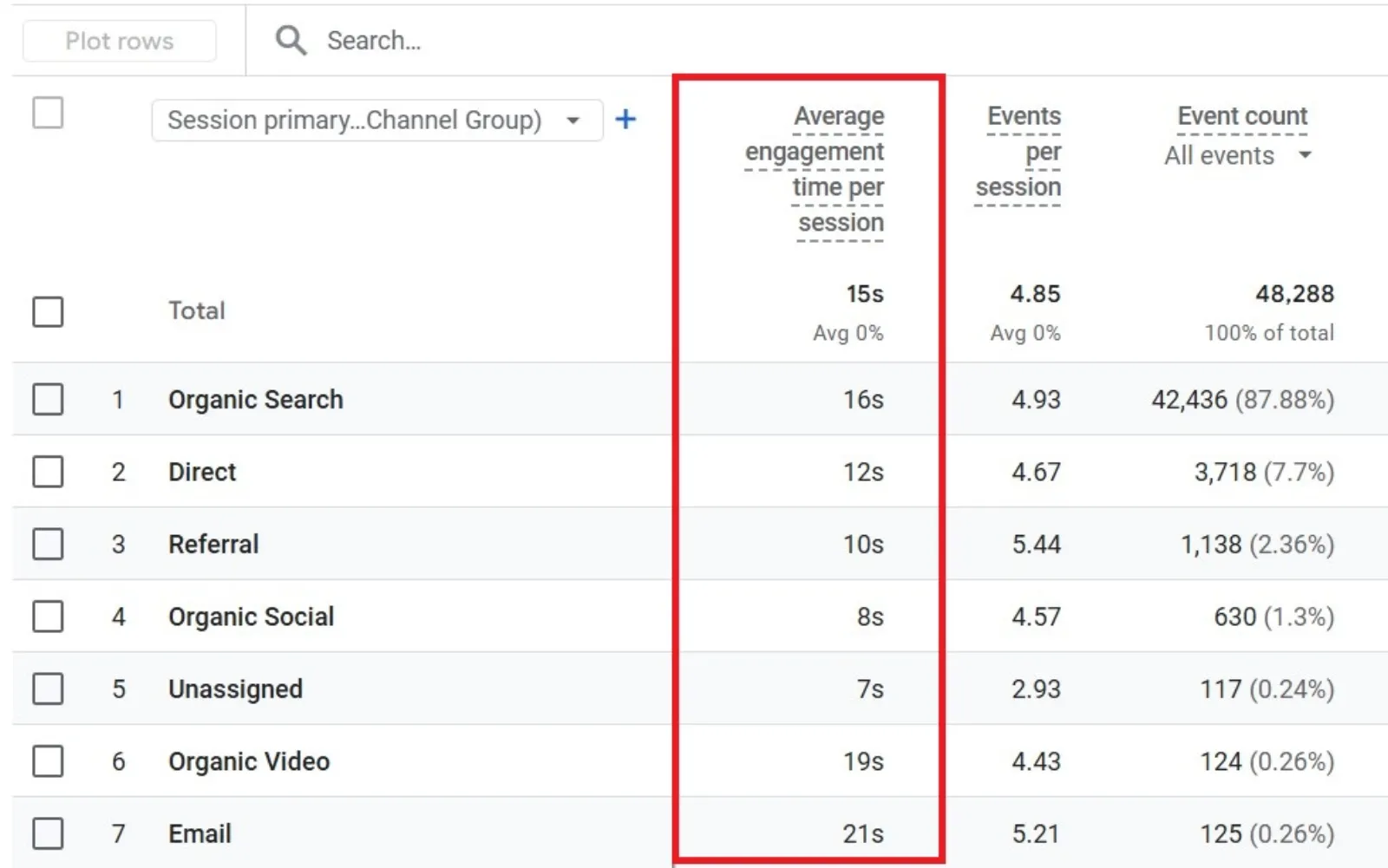
We also have Average Engagement Time, which tells you how long users are actively engaging with your content during their visit. Longer engagement usually points to better content or a better user experience. Events In GA4, almost everything is tracked as an event – page views, clicks, downloads, video plays, you name it. Tracking events is powerful because it helps you understand exactly what users are doing on your site.

You can even set up custom events to track specific actions that are important to your business, like form submissions or button clicks. This leads us to the next key metric. Conversions Conversions are simply events that you mark as being important. This could be a purchase, a form submission, a sign-up, or any other key action you want users to take.

If you're not tracking conversions, you're honestly missing the whole point of having a website for many businesses. You need to know what's driving results. Pages and Screens Beyond these core metrics, keep an eye on Pages and Screens to see which content is most popular, Traffic Sources to understand where your visitors are coming from (like Organic Search, Paid, Social, etc.), User Retention to see if people are coming back, and Demographics and Tech to learn more about your audience's age, location, devices, and browsers.

Look, GA4 can take a little getting used to. But don't get overwhelmed by all the data. Start with the foundational metrics: Users, Engagement, Events, and Conversions. These metrics tell you if people are finding, using, and enjoying your content. Add more as you get comfortable, and always tie your data back to your business goals. Metrics are only truly helpful if they help you make better decisions.

Hope you enjoyed the video. Like & subscribe for more.

Google Analytics 4 (GA4) has changed the way we look at website data. If you used Universal Analytics before, GA4 might feel like a different tool. But once you get the hang of it, it offers a more detailed and flexible way to understand how users interact with your website or app.

In this post, I’ll go over the top metrics you should track in GA4 and explain why each one matters. This isn’t going to be full of jargon or overly complicated. My goal is to help you get familiar with what counts when it comes to website analytics.

Free NatWest Accelerator event

Get Found, Get Chosen, Get Your Time Back

A free one-day marketing seminar in Milton Keynes · 10 November 2026

Get your free invite →

1. Users

Google Analytics 4 Users

The “Users” metric tells you how many people have visited your site or app. In GA4, you get three types:

Get your free Marketing Action PlanNot sure where to start? Answer a few questions and get your plan in about a minute. No email needed.

Get my plan →
  • Total Users: Everyone who visited.
  • New Users: People who visited for the first time.
  • Active Users: Users who had an engaged session (we’ll talk about that soon).

Why it matters: Understanding user numbers helps you track growth. If your marketing is working, you should see your total and new users go up. Active users give you a better sense of who’s interacting with your content.

2. Engaged Sessions
Google Analytics 4 Engaged Sessions

An engaged session is a session that lasted longer than 10 seconds, had at least one conversion event, or had 2 or more page views.

Why it matters: This filters out people who just clicked and bounced. It shows who’s spending time on your site. If engagement sessions are low, it could mean your content isn’t capturing attention.

3. Engagement Rate

Google Analytics 4 Engaged Sessions

This is the percentage of engaged sessions out of total sessions.

Why it matters: It gives a quick snapshot of quality over quantity. If you have a high number of sessions but a low engagement rate, something might be off. You want to attract people who stay, not just click in and leave.

4. Average Engagement Time
Google Analytics 4 Average Engagement Time

This tells you how long users are actively engaging with your content during their visit.

Why it matters: Longer engagement usually means better content or user experience. If people are spending more time, they’re probably finding what they came for.

5. Event Count
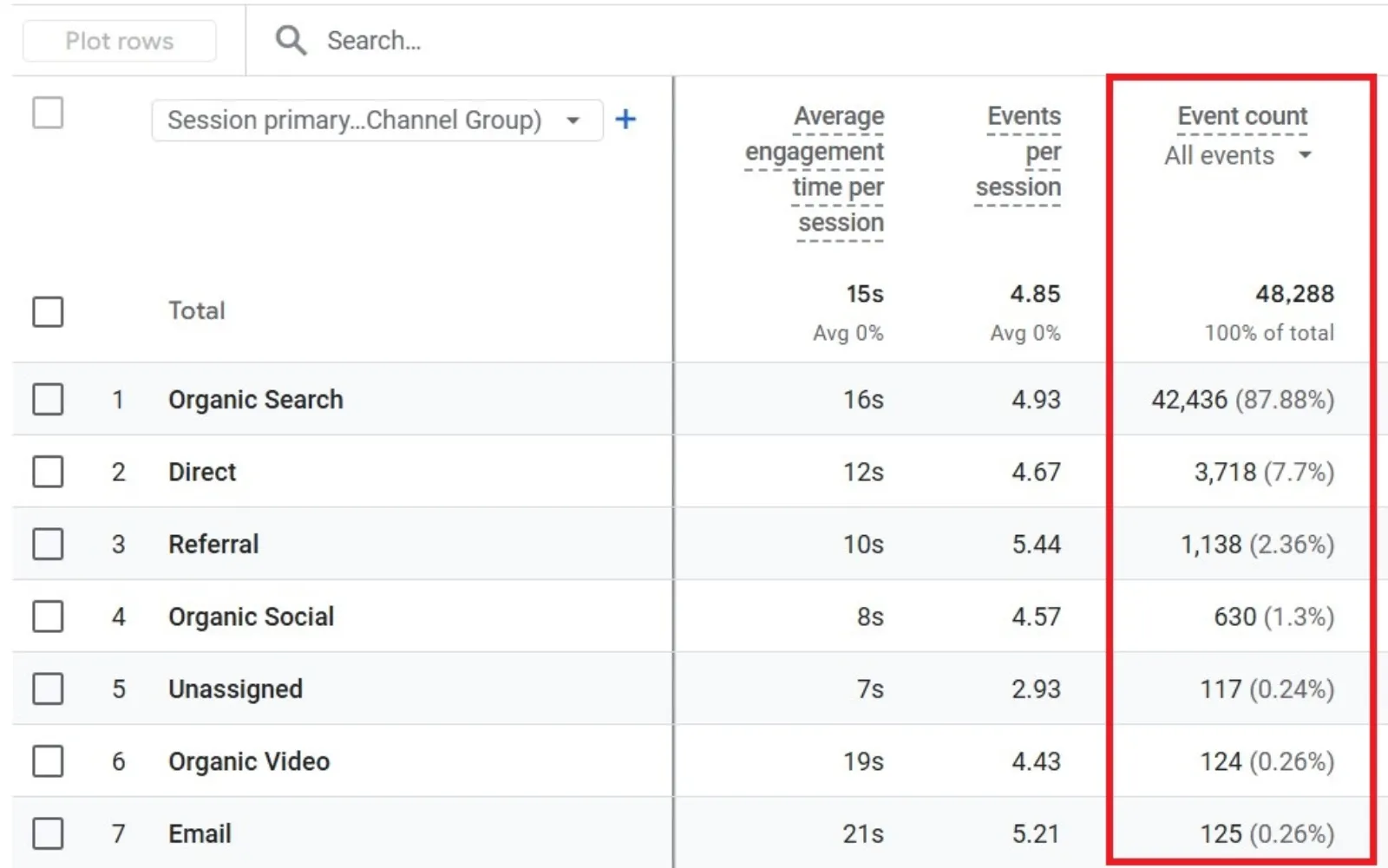
Google Analytics 4 Event Count

In GA4, everything is an event: page views, clicks, downloads, video plays, etc.

Uzair KharawalaLIVE
Free weekly YouTube live

Live every Tuesday at 2pm UK. Bring your marketing questions.

Get your Google, local SEO and AI questions answered live.

Join for free

Why it matters: Tracking events helps you understand exactly what users are doing. You can set up custom events to track specific actions like form submissions or button clicks, which can show where people are converting.

6. Conversions
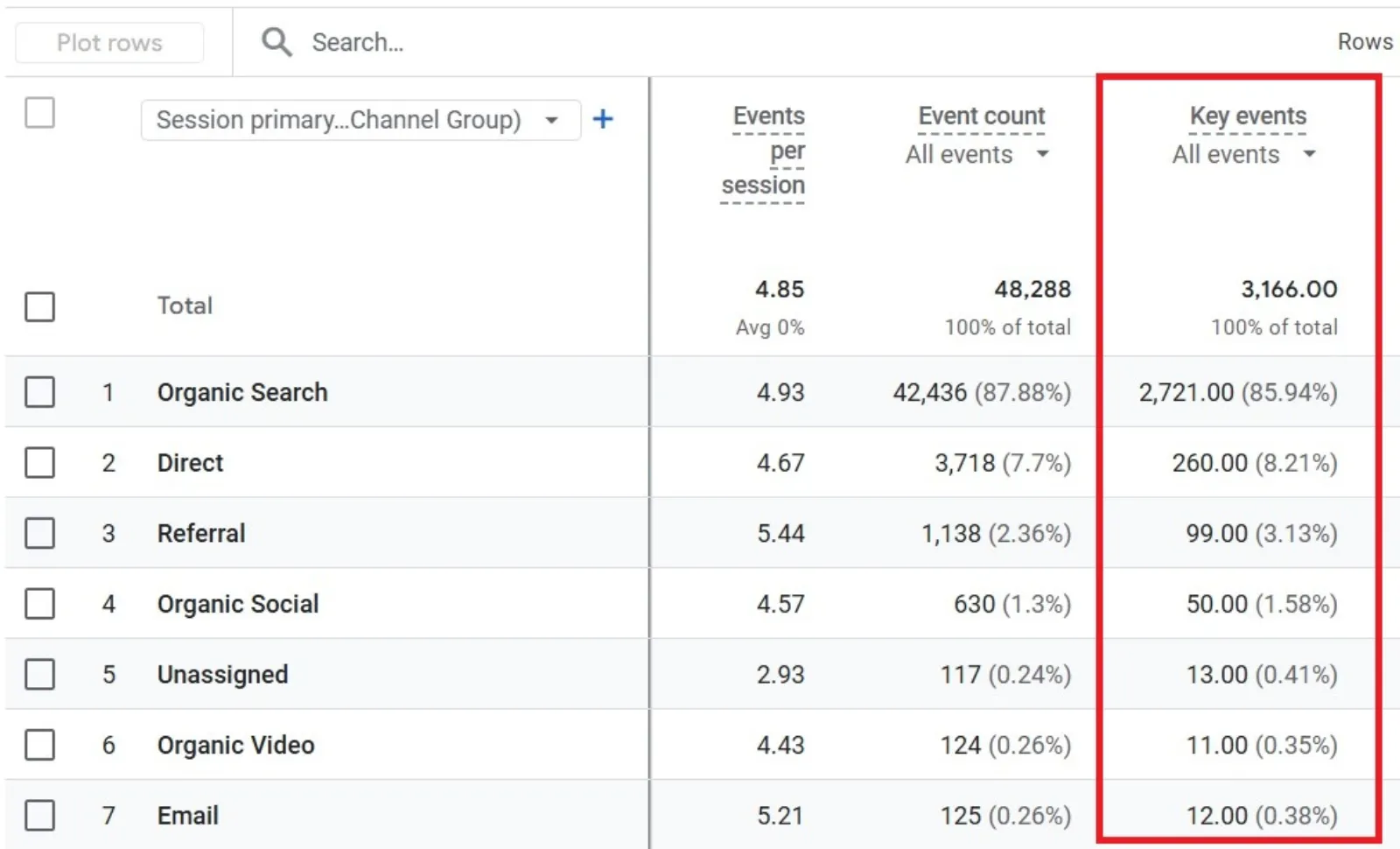
Google Analytics 4 Conversions

Conversions are events that you mark as important (like a purchase, form submission, or sign-up).

Why it matters: These are your key actions. If you’re not tracking conversions, you’re missing out on the whole point of having a website. You need to know what’s driving results.

7. Pages and Screens
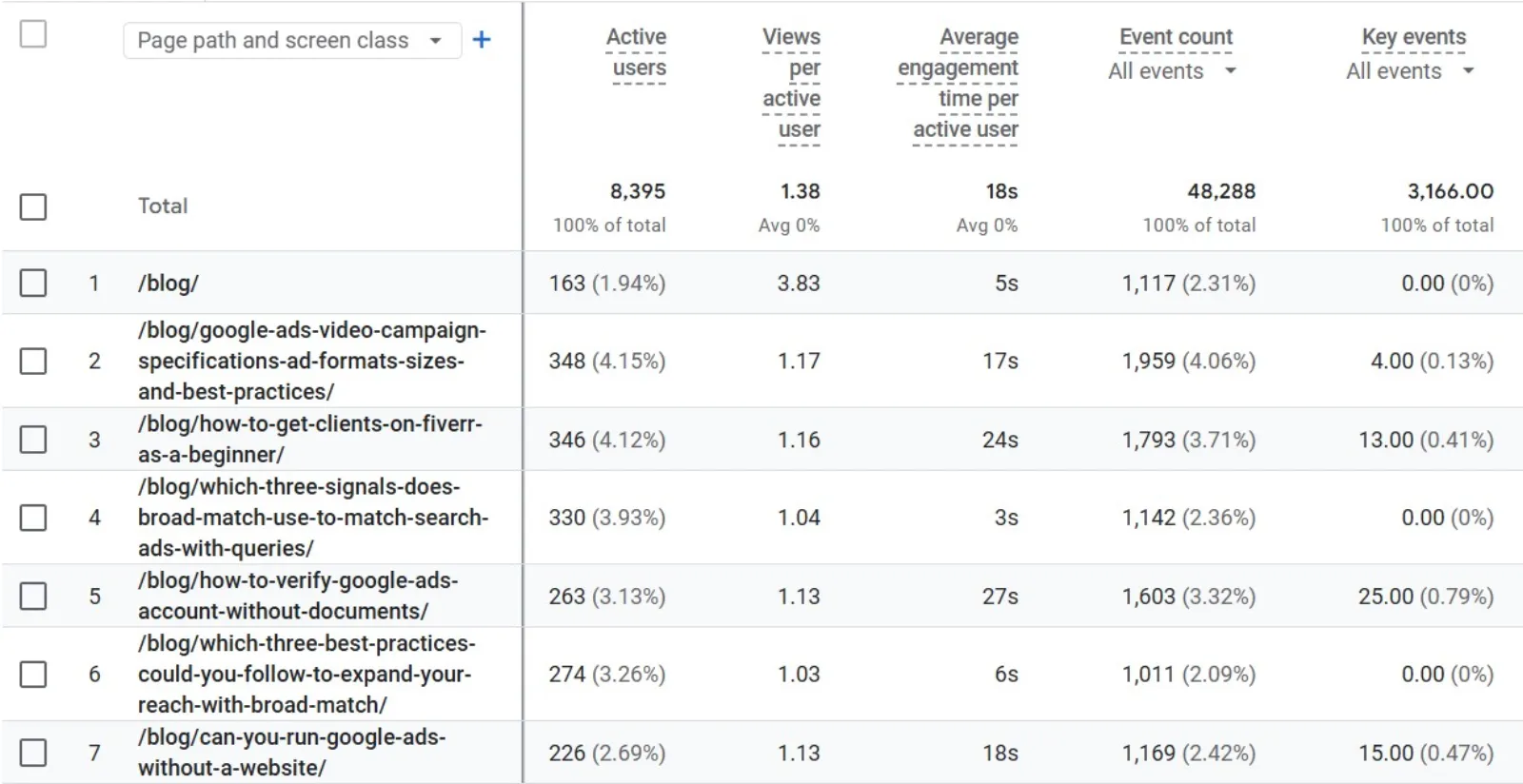
Google Analytics 4 Pages And Screens

This report shows which pages (on a website) or screens (in an app) are getting views.

Why it matters: Knowing which pages are most popular can help you make better content and UX decisions. Are people spending time where you want them to? Are they ignoring important pages?

8. Traffic Sources
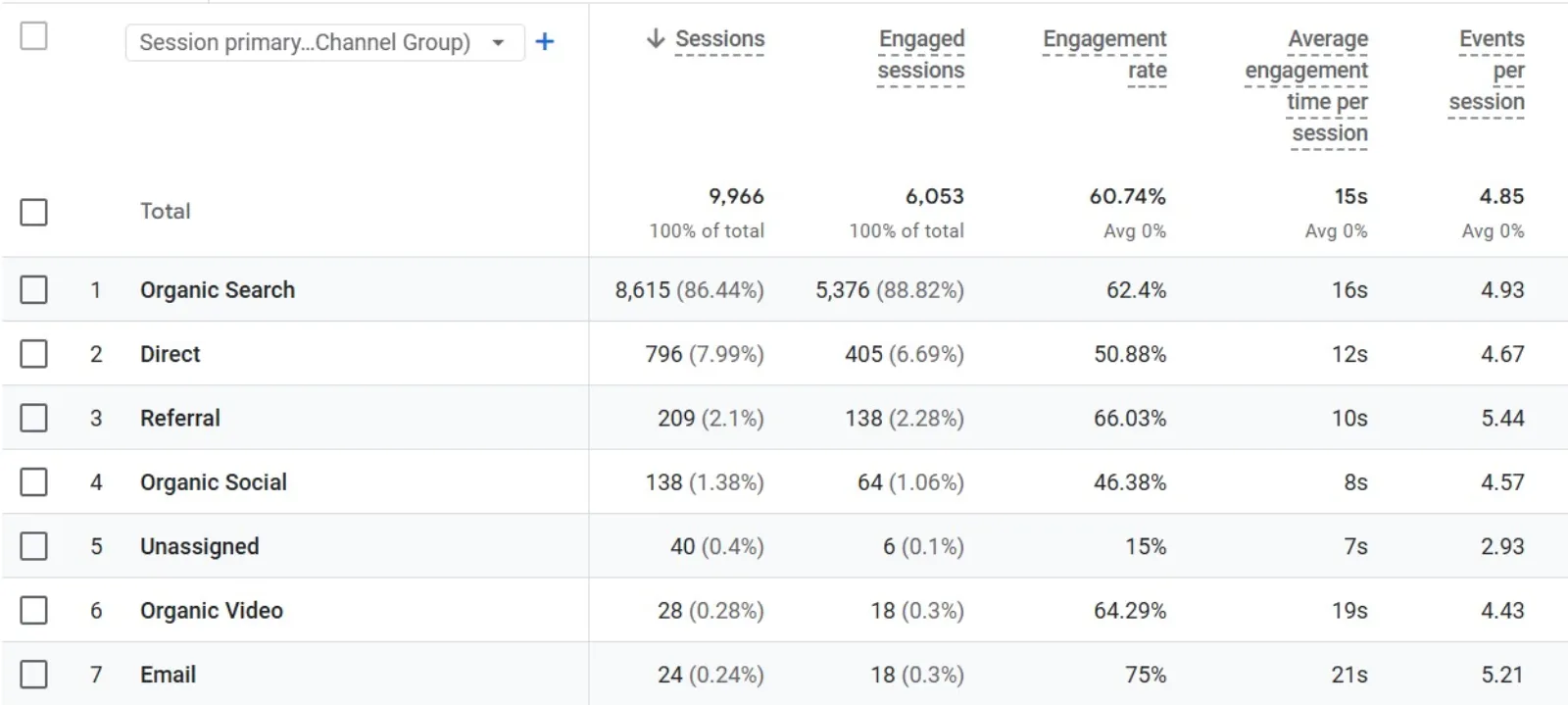
Google Analytics 4 Traffic Sources

This tells you where your users are coming from. GA4 breaks it down by channel (Organic Search, Direct, Paid Search, Referral, etc.).

Why it matters: Understanding your traffic sources helps you see what’s working. If you’re spending money on ads but not seeing traffic from Paid Search, that’s a red flag. On the flip side, a strong Organic Search channel means your SEO is doing well.

9. User Retention
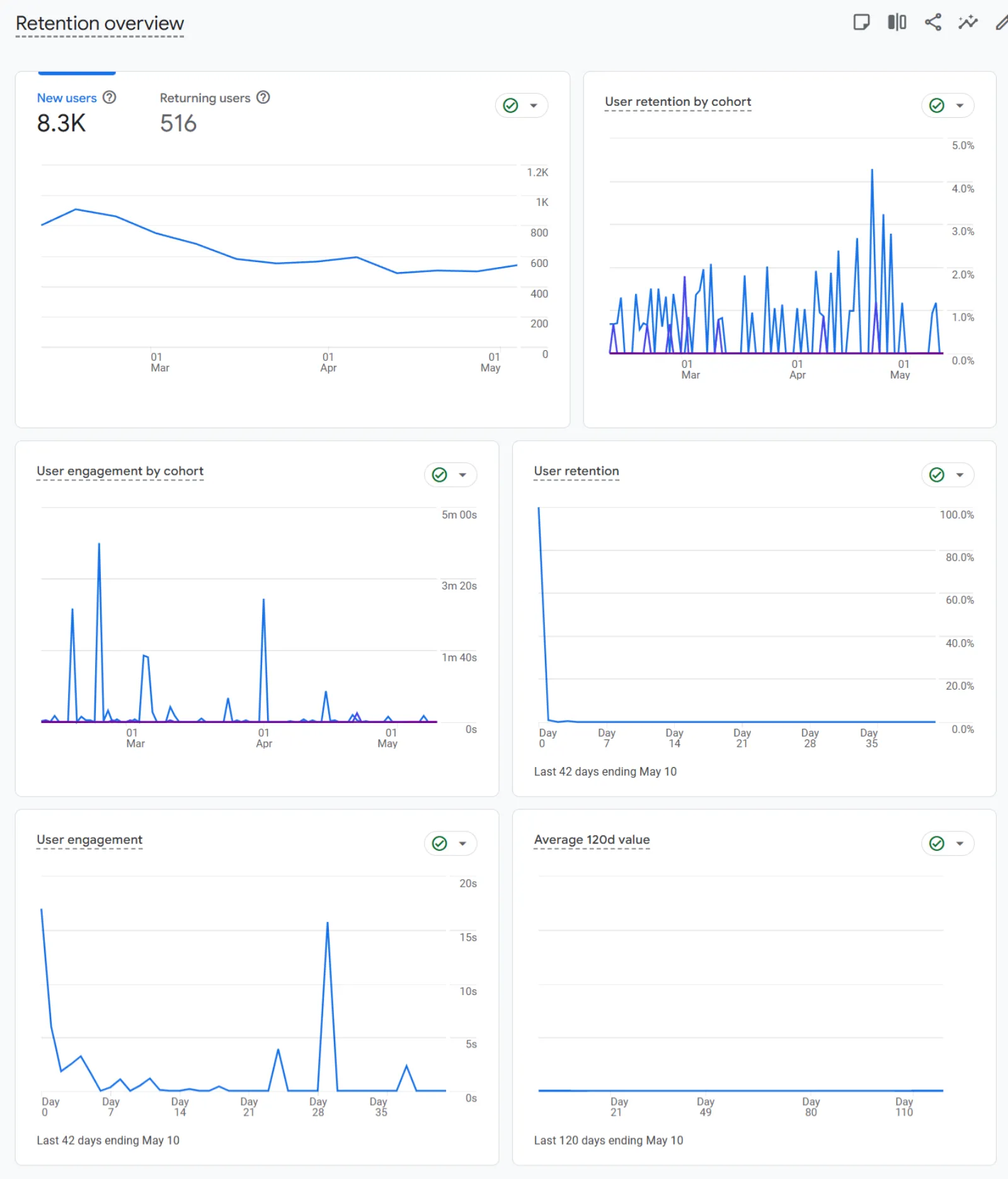
Google Analytics 4 Retention Period

Retention shows how many users return to your site after their first visit, usually tracked over a few days or weeks.

Why it matters: If people keep coming back, it means your site offers value. Poor retention could mean they didn’t find what they were looking for or had a bad experience.

10. Demographics and Tech
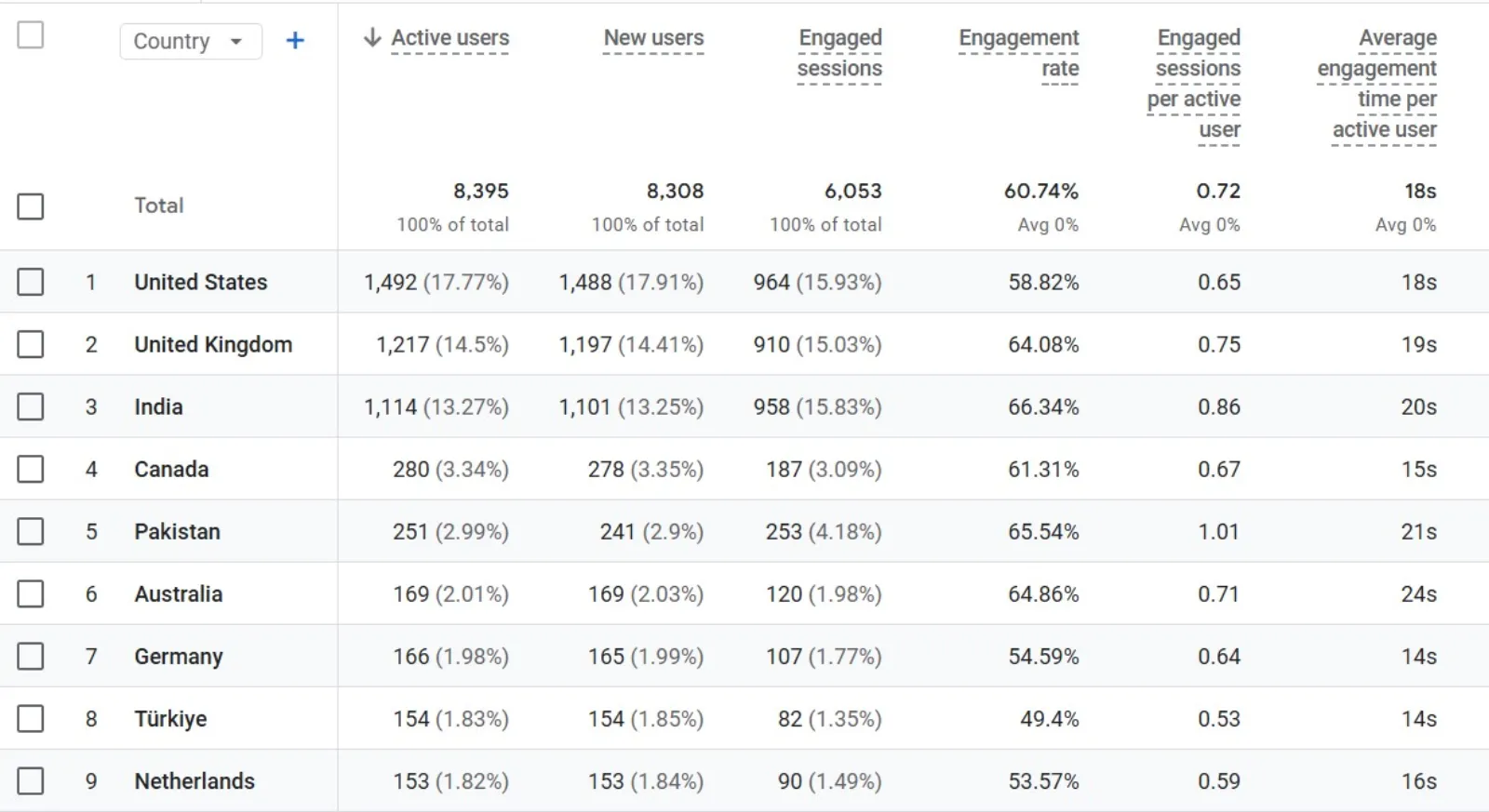
Google Analytics 4 Demographics And Tech

GA4 provides details about your users’ age, gender, location, device type, browser, and more.

Why it matters: This data helps you understand your audience. Are most of your visitors on mobile? Is a certain region driving traffic? You can use this to make decisions about design, content, and targeting.

Final Thoughts

GA4 may take some getting used to, but once you understand the key metrics, it becomes a powerful tool for improving your website or app. The trick is not to get overwhelmed by every possible data point. Focus on the metrics that tell you if people are finding, using, and enjoying your content.

Start with Users, Engagement, Events, and Conversions. Add more metrics as you get comfortable. And always tie your data back to your goals. Metrics are only helpful if they help you make better decisions.

Uzair Kharawala

Written by Uzair Kharawala

Partner at SF Digital Studios, a Google Premier Partner agency. Uzair has been helping businesses grow with Google Ads since 2002 and teaches it every week on YouTube.

Book A Call →Subscribe on YouTube for new videos every weekday →
Free every week

Get our best Google Ads tips by email

New articles and videos, straight to your inbox. Unsubscribe any time.

We respect your privacy at all times. Privacy Policy

You may also like

Read the blog →

Your next customers are out there. Let's go and get them.

Tell us where you want your business to be, and we'll show you how to get there.

Book A Call →or get your free Google Health Check →
Happy clients

Don't take our word for it

4.9 from 157 Google reviews, plus case studies and client videos.

See our happy clients →
"It has now been 3 months since we started and our sales have increased 300%."
Ruhi Latif Rafplay, Dubai
"Uzair and Farzana are two of the most honest, sincere and trustworthy people you will ever meet."
Gavin Morgan GDM Jewellery · Google review
"If I needed a campaign built, this is one of the rare few people IN THE WORLD I would trust to do it properly."
Hemmel Amrania Google Ads professional · Google review
Book A Call →
Chat with us on WhatsApp