
Most owners think showing up on Google costs money. They've seen the sponsored results at the top and assumed that is the only way in.
It isn't. Knowing how to get your business on Google for free is one of the most useful things a small business owner can learn. And most of it takes an afternoon.

Get Found, Get Chosen, Get Your Time Back
A free one-day marketing seminar in Milton Keynes · 10 November 2026
I've run Google Ads accounts for almost 15 years.
Get your free Marketing Action PlanNot sure where to start? Answer a few questions and get your plan in about a minute. No email needed.
Get my plan →So it might sound odd that I'm telling you how to show up without paying for ads. Stay with me.
But every account we start with goes better when the free side is sorted first. The ads simply work harder. The profile, the reviews and the website are already doing their job.
This guide walks you through all of it. What "being on Google" really means, the free places you can appear, how to set them up and how to check they are working.
How Do You Get Your Business On Google For Free?
To get your business on Google for free, create a Google Business Profile, verify it, and fill in every section. That puts you on Google Maps and in the local results. Then make sure your website is in Google's index and keep collecting reviews. None of it costs a penny, only your time.
That's the short answer. Three free jobs: a profile, a website Google can find and a steady flow of reviews.
The rest of this post is the detail. That's where most owners slip. A half-filled profile and a website Google has never seen will not get you far.
Being on Google is free. Being found on Google takes work. Keep that in mind as you read.
What Does Being On Google Actually Mean?
Search for a local service and Google usually shows three kinds of result. Only one of them is paid.
At the top, you often see sponsored results. Those are Google Ads, and you pay each time someone clicks.
Below them sits a map. Three businesses are listed underneath it. People call this the map pack or the local pack. You cannot buy your way into it.
Below the map come the ordinary website results. These are often called organic results. You can't buy those either.
So two of the three places on that page are free. You earn them rather than pay for them.
Here's how the three compare side by side.
| Google Ads | Google Business Profile | Your website in search | |
|---|---|---|---|
| What it costs | You pay per click | Free | Free |
| Where it shows | Top of the page, marked sponsored | The map and the local pack | The normal results below |
| How fast it works | Same day | Days to a few weeks | Weeks to months |
| What gets you there | Budget and bids | A full, verified profile and reviews | Useful pages Google can find |
| What happens if you stop | You vanish straight away | You stay, if you keep it fresh | You stay, if the pages stay useful |
Look at the bottom row. That's the big difference, and it's the one most owners never think about until the month they cut the ad budget and the phone goes quiet overnight. Paid visibility switches off the day the money stops. Free visibility keeps working while you sleep.
Why Should You Bother When You Could Just Pay For Ads?
Because you can't buy the map. As of October 2026, Google's own help page on local ranking says there's no way to request or pay for a better local ranking on Google.
That is worth reading twice. The part of the page where most local customers click is closed to money. It is open to effort.
There's a second reason. Many people scroll straight past anything marked sponsored.
They trust the map and the reviews more than an advert.
If you are not in the map, you are invisible to those people, however much you spend on ads.
And there is a third reason, which is cost. A click on a local service ad can easily cost several pounds. A call from your Business Profile costs nothing.
Think of a plumber who gets ten calls a week from the map. If those same calls came through ads instead, at several pounds a click and a few clicks for every call, the bill could easily run to hundreds of pounds a month. Free adds up.
Free visibility doesn't replace paid ads for everyone. But it should always come first. If your profile is weak, your ads have to work twice as hard to win the same trust.
Even when we run ads for a client, a strong profile helps. People see the advert. They check the reviews on the map, and then they call. The two work together.
How Google Decides Who Shows Up On The Map
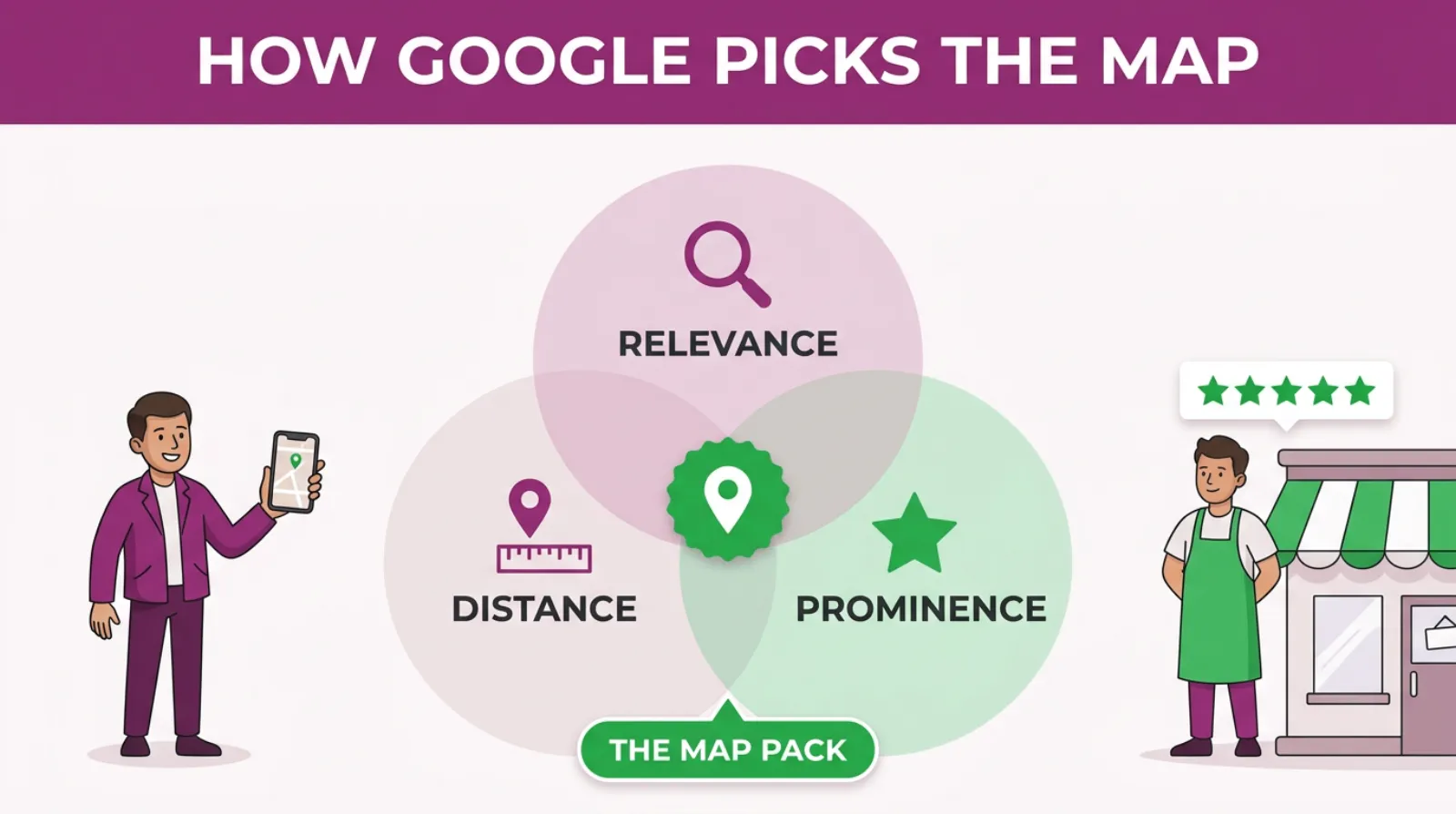
Google's local ranking help page names three things it looks at. They are relevance, distance and prominence.
Relevance is how well your profile matches what someone searched for. Distance is how far you are from the person searching.
Prominence is how well known you are. Google's page says that is partly based on how many websites link to you and how many reviews you have.
You can't move your premises closer to every customer. But you can control relevance and prominence, and that is what the rest of this guide covers.
Is Your Business Allowed A Google Business Profile?
Most local businesses can have one. The rule is that you must meet customers in person during your stated hours.
That can be at your premises, like a shop, a salon or a garage.
Or it can be at the customer's home or site. Think of a roofer, a cleaner or a mobile mechanic.
Do you visit customers rather than them visiting you? Then you are a service area business. You can hide your address and show the towns you cover instead.
That matters if you work from home. Nobody needs to see your house on the map, and Google is happy for a roofer or a cleaner to cover a dozen towns from a spare bedroom as long as the customers are real.
There are some businesses Google will not accept. Online-only shops, virtual offices and PO boxes don't qualify under its guidelines for representing your business.
If you only sell online, skip to the section on your website. That is your free route onto Google.
How Do I Set Up A Google Business Profile Step By Step?
Setting up a profile takes about 30 minutes if you have everything ready. Here is the order I'd follow.
- Search for your business name and town on Google first. A profile might already exist. If so, claim it rather than create a new one.
- Go to Google Business Profile and sign in with a Google account you will keep. Use a business email, not a personal one you might lose.
- Enter your business name exactly as it appears on your signs and paperwork. Don't add keywords or towns to it.
- Pick your main category. Choose the closest match to what you actually do, such as "Plumber" rather than "Contractor".
- Add your address, or your service areas if you visit customers.
- Add your phone number and website. Use a number you will actually answer.
- Verify the profile using the method Google offers you.
The business name rule trips up a lot of people. Adding "Best Plumber Milton Keynes" to your name breaks Google's guidelines.
It can get your profile suspended. It's not worth the risk. An owner can lose a profile with years of reviews on it because of three extra words in the name, and getting it back can take weeks.
The main category matters more than most owners realise. It is one of the strongest signals Google uses to decide which searches you appear for.
You can add extra categories too. But only add ones that genuinely describe your work.
How Do You Get Verified On Google?
Verification proves to Google that you really run the business. Until you are verified, you can't fully manage your profile.
Google decides which method you get. You don't pick. Its help page on verification says the methods are chosen automatically and cannot be changed.
The options include a phone call or text, an email, a live video call or a recorded video.
Some businesses get asked for more than one.
If you are offered video, Google's help page recommends you use it. Most owners find it fine once they know what to show.
Here is what tends to get a video passed first time. Record one continuous clip, without edits.
Start outside. Show the street, a street sign or the businesses next door.
Then show your signage, your branded van or your tools and equipment.
Finish by showing something only the owner could do. Open the front door. Open the till, or log into your business software.
If you work from home with no signs, show your branded van, your tools and paperwork with your business name on it.
Verification can take a few days. Be patient. Don't keep editing your profile while you wait, because changes can trigger another review.
What Should You Fill In So Google Shows You More Often?
Fill in every section you can. A complete profile gives Google more reasons to match you to a search.
Google's ranking page says it plainly. Complete and detailed business information helps it match you to relevant searches.
Here is what to focus on.
Your Services
List every service you offer, one by one. A builder shouldn't just say "building work".
List extensions, loft conversions, garage conversions and repointing.
Each service is another phrase Google can match. Someone searching for "garage conversion" is far more likely to see you if you have named it.
Your Description
You get 750 characters. Use the first two lines well, because that's what people see first.
Say what you do, where you do it and why people choose you.
Write it for a customer, not for Google. Keyword stuffing reads badly and helps nothing.
 LIVE
Live every Tuesday at 2pm UK. Bring your marketing questions.
Get your Google, local SEO and AI questions answered live.
Your Opening Hours
Keep them accurate, including bank holidays. Google is less likely to show a business that looks closed when someone searches.
If you answer the phone in the evening, say so. Many emergency searches happen after 6pm.
Your Photos
Add real photos of your work, your team, your van and your premises. Never use stock images.
People want to see who'll turn up at their door. Add new photos every month or two, so the profile looks active.
Your Posts
You can add short updates to your profile, like a mini social media feed. Share recent jobs, offers or seasonal tips.
Posts will not rescue a weak profile on their own. But they show customers you are active, and they cost nothing.
How Do Reviews Help You Show Up On Google?
Reviews help in two ways. They are part of how Google judges prominence, and they're what customers read before they pick up the phone.
Google's help page on local ranking mentions review count and positive ratings as factors.
So the business with 80 recent reviews often shows above the one with 6 old ones, even if the second one is closer.
Asking is allowed. Paying, bribing or offering discounts for reviews is not, and Google removes fake ones.
The trick is to make asking part of every job. Here is a simple routine.
- Find your review link in your Business Profile and save it on your phone.
- Send it by text or WhatsApp the same day you finish a job, while the customer's still happy.
- Ask them to mention the service and the town. That gives Google more to match against.
- Reply to every review, good or bad, within a couple of days.
Replying matters more than people think, because the next customer reads your reply as much as the review itself, and they're judging how you'd treat them if something went wrong. A calm, helpful reply to a bad review often wins more trust than ten five-star ones.
One new review a week beats twenty in one month and then nothing. Google and customers both notice when reviews stop.
Do You Need A Website To Get Found On Google?
No, you can get on Google without a website. A verified Business Profile alone can put you on the map.
But a website gives you a second free place to appear. And it gives Google more proof that you are a real, trusted business.
Your website can show up in the normal results for searches the map doesn't cover.
Think of questions like "how much does a loft conversion cost" or "do I need planning permission for a garage conversion".
Those people are not ready to call yet. But if your page answers them, you're the business they remember.
A website also backs up your profile. When the name, address and phone number match everywhere, Google trusts the details more.
How Do You Get Your Website Into Google's Search Results?
Google finds most websites on its own in time. But you can speed it up and make sure nothing's blocking it.
Here is what I'd do, in this order.
- Set up Google Search Console. It is free and shows whether Google has found your pages.
- Submit your sitemap in Search Console. Most website builders create one for you automatically.
- Give each service its own page. One page for boiler repairs, one for boiler servicing and one for new installs.
- Write a clear page title for each page, naming the service and the town.
- Answer the questions customers ask you on the phone, in plain English, on the right page.
- Link your website from your Business Profile, and your profile from your website.
Search Console is the one most owners have never opened. It tells you which searches you already show up for, and which pages Google cannot read.
How long does it take? Google's SEO Starter Guide says some changes take effect in a few hours, while others can take several months. It suggests waiting a few weeks before judging whether a change has worked.
So don't panic if a new page does not appear the next morning. Give it time.
What Other Free Places On Google Can You Use?
Your profile and your website do most of the work. But there are a few more free spots worth knowing about.
- Free product listings. If you sell products, you can add them to Google Merchant Center and show them in the Shopping tab without paying.
- Products on your Business Profile. Shops and trades can add products or packages to the profile itself.
- Google Maps photos and updates. Customers can add photos of your business. Check them now and then, and report anything that isn't yours.
- Your YouTube channel. Videos can appear in Google's results, especially for "how to" searches.
You do not need all of these on day one. Get the profile and the website right first, then add the rest.
Free Visibility: Where You Start And Where You Get To
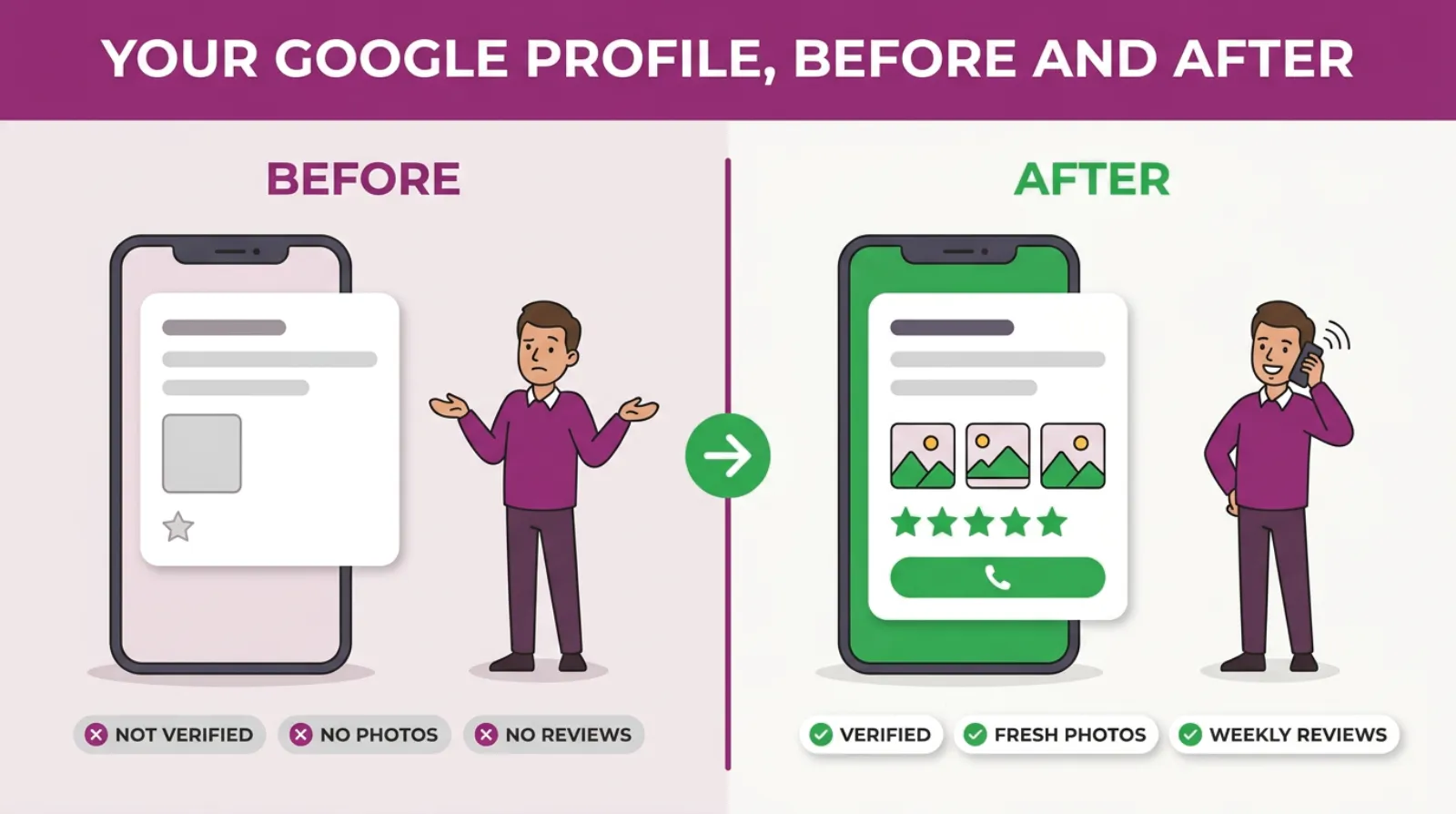
Most businesses start with a thin, unverified listing that nobody looks after. A few months of steady work turns that into a full profile, fresh photos, a review every week and replies to every one.
Why Isn't My Business Showing Up On Google?
If your business is not showing up on Google, the cause is usually one of five things. Most of them take minutes to fix.
- The profile is not verified. Unverified profiles often don't show, or show with limited detail.
- The main category is wrong. A kitchen fitter listed under "Contractor" will not appear for kitchen searches.
- The profile is thin. No services, no photos and no description gives Google little to match.
- You're too far away. If you are searching from across town, competitors nearer to you may win.
- There's a problem with the name or address. Keywords stuffed into the name, or a different address on your website, can hold you back.
Also check that you are searching the right way. Searching your own business name tells you very little.
Try searching the way a customer would, such as "electrician in Leighton Buzzard". That is the test that matters.
New businesses often wait a while before they show for competitive searches. If that's you, the Keep Reading list below has a post on exactly that.
How Long Does It Take To Show Up On Google?
Once verified, your profile can appear for searches of your business name within days. Showing up for wider searches, like "plumber near me", usually takes weeks to a few months.
The speed depends on your area, your competitors and how complete your profile is.
A new kitchen fitter in a busy town is up against businesses with years of reviews behind them, so it simply takes longer to catch up than it would for a dog groomer in a village with two competitors.
Websites follow a similar pattern. Google says some changes show in hours and others take months. In my experience, new service pages usually take a few weeks to settle.
The owners who show up fastest do the boring things every week. A review, a photo, a post, an answer to a question. Little and often.
How Can I Check If My Business Shows Up On Google?
The quickest check is simple. Search for your main service and your town on your phone, with location turned on. Then look for yourself in the map pack.
But one search from your sofa does not tell you the whole story. Results change depending on where the person's standing.
Here are three better ways to check.
- Your Business Profile performance report. It shows how many people found you, which searches they used and how many called or asked for directions.
- Google Search Console. It shows which searches your website appeared for and how many people clicked.
- Ask every new customer how they found you. "I saw you on Google Maps" is the clearest sign there is.
Check once a month and write the numbers down. A simple notebook or spreadsheet is fine, as long as you look at the same numbers on the same day each month so you can see the trend rather than a one-off blip.
If calls from your profile are rising month by month, it's working. That is the number to watch, not your position for one search.
When Is It Worth Paying Google After All?
Free visibility is the foundation. But there are times when paid ads make sense on top.
If you need calls this week, free visibility is too slow.
Ads can switch on the same day.
If you're in a very competitive area, it can take months to break into the map. Ads keep the phone ringing while you build.
And if competitors are bidding on your business name, a small brand campaign stops them taking customers who were looking for you.
That is a decision for later, not for day one. Get the free side right first, then decide if ads are worth adding. A strong profile makes every pound you spend on ads go further.
A Simple 30-Day Plan To Get On Google Without Paying
Here is how I'd fit all of this into one month. It is simple on purpose.
- Week one: claim or create your Google Business Profile, choose the right main category and start verification.
- Week one: set up Google Search Console for your website and submit your sitemap.
- Week two: once verified, fill in every service, write your description and add at least ten real photos.
- Week two: save your review link and send it to your last ten happy customers.
- Week three: write or fix one page on your website for each main service, naming the town.
- Week three: post your first update on your profile and reply to every review.
- Week four: check your profile performance report and Search Console, and write down the numbers.
After that, keep the weekly habit going, because the profiles that win the map are rarely the ones with the cleverest set-up, they are the ones somebody quietly looks after every single week. One review request, one photo or post, one reply. Ten minutes a week keeps the profile alive.
Frequently asked questions
Is a Google Business Profile really free?
Yes. Creating, verifying and managing a Google Business Profile is free. There's no paid version, and Google says you cannot pay for a better local ranking. Be wary of anyone who calls claiming to be from Google and asks for a fee.
Can I have a Google Business Profile if I work from home?
Yes, as long as you meet customers in person. If they don't come to you, set yourself up as a service area business and hide your home address. Your profile will show the towns you cover instead.
Can I get my business on Google without a website?
Yes. A verified Business Profile can put you on Google Maps and in the local results with no website at all. A website does help, because it gives Google more proof you are a real business and gives you a second place to appear.
Can I pay Google to rank higher on Google Maps?
No. Google's help page says there is no way to request or pay for a better local ranking. You can pay for ads that appear above or within the map, but they're marked as sponsored and stop when you stop paying.
Is it allowed to ask customers for Google reviews?
Yes, asking for reviews is fine and encouraged. What is not allowed is paying for them, offering discounts in return or writing fake ones. Ask every happy customer, and make it easy by sending your review link the same day.
Do I need to post on my Google Business Profile?
You don't have to, but it helps. Posts show customers you are active and give them a reason to get in touch. Once or twice a month is plenty for most small businesses.
Keep Reading
If you want to go further with free visibility on Google, these posts pick up where this one stops.
- How to Climb the Google Maps Rankings in 90 Days Without Paying for Ads
- The Google Maps Sandbox: Why Your New Business Isn’t Showing Up (And How To Force It Out Faster)
- 7 Local SEO Myths That Are Quietly Burying Your Google Business Profile On Page 2
- Google Search Console – The Free Google Tool That Reveals Why Your Customers Aren’t Finding You Online
- The £10 A Day Google Ads Brand Campaign Every Local Business Should Run
We picked these because each covers a next step from this guide. The map, new businesses, Search Console and when a small paid campaign is worth adding.
Sources
The local ranking factors and the rule that you can't pay for a better ranking come from Google's help page on local ranking. The verification methods come from Google's help page on verifying your business.
The timing for website changes comes from Google's SEO Starter Guide. We checked all three on 18-10-2026.
- Tips to improve your local ranking on Google - Google Business Profile Help
- Verify your business on Google - Google Business Profile Help
- SEO Starter Guide: The Basics - Google Search Central
So, What's Stopping You Showing Up Tomorrow?
You do not need a budget to get your business on Google. You need a verified profile, a website Google can find and a habit of asking for reviews.
Most of your competitors won't do all three properly. That is your opening. Take it.
Start this week with the profile. Then add one small job every week after that. In three months you'll be easier to find than most of the businesses around you.
Want someone to look over your Google Business Profile and tell you what is holding it back? That's a conversation we have with business owners at SF Digital every week.

Written by Uzair Kharawala
Partner at SF Digital Studios, a Google Premier Partner agency. Uzair has been helping businesses grow with Google Ads since 2002 and teaches it every week on YouTube.
Get our best Google Ads tips by email
New articles and videos, straight to your inbox. Unsubscribe any time.