
Most small business owners think their local lead generation problem is money. If they could just spend a bit more, the phone would ring. So they add another £200 to Google Ads, and nothing changes.
Here is the uncomfortable part. The budget usually isn't the problem. The map is.
Right now, your ads may be showing to people 30 miles away. People who will never book you, in towns you would never drive to. Every one of those clicks comes out of the same small pot that should be finding the customers round the corner.
Get your free Marketing Action PlanNot sure where to start? Answer a few questions and get your plan in about a minute. No email needed.
Get my plan →This post shows you why a smaller map often brings in more leads, not fewer. You will learn how to find your real lead zone from your own invoices, which settings to change in each channel, and when it is safe to grow.
What "Your Map" Actually Means
Every local marketing channel has a map behind it. You set it once, usually in a hurry, and never look at it again.
Your map is the area where your marketing is allowed to show up. It is the radius in your Google Ads. It is the service area on your Google Business Profile. It is the list of towns you have built pages for on your website.
When that map is bigger than the area you really serve, money leaks out of it. Think of a garden hose full of holes. The tap is on full, but only a trickle reaches the plants.
A Tale Of Two Roofers
Picture two roofers. Both spend £600 a month on Google Ads.
- Roofer A targets 40 miles around his yard. That covers four large towns and dozens of villages.
- Roofer B targets 12 miles. That covers her home town and three nearby areas.
Roofer A's £600 is spread across a huge area. His ads show for a few hours each morning, then his daily budget runs dry. Many of his clicks come from places he won't travel to.
Roofer B's £600 stays focused. Her ads show all day in the areas she serves, and she wins more of the local searches that matter.
Same budget. Very different month.
Why A Bigger Map Feels Right
It makes sense on paper. More area means more people, and more people means more leads.
In practice, four things go wrong.
Your budget runs dry before lunch
Google Ads spends against a daily budget. Once it has gone, your ads stop. A wide area means more people see your ad early in the day, so the money runs out fast.
Then you vanish from searches in your own town for the rest of the day. Your competitor down the road picks those leads up instead.
You pay full price for clicks you can't use
A click from 35 miles away costs the same as a click from next door. The person 35 miles away is far less likely to book. Or you turn them down, because the travel eats the profit.
Either way, you paid for nothing.
Far-away leads are colder leads
People further away are often browsing and collecting quotes. The person on your doorstep with a leaking roof or a dead boiler is ready to act today.
Close leads are hot leads. Far leads are often cold.
Google's default setting works against you
When you build a campaign, Google tends to suggest a wide area. It also defaults to a location option called "Presence or interest". That shows your ads to people who are interested in your area, not only people in it.
So someone in Manchester searching "plumber in Bedford" can see your ad. Unless they are moving house, that is a wasted click.
This isn't a conspiracy. Google earns more when more ads show. Your goal is booked jobs. Those two goals overlap less than you would think.
What Happens When You Shrink The Map
Once you tighten your map, several good things happen at once.
Your cost per lead drops
Cost per lead is what you spend divided by the number of enquiries you get. Stop paying for far-away clicks and the same budget brings in more real enquiries.
You close more of what comes in
Local leads are easier to win. You can get there fast and quote the same day. You may know their street, or someone on it.
That trust turns more enquiries into paying jobs.
You own your patch
A focused budget keeps your ads live all day, every day, in your core area. People see your name again and again.
When they finally need you, you are the first name they think of. This is what we mean by grow local before you go big.
Your reviews start working harder
More jobs in one area means more reviews from that area. Google notices a business that serves one place well, and that helps your Google Maps visibility in the towns that matter.
Better rankings bring more leads, which bring more reviews. The cycle feeds itself.
How To Find Your Real Lead Zone
So how small should the map be? It depends on your business. Here is a way to work it out in an afternoon.
Step 1: Map your last 50 paying customers
Pull up your invoices or your CRM. Note the town or postcode for each paying customer. Not enquiries. Paying customers.
Drop them onto a map. Google My Maps is free and does the job. Most businesses find the bulk of their best customers sit in a much smaller area than the one they target.
Step 2: Set your drive-time limit
Ask one honest question. How far will you happily drive for a job?
Not how far you can drive. How far you want to. A 45-minute trip for a small job often loses money once you count fuel and time.
Step 3: Check where you already show up
Search your main service from a few different postcodes, or use a map grid tool. You will usually see strong visibility near your base that fades further out.
That fade line tells you a lot about where your leads really come from.
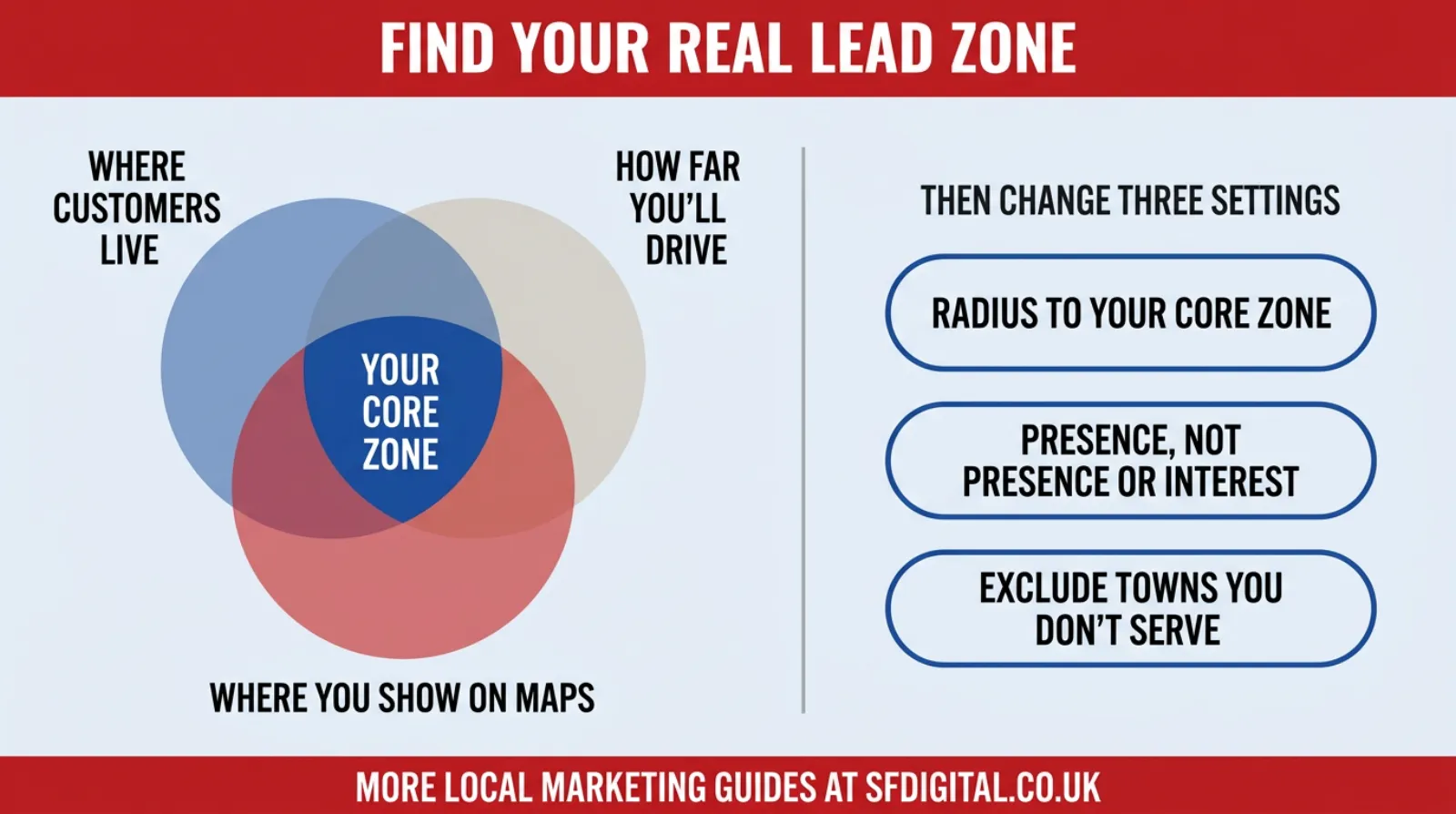
Step 4: Draw your core zone
Your core zone is where three things overlap:
- Where your best customers already live
- Where you are happy to travel
- Where you already show up on Google Maps
That is your real map. Everything outside it goes on a "maybe later" list.
The Settings To Change, Channel By Channel
Google Ads location targeting
This is where most of the money leaks. Change these today:
- Shrink the radius to match your core zone. For many local firms, 10 to 15 miles is a sensible start.
- Switch the location option to "Presence". That shows ads only to people in, or regularly in, your area.
- Exclude towns you don't serve. If a large town sits inside your radius and you never work there, exclude it.
- Bid more where you win most. Use location bid adjustments to push harder in your best postcodes.
One warning. Don't go too tight. Google's own help notes that a very small radius can mean your ads show only occasionally, or not at all. Start with the core zone and let the data guide you.
Google Business Profile service area
Your Google Business Profile service area tells Google where you work. Keep it honest.
- List the towns and postcodes you genuinely serve.
- Don't list whole counties to look bigger.
- Keep it well inside a sensible drive of your base. You will see a two-hour limit quoted often. Most local firms need far less than that.
Local SEO and location pages
Plenty of businesses build a page for every town within 50 miles. Most of those pages are thin copies and never rank.
Build strong pages for the towns in your core zone instead. Mention real local detail, jobs you have done there and reviews from customers in that town. Five good local pages beat fifty weak ones.
Social and display ads
The same rule applies on Facebook, Instagram and display. Set targeting around the core zone, and don't let the platform "expand" your audience without asking.
How To Tell Whether It Is Working
Clicks will probably fall in the first week. That is the point, not a problem.
Judge the change on three numbers:
- Calls and form fills from inside the core zone
- Cost per lead, compared with the month before
- Booked jobs, not enquiries
Write your current cost per lead down today. Check it again in 30 days. That is your honest before and after.
What Not To Do
- Don't shrink the radius and raise the budget in the same week. You won't know which change did the work.
- Don't cut the area to a mile or two. Delivery becomes patchy and you lose useful data.
- Don't leave "Presence or interest" switched on after tightening the radius. It will still let far-away clicks in.
- Don't judge the change on day three. Give it two to four weeks.
When (And How) To Grow The Map
Shrinking the map isn't forever. It is a starting point.
You are ready to grow when your ads run all day with budget to spare, your cost per lead is steady or falling, and you have the capacity for more work.
Then add one town at a time. Give it its own campaign or its own bid adjustment so you can see how it performs alone. If it pays, keep it. If it doesn't, cut it.
Grow in rings, not leaps.
Frequently asked questions
What radius should I use for Google Ads as a local business?
For most local service businesses, 10 to 15 miles is a strong starting point. Base it on where your paying customers live and how far you will travel, then review after a month.
Why am I getting leads from outside my area?
Usually because the campaign uses the default "Presence or interest" location option. It shows your ads to people who search about your area, even if they live elsewhere. Switch to "Presence" in the campaign location options.
Will a smaller radius mean fewer leads?
Not usually. A smaller area keeps your daily budget running all day where people actually book. Clicks may fall, but more of them turn into real enquiries.
How big should my Google Business Profile service area be?
It should match the area you genuinely serve. List specific towns or postcodes rather than whole counties, and keep it well within a sensible drive of your base.
How long does it take to see results after changing my ad radius?
Allow two to four weeks. Judge it on calls, form fills and booked jobs, not clicks.
Keep Reading
If you are tightening your local marketing, these are the ones that follow on.
- How Google Ads Location Assets Helped Me Dominate Local Search Results
- Top Tips To Optimise Your Google Business Profile Page
- 11 Effective Ways To Boost Your Local SEO And Stand Out Locally
- Your Conversions Went Up And Your Diary Did Not
- Where Good Clicks Go To Die
The first three cover the rest of your local footprint. The last two help you judge whether the leads you get are real.
The Part Worth Remembering
When leads slow down, the instinct is to spend more. It feels like the only lever you have.
It usually isn't. Most local businesses are paying to be seen by people who will never book them, while the people who would book them can't find them after lunch.
Look at where your best customers really come from. Draw that map. Point every pound at it.
You don't need a bigger budget. You need a smaller map.

Written by Uzair Kharawala
Partner at SF Digital Studios, a Google Premier Partner agency. Uzair has been helping businesses grow with Google Ads since 2002 and teaches it every week on YouTube.
Get our best Google Ads tips by email
New articles and videos, straight to your inbox. Unsubscribe any time.