

On 1 September 2026, Google starts moving Search campaigns into AI Max on its own. You do not have to agree. There is no opt-out once it begins.
If your campaigns use Automatically Created Assets, or the campaign-level Broad Match setting, they are on the list. Google emailed affected advertisers on 5 August 2026. Plenty of those emails went to a billing address nobody reads.

Get Found, Get Chosen, Get Your Time Back
A free one-day marketing seminar in Milton Keynes · 10 November 2026
The change is not cosmetic. Your keywords stop being a list of what you want to appear for. They become a hint. Your ad copy stops being the copy you wrote. It becomes copy Google assembles from your website to suit each search.
Get your free Marketing Action PlanNot sure where to start? Answer a few questions and get your plan in about a minute. No email needed.
Get my plan →Most write-ups of AI Max explain the features. That is not the useful question this week. The useful question is simpler. What happens to your account if you do nothing at all?
This post answers that. Then it gives you a check you can run yourself in about twenty minutes.
What AI Max Actually Is
AI Max is not a new campaign type. That is the first thing to get straight, because the name suggests it sits alongside Performance Max. It does not.
It is a set of features you switch on inside a Search campaign you already have. Think of it as a layer, not a replacement.
There are three parts. They do different jobs, and they can be controlled separately.
Search term matching is the big one. Your keywords stay in the account, but Google is no longer limited to them. It uses broad match and what it calls keywordless technology, reading your landing pages, your existing assets and your keyword list as signals rather than instructions. The effect is that your ads appear for searches you never added.
Text customisation rewrites your ad copy. Google reads your site and your existing ads, then generates headlines and descriptions aimed at the specific search. Your responsive search ad becomes a starting point rather than the finished article.
Final URL expansion changes where the click lands. Instead of sending everyone to the page you chose, Google picks whichever page on your domain it thinks matches the query best.
Put simply, the three parts loosen the three things you used to control absolutely. What you appear for. What you say. Where you send them.
That is not automatically bad. It is a real shift in who is driving, and it deserves a decision rather than a default.
It helps to picture each part on a real account. Say you are a roofer in Bedfordshire bidding on flat roof repair.
Under search term matching, you might start appearing for someone asking how much it costs to fix a leaking garage roof. You never added that phrase. Google decided it means the same thing as your keyword. Often it is right. Sometimes it decides a search about roof insulation grants is close enough, and it is not.
Under text customisation, your headline stops being the one you wrote. If your site mentions a ten-year guarantee, Google may pull that into the headline for a search that reads like the person is worried about cowboys. That can lift your click-through rate. It can also surface a claim you no longer honour, because your website still says it and nobody updated the page.
Under final URL expansion, a search for emergency roof repair might land on your emergency page, which is ideal. Or on a blog post about choosing a roofer, which is not ideal, because that page has no phone number above the fold.
The pattern holds across trades. The upside is reach you would not have written down yourself. The risk is that all three are drawing from your website, so anything wrong, dated or missing on the site now shows up in the advertising.
AI Max Is Not Performance Max
This confusion comes up constantly, and it is worth settling, because the two are frequently discussed together and they work very differently.
Performance Max is a campaign type. You create it as its own campaign. It runs across Search, YouTube, Display, Gmail, Maps and Discover. You give it assets and a budget, and it decides where to show. You cannot see keywords, because it does not use them.
AI Max is a setting inside a Search campaign you already have. It only runs on Search. Your keywords still exist. Your ad groups still exist. Your structure is untouched.
That distinction matters for three practical reasons.
You keep your reporting. A Search campaign with AI Max still shows you a search terms report, ad group performance and keyword data. Performance Max has never offered that level of visibility, which is why it frustrates people who like to audit.
You keep your controls. Negatives, brand controls, URL exclusions and text guidelines all work at the level you are used to. Performance Max has a thinner set.
And you keep your structure. If you have spent time building tightly themed ad groups, AI Max sits on top of that work rather than discarding it.
The short version. If someone tells you AI Max is just Performance Max for Search, they are wrong in a way that will cost you. Performance Max asks you to hand over the campaign. AI Max asks you to loosen your grip on matching, copy and landing pages, inside a campaign you still run.
Why This Lands On Your Account Whether You Asked Or Not
Here is the part the feature explainers skip.
From 1 September 2026, Google begins automatically migrating eligible Search campaigns into AI Max. The rollout runs through the month. You do not opt in. Nothing needs approving.
Two things put a campaign on the list. Using Automatically Created Assets, which is the setting that lets Google write extra headlines and descriptions for you. Or using the campaign-level Broad Match setting, which forces every keyword in the campaign to broad match.
Both are common. Automatically Created Assets in particular has been switched on by default in new campaigns for years, so a lot of accounts have it running without anyone deciding to.
What lands depends on which of the two you have.
If your campaign uses Automatically Created Assets, it gets search term matching and text customisation, both switched on. That is the wider matching and the rewritten copy.
If your campaign uses the campaign-level Broad Match setting, it gets search term matching only. No automatic text customisation, no final URL expansion.
Some things carry across. Google has said existing brand inclusions and exclusions move with the campaign, and campaigns are migrated in place rather than rebuilt, so your history and learning are not thrown away.
The window to avoid it has effectively closed. Google stopped allowing new Automatically Created Assets and campaign-level Broad Match on 3 August 2026, across the interface, Editor and the API. The only route out was to disable those settings before 1 September. After that, doing nothing means Google chooses your configuration.
There is a second deadline worth knowing about. Dynamic Search Ads are being retired into AI Max during the same period. If you run DSA, that capability becomes final URL expansion.
What Changes In Your Account On 1 September
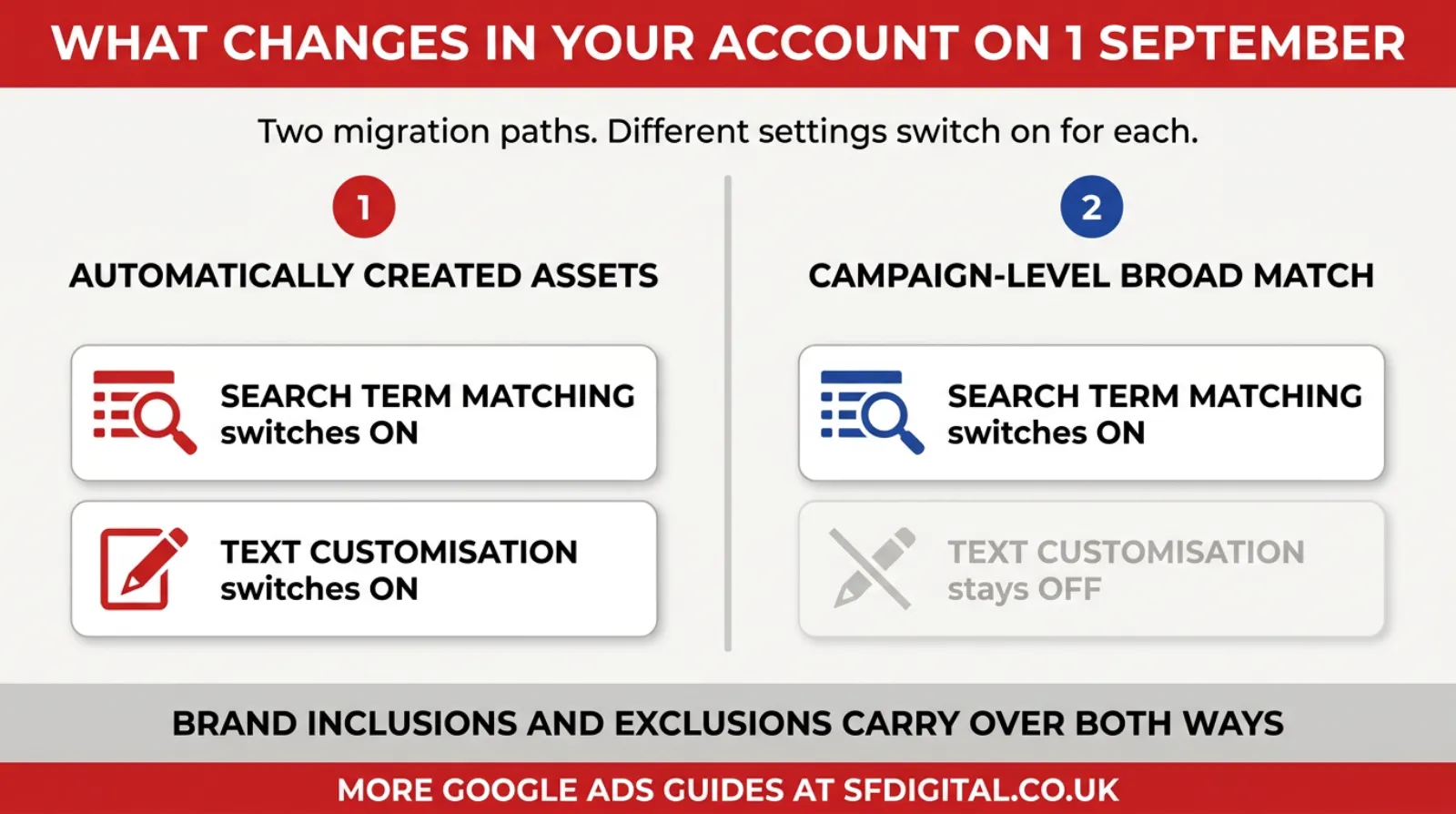
The two paths lead to different places. Knowing which one you are on decides what you check first.
What You Still Control
Losing the defaults is not the same as losing control. The controls are still there. They are just in different places, and some of them matter far more than they used to.
Negative keywords become your main lever. When keywords stop being literal instructions, negatives are the clearest signal you can still give. They work at campaign and ad group level as before. A thin negative list was survivable when matching was tight. It is not survivable now.
It is worth being specific about what a usable list contains, because most accounts have a handful of obvious words and nothing else.
Start with intent blockers. Free, cheap, DIY, how to, tutorial, course, jobs, career, salary, apprenticeship, training. These catch people who will never buy, and they account for a surprising share of wasted spend once matching widens.
Then research blockers. Wikipedia, Reddit, forum, review, complaints, scam, lawsuit. Some of these are worth keeping if you sell into a comparison-heavy market, so use judgement rather than pasting the list wholesale.
Then wrong-service terms. This is the one people skip, and it is the most valuable. Write down every service a customer might reasonably confuse with yours, then block the ones you do not sell. A commercial cleaner who does not do carpets should block carpet. A solicitor who does not do criminal work should block criminal.
Then competitor brands, unless you have a deliberate competitor campaign running separately.
Finally, add ad group-level negatives so your own ad groups do not compete against each other. If you have separate groups for flat roof and pitched roof, each should exclude the other's terms in exact match. This stops a search landing in the wrong group and getting the wrong ad.
Set a recurring half hour in the diary to read the search terms report and add to the list. Under wider matching, this stops being a setup task and becomes ongoing maintenance. It is the single highest-return half hour in the account.
Brand controls let you say which brand terms you do and do not want to appear for. These carry over through the migration, so if you have them set, they keep working.
URL inclusions and exclusions control final URL expansion. You can stop Google sending traffic to pages that should never be a landing page, which for most sites means the blog, the careers page, the terms page and anything to do with an existing customer.
Text guidelines constrain what text customisation writes. You can exclude specific terms and set messaging restrictions. If you work in a regulated trade, or you have claims you legally cannot make, this is the setting that keeps you out of trouble.
Locations of interest give geographic control based on the intent in the query, not just the searcher's location.
And each of the three parts can be turned off on its own. Text customisation and final URL expansion are campaign settings. Search term matching is an ad group setting. You do not have to accept all three because you accepted one.
That last point is the most useful thing in this article. Most accounts that struggle with AI Max are not struggling with AI Max. They are struggling with final URL expansion, or with text customisation, while search term matching is quietly doing fine.
The Twenty Minute Check
You do not need an agency to find out where you stand. You need about twenty minutes and access to your own account.
 LIVE
Live every Tuesday at 2pm UK. Bring your marketing questions.
Get your Google, local SEO and AI questions answered live.
Start with exposure. Open each Search campaign and look at Settings. You are checking two things. Is the campaign using Automatically Created Assets, and is campaign-level Broad Match on? If either is true, that campaign is on the migration list.
Next, look at the AI Max section in Settings. Note whether search term matching, text customisation and final URL expansion are on or off. Write it down per campaign. You want a record of what the account looked like before, because after the migration you will want something to compare against.
Then open the search terms report and set it to the last fourteen days. Read it properly rather than skimming. You are looking for searches that match none of your keywords, and for searches that are clearly the wrong intent. Free, jobs, salary, DIY, wholesale, complaints, and the name of a service you do not offer.
Now check your negative keyword list. If it has fewer than thirty entries, treat it as unfinished. Thirty is a rough floor rather than a target. An account about to have its matching widened needs the obvious waste blocked first.
Look at your landing pages. If final URL expansion is on, ask yourself which pages on your site would embarrass you as a landing page for a buying query. Add those to your URL exclusions.
Finally, check conversion tracking is actually recording the right thing. This matters more than any AI Max setting. Wider matching means the bidding has more decisions to make, and it makes them using your conversion data. If that data counts newsletter signups and mis-dials as conversions, wider matching will find you more of them, faster.
Where AI Max Genuinely Helps
It would be dishonest to write this as a warning and stop there. There are accounts where this change is a straightforward gain.
Google reports that advertisers activating AI Max typically see around 14% more conversions or conversion value at a similar cost per acquisition or return on ad spend. That is Google's own figure, and it should be read as such, but the mechanism behind it is real.
Long-tail and conversational searches are the clearest win. People increasingly type and speak full questions rather than two-word phrases. No keyword list keeps up with that. Matching on intent catches searches you would never have thought to add.
Sites with a deep, well-built page structure benefit from final URL expansion. If you genuinely have a strong page for every service and location, letting Google pick the closest one is better than funnelling everyone to a generic page.
Accounts that were already running broad match with tight negatives and solid conversion data will notice the least disruption. They were already operating this way. AI Max formalises it.
The pattern is worth naming. AI Max rewards accounts that have done the boring groundwork. Clean tracking, a real negative list, a site where every page earns its place. It punishes accounts that were relying on tight keyword matching to hide those gaps.
Where The Reported Problems Are
The complaints are specific enough to be useful, and they are worth knowing before you decide.
The most consistent one concerns final URL expansion and landing page relevance. Advertisers have reported that specific product searches get routed to generic category or homepage URLs. That was the one job Dynamic Search Ads did reliably, which is why the DSA retirement has drawn the sharpest criticism. If you sell many distinct products, this is the setting to watch.
There have been public reports of costs running well above previous setups, in some cases considerably higher. These are advertiser reports rather than a controlled study, and the accounts behind them are not visible, so treat them as a signal to monitor closely rather than a prediction.
Reporting is the quieter problem. Search term visibility inside AI Max is not as granular as advertisers are used to, which makes it harder to work out which part of the widened matching is producing results and which is producing waste.
None of these is reasons to panic. They are reasons to keep the first fortnight under proper observation rather than assuming it will settle by itself.
If You Run Dynamic Search Ads
This group has the sharpest version of the problem, so it deserves its own note.
Dynamic Search Ads worked by crawling your site and matching a search to the single best page for it. For retailers and anyone with a large catalogue, that was the whole value. A search for a specific product reached that product's page, without anyone building a keyword for it.
Final URL expansion is the replacement, and it is doing a broader job. It is choosing a relevant page rather than the precise page. On a site with twelve service pages, that difference is small. On a site with two thousand products, it is the difference between a sale and a bounce.
If that describes you, do three things before the change beds in.
Check where your highest-value product searches are actually landing. Pull the landing page report alongside the search terms report and look for specific queries arriving on category or home pages.
Use URL inclusions rather than exclusions. Excluding pages one at a time does not scale across a large catalogue. Telling Google which section of the site is eligible is faster and more reliable.
Keep a small number of tightly built Search campaigns for your best sellers, with real keywords and fixed landing pages. Products that earn most of your margin should not be left to automatic page selection. This is the one case where doing the manual work still clearly pays.
What To Do In The First Two Weeks
Set a reminder for fourteen days after your campaigns migrate. Not thirty. Two weeks is enough to see a pattern and early enough to act on it.
Compare cost per qualified enquiry, not cost per conversion. If your conversion count rises and your diary does not, the extra volume is not worth having.
Read the search terms report weekly for the first month, then fortnightly. Add negatives as you go. This is now maintenance, not a one-off task.
Check where the clicks are landing if final URL expansion is on. If buying queries are reaching pages that cannot convert, exclude those URLs rather than switching the whole feature off.
Read the ad copy Google generated. Text customisation writes from your site, and if your site says something clumsy or out of date, so will your ads.
If a specific part is clearly hurting you, turn that part off. Not the whole thing. The granular controls exist precisely so you do not have to make an all-or-nothing decision.
How To Judge Whether It Worked
Most people judge this badly, and the reason is that the easiest number to look at is the one most likely to mislead.
Conversions will probably go up. Wider matching finds more people, and more people produce more form fills. If you stop there, AI Max looks like a success on every account it touches.
The number that tells the truth is cost per qualified enquiry. Not cost per conversion. A qualified enquiry is one where the person wants what you sell, can afford it, and is in your area. Your sales inbox knows this figure even if your reporting does not.
Work it out the simple way. Take the spend for the period. Count the enquiries you would have been glad to receive. Divide one by the other. Compare that against the same figure from a comparable period before the migration.
Be careful choosing the comparison period. Use like-for-like. Compare a fortnight against a fortnight, and avoid periods containing a bank holiday or a promotion, because those distort volume in ways that have nothing to do with AI Max.
Three patterns are worth recognising.
Conversions up and qualified enquiries up, at a similar cost. That is the outcome Google describes, and it means the wider matching is finding genuine demand you were missing. Leave it alone.
Conversions up and qualified enquiries flat. The extra volume is noise. Your negative list is the fix, not the AI Max settings.
Conversions flat and costs up. Look at final URL expansion first. This pattern usually means clicks are landing on pages that cannot convert, so you pay for the click and get nothing back.
Give it a fortnight before drawing any conclusion. Bidding needs time to adjust after a change this size, and judging it after four days tells you about the adjustment rather than the outcome.
Frequently asked questions
What is AI Max in Google Ads?
AI Max is a set of features you switch on inside an existing Search campaign, not a new campaign type. It has three parts. Search term matching finds queries beyond your keywords. Text customisation rewrites your headlines and descriptions to suit the search. Final URL expansion sends the click to whichever page on your site Google judges the best fit.
Is AI Max mandatory?
Not for every campaign, but it is unavoidable for some. From 1 September 2026, Google automatically moves Search campaigns using Automatically Created Assets or the campaign-level Broad Match setting into AI Max, and there is no opt-out once that begins. The only route out was disabling those settings before the date.
How do I turn off AI Max in Google Ads?
You can toggle AI Max off as a campaign setting, and you can disable its parts individually. Text customisation and final URL expansion are switched off in campaign settings. Search term matching is switched off at ad group level. Turning off the specific feature causing trouble is usually better than turning everything off.
Does AI Max replace Dynamic Search Ads?
Yes. Google is retiring Dynamic Search Ads and folding the capability into AI Max during September 2026. The closest equivalent is final URL expansion, which selects a landing page based on the query. Advertisers have reported it is less precise than DSA at matching specific product searches to specific product pages.
How do I check whether AI Max is switched on in my account?
Open each Search campaign, go to Settings, and find the AI Max section. Check whether search term matching, text customisation and final URL expansion are on. Then open the search terms report for the last fourteen days. Searches appearing that match none of your keywords are the clearest sign matching has widened.
Will AI Max increase my costs?
It can. Google reports advertisers typically see around 14% more conversions at a similar cost per acquisition, and some advertisers have publicly reported considerably higher costs than their previous setup. The difference usually comes down to how tight your negative keyword list is and whether your conversion tracking is accurate enough for the bidding to learn from.
What happens if I do nothing?
Your eligible campaigns are migrated during September with Google's default settings. Automatically Created Assets campaigns get search term matching and text customisation. Campaign-level Broad Match campaigns get search term matching. Brand inclusions and exclusions carry over. Nothing is deleted, but the configuration is chosen for you.
Keep Reading
If you are doing the twenty-minute check, these five will save you time.
- The Search Terms Report: The Most Expensive Tab You've Never Opened
- The Beginner's Guide To Using Google Ads Negative Keywords
- Google Ads Negative Keyword Match Types: How To Use Them Effectively
- What's The Benefit Of Using Smart Bidding With Broad Match?
- 5 Google Ads Settings You Should Turn Off Today (Before They Burn Through Your Budget)
- The Optimisation Score Is A Sales Target, Not A Health Check
The first three are the audit skills you need once matching widens. The last two cover the same theme as this post, which is that Google's defaults are set for Google.
The Part That Actually Matters
The instinct with a change like this is to fight it. That instinct is usually wrong, and this time it is also impractical, because the migration is happening regardless.
The better response is to notice what AI Max is really testing. It removes the ability to control results through tight keyword matching. What is left is the groundwork. Whether your conversion tracking measures something real. Whether your negative list reflects the enquiries you actually want. Whether your website has a page worth landing on for every service you sell.
Accounts with that groundwork in place tend to find this change unremarkable. Accounts without it find that the gaps stop being hidden.
So the useful work this week is not learning every AI Max setting. It is the twenty-minute check. Find out whether you are affected. Write down what your settings look like now. Fix your negative list. Confirm your tracking measures a real enquiry.
Do that, and whichever way the migration goes on your account, you will be able to tell. That is worth more than any single setting.

Written by Uzair Kharawala
Partner at SF Digital Studios, a Google Premier Partner agency. Uzair has been helping businesses grow with Google Ads since 2002 and teaches it every week on YouTube.
Get our best Google Ads tips by email
New articles and videos, straight to your inbox. Unsubscribe any time.