
The dreaded email has landed in your inbox: “Your Google Ads account has been suspended for violating the Misrepresentation policy.” Your heart sinks. You’ve worked hard on your business, your website, and your ads. You know you’re not a scammer. So, what went wrong? And more importantly, how do you fix it?
This isn’t a post filled with complex jargon or a magic bullet solution. It’s a simple, straightforward guide to understanding what “misrepresentation” really means to Google, and a step-by-step plan to get back on track.

Get Found, Get Chosen, Get Your Time Back
A free one-day marketing seminar in Milton Keynes · 10 November 2026
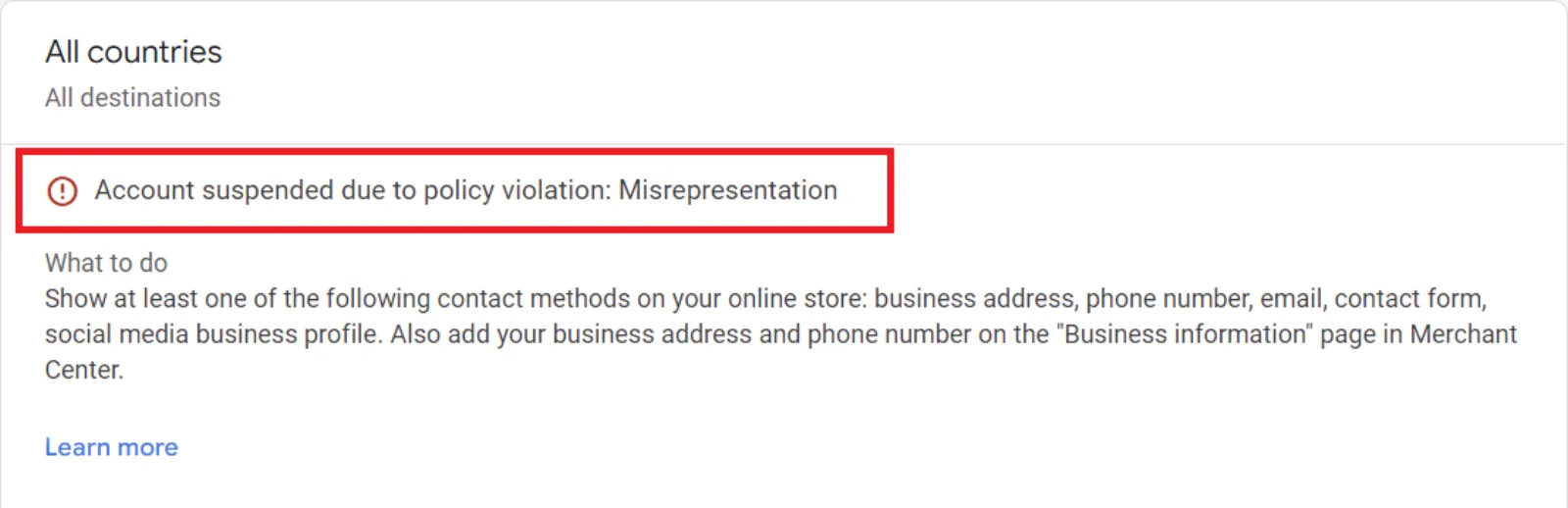
The Real Reason Isn’t What You Think
When Google uses the word “misrepresentation,” they’re not just talking about outright lies. They’re talking about a lack of trust and transparency. Google’s number one goal is to protect its users. If they feel your ad or website could mislead someone, even by accident, they’ll shut you down.
Get your free Marketing Action PlanNot sure where to start? Answer a few questions and get your plan in about a minute. No email needed.
Get my plan →Think of it like this: If a customer sees your ad, clicks on it, and then feels like they were tricked or that something was hidden from them, that’s a misrepresentation. Google’s automated systems are designed to detect these trust issues on a huge scale. This means even small, seemingly harmless mistakes can get you flagged.
So, let’s break down the most common reasons you might have been hit with this policy violation.
1. Your Website is Missing Key Information
This is a huge one, and often the most overlooked. Google wants to see a legitimate business. Your website should be a complete and trustworthy experience. A lack of this information creates a “red flag” for their system.
 LIVE
Live every Tuesday at 2pm UK. Bring your marketing questions.
Get your Google, local SEO and AI questions answered live.
- Contact Information: Do you have a physical address, a business email, and a phone number listed on your website? A simple contact form or a generic email address might not be enough. Put this information in your footer and on a dedicated “Contact Us” page.
- Business Policies: Is it easy for a customer to find your shipping policy, return policy, and privacy policy? These should be linked and easy to read. Don’t hide them.
- About Us Page: Do you have a detailed “About Us” page that tells a real story about your business? Google wants to see that you’re a real company run by real people.
2. You’re Not Being Clear About Your Products or Services
This is about the promises you’re making in your ads and on your landing page. If there’s a disconnect, Google will see it as misleading.
- Unrealistic Claims: Are you promising something that sounds too good to be true? For example, “Lose 50 pounds in a week!” or “Become a millionaire overnight!” Google is extremely wary of these claims, and for good reason. If you’re going to make a claim, make sure it’s backed up by clear, honest information.
- Product and Price Mismatches: Does the price you advertise in your ad match the price on your landing page? Does the product you show in the ad match the one on the product page? Any discrepancy can lead to a suspension. This is especially common for e-commerce stores with frequently changing inventory.
- Hidden Fees: Are there unexpected costs or subscriptions that only show up at checkout? If a user thinks they’re buying something for a certain price and then finds a bunch of extra charges, that’s a classic case of misrepresentation.
3. Your Business Model Itself is Deceptive
This is the most serious type of misrepresentation, and it’s much harder to fix. This is for businesses that are intentionally trying to trick people.
- Affiliate Marketing or Drop-shipping: This is a grey area, but if you’re drop-shipping, you need to be transparent about it. If your business appears to be a legitimate brand, but you’re just an intermediary with no direct control over shipping or customer service, Google may flag you.
- Impersonation: Are you using the branding, logos, or name of another well-known company to make it seem like you’re them or associated with them? This is a major violation and will almost always result in a permanent ban.
- Phishing or Malware: Is your website trying to steal user information or secretly install harmful software? If Google detects anything like this, your account is gone forever, and rightfully so.
How to Fix It and Get Your Account Back
Okay, you’ve been hit with the suspension. Don’t panic, but don’t waste time either. Here’s a simple plan of action.
Step 1: Don’t Create a New Account.
This is the most important rule. Creating a new account to “circumvent” the ban is an egregious violation and will lead to an even worse, permanent ban for you and any related businesses. Don’t do it.
Step 2: Find the Real Problem.
Google’s suspension notice is often vague. It will tell you that you violated the “Misrepresentation” policy, but it won’t point out the exact issue. You need to become a detective.
- Review your website with fresh eyes. Go through it as if you’re a first-time customer. Is anything unclear? Is the contact info easy to find? Are the policies there?
- Check your ads and landing pages. Do the ads match the landing pages perfectly? Are the claims you’re making realistic?
- Look for technical issues. Is your site loading slowly? Are there any broken links? Check for any sneaky redirects. A slow or broken site can look like a red flag to Google’s crawlers.
Step 3: Fix Everything, Big and Small.
Don’t just fix one thing and hope for the best. Fix everything you find.
- Add a physical address and phone number.
- Write or update your shipping, return, and privacy policies.
- Make sure all your product prices match exactly.
- Remove any exaggerated or unsupported claims from your ads and website.
- If you’re an affiliate or drop-shipper, make sure you’re being open and honest about your business model.
Step 4: Prepare a Thorough Appeal.
Once you’ve made all the changes, it’s time to appeal. Don’t rush this. This is your one shot to explain to a human reviewer what happened and what you’ve done to fix it.
- Be polite and professional. The person reading your appeal is just doing their job.
- Acknowledge the policy. Show them that you’ve read and understood the “Misrepresentation” policy.
- Be specific about your changes. Don’t just say “I fixed it.” Say, “I have updated my contact page to include my full business address and a phone number. I have also added a clear return policy to my website footer.”
- Provide evidence. Take screenshots of your updated contact page, your new policies, and any other changes you’ve made. Attach them to your appeal.
Final Thoughts
A Google Ads suspension is a stressful experience, but it’s not the end of the world. The key is to stop and think like Google. They are trying to protect their users from bad experiences. By building a transparent, trustworthy, and user-friendly website, you not only comply with their policy but also build a better business in the long run. Follow these steps carefully, and you’ll have a much better chance of getting your account back and keeping it active for good.

Written by Uzair Kharawala
Partner at SF Digital Studios, a Google Premier Partner agency. Uzair has been helping businesses grow with Google Ads since 2002 and teaches it every week on YouTube.
Get our best Google Ads tips by email
New articles and videos, straight to your inbox. Unsubscribe any time.