
I’ve been running Google Ads for a while, and honestly, a lot of it felt like a guessing game. I’d tweak bids, change keywords, and watch my daily budget disappear with not much to show for it. I knew I needed a better way to generate leads, but I was stuck in the weeds.
Then I heard about the “Maximise Conversions” bid strategy. The name alone sounded like a magic bullet, but I was a little sceptical. Could a simple change make that much of a difference? I decided to give it a shot. And what happened next completely changed my Google Ads game.

Get Found, Get Chosen, Get Your Time Back
A free one-day marketing seminar in Milton Keynes · 10 November 2026
In just seven days, my lead volume went through the roof. I wasn’t just getting more clicks; I was getting more people filling out my forms, more phone calls, and more actual potential customers. It wasn’t a fluke—it was a direct result of changing my strategy.
Get your free Marketing Action PlanNot sure where to start? Answer a few questions and get your plan in about a minute. No email needed.
Get my plan →And the best part? It’s not a secret formula. It’s a simple, powerful tool that anyone can use. If you’re ready to stop guessing and start getting real results, here’s how you can copy my success.
What is Maximise Conversions, Anyway?
Think of it like this: your Google Ads account is a car. Before, with manual bidding, you were the driver, constantly pushing the gas and brake pedal for every single turn. You had full control, but it was a lot of work, and you probably missed some opportunities.
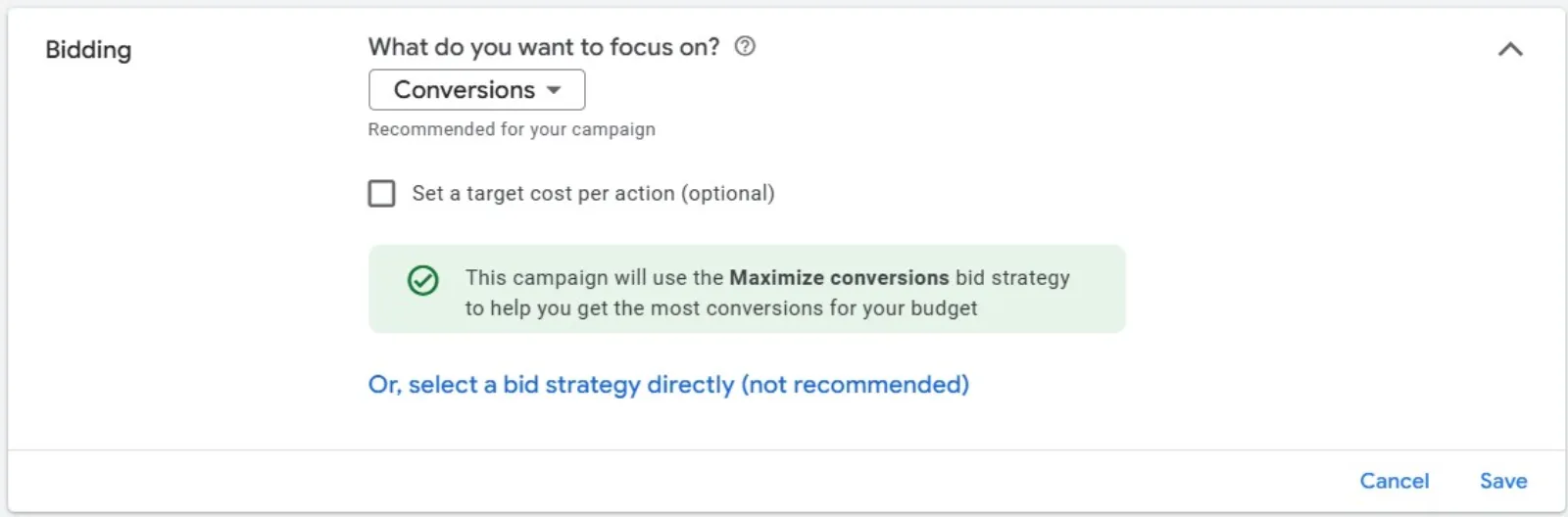
Maximise Conversions is like switching to cruise control. You tell the car, “I want to get as many conversions as possible with this much fuel (your daily budget),” and the car’s computer takes over. It uses Google’s AI to figure out the best bid for every single auction, for every person who sees your ad. It looks at a ton of data points in real time—where the person is, what device they’re using, the time of day—to decide if they’re likely to convert. If they are, it bids higher to get your ad in front of them. If they aren’t, it bids lower or not at all.
The goal isn’t to get the cheapest clicks. The goal is to get the most conversions, and that’s a huge difference.
 LIVE
Live every Tuesday at 2pm UK. Bring your marketing questions.
Get your Google, local SEO and AI questions answered live.
The Crucial First Step I Took
Before I even touched the bid strategy, I had to make sure my foundation was solid. This is the part that a lot of people skip, and it’s why they don’t see results. You need to make sure Google knows what a “conversion” is for your business.
For me, a conversion is a lead. Specifically, it’s a form submission on my website or a phone call from a click-to-call ad. I had to make sure my conversion tracking was set up perfectly. I went into my Google Ads account and checked to make sure all my valuable actions were being counted. If you haven’t done this, stop right now and do it. Google can’t maximise something it can’t see!
I recommend setting up conversions for everything important: form fills, phone calls that last longer than a certain amount of time, a download of a resource, etc. The more data you give Google, the smarter it becomes.
Flipping the Switch: The 7-Day Blitz
Once my conversion tracking was locked and loaded, I was ready to make the change. Here’s what I did:
- I picked a campaign. I chose a campaign that had been running for a while and had a decent number of conversions in the last 30 days. This is key. The AI needs a little bit of historical data to learn from. If you have a brand new campaign with no conversions, start with Maximise Clicks for a week or two to get some data, then switch.
- I went to the campaign settings. It’s a simple change. Under the “Bidding” section, I clicked “Change bid strategy” and selected “Maximise Conversions.”
- I kept my budget the same. I didn’t want to throw a ton of money at it right away. I wanted to see if the strategy itself could improve performance with the same budget.
- I waited. And this is the hardest part. The AI needs a “learning period.” For the first few days, my results were a little all over the place. My cost per click (CPC) went up, which was a little scary at first. But I resisted the urge to panic and make changes. I trusted the process.
By day 7, the results were undeniable. My cost per lead (CPA) was down significantly, and the sheer number of new leads was more than I had seen in any previous week. The algorithm was finding people who were truly interested and were more likely to convert, and it was outbidding my competitors to get in front of them. It was working exactly as advertised.
My 3 Simple Tips for Your Success
If you’re ready to make this change, here are the three things you need to remember:
- Nail Your Conversion Tracking: I can’t stress this enough. If you don’t tell Google what to optimise for, it can’t help you. Make sure your conversion actions are set up and working properly.
- Give It Time: Don’t check your results every hour. The first few days might look weird. Trust that the algorithm is learning and let it do its thing. A week is a good minimum timeframe to evaluate performance.
- Don’t Touch Anything Else: When you switch, resist the urge to change your keywords, ad copy, or landing page. You want to isolate the change to the bidding strategy so you know for sure if it’s working.
Making this simple switch freed up so much of my time. I stopped agonising over bids and started focusing on what matters: creating great ad copy and improving my landing pages to convert the new, high-quality traffic I was getting.
So, if you’re tired of the Google Ads guessing game and want to see a real increase in your leads, try Maximise Conversions. It’s a powerful tool that, when used correctly, can transform your results.

Written by Uzair Kharawala
Partner at SF Digital Studios, a Google Premier Partner agency. Uzair has been helping businesses grow with Google Ads since 2002 and teaches it every week on YouTube.
Get our best Google Ads tips by email
New articles and videos, straight to your inbox. Unsubscribe any time.