
The first thing Google tells you about Maximise Clicks is that it’s for getting the most clicks possible within your budget. Sounds simple, right? You turn it on, set your budget, and Google’s magic AI does the rest. I used to believe that. It’s an easy sell, especially when you’re starting out or just want to drive some quick traffic. But after a few weeks of running a new campaign with this strategy, I learned a few things that aren’t in the Google Ads support docs.
Let’s be honest: Google is a business. Their goal is for you to spend your money on their platform. The more you spend, the more they make. So when they say “get the most clicks for your budget,” they’re not lying, but they’re also not telling you the whole story.

Get Found, Get Chosen, Get Your Time Back
A free one-day marketing seminar in Milton Keynes · 10 November 2026
The unspoken truth about Maximise Clicks is that it’s built to find the cheapest clicks, not the best clicks.
Get your free Marketing Action PlanNot sure where to start? Answer a few questions and get your plan in about a minute. No email needed.
Get my plan →Think about it. The algorithm’s only job is to get you as many clicks as possible for your daily budget. It doesn’t care if those clicks turn into a sale, a lead, or even a newsletter signup. It just wants to click, click, click. The easiest way to get a lot of clicks for a low price is to find the cheapest ad auctions. And what kind of auctions are cheap? The ones for keywords that are less competitive, often with low commercial intent.So, while your ad might be showing up and getting clicked, you’re not necessarily reaching people who are ready to buy. You might be getting clicks from people who are just doing research, or even worse, from people who accidentally clicked your ad. Your analytics might show a nice, low cost-per-click (CPC), but if your conversion rate is zero, you’ve just spent money to entertain some internet browsers.
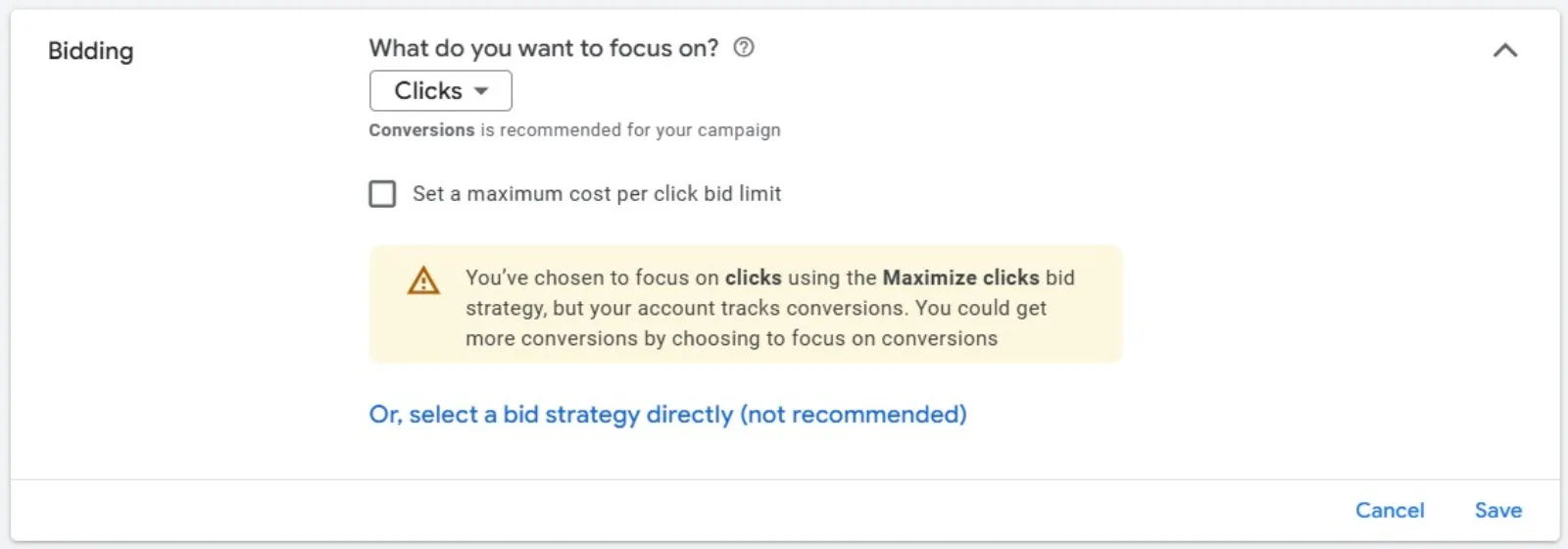
Now, this isn’t to say Maximise Clicks is a bad strategy. It has its place. The trick is knowing when and how to use it, and what to look out for.
 LIVE
Live every Tuesday at 2pm UK. Bring your marketing questions.
Get your Google, local SEO and AI questions answered live.
The Real-World Scenario
I decided to test this on a new campaign for a client who sells niche, handmade jewellery. Our goal was to drive traffic to a specific new collection. I set up the campaign, wrote some ads, and chose the Maximise Clicks strategy with a modest daily budget.
For the first week, things looked great on the surface. My CPC was incredibly low, and we were getting a lot of clicks. My client was excited to see the traffic numbers go up. But when we looked at the conversions, the numbers were flat. Zero. Nada. Zilch.
I dug into the Search Terms report, and it all started to make sense. My keywords were things like “handmade silver necklace” and “unique artisan jewellery.” Perfectly fine. But the search terms that were triggering my ads were far broader and less specific. I was getting clicks for things like “how to clean silver” or “diy jewelry projects.” These people weren’t looking to buy. They were looking for information. My ads were being shown to a huge audience of people who had no intention of purchasing a product right then.
This is what Google doesn’t emphasise. The algorithm will cast a wide net to get those clicks, and if you’re not careful with your keywords and targeting, you’ll end up paying for a lot of window shoppers.
How to Make Maximise Clicks Work for You
So, what can you do? You don’t have to throw Maximise Clicks in the trash. It’s a fantastic tool for a few specific situations, but you have to be smarter than the algorithm.
- Use it for a Purpose (That Isn’t Sales). Maximise Clicks is great for brand awareness. If your main goal is to get as many eyes on your brand and website as possible, this strategy works well. It’s also a good way to test new ads or landing pages. The flood of traffic will give you a lot of data quickly, so you can see which ads have the highest click-through rate (CTR) or which landing pages hold a user’s attention the longest.
- Set a Max CPC Bid Limit. This is the most important part that many people miss. Google will let you set a maximum CPC, which puts a cap on how much you’ll pay for a single click. This is your safety net. Without it, Google might spend $10 on one click just to meet your budget, even if all the other clicks were $0.50. By setting a bid limit, you’re telling Google, “I still want as many clicks as possible, but don’t spend more than this amount for any single click.” This simple setting gives you a lot more control and stops you from accidentally paying a fortune for a single, low-quality visitor.
- Hone Your Keywords and Negative Keywords. If you want to use Maximise Clicks for lead generation or sales, you have to be extremely strict with your keywords. Use specific, long-tail keywords that show commercial intent, like “buy sterling silver necklace” or “unique gold ring.” Even more importantly, you have to be on top of your negative keywords. Go into that Search Terms report every single day and add any irrelevant terms as a negative keyword. In my jewellery example, I would have immediately added “how to,” “diy,” and “clean” to my negative keyword list. This tells the algorithm what to avoid, which helps it find better-quality clicks.
- Pair it with Conversion-Based Bidding Later. Maximise Clicks is a great way to “warm up” a new campaign. The reason Google might suggest it first is that conversion-focused strategies like Maximise Conversions need a certain amount of conversion data to work effectively. By starting with Maximise Clicks, you can generate some initial traffic and hopefully, a handful of conversions. Once you have enough data (a good rule of thumb is 30-50 conversions in a month), you can then switch to a smarter, more conversion-focused strategy. The groundwork you laid with Maximise Clicks will give the new algorithm the information it needs to start finding you the right kind of customers.
So, the next time you see Maximise Clicks as an option, remember it’s not the magic bullet for sales. It’s a tool. And like any tool, it’s only effective when you know its purpose and how to use it correctly. Don’t just set it and forget it. Be smart about it, and you’ll get a lot more out of your campaigns.

Written by Uzair Kharawala
Partner at SF Digital Studios, a Google Premier Partner agency. Uzair has been helping businesses grow with Google Ads since 2002 and teaches it every week on YouTube.
Get our best Google Ads tips by email
New articles and videos, straight to your inbox. Unsubscribe any time.