
Google Ads Performance Max (PMax) campaigns have quickly become a favorite among advertisers. These versatile campaigns can be tailored for various objectives such as sales, leads, website traffic, and local ads. In this blog post, we’ll dive into the asset specifications for PMax campaigns, covering ad formats, sizes, and best practices to help you optimize your campaigns effectively.
Text Assets
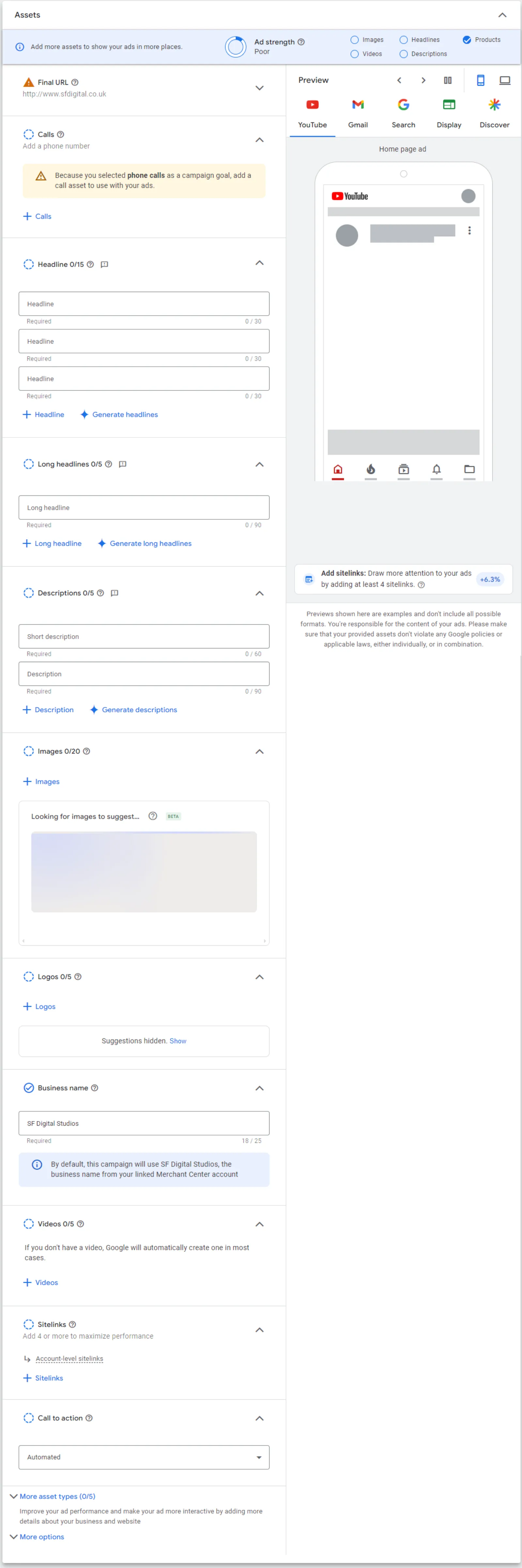
Text assets are the backbone of your PMax ads. Here’s a breakdown of the key elements:
- Headlines: You can add 3 to 15 headlines, with 11 being the recommended number. Headlines are crucial as they grab the audience’s attention and convey your core message.
- Long Headlines: These are longer versions of your regular headlines. You can add up to 2, which are recommended to give more context to your ad.
- Descriptions: You can include up to 4 descriptions, each providing additional details about your product or service.
- Business Name: This is a single, mandatory field where you input your business name.
- Call to Action (CTA): One CTA is recommended to guide users on what action to take next.
- Final URL: This is where users land after clicking your ad. It’s advisable to switch off the Final URL expansion to ensure users land on the specific page you intend.
Best Practices for Text Assets
- Diverse Headlines: Use a variety of headlines to test what resonates best with your audience.
- Clear Descriptions: Make sure your descriptions are concise and highlight key benefits.
- Consistent Branding: Ensure your business name and CTA align with your overall brand message.
Image Assets
Images play a crucial role in capturing attention and conveying your message visually. Here are the recommended specifications:
- Landscape Images: 4 images
- Square Images: 4 images
- Logos: 2 logos
- Portrait Images: 2 images
You can upload images in JPEG or PNG format, with a maximum file size of 5 MB.
Best Practices for Image Assets
- High-Quality Visuals: Use high-resolution images to ensure your ads look professional.
- Consistent Style: Maintain a consistent visual style that aligns with your brand identity.
- Variety: Include a mix of images to see which ones perform best.
Video Assets
Video is becoming increasingly important in digital advertising. For PMax campaigns, you need to upload your videos to YouTube first. Here are the specifications:
- Landscape Videos: 1 video, 10 or more seconds
- Square Videos: 1 video, 10 or more seconds
- Vertical Videos: 1 video, 10 or more seconds
Best Practices for Video Assets
- Engaging Content: Create videos that are engaging and relevant to your target audience.
- Short and Sweet: Keep videos concise while still delivering your key message.
- Mobile-Friendly: Ensure your videos are optimized for mobile viewing, especially vertical formats.
Additional Tips
If you’re a retailer, you can attach your Google Merchant Center feed to your PMax campaigns to start serving shopping ads. This integration can enhance your campaign by displaying your products directly to interested shoppers.
Final Thoughts
Setting up a successful PMax campaign involves paying attention to the details of your ad assets. By following these specifications and best practices, you can create compelling ads that drive results. Remember to continually test and refine your assets to find the optimal combination for your audience. Happy advertising!

Written by Uzair Kharawala
Founder of SF Digital Studios, a Google Premier Partner agency. Uzair has been helping businesses grow with Google Ads since 2002 and teaches it every week on YouTube.
Get our best Google Ads tips by email
New articles and videos, straight to your inbox. Unsubscribe any time.