
Google Ads’ Responsive Search Ads (RSAs) are a powerful tool for any digital marketer. They offer flexibility and dynamic content to engage potential customers better than traditional static ads. This blog post will guide you through the specifications, formats, sizes, and best practices for creating effective RSAs.
What Are Responsive Search Ads?
Responsive Search Ads are designed to adapt to show more relevant messages to users. When you create an RSA, you can enter multiple headlines and descriptions. Google Ads will then automatically test different combinations of these elements to determine which performs best, optimising your ad for better performance over time.
Ad Formats And Sizes
1. Headlines and Descriptions
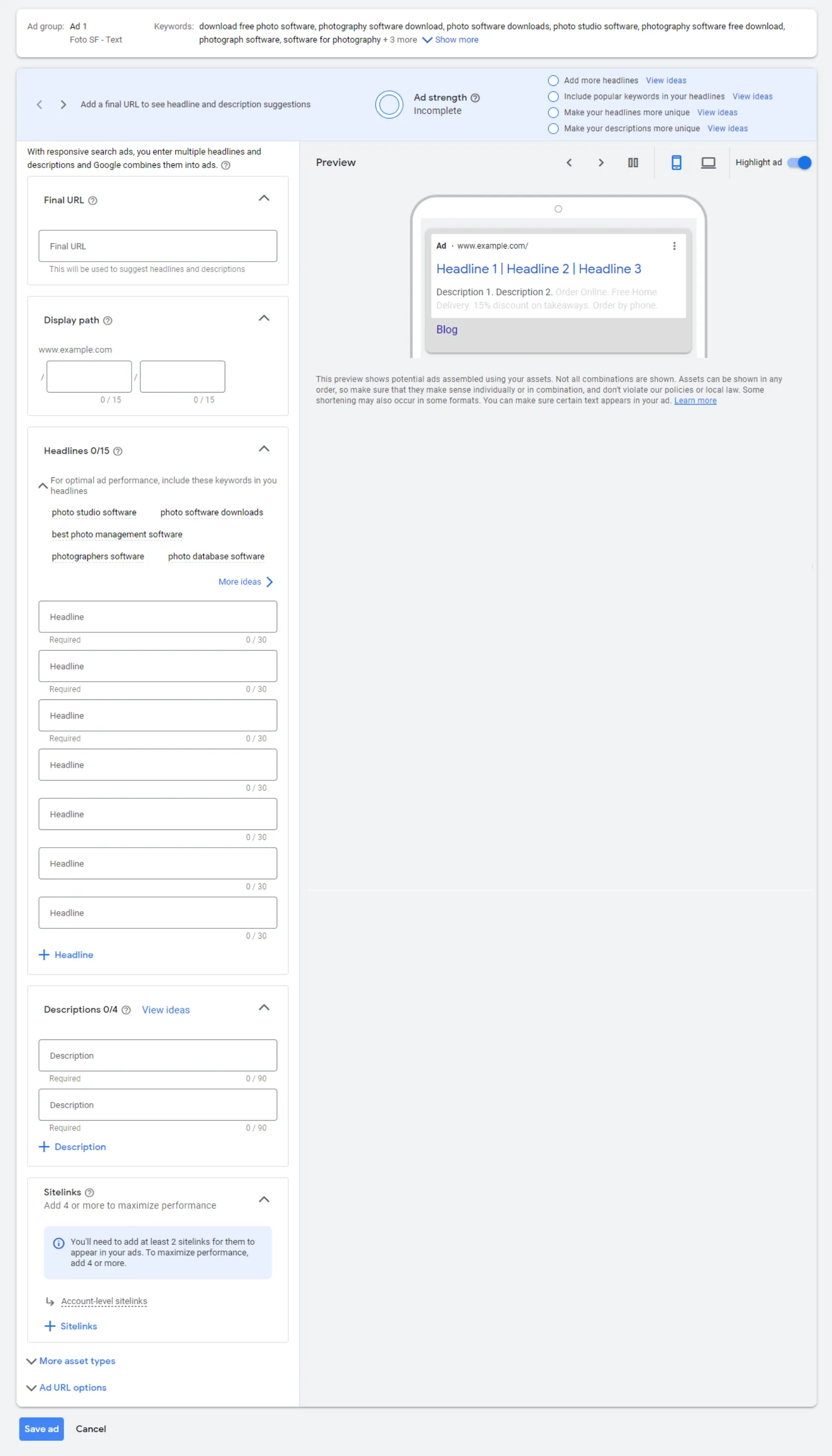
- Headlines: You can add up to 15 headlines, each up to 30 characters long. It’s crucial to utilise this space effectively to grab attention.
- Descriptions: You can include up to 4 descriptions, each with a maximum of 90 characters. These should be clear and compelling, providing essential information about your product or service.
2. Business Information
- Business Name: This is a new feature allowing you to include your business name in the ad. Your business name can be up to 25 characters long.
- Logo: Adding a logo helps users recognise your brand easily. The logo should be a square image with a 1:1 aspect ratio, and the recommended size is 1200 x 1200 pixels.
3. Images
- Square Images: One square image is required, with the recommended size being 1200 x 1200 pixels.
Landscape Images: You can add up to 20 landscape images. While the exact dimensions aren’t specified, it’s crucial to maintain high resolution and clarity.
Best Practices For Creating Responsive Search Ads
Utilise All Available Headlines and Descriptions
The more headlines and descriptions you provide, the better Google Ads can optimise your ad performance. Use different variations to test what resonates best with your audience.
Incorporate Keywords
Include relevant keywords in your headlines and descriptions to increase the chances of your ad appearing in search results.
Focus on Unique Selling Points
Highlight what makes your business or product unique. This could be special offers, features, or benefits that set you apart from competitors.
Call to Action (CTA)
Ensure your ad includes a clear call to action. Phrases like “Buy Now,” “Learn More,” or “Get a Quote” encourage users to take the next step.
Test Different Combinations
Regularly review the performance of your ads and test different combinations of headlines and descriptions to find the most effective messaging.
Use High-Quality Images
Ensure your images are high quality and relevant to your ad content. Poor-quality images can deter potential customers.
How To Set Up Responsive Search Ads
- Log in to Google Ads: Go to your Google Ads account and navigate to the search campaigns section.
- Create a New Ad: Select the option to create a new Responsive Search Ad.
- Enter Your Final URL: Input the URL you want users to visit when they click on your ad.
- Add Headlines and Descriptions: Enter multiple headlines and descriptions. Remember to use all the available slots for better optimisation.
- Include Business Information: Add your business name (up to 25 characters) and your logo (square image, 1200 x 1200 pixels).
- Upload Images: Add the required square image and any additional landscape images.
- Save and Launch: Review your ad, make any necessary adjustments, and then save it. Your ad will now be live and start testing different combinations to find the best-performing ones.
Conclusion
Responsive Search Ads offer a dynamic and efficient way to reach your target audience with the most relevant messages. By following these specifications and best practices, you can create effective RSAs that enhance your advertising efforts and drive better results. Keep experimenting with different combinations and continually refine your ads based on performance data to maximise your ROI.

Written by Uzair Kharawala
Founder of SF Digital Studios, a Google Premier Partner agency. Uzair has been helping businesses grow with Google Ads since 2002 and teaches it every week on YouTube.
Get our best Google Ads tips by email
New articles and videos, straight to your inbox. Unsubscribe any time.