NatWest Accelerator Events Free one-day marketing seminar at the NatWest Accelerator, Milton Keynes · 10 November 2026 Free marketing seminar · NatWest Accelerator, Milton Keynes · 10 Nov 2026 Free seminar · 10 Nov 2026
NatWest Accelerator, MK
Get your free invite →Invite →

Home › Blog › Google Ads

Google Ads

Google Ads Sitelink Assets: The Simple Tweak That Doubled My CTR In 24 Hours!

Google Ads Sitelink Assets: The Simple Tweak That Doubled My CTR In 24 Hours!
Read the video transcript

Would you like to make your Google Ads look a lot bigger, get more clicks and take up more real estate on the Google homepage? In this video, I'm going to show you just that. Hello. My name is Uzair, and thanks for joining in. In this video, I'm going to show you how you can make the size of your Google Ads bigger, get more clicks, make your ads a lot more bigger than your competitors, and hopefully increase your ad rank and your click-through rate.

So the way to do that, or one of the ways to do that is by using sitelinks on your ads and I'm going to show you in a bit how to set these up, but let's go over to the Support Center on Google and see what they have to say about it...So these are what we call the sitelink.

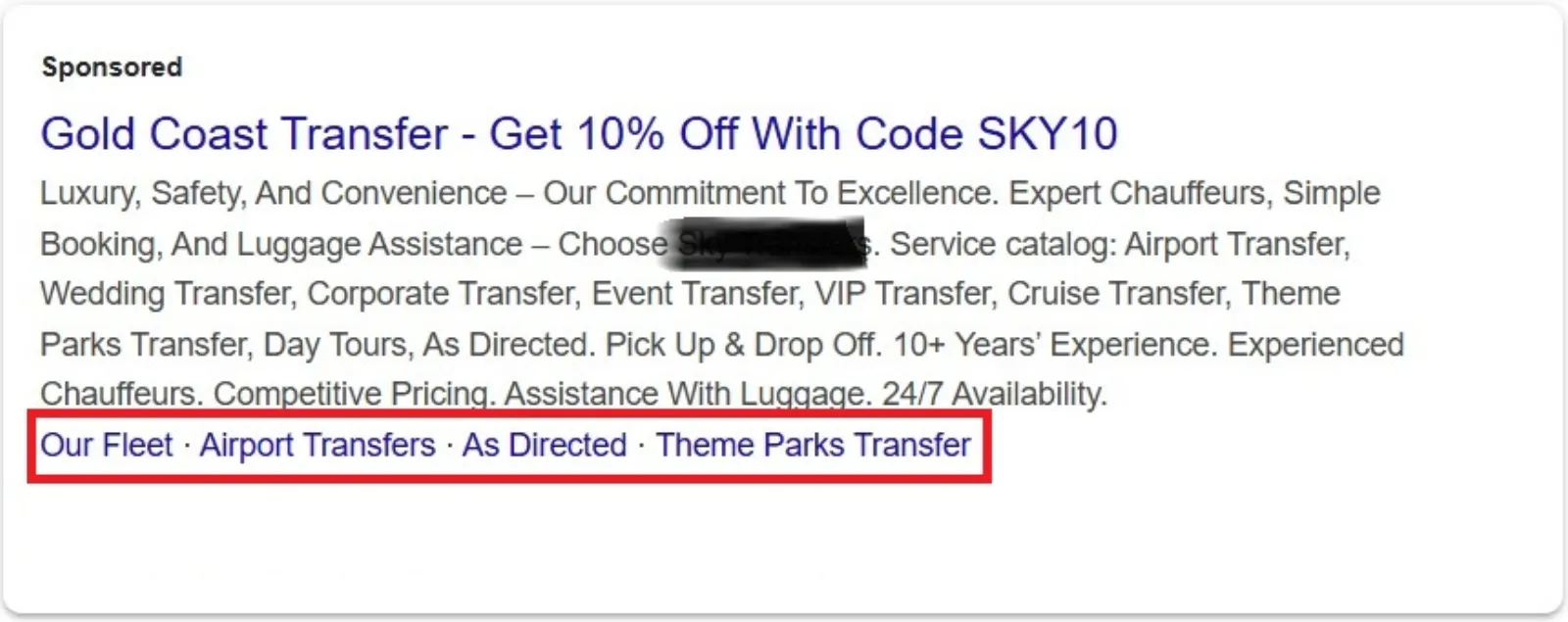
This is an ad where you've got your headline, your URL and the description line. And then underneath there, you will have up to four different sitelinks, but its own headline and description lines. So you can see, instead of just having the top bit, you are having the sitelinks on your ads, which makes the ad look a lot bigger than your competitors if they are not using these.

So I would highly recommend that you use sitelinks. The link shown below some of Google's search results are called sitelinks, are meant to help users navigate your site. So these will be additional links to your website, not the same link. You can't have the same link which you've got on the main ad. You will have additional links like it.

You can have a link to 'About page,' 'the blog' and the 'special offer' or a 'service page.' So the system analyzes the link structure of your site to find shortcuts that will save users time and allow them to quickly find the information they're looking for. We only show sitelinks for results when we think they'll be useful to the user.

So we don't have any control, even though you may have set them up properly and you find that you are not getting these shown, we can't do anything about it because it's up to Google to decide when it's going to show the sitelinks or when it won't show the sitelinks. If the structure of your site doesn't allow algorithms to find good sitelinks or we don't think that the sitelinks for your website are relevant for the user's query, they won't show them.

So you need to make sure that the sitelink's information is also very relevant to your main ad. What I tend to do is to look at my website structure and then just replicate each page with a headline and a couple of description lines. So at the moment the sitelinks are automate, but Google is always working to improve the sitelink's algorithms.

And we may incorporate webmaster input in the future. So they're not doing it right now, but in the future, perhaps they may include it. So there are best practices you can follow. However, to improve the quality of your sitelinks, for example, for your sites, internal links, make sure you use anchor texts and all texts that's informative, compact and avoids repetition.

So we don't want a website or web pages to have spammy links or keywords, which are stuffed and repeated all the time, make sure you don't do that. Okay. So let's head over to Google Ads account and in here under ads and extensions, you'll click on the plus sign. And then I'm just going to cancel that I was in the call extension.

Okay. So here's the extensions you go plus, and then you've got all these other ones. So in this one, I'm only covering the sitelinks, click on there. Now you can add these up at account campaign or ad group level. If you've got a fairly straightforward website, I would recommend that you set up at account level. So then you... once it's set up, you don't need to worry too much about it.

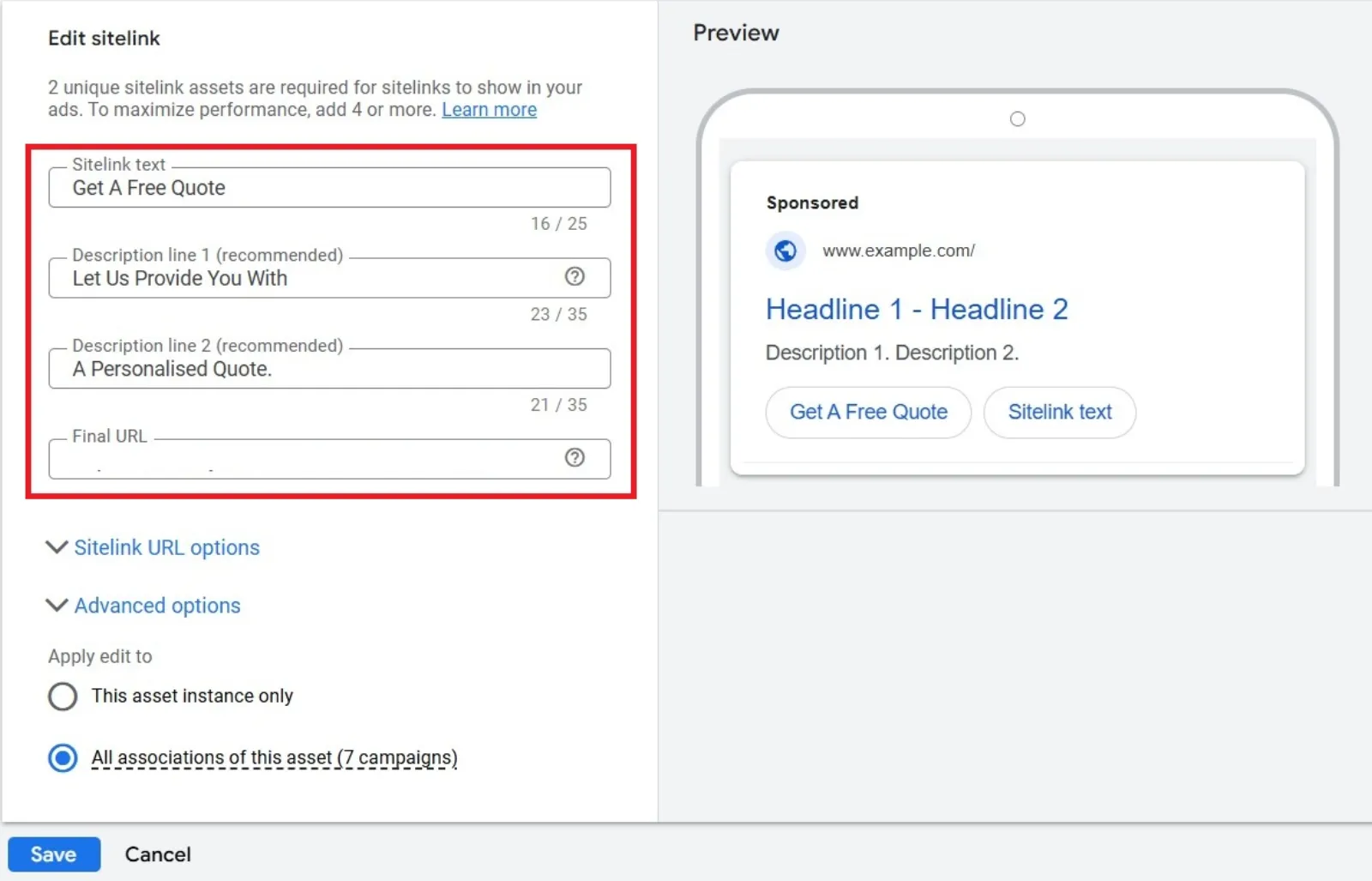
Then you've got your headline, your two lines of description and the final URL. Ideally, you want to put up more than four because then Google can decide which one is the most relevant. If you just put up four, it may not show all four. So I would recommend that you put up at least six or eight. If you've got that many pages on the website and each one of them must be a different URL.

So let's say I've got a 'Contact us' page. So please get in touch via email, telephone or live chat. And then I'm going to put up about us, whatever the link is. Now you see there is a little warning sign, it's because I didn't put in the HTTPS and now it's going to disappear. I've made one. Now you'll notice that I have not used the capitalization over here which I always say that in ads, you must capitalize every word, but it's not required over here in the sitelinks then I can make another one, let's say (a) blog.

And let's say we have over a 100+ blog posts. Read the latest blog here...just need to be simple and straightforward. It doesn't take long at all to set these up and I'll just do one more. Let's say "About us" and what they do. Learn more and then we have our URL and that's how easy and quickly it is to keep uploading these sitelinks and once they are done, you hit the save button and that's it.

The sitelinks has been done, has been set up and then what you will find is these will be... This will go under review and if you have put up something which is not as per the Google's policies, they will get disapproved, but if it's all fine, then they will go approved and then you will start to see the impressions, clicks, costs, or conversions.

If people are clicking on the sitelinks when they see your ads. I hope you found this video informative. Please do subscribe to our channel and hit the bell button as you will be the first one to be notified when we go live or we upload a new video on our channel. We go live every weekday at four o'clock in the UK.

I hope you can join in. And if you have any questions, then please do so. And pretty much every question is answered during the live stream. So thanks for being with me today and I look forward to seeing you again. Bye for now.

Okay, so I’m going to be straight with you. For a while, Google Ads felt like trying to hit a moving target with my eyes closed. I was getting clicks, sure, but the cost per click (CPC) was slowly creeping up, and my click-through rate (CTR) was just… okay. Nothing to write home about. I knew there had to be a way to squeeze more out of my campaigns without blowing my budget, but where to start?

I’ve always heard about “ad extensions” (now called “assets” by Google), and I knew sitelinks were important. But, honestly, I hadn’t given them the full attention they deserved. My sitelinks were pretty basic: “Home,” “About Us,” “Contact.” Generic stuff. They were there, doing their job, but not working for me.

Free NatWest Accelerator event

Get Found, Get Chosen, Get Your Time Back

A free one-day marketing seminar in Milton Keynes · 10 November 2026

Get your free invite →

Then, about 24 hours ago, something clicked. I was reviewing my campaign data, feeling a bit frustrated, and I remembered a small piece of advice I’d read somewhere: “Sitelinks aren’t just extra links; they’re opportunities.” That hit me. My sitelinks weren’t offering people choices or solutions. They were just… navigation.

Get your free Marketing Action PlanNot sure where to start? Answer a few questions and get your plan in about a minute. No email needed.

Get my plan →

So, I decided to dedicate an hour to revamp my sitelinks. And let me tell you, the results were almost immediate.

Sitelink Assets Google Ads

Before I dive into my “aha!” moment, let’s quickly explain what we’re talking about. Sitelink assets are those extra clickable links that appear below your main ad text on Google Search. Instead of just going to your homepage, they can take users to specific pages on your website – think “Product Categories,” “Services,” “Pricing,” “Reviews,” “Special Offers,” or even specific blog posts. They make your ad bigger, more informative, and give users more reasons to click.

My “Simple Tweak”

Here’s what I did, and it’s truly not rocket science:

Uzair KharawalaLIVE
Free weekly YouTube live

Live every Tuesday at 2pm UK. Bring your marketing questions.

Get your Google, local SEO and AI questions answered live.

Join for free
  1. Stopped Being Generic: I looked at my main ad copy and the keywords I was targeting. Instead of “Home,” I thought, “What are people looking for when they search for my main service?”
  2. Focused on User Intent: For example, if my main ad was about “Premium Web Design Services,” my old sitelinks might have been “Our Work,” “Testimonials,” “Get a Quote.” Decent, but still a bit bland.
    My new sitelinks became:
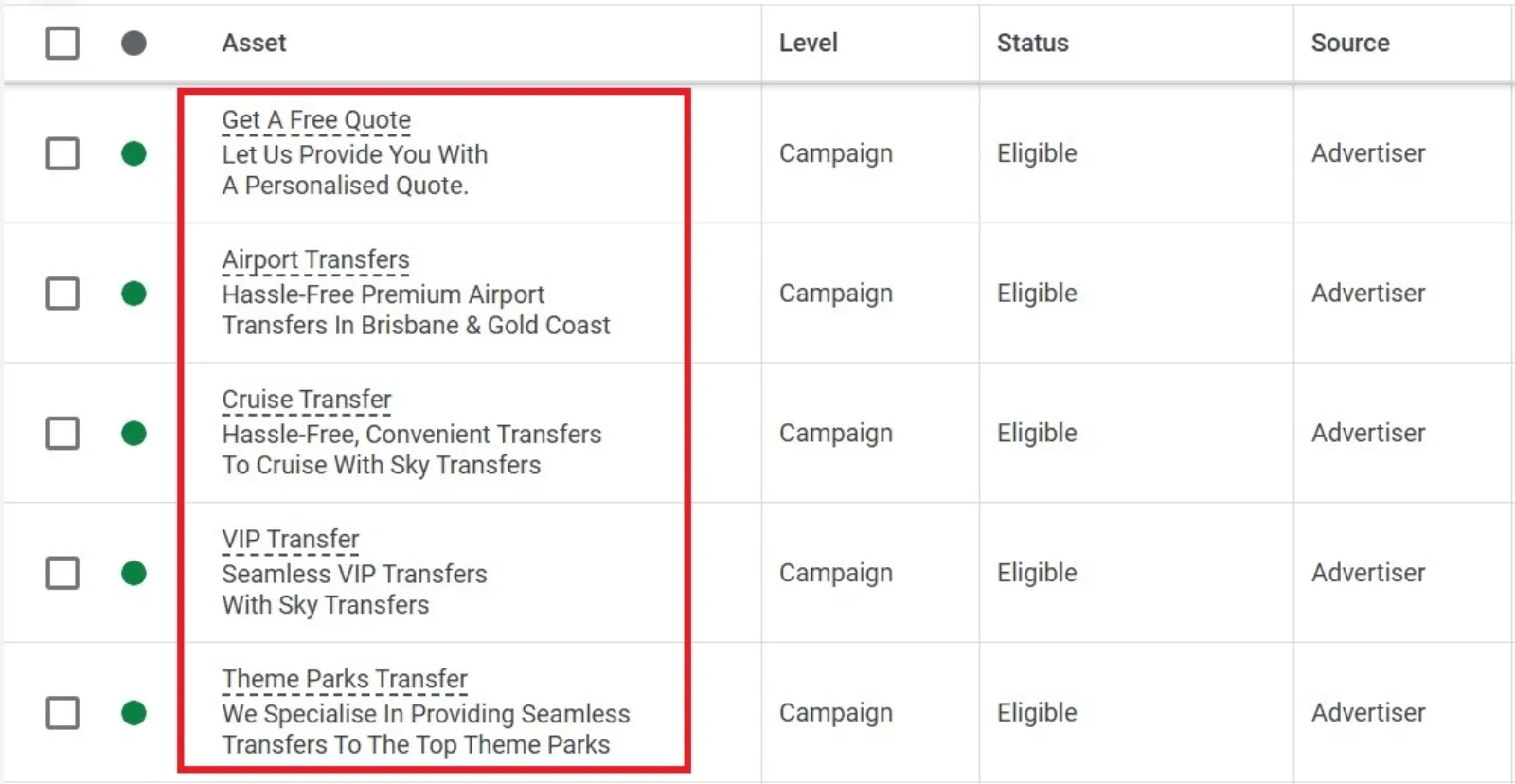
    • “See Our Portfolio” (Direct link to my best work, with a strong call to action)
    • “Custom Design Packages” (Highlighting different service tiers, directly addressing common questions about scope)
    • “Read Client Success Stories” (Social proof, building trust right away)
    • “Schedule a Free Consultation” (A clear, immediate call to action for serious leads)
  3. Added Descriptions (Crucial!): This is where the magic happened. Google lets you add two lines of description for each sitelink. I wasn’t using these fully before. This time, I wrote compelling, benefit-driven descriptions for each sitelink.
    • For “See Our Portfolio,” the description was something like: “Explore award-winning websites we’ve crafted for businesses like yours. Get inspired!”
    • For “Custom Design Packages”: “Tailored solutions for every budget. Find the perfect fit for your unique vision.”
    • For “Read Client Success Stories”: “Hear from happy clients who transformed their online presence. Real results, real satisfaction.”
    • For “Schedule a Free Consultation”: “Book a no-obligation call with our experts. Let’s discuss your project goals today.”

The Immediate Impact
Sitelink Assets Examples

I rolled out these updated sitelinks to my main campaign. I didn’t change my ad copy, my bids, or anything else. Just the sitelink assets.

The next morning, I logged into Google Ads, admittedly with a bit of scepticism. But what I saw genuinely surprised me. My CTR had, in fact, almost doubled! It went from a respectable but unremarkable 4.5% to just over 8.9%. This wasn’t a fluke; it held steady throughout the day.

Why Did This Work So Well?
What Are Sitelink Assets

I think it boils down to a few key things:

  • Increased Ad Real Estate: The sitelink descriptions made my ad physically bigger on the search results page. More space means more attention.
  • Enhanced Relevance: My new sitelinks directly addressed specific user needs and questions. Someone searching for “web design” might not know exactly what they want, but offering “Portfolio” or “Custom Packages” gives them immediate, relevant choices.
  • Clearer Value Proposition: The descriptions added context and highlighted the benefits of clicking those specific links. It wasn’t just “Contact Us,” it was “Schedule a Free Consultation” with a clear benefit.
  • Improved User Experience: By giving users direct pathways to exactly what they might be looking for, I reduced the “thinking” they had to do. Less friction often means more clicks.
  • Better Ad Rank (Likely): While Google doesn’t give us all the secret sauce, it’s widely believed that robust and relevant ad assets contribute to a better Quality Score, which in turn can improve your Ad Rank and sometimes even lower your CPC.

Your Turn: Take Action!

If your Google Ads CTR isn’t where you want it to be, and your sitelinks are just basic navigation, please, please, give this a try. It’s not a magic bullet for every campaign, but it’s such a simple, free tweak that can have a surprisingly powerful impact.

Here’s your quick checklist:

  1. Review your current sitelinks: Are they generic?
  2. Think about user intent: What are people trying to find when they search for your keywords?
  3. Create specific, benefit-driven sitelink text: Make them enticing.
  4. Write compelling descriptions for each sitelink: This is key!
  5. Monitor your CTR: See the difference for yourself.

Don’t underestimate the power of these little links. Sometimes, the simplest changes yield the biggest results. Happy optimising!

Uzair Kharawala

Written by Uzair Kharawala

Partner at SF Digital Studios, a Google Premier Partner agency. Uzair has been helping businesses grow with Google Ads since 2002 and teaches it every week on YouTube.

Book A Call →Subscribe on YouTube for new videos every weekday →
Free every week

Get our best Google Ads tips by email

New articles and videos, straight to your inbox. Unsubscribe any time.

We respect your privacy at all times. Privacy Policy

You may also like

Read the blog →

Your next customers are out there. Let's go and get them.

Tell us where you want your business to be, and we'll show you how to get there.

Book A Call →or get your free Google Health Check →
Happy clients

Don't take our word for it

4.9 from 157 Google reviews, plus case studies and client videos.

See our happy clients →
"It has now been 3 months since we started and our sales have increased 300%."
Ruhi Latif Rafplay, Dubai
"Uzair and Farzana are two of the most honest, sincere and trustworthy people you will ever meet."
Gavin Morgan GDM Jewellery · Google review
"If I needed a campaign built, this is one of the rare few people IN THE WORLD I would trust to do it properly."
Hemmel Amrania Google Ads professional · Google review
Book A Call →
Chat with us on WhatsApp