
Google Ads will now do almost everything for you. It will write your headlines. It will set your bids. It will decide which searches your keywords match. With Performance Max, it will even build the campaign.
There is one job it leaves on your desk. Telling it where not to show your ads.
That job is called negative keywords, and in 2026 it matters more than it ever has. The more Google automates, the more searches your ads can match. Some of those searches are customers. Plenty are not.
Get your free Marketing Action PlanNot sure where to start? Answer a few questions and get your plan in about a minute. No email needed.
Get my plan →This guide explains what Google Ads negative keywords are, why Google will not add them for you, and how to build a simple system that stops you paying for the wrong clicks. It is written for business owners, with a routine that takes about 20 minutes a week.
What Are Negative Keywords?
A negative keyword is a word or phrase you tell Google Ads not to show your ads for. If a search contains it, your ad stays out of the way.
Here is a simple example. A plumber bids on the keyword "plumber". Without negatives, the ad can show for "plumber jobs", "plumber salary", "plumbing course" and "how to become a plumber". None of those people want a plumber. They want to be one.
Add "jobs", "salary", "course" and "become" as negatives, and those searches stop costing money. Your budget goes to the people who actually have a leak.
That is the whole idea. Keywords tell Google where to show up. Negative keywords tell it where to stay away.
You can add negatives at three levels. Account-wide, so they apply everywhere. Campaign level, for one campaign. And ad group level, for one group of keywords. Google also lets you save negatives in shared lists and apply the same list to several campaigns.
Why Google Will Not Do This Job For You
Google's automation is built to find more searches for your ads, not fewer. That is not a conspiracy. It is simply what the tools are designed to do.
Broad match, which Google now pushes as the default, lets your keywords match many related searches. AI Max for Search goes further, matching searches based on your website and ads as well as your keywords. Performance Max reaches across Search, Shopping, YouTube, Display, Gmail and more.
Every one of those tools widens your reach. None of them is designed to narrow it on your behalf.
Look at the recommendations tab in most accounts and you will see the same pattern. Raise the budget. Add broad match. Try new keywords. You will rarely see a suggestion to exclude searches that waste your money.
That is not because Google wants you to waste it. It is because only you know which searches are customers. Google cannot tell that "boiler repair course" is useless to a heating engineer who does not run courses. You can, in about a second.
So the division of labour is clear. Google finds the searches. You decide which ones are worth paying for.
Why It Matters More Than Ever In 2026
A few years ago, exact match meant exact. A keyword matched the search you typed and little else. Negatives were a tidy-up job.
That has changed. Match types are looser, automation is wider and campaigns like Performance Max reach places you never chose. The gap between what you meant and what Google matches has grown.
Negative keywords are how you close that gap. They are the steering wheel on a car that now accelerates by itself.
Google has also given you more room to use them. In March 2025, it raised the limit on Performance Max negatives from 100 to 10,000 per campaign. That change only makes sense if negatives matter. They do.
There is a cost to ignoring this, and it is easy to underestimate. Irrelevant clicks do not just waste the money they cost. They also feed Google's bidding with bad signals. If a campaign keeps getting clicks from job hunters, it learns to find more job hunters.
So a missing negative costs you twice. Once for the click, and again for what the click teaches the algorithm.
What Negative Keywords Actually Save You
It helps to put a number on it. Here is a made-up example with round figures, so the maths is easy to follow.
Say a small business spends £1,500 a month on Google Ads. The owner opens the search terms report and finds that 20% of the spend went on searches that could never convert. Job hunters, students, DIY fans and people looking for a competitor by name.
That is £300 a month, or £3,600 a year, spent on people who were never going to buy.
Now say the business adds the right negatives and that waste drops to 5%. The same £1,500 now buys £225 more of useful clicks every month. Nothing else changed. No bigger budget, no new ads.
Your own numbers will be different. Some accounts waste far less, some far more, especially on broad match. But the only way to know is to look, and the looking costs nothing.
The Three Layers Of Negative Keywords
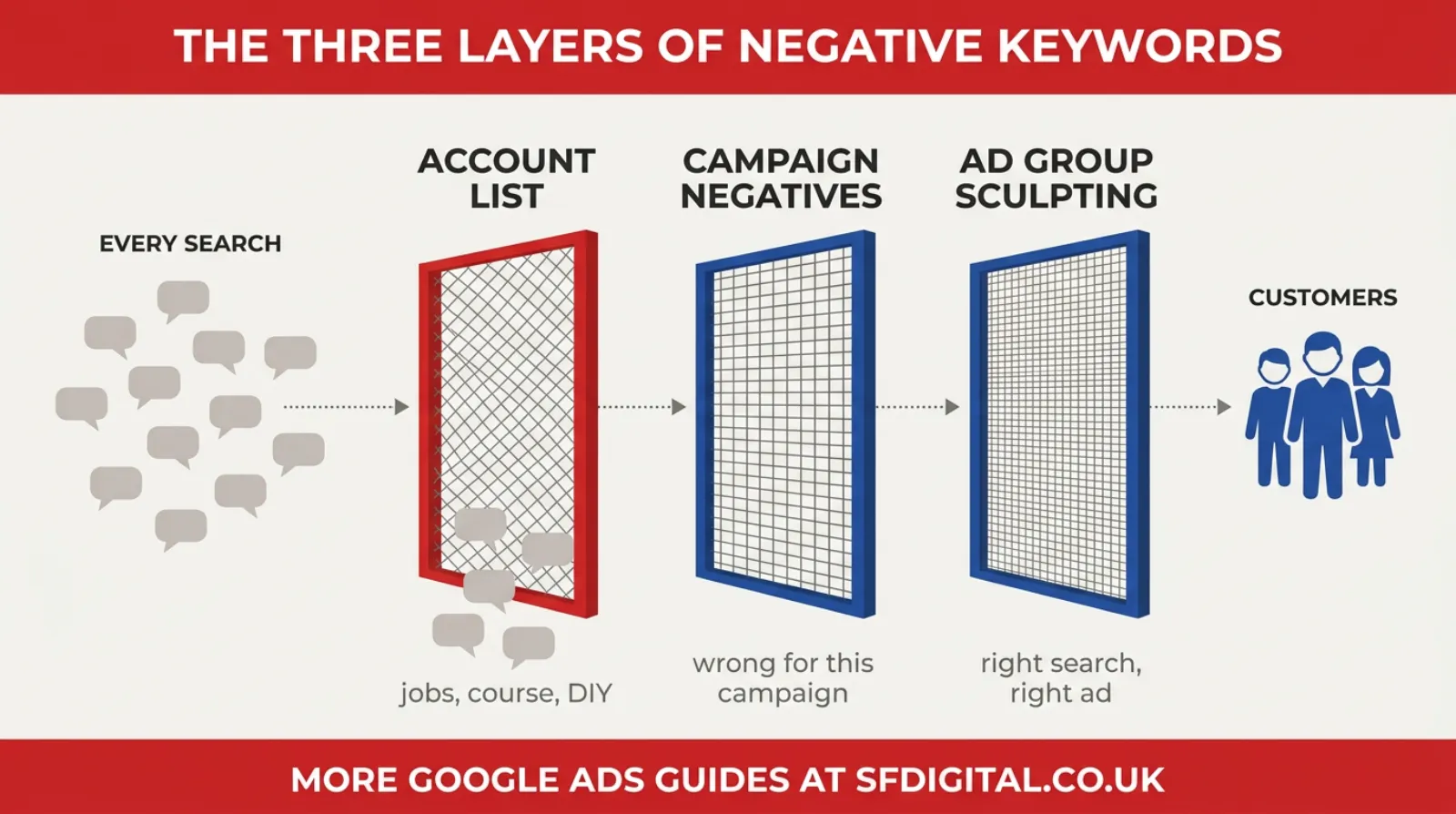
The simplest way to organise negatives is in three layers, from broad to narrow. Each layer does a different job.
Layer One, The Account List
This is your list of searches that are wrong for the whole business, in every campaign, forever. Jobs, training, free, DIY and the like.
Build it once as a shared negative keyword list and apply it to every campaign. Add to it whenever you spot a new pattern. It is the single most valuable list in most small business accounts.
Layer Two, Campaign Negatives
These are searches that are wrong for one campaign but might be right for another. A campaign for emergency callouts might exclude "quote" and "estimate". A campaign for planned work might exclude "emergency" and "tonight".
Campaign negatives stop your campaigns fighting each other, and keep each one focused on the searches it was built for.
Layer Three, Ad Group Sculpting
This is the most precise layer, and the one most accounts skip. It routes each search to the ad group with the most relevant ad.
Say you have one ad group for "roof repair" and another for "flat roof repair". Without help, a search for "flat roof repair" might trigger the general ad. Add "flat roof repair" as an exact match negative in the general ad group, and Google sends that search to the specialist one, with the more relevant ad.
Use exact match for sculpting negatives. That way you only block the precise search you are routing, not every search that contains the words.
How Negative Keyword Match Types Work
Negative match types behave differently from normal ones, and this is where many people go wrong. Google's own help page sets out the rules.
Broad Match Negatives
This is the default. Your ad will not show if the search contains all the words in your negative, in any order.
A negative of "boiler course" blocks "course for boiler engineers" and "boiler installation course". It does not block "boiler training", because "course" is missing.
Phrase Match Negatives
Your ad will not show if the search contains the exact words in the same order, even with other words around them.
A phrase negative of "boiler course" blocks "gas boiler course near me". It does not block "course on boilers", because the order and wording differ.
Exact Match Negatives
Your ad will not show only when the search is exactly your negative, with no extra words.
An exact negative of "boiler course" blocks that search and nothing else. "Boiler course online" would still trigger your ad.
The Close Variants Rule
Negatives do not match close variants or synonyms. Google says so plainly. That means a negative of "job" does not block "jobs", and "course" does not block "training". Add the plural and the obvious synonyms yourself.
There is one piece of good news that surprises people. Google says negatives do automatically account for casing and misspellings, so you do not need to add every typo.
A simple rule of thumb for small businesses: use single-word broad negatives for words that are always wrong, such as "jobs" or "salary", and phrase or exact negatives when a word is only wrong in certain combinations.
Where To Find Your Negative Keywords
You do not have to guess. Google shows you exactly which searches triggered your ads.
The Search Terms Report
This report, in the Insights and reports section of your account, lists the real searches people typed before they saw and clicked your ad. It is the single most useful screen in Google Ads for this job.
Sort it by cost, highest first. Read down the list and ask one question of each search. Could this person ever become a customer? If the answer is no, find the word that makes it wrong and add it as a negative.
The Single-Word Trick
Reading search terms one by one works for small accounts. Once you have hundreds, look for patterns instead.
Break each search into its individual words and add up the cost and conversions for each word across all searches. A word like "free" might appear in forty different searches, costing money across all of them and converting in none. One negative fixes forty problems.
This is often called n-gram analysis. You can do a simple version in a spreadsheet, or use a script. It is how agencies deal with thousands of searches without reading every line.
Competitor Names
Some searches are for a specific competitor by name. Whether to show for those is a strategic choice, but most small businesses are better off excluding them. People searching for a named rival usually want that rival.
Research the distinctive brand names of competitors in your area and add them as phrase negatives at launch. Stick to genuinely distinctive names. Never add generic phrases like "roofing Bedford", which would block your own customers.
Wrong Locations
If you only serve certain areas, searches naming towns you do not cover are wasted. Location targeting helps, but people outside your area can still search for your service in a town you do not serve. Add those town names as negatives where they keep appearing.
A Starter List For Small Businesses
Every business is different, but most small service businesses can start with the same categories. Treat these as prompts, not a list to paste blindly.
- Jobs and careers: jobs, job, careers, salary, vacancies, apprenticeship, hiring, recruitment
- Learning: course, courses, training, qualification, how to become, certificate
- Do it yourself: DIY, yourself, how to, tutorial, YouTube
- Free and bargain hunting: free, cheapest, second hand, used, for sale, where only relevant
- Research only: definition, meaning, what is, history, statistics, PDF
- Wrong service: services you do not offer that share a word with ones you do
- Wrong location: towns and areas you do not cover
- Competitors: distinctive brand names of local rivals
Check each word against your own business before adding it. "Cheap" might be a real buying signal for some trades. "How to" might be exactly what a training company wants. "Used" might be your whole business if you sell reconditioned equipment.
Negative Keywords In Performance Max
For a long time, Performance Max made negative keywords awkward. That changed in 2025.
Google now lets you add up to 10,000 negative keywords per Performance Max campaign. That is a huge jump from the old limit of 100.
There is an important catch. Those negatives only apply to Search and Shopping inventory. They do not stop your ads showing on YouTube, Display, Gmail or Discover.
If you run Performance Max alongside Search campaigns, add your core account negatives to it as well. And if Performance Max is picking up searches for your own brand name, look at brand exclusions too, so it is not taking credit for customers who were already looking for you.
How To Add Negative Keywords, Step By Step
There are two easy ways to add negatives, and you will use both.
From The Search Terms Report
This is the quickest route. Open the search terms report, tick the box next to a search you want to exclude, and choose the option to add it as a negative keyword. Google lets you pick whether it applies to the ad group, the campaign or a shared list.
Before you save, edit the text. Google fills in the whole search, but you usually want just the word that makes it wrong. Change "plumber jobs in Bedford" to "jobs", then choose the match type.
Through A Shared Negative Keyword List
For your account-wide list, use the shared library, found under Tools in your account. Create a negative keyword list, give it a clear name such as "Always wrong", add your words, then apply it to every campaign.
The advantage is that you only maintain one list. Add a word once and every campaign linked to the list is protected.
Keep A Simple Record
Once a month, export your negatives or keep a short note of what you added and why. It sounds fussy. It saves you from undoing a good decision six months later, or from forgetting why a word is blocked when a new service launches.
Negatives For Different Kinds Of Business
The categories in the starter list apply to most businesses, but each type of business has its own traps. Here are a few patterns worth knowing.
Trades And Home Services
The biggest waste is usually job hunters and DIY fans. Plumbers, electricians, roofers and builders all attract searches from people wanting to train or fix things themselves. Parts and materials searches, like "copper pipe" or "roof felt", are another common leak.
Shops And Online Stores
Watch for searches about products you do not stock, brands you do not sell and second-hand or rental versions. Searches containing a big retailer's name usually mean the person wants that retailer.
Professional Services
Accountants, solicitors and consultants attract a lot of research searches. "What is", "template", "example" and "free" often mean someone wants information, not a paid adviser. Job titles, like "accountant salary", are common too.
Local Services With A Tight Area
Salons, clinics, gyms and restaurants live and die by location. Town names outside your area, and searches for chains with the same service, are usually the biggest waste.
Whatever your business, the search terms report will tell you which of these applies. The categories are just a head start.
The 20-Minute Weekly Routine
Negatives are not a job you do once. New searches appear every week, especially with broad match. The fix is a short, regular habit.
- Open the search terms report for the last seven days, sorted by cost.
- Read the top 50 searches. Mark anything that could never become a customer.
- For each one, pick the word or phrase that makes it wrong, not the whole search.
- Decide the level. Account list if it is always wrong, campaign if it is wrong here only, ad group if it is a routing issue.
- Add them, then check Google's warning for any negatives that now block your own keywords.
- Once a month, run the single-word check across the whole month's searches.
That is 20 minutes on a Monday morning. For a new campaign, do it every few days for the first month, because that is when the most surprises turn up.
The Mistakes That Cost The Most
Negatives are simple, but a few mistakes come up again and again.
Blocking Good Traffic
This is the opposite problem, and it is just as expensive. A broad negative of "cheap" might seem sensible, until you realise people searching "cheap boiler repair" do still book. A negative of "repair" in the wrong place can wipe out half your enquiries.
Before you add a broad single-word negative, search your own list of converting search terms for it. If it appears in searches that have produced customers, use a phrase or exact negative instead.
Negatives That Block Your Own Keywords
If a negative matches one of your own keywords, that keyword stops showing. Google flags these as conflicting negative keywords. Check for the warning after every batch you add.
Adding Negatives Once And Walking Away
A list built at launch goes stale. New search patterns appear all the time, especially as match types loosen. The weekly routine exists for this reason.
Negating Whole Searches Instead Of The Problem Word
If you add "boiler repair jobs in Luton" as an exact negative, you block that one search and nothing else. Add "jobs" and you block every search like it. Find the word that makes it wrong.
Forgetting Plurals And Synonyms
Remember the close variants rule. "Job" does not block "jobs". "Course" does not block "training". Add both.
A Worked Example, Week One
Here is how the routine looks for one made-up business. Picture a small roofing firm in Luton that launched a Search campaign on broad match seven days ago.
The owner opens the search terms report and sorts by cost. Near the top are "roofing apprenticeship Luton", "how to fix a leaking roof yourself", "roof tiles B&Q" and "roofer salary UK". None of those people will ever book a roofer.
So the owner adds "apprenticeship", "yourself", "salary" and "B&Q" as account-level negatives, plus the plurals and a few synonyms, like "apprenticeships", "diy" and "wages".
Further down there is "flat roof repair Dunstable". That is a real customer, but it triggered the general roof repair ad. So the owner adds "flat roof repair" as an exact match negative in the general ad group, sending those searches to the flat roof ad group instead.
There is also "roofing Leighton Buzzard". The firm does cover Leighton Buzzard, so that stays. Not every surprise is a waste.
Total time, about 25 minutes. The following week, the report is noticeably cleaner, and the money that went on apprentices and DIY fans goes to people with leaking roofs.
When Not To Add A Negative
Not every odd-looking search is waste. Some deserve a second look before you block them.
A search that looks off but has converted is a customer, however strange the wording. Leave it alone.
A search with only one or two clicks may just be noise. If it is not obviously wrong, wait a week or two and see if it repeats.
A search for a related service you could offer may be telling you something. If people keep searching for "gutter cleaning" and you are a roofer who could do it, that may be a new ad group rather than a negative.
Negatives are for searches that can never become customers. If there is a real chance, give it time.
How To Check You Are Not Over-Blocking
It is worth checking the other direction now and then, because a heavy negative list can quietly choke a campaign.
Watch your impressions. If they drop sharply after a batch of new negatives, one of them may be too broad.
Check the keywords tab for any status showing a keyword blocked by a negative. Google shows this when a negative conflicts with a keyword you are bidding on.
Once a quarter, read your account list from top to bottom. Remove anything that no longer applies. A new service line can turn an old negative into a lost customer.
Frequently asked questions
What are negative keywords in Google Ads?
Negative keywords are words or phrases you tell Google Ads not to show your ads for. If you add "jobs" as a negative, your ads will not appear for searches like "plumber jobs". They stop you paying for clicks from people who were never going to buy.
How do I find negative keywords in Google Ads?
Open the search terms report, which shows the real searches that triggered your ads. Look for searches that could never become a customer, then add the word or phrase that makes them wrong as a negative keyword. Check it weekly.
Do negative keywords block plurals and misspellings?
Google says negative keywords do not match close variants or synonyms, so add plurals and synonyms yourself. It also says negatives automatically account for casing and misspellings, so you do not need to add every typo.
Can I add negative keywords to Performance Max?
Yes. Since March 2025, Performance Max campaigns can take up to 10,000 negative keywords at campaign level. They only apply to Search and Shopping inventory, not YouTube, Display, Gmail or Discover.
How often should I add negative keywords?
Weekly for most small business accounts. A 20-minute review of the search terms report catches wasted spend before it builds up. New campaigns benefit from checks every few days for the first month.
Can negative keywords hurt my campaign?
Yes, if they are too broad. A single-word negative can block searches that would have become customers. Check a word against your converting searches before adding it, and watch for Google's conflicting negatives warning.
What is the difference between a negative keyword list and campaign negatives?
A negative keyword list is a shared list you can apply to many campaigns at once. Campaign negatives apply to one campaign only. Use a shared list for searches that are always wrong, and campaign negatives for searches that are only wrong in one place.
Keep Reading
If you are working on your search terms, these six go deeper on the problems negatives solve.
- The Search Terms Report: The Most Expensive Tab You've Never Opened
- Decoding Google Ads: Understanding The Search Term That Matched Your Keyword
- You're Paying for Clicks That Were Never Going to Convert. Here's How to Spot Them Before They Drain Your Budget
- Fake Leads Google Ads - Why You Are Getting Irrelevant Leads In Google Ads?
- PMax Negative Keywords - Campaign-Level Negative Keywords In Performance Max: What You Need To Know
- What Should You Do If Performance Max Targets Branded Search Terms?
The first two explain the report where negatives come from. The middle two cover what wasted clicks look like in your leads. The last two go deeper on Performance Max.
The Job That Pays For Itself
It is easy to think of negative keywords as housekeeping. Something to get round to.
They are not. They are the one lever in a modern Google Ads account that only you can pull. Google will find the searches. It will bid on them, write the ads and chase the clicks. It will not decide which of those people are worth paying for.
That decision is yours, and it takes 20 minutes a week. Open the search terms report. Find the words that are always wrong. Put them in the right layer. Check you have not blocked a customer.
Do that every Monday, and the money that currently goes on job hunters, students and DIY fans goes back into reaching people who want to buy.
And if you would rather someone else kept that weekly watch, it is exactly the kind of work we do for every account we manage.

Written by Uzair Kharawala
Partner at SF Digital Studios, a Google Premier Partner agency. Uzair has been helping businesses grow with Google Ads since 2002 and teaches it every week on YouTube.
Get our best Google Ads tips by email
New articles and videos, straight to your inbox. Unsubscribe any time.