

Google Ads can sometimes feel like a whole new language! One term that often trips people up is “the search term that matched your keyword.” If you’ve seen this in your search terms report and wondered what it means, you’re not alone. Let’s break it down in simple terms and explore how you can use this information to your advantage.
Why It’s Not an Exact Match
First, it’s important to understand that the search term that matched your keyword isn’t always an exact match to your keyword. This might seem confusing, but here’s why:
Close Variants
Google Ads may show your ads for close variations of your keywords. These can include misspellings, plurals, or slight differences in wording. For example, if your keyword is “running shoes,” your ad might also show up for searches like “running shoe” or “running shoes” (yes, even with the typo).
Broad Match
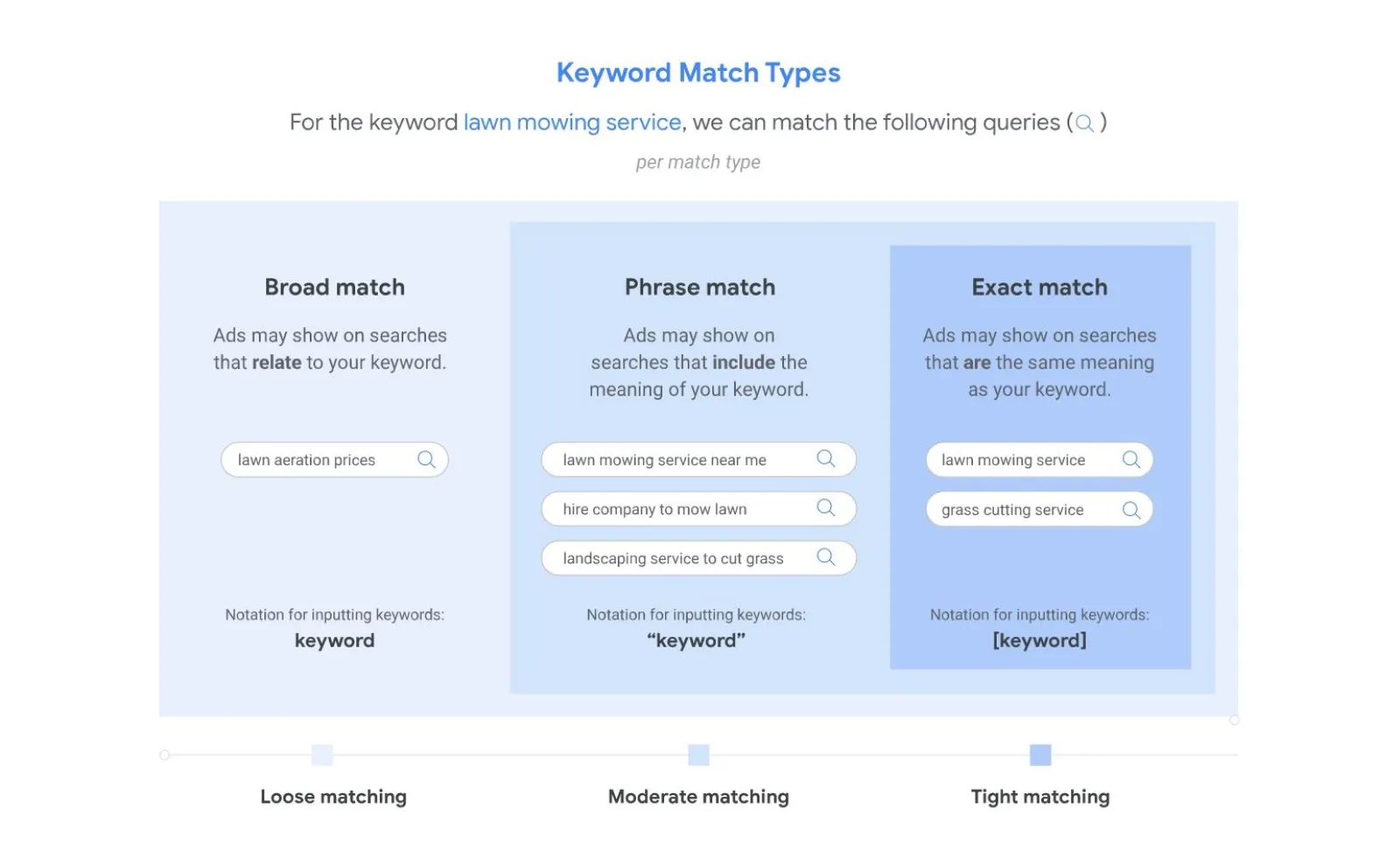
When you use broad match, your ads can show searches that are related to your keyword, even if they don’t contain the exact words. For instance, if your keyword is “women’s hats,” your ad might show up for “ladies sun hats” or “best hats for women.”
Other Signals
Google Ads doesn’t just look at keywords. It also considers other factors like the searcher’s location, their search history, and the overall context of your ad group. This helps Google determine the relevance of your ad to a searcher’s query.
Harnessing the Power of Search Terms Reports
The search terms report is where you can see what people actually typed into Google that triggered your ad. This report is full of useful insights. Here’s how you can use it:
Find Relevant New Keywords
Look for high-performing search terms in your report. These are the searches that led to clicks and conversions. Consider adding these terms as keywords to gain more control over when your ads show up.
Discover Negative Keywords
Sometimes, your ads might show up for searches that aren’t relevant to your business. These irrelevant searches can drain your budget. By adding these as negative keywords, you can prevent your ads from showing up for those searches in the future.
Refine Ad Copy & Targeting
Use the insights from your search terms report to improve your ads. Write ad copy that resonates with the actual search phrases people use. Adjust your targeting to focus more on what works and less on what doesn’t.
Pro Tips
Start Broad, Get Specific
Begin with broad match keywords to gather a wide range of data. This helps you understand the different ways people search for your products or services. Once you have enough data, refine your targeting by adding more specific match types like phrase match and exact match.
Use Match Types Strategically
Different match types give you different levels of control. Broad match gives you a wide reach, while phrase match and exact match offer more precision. Choose the right match type based on your goals.
Regular Review is Key
Your search terms report isn’t something you check once and forget about. Regularly reviewing this report helps you continuously optimise your campaigns. Make it a habit to check in and adjust your keywords and ad copy as needed.
The Takeaway
The “search term that matched your keyword” report is a goldmine of information about real-world search behavior. By understanding how Google matches your ads to searches and analyzing your report, you can improve your targeting, reduce wasted ad spend, and drive more conversions.
So next time you dive into your Google Ads account, take a closer look at your search terms report. It’s one of the best tools you have for turning data into actionable insights!

Written by Uzair Kharawala
Founder of SF Digital Studios, a Google Premier Partner agency. Uzair has been helping businesses grow with Google Ads since 2002 and teaches it every week on YouTube.
Get our best Google Ads tips by email
New articles and videos, straight to your inbox. Unsubscribe any time.