
With Google Ads’ one-click upgrade tool, we previewed the timeline and process for upgrading your Smart Shopping and Local campaigns to Performance Max.
The tool began rolling out in April for Smart Shopping campaigns and is now available to most advertisers. We highly recommend using the tool to upgrade your campaigns as quickly as possible to get a head start on the holiday season.

Get Found, Get Chosen, Get Your Time Back
A free one-day marketing seminar in Milton Keynes · 10 November 2026
A self-upgrade tool for local campaigns will be available soon. More information is coming in the next few weeks, stay tuned for updates.
Get your free Marketing Action PlanNot sure where to start? Answer a few questions and get your plan in about a minute. No email needed.
Get my plan →Start Automatic Upgrades For Smart Shopping Campaigns
Advertisers using Smart Shopping campaigns will have advanced access to the self-upgrade tool for an average of two months to give them time to promote themselves before the automatic upgrades start.
Automatic upgrades now start on a rolling basis for Smart Shopping campaigns that did not self-upgrade using the tool. Keep these details in mind when starting automatic upgrades:
- Automatic upgrades will progress gradually and will expire in September for most advertisers. You’ll get a notification in Google Ads 2-3 weeks before your campaigns are automatically upgraded to help you get ready. The notification will provide a specific start date for your automatic upgrade campaigns.
- Some Smart Shopping campaigns that use features like vehicle ads not yet available in Performance Max will complete automatic upgrades in early 2023. For campaigns that are not yet eligible for upgrades, advertisers will receive more specific information later this year about automated upgrades coming in early 2020.
- Until you start the automatic upgrade process for your Smart Shopping campaigns, you can still upgrade your campaigns using the Google One Click Tool.
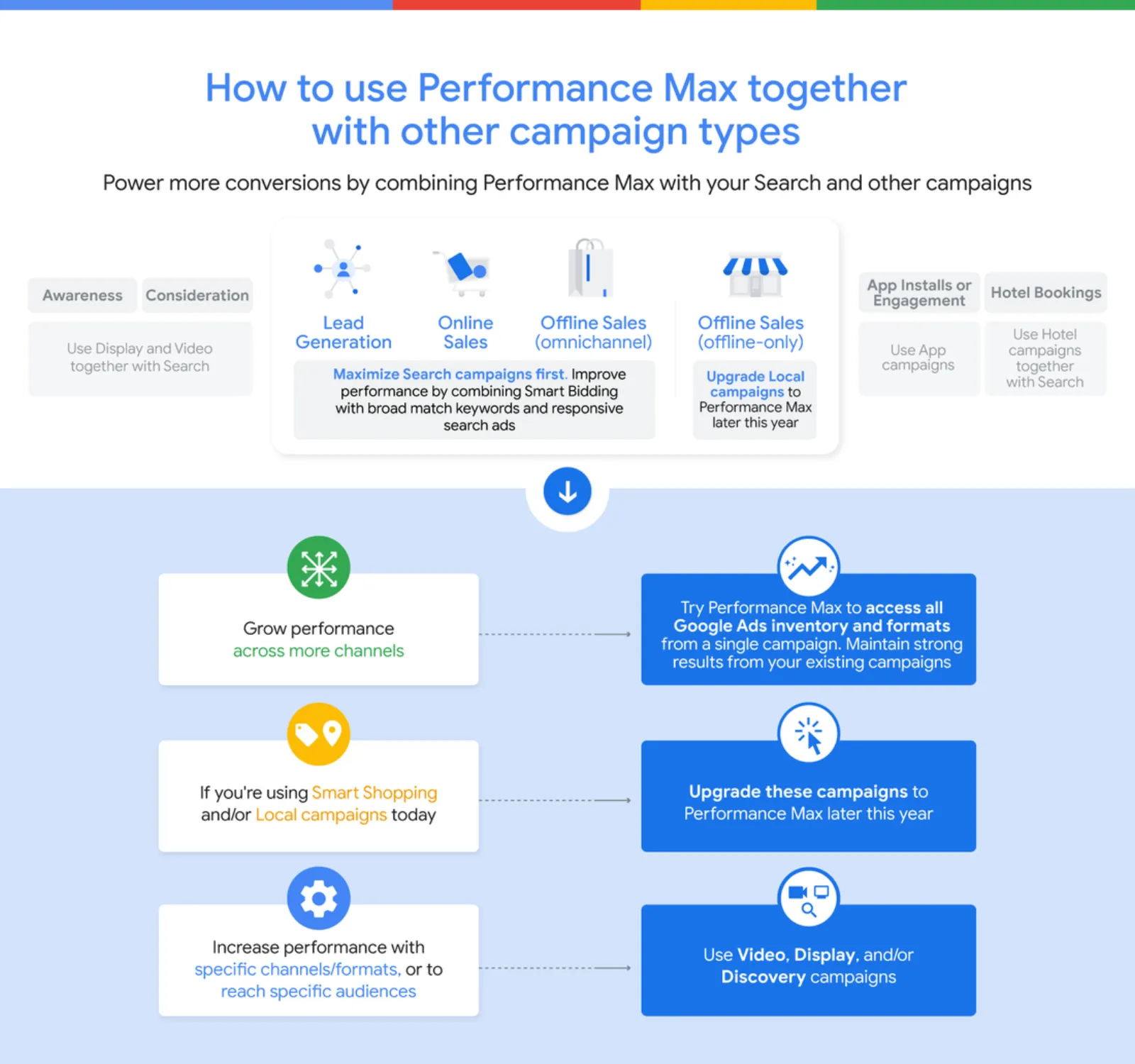
How Do I Self-upgrade?
You can upgrade your Smart Shopping campaigns yourself using the Upgrade Tool which can be accessed from the Google Ads Notifications, Recommendations or Campaigns page.
When your campaigns are self-upgraded with the tool or are upgraded automatically, information gained from your previous Smart Shopping campaigns passes to new Performance Max campaigns to maintain consistent performance.
 LIVE
Live every Tuesday at 2pm UK. Bring your marketing questions.
Get your Google, local SEO and AI questions answered live.
Your campaign settings such as conversion goals, budget, creative assets, and bid strategy will also be automatically transferred to Performance Max.
Consider The Best Practices To Easily Upgrade & Get Started With Performance Max:
- Add more creative assets once you upgrade your Smart Shopping campaigns. Providing as many titles, descriptions, images, and videos as possible help you access additional inventory and formats. Uploading your videos is especially important for achieving solid results on YouTube. With video ad creation now available in Google Ads, anyone can create a high-quality video ad in minutes and then add it to your campaigns – Performance Max included.
- Visit the Insights page to better understand your campaign performance and find new tools to improve results. For example, you can quickly identify potential campaign setup issues using diagnostic statistics or look at performance shifts to see what factors have led to changes in your campaign’s performance.
What Happens To Previous Smart Shopping Campaigns?
After upgrading to Performance Max, your previous Smart Shopping campaigns will be set to the “Removed” status and you won’t be able to modify or reactivate these campaigns.
However, you can still access your past data from the Campaigns page or the Google Ads overview page. Also, you will no longer be able to create new Smart Shopping campaigns. Find more details about the upgrade process in the Help Center.
Take Advantage Of New Performance Max Features
Once you upgrade, you’ll be able to take advantage of the new inventory, formats, and insights available in Performance Max to help you achieve better results.
For example, newly launched video formats allow you to take advantage of the product feed and display product images front and centre to capture the attention of viewers across YouTube on short films and in-stream and in-stream videos.
Now, you can also edit list groups in bulk in Performance Max and review click engagement reports to find opportunities to drive more clicks. Upgrade to Performance Max as soon as possible to make sure you’re in top shape for the upcoming holiday season.

Written by Uzair Kharawala
Partner at SF Digital Studios, a Google Premier Partner agency. Uzair has been helping businesses grow with Google Ads since 2002 and teaches it every week on YouTube.
Get our best Google Ads tips by email
New articles and videos, straight to your inbox. Unsubscribe any time.