
As a PPC marketer, you know your paid search campaign won’t run effectively if you don’t have a versatile mix of hyper-targeted keywords. But negative keywords are just as critical, as they enable an advertiser to polish their ad targeting by stopping ads from reaching people who aren’t interested in your service or product.
As a result, this allows marketers to save their money by investing their advertising budget in ROI-generating keywords. In this blog post, we’ll walk you through the fastest way to add negative keywords from thousands of search terms.
How To Add Negative Keywords Quickly
The fastest way to run Google Ads, full stop, is through Google Ads Editor. If you want to save time, money and interface hassle, download Google Ads Editor – it’s free to work on it on your desktop and then upload it to your Google Ads.
That’s the fastest way, by far. If a search term gets lots of clicks but no conversions, remove it. It all depends on what your campaign goals are. If your goal is to get more clicks to your landing page or for top-of-the-funnel traffic, this doesn’t matter. It’s irrelevant.
You just want more clicks to your page. For instance, you might have an affiliate offer or something similar, so create your metrics and thresholds. That said, our metrics and thresholds may not work for you and yours may not work for ours.
In fact, each account is different. So, create those filters in terms of how you want to filter them out, take them off that spreadsheet, copy-and-paste them into the editor and upload from there.
Are Negative Keywords Dissimilar To Other Keywords?
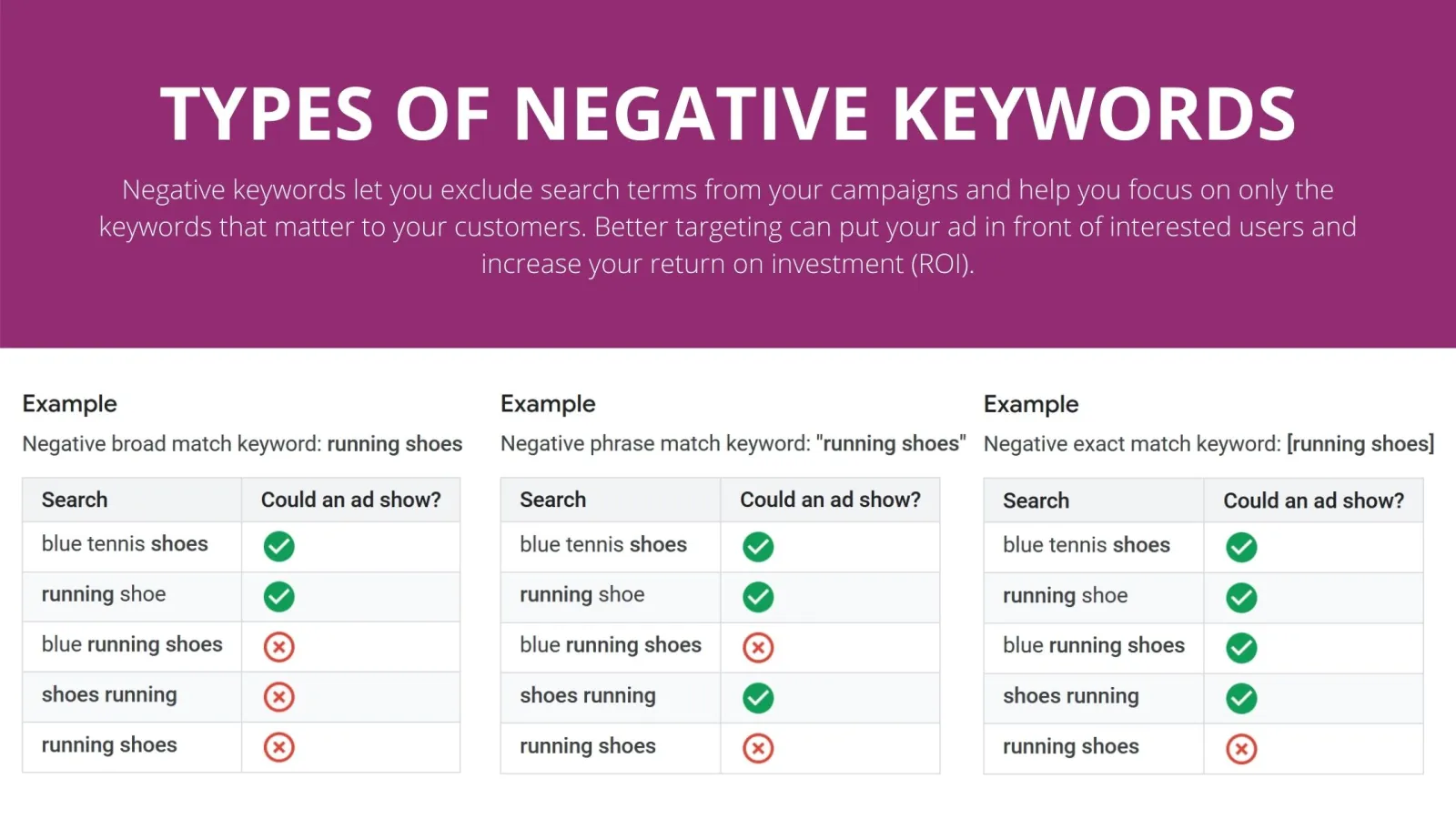
Yes, most definitely. The main distinction is whether your ads materialise in search results or not. When you allocate negative keywords, your campaign concentrates on search queries that you consider pertinent to your service or product and will yield encouraging results.
In other words, deciding on what you don’t want to target means your campaign is more targeted. Thus, there’s more chance of better ROI. If you need help adding negative keywords to your campaign, reach out to us now. We’d love to help.

Written by Uzair Kharawala
Founder of SF Digital Studios, a Google Premier Partner agency. Uzair has been helping businesses grow with Google Ads since 2002 and teaches it every week on YouTube.
Get our best Google Ads tips by email
New articles and videos, straight to your inbox. Unsubscribe any time.