
You switch on a Google display campaign. By Friday it has had 4,000 impressions and 60 clicks, and the phone has not rung once.
So are Google display ads worth it for a local business? Sometimes, yes.

Get Found, Get Chosen, Get Your Time Back
A free one-day marketing seminar in Milton Keynes · 10 November 2026
But not in the way Google's setup screens suggest, and not as the first thing you spend on.
Get your free Marketing Action PlanNot sure where to start? Answer a few questions and get your plan in about a minute. No email needed.
Get my plan →This guide shows where a display budget really goes. It covers when display pays its way and what it costs in the UK. It also shows how to set it up so it can't leak.
It also gives you three clear signs that it is time to switch it off.
Google display ads are worth it for a local business when they show to people who already know you, mainly past website visitors, inside your service area. They're rarely worth it for finding brand-new customers on a small budget. Run search first, then add display for remarketing once your site gets steady traffic.
That's the short answer. The rest of this post explains why, and how to tell which side of the line your own campaign sits on.
What Are Google Display Ads?
Display ads are the picture and banner ads you see on websites, inside apps, on YouTube and in Gmail. Google sells the space, and you pay when someone sees or clicks your ad.
As of October 2026, Google's help page on the Display Network says display campaigns can reach people across 35 million websites and apps. That is the selling point.
It's also the problem.
Search ads work differently. They wait to be asked. Someone types "emergency plumber Luton" and your ad appears. They asked for you. That's the whole difference.
Display ads interrupt people who weren't looking. They're reading the news, checking the weather or playing a puzzle game on the bus. Your ad turns up beside that.
Think of search as answering the phone and display as putting a flyer through a door. Both have a place. Both can work. One is far more likely to win the job today.
Where Does A Display Budget Actually Go?
Most of it goes where Google can show the most ads for the least money. Left on its default settings, that usually means mobile apps, small content sites and placements your customers never visit.
Google's system isn't trying to waste your money. It's following orders. It is trying to spend your budget and hit the goal you set.
If the goal is clicks, it finds the cheapest clicks it can.
The cheapest clicks are often accidental ones. Nobody meant to tap. A thumb slips in a game. A child taps a bright advert. A banner loads in the exact spot where the "close" button sat a second earlier, and someone who only wanted to read the football scores becomes your newest click.
You can see all of this in your own account. Most owners never look. Open the campaign, go to the placements report called "Where ads showed" and sort by cost. It takes two minutes.
We have seen the same pattern across SME accounts for years. The top of that list is often apps and sites you'd never choose.
We wrote a full guide to reading that report and cleaning it up. It is in the Keep Reading list at the end.
This post stays with the bigger question of whether you should be running display at all.
Why Do Display Ads Disappoint So Many Local Businesses?
They disappoint because they're built for reach, and a local business needs nearness. A plumber in Dunstable doesn't need 50,000 people to see an advert. They need 30 people within ten miles who have a leak this week.
There are four reasons it goes wrong so often.
The first is intent. It's the big one. Nobody seeing your display ad asked for your service. Some will need it one day, but most will not remember you when they do.
The second is location. Google's default location setting includes people "interested in" your area, not only people in it.
A flat in Leeds can see your Milton Keynes boiler offer because someone there once searched for Milton Keynes.
The third is the goal you give Google. Goals steer everything. Tell it to get clicks, and it'll find cheap clicks, wherever they are.
Tell it to get conversions without real conversion tracking, and it will learn from rubbish.
The fourth is time. Display learns slowly. Display needs a lot of impressions before it learns anything useful, and small budgets rarely give it enough.
A £10 a day campaign can spend for weeks without showing a clear result.
None of this means display is broken. It means display is a tool for a later stage, and most local businesses switch it on at the wrong stage.
Keep, Fix Or Switch Off: How To Judge A Display Campaign
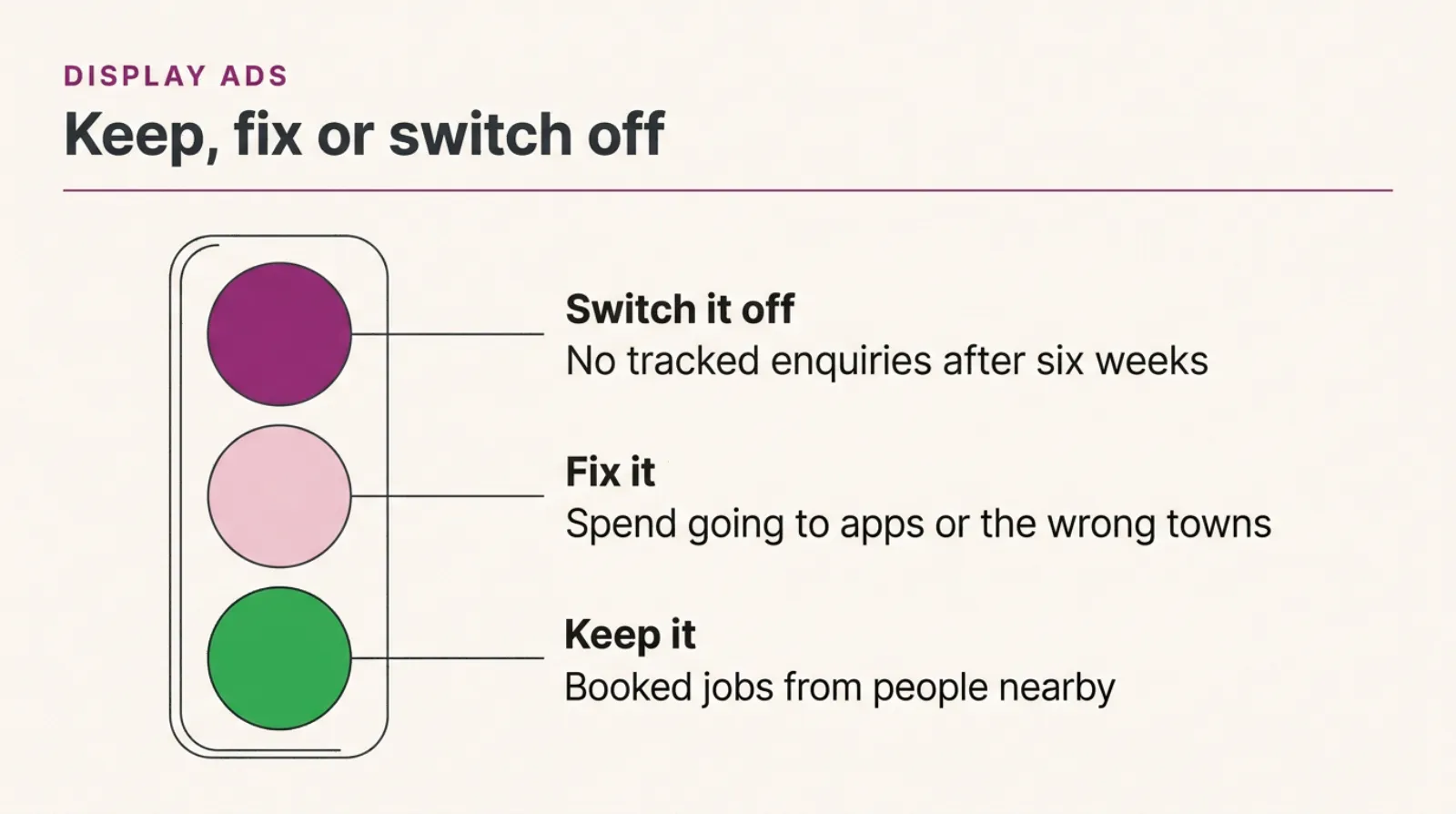
A traffic light check for a display campaign: keep it when it brings booked jobs from people in your area, fix it when the clicks come from apps or the wrong towns, and switch it off when there are no tracked enquiries after a fair test.
When Are Display Ads Worth Paying For?
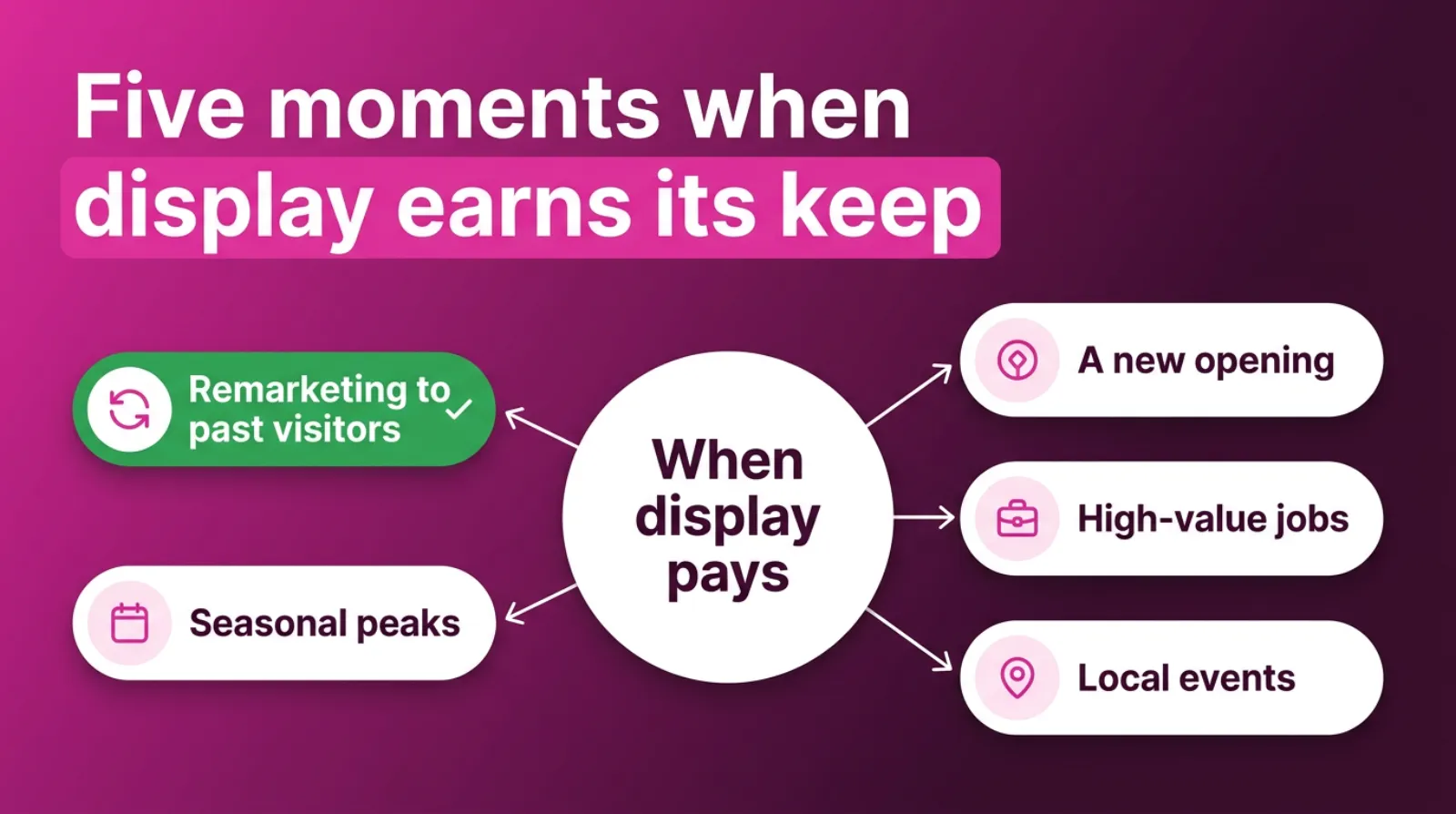
Display ads are worth paying for when the people seeing them already know you, or are about to need you soon. That covers remarketing, a new opening, high-value jobs, seasonal peaks and local events.
Here's what each one looks like in practice. Start with the first.
Remarketing to your own visitors. This is the best use of display for most local firms. Someone looked at your kitchen fitting page, didn't call, and now sees your ad for the next two weeks.
They know you, and you're keeping your name in front of them while they decide.
Google calls these "your data segments". As of October 2026, its help page says you can use them to reach people who have previously visited your website or app.
Google needs a minimum number of active people on a list before it will serve ads to it. A site with very little traffic may not qualify yet.
A new opening or a move. A new café, salon or showroom has a short window to tell the area it exists. A tight radius, a clear opening date and a photo of the new shopfront can earn display its keep for the few weeks when the area most needs to hear about you.
High-value jobs with long decisions. Think extensions, solar panels, wedding venues or private surgery. People research for weeks or months.
A steady, low-cost presence while they compare can pay for itself with one job.
Seasonal peaks. A garden centre in spring or a heating engineer in the first cold snap can use display to stay visible while demand is high. Then you turn it down when the season ends.
Local events and sponsorships. If you're at a show or sponsoring a local team, display aimed at that town can back it up for a short period.
Notice what's missing from that list. It matters. "Finding brand-new customers cheaply" is not on it. Search does that job better, because the customer tells you what they want first.
Five Moments When Display Earns Its Keep
How Much Do Google Display Ads Cost In The UK?
Display clicks are cheap, often well under £1. That sounds great. Whito's UK pricing guide, updated July 2026, puts the average display click at about £0.48, against £1.95 for search. It calls its own figures indicative, so treat them as a rough guide rather than a fact about your market.
Cheap clicks are not the same as cheap customers. That's the trap. Clicks don't pay wages.
A search click from someone typing "boiler repair near me" might cost £4. A display click might cost 40p.
But if one in ten search clicks becomes an enquiry, that's £40 a lead. If one in 300 display clicks does, that's £120 a lead. Those numbers are illustrative, not a promise either way.
Judge display on cost per enquiry, never on cost per click. If you can't measure enquiries, you can't judge display at all.
You can also pay for display by impressions, which Google counts in thousands. That suits awareness campaigns, but it makes the "did it work?" question even harder for a small business to answer.
For a local business testing remarketing, £5 to £10 a day is usually enough. Small lists need small budgets. Lists are small, so the campaign cannot spend much more without showing the same ad to the same people too often.
Should A Local Business Run Search Or Display First?
Run search first. Every time. Search catches people who are asking for your service right now, so it turns budget into enquiries fastest. Add display remarketing once search is sending steady traffic to your site.
Here's how the three options compare for a typical local service business.
| Search ads | Display, new audiences | Display remarketing | |
|---|---|---|---|
| Who sees it | People searching for your service | People browsing sites and apps | People who visited your site |
| How ready they are | Ready to buy now | Mostly not looking | Already know you |
| Typical click cost | Higher | Lowest | Low |
| What to judge it on | Cost per enquiry | Cost per enquiry, after a long test | Cost per enquiry and return visits |
| Best budget to start | Most of it | None, or a small test later | £5 to £10 a day |
| Run it when | From day one | Search is working and you want reach | Your site has steady traffic |
The middle column is where most local budgets get burned. It's not useless, but it is the hardest one to make pay on a small spend.
If your total budget is under £30 a day, we'd usually put it all into search and a brand campaign. Display can wait until search is sending enough visitors to remarket to.
Are Display Ads Better Than Facebook Ads For A Local Business?
Neither is better across the board. Facebook and Instagram ads usually target local people more precisely by age, interests and area. Google display remarketing is often stronger for following up people who've already visited your website.
Both are interruption advertising. Nobody opened Facebook or a news site looking for a plumber. So both suffer from the same intent problem as display.
The difference is in the audience you can build. Meta knows a lot about who its users are and where they live.
That makes it easier to reach, say, homeowners within ten miles of Leighton Buzzard.
Google's strength is what people do. A visitor who looked at your "emergency boiler repair" page has shown a real need.
Remarketing to that person on display can work very well.
If you only have budget for one, start with Google search. If you are choosing between Facebook ads and display for reaching new local people, Facebook often gives a small business more control. If you want to follow up your own website visitors, display remarketing is a strong, cheap option.
Many local businesses end up using both, each for its own job. Search catches demand. Facebook builds local awareness. Display remarketing brings back the people who looked at your prices, picked up the phone to call you and then got distracted by the school run.
Whatever mix you choose, judge each one the same way. What did each enquiry cost, and how many became paying jobs? Those two numbers settle most arguments.
How Do You Set Up Display So It Doesn't Leak Money?
You stop display leaking with a handful of settings, most of them switched on by default in the wrong direction. Change them before the campaign spends a penny. Not after.
 LIVE
Live every Tuesday at 2pm UK. Bring your marketing questions.
Get your Google, local SEO and AI questions answered live.
- Set location to "Presence: people in or regularly in your targeted locations". This stops the "interested in" setting from showing your ads to people miles away.
- Draw a tight radius. Be strict here. Use the distance your team will actually travel, not the whole county.
- Start with remarketing only. Target your own website visitors and switch off the wider audiences until that works. Your list does the work.
- Turn off optimised targeting while you test. Google says it uses things like the keywords on your landing page to find new people. That widens your reach past your list.
- Exclude app categories in the content settings. Google no longer offers a one-click switch that blocks every app. So check the placements report each week and exclude the bad ones.
- Add account-level placement exclusions. As of October 2026, Google's help page lets you add up to 65,000 per account under Tools, then Content suitability, then Advanced settings.
- Set a frequency cap. Three or four views per person per day is plenty for a small remarketing list.
- Track real enquiries. Calls from the ads, calls from the website and form fills should all count as conversions before you judge anything.
Steps 1, 3 and 8 matter most. Get those right and display cannot do much damage, even if the rest isn't perfect.
Here's a tip from almost 15 years of running Google Ads for small businesses. Put your exclusions at the account level, not the campaign level.
New campaigns pick them up straight away, and nobody has to remember to copy a list across.
What Should A Display Ad Say For A Local Business?
A good local display ad says who you are, where you work and what to do next. Your name, your town and one clear offer beat any clever slogan.
Most display campaigns now use responsive display ads. You upload a few images, a logo, some short headlines and a description. Google mixes them into the shapes each site needs.
That saves time. But it also means Google picks the combination, so every piece has to work on its own.
Here's what tends to work for local firms. None of it costs extra.
Use real photos of your team, your van or your work. Stock photos of smiling models look like every other advert, and people scroll past them. Your own van is more believable.
Put the town in a headline. Be specific. "Roof repairs across Milton Keynes" tells the right person this is for them.
It also tells the wrong person to ignore it, which saves you money.
Give one reason to act now. A free quote, a booking slot this week or a seasonal check. One offer, not three.
Keep the logo clean and readable at a small size. Display ads often appear tiny on a phone, so fine detail disappears.
Match the ad to the page it sends people to. If the ad says "free roof survey", the landing page should open with the free roof survey. Sending people to your home page wastes the click.
For remarketing, you can be more direct. These people already looked at your site. "Still thinking about that new boiler?" works because it's true.
How Do You Know If Display Is Working?
You know display is working when it brings tracked enquiries at a cost per enquiry you're happy with. Clicks, impressions and views do not tell you that on their own.
Start with your conversions column. Calls from ads, calls from the website and form fills should all be set up as conversions.
If they aren't, fix that before you judge anything.
Then look for these four signals. Start at the top.
Enquiries the campaign can claim. These are people who clicked a display ad and then called or filled in a form. This is the hardest evidence and the one that matters most.
View-through conversions, with care. Google also counts people who saw a display ad, didn't click, and converted later. Some of those were helped by the ad.
Many would have called you anyway. Treat them as a hint, not proof.
More people searching for your name. Remarketing often shows up as extra brand searches. Check your brand campaign or Search Console for a rise in searches for your business name.
Fewer wasted placements. After your clean-up, the "Where ads showed" report should be mostly sites your customers use. If it is not, the campaign is not ready to judge yet.
Compare cost per enquiry across campaigns, not clicks. Be honest about it. If display costs £120 an enquiry and search costs £40, the decision makes itself.
When Should You Switch Display Ads Off?
Switch display off when it hasn't produced tracked enquiries after a fair test, when most of the spend goes to apps or places you don't serve, or when your search campaign is short of budget. Any one of those is enough.
A fair test means enough time and enough spend for the system to learn. For a remarketing campaign that is usually four to six weeks.
For a new-audience campaign it's longer, and many small budgets never get there.
Here are the three signs in more detail. Check all three.
No tracked enquiries after four to six weeks. If conversion tracking is working and display has brought nothing, more time rarely fixes it. Turn it off and move the money to search.
The money goes to the wrong places. Open "Where ads showed". If apps and sites outside your area take most of the spend, fix the settings above and retest once.
If they creep back, switch it off.
Search is running out of budget. Look for "Limited by budget" on your search campaign. If search is turning people away while display spends freely, you've got the order wrong.
Switching display off isn't a failure. It's housekeeping. It is a decision to spend the same money where it works harder.
You can always switch it back on when your site has more visitors to remarket to.
What About Performance Max And Demand Gen?
Performance Max and Demand Gen can both show your ads on display placements, so the same risks apply. You just see less of where the money went. That makes it riskier, not safer.
Performance Max runs across search, display, YouTube, Gmail and Maps in one campaign. It can work well for local businesses with good conversion tracking.
Without it, a large share of spend can drift into display placements you'd never pick.
The good news is that your account-level placement exclusions apply. That helps a lot. Google's own help pages say Performance Max respects account-level and manager-level placement exclusions. So the list you build for display protects these campaigns too.
Demand Gen is built for YouTube, Gmail and Discover. It suits businesses with strong images or video and a story to tell.
For most local trades, it's a later-stage test, not a starting point.
If you are running either, check their placement reports as often as you'd check a display campaign. The settings hide the detail, but the money is the same money.
What Mistakes Waste The Most Display Budget?
The costliest display mistakes are almost all settings left on their defaults. Here are the six we see most often in local accounts.
- Running display from a search campaign by ticking "Include Google Display Network". This mixes two very different audiences in one budget, and display usually wins the spend.
- Choosing "Maximise clicks" as the goal. It tells Google to find the cheapest clicks, and the cheapest clicks are often accidental.
- Leaving location on "Presence or interest". Your ads show to people who have only searched about your area.
- Never opening the placements report. You cannot fix what you don't look at, and most owners never do.
- Judging the campaign in its first two weeks. Display needs time to learn, so early results swing wildly in both directions.
- Keeping display running while search is limited by budget. That's paying for the flyer while the phone line is engaged.
The first one is the easiest to miss. Open your search campaign settings and check the networks section today. If the display box is ticked, untick it and run display as its own campaign, if at all.
A Worked Example: One Roofer, Two Months
Picture a roofer in Milton Keynes. The business, the figures and the result here are illustrative, not a real client.
The roofer runs search ads at £25 a day. They also run a display campaign at £10 a day, set up by an online wizard. Display brings plenty of clicks and almost no calls.
The roofer is ready to give up on Google altogether.
In week one, they open "Where ads showed" and find that most of the display spend went to puzzle games, quiz apps and sites far outside Milton Keynes.
The location setting was on "Presence or interest", and the goal was clicks.
In week two, they switch display to remarketing only. They set location to presence, draw a 15-mile radius and exclude app categories.
They cap views at three a day and add call tracking to the website.
In weeks three to eight, the display campaign spends less, about £4 a day, because the remarketing list is small. Calls start to come from people who'd visited the roof repair page and then seen the ad a few days later.
The roofer moves the spare £6 a day into search, which had been "Limited by budget". Most of the extra jobs come from there.
That's the usual shape of a good result. It's rarely dramatic. Display gets smaller and smarter. Spend drops too. Search gets the money it was missing.
Frequently asked questions
Are display ads effective for small businesses?
They can be, mainly as remarketing to people who have already visited your website. As a way to find brand-new customers on a small budget, they're usually less effective than search ads.
How much should a local business spend on Google display ads?
For a remarketing test, £5 to £10 a day is usually enough. Small lists can't use much more without showing the same people the same ad too often.
Can I stop my display ads showing in mobile apps?
You can exclude app categories in the campaign's content settings and exclude individual apps from the placements report. Google no longer offers a single switch that blocks every app, so check the report weekly.
How long should I test display ads before switching them off?
Give a remarketing campaign four to six weeks with conversion tracking in place. If it brings no tracked enquiries in that time, switch it off and move the budget to search.
Do I need a website to run Google display ads?
You need somewhere for people to land, and for remarketing you need website visitors to build a list. A simple, fast website with a clear phone number is enough.
What is the difference between display ads and remarketing?
Display ads are the format, the image and banner ads across websites and apps. Remarketing is one way to target them, showing them only to people who have already visited your website.
Keep Reading
These posts go deeper on the parts of this one that most local businesses get stuck on.
- Where Half Your Display Budget Quietly Goes
- Do Google Ads Remarketing Campaigns Work For Local Businesses?
- The £10 A Day Google Ads Brand Campaign Every Local Business Should Run
- The Five-Mile Test: Is Your Local Advertising Reaching Anyone Who Can Actually Buy?
- Clicks Came In, Customers Did Not: Where A Google Ads Account Actually Breaks
We picked these because each one covers a next step: cleaning up placements, remarketing, brand search, local reach and tracking.
Sources
The Google facts in this post come from Google's own Ads help pages, which we checked on 25-10-2026. Settings and menus change, so check them before you rely on a step.
So, Should You Run Display This Month?
Start with one question. Is your search campaign already getting every enquiry it can? Look at the budget column first.
If it isn't, put your money there first. Display can wait. Search pays first.
If it is, and your site gets steady visitors, set up a small remarketing campaign with the eight settings above. Give it four to six weeks and judge it on enquiries, not clicks.
And if you'd like a second pair of eyes on your display spend, book a call. We'll open "Where ads showed" with you and tell you straight whether to keep it, fix it or switch it off.

Written by Uzair Kharawala
Partner at SF Digital Studios, a Google Premier Partner agency. Uzair has been helping businesses grow with Google Ads since 2002 and teaches it every week on YouTube.
Get our best Google Ads tips by email
New articles and videos, straight to your inbox. Unsubscribe any time.