

Open your Google Ads account and look at the conversions column. Some of those conversions did not happen the way you think they did.
They are estimates. Google could not observe them, so it estimated how many probably occurred and added them in. They sit in the same column as the real ones, with the same attribution and the same values, and there is no way to tell them apart.

Get Found, Get Chosen, Get Your Time Back
A free one-day marketing seminar in Milton Keynes · 10 November 2026
That is not a bug or a scandal. It is how consent mode works, and it has been working this way in the UK since March 2024.
Get your free Marketing Action PlanNot sure where to start? Answer a few questions and get your plan in about a minute. No email needed.
Get my plan →The problem is that almost nobody explained the consequence. The guidance available is about compliance: install a banner, send the four signals, tick the box. All true, and all the boring half.
The interesting half is what happens to your numbers afterwards. That is what this post is about.
What Consent Mode Actually Is
Consent mode is the messenger between your cookie banner and Google's tags.
When someone lands on your site and your banner appears, they either accept or decline. Consent mode takes that answer and tells Google's tags what they are allowed to do.
Version 2, which is the one that matters now, sends four signals.
Two are about storage. The signal called ad_storage covers advertising cookies. The signal called analytics_storage covers analytics cookies.
Two were added in version 2 and are the reason it is called v2. The signal called ad_user_data says whether you may send advertising data to Google at all. The signal called ad_personalization says whether that data can be used for personalised ads and remarketing.
All four have to be sent. If they are not, Google restricts what your account can do.
That is the whole mechanism. It is a set of yes or no answers passed from your banner to Google's tags on every single page view.
One clarification worth making, because it is widely misreported. The legal driver here is the Digital Markets Act, not GDPR directly. The EU designated Google as a gatekeeper in late 2023, which triggered a compliance deadline of 6 March 2024. Google's response was to require these signals from everyone advertising to EEA and UK users. GDPR governs your cookie banner. The DMA is why Google demands proof of what the banner said.
Why This Is Not Optional Any More
Consent mode v2 became a requirement in March 2024. For a while, enforcement was light, and plenty of accounts carried on without it.
That ended on 21 July 2025, when Google began enforcing it properly. Non-compliant accounts lost access to personalised advertising, to remarketing, and to parts of conversion tracking.
This is worth stating plainly because it is easy to assume it only applies to large advertisers. It does not. UK GDPR applies to any site collecting personal data from UK visitors, and Google's requirement applies to any advertiser serving UK or EEA users. A one-person business running fifteen pounds a day is inside the rules exactly as much as a national retailer.
There is a change coming as well. From 15 June 2026, Google Analytics moves to using consent mode within Google Ads as the single control for this data, rather than maintaining separate controls. If you have configured things in two places, that is worth checking rather than assuming it carries over.
The Four Signals, And Where To Check Yours
It is worth knowing what each signal actually permits, because the names are opaque and they do genuinely different jobs.
The signal ad_storage controls whether advertising cookies can be written. If denied, Google cannot recognise a returning visitor for advertising purposes.
The signal analytics_storage controls analytics cookies. Denied, GA4 cannot maintain a consistent visitor identity, so sessions fragment and returning visitors look like new ones.
The signal ad_user_data controls whether any advertising data may be sent to Google at all. This one is broader than cookies. If denied, the data does not go.
The signal ad_personalization controls whether that data can be used for personalised advertising and remarketing. Denied, your remarketing audiences stop filling up.
That last pair is what version 2 added, and they are the ones that break things when missing.
Checking your own implementation does not require a developer. Open your site in a Chrome incognito window, right-click, choose Inspect, and open the Console tab. Type `dataLayer` and press Enter. You are looking for consent entries showing all four signal names.
Do it twice. Once accepting the banner and once declining, because the whole point is that the values change. If you decline and the signals still read granted, your banner is decorative, and you are not compliant.
If `dataLayer` returns nothing at all, you are almost certainly not running consent mode, whatever your cookie banner provider's dashboard claims.
Google Tag Assistant will show the same thing more comfortably if the console feels unfamiliar. Either way, the check takes five minutes, and it is worth doing yourself rather than taking anyone's word for it.
Basic Or Advanced, And Why It Decides Everything
This is the choice that determines whether your numbers are recoverable, and most people make it without realising they made it.
Basic consent mode blocks Google's tags completely until someone consents. If a visitor declines, nothing is sent. No ping, no signal, nothing. That visitor is invisible to Google, and if they go on to enquire, that enquiry is invisible too.
Advanced consent mode loads the tags in a consent-aware state. If a visitor declines, cookies are not set, but a cookieless ping is still sent. It carries no information identifying that person. It tells Google that an anonymous something happened.
Those pings are the raw material for conversion modelling. Without them, there is nothing to model from.
So the practical difference is simple. Basic is the more conservative privacy position and leaves you with a hole in your data. Advanced recovers more of your measurement and relies on sending a signal for people who declined.
There is a live argument about advanced mode that you should know about rather than discover later. Academic work has found data actively transmitted through those cookieless pings that Google's own documentation described as passively collected browser metadata. No regulator has ruled either way. That makes the basic versus advanced choice a judgement about risk rather than a settled technical question, and if you operate somewhere heavily regulated it is worth a conversation with whoever handles your compliance.
How Conversion Modelling Fills The Gap
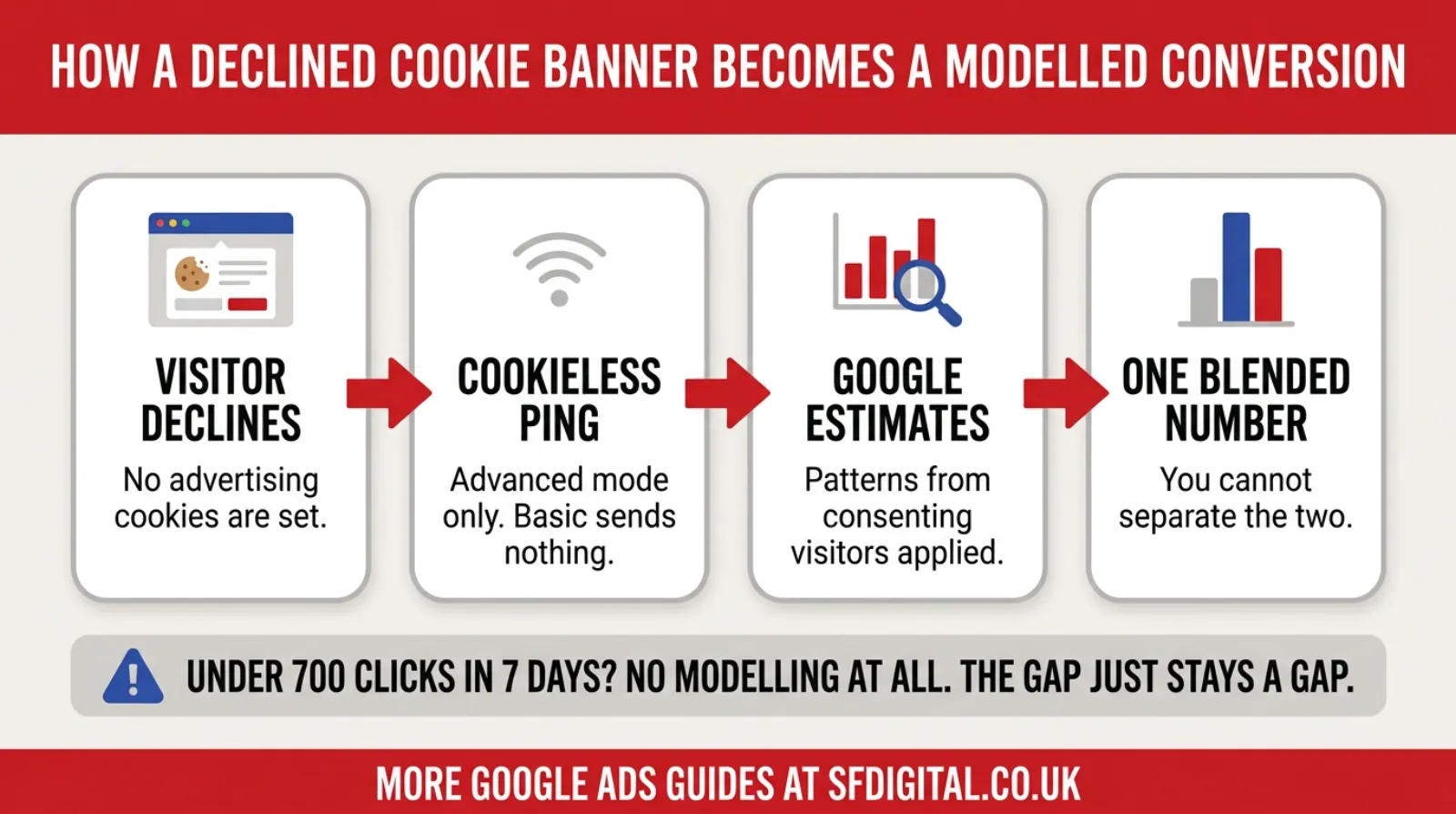
The mechanism is easier to follow than the name suggests, and the last step is the one that catches people out.
What Modelling Does, In Plain Terms
Google takes the conversions it can see. It groups them by shared characteristics: device, location, browser, time of day.
It works out the conversion rate for each of those groups.
Then it looks at the ad clicks it cannot observe, works out which groups they resemble, and applies the same rates. If a group of observed clicks converts at four per cent, and there are two hundred unobserved clicks that look like that group, Google estimates eight conversions and reports them.
Those eight go into your conversions column. They are indistinguishable from the ones that were actually recorded.
Google reports a median lift of around 17% in reported conversions once modelling activates, with some sectors seeing between 15 and 25 per cent. Practitioner audits circulating in 2026 put recovery rates across a wider range, roughly 15 to 40 per cent.
That spread is the honest picture. Modelling is a reasonable estimate, not a measurement, and its quality varies a lot by account.
The Threshold Nobody Mentions
Here is the part that changes the answer for most small UK businesses.
Conversion modelling does not apply automatically. Google requires roughly 700 ad clicks over a seven-day period, per country and domain grouping, plus a correctly implemented consent mode, before modelling kicks in.
Seven hundred clicks a week is around a hundred a day. Plenty of SME accounts never reach that.
If you are below the threshold, the gap is not modelled. It just stays a gap. Your declined visitors are simply missing from your reporting, and nothing fills them in.
That produces a genuinely unfair outcome that is worth naming. Smaller advertisers carry the full cost of compliance, the banner, the tag setup, the lost visibility, and receive none of the recovery that modelling provides. The bigger the account, the more of its data gets restored.
Practitioners also report that modelling quality is poor in accounts with fewer than thirty to fifty observed conversions per month per consent state, even where the click threshold is met. Below that, the model has too little to learn from, and the estimates get noisy.
So before you spend time worrying about modelling accuracy, work out whether you are getting any modelling at all.
How To Tell Where You Stand
You cannot separate modelled from observed conversions inside Google Ads. The interface offers no filter, no column, no segment. Google's documentation is explicit that they are reported together.
That sounds like a dead end. It is not, because you have a data source Google does not: you know how many real enquiries you received.
Start by counting actual enquiries for a full month. Emails, phone calls, form submissions, whatever counts as someone genuinely making contact. Use your inbox and your call log rather than any analytics tool.
Then compare that against the conversions Google Ads reports for the same period, remembering that Google reports conversions against the date of the click rather than the date of the enquiry, so allow for a few days of drift at each end.
A close match means your tracking is broadly reflecting reality.
Google Ads reporting substantially higher than your real enquiries points to either modelling filling in optimistically, or conversion actions counting things that are not enquiries, such as page views or scroll depth.
 LIVE
Live every Tuesday at 2pm UK. Bring your marketing questions.
Get your Google, local SEO and AI questions answered live.
Google Ads reporting substantially lower than your real enquiries usually means you are on basic consent mode, or you are below the modelling threshold, and declined visitors are simply missing.
Then check your click volume. Look at total clicks over a seven-day period for the UK. If you are meaningfully below seven hundred, assume you are getting no modelling and plan accordingly.
Finally, check your consent rate if your banner platform reports it. The proportion of visitors accepting cookies tells you how big the invisible portion of your audience is. A site with a ninety per cent acceptance rate has a small problem. A site at forty per cent has a very large one.
What To Actually Do About It
The instinct is to chase perfect measurement. That is not available any more, and pursuing it wastes money.
Get the four signals implemented properly. This is table stakes, and it is the one part that is genuinely non-negotiable. If you are not sending all four, you are losing account features on top of losing data.
Decide basic or advanced deliberately rather than by default. Most SMEs running Google Ads will be better served by advanced, because the measurement recovery is real and the account works better with it. Make it a decision you can explain, not a setting someone ticked.
Improve your consent rate, because it changes more than anything else on this list and almost nobody works on it. A clear, honest banner that explains what you collect gets far higher acceptance than a hostile one full of legalese. Moving acceptance from forty per cent to seventy per cent does more for your data than any tracking configuration.
Send better signals with the data you do have. Enhanced conversions and offline conversion imports let you tell Google what happened after the click using your own first-party records. When observation is restricted, first-party data is the strongest thing you have left.
And measure your business, not your dashboard. Track cost per real enquiry using your own records alongside what Google reports. If those two numbers move together, your reporting is useful. If they diverge, trust yours.
Your Consent Rate Is The Number To Work On
Almost every article on this subject treats your consent rate as weather. Something that happens to you. It is not. It is a design problem, and it is the one lever here that is entirely within your control.
The arithmetic is simple. If seventy per cent of visitors accept, thirty per cent of your audience needs estimating or is invisible. If forty per cent accept, sixty per cent is. No tracking configuration fixes a forty per cent acceptance rate, and no amount of modelling makes it good data.
Several things reliably move the number, and none of them requires a developer.
Say what you actually do in plain words. "We use cookies to see which pages people find useful and to measure our advertising" beats a wall of legal text. People decline what they do not understand, and dense legalese reads as something being hidden.
Make accept and reject look like equal choices. Beyond being an honest design, hostile patterns where reject is buried or greyed out increasingly attract regulatory attention. A visitor who feels tricked into accepting is not a good outcome, and in the UK the ICO has been explicit that consent must be as easy to refuse as to give.
Do not show the banner before the page has rendered. A banner that appears over a blank screen gets dismissed by whichever button is nearest. Let the page load, then ask.
Ask at a sensible moment on mobile. A full-screen banner on a small phone, before anyone has seen a word of your content, produces the worst acceptance rates of any pattern.
Keep it to one decision. Multi-layered preference centres with six toggles produce rejection by exhaustion. Offer a clear accept, a clear reject, and a link to detail for the small number who want it.
Then actually measure it. Most consent platforms report acceptance rate somewhere in their dashboard, and most people have never looked. Check it, change one thing, check again a fortnight later. It is the cheapest data recovery available to you.
What Changes On 15 June 2026
There is a change worth putting in the diary rather than discovering later.
From 15 June 2026, Google Analytics moves to using consent mode within Google Ads as the single control for this data, instead of the two products maintaining separate arrangements.
For most advertisers, this is a simplification, and nothing breaks. The risk sits with anyone who configured consent in one place and assumed the other was covered, or who has had different settings in Analytics and Ads without realising.
If your setup was done at different times by different people, or inherited from a previous agency, this is the moment to confirm the two agree. The check is the console check above: decline the banner, confirm all four signals report denied, and confirm your Analytics data responds the same way.
Doing that before the date is a twenty-minute job. Doing it afterwards, having spotted a gap in your reporting, is considerably less pleasant.
Five Mistakes That Make This Worse
These come up repeatedly, and each one is avoidable.
Assuming a cookie banner means consent mode is implemented. They are separate things. A banner shows a message. Consent mode passes the answer to Google's tags. Plenty of sites have the first without the second, and the platform dashboard often implies everything is fine.
Counting things that are not enquiries. If your conversion actions include page views, scroll depth or time on site, your conversions column was already unreliable before any of this. Consent mode did not cause that problem; it just made it harder to see.
Comparing Google Ads conversions with GA4 conversions and expecting them to match. They never will. Different attribution, different windows, different modelling. Comparing two estimates against each other tells you nothing. Compare both against your own enquiry records instead.
Switching to basic mode after reading about the cookieless ping debate, without noticing what it costs. That is a legitimate position to take, but take it knowingly. Basic means declined visitors are entirely invisible and no modelling can recover them.
Ignoring the click threshold. Reading about modelling accuracy is a waste of time if you are running eighty clicks a day and never qualify for it. Establish whether it applies to you before optimising for it.
What This Means For Bidding
There is a consequence people miss, and it matters more than the reporting question.
Smart Bidding learns from your conversion data. If that data is incomplete because declined visitors are invisible, the bidding is learning from a partial picture. It will optimise towards the kinds of people it can see, which are the people who accept cookies, and that is not necessarily the same group as the people who buy from you.
That is a subtle bias, and it is very hard to detect from inside the account.
It is also the strongest practical argument for advanced consent mode and for feeding in first-party data. Not because your reports look better, but because the bidding makes better decisions when it can see more of what actually happened.
The First-Party Data Answer
If observation keeps getting restricted, the durable answer is to stop relying on observation.
First-party data is information people give you directly. An email address on a form. A phone number. A booking reference. It is not inferred from a cookie, so consent rules affect it very differently, and you own it rather than borrowing it from a platform.
Two Google features let you feed it back, and both are within reach of a small business.
Enhanced conversions take the details someone submits on your form, hash them so the raw values never leave your site, and send that hashed version alongside the conversion. Google matches it against signed-in Google accounts and recovers conversions that cookie-based measurement missed. Setup is a Tag Manager job, and it is usually an afternoon rather than a project.
Offline conversion imports close the other gap. If someone enquires today and buys in six weeks, no browser-based tracking will ever connect those two events. Uploading the outcome from your own records does. This also lets you tell Google which enquiries were any good, rather than treating every form fill as equal, which improves the bidding rather than just the reporting.
Both share the same underlying advantage. They work from what you know rather than what a browser permits, so they degrade far more slowly as privacy rules tighten.
There is a prerequisite worth being honest about. Both need you to actually record outcomes somewhere retrievable. A spreadsheet is enough to start. A business that cannot say which enquiries turned into customers cannot feed that back, and no amount of tracking configuration substitutes for keeping that record.
That is the unglamorous version of future-proofing your measurement. Not a clever tag, a habit.
Frequently asked questions
What is consent mode v2?
Consent mode is the system that tells Google's tags what a visitor agreed to on your cookie banner. Version 2 added two signals to the original two, so there are now four: ad_storage, analytics_storage, ad_user_data and ad_personalization. It has been required for advertisers serving the UK and EEA since March 2024.
Is consent mode mandatory in the UK?
Yes, if you run Google Ads or GA4 for UK or EEA visitors. Google made it a requirement in March 2024 and began enforcing it on 21 July 2025, with non-compliant accounts losing personalised advertising, remarketing and parts of conversion tracking. The legal driver is the Digital Markets Act rather than GDPR directly, although GDPR still governs your banner.
How do I know if my Google Ads conversions are modelled?
You cannot tell from the interface. Modelled and observed conversions appear in the same column with the same attribution paths and values, and there is no filter or segment that separates them. The practical check is to compare what Google Ads reports against your own record of real enquiries for the same period.
Should I use basic or advanced consent mode?
Basic blocks Google tags entirely until someone consents, so visitors who decline send nothing at all. Advanced loads tags in a consent-aware state and sends cookieless pings when consent is declined, which is what makes modelling possible. Advanced recovers more measurement. Basic is the more conservative privacy position.
How accurate are modelled conversions?
They are estimates rather than counts. Google reports a median lift of around 17% once modelling activates, and practitioner audits put recovery across a wider 15 to 40 per cent range. Accuracy falls as the share of non-consenting traffic rises, and below roughly 700 ad clicks in seven days there is no modelling at all.
Why did my Google Ads conversions drop after I added a cookie banner?
Because visitors who decline stopped being measured. On basic consent mode, they send no data whatsoever. On advanced but below the modelling threshold, the gap is not filled either. The enquiries did not stop happening; they stopped being visible, which is why your own enquiry records matter more than they used to.
Do I need consent mode for a very small website?
Yes. UK GDPR applies to any site collecting personal data from UK visitors, and Google's requirement applies to any advertiser serving UK or EEA users regardless of budget. The uncomfortable part is that small accounts carry the full compliance cost while often falling below the threshold that would earn them the modelling benefit.
Keep Reading
If you are checking whether your tracking still reflects reality, start with these five.
- Google Ads Conversion Tracking 101
- How To Set Up Google Ads Enhanced Conversions With GTM (Google Tag Manager)
- Google Ads Offline Conversion Tracking
- Google Ads Qualified vs. Converted Leads: How To Maximise ROI With Google AI
- What Are The Benefits Of Linking Google Ads With Google Analytics (GA4)?
- Google Click Identifier (GCLID) - What Is GCLID and How To Use Google Click ID?
The first two are the setup. The middle two are how you feed Google better information when observation is restricted. The last two matter when you are trying to reconcile what your own records say against what the platform reports.
The Honest Summary
Your conversions column is no longer a count. It is a count plus an estimate, presented as one number, and you cannot pull them apart.
That is uncomfortable, but it is workable, provided you stop treating the dashboard as the truth and start treating it as a well-informed approximation.
The businesses that handle this well do three unglamorous things. They implement the four signals properly. They work on their consent rate, because every extra person who accepts is one fewer person who has to be estimated. And they keep their own record of real enquiries, so they always have something to check the platform against.
None of that requires a developer or a large budget. It requires deciding that your own numbers matter more than the ones on the screen.
Which, on reflection, was always true. Consent mode just made it obvious.

Written by Uzair Kharawala
Partner at SF Digital Studios, a Google Premier Partner agency. Uzair has been helping businesses grow with Google Ads since 2002 and teaches it every week on YouTube.
Get our best Google Ads tips by email
New articles and videos, straight to your inbox. Unsubscribe any time.