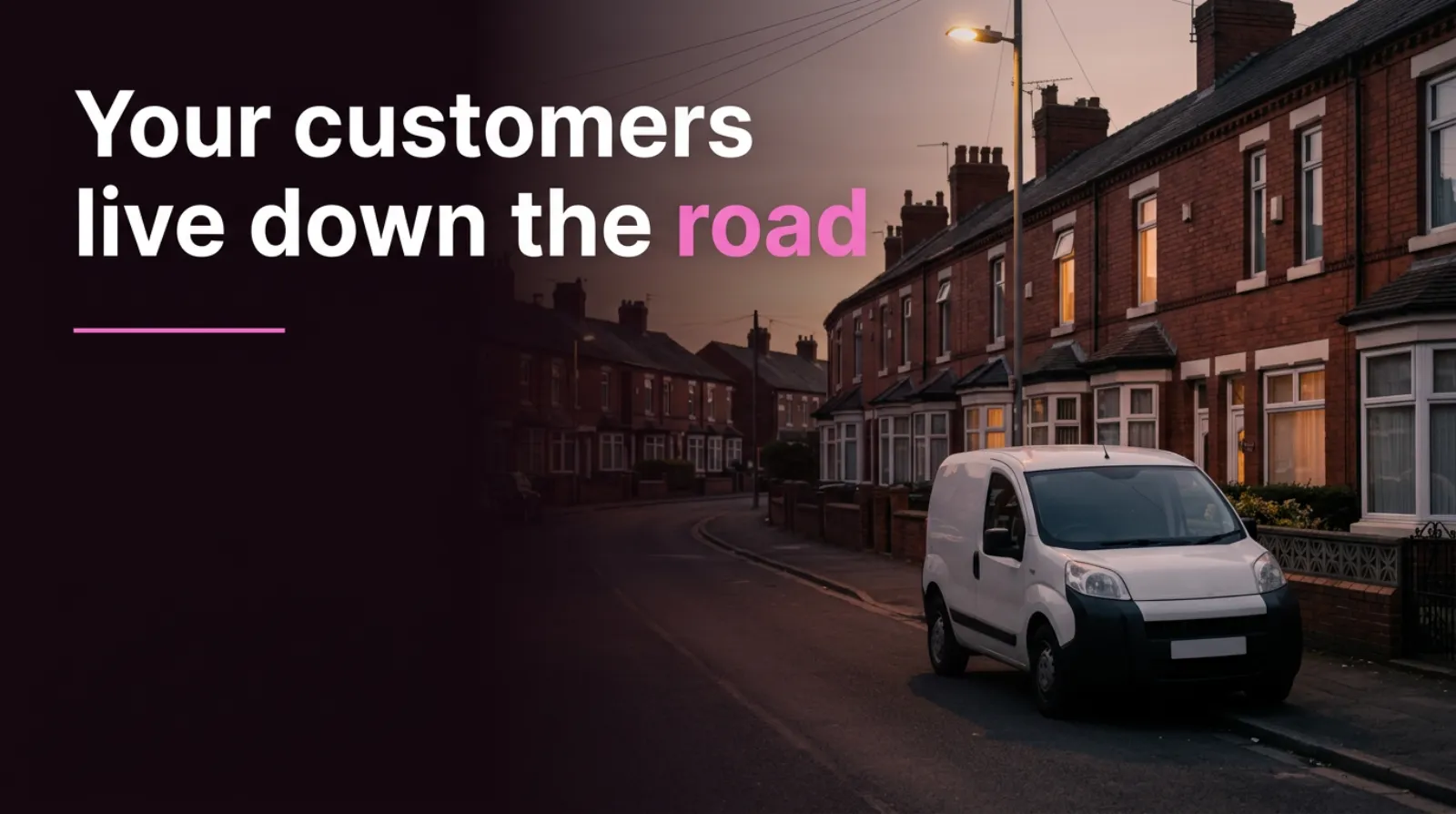
Most of your best customers live within a few miles of you. Yet plenty of local Facebook ads end up in front of people forty miles away.
Facebook ads for a local business work when you draw a tight ring around the streets your customers actually live on. Then you pick a goal like calls, messages or leads, and run plain ads with real photos and a local offer. Done that way, £5 to £15 a day can put you in front of most of your town every week.
That's the short answer. The rest of this post shows how to set the ring and what to spend. It also covers what to say, and how to tell if it's bringing in work.
Get Found, Get Chosen, Get Your Time Back
A free one-day marketing seminar in Milton Keynes · 13 January 2027
Get your free Marketing Action PlanNot sure where to start? Answer a few questions and get your plan in about a minute. No email needed.
Get my plan →Most local owners have tried Facebook ads at some point. Usually it is a boosted post on a quiet Tuesday.
A few likes come in, mostly from people who'll never buy anything, and the owner decides Facebook "doesn't work for us" and gives up on it.
It does work. It just works differently for a business whose customers are down the road.
A national brand wants as many people as possible. You don't. You want the right few thousand, again and again.
A quick note on where this comes from. SF Digital Studios looks after Google Ads, websites and local marketing for small firms.
Most of them sit around Leighton Buzzard, Milton Keynes and the towns between.
The facts below come from Meta's own help pages and Ofcom. Where something is our view rather than a fact, we say so.
What Are Facebook Ads For A Local Business?
Facebook ads for a local business are paid posts that Meta shows only to people who live in, or spend time in, the area you choose. You set the area, the budget and the goal. Meta then shows the ad on Facebook, Instagram and Messenger to people inside that area, and you pay for that reach. You can switch it off any day.
That is the whole idea. You're renting a spot in your neighbours' feeds.
The ads look like normal posts. They carry a small "Sponsored" label and a button, such as Call now, Send message or Get quote.
There are two ways to make one. You can press Boost on a post you've already shared, or you can build a proper campaign in Meta Ads Manager.
For most local firms, only one of those is worth the money.
They aren't the same thing. And we will come back to that, because it's where most local owners go wrong.
Here is what a local ad lets you choose.
- Where. A town, a postcode or a pin dropped on the map with a radius around it.
- Who. Usually everyone in that area. For a local firm, the area does most of the targeting.
- What you want. Calls, messages, website visits, leads or simple reach.
- How much. A daily budget or a total for the whole run.
- How long. A week, a month or until you turn it off.
Why Do Facebook Ads Work When Your Customers Live Nearby?
They work because nearly all your customers are on Facebook. And most of them aren't searching for you yet.
Google catches people who already know they need you. Facebook reaches them before that moment, while they scroll.
Here is the number that matters.
As of December 2025, Ofcom's report on how the UK goes online found that 93% of UK adults online use Facebook or Messenger. Only YouTube reaches more people.
That's your town. All of it.
The parents at the school gate are on there, and so are the retired couple on the corner and the family who moved in last spring.
Now think about how people choose a local firm. Most people do not search for a local firm until something breaks, a date gets close or a neighbour mentions a name over the fence.
Then they pick a name they already know. It's usually the first one that comes to mind.
Facebook is how they get to know that name.
It happens slowly, over weeks. Someone sees your van in three ads over a month, then sees it parked on their street on a Saturday morning. The name starts to feel familiar. That's the point.
When the boiler goes, your name is the one they remember.
For a local business, Facebook is less about the click today and more about being the obvious name next month. That changes how you set it up and how you judge it.
There is a second reason. Local ads are cheap, because the area is small and you are not bidding against national brands for every person.
A few pounds a day goes a long way when the ring is tight.
And there's a third reason. A local ad can say things a national ad never could.
"We're on the High Street, next to the bakery" is a strong line. Nobody forty miles away cares.
Your neighbours do care.
Where Should Your Ring Sit? The Local Facebook Ads Map
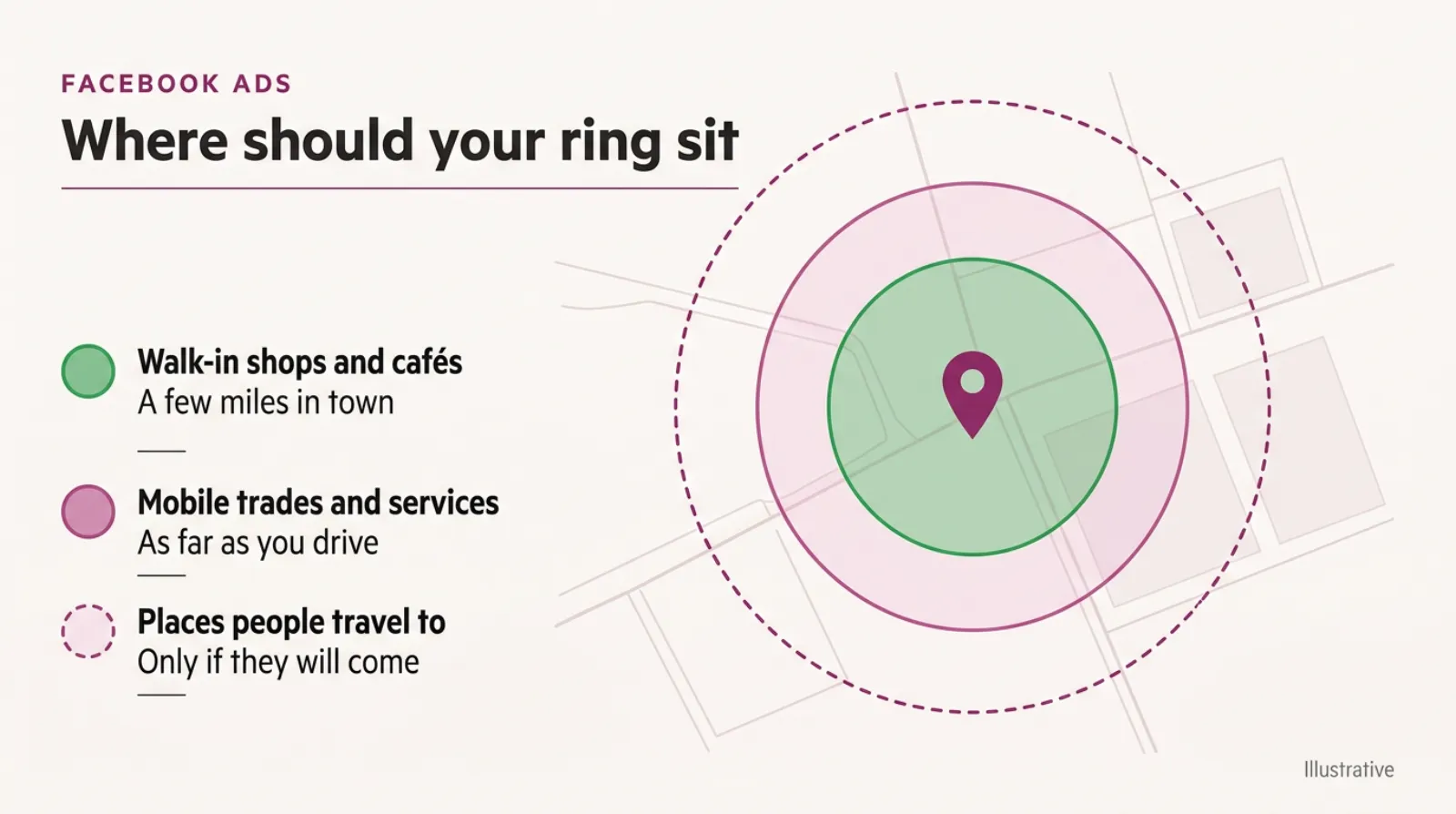
The ring depends on how far your customers will come, or how far you will go to them. A café's ring is small.
A roofer's is much wider. Get this one setting right and half the waste disappears.
How Do You Target People Who Live Near Your Business?
You target them in Ads Manager, at the ad set level, under Locations. Type a town or a postcode, or drop a pin on your address.
Then drag the radius to the distance your customers actually travel. Be honest about it.
Meta's help page says your ads go to people who spend time in that area. That means people who live there or have recently been there.
That is the core setting. Here's how to do it well.
Start from your address, not your town. Typing "Leighton Buzzard" gives Meta the whole town and its default radius. Dropping a pin on your shop lets you pick the exact distance.
Meta's help page on choosing locations, checked on 13 November 2026, says the minimum and maximum radius vary by location type. So try your number on the slider and see what it allows.
Use postcodes for odd shapes. Many service areas are not circles. Maybe you cover three villages to the north but never cross the motorway.
Meta lets you add postcodes, up to 50,000 of them, and leave others out.
There's one catch. The same page says you can't add a radius to a postcode. The ad covers the whole postcode area, so check what it includes.
Exclude where you do not go. If your ring crosses into a town you never work in, exclude that town. It's a two-click job that stops you paying for people you would turn away.
Untick the box that widens your area. When you choose a city or region, Meta may tick a box called "Reach more people likely to respond to your ads".
Its help page says this finds people interested in travelling to that place or buying there. For a plumber or a hair salon, untick it.
Do not stack interests on top of a small ring. This is our view, but we hold it firmly.
In a small area, adding interests like "home improvement" or "pets" shrinks your audience to a few hundred people. The ad then struggles to spend and costs more per person.
Let the ring do the work.
Your area is already the filter that matters, so every pound you spend goes on people who could walk into your shop or book you this week.
Accept that it is not perfect. Meta says plainly that location targeting cannot be fully accurate.
You'll get the odd message from someone outside your area. That is normal, and it is not a reason to panic or narrow things further.
How Small Can Your Area Be Before Facebook Stops Working?
It can be small, but not tiny. Look at the audience estimate on the right of Ads Manager.
If it drops to a few thousand people, Meta has very little room to find the ones most likely to act. Your costs go up, and the same faces see your ad over and over. Nobody wins.
Here is a simple way to think about it. Picture a market town of around 40,000 people.
That's plenty to work with.
A 3-mile ring around the centre takes in most of them, plus a few villages. That's a healthy local audience. Meta can work with it.
Now picture a farm shop with a 1-mile ring out in the countryside. That might only hold a few hundred adults.
The ad will reach them, but it'll reach the same few hundred all month.
Watch the number called frequency. It's simple. It shows how many times, on average, each person has seen your ad.
Over a month in a small area, a frequency of 4 to 8 is fine. People need to see a local name a few times.
Once it climbs past about 3 to 4 a week, people start scrolling past. In our view that is the moment to change the picture or widen the ring a little.
So the rule is simple. Start tight. Make the ring as tight as your real customer area, then check the audience number before you publish.
If it looks very small, widen it a mile at a time, not by ten.
Should You Boost A Post Or Use Ads Manager?
For most local firms, use Ads Manager. Boosting is quick and fine for getting a post seen.
But Meta's own help page says boosted posts offer fewer targeting and setup options. It also says campaign setup, budget settings and full results only live in Ads Manager.
The Boost button is tempting. We get it. It sits right under your post and takes thirty seconds. That's exactly why so many local firms never try anything else.
Here is how they compare.
| Boost a post | Ads Manager campaign | |
|---|---|---|
| Where you start | The Boost button under a post | Meta Ads Manager on a computer or the app |
| Goals you can pick | Messages, engagement, website visits and a few more | Calls, leads, sales, messages, traffic and more |
| Location control | Basic area and radius | Pins, postcodes, exclusions and the widening box |
| Who it tends to reach | People who like and comment | People more likely to take your chosen action |
| Results you can see | Simple reach and clicks | Cost per lead, per call and per message |
| Best for | Getting one good post seen | Bringing in enquiries week after week |
The biggest difference is the goal. A boost often ends up chasing likes and comments.
Meta then finds the people in your area who like and comment on everything. They're rarely the ones who book.
A campaign in Ads Manager can chase leads or calls instead.
Meta then looks for the people who tend to fill in forms or ring businesses. That is a very different crowd, and for a firm that needs bookings rather than applause, it's the only crowd worth paying to reach.
Boosting is not useless. If you've posted a great before-and-after photo, a small boost to your area gets it seen. Just don't make it your main way of finding work.
Which Campaign Goal Should A Local Business Pick?
Pick the goal that matches the action you want, because Meta takes it literally. If you want enquiries, choose Leads.
If you want people to ring, choose Leads with calls as the destination. If you only want to be seen, choose Awareness. Never pick Engagement and expect bookings.
Ads Manager calls these goals "objectives". There are six of them. For a local business, three of them do almost all the work.
- Leads. Best for trades, clinics and services. The ad can open a short form inside Facebook, or send people to your website or to Messenger.
- Awareness. Best for shops, cafés and anyone who needs people to know them. It shows the ad to as many people in your ring as often as you allow.
- Traffic. Best when a good page on your website does the selling, like a menu, a price list or a booking page.
Messages are worth a special mention. Many local customers would rather send a quick message than fill in a form or ring.
The Leads goal lets you send people into Messenger, Instagram Direct or WhatsApp instead.
If you choose that, make sure someone answers within the hour. A message left unread until the evening is a lead handed to your competitor.
A word on lead forms. Forms inside Facebook are easy to fill in, which is good and bad.
 LIVE
Live every Tuesday at 2pm UK. Bring your marketing questions.
Get your Google, local SEO and AI questions answered live.
You will get more of them. And some will be people who tapped by mistake.
Ads Manager also offers a "higher intent" form type. It adds a review step before someone can submit.
For a local trade, we'd switch it on. You'll get fewer leads, but more of them will answer the phone.
What Should A Local Facebook Ad Actually Say?
It should look local, sound local and give a reason to act now. Use a real photo of you, your van, your shop or your work.
Name the town or the street in the first line. Then make one clear offer with one button. Polished stock images make a local firm look like a national chain.
People stop scrolling for faces and places they know. Stock photos do not stop anyone.
A photo of your shop front on a street they walk down every day beats any designer's graphic. It tells them straight away that you are one of theirs. That's hard to fake.
So does a photo of you holding a finished job.
Here is a simple four-part ad that works for most local firms.
- A first line that names the place, such as "Dog grooming in Leighton Buzzard, five minutes from the station".
- One sentence on the problem you fix, written the way customers say it.
- One proof point, such as your Google rating and how many reviews you have.
- One offer and one button, such as "Book this week and get a free nail clip" with Book now.
Take a made-up example to see it work. A mobile dog groomer covers Leighton Buzzard and the villages around it.
Her ad says "Mobile dog grooming in Leighton Buzzard and the villages. We come to your door, so your dog stays calm. 4.9 on Google from 120 reviews. New customers get a free nail clip this month." That's four short lines, and every one of them earns its place.
The photo is her van outside a house on a real local street, with a freshly groomed spaniel in the doorway. Nothing in it would work in Leeds, and that is the point.
Make two or three versions. Change the photo, not just the words. Photos matter most. The picture is what stops the scroll, and the words only get read once someone has stopped. Meta will show the one that works best more often.
After two or three weeks you will know which picture your town likes.
Use video if you can. A ten-second clip on your phone, filmed in the van or behind the counter, often beats a still photo. It doesn't need music or captions to start, though captions help because most people scroll with the sound off.
Keep the offer simple. "10% off" is fine. "Free quote this week" is fine. "Book by Friday" is better, because it gives a reason to act now rather than later.
How Much Should A Local Business Spend On Facebook Ads?
Start with £5 to £15 a day, for at least four weeks, in one campaign. In a small ring that is enough to reach most of your area several times a month.
Judge it by the cost of each real enquiry against what a customer is worth to you, not by likes or clicks.
There's no fixed price. It moves. Meta runs an auction, so costs change with the season, your area and how many other firms want the same people around you that week.
Here is how we'd think about it. Say your ring holds 30,000 adults.
At £10 a day, a month costs about £300. That's often enough to put your ad in front of a good share of them several times.
Then do the sum that matters. It's simple. Suppose a new customer is worth £400 to you over a year.
If £300 brings in five real enquiries and two become customers, that is £800 of work from £300 of ads.
Those are illustration numbers, not a promise. Your own will be higher or lower. But that's the sum to run, every month.
Give it time. A new ad set goes through what Meta calls a learning phase, while it works out who responds.
In a small area that can take a couple of weeks. Changing everything every two days resets it. So leave it alone for at least a week between changes.
Do not split a small budget. Five campaigns at £2 a day each will all struggle. One campaign at £10 a day learns far faster.
Spend more in your busy season. A gardener can push harder in March, when lawns start growing and people notice the garden they've ignored all winter.
A heating engineer can push in September. The ring and the ads stay the same; only the budget moves.
Boost Versus A Real Campaign, Side By Side
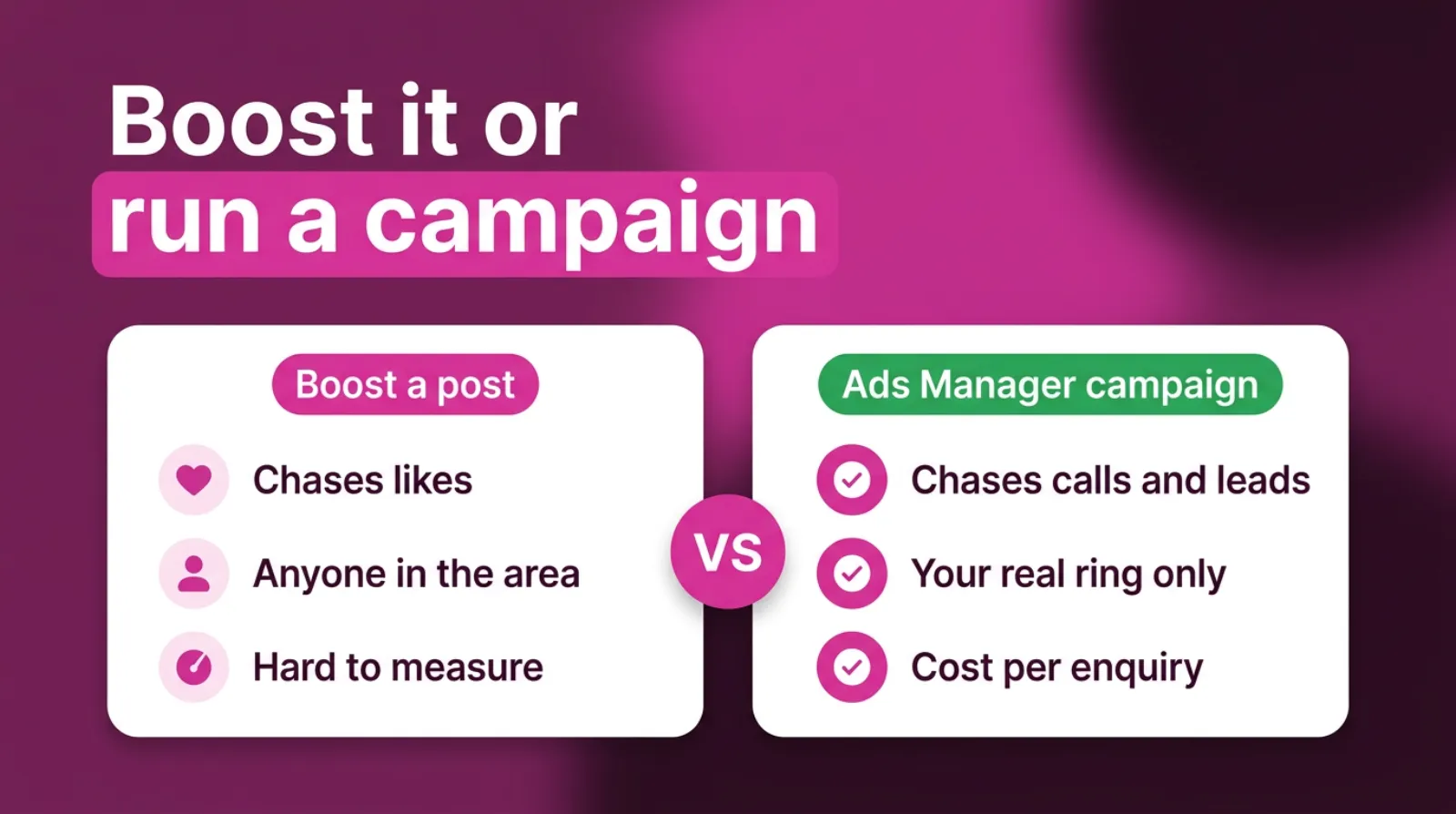
A side-by-side comparison of boosting a post, which chases likes from anyone, and running a local campaign in Ads Manager, which uses a tight ring, a leads goal, a real local photo and a clear offer, with the campaign marked as the better choice.
The setup takes an hour longer than pressing Boost. That hour is the difference between likes and phone calls.
Why Are My Facebook Ads Not Getting Leads?
Usually it is one of five things. It is the wrong goal, an area that's too wide, a generic ad, a weak offer or slow replies.
Check them in that order. Most local campaigns that "don't work" are boosted posts chasing likes across half the county.
They use a stock photo and give no reason to act.
Here's the checklist we'd run on any local campaign that's gone quiet.
- The goal. Is it set to Leads, with a form, calls or messages as the destination? If it says Engagement or Reach, Meta is doing exactly what you asked.
- The area. Open Locations. Is the widening box still ticked? Is the radius far bigger than where you work?
- The ad. Would a neighbour know it is you from the photo alone? If it could be any firm anywhere, change it.
- The offer. Is there a reason to get in touch this week rather than next year?
- The reply. How fast do you answer messages and form leads? If it is hours, you are losing the best ones.
There is a sixth that catches people out. If your ad sends people to a website, open that page on your own phone.
If it is slow, or the phone number isn't easy to tap, people leave before they ever reach you.
And there is a seventh. Look at the audience estimate. Check the number.
If you have stacked interests on a small ring, it may be too small to spend properly. Take the interests off and try again.
How Do I Know If My Facebook Ads Are Working?
Count real enquiries, not clicks. Ads Manager shows cost per lead or per message.
But the real test is how many of those turned into paid jobs, so track every one from first message to invoice. If paid work from the ads beats what you spent, it's working.
Facebook's own numbers are a useful starting point. Check them every week. But for a local firm whose customers often ring rather than click, they only tell half the story.
You'll see reach, frequency, clicks and cost per result. They tell you if the ad is being seen and if anyone's tapping it.
They do not tell you if anyone paid you. For that, you need your own simple record.
Here is the setup we'd suggest for a small firm. It takes ten minutes.
- Ask every new customer how they found you. Write it down every time, even if they say "I just knew the name".
- Use a separate number or form if you can. A tracking number on the ad, or a lead form only used for Facebook, makes counting easy.
- Keep a simple sheet. Date, name, source, quoted, booked, value. Fill it in weekly.
- Add the Meta pixel to your website. It is a small piece of code that tells Meta when someone fills in your form after seeing your ad.
Then, once a month, compare the two numbers. It takes five minutes. Put ad spend on one side and paid work from Facebook on the other.
Remember the "obvious name" effect too. Some people will see your ads for weeks, never tap, then search your name on Google and ring you.
They'll show up in your Google numbers, not Facebook's. That's why asking "how did you hear about us" matters so much.
Give it three months before you decide. One month is too short for a local firm, because many people see your name today and need you in six weeks.
When Are Facebook Ads The Wrong Choice?
Facebook ads are the wrong choice in three cases. The first is when people only look for you in an emergency. The others are an area too small to hold an audience, and enquiries you can't answer quickly.
In those cases, Google, your Google Business Profile or simple word of mouth will usually do more for less.
Think about the emergency trades first. Nobody scrolls Facebook while water is pouring through the ceiling and the kids are running round with buckets.
They search "emergency plumber near me" and ring the first good name. That's a Google job.
Now think about very rural firms. If your ring holds a few hundred people, you will show them the same ad until they are sick of it.
A leaflet drop or a local Facebook group post may reach them better.
Then think about capacity. It matters too. If you're booked solid for the next two months, ads just create a pile of enquiries that you'll have to turn away. And a customer you turn away rarely comes back.
Spend the money when you have room to take the work.
For most local firms, the answer is not Facebook or Google. It is both, doing different jobs.
Google catches people who are searching now. Facebook makes sure your name is the one they search for.
A Four-Week Plan For Your First Local Campaign
You don't need to get everything right on day one.
You need a sensible start, then a few small changes based on what your town tells you. Here is a simple plan for the first month.
- Week one, set it up. Create one campaign in Ads Manager with the Leads goal. Drop a pin on your address, set your real radius and untick the widening box. Make three ads with three different real photos and one offer. Set £10 a day.
- Week two, leave it alone. Answer every message fast. Speed wins local work. Ask every new customer how they found you. Don't change the ads.
- Week three, look at the ads. Pause the weakest photo and add a new one. Check the frequency. If it is high, widen the ring by a mile.
- Week four, do the sums. Count the enquiries and the paid jobs. Be strict. Compare them with the spend. Decide whether to keep going, change the offer or move the money to your busy season.
After that, repeat the monthly check. Most local campaigns get better in months two and three, as you learn which photos and offers your area responds to.
Frequently asked questions
Do Facebook ads work for a small local business?
Yes, when they're set up for a local area. Use a tight radius, the Leads goal and real local photos.
That gives a small firm a cheap way to stay in front of the people nearby. They work best alongside Google, not instead of it.
How far should I set my radius on Facebook ads?
Set it to the distance your customers actually travel, or you actually drive. For a shop or café in a town, that is often 2 to 5 miles.
For a mobile trade it might be 10 to 15 miles. Check the audience estimate before you publish.
Is it better to boost a post or create an ad?
For enquiries, create an ad in Ads Manager. Boosting is fine for getting one good post seen.
But Meta's help page says campaign setup, budget settings and full results are only in Ads Manager. That's also where you can set a Leads goal.
Can I target a postcode with Facebook ads?
Yes. Meta lets you add postcodes in the Locations setting and exclude others.
You cannot add a radius to a postcode. So the ad covers the whole postcode area. For odd-shaped service areas, a mix of postcodes works better than one circle.
Why am I getting Facebook leads from outside my area?
Meta says location targeting can't be fully accurate, so a few will slip through. Check that the "Reach more people likely to respond to your ads" box is unticked.
Then name your town in the ad, so people far away can see it isn't for them.
How long should I run Facebook ads before judging them?
Give a local campaign at least four weeks before changing much. Then give it three months before deciding if it pays.
Meta needs time to learn who responds. Many local customers also see your name now and only need you weeks later.
Keep Reading
If you're weighing up Facebook against your other options, these posts pick up where this one stops.
- What Happens When You Stop Boosting Posts and Start Running Actual Ad Campaigns?
- Google Ads or Facebook Ads
- How To Grow A Local Business That Only Serves One Town
- How Do I Promote My Business When I Have No Budget And A Van?
- What Remarketing Costs A Small Business, And When To Stop
- How To Build A Complete Ad Ecosystem: Facebook, TikTok & Google Working Together
We picked these because they cover the next questions owners ask us: boosting, Google versus Facebook and growing in one town.
Sources
The facts in this post come from Meta's own help pages and Ofcom, checked on 13 November 2026.
- How to choose locations for your ad | Meta Business Help Centre
- The difference between boosted posts and Meta ads | Meta Business Help Centre
- From apps to AI search: how the UK goes online in 2025
So, Do Your Neighbours Know Your Name Yet?
You do not need a big budget to make Facebook work for a local business. You need a tight ring, the right goal and ads that look like they came from your street.
Set the radius to where your customers live. Choose the Leads goal, with calls or messages as the destination, not likes.
Use real photos and one clear offer. Answer every message fast.
Then count the paid jobs, not the clicks. Give it three months.
Most local owners find a steady trickle of work from people who'd seen their name for weeks before they needed them.
If you'd like a hand setting it up, or tying it in with your Google Ads and your website, book a call. We'll look at your area and tell you honestly whether Facebook is worth it for you.

Written by Uzair Kharawala
Partner at SF Digital Studios, a Google Premier Partner agency. Uzair has been helping businesses grow with Google Ads for almost 15 years and teaches it every week on YouTube.
Get our best Google Ads tips by email
New articles and videos, straight to your inbox. Unsubscribe any time.