
Starting with Google Ads can feel overwhelming. There are keywords, budgets, bidding, and ad groups, it can seem like a whole new language. But the truth is, once you get the basics down, it’s not that complicated. In this post, I’ll walk you through how to launch your first Google Ads campaign like a pro, without needing a marketing degree.
This guide is for beginners, small business owners, freelancers, or anyone who wants to dip their toes into digital advertising. So grab a cup of coffee, and let’s dive in.

Get Found, Get Chosen, Get Your Time Back
A free one-day marketing seminar in Milton Keynes · 10 November 2026
Why Google Ads?
Before we get into the how, let’s talk about the why.
Get your free Marketing Action PlanNot sure where to start? Answer a few questions and get your plan in about a minute. No email needed.
Get my plan →Google Ads (formerly Google AdWords) is one of the most powerful online advertising platforms. Why? Because it shows your ads to people who are already searching for what you offer. That’s not just advertising, that’s demand capture.
Think of it this way: If someone searches “emergency plumber near me” at 2 AM, and your ad shows up, they’re not just browsing; they need help now. That’s the kind of traffic you want.
Step 1: Get Set Up with Google Ads
First things first, you need a Google Ads account. Go to ads.google.com and click “Start now.” You’ll need a Google account to sign in.
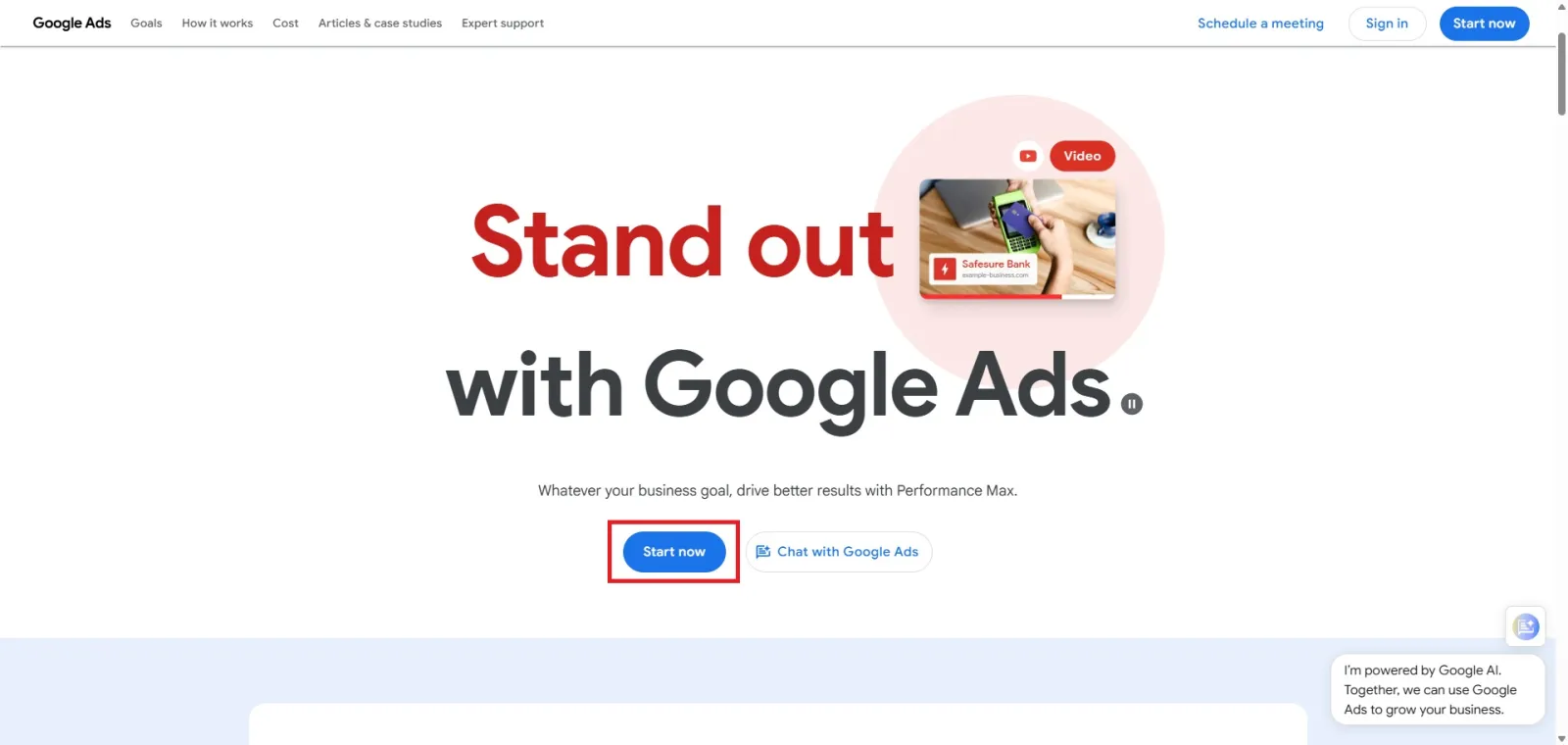
Follow the prompts. Google will try to walk you through a simplified version of campaign creation called “Smart Mode.” But we’re aiming for more control, so you’ll want to switch to “Expert Mode.” Don’t worry, it’s not as scary as it sounds.
Once you’re in, you’ll land on your main dashboard. This is where all your campaigns will live.
Step 2: Define Your Campaign Goal
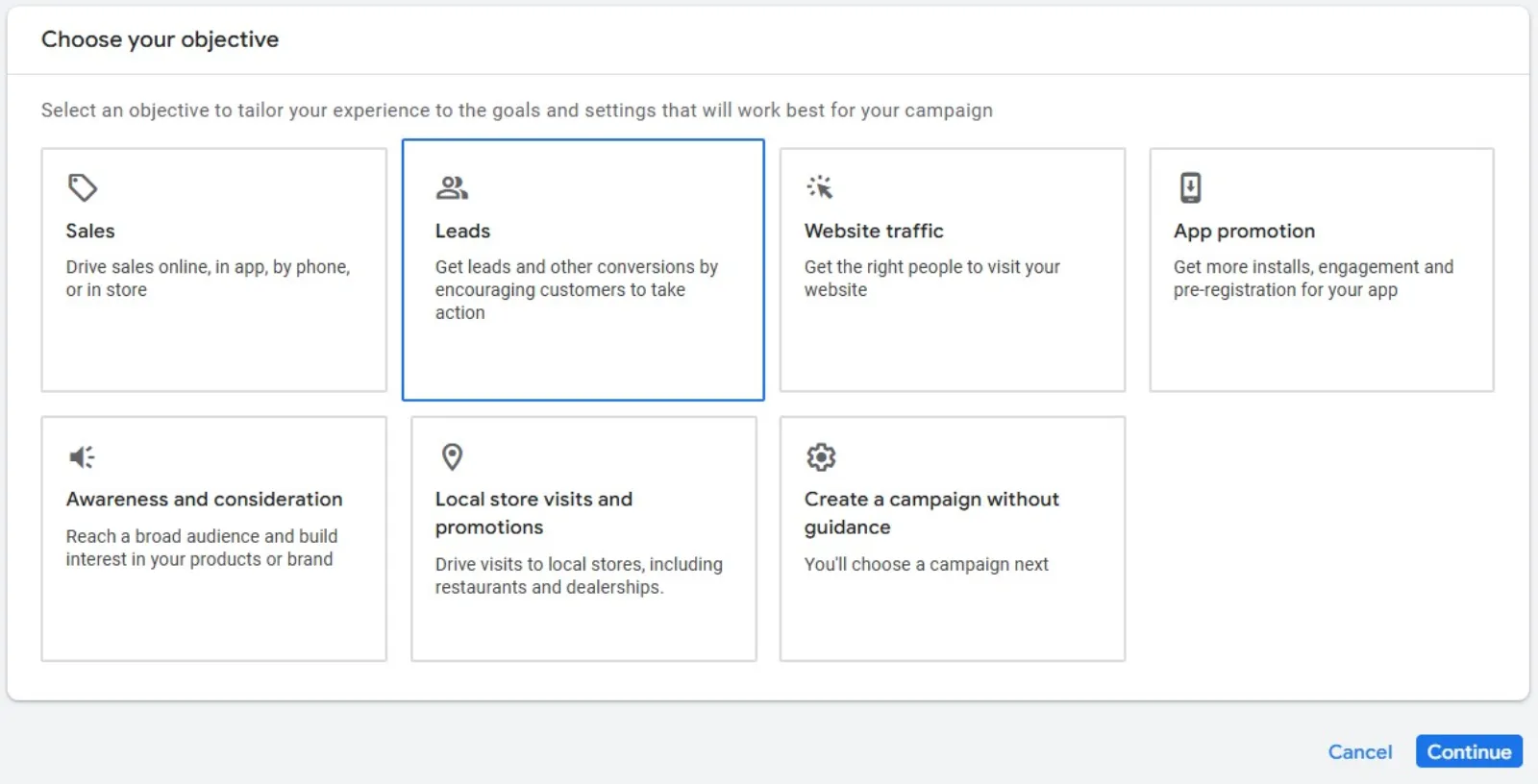
Google Ads campaigns are organised by goal. For your first campaign, pick one of the following goals:
- Sales – great for e-commerce or lead-based services.
- Leads – ideal if you’re collecting form submissions or calls.
- Website traffic – good if your main goal is getting visitors to your site.
You can also choose “Create a campaign without a goal” if you want full customisation.
Your choice will guide Google’s recommendations, but it won’t lock you in.
Step 3: Choose Your Campaign Type
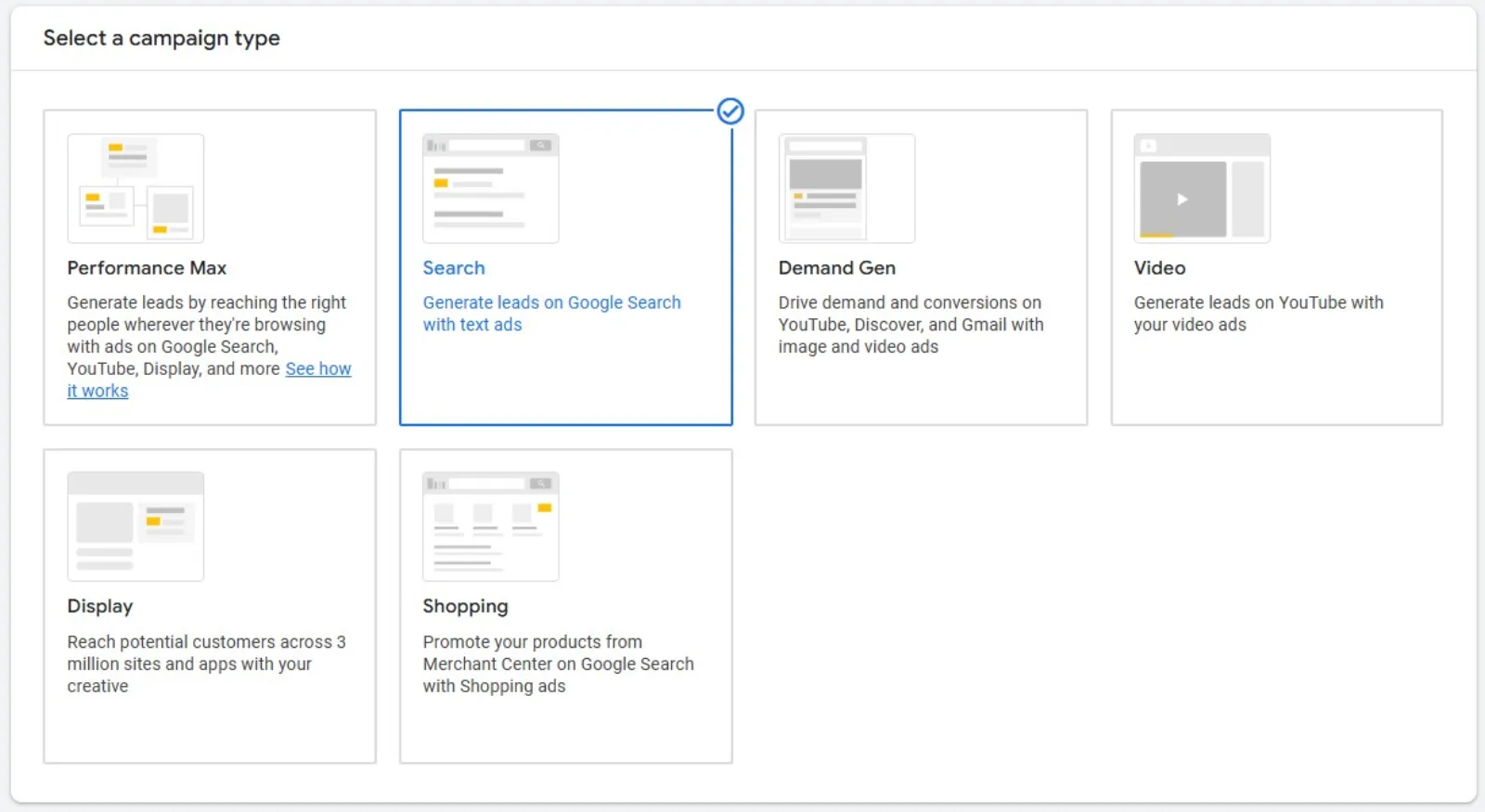
Now it’s time to pick the campaign type. The most common (and beginner-friendly) is:
- Search Network – your ads show on Google search results pages.
There are others like Display, Video (YouTube), Shopping, and Performance Max, but for your first go, stick to Search. It’s simple, and it gets straight to the people actively looking for what you offer.
Step 4: Set Your Campaign Settings
This is where things get a bit more detailed. But take it step by step:
- Campaign Name: Keep it simple. Something like “Spring Promo – Plumbing Services.”
- Networks: Uncheck “Display Network.” We’re focusing on Search only for now.
- Locations: Choose where your ads will appear geographically. You can select countries, cities, or even a custom radius. Local business? Stick to your city or service area.
- Languages: Set to the language your customers speak. Usually English (or local language).
- Budget: Start small. $10–$20 per day is a good starting point. You can always scale later.
- Bidding: For beginners, choose “Clicks” as your bidding focus. You can let Google set bids to maximise clicks. Later on, you can experiment with conversions and manual bidding.
Step 5: Create Ad Groups
Ad groups are like folders for your keywords and ads. Each group should focus on a single theme or product/service.
For example:
- Ad Group 1: “Drain Cleaning”
- Ad Group 2: “Emergency Plumbing”
Each ad group contains:
- A set of closely related keywords
- One or more responsive search ads
Keep things organised. It’ll help with performance and relevance.
Step 6: Do Basic Keyword Research
Now we get into the fun part, keywords.
 LIVE
Live every Tuesday at 2pm UK. Bring your marketing questions.
Get your Google, local SEO and AI questions answered live.
Google Ads works based on keywords. You bid on search terms you want your ads to show up for. You can use Google’s free Keyword Planner (inside the Google Ads dashboard) to find ideas. Type in what your business offers, and it’ll suggest terms along with average monthly searches and cost-per-click estimates.
A few keyword tips:
- Start with 5–10 keywords per ad group.
- Choose a mix of broad, phrase, and exact match types.
- Avoid overly generic terms (like “plumber”) unless you’ve got a big budget.
Example:
- Broad match: plumber near me
- Phrase match: “plumber near me”
- Exact match: [plumber near me]
Step 7: Write Your First Ads
This is where you get creative but not too creative. Google responsive search ads follow a simple format:
- Headlines (15 max, up to 30 characters each)
- Descriptions (4 max, up to 90 characters each)
- Display URL (this shows in your ad but doesn’t need to match the real page)
Quick ad writing tips:
- Include your keyword in the headline.
- Highlight a unique benefit or offer.
- Use a clear call to action (CTA): “Call Now,” “Get a Free Quote,” etc.
Example Ad:
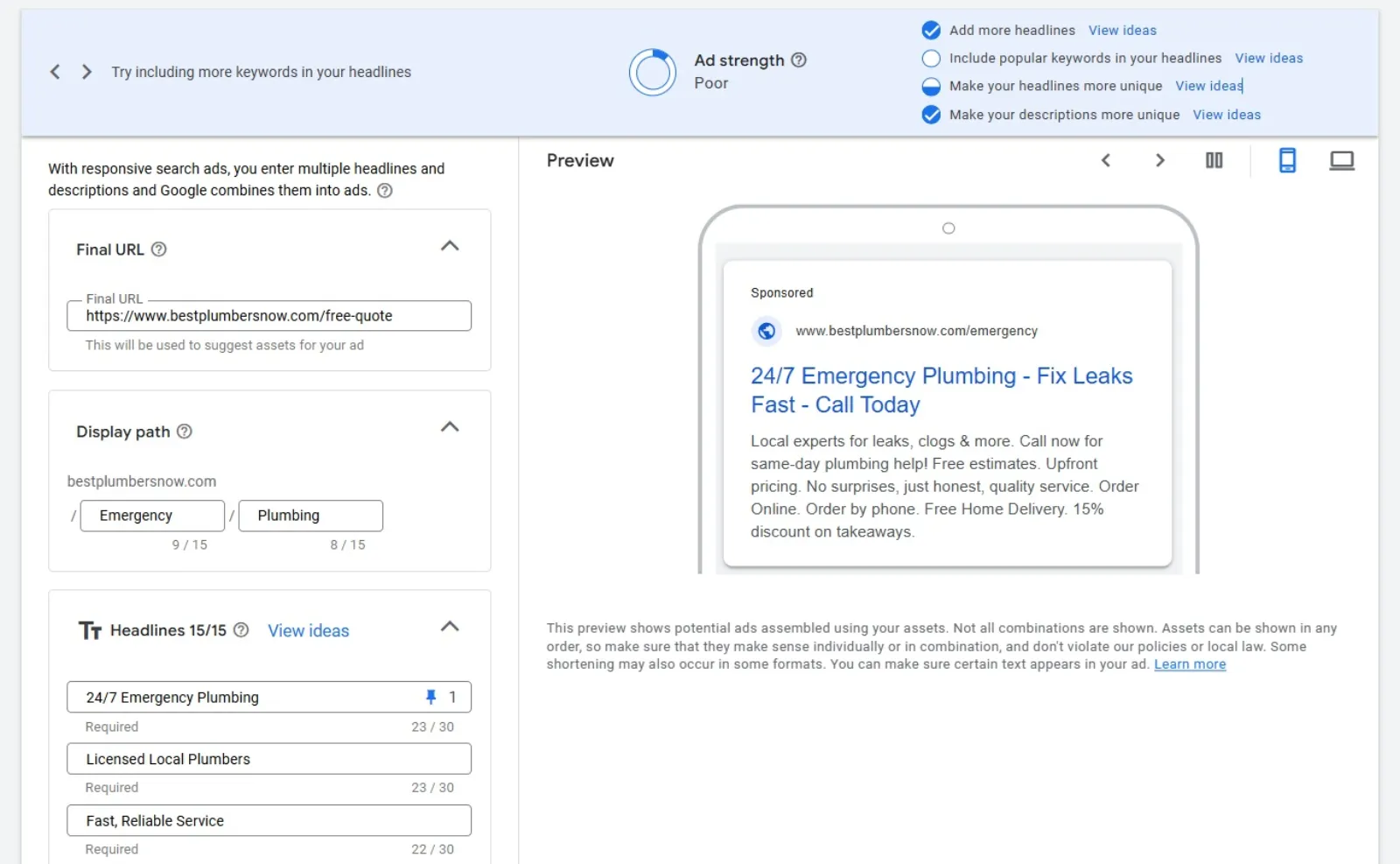
Headlines (up to 15 examples, each max 30 characters):
- 24/7 Emergency Plumbing
- Licensed Local Plumbers
- Fast, Reliable Service
- Free Estimates Available
- Drain Cleaning Experts
- Leak Repair Specialists
- Affordable Plumbing Rates
- Call Now for Quick Service
- Experienced Plumbing Team
- Fix Leaks Fast – Call Today
- Trusted Since 1998
- No Job Too Big or Small
- Upfront Pricing, No Surprises
- Same-Day Service Available
- Get a Free Plumbing Quote
Descriptions (up to 4, each max 90 characters):
- Local experts for leaks, clogs & more. Call now for same-day plumbing help!
- Free estimates. Upfront pricing. No surprises, just honest, quality service.
- Need a plumber today? We’re fast, friendly, and fully licensed & insured.
- Reliable plumbing solutions are available 24/7. Get your free quote now!
Display URL: www.bestplumbersnow.com/free-quote
Step 8: Add Ad Assets (Optional, but Recommended)
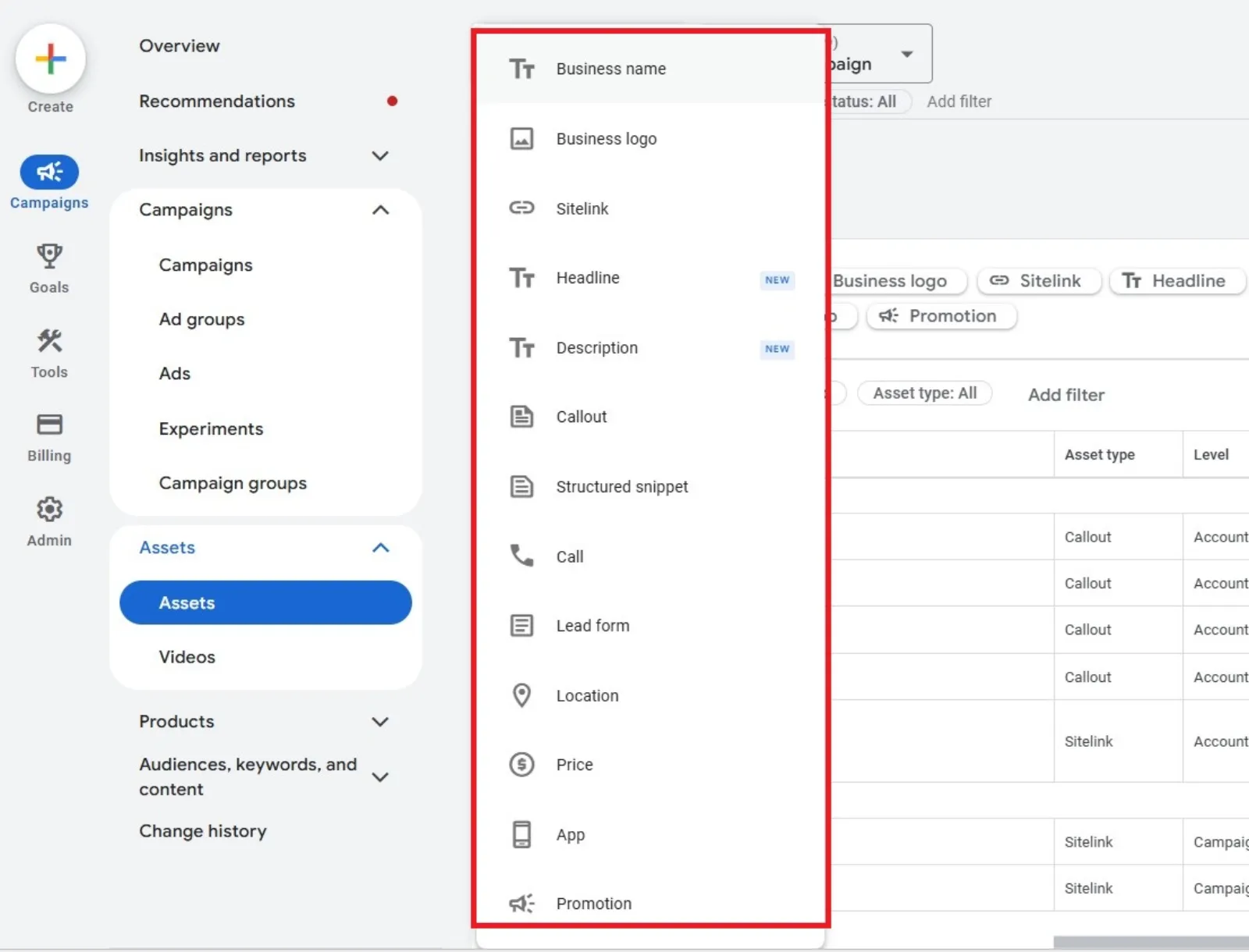
Ad assets make your ad bigger and more useful. They don’t cost extra and can increase click-through rates.
Here are some popular ones:
- Sitelink Assets – link to different pages (e.g., “Contact Us,” “About Us”).
- Call Assets – add your phone number to the ad.
- Location Assets – show your business address on Google Maps.
They’re easy to set up and can give your ad more space on the results page.
Step 9: Review and Launch
Before you hit “Publish,” double-check everything:
- Did you set the right budget?
- Are your keywords relevant to your ads?
- Do your ads point to the right landing page?
Once everything looks good, launch your campaign. Google will review your ads (usually within 24 hours), and then they’ll go live.
Step 10: Monitor and Adjust
Launching your campaign isn’t the end—it’s just the beginning.
Check in daily or every few days. Focus on:
- CTR (Click-Through Rate) – tells you how many people clicked.
- CPC (Cost Per Click) – how much each click is costing.
- Conversions – if you’ve set up tracking (highly recommended).
If something’s not working, don’t panic. Ads are meant to be tested and optimised.
Simple adjustments to try:
- Pause underperforming keywords.
- Try new ad variations.
- Adjust your bid strategy based on results.
Final Thoughts
You don’t have to be a marketing expert to run a successful Google Ads campaign. Start simple, stay organised, and pay attention to your data. The beauty of Google Ads is in the control you can test, tweak, and improve as you go.
Every big account once started with a small test campaign. Yours could be the next one to grow.
So take a breath, follow these steps, and get your first campaign live. You’ve got this.

Written by Uzair Kharawala
Partner at SF Digital Studios, a Google Premier Partner agency. Uzair has been helping businesses grow with Google Ads since 2002 and teaches it every week on YouTube.
Get our best Google Ads tips by email
New articles and videos, straight to your inbox. Unsubscribe any time.