
It’s a moment no marketer or business owner wants to experience: you log into your Google Ads account, and a big, red banner screams “ACCOUNT SUSPENDED.” Your heart sinks. Your campaigns are halted, your business is at a standstill, and you’re left scrambling. If the reason for this dreaded suspension is an unpaid balance, take a deep breath. This isn’t the end of your advertising journey. It’s a solvable problem, and you can get your campaigns back on track.
This post will walk you through the simple, logical steps to take when you encounter this issue. We’ll skip the jargon and get straight to what you need to do, from identifying the problem to getting your ads running again.

Get Found, Get Chosen, Get Your Time Back
A free one-day marketing seminar in Milton Keynes · 10 November 2026
First Things First: Why Did This Happen?
Google Ads operates on a system of trust and a little thing called a payment threshold. For most accounts, Google charges you after your ads have run, either when you reach a specific spending limit (your threshold) or on a regular monthly billing date. If the payment method on file fails to process this charge—for any number of reasons—your account can be suspended.
Get your free Marketing Action PlanNot sure where to start? Answer a few questions and get your plan in about a minute. No email needed.
Get my plan →Common reasons for a failed payment include:
- An expired credit card. This is a classic and easy fix.
- Insufficient funds. Your credit card or bank account simply didn’t have enough money to cover the charge.
- A new card with outdated information. You got a new card but forgot to update the security code or expiration date.
- Your bank flagged the charge as suspicious. Sometimes banks will block a large, foreign-based transaction (like a Google Ads charge) for your protection.
Google’s system is automated and doesn’t know the difference between a simple mistake and a serious issue. When a payment fails, it sees a potential risk and, to protect itself, it pauses your account.
Step 1: Stay Calm and Don’t Do Anything Drastic
The first instinct for many people is to panic. Don’t. You might feel tempted to create a new account to keep your ads running. Don’t do this. Google’s policies are strict about creating multiple accounts to circumvent a suspension. Doing so will only make things worse and can lead to a permanent, irreversible ban.
Your immediate goal is to fix the problem in your existing account, not try to bypass the system.
Step 2: Find the Unpaid Balance and the Reason for Failure
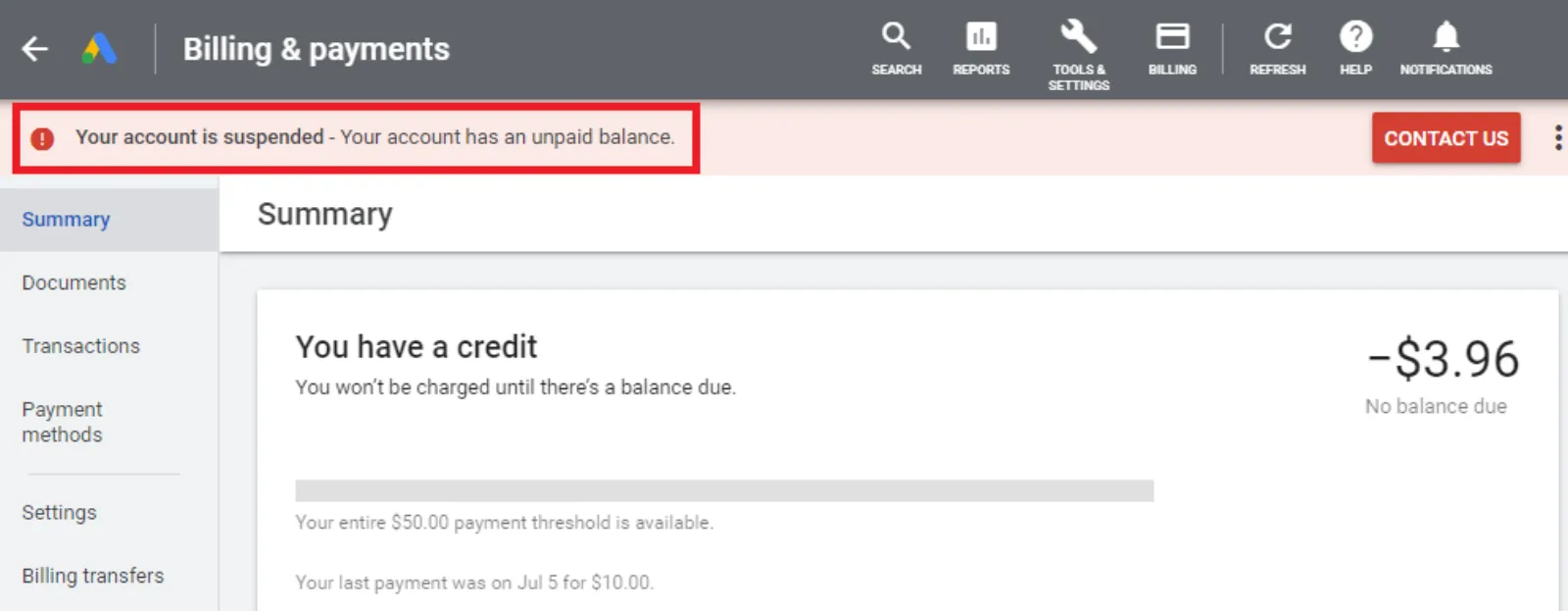
Your Google Ads account is your best friend here. Log in and navigate to the Tools & Settings menu. Under the “Billing” section, click on Summary or Transactions. You’ll see the outstanding balance and a clear indication of a failed payment.
In the summary, you’ll see which payment method was used and why it failed. For example, it might say “Declined” or “Payment failed.” If you’re on a monthly invoicing system, you might have received an email from Google’s collections team. Read these messages carefully to understand the exact problem.
Step 3: Fix Your Payment Method
This is the most crucial step. Once you know why the payment failed, you need to rectify it.
 LIVE
Live every Tuesday at 2pm UK. Bring your marketing questions.
Get your Google, local SEO and AI questions answered live.
- Update your payment information. If your card has expired, go to Billing > Settings and update the expiration date and CVV code.
- Add a new payment method. If you had a problem with a specific card, you can add a new one. Make sure it’s valid and has enough funds.
- Contact your bank. If your bank blocked the charge, call them and approve the Google Ads transaction. Tell them it’s a legitimate charge from you, and ask them to unblock future payments from Google.
- Make the payment. Once your payment method is ready, you’ll need to pay the outstanding balance. The system will usually prompt you to do this. You’ll either have a “Make a payment” button or the system will automatically retry the charge on your updated card.
Once the payment is successful, the system will process it. This can take a few minutes or a few hours, but you should see the balance clear.
Step 4: The Waiting Game (It’s Shorter Than You Think)
After a successful payment, your account suspension won’t be lifted instantly. The Google Ads system needs to verify the payment and run its internal checks. This process can take anywhere from a few hours to 48 hours.
During this time, resist the urge to contact support with the subject line “Why is my account still suspended?!” You’ve already done your part. The system is working on its end. Be patient.
You can check the status of your account in the top banner. It will change from “Suspended” to “Active” once everything is clear.
Step 5: What If the Suspension Isn’t Just About the Money?
Sometimes, a failed payment can be linked to a broader issue Google’s system flagged as “suspicious payment activity.” This is a different beast entirely. It can happen if:
- You’re using a payment method from a country different from your business address.
- You’ve tried to use multiple payment methods in a short amount of time.
- The billing information doesn’t match the information on the card.
If your suspension notice mentions “suspicious payment activity” in addition to an unpaid balance, the process is a bit more involved. You will likely need to go through an appeal process. The notification in your account will provide a link to the appeal form.
When you fill out the appeal form, be prepared to:
- Explain what happened. Be clear, concise, and honest.
- Provide proof of your identity and payment method. This could include a picture of your ID and a redacted bank statement or credit card statement showing the name and address.
- Explain the steps you’ve taken to fix the issue. For example, “I have updated my expired credit card and successfully paid the outstanding balance.”
In these cases, a human from Google’s support team will review your appeal. This process takes longer, but providing all the necessary information upfront will speed it up.
Final Thoughts: A Proactive Approach
Once your account is reinstated, it’s time to be proactive to prevent this from happening again.
- Set up alerts. Google can send you email alerts for payment failures. Make sure these are enabled so you can fix the issue the moment it happens.
- Monitor your payment methods. Keep track of expiration dates and ensure your cards have sufficient funds before the billing date.
- Keep your information up to date. If you move or change your business address, update it in your billing profile immediately.
An account suspension due to an unpaid balance is a frustrating but manageable problem. By staying calm, following the right steps, and being proactive, you can resolve the issue and get back to what you do best: running successful ad campaigns. Don’t let a moment of panic turn a simple fix into a permanent headache.

Written by Uzair Kharawala
Partner at SF Digital Studios, a Google Premier Partner agency. Uzair has been helping businesses grow with Google Ads since 2002 and teaches it every week on YouTube.
Get our best Google Ads tips by email
New articles and videos, straight to your inbox. Unsubscribe any time.