
In the bustling world of online advertising, everyone’s looking for that secret weapon, that “hidden gem” that can make leads pour in without breaking the bank or requiring a massive website overhaul. Well, let me tell you that a hidden goldmine might be staring you right in the face: Google Ads Lead Form Assets.
Forget the days of sending every interested person to a landing page, hoping they’ll fill out your form there. While landing pages are still super important for many strategies, Lead Form Assets offer a direct, frictionless path for potential customers to get in touch. It’s like having a miniature contact form built right into your Google ad.

Get Found, Get Chosen, Get Your Time Back
A free one-day marketing seminar in Milton Keynes · 10 November 2026
What Are We Even Talking About?
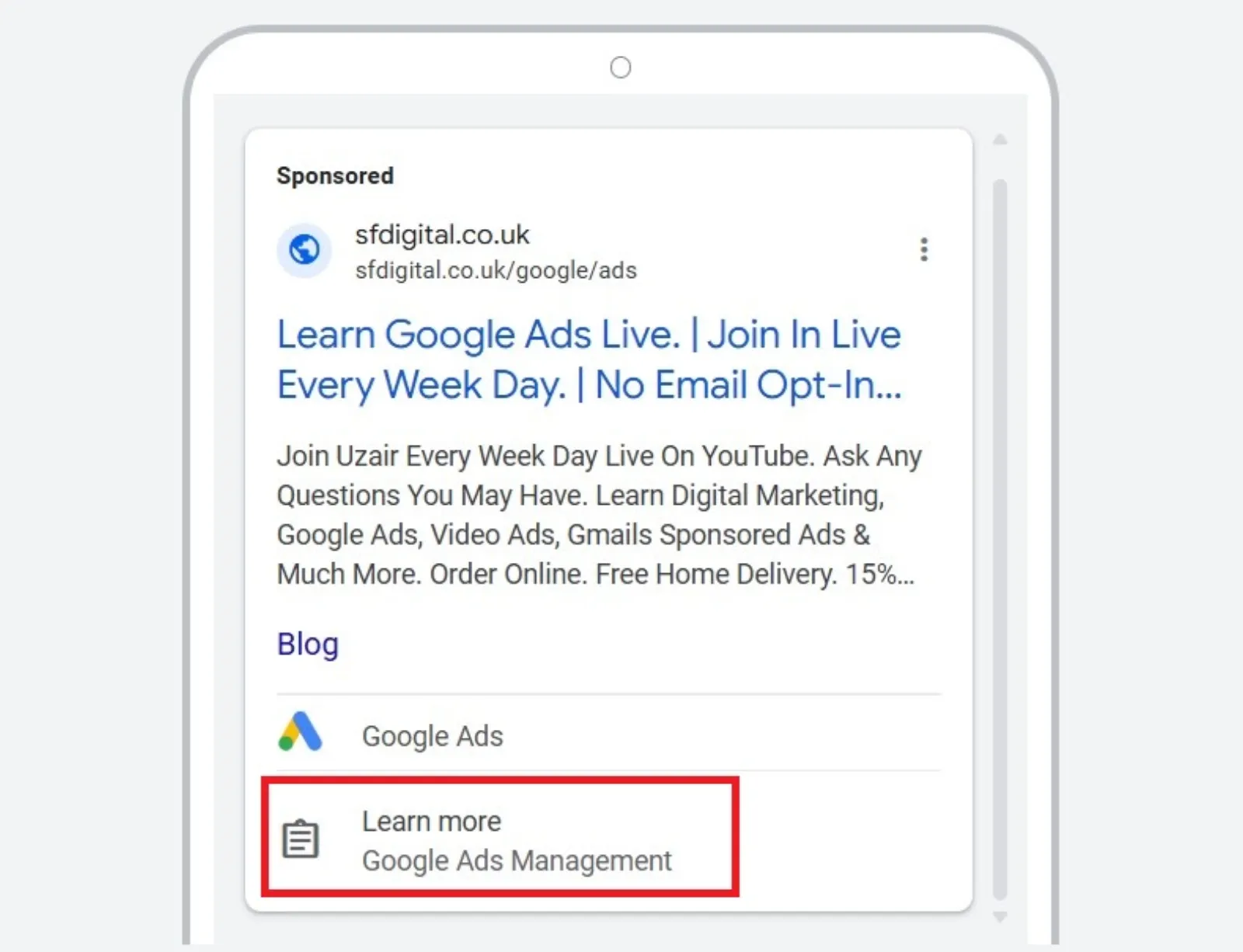
Imagine someone searches for “best home cleaning services near me.” Your Google Ad pops up. Instead of just a headline and description, there’s also an option right there, like a little button or a tiny form that says “Get a Quote” or “Request Info.” When they click it, a small, pre-filled form appears, often with their name and email already filled in from their Google account. They hit submit, and boom – you’ve got a lead. All without them ever leaving Google!
Get your free Marketing Action PlanNot sure where to start? Answer a few questions and get your plan in about a minute. No email needed.
Get my plan →This isn’t some brand-new, complex tech that only the big players can use. It’s a standard feature within Google Ads, and it’s surprisingly easy to set up. Think of it as an express lane for leads.
Why Is This a “Hidden Goldmine”?

The beauty of Lead Form Assets lies in their simplicity and directness. Here’s why they’re so powerful:
- No Landing Page Needed (for this step!): This is a huge one. For many businesses, creating and optimising a high-converting landing page can be a big project. With lead forms, you cut out that step for the initial lead capture. This means less work for you and a faster, smoother experience for the user.
- Reduced Friction: Every extra click or page load is a chance for someone to get distracted or change their mind. Lead Form Assets minimise this friction. People are already on Google, they see your ad, they’re interested, and they can act right then and there.
- Mobile-Friendly by Default: Most people are searching on their phones. Fiddly forms on tiny screens are a nightmare. Google’s lead forms are designed to be super easy to use on mobile devices, making lead generation on the go a breeze.
- Instant Gratification (for both sides): Users get their request in quickly, and you get their details instantly. This speed can be crucial, especially for services where people are looking for quick solutions.
- High Intent Leads: When someone is actively searching for something and then fills out a form directly from your ad, their intent is usually very high. They’re not just browsing; they’re looking to connect.
- Pre-filled Information: Often, Google can pre-fill parts of the form (like name and email) using the user’s Google account information. This saves the user time and reduces typos, leading to better quality data for you.
How Do You Get Started? It’s Simpler Than You Think!
Setting up Lead Form Assets isn’t rocket science. Here’s a simplified rundown:
Log in to Google Ads: Head over to your familiar Google Ads account.
Go to “Ads & Assets”: In the left-hand menu, find “Ads & Assets” and then click on “Assets.”
Click the Blue Plus Button: This is where you add new assets.
Select “Lead form”: You’ll see this option in the dropdown.
Build Your Form: This is the fun part!
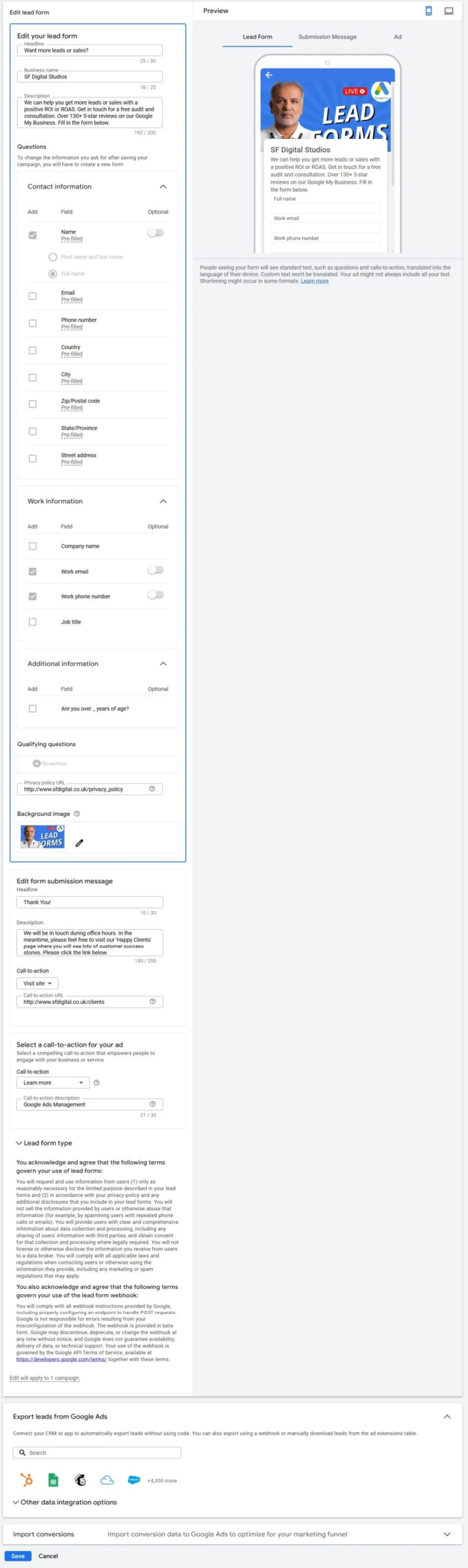
- Business Name: Keep it clear and professional.
- Headline & Description: This is your ad copy within the form. Make it compelling and tell people what they’ll get. Are they requesting a quote? A demo? A free guide? Be super clear.
- Questions: Google offers standard questions like name, email, and phone number. You can also add custom questions if you need more specific info, but remember: the fewer questions, the more likely someone is to complete it. Find a balance between getting enough info and keeping it short.
- Privacy Policy Link: This is a must-have. Make sure you have a privacy policy on your website and link to it here.
- Submission Message: What do people see after they submit? A “Thank You!” and maybe instructions on what happens next.
- Call-to-Action (CTA): This is the button text on your initial ad. Options like “Get Quote,” “Sign Up,” “Learn More,” or “Apply Now” work well.
Choose How You Get Leads: You can download them as a CSV file (think of it like a spreadsheet) from your Google Ads account, or even better, integrate it with your CRM (Customer Relationship Management) system using a webhook for instant lead delivery. This means leads pop up directly in your sales team’s system as soon as they’re submitted.
Pro-Tips for Maximising Your Lead Form Assets:
- Keep it Short and Sweet: Seriously, don’t ask for someone’s life story. Name, email, and maybe phone number are often enough for initial contact. You can gather more details later.
- Offer Value: Why should someone fill out your form? Is it for a free consultation, a discount, an exclusive download, or a quick quote? Make the benefit clear.
- Align with Ad Copy: Make sure the message in your ad matches what the lead form is offering. Consistency builds trust.
- Don’t Forget Your Privacy Policy: This isn’t just a Google requirement; it’s good practice. People want to know how their information will be used.
- Follow Up FAST: This is crucial! Instant leads demand instant follow-up. If you get a lead through a form, try to reach out within minutes, not hours or days. The quicker you respond, the higher your chances of conversion.
- Test and Optimise: Like all things in Google Ads, don’t just set it and forget it. See which forms perform best, which CTAs get more clicks, and which questions yield the best quality leads.
Google Ads Lead Form Assets are a powerful tool that often gets overlooked. They offer a direct, low-friction path to capturing valuable leads, especially for mobile users. By simplifying the process and focusing on immediate connection, you can truly tap into this hidden goldmine for instant lead generation. So, go on, give them a try – you might be surprised at the results!

Written by Uzair Kharawala
Partner at SF Digital Studios, a Google Premier Partner agency. Uzair has been helping businesses grow with Google Ads since 2002 and teaches it every week on YouTube.
Get our best Google Ads tips by email
New articles and videos, straight to your inbox. Unsubscribe any time.