
Let’s be honest, everyone running Google Ads wants more clicks and conversions, right? And usually, when we think about getting more, our first thought goes to “raise the budget.” But what if I told you there’s a clever way to grab more attention and snag those valuable clicks without spending an extra penny?
Enter Google Ads Price Assets. These often-overlooked little gems are like a secret weapon, giving your ads a serious advantage.

Get Found, Get Chosen, Get Your Time Back
A free one-day marketing seminar in Milton Keynes · 10 November 2026
What are Price Assets, Anyway?
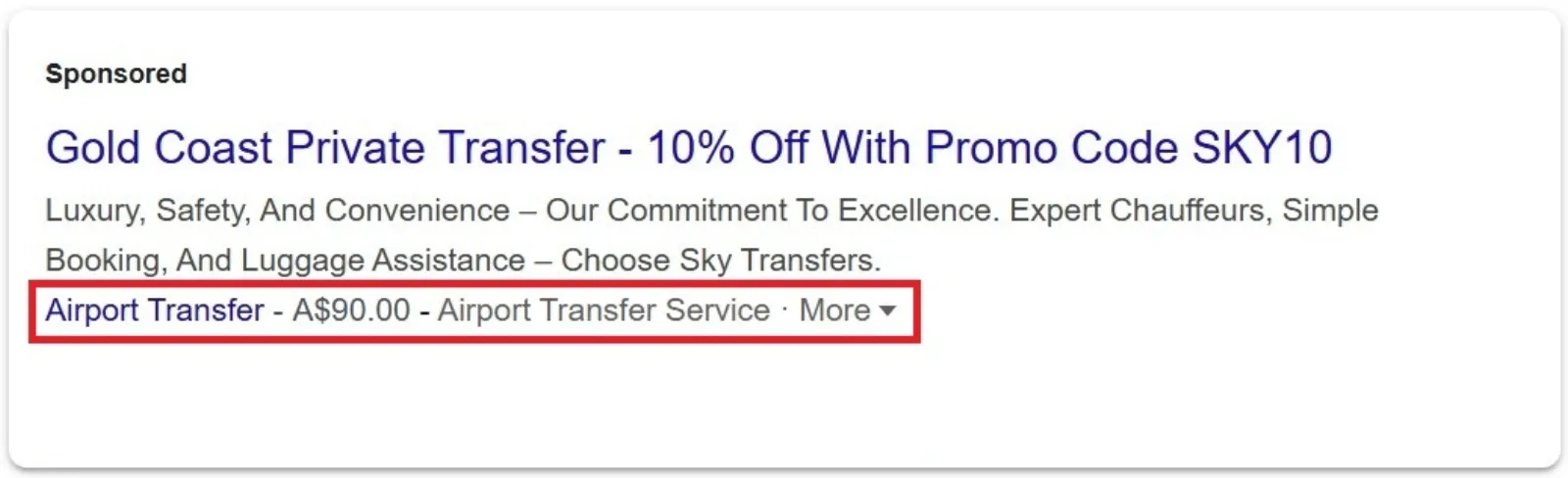
Think of Price Assets as a mini-menu for your Google Ads. Instead of just a headline and description, these assets let you showcase specific products or services, along with their prices, directly within your search ad.
Get your free Marketing Action PlanNot sure where to start? Answer a few questions and get your plan in about a minute. No email needed.
Get my plan →Imagine you’re searching for “yoga classes near me.” You see one ad that just says “Great Yoga Classes” and another that lists “Beginner Yoga: ₹500,” “Advanced Flow: ₹750,” and “Private Sessions: ₹2000.” Which one are you more likely to click? The one that gives you clear, upfront pricing, of course!
That’s the power of Price Assets. They give searchers the information they need before they even click, making your ad more useful and enticing.
Why Are They Such a Big Deal?

This isn’t just about looking pretty. Price Assets offer some real benefits that can seriously boost your ad performance:
 LIVE
Live every Tuesday at 2pm UK. Bring your marketing questions.
Get your Google, local SEO and AI questions answered live.
- Instant Transparency: In a world where everyone wants information now, showing prices upfront is a huge win. People appreciate knowing what they’re getting into. It builds trust right from the start.
- Higher Quality Clicks: When someone clicks on your ad because they’ve already seen your prices and are interested, they’re much more likely to be a qualified lead. They’re not just browsing; they’re actively considering your offer at that price point. This means less wasted ad spend on clicks that go nowhere.
- Stand Out in a Crowded Space: Most advertisers aren’t using Price Assets to their full potential. By adding them, your ad takes up more space on the search results page and offers more detail than your competitors. It’s like having a bigger, bolder billboard.
- Faster Decision Making: For many products and services, price is a major factor in the decision-making process. Price Assets help users quickly compare options and decide if your offering fits their budget, leading to quicker conversions for you.
- Direct to the Right Page: Each item in your Price Asset can have its own unique landing page. So, if someone clicks on “Beginner Yoga,” they go straight to the beginner yoga page, not just your general homepage. This smooth journey reduces friction and increases the chances of a conversion.
How to Get Started (It’s Easier Than You Think!)
Setting up Price Assets in Google Ads is straightforward. You don’t need to be a tech wizard.
Log in to your Google Ads account.
Go to “Ads & Assets” and then “Assets.”
Click the blue plus (+) button and select “Price.”
Choose the type of price asset (e.g., Brands, Events, Services, Product Categories). This will depend on what you’re offering.
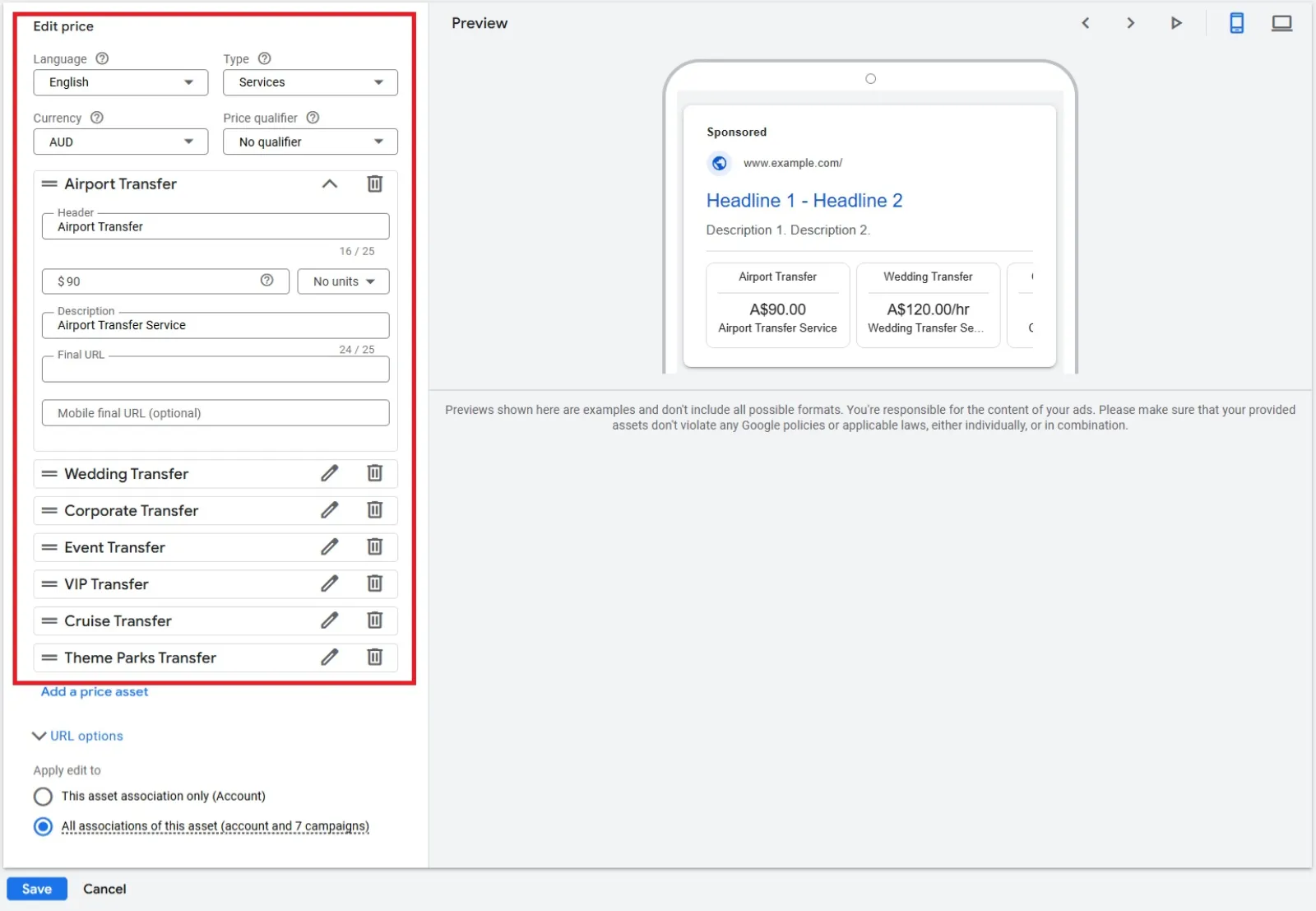
Fill in the details for each item:
- Header: A short, catchy title for your product or service (e.g., “Haircut,” “Basic Package”).
- Price: The actual price. You can add qualifiers like “From,” “Up to,” or “Average.”
- Description: A brief, enticing description (e.g., “Includes wash and style,” “All-inclusive”).
- Final URL: The specific page on your website for that item.
Pro Tip: Aim for at least 3-5 price items, but you can add up to 8. Make sure they are relevant to the keywords in your ad group.
A Few Things to Keep in Mind:
- Relevance is Key: Only show prices for things directly related to the search query. Don’t mislead users.
- Keep Prices Current: If your prices change, update your Price Assets immediately. Nothing frustrates a potential customer more than incorrect information.
- Mobile-Friendly: Price Assets often look fantastic on mobile devices, taking up valuable screen real estate. Make sure your landing pages are mobile-friendly too!
- Test and Optimise: Like all things in Google Ads, don’t just set it and forget it. Monitor their performance. See which price items get the most clicks and adjust as needed.
Google Ads Price Assets are a fantastic way to supercharge your ad performance without reaching for that “increase budget” button. They empower users with information, attract higher-quality clicks, and ultimately, help you get more value for your advertising spend. So, why not give this sneaky trick a try and watch your clicks and conversions grow?

Written by Uzair Kharawala
Partner at SF Digital Studios, a Google Premier Partner agency. Uzair has been helping businesses grow with Google Ads since 2002 and teaches it every week on YouTube.
Get our best Google Ads tips by email
New articles and videos, straight to your inbox. Unsubscribe any time.