
NatWest Accelerator Events Free one-day marketing seminar at the NatWest Accelerator, Milton Keynes · 10 November 2026 Free marketing seminar · NatWest Accelerator, Milton Keynes · 10 Nov 2026 Free seminar · 10 Nov 2026
NatWest Accelerator, MK
Get your free invite →Invite →

Home › Blog › Google Ads

Google Ads

How Google Ads Image Assets Turned My Boring Text Ad Into A Click Magnet

How Google Ads Image Assets Turned My Boring Text Ad Into A Click Magnet
Read the video transcript

So, we have got Google Ads extensions, why you need to use them, why should you care about them and why you ought to be using it... It's because it makes your ads a lot bigger. You hog even more real estate on Google at the top. Doesn't cost you anything additional or extra. You can cram in more of your messaging, products, services, or anything you want to put up on Google.

So, why wouldn't you use it? You know, it doesn't cost you anything extra. It's just that sometimes people don't know how to use them. Can't be bothered. They are a bit lazy because it does take a little bit of time to set them up. But once they're set up, you don't need to touch them. They'll just keep on running.

As long as Google thinks it is relevant to that search term which somebody is putting up and it's going to enhance the user experience. So, in this case, I put in let's say iPhone 11, you got these site links, see now how big this ad is compared to this one. I'm really surprised how small Apple's own ad is, not put in description two even, but there you go!

You've got your auto headline one and two descriptions. We've got two lines and your site links these are so you got a bigger, big heading as big as the main headline and then two additional lines of text. This ad looks a lot bigger than this one, that one and that one. And this is what I mean by using these extensions, makes your ads a lot bigger, increases your quality score, ad rank, click-through rate, pretty much, you know, everything is heading in the right direction.

If you know how to use these properly, same over here, we've got two site links and the three other ones. Now, these won't appear on all the ads. It will be only at the top. So, the ad or the advertiser with the highest ad rank will get to build these site links. Now, you can have up to a maximum of four site links over here.

Now, there are other extensions as well, and I'm not seeing any over here, there you go. These are call-outs over here. So, you've got four site links... You see how big this ad is? So, this is what I'm going to show you how to put these in. So, your ads become a lot bigger and you attract that click.

Let's hop into our GoogleAds interface. So, go to your plus blue button, add extension. Then you have what eight or nine, I think and they keep on changing as well and this is the new one, the lead form extension. That's why it's ten. Site link, callout structure, snippet, call, location, price, app, promotion. If you are not running an app campaign, then this doesn't apply to you.

But the two most important one, which I would always start with is the call extension and the location extension. You must link your Google My Business page to your Google Ads account because when somebody's searching for a restaurant near me, Google is going to look at your Google My Business page, and then it will work out okay.

How far that searcher is away from your restaurant or your store or whatever, so this is really a must. Let's do the easy one - call extension. Now, all of these can be set up at the account campaign or ad group level. So, if you've got a fairly small business and pretty much all the extensions apply to the whole account, then I would just set it up over here and then forget about it.

But if you've got some extensions which are relevant to certain campaigns only then you apply to those campaigns or perhaps to those ad groups. So, you can create new or use the existing one. I'm going to create new and you use your country. Now, it is not available in all the countries, but the ones which are available, you will see them in this list and I'm going to put my number and call reporting is turned on and I'm not going to go into conversion tracking and conversion setup, but that is from there.

So, I want to make sure that I'm tracking all the clicks from my ads. So, somebody clicks on my ad as a call button. I know that it has come through my ad and it is being tracked. This is why we set this up. You can go on the advance options. So, let's say you want to run this call extension from your opening to the closing time, which could be let's say nine AM till five PM and it will only run during those times, not at any other and you can select the days, Monday to Friday or on the weekend and that's your call extension set up.

With site link, it is kind of like creating a mini ad on extension. So, we saw we had a headline and two lines of description, right. So, the same thing will apply over here. The headline will be twenty-five characters and the description one, description two is up to thirty-five characters and then a final URL. One thing you can't do is send all of these to the same homepage or the same URL.

It's got to be different. On my website, we've got different pages for GoogleAds, web design, video, photography and so on. If I'm talking about GoogleAds agency and say the best agency for managing the campaign, something like that. Now, you will notice that I have not put in or put up the capitalisation on each of these words, which we always do on the ads, what you want to do is to...

Because this is kind of like a subheading. You don't want to make it too obvious and it doesn't read right or look good, it's fine. If we just have the first letter as the capital, even though over here, they have not utilised the capitalisation properly. They should have, but overall, this ad looks good. They've got all the various pages call to actions as well.

You can put in a call to action, buy now, book now, free consultation or whatever it may be in these like site links. Now, what you want to do is you don't want to just put up four you want to put up at least six to eight because then Google is going to pick out the most relevant ones for that ad.

So, if you just put in four, you're more likely to get a maximum of two site links being shown you won't get three or five. Four is the maximum obviously, but they'll either show two or four, I've never seen three site links being shown. So, it's best you put up more, set them all up in one go, and it's all done and dusted, don't need to tinker with it.

Okay, I'm going to cancel this. Go to a couple of other ones. Callouts are really good. Again, account-level campaign or ad group level. These are like, let's say free consultation, I will use capitalisation on there. What else could I...open five days a week or it could be seven days a week. If you had something like a free trial for your offer, the free trial, spell it correctly, free parking is good because then people can see that you've got plenty of parking and so on.

So, these are all the callouts, which you don't need to have additional headlines description it's just one line up to twenty-five characters. Cancel that. Structured snippets are one of my favourites because you have got lots of things you can put up - you can put up if you are a service-based industry like we are, we'll put up our service catalogue, pay per click, Google Ads, we can put in Facebook ads.

These are all your services, right. Web design, videography, corporate photography, nice and quick. It literally takes you seconds and you should always put these up. If you are selling brands, Nike, Puma, Adidas, and all of these, then put them up and make a list. You can have insurance coverage as well. Lots of things. Courses, destinations. If you are a travel company, then you can say, well, you know, cover or travel to, all of these can be put up.

Location is your Google My Business. So, you link it and it's going to show up over here. This is another good one where you can make your ads fairly prominent by pre-qualifying your audience for that click by putting up your price. They can't afford ten dollars. I don't want them to click on my site, and waste my budget, but I could have service categories, services, products and so on.

Let’s be honest, text ads can be a bit… well, plain. You’ve got your headlines, your descriptions, maybe a sitelink or two, and you’re hoping for the best. For a while, that was my Google Ads reality. My ads were technically sound, but they rarely jumped off the page. Then, I decided to give Google Ads Image Assets a proper shot and let me tell you, it was like flipping a switch. My boring text ads suddenly became click magnets!

What are these “Image Assets” anyway?
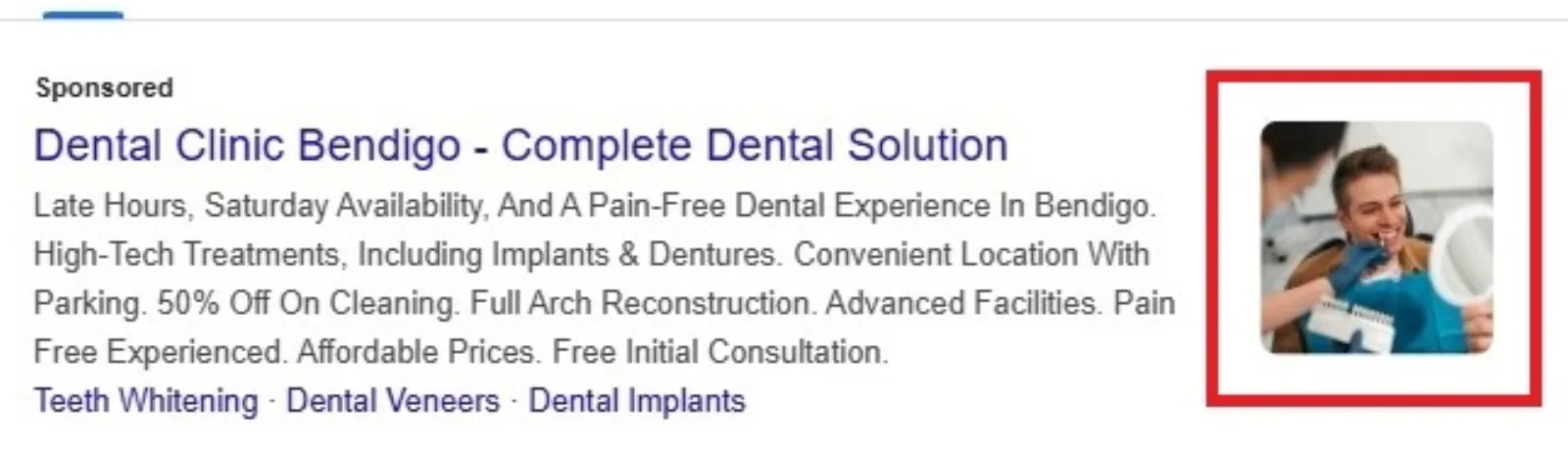
Image Assets Google Ads

Before I get too carried away with my newfound love for them, let’s quickly explain what we’re talking about. Google Ads Image Assets (they used to be called image extensions, you might remember them) allow you to add relevant visuals right alongside your regular text ads on the Google search results page. Think of it as giving your ad a little billboard space in a prime location. Instead of just words, potential customers see an image that showcases your product, service, or brand.

Free NatWest Accelerator event

Get Found, Get Chosen, Get Your Time Back

A free one-day marketing seminar in Milton Keynes · 10 November 2026

Get your free invite →

My “Aha!” Moment

I’d seen them popping up on other ads, but for some reason, I just never prioritised adding them to my campaigns. I figured, “It’s just an image, how much difference can it make?” Boy, was I wrong?

Get your free Marketing Action PlanNot sure where to start? Answer a few questions and get your plan in about a minute. No email needed.

Uzair KharawalaLIVE
Free weekly YouTube live

Live every Tuesday at 2pm UK. Bring your marketing questions.

Get your Google, local SEO and AI questions answered live.

Join for free
Get my plan →

My particular business sells handmade artisan soaps. My text ads were decent: “Handmade Soaps – Natural Ingredients – Shop Now!” You know the drill. But when I added a beautifully shot image of a vibrant, lavender-scented soap bar with delicate bubbles, something incredible happened. The click-through rate (CTR) on that ad group shot up. Not by a little, but significantly. It was genuinely astounding to see the numbers climb. People weren’t just reading about my soap; they were seeing it. The visual appeal broke through the usual text-heavy search results page. It wasn’t just an ad anymore; it was a little preview of what they could expect.
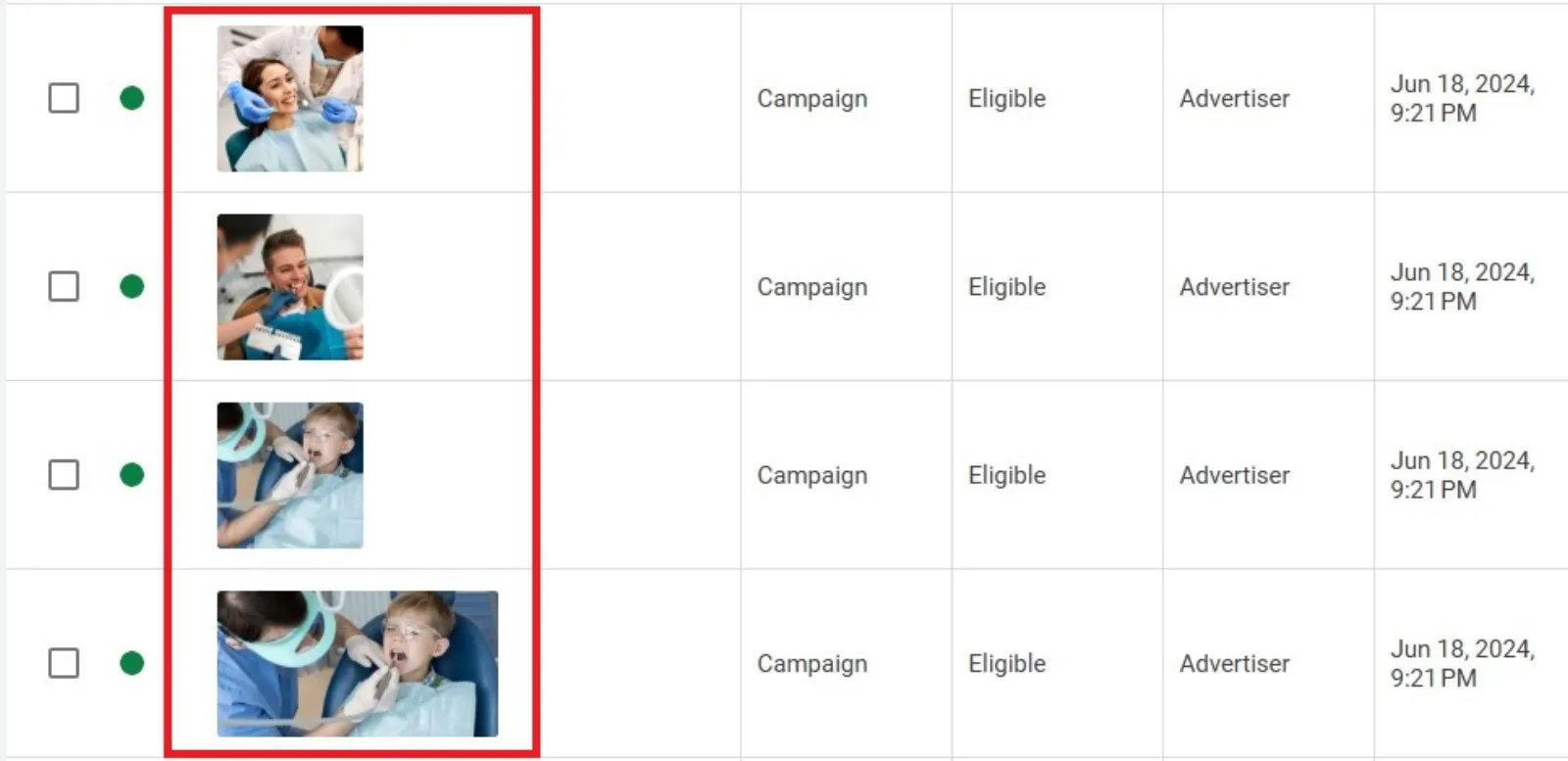
Google Ads Image Assets Examples

Why did it work so well?

I’ve been thinking about it, and here’s what I believe made the biggest difference:

  1. Instant Attention Grabber: Let’s face it, our brains process images way faster than text. When my ad showed up with a colourful, appealing image, it immediately drew the eye. In a sea of text, it stood out like a brightly coloured flower.
  2. Visual Storytelling: A picture, as they say, is worth a thousand words. My text ad could tell you my soap was natural and beautiful, but the image showed you. It conveyed the quality, the craftsmanship, and the overall vibe of my brand in an instant. This is especially true for products where aesthetics play a big role, like my soaps.
  3. Increased Relevance: The image reinforced the ad copy. If someone searched for “handmade lavender soap,” and my ad showed the text and a picture of a lovely lavender soap, it created a much stronger, more relevant connection. It confirmed to the searcher that they had found exactly what they were looking for.
  4. Building Trust (Subtly): High-quality images communicate professionalism and attention to detail. If my images looked good, it implicitly suggested that my products and my business were also of high quality. It’s a subtle psychological cue, but it works.
  5. More Real Estate on the SERP: Simply put, ads with image assets take up more space on the search results page. More space means more visibility and more visibility means more chances for a click. It’s a simple but effective advantage.

My Simple Tips for Using Image Assets:
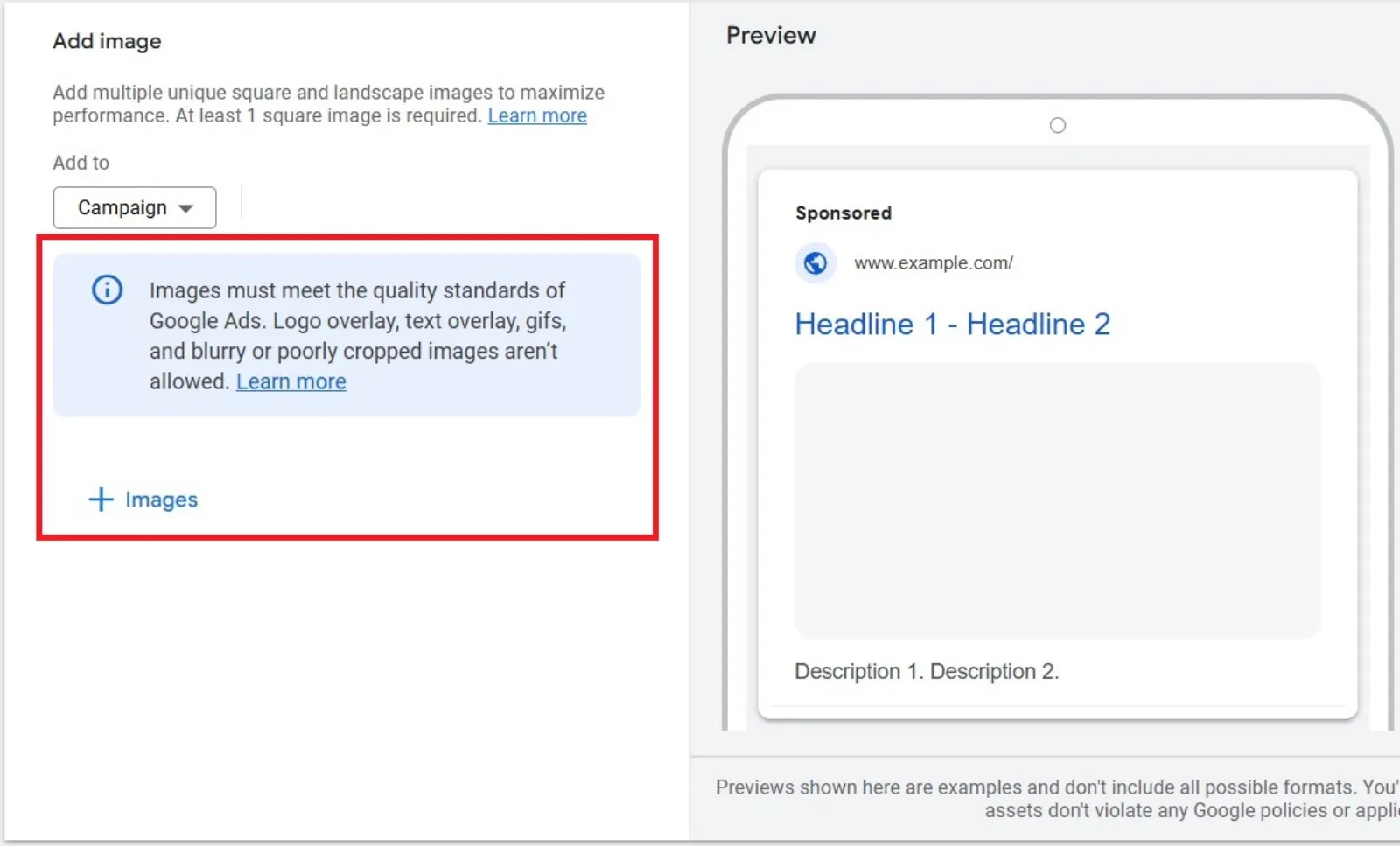
Google Ads Image Assets Specs

If you’re still on the fence, or if you’ve tried them before without much success, here are some super simple tips based on my experience:

  • Quality is Key: This isn’t the place for blurry phone photos. Invest in good-quality images. They don’t need to be professional studio shots, but they should be clear, well-lit, and in focus.
  • Showcase Your Best: Pick images that highlight what you offer. If you sell physical products, show them in their best light. If it’s a service, perhaps an image that evokes the benefit of that service.
  • Relevance, Relevance, Relevance: Make sure your images are directly relevant to the ad group and keywords they are associated with. Don’t just throw in a generic stock photo.
  • Test, Test, Test: Don’t just upload one image and forget about it. Try different images! See which ones resonate most with your audience. Google Ads provides performance data for your image assets, so use it.
  • Mind the Ratios: Google has specific requirements for image sizes and aspect ratios (square and landscape are usually good to have). Make sure your images fit these guidelines to ensure they display properly.

The Takeaway

Adding image assets to my Google Ads was one of the simplest yet most impactful changes I’ve made to my campaigns. It transformed my plain text ads into compelling visual invitations, leading to more clicks and, ultimately, more sales. If you’re looking to give your Google Ads a serious boost without a complete overhaul, I highly recommend diving into image assets. You might just find your click magnet, too!

Uzair Kharawala

Written by Uzair Kharawala

Partner at SF Digital Studios, a Google Premier Partner agency. Uzair has been helping businesses grow with Google Ads since 2002 and teaches it every week on YouTube.

Book A Call →Subscribe on YouTube for new videos every weekday →
Free every week

Get our best Google Ads tips by email

New articles and videos, straight to your inbox. Unsubscribe any time.

We respect your privacy at all times. Privacy Policy

You may also like

Read the blog →

Your next customers are out there. Let's go and get them.

Tell us where you want your business to be, and we'll show you how to get there.

Book A Call →or get your free Google Health Check →
Happy clients

Don't take our word for it

4.9 from 157 Google reviews, plus case studies and client videos.

See our happy clients →
"It has now been 3 months since we started and our sales have increased 300%."
Ruhi Latif Rafplay, Dubai
"Uzair and Farzana are two of the most honest, sincere and trustworthy people you will ever meet."
Gavin Morgan GDM Jewellery · Google review
"If I needed a campaign built, this is one of the rare few people IN THE WORLD I would trust to do it properly."
Hemmel Amrania Google Ads professional · Google review
Book A Call →
Chat with us on WhatsApp