Okay, I believe we are live. Please give me a moment; I'll make sure everything is working fine and we'll get started. Okay, I think everything is, everything is working fine, and it is 4:00 in the UK, 4th of January 2021. I'll, I'll need to get used to saying 2021. First of all, a very warm welcome and a very Happy New Year to you. New year, new start, and it feels like ages since I last went live. I think it was around the 22nd of December, can't remember. Seems like ages.
But anyhow, we're back live every weekday on this channel and at this time, where I'll talk about Google Ads, digital marketing, workflows and lots of interesting subjects and topics to help you with your business, to generate more leads and sales. And 2021 is going to be even more exciting for us, because we have got a lot of new stuff coming out. We've got coaching programs which just went live, we have got a couple of new tools which we are working on right now, and it should be ready within the next couple of weeks or so. So keep, keep an eye out on this channel and follow us, and you'll be the first one to, to hear about it.
Okay, so today is all about negative keywords in Google Ads. Now, I'm often asked what's my favourite keyword match type, and I always say it's the negative keywords, because it helps you save money and it also helps you make money. Because when you cut out all the wastage, you are going to make more money, your budget is going to last longer, and your ads will be shown to the relevant search term queries.
So if you are not using negative keywords right now, this video or the live stream is going to help you a lot, and it's going to open up your eyes as to why you should be using them, because right now you are losing a lot of money if you aren't using negative keywords. So it's a very important part of managing and optimising your Google Ads campaign.
So the format of these sessions, if you're new here, is I'm going to go through the topic, explain how it works, what it is, then we'll go into our Google spreadsheet and I'm going to see how I would create a list of negative keywords before the campaign has been started. So if you have any questions, then please put them in the comment box; I'll come to that towards the end. So I'll first go through our today's topic and subject, and we'll then go through our, our question towards the end.
Now, I'm not sure whether there is any problems on the comment box, because I can't seem to see any. If you are watching this live, please put in a little hello in the comment box so I can see that, yes, it is working fine, because it's showing me as a little error message over here. Let me try again. It is still giving me an error. So if you can't put them, put your comments in the comment box on the right-hand side of your video, then what I would request you to do is to put underneath, in the comment box under the video where the comments section is. I'll try and read your comments as we go along.
Okay, so let's hop into our Google support centre. So this is the Bible. This is where you should be referring to, this is where you should be reading anything and everything about Google Ads if you are not sure as to how to do, what to do, because this is what, this is the place where you are going to find all the right information.
And don't, don't just read a blog post which was written four years ago, because that may well be out of date, and Google Ads is moving at such a fast pace, you need to keep up to date. And the support centre is where everything is, well, in black and white, and I totally, 100% trust what it says over here.
Okay, so what are negative keywords? Right, so it's, lets you exclude search terms from your campaign and help you focus on only the keywords that matter to your customers. So it is for better targeting, and your ads will be put in front of the interested users, and obviously it increases your return on investment.
Because of people, if somebody searching for red apple and you put in a keyword, for a negative keyword, for green apples, which you don't sell, then anyone who searches for green apples, your ads will, won't show. But when somebody puts in a search for red apple, your ad is going to show for that search term. It's more relevant, and the person searching for red apples is more likely to click on your ad and go through to your website, and then the ball is in your court as to how to convert them or convince them to buy from you.
So this article explains how negative keywords work and why they are useful, and you can learn a lot more about it. So I'm not going to read the whole lot; you can come here and read about it afterwards. But what you can do is, I'm going to go through a couple of quick things very quickly.
Now, the most important thing is negative keywords are the opposite of, obviously, the positive keywords. That's why they are called negative, and they, it's, it's true in nature as well, not, not just in name. Because when we put in a keyword, Google is going to show your ads for similar keywords, but in negative keywords they don't. So you need to put in negative keywords for those words as well.
So let's see over here, which they very kindly put this in red because it is very important: negative keywords won't match to close variants or other expansions of that search term or the keyword you put in. For example, if you exclude the negative broad match keyword "flowers", ads won't be eligible to serve when a user searches "red flowers", but if, but can serve if a user searches for "red flower". So what you want to do is to put in close variants, singular and plural variations of that negative keyword, in your list.
The types of negative keywords: we've got broad, phrase and exact. So in the broad match type, if the negative keyword is "running shoes", the ad could show for "blue tennis shoes", "running shoe", because, see, this is singular, so you need to put in the plural as well as the singular one if you are, are not selling running shoes. But it won't show for "blue running shoes", "shoes running" and "running shoes". Even if it's in the different order, it's not going to show.
Negative phrase match, you need to put the quotation marks in here. You have somebody searches for "blue tennis shoes", it's going to show. "Running shoe", it will, it will show. "Blue running shoes", it won't. "Shoes running", it will. And you can go through the same process over here as well.
And if you want to set up your negative keywords as exact match, then you need to put the square bracket. So the square bracket, and the quotation marks for phrase, and for broad, are the same, right? And the only term which is going to block your ads running for, excuse the pun, is "running shoes", whereas all of these variants or close, or variations of that "running shoes" is going to trigger that ad.
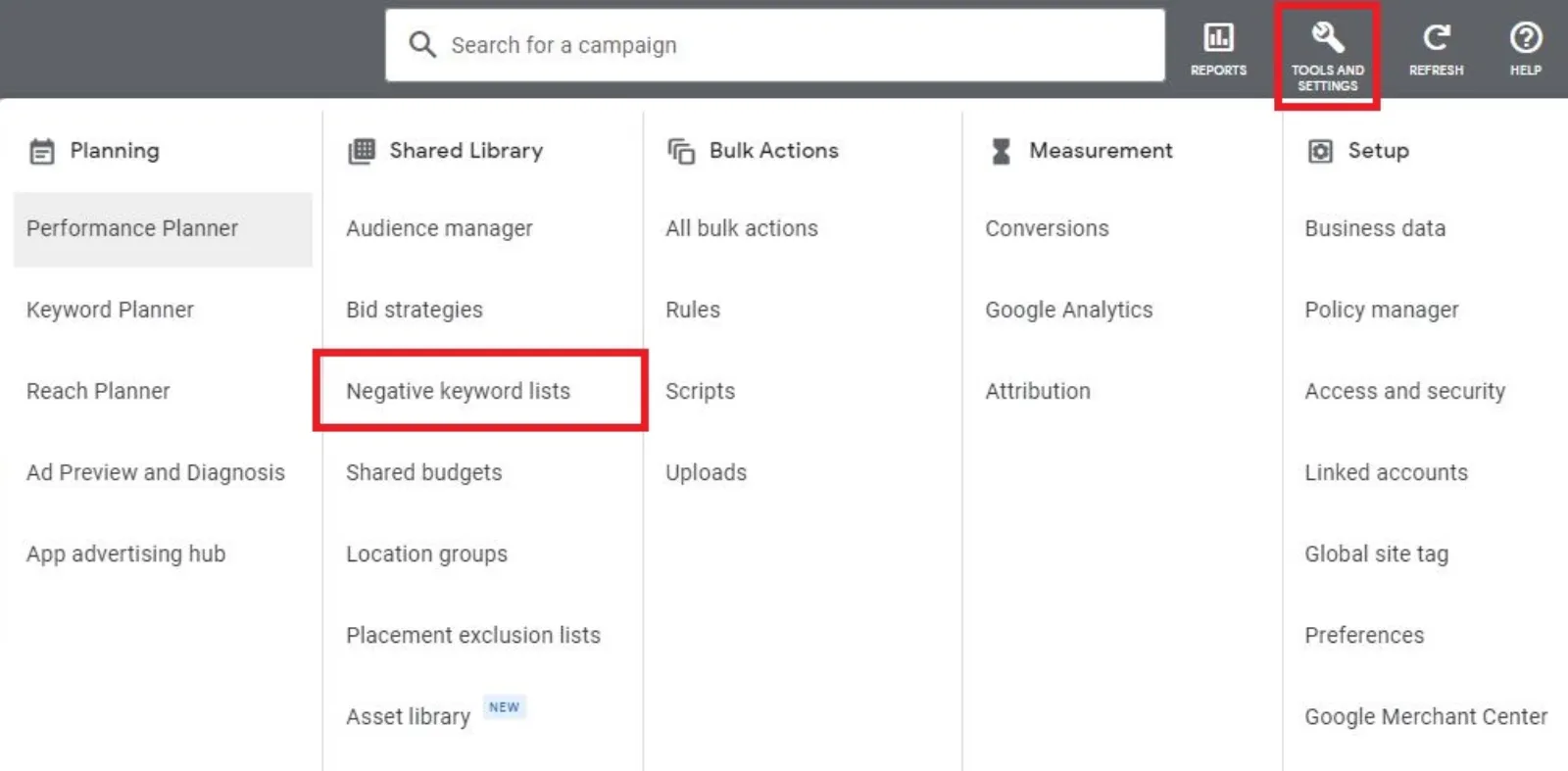
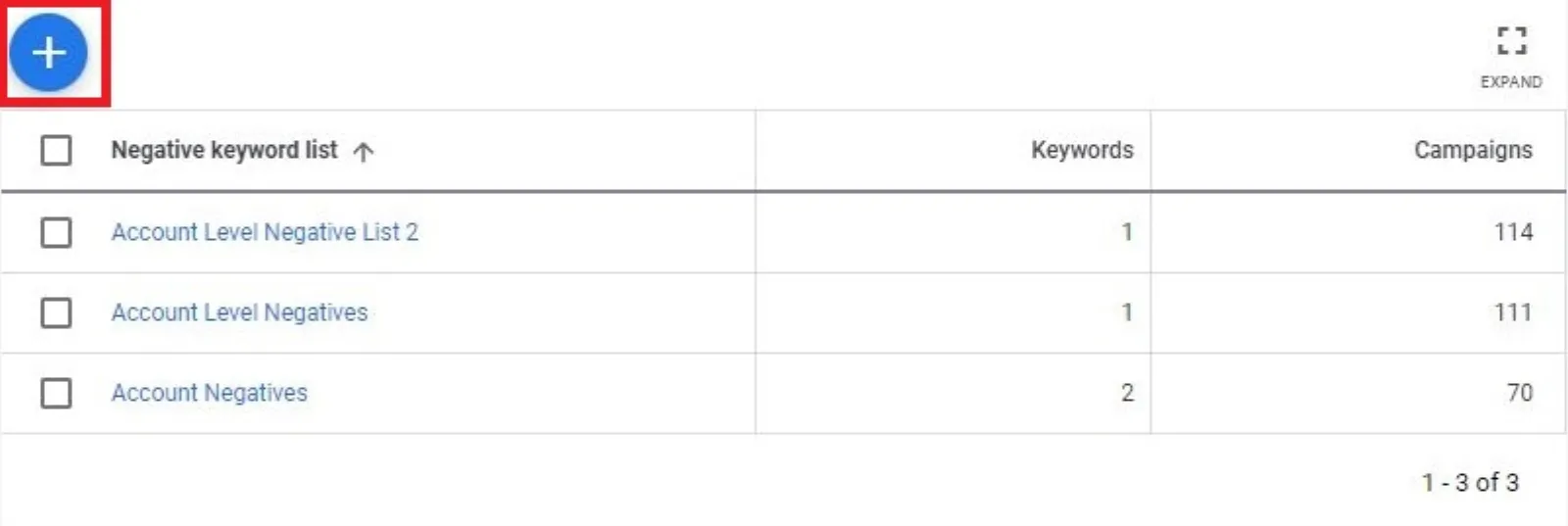
Now the ad, the negative keywords can be set up at account level, campaign level as well as ad group, ad group level. Okay, there are a couple of other things which you need to keep an eye on. Ignored symbols, like periods, will be ignored, and we've got, for example, over here, plus, C, C or C++. Invalid symbols are here; you can't use those, and so on.
Okay, what have they got over here to keep in mind? Choose your negative keywords carefully. If you use too many negative keywords, your ads might reach fewer customers. But you need to use them properly. It's not a question about quantity; it's also about the quality of these negative keywords. Yeah, you can have as many as you like if they're all irrelevant search terms which you don't want your ads to show through.
So I would not suggest for a single moment that, you know, putting in too many negative keywords will reach fewer audiences or customers. We don't want irrelevant people seeing our ads and clicking on our ads to come through to our website.
Negative keywords do not match to close variants, as we've just discussed and shown above. There's no negative broad match modifier match type; that's fine. And your ad still might show when someone searches for a phrase that's longer than 16 words. So that's too long anyway. We never use, maybe between one word, two to three words or four words, negative keywords is more than enough. So this is what they're all talking about.
All right, so let's go into our Google Sheets. I'm just going to have a quick look at the chat. I'm not sure if it is working or not. I'm just going to see if this is working or not. Okay, seems to be working fine at my end. If anyone is watching live, then please put something in there, then I'll know that it has been, it has been put up. Okay, so now what we, okay, wine TS. Hi Buzz, good to see you. Happy New Year, and thank you. Yeah, it's working. Brilliant.
So I've got a list of keywords here which is about car insurance, right? I've got, I don't know how many I've got here. Thank you, Biset. Yeah, please put in the question; I'll come to your questions towards the end. So I've got about 800-odd keywords. Now, I want to find the negative keywords out of here. So let's say if we don't do home, home insurance. So instead of going through the whole lot, I want to say, there you go.
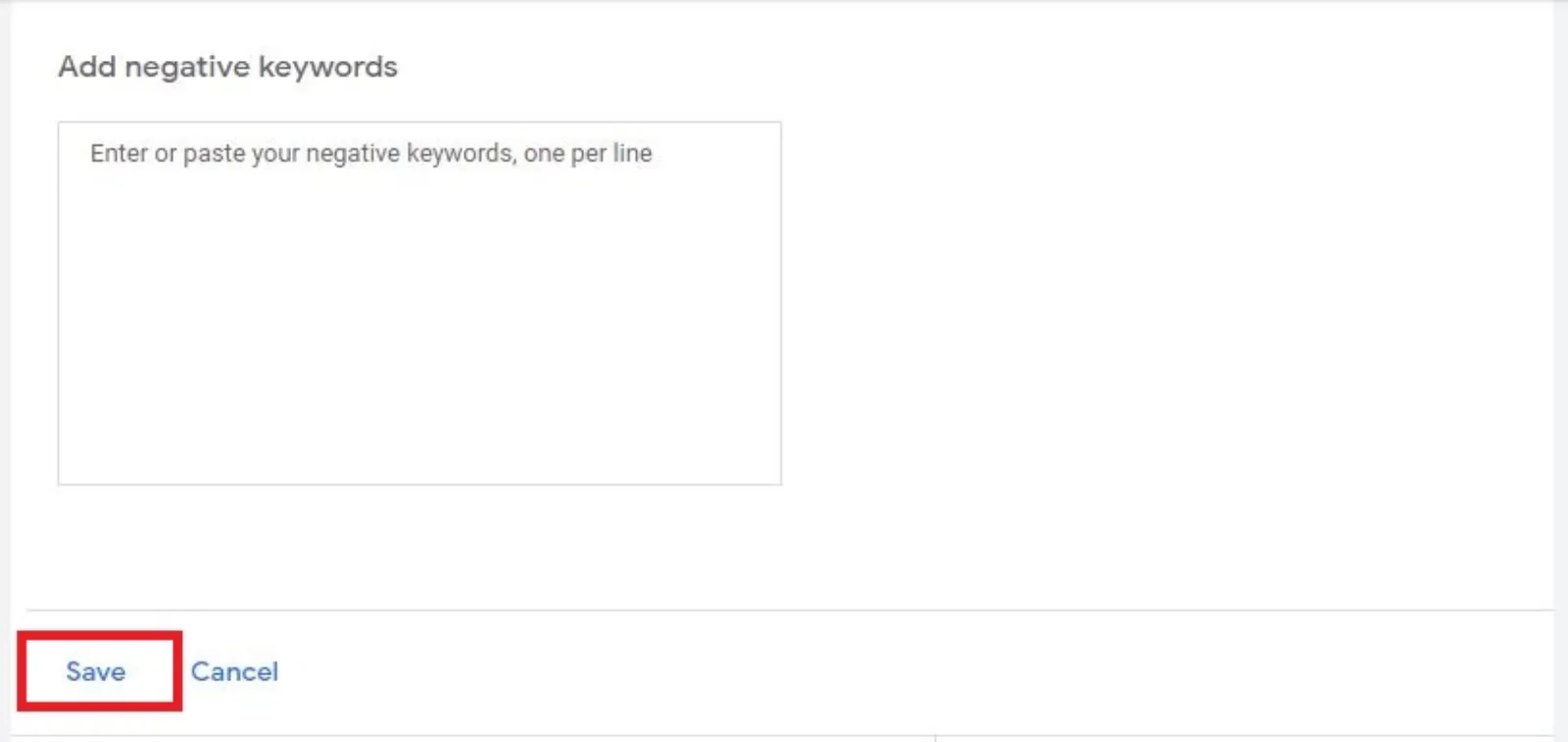
So these are all the, so what this Google Sheet has done is scanned through my column A, where all the keywords are, and it has put in all these negative, potential negative keywords. Now I can put in a negative keyword as "home" and it's going to block all of these, or I can put them as exact match. But exact match will only block that particular search term, because if somebody puts in "AA home insurance cheap", let's say, then obviously the exact match won't, won't work. So you need to work out some keywords which need to be as phrase match and some as exact match, so you don't block out the most relevant search terms.
So you got, I've got a handful of good keywords over here. Let's say mobile phone. So I'm just going to put in "mobile". Phone insurance is also, "automobile", okay, so that is a good one. So I don't have any words which are for smartphones or something like that. Let's try "phone".
So this is my thought process. In fact, what I might do, not might do, I will do, is I'm going to put in this keyword planner for you, which is free to use. Put the link in the comment, so you can go there and you can download this. What you do is, once you sign up, you go to File and Make a copy, and then use it on your Google Drive. Please don't request access to this, because it won't be given.
Now, I've got no, no records or no keywords for "phone", which is again good. Now what I also want to do is to find out competitors, brand terms type of keywords. Now if I were to go "Tesco". I don't know whether Amazon does car insurance or not; knowing them, they probably will. Ah, no. Okay, so I'm going to think out loud about, you know, some irrelevant keywords which might be lingering in that long list.
So, which is good. So there are no records for Amazon, eBay, Walmart, so I know that I'm not going to be wasting any search terms if people are searching. Because if Amazon or eBay or Walmart was in this list, potentially you might get a lot of impressions and click-throughs which may be wasted. I then also go through this list and have a scan through and see what they are, how they do.
Now let's say we are not the cheapest; we only do luxury car insurance, right? So I don't want to show for the word "cheap" or "cheap insurance". There you go. Now I can put in the word "cheap", and I can also get ideas for other search terms as to what people are searching for, and whether there are any good keywords in here if I were to take out the word "cheap" from it.
So let's say "classic car insurance" is a good one. So you need to niche down, especially for any kind of service or product you're offering. So what, what I want to do is then I need to break down, and we are going away from the negative keywords; I'm now talking about positive keywords. So we've got classic car, vintage car, learner, that's a good one, multi, family, one day. See, now I'm getting lots of ideas from here. So if I don't do one day insurance or learner car insurance, I'm going to take these out.
Now imagine how much money you are going to save up front if you were to do this little exercise, which doesn't take a long time, and save a lot of money. Because it's not only about making a lot of money; it is about utilising the budget for the right terms. Because if you are not showing your ads for all these learner, one day, cheap, home insurance and all that kind of ones, your budget is going to last longer. As simple as that.
Your competitors may not be using this workflow, and they're going to start, upload, running ads and fly blindly, and then they will put in the negative keywords after they have been clicked. So what that means is they have wasted a ton of money. So what you want to do is to do this research work, plan out these keywords and negative keywords before you go anywhere near setting up a, a campaign.
So this is my thought process and my workflow as to how I would look for positive as well as negative keywords. And if I want to take out all my branded search terms as well, so I only want to show for, let's say, "car insurance" and those kind of variations, then I can see that these are, there are keywords in here with the word "Tesco" in it, or "Churchill" or, let's say, "Saga". I can then put in all these keywords in my, at my account. I would definitely put these up at account level, because then no matter how many campaigns I'm running, the whole account will save the money.
So I hope this made sense, and now it's time to go to your questions and comments, if you have any, and I'll try my best to answer them for you. Please keep in mind that there's a 30 second display, delay, by the time you put the comment to the time I receive it over here, so don't wait until the very last second, because I may turn off and switch off the live stream.
So The Big Show: "How to find keyword for co-working place company in local area?" So the same way you would find any other keyword. You would go to your keyword planner, and then you can put in the word "co-working" or "shared offices", "short-term rent offices" and things like that. Just think out loud, put something in and start to see what people are doing, searching. Then make a long list like this and then sort out all these ad groups.
Because with, with this keyword planner, what you can also do is you are sorting out your ad group. So let's say you did all these search terms, of, you did offer car insurance for learner drivers and you were an agent for Tesco, Churchill and Saga. I would make a new ad group for "cheap". In fact, I've done Tesco twice, my apologies. I can put in something else, R, over here.
I'm making up my ad groups as well. Be careful how you write your ads, because if this is a trademark, then you may not be able to use the trademark. You might need to get special permission to run those trademarked terms. And now I've got my list of positive as well as negative keywords, and I can then set them up the way you want to set up your campaigns.
So let me go back and see if you, if you got any other comments. I know it is the first day of the year and everybody may not be in full form. Okay, all right, so that's good. I've, haven't got anything else. Tomorrow I will be writing ads. Every Tuesday I write your ads. If you want me to write your ads for you, for your campaigns, all you need to do is to either put, put it up in the comment over here or send me an email to info@sfdigital.co.uk. I'll put the email in there. All I need is a landing page, that's it, and I'll, I'll write the ads for you.
So thank you, thank you so much for being with me today. I hope you have a happy, prosperous and a wonderful 2021, and, and let's hope that, and pray that, this awful virus goes away very quickly.
So I've just seen one last comment from Chris: "Can you explain more on audiences and remarketing?" So audience, with audiences, Chris, you, you can target those kind of audiences in, in Google Ads, especially on YouTube and Display Network, where you really can expand your campaigns. So the great example, and it's a perfect example of what I've just talked about, this keyword for the co-working place company in a local area.
So when you're running a campaign in a small location or a local community or a town, the number of search terms will be very restrictive and restricted, right? There may be 20, 30, 40 number of search terms which may be searched in your local community. It's not a lot. Your campaigns will not spend any money, you will not get any brand awareness, and people in the, the local community will not know who you are, what you do and where you are.
So the way I would run this campaign, especially for this co-working place, is create a custom intent audience. So what that means: anyone who has gone to Google and searched for a particular keyword, we can then target those people on display and YouTube with image ads, responsive display ads and video ads, as well as Gmail, with your ad.
So if I was a person looking for office in my local area, now I'm looking for co-working places and so on. Now, your ad may not pop up, because your budget might have been exhausted or your ad got outranked by your competitors, and I did not see your ad. So I never know of you, right? Who you are, what you do.
Then I go to YouTube, or go to ESPN, CNN or any other kind of newspaper to read the daily news. Using that custom intent audience, because I searched for that keyword, you can target me on all of these high-traffic websites, and all of a sudden an image ad or a video ad, which, with the skip button, pops up in front of me: "Are you looking for a co-working space? We can help." You know, you can have a little ad, "from only" whatever price it is, or whatever message you want to put in, and all of a sudden I'm thinking, "Ah, this is exactly what I was looking for. This looks really good."
Now, the beauty with these image and video ads: you can showcase your venue, which you can't do on the text ads. And this is where, I would say, the majority of advertisers on Google, they only think of Google as a Google page with four ads at the top. Google is a lot more bigger than, than those four ads. You can target and hit your audiences in so many different ways and places that your brand starts to grow, and before you know it you are getting impressions, you're getting eyeballs on your brand, and people start to remember and recognise you.
So this is how we would use audiences. I mean, this is just one example. If you care to look into the, on our channel, we've got loads of videos about audiences as well as custom audiences, so please do feel free to have a look at it.
"I set up remarketing and imported from Analytics, okay, and I had 400 clicks in the Google Ads campaign but could only remarket to 150 people on display. Why is that?" Now, there is a minimum number of, not the clicks, number, minimum audience in, per list. The search campaign is 1,000. So you can do a remarketing list for search ads as well; it's called the RLSA. So if I go to Google one day and search for something, and then when I go back again, you can bid adjust on that audience, and then you can bid very aggressively, because you know that I'm still in the hunt and a look, and on the lookout for, for the, for this product or service.
"What are the main remarketing audiences you suggest to remarket to? All users, new visitors, and what else?" Oh, there's, I mean, you're restricted by your imagination. You can remarket in a variety of ways. Website visitors. Somebody who stayed on your website for five or more minutes, that means he or she is very interacted and engaged. They are the high-value targets which I would absolutely target with very aggressive bidding. I don't want to lose out in the auction on those.
Anyone who viewed my video, anyone who stayed on my website for, well, five or more minutes, visited multiple pages, visited one page but did not visit the thank you page, i.e. did not sign up to my offer. So let's say I've got my offer over here, which you guys can feel free to sign up; the link is in below. So I've created a, a masterclass where I show you how to create a high converting Google Ads campaign in 30 minutes.
And in this masterclass you, we've got about over 500 ad groups, 600, 500-odd keywords as well, in under 30 minutes. Now, usually it's not possible to have so many keywords and ad groups and ads, and two ads per ad group, which makes it about over a thousand ads. How you can do that in 30 minutes.
This is how I would show you how you pay the lowest CPC, because your ads are super relevant to the keywords, how to get the highest ad position and ad rank, how you outrank and outbid your competitors and so on. And obviously you get to know a free Google Ads tool, which is the key to setting up really good campaigns.
So you can really target all these audiences, and what I would do is I would have one audience per ad group and then keep them as separate. Don't dump everybody in one: the video viewers, the, somebody who subscribed or engaged with your content and so on. Keep them in separate ad groups, and then you can see how each audience is performing, and the ones which are performing, you bid more; the ones which are not, you either cut out or bid less.
Mike: "How is the new Apple update will affect Facebook advertising?" It is going to affect. In fact, the, what, where, from where I see, I think Google and Amazon must be extremely happy with how things are progressing, and why Apple has just targeted Facebook and not Google and Amazon. So we don't know. If they choose to go after Google and Amazon as well, then we shall see what happens. But no, right now I think it's too early to make a comment, and I wouldn't want to make a comment as to how things will pan out. For now, just keep running your Facebook ads as much as possible, or up your game and come over to, from the dark side of Facebook advertising, to Google Ads, and especially video ads.
You know I keep banging on about and going on about video and YouTube. 2021 is where we are, are going to even increase our content marketing, which is obviously video marketing, and we're going to create more and more video content to get our message across to, to everyone and to all parts of, of the globe.
And video is something which, you know, we, I think last year we started these live streams around March, and since then we have done all over 105; I think this is the 106th live stream. And unless we are on holiday or we have got some technical glitch, we have not stopped. Every weekday we've been live here, myself and my wife, live here to give you guys as much value as we possibly can.
Because I know a lot of people are suffering, and this is what we decided that we will do, is to help out as many people as possible. And the support we have got has been incredible and amazing, which we truly appreciate, because if you guys aren't listening to me and putting in these comments and questions, then it'll be pretty boring for us to just talk to a computer.
Chris: "When are Mo live with?" It is, we are live every weekday over here at 4:00. So you can go to our channel over here, I'll take you, and then you can put in a reminder. So we have a, this is the "Live now", "Upcoming live streams", there you go. So tomorrow is "I'll write your ads", then we got responsive search ads, question and answers on Thursdays and so on.
So we've got all these live streams which have been scheduled for the next two weeks or so, and all you need to do is to come here, set up a, a reminder and you'll be notified. You'll be the first one to be notified when we go live, and also when we do upload new content or videos on the channel.
Okay, thank you, Mike. I truly appreciate your lovely words. I know you have also sent a Google review before, I believe, so truly appreciate it. Okay, I think I've covered everybody's questions, so we'll, we'll wrap things up for today, and I shall be back again tomorrow, same place, same time.


 LIVE