
You need a website that makes the phone ring. One friend swears by Wix. Another says you will regret not hiring a web designer. A third built theirs on Squarespace over a weekend and loves it.
So should you use Wix or a web designer? The honest answer depends less on the tool and more on what you need the site to do.
Get Found, Get Chosen, Get Your Time Back
A free one-day marketing seminar in Milton Keynes · 10 November 2026
One thing first. SF Digital builds websites, so we're not neutral. But this guide gives you the same answer we'd give a friend, including when you shouldn't pay someone like us.
Get your free Marketing Action PlanNot sure where to start? Answer a few questions and get your plan in about a minute. No email needed.
Get my plan →Should You Use Wix, Squarespace Or A Web Designer?
Use Wix or Squarespace if you need a simple, good-looking site quickly, have more time than budget and don't rely on Google for most enquiries. Hire a web designer if your phone depends on search, you run ads, or you would rather spend your time running the business.
Neither choice is wrong. Both can work well. The wrong choice is picking a route that doesn't match how customers find you.
A florist who gets most orders through Instagram has different needs from a plumber who lives on Google searches. The plumber's website has to win searches and turn visitors into calls.
The florist's mostly has to look good and take payments.
What's The Real Difference Between A Website Builder And A Web Designer?
A website builder gives you the tools and templates to make the site yourself. A web designer makes it for you, and a good one also plans what it needs to say and how it brings in enquiries.
Wix and Squarespace are website builders. You pick a template, drag in your text and photos and press publish. Hosting, security updates and the technical side are handled for you.
You pay a monthly fee, and you do the work. That's the deal.
A web designer is a person or a small agency. They might build on WordPress, on a builder like Wix or Squarespace, or from scratch.
You pay for their time and skill, usually as a one-off fee, plus ongoing hosting.
The real difference is not the software. It is who does the thinking. A builder gives you a blank page.
A good designer asks who your customers are, what they search for and what makes them pick up the phone.
That thinking is what most DIY sites are missing. Not the template. Not the colours either.
What Does A Website That Brings Calls Actually Need?
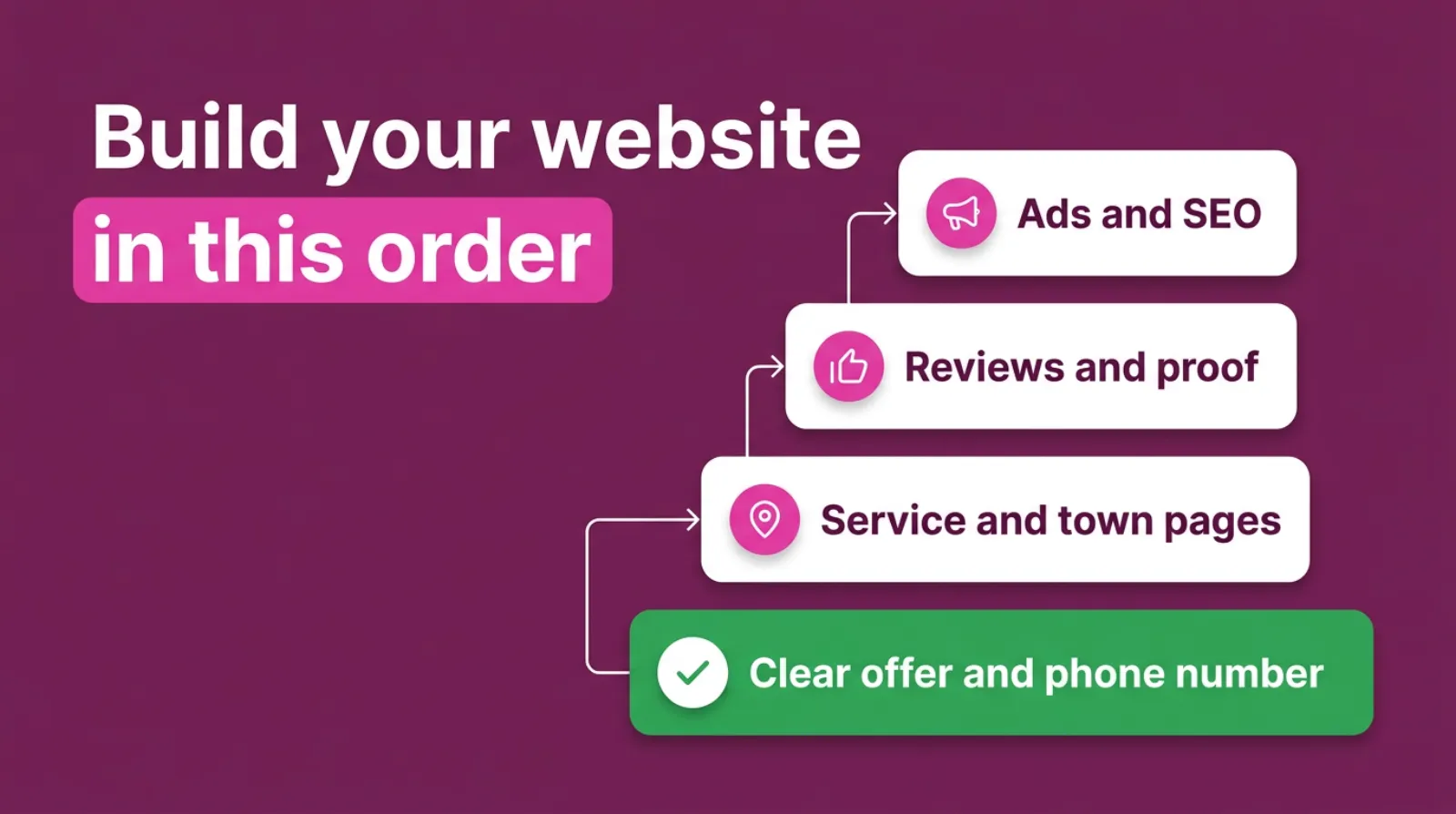
A website that brings calls needs six things: a clear offer, a phone number that's easy to tap, pages for each service and area, proof like reviews and photos, speed on a mobile and tracking so you know what works.
Here's what each one means in practice. Check your own site as you read.
A clear offer at the top. Within three seconds, a visitor should know what you do, where you do it and how to get in touch. "Boiler repairs in Luton, same-day callouts" beats "Welcome to our website".
A tappable phone number. Most local searches happen on a phone. Put the number at the top of every page, and make sure tapping it actually rings you.
A page for each service and area. One page called "Services" rarely ranks for anything. A page for "boiler servicing in Dunstable" gives Google and the customer a clear match.
Proof. Reviews, photos of real jobs, accreditations and a name or face. People call businesses they trust.
Speed on a mobile. A slow site loses people before they read a word. Big images and too many apps slow sites down whichever route you choose.
Tracking. Call tracking and form tracking tell you which pages and ads bring enquiries. Without them, you're guessing.
Every route can deliver all six. Wix can. Squarespace can. A designer can. What differs is who does the work and how much it costs.
Three Routes To A Website That Brings Calls
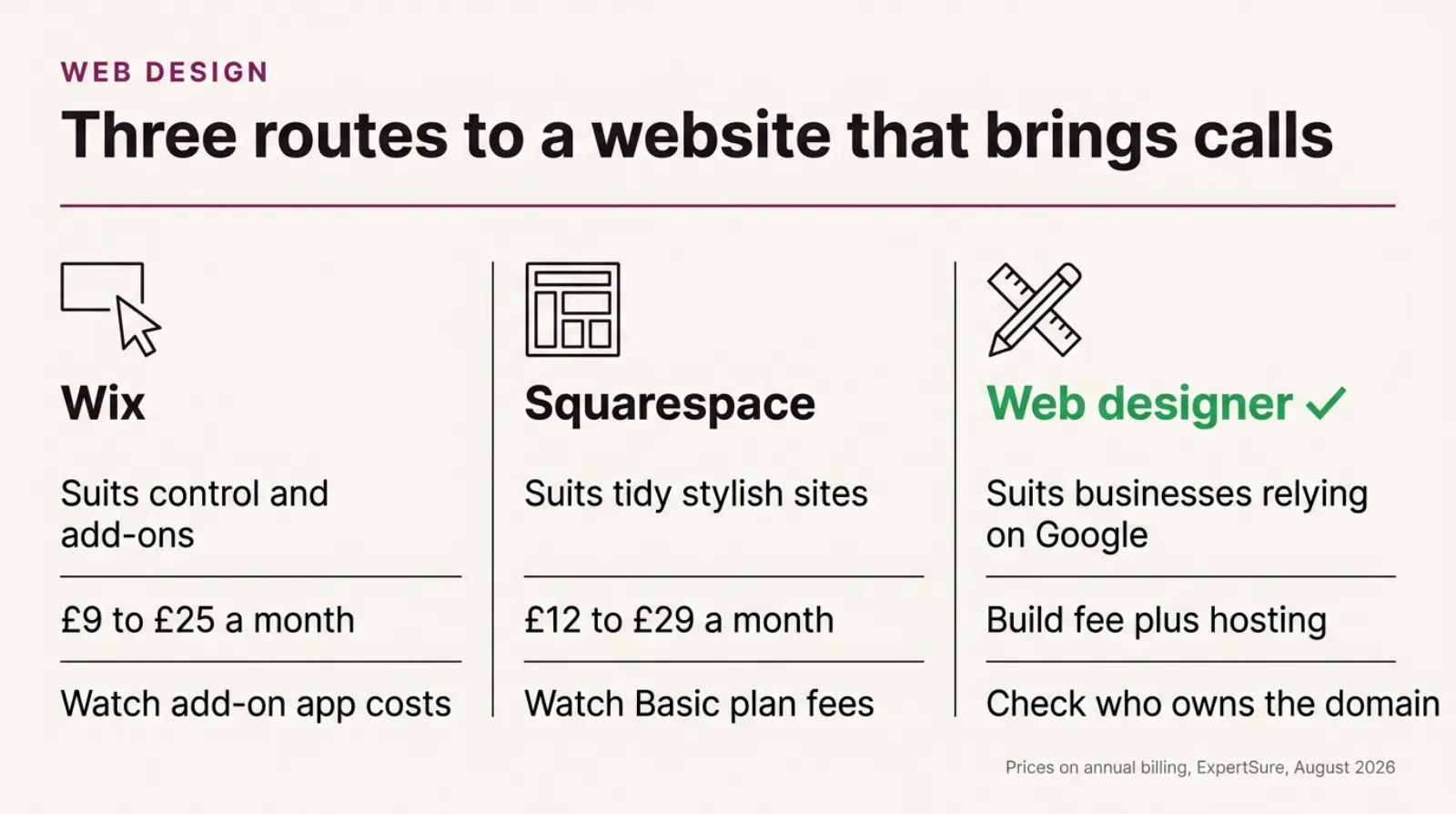
A side-by-side comparison of three ways to get a website: Wix, Squarespace and a web designer, showing who each one suits, the typical monthly cost and the main thing to watch out for, with the web designer marked for businesses that rely on Google for calls.
When Is Wix Or Squarespace The Right Choice?
Wix or Squarespace is the right choice when you're starting out, your budget is tight and you have time to learn. It also suits businesses whose customers mostly arrive from word of mouth, social media or a Google Business Profile rather than website searches.
Here are the situations where we'd happily tell an owner to build it themselves. There are more than you'd think.
You are just starting. A clean, simple site that explains what you do is far better than no site while you wait for the budget.
Most enquiries come from elsewhere. If customers find you through Instagram, referrals or your Google Business Profile, the website mainly needs to confirm you're real and easy to contact.
You enjoy doing it. Some owners like building and tweaking. If that is you, a builder gives you control.
You sell products online. Both builders handle payments, stock and delivery options well for small shops. Squarespace in particular is known for polished, image-led templates.
You can't commit to a large upfront cost. Monthly fees spread the cost. You can always upgrade later.
Wix tends to suit people who want lots of control and add-ons. Squarespace suits people who want a tidy, stylish site with fewer decisions.
Both are perfectly capable for a small local business.
What To Build First, Whichever Route You Choose
When Is A Web Designer Worth Paying For?
A web designer is worth paying for when your phone depends on Google, when you run or plan to run ads, or when your time is worth more than the fee. A good designer pays for themselves if they bring more enquiries than a DIY site would.
Here is when we'd suggest paying for help.
Search brings most of your work. Plumbers, electricians, solicitors, dentists and builders often live on Google. Pages planned around what customers search for make a real difference.
You run Google Ads. Ads send paid visitors to your site. If the page doesn't convert, you pay for clicks that never become calls.
A designer who understands landing pages protects that spend.
You compete with established local firms. If three competitors already have strong sites, a basic template may not be enough to stand out.
You don't have the time. Building a decent site takes most owners several weekends. If you would earn more doing paid work in that time, the maths favours hiring.
You need something specific. Online booking linked to your diary, a quote calculator or integration with your software can be easier with a professional.
The best designers don't just make it look nice. They ask about your customers, your competitors and how enquiries reach you. If a designer only talks about colours and fonts, keep looking.
How Much Does Each Option Cost In The UK?
Wix's main UK plans cost about £9 to £25 a month and Squarespace's about £12 to £29, paid yearly, according to ExpertSure's UK pricing guides updated in August 2026. A web designer usually charges a one-off fee for the build, plus hosting and any ongoing support.
Prices change, so check the builders' own UK pricing pages before you buy. Here's the picture from those guides, which say the prices were checked against the official UK pages in July 2026.
| Wix | Squarespace | Web designer | |
|---|---|---|---|
| Typical monthly cost | £9 to £25 on annual billing | £12 to £29 on annual billing | Hosting and support, varies by designer |
| Upfront cost | None | None | A one-off build fee |
| Who does the work | You | You | The designer |
| Time from you | Several weekends | Several weekends | A few meetings and your content |
| Best for | Control and add-ons | Tidy, stylish sites | Businesses that rely on search and ads |
| Watch out for | Add-on apps and renewal prices | Transaction fees on the Basic plan | Who owns the site and domain |
Designer fees vary widely. So do the results. A simple site built on a template can cost a few hundred pounds, while a fully planned site with many service and area pages can cost several thousand.
Always ask for a fixed quote that says exactly what is included.
Compare cost against enquiries, not against each other. A £1,500 site that brings two extra jobs a month is cheaper than a £9 site that brings none.
Remember the extras whichever way you go. Domain renewals, email, call tracking and paid apps all add up.
Which Pages Should A Local Business Website Have?
A local business website should have a clear home page, one page for each main service, a page for each town or area you cover, an about page with real people, a reviews page and a simple contact page. An FAQ page helps too.
Here's what each page is for. Start with the ones you are missing.
Home page. It says what you do, where and how to get in touch. It links to every service and area page.
Service pages. One page per main service, such as "boiler servicing" or "bathroom fitting". Each explains the job, the price range if you're comfortable sharing it, and what happens next.
Area pages. One page for each town you serve regularly. Don't copy the same text and swap the town name.
Mention local details, jobs you've done there and how quickly you can get there.
About page. Your name, your team, how long you've been trading and any accreditations. People hire people.
Reviews page. Pull in your Google reviews or add written testimonials with a name and town.
Contact page. Phone, email, a short form and your opening hours. Keep the form short. Three or four boxes is plenty.
FAQ page. Answer the questions people ask on the phone. It saves you time and gives Google and AI assistants something to quote.
A builder can handle all of these pages. The work is in writing them well, not in the software.
Can A Wix Or Squarespace Site Rank On Google?
Yes. Wix and Squarespace sites can rank on Google, and plenty do. What decides your ranking is mostly your content, your local proof and how well each page matches what people search for, not the builder.
Google's own guidance backs this up. As of October 2026, its page "Do You Need an SEO?" says that if you run a small local business, you can probably do much of the work yourself.
Its SEO Starter Guide adds that content people find compelling and useful will likely influence your website's presence in search results. It also notes that some changes can take a few hours to show, and others several months.
So the builder isn't the problem. The content usually is. The usual problem is that DIY sites are thin. They have one services page, no area pages, few photos and no reviews on the site.
Google also gives a useful warning when hiring anyone. Its page says no one can guarantee a number one ranking on Google, and that if someone guarantees first place, you should find someone else.
If a designer promises page one, walk away. That's Google's advice, not just ours.
 LIVE
Live every Tuesday at 2pm UK. Bring your marketing questions.
Get your Google, local SEO and AI questions answered live.
What Do DIY Websites Usually Get Wrong?
DIY websites usually get the same six things wrong, and almost none of them are about the template.
- The headline says "Welcome" instead of what you do and where.
- The phone number is hidden in the footer or not tappable on a mobile.
- All services sit on one page, so nothing ranks for a specific search.
- There are no area pages, so the site does not match searches in nearby towns.
- Photos are huge, so the site loads slowly on a phone.
- Nothing is tracked, so the owner cannot tell which pages bring enquiries.
Every one of these can be fixed on Wix or Squarespace. You don't need a new website to fix a weak one. You often just need a clearer plan.
If you've built your own site, check it against that list this week. Fix one item a day. It's a quicker win than a redesign.
What Should You Ask A Web Designer Before You Pay?
Ask who will own the website and domain, what the monthly costs will be, whether you can edit it yourself and what happens if you stop working together. Then ask how the site will bring enquiries.
Here are the questions we'd want any owner to ask, including us.
- Who owns the domain, the website and the content once it's built?
- What will I pay each month for hosting, support and updates?
- Can I change text and photos myself without paying each time?
- What happens to the site if I stop working with you?
- How will the site be planned around what my customers search for?
- Will call and form tracking be set up from day one?
- How many service and area pages are included?
- When will it be finished, and what do you need from me?
Good designers welcome these questions. They've heard them all before. If the answers are vague, or the designer promises guaranteed rankings, keep looking.
Make sure the domain is registered in your name. If a designer registers it in theirs, moving later can be painful.
Can You Start On Wix And Move To A Designer Later?
Yes, and it's a sensible route for many new businesses. Start on a builder, prove the business works, then pay for a professional site once you know what customers want.
There's a catch to plan for. It is manageable. Moving from one platform to another usually means rebuilding the site rather than copying it across.
Your words and photos move, but the pages themselves are recreated.
That's fine if you plan for it. Keep your own copies of your text and photos.
Keep your domain in your name. And make a list of your current page addresses before you move.
Ask your designer to redirect the old page addresses to the new ones. It keeps the Google rankings you've already earned and stops visitors landing on broken pages.
What About WordPress?
WordPress sits between the two. It is free software that powers a large share of the web, and most web designers build on it. You can also build a WordPress site yourself, but it takes more learning than Wix or Squarespace.
With WordPress, you pay for hosting separately and handle updates, or pay someone to. In return you get almost unlimited flexibility and full ownership of your site.
For most small local businesses, the choice is really this. Keep it simple. Do it yourself on a builder, or have a designer build it, often on WordPress.
Doing WordPress yourself only makes sense if you enjoy the technical side. It's powerful, but it asks more of you.
If a designer builds on WordPress for you, ask who handles the updates. WordPress and its plugins need regular updates to stay secure. Some designers include this in a monthly support fee, and some leave it to you.
Neither is wrong. But an out-of-date WordPress site is one of the most common reasons small business websites get hacked, so make sure someone owns the job.
Do You Need A Website If You Have A Google Business Profile?
Yes, for most local businesses. A Google Business Profile wins you calls from the map, and a website backs it up. It gives people more detail, helps your profile rank and catches the customers who want to check you out before calling.
Your profile and your website work as a pair. The profile is often the first thing people see. The website is where they go to decide.
There are three reasons not to rely on the profile alone. Each one costs you calls.
First, the profile has limited space. You can't explain each service in depth, show a full gallery or answer every question.
Second, many searches don't show the map. People who search for detailed questions often land on websites instead.
Third, you don't control the profile the way you control your own site. Google can change how it looks, and other people can suggest edits.
If you only have time for one this month, start with the profile. Then build a simple website that links to it and adds the detail.
How Long Does Each Option Take?
A simple Wix or Squarespace site can be live in a weekend, but a good one usually takes several weekends of writing and tweaking. A designer typically takes a few weeks, depending on how quickly you supply your content and feedback.
The software is rarely the slow part. Writing is. Most owners find it harder than they expected.
Most owners underestimate how long it takes to write clear service pages, choose photos and gather reviews. That's true whether you build it yourself or hire someone.
Gather your content before you start. A list of services, the towns you cover, ten good photos and a handful of reviews will speed up either route.
A designer cannot finish without your input. If they're waiting three weeks for your photos, the site waits too.
How Do You Know If Your Website Is Working?
Your website is working when it brings a steady flow of calls and enquiries you can trace back to it. Visitor numbers alone don't tell you that. A site with 300 visitors and 15 calls beats a site with 3,000 visitors and two.
Start by counting enquiries properly. Call tracking shows which calls came from the website. Form tracking shows which pages people filled in forms on.
Google Analytics is free and works with Wix, Squarespace and designer-built sites. Set up the phone number clicks and form submissions as key events, so you can see them in your reports.
Then look at four simple signs each month. It takes ten minutes.
Calls and forms from the site. Is the number going up, flat or down?
Which pages people visit before they get in touch. Those are your best pages. Make more like them.
Searches you appear for. Google Search Console is free and shows the searches that bring people to your site.
How the site feels on your own phone. Open it, tap the phone number and try the form. If anything is awkward for you, it's awkward for customers too.
If the site isn't bringing enquiries, don't rebuild it straight away. Fix the headline, the phone number and the service pages first. A rebuild is the most expensive fix, and often not the right one.
What Happens After The Website Goes Live?
After launch, a website needs small, regular updates: new photos, new reviews, seasonal offers and the occasional new service or area page. Sites that never change slowly lose ground to competitors that do.
On Wix and Squarespace, the platform handles security and hosting. You handle the content.
With a designer, ask who does what. Some include updates in a monthly fee. Others charge per change. Either is fine, as long as you know before you sign.
Check three numbers every month: calls from the website, form enquiries and which pages people visit before they get in touch. If a page brings calls, write more like it.
If a page brings nothing, improve it or remove it.
A website is never really finished. The best local sites grow a page or two every few months, and their enquiries grow with them.
A Worked Example: Two Electricians, One Town
Picture two electricians in Milton Keynes. The businesses, the figures and the results here are illustrative, not real clients.
The first builds a Wix site over two weekends. It has one page listing every service, a contact form and a photo of the van.
It looks smart, and it costs about £16 a month.
The second pays a web designer. The new site has separate pages for rewiring, consumer unit upgrades and EV charger installs.
It has pages for Milton Keynes, Newport Pagnell and Bletchley, reviews on every page and call tracking.
Six months later, the first electrician still gets most work from referrals. That's fine, but it caps growth. The website mainly confirms they are real.
The second gets regular calls from people searching "EV charger installer Newport Pagnell" and similar phrases. They can see which pages bring calls and add more.
Here's the twist. The first electrician could have built those same pages on Wix. The difference wasn't the tool. It was the plan.
Frequently asked questions
Is Wix good for a small business website?
Yes, Wix is a solid choice for many small businesses, especially when starting out. It is quick to set up, handles hosting for you and costs about £9 to £25 a month on its main UK plans, paid yearly.
Is Squarespace better than Wix?
Neither is better for everyone. Squarespace suits people who want a polished, stylish site with fewer decisions, while Wix offers more control and add-ons. Both are capable for a small local business.
How much does a web designer cost in the UK?
It varies widely. A simple template-based site can cost a few hundred pounds, while a fully planned site with many service and area pages can cost several thousand. Always ask for a fixed quote listing what's included.
Can a Wix website rank on Google?
Yes. Wix sites can rank well when they have useful content, clear service and area pages and local proof such as reviews. The builder matters far less than what you put on the site.
Can I move my Wix site to WordPress later?
Yes, but it usually means rebuilding the pages rather than copying them across. Keep copies of your content, keep the domain in your name and set up redirects from old page addresses to new ones.
Should I build my own website or hire someone?
Build your own if you have time, a small budget and get most work from referrals or social media. Hire someone if your phone depends on Google searches or ads, or your time is better spent on paid work.
Keep Reading
These posts go deeper on turning a website into a source of calls.
- Why Your Website Gets 1,000 Visitors a Month and Almost None of Them Pick Up the Phone
- Local SEO Ranking Factors Reward Proof, Not Technical Polish
- 6 Local SEO Fixes That Get SMEs Into the Google Maps 3-Pack Faster
- If Your Landing Page Isn’t Converting, It’s Probably Because Of THIS (Not Your Design)
- Clicks Came In, Customers Did Not: Where A Google Ads Account Actually Breaks
We picked these because each one covers a next step: getting visitors to call, ranking locally, converting landing pages and tracking ads.
Sources
Google's guidance in this post comes from Google Search Central, which we checked on 25-10-2026. Wix and Squarespace prices come from ExpertSure's UK pricing guides, updated August 2026. Prices change often, so check the builders' own UK pricing pages before you buy.
So, Which Route Should You Take?
Start with how customers find you today. Do they search on Google, or do they come from referrals and social media? Write the answer down before you spend anything.
If it's referrals and social, a builder is probably all you need. Spend a few weekends, follow the six-point list and keep it up to date.
If it is Google, or you run ads, the plan matters more than the tool. That's when a designer who thinks about enquiries earns their fee.
And if you'd like an honest second opinion, book a call. We'll look at your current site with you and tell you straight whether it needs rebuilding, fixing or simply leaving alone.

Written by Uzair Kharawala
Partner at SF Digital Studios, a Google Premier Partner agency. Uzair has been helping businesses grow with Google Ads since 2002 and teaches it every week on YouTube.
Get our best Google Ads tips by email
New articles and videos, straight to your inbox. Unsubscribe any time.