
This one is for product businesses. If you sell services, the rest of this cluster is more use to you.
Here is the shift. When someone asks an AI assistant to find them a product, it does not browse your website. It does not read your carefully written product page, it does not see your photography, and it never reaches your reviews.

Get Found, Get Chosen, Get Your Time Back
A free one-day marketing seminar in Milton Keynes · 10 November 2026
It reads structured product data. For most retailers, that means the feed sitting in Google Merchant Center, the one nobody has looked at properly since it was set up.
Get your free Marketing Action PlanNot sure where to start? Answer a few questions and get your plan in about a minute. No email needed.
Get my plan →That feed used to have one job: putting a price and a picture into a Shopping ad. It now has a second job, which is being the entire basis on which a machine decides whether to recommend you.
Most retailers are sending a feed built for the first job into a world that is doing the second.
This post covers what these agents actually read, the real attribute names, and the two formatting rules that cause uploads to be rejected. That last part comes from doing it rather than reading about it.
How Big This Actually Is
Worth establishing the scale before the detail, because the numbers moved faster than most people noticed.
AI referral traffic to US retail sites grew 393% year on year in the first quarter of 2026. March alone was up 269%.
ChatGPT handles around 50 million shopping queries a day. Amazon's assistant, Rufus, serves roughly 300 million users.
ChatGPT Shopping is live for all US users, connected to Etsy and more than a million Shopify merchants. Google's AI Mode has launched agentic checkout with retailers including Wayfair, Chewy and Etsy.
Two caveats before anyone panics. This is still small relative to conventional search traffic, and the growth rate flatters a low base. And the UK is behind the US on most of these rollouts.
But the direction is not ambiguous, and the work required is cheap. That combination is unusual and it is why this is worth doing now rather than watching.
What The Agents Actually Read
The mental model most people have is wrong, and getting it right changes what you prioritise.
An AI shopping agent is not a browser. It does not load your page, wait for your images, scroll your reviews and form an impression. It queries structured data and reasons over the result.
So the things you invested in are largely invisible to it. Your page design. Your photography. Your brand voice. The customer reviews that took two years to accumulate.
What it can see is your product data. Title. Description. Price. Availability. Attributes. Whatever structured fields you have populated.
There is supporting evidence for why structure matters so much: pages carrying structured data are cited roughly 3.1 times more often in Google's AI Overviews than pages without.
The practical consequence is uncomfortable for anyone who has spent money on their website and nothing on their feed. Your feed is now your shop front for a growing share of demand, and most feeds were assembled once, by an app, from whatever fields happened to map across.
The Attributes That Matter
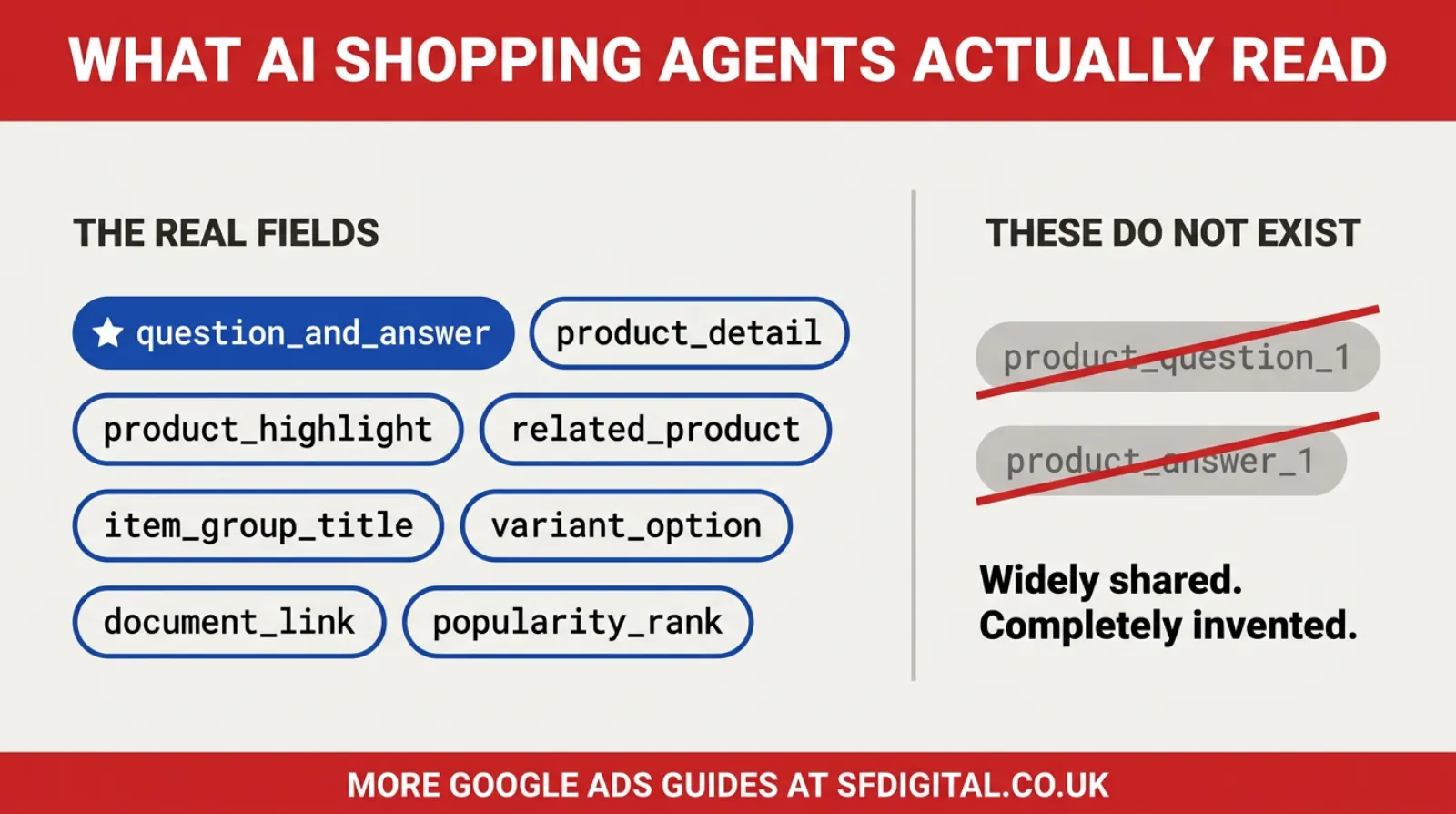
Start with the correct names, because a lot of what is circulating is wrong.
The Real List, And The Fake One
Google provides a set of optional fields that help AI surfaces understand products. Sources group them slightly differently, with some listing six conversational attributes and others describing eight fields that feed conversational experiences. The full set worth knowing is:
`question_and_answer`, which is the important one. `product_detail`, for technical specifications not covered elsewhere. `product_highlight`, for short bulleted highlights. `related_product`, for connecting items. `item_group_title`, for naming a group of variants. `variant_option`, for the variant dimension itself. `document_link`, for manuals and specification sheets. `popularity_rank`, for relative popularity within your catalogue.
All of them are optional, and adding them does not affect the approval status of your existing products. That is worth knowing because it removes the main reason people hesitate.
Now the correction. Several widely shared articles refer to attributes called `product_question_1` and `product_answer_1`. These do not exist. Building a feed around them produces a file Merchant Center will not accept, and the error message will not tell you the field name was invented.
If a guide you are following uses those names, stop following it. That single check will save you a wasted afternoon.
Getting question_and_answer Right
This is the attribute worth most of your effort, so it deserves specifics.
You can submit up to 30 question and answer pairs per product. Each question and each answer may run to 1,000 characters. The combined total across all pairs for a single product is capped at 10,000 characters.
Two rules from Google's own guidance are easy to miss. Do not duplicate content already present in the title, description, product detail or product highlight. And do not include prices, sale dates, shipping details or anything else time-sensitive or offer-related.
What to actually write is more useful than the limits.
Answer the questions your customers really ask. Not the ones you wish they asked. If your inbox and your phone log are full of the same five questions, those are your first five pairs, and you already know the answers.
Write them as a person would ask them. "Will this fit a standard UK doorway" beats "Dimensional specifications". The agent is matching against natural language, so natural language is what to feed it.
Be specific and be honest about limitations. "Suitable for outdoor use in sheltered positions, not exposed coastal sites" is more useful to an agent than "weather resistant", and it filters out the customers who would have returned it.
Cover the objections that stop a sale. Compatibility, sizing, what is included in the box, whether assembly is needed, how long delivery takes as a general statement rather than a dated promise.
Thirty pairs is a lot. Ten good ones on your best-selling products beats thirty thin ones across the whole catalogue, and you should start with the products that actually make you money.
What A Good Q&A Pair Looks Like
Abstract advice on writing these is easy to nod at, so here are the two versions side by side.
A weak pair looks like this. Question: "What are the product specifications?" Answer: "This product features high quality construction and premium materials for lasting durability."
That is worthless to an agent. It answers nothing, it duplicates marketing language already in your description, and it contains no fact anyone could act on.
A strong pair looks like this. Question: "Will this fit through a standard UK internal doorway?" Answer: "The unit is 72 cm wide assembled. A standard UK internal door is 76 cm, so it fits through most doorways without dismantling. The legs unbolt if you need a further 6 cm."
Notice what makes the difference. It names a real dimension. It states the comparison the customer is actually making rather than the raw number. It gives the fallback if the answer is no. And it uses the words a customer would use, not the words a catalogue would use.
Three more that work well across most categories.
Compatibility. "Does this work with X?" Say which versions or models, and say which ones it does not work with. The exclusion is as valuable as the inclusion.
What is in the box. "Do I need to buy anything else to use this?" Retailers consistently underestimate how often this stops a purchase.
Suitability limits. "Can I use this outdoors all year?" Answer honestly. "Suitable for sheltered outdoor use, not for exposed coastal positions" prevents a return, and an agent that recommends you accurately is worth more than one that recommends you often.
The test is simple. Read the answer and ask whether it contains a fact your competitor could not also claim. If not, rewrite it.
The Two Formatting Rules That Cause Rejections
This is the part no vendor blog covers, because their tool handles it and you never see it. If you are uploading a file yourself, these two will cost you an afternoon each.
The first is about characters inside subattribute values. Merchant Center's upload parser ignores quoting. That is the whole problem in one sentence. Google's own product export writes quoted values, which makes the format look safe, but on upload the parser splits on the delimiter regardless of quotes and returns a "too few subattributes" or "too many subattributes" error.
The consequence is that subattribute values must contain no commas, no colons and no double quotes at all. Not escaped, not quoted. Absent.
So you rewrite. "Yes, it is suitable" becomes "Yes. It is suitable". A colour list of "Red, Blue" becomes "Red / Blue". A measurement written as 20" becomes 20 in. A figure of 1,800 becomes 1800.
Tedious, entirely mechanical, and it is the difference between an upload that works and one that does not.
The second rule is about which products a supplemental feed can attach to. A supplemental feed matches offers only within its linked primary feed, on the combination of id, that feed's country and its language.
If your catalogue spans several primary feeds, for different countries or languages, you cannot upload one supplemental file covering everything. The rows that do not match will fail with "offer does not exist", which sounds like a data problem and is actually a scoping problem.
The fix is to split your supplemental output into one file per primary feed, by feed label and language.
Both of these come from live uploads being rejected and having to work out why. Neither is in the obvious documentation path, and neither error message points at the real cause.
Where To Start If Your Catalogue Is Large
Doing this across thousands of products by hand is not realistic, so the order matters.
Begin with your top twenty products by revenue. Not by traffic, by revenue. Those are the ones where a recommendation is worth something.
For each, write ten question-and-answer pairs from questions you have genuinely been asked. Your customer service inbox is the source. This is a copywriting job rather than a technical one, and it is the part that cannot be automated well.
 LIVE
Live every Tuesday at 2pm UK. Bring your marketing questions.
Get your Google, local SEO and AI questions answered live.
Then fill `product_detail` and `product_highlight` from specifications you already hold. Most retailers have this information somewhere, usually in a supplier document, just not in the feed.
Add `item_group_title` and `variant_option` if you sell variants, because agents handle "which size" questions badly without them.
Then validate before you upload, checking character limits and the comma, colon and quote rule, rather than discovering problems through rejection messages.
Then measure. Watch your Merchant Centre impressions and any AI referral traffic your analytics can identify. Expect this to be imperfect, because attribution from AI surfaces is poor and improving slowly.
Only then extend to the rest of the catalogue, and consider automation at that point. Mining your own product descriptions for specifications is a solved problem and does not need an AI writing tool inventing claims.
How To Tell Whether It Is Working
Measurement here is genuinely poor, so it is worth setting expectations rather than promising a dashboard.
There is no report that tells you an AI agent recommended your product. That data does not exist for merchants today, in the same way there is no reporting for ads inside AI Overviews.
Four indirect signals are available and worth watching together.
Referral traffic from AI domains. Your analytics can identify visits arriving from ChatGPT, Perplexity and similar sources. It is a small number for most retailers today, and the trend matters more than the level.
Branded search volume. Search Console shows how many people search your business or product names. When an agent mentions you, and someone looks you up rather than clicking, this is where it appears and nowhere else.
Merchant Centre impressions on your improved products, compared against products you have not touched yet. This is the closest thing to a controlled comparison available to you, and it is the reason for starting with twenty products rather than the whole catalogue.
Direct traffic to specific product pages that you did not promote. Unexplained direct visits to a deep product URL usually mean somebody was told about it somewhere you cannot see.
Give it a quarter. This is not a channel that turns on, and a fortnight tells you nothing.
One honest caveat. For a UK retailer in 2026, the volume arriving this way is still modest. The reason to do the work now is that it is cheap, it improves your conventional Shopping performance anyway, and the position compounds. It is not because next month's revenue depends on it.
What Not To Do
Three temptations worth resisting, because each one causes real damage.
Do not let a language model invent your product data. It will produce fluent, plausible specifications that are wrong, and wrong specifications in a feed become wrong recommendations, which become returns and complaints. Every value must come from something you actually know.
Do not stuff keywords into these fields. They are read by systems evaluating relevance and helpfulness, not by a ranking algorithm you can game. A stuffed answer is worse than no answer.
Do not promise anything dated or offer-specific. Google's guidance excludes prices, sale dates and shipping specifics from these attributes for good reason. A feed updates on a schedule and a promise ages badly.
Does This Help With ChatGPT Too
A fair question, and the honest answer has two parts.
Not directly. ChatGPT Shopping does not read your Google Merchant Centre feed. It operates on the Agentic Commerce Protocol, developed with Stripe, and connects through platforms including Shopify and Etsy.
Indirectly, very much. Every one of these systems works the same way: it reads structured product data rather than browsing your site. The work of writing honest, specific, well-structured product information travels between them, even though the pipes are different.
There is a wider point here worth noticing. The protocol picture is unsettled, with several competing families including ACP, UCP and AP2 alongside payment-side efforts from Visa and Mastercard. Even the direction within a single platform has shifted: OpenAI deprecated its Instant Checkout programme after fewer than thirty Shopify merchants had gone live, and moved ChatGPT Shopping towards discovery plus a redirect into the merchant's own checkout.
So betting on one protocol would be premature. Improving your product data is not a bet, because it pays off in every version of this.
Why This Suits Small Retailers
There is a structural point here that is easy to miss, and it is unusually favourable.
Most competitive advantages in ecommerce go to whoever spends the most. Bigger ad budgets, better photography, faster delivery, more reviews. A small retailer competes at a disadvantage on nearly all of them.
This one is different, for three reasons.
Catalogue size works against you when it is large. Writing thirty honest question-and-answer pairs for eight hundred products is a project needing a team and a budget. Writing them for forty products is an afternoon. The small retailer can simply do it, while the large one has to justify it.
Feed ownership works against big businesses too. Their feeds are generated by systems maintained by someone else, often through an agency, often through a middleware tool nobody wants to reconfigure. Changing a field means a ticket and a queue. A small retailer changes their feed themselves.
And product knowledge is the actual input. The person who knows whether the unit fits through a doorway, which model it is compatible with and why it fails in coastal positions is usually the owner. In a larger business, that knowledge is distributed across warehouse staff, customer service and a supplier document nobody has read.
So the constraint here is not money or technology. It is whether someone who genuinely knows the products will sit down and write honestly about them.
That is a rare shape of opportunity, and it will not last. As this becomes standard, the tooling will improve, and the advantage will compress. The window is now, and the entry cost is an afternoon rather than a budget.
What This Costs You
Worth being concrete about the investment, because "an afternoon" is doing a lot of work in this article.
For twenty products with ten pairs each, that is two hundred question-and-answer pairs. Written properly, drawing on questions you already know, expect four to six hours. It goes faster than people assume because you are not inventing anything; you are transcribing what you already tell customers on the phone.
Formatting and validation add an hour or two the first time, mostly spent removing commas and colons from values. The second time it takes twenty minutes because you write them correctly from the start.
Upload and troubleshooting, realistically, take half a day on your first attempt. Both of the rejection causes described above will probably happen to you once. After that, they will not.
So the honest total for a first pass on your best products is roughly one working day, with no software purchase and no developer.
Compare that against what a day of paid traffic costs you, and the arithmetic is not close.
Two things worth knowing before you start, so the day is not wasted.
Export your existing feed first and work from that file rather than building one from scratch. Google's own product export shows you the exact column headers the system expects, which removes most of the guesswork about format.
And write the answers in a plain document first, then move them into the feed file. Doing the writing and the formatting at the same time is how people end up with commas embedded in values and a rejected upload.
Frequently asked questions
What are AI shopping agents?
They are AI assistants that help people find and compare products, then hand them off to buy. ChatGPT Shopping, Google's AI Mode and Amazon's Rufus are the main examples. They do not browse your website the way a person does. They read structured product data, which for most retailers means the Merchant Centre feed.
What are conversational attributes in Merchant Centre?
They are optional product feed fields that help AI surfaces understand your products. The set includes question_and_answer, product_detail, product_highlight, related_product, item_group_title, variant_option, document_link and popularity_rank. Sources group them slightly differently. They are optional and do not affect the approval status of existing products.
Does ChatGPT Shopping use my Google product feed?
Not directly. ChatGPT Shopping runs on the Agentic Commerce Protocol developed with Stripe, connecting through platforms such as Shopify and Etsy. The principle is the same though: it reads structured product data rather than web pages, so the work that improves your Google feed improves your position there too.
How many question and answer pairs can I add?
Up to 30 pairs per product, with each question and each answer running to 1,000 characters and a combined cap of 10,000 characters per product. Do not duplicate content already in the title, description, product detail or product highlight, and leave out prices, sale dates and shipping specifics.
Why was my supplemental feed upload rejected?
Two causes account for most of them. Subattribute values containing commas, colons or double quotes break the parser, which ignores quoting, giving a too few or too many subattributes error. And supplemental feeds only match offers inside their linked primary feed by ID, country and language, so a catalogue spanning several feeds needs one file per feed.
Is it worth doing if I am a small retailer?
Yes, and arguably more so. The attributes are optional and free, the work is copywriting rather than development, and doing ten products properly is achievable in an afternoon. Large competitors are often slower to change their feeds than a small business is.
Keep Reading
If you are working on your feed, these five are the ones that follow on.
- Google Shopping Feed Optimization Tips - How To Optimize Your Google Ads Shopping Feed
- Google Smart Shopping Campaigns: Everything You Need to Know
- Google Ads Performance Max (PMax) Asset Specifications: Ad Formats, Sizes, and Best Practices
- A Simple Guide To Google Performance Max Campaigns For Your Business
- How To Rank in ChatGPT: The New SEO Playbook for 2026
- Beyond Google Search: Mastering SEO, AEO and GEO (The 2026 Playbook For Small Business Owners)
The first three are the feed mechanics. The fourth matters because Performance Max runs on the same product data. The last two cover the same shift on the content side.
The Part Worth Remembering
For twenty years, retail marketing meant making a website a person wanted to buy from. Photography, layout, persuasion, trust.
That still matters, and it is now doing a smaller share of the work than it used to, because a growing number of buying decisions get shortlisted before anyone sees your site at all.
What decides whether you make that shortlist is the least glamorous asset you own. A file of structured product data that most retailers set up once and never revisit.
The good news is that this is unusually fair. Writing honest, specific answers to the questions your customers actually ask does not require a budget. It requires knowing your products and being willing to spend an afternoon writing it down.
Large retailers are frequently worse at this than small ones, because their catalogues are enormous and their feeds are automated from systems nobody wants to touch.
So the opportunity is real, and it is temporary. It will close as this becomes standard practice, which gives you a window rather than an advantage.
Start with your ten best products. Write the questions people genuinely ask. Answer them honestly, including the limitations.
That is the work. It is not technical, and it is worth more than anything else you could do to your feed this month.

Written by Uzair Kharawala
Partner at SF Digital Studios, a Google Premier Partner agency. Uzair has been helping businesses grow with Google Ads since 2002 and teaches it every week on YouTube.
Get our best Google Ads tips by email
New articles and videos, straight to your inbox. Unsubscribe any time.