
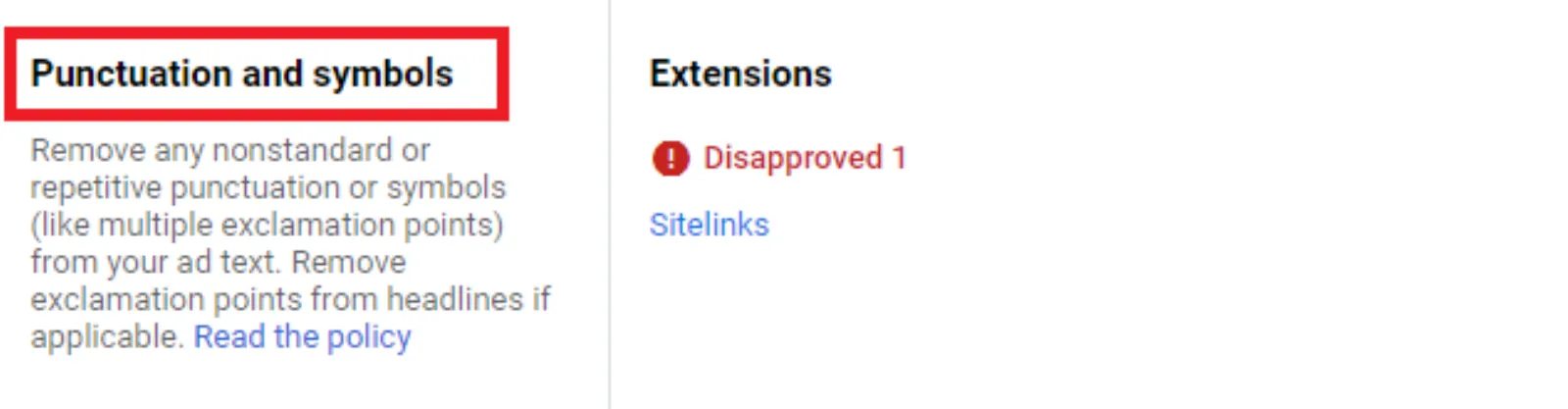
Ever been there? You’ve spent hours crafting the perfect Google Ad. The headline is catchy, the description is persuasive, and you’re sure it’s going to drive a ton of traffic. You hit ‘save’, and a few minutes later, you see it: “Disapproved.” You check the reason, and it says… “Punctuation and symbols.”
It sounds ridiculous, I know. How can a little punctuation mark cause so much trouble? But if you’re a digital marketer or a small business owner running your own ads, this isn’t a joke. It’s a very real and very frustrating roadblock. Google, in its quest for a clean, professional advertising environment, has some pretty strict rules that can feel like they’re designed to trip you up.
So, why is this happening? And more importantly, how do you fix it?
The Unwritten Rules of the Ad World
Think of a search results page. You’ve got a bunch of blue links and some snippets of text. Google wants this page to look tidy and trustworthy. They don’t want it to look like a spammy email from the early 2000s, full of weird symbols and shouting text. This is where their “Editorial Policy” comes in. It’s a set of guidelines designed to keep the platform professional. And a big part of that policy is about how you use punctuation and symbols.
Google’s system is automated. It’s a machine that scans your ad text for specific patterns. When it sees something that looks “off” or “gimmicky,” it raises a red flag and disapproves of the ad. It doesn’t care about your creative intent or how much time you spent on the copy. It’s just following the rules it was given.
The Most Common Punctuation Pitfalls
Let’s break down the most frequent offenders. These are the things that will get your ad disapproved faster than you can say “quality score.”
- Excessive Exclamation Marks!!! This is probably the most common one. You’re excited about your product, so you put three, four, or even five exclamation marks at the end of a sentence. “Huge Sale!!!” Google sees this as unprofessional and tries to stop you from “shouting” at the user. The rule is simple: stick to one exclamation mark per ad, and don’t use it in the headline. If you can avoid it entirely, even better.
- Gimmicky Symbols and Characters. Ever seen an ad that says “F.L.O.W.E.R.S.” or “S@le”? Using symbols or alternating capitalisation to make a word stand out is a huge no-no. Google sees this as a cheap trick to grab attention. The same goes for using symbols in place of letters, like “b3st pr1c3s.” Unless it’s part of your officially registered brand name, don’t do it. The system will catch it.
- Repetitive Punctuation This one is a little more subtle. It’s not just about exclamation marks. Repeating question marks (Why us???) or even periods (Get the product….) can get your ad disapproved. The goal is to be clear and concise. Any kind of repetition is seen as an attempt to game the system and make your ad look more prominent than it is.
- Non-Standard Spacing. While not strictly punctuation, spacing issues fall under the same editorial policy. Things like “Free Shipping” or “C l e a r a n c e S a l e” are not allowed. Your ad text needs to be formatted with standard spacing between words.
The Exceptions to the Rule
Now, there are a few exceptions. Google isn’t completely unreasonable. If a piece of punctuation or a symbol is part of your official brand name, product name, or a legally required disclaimer, you can often get it approved. For example, if your company is called “A & B Industries” and that’s how it’s consistently written on your website, you can appeal the disapproval. Similarly, if you need to use an asterisk to note a disclaimer (like “5* star hotel”), that’s generally acceptable.
The key here is consistency. The ad text must match what’s on your website. If your ad says “A&B Industries” but your landing page says “A and B Industries,” you’re likely going to have an issue.
How to Fix It and Get Your Ad Live
So, your ad has been disapproved. What now? Don’t panic. The fix is usually pretty straightforward.
- Identify the Problem: Look at the “Status” column in your Google Ads account. Hover over the “Disapproved” label. It will usually give you a specific reason, like “Punctuation and Symbols.” Click on it for more details.
- Edit the Ad: Go into your ad copy and remove the offending punctuation. Re-read the entire ad, including the headline and description lines. A good rule of thumb is to write it like you’re writing an email to a professional contact. Use standard grammar and spelling.
- Resubmit for Review: Once you’ve made the changes, save the ad. It will automatically go back into the review queue. Most of the time, if you’ve fixed the issue, it will be approved within a few hours.
- Appeal if Necessary: If you are sure that your ad is compliant (for example, if the punctuation is part of your brand name), you can file an appeal. There’s a button for this right in your account. Just be prepared to explain why your ad should be an exception to the rule.
A Final Word of Advice
The Google Ads system can be a frustrating black box sometimes. But when it comes to punctuation and symbols, the rules are generally designed to protect the user experience and prevent a low-quality, spammy ad landscape. While it might feel silly to get a campaign nuked over a single exclamation mark, understanding these policies is a fundamental part of running a successful and long-lasting ad campaign.
Before you launch a new ad, give it one last proofread. Imagine you’re a Google bot. Is there anything that looks like you’re trying to trick or manipulate the system? If the answer is yes, you’re better off making it simpler and more professional. It might not feel as “exciting,” but it will save you a lot of headaches and help your ads get live faster.

Written by Uzair Kharawala
Founder of SF Digital Studios, a Google Premier Partner agency. Uzair has been helping businesses grow with Google Ads since 2002 and teaches it every week on YouTube.
Get our best Google Ads tips by email
New articles and videos, straight to your inbox. Unsubscribe any time.